Disclosure: As an Amazon Associate, reviewstook.com earns from qualifying purchases. Links on this page are affiliate links; they cost you nothing extra. Prices and availability change often, so check the current Amazon listing before you buy.
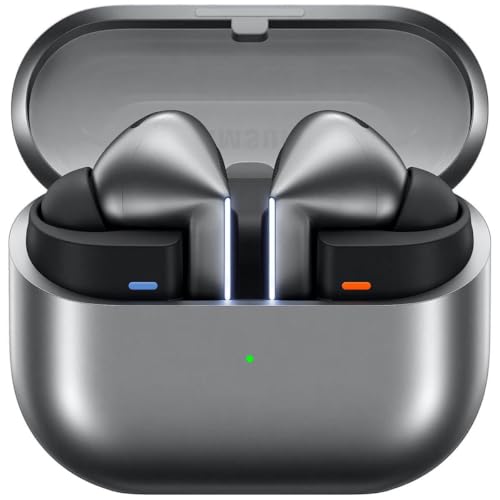
The Samsung galaxy buds3 pro truly wireless earbuds mark the moment Samsung stopped imitating the market’s default earbud shape and committed to its own: a stemmed design with angled heads, blade-like touch surfaces, and a two-way speaker system that pairs a dynamic driver with a planar tweeter in each bud. The verified listing adds the rest of the flagship brief — active noise cancellation, water resistance, Bluetooth 5.4, high-fidelity audio support, and Samsung’s AI interpreter features for Galaxy phone owners. The result is the most ambitious earbud Samsung has made, and the most ecosystem-dependent: paired with a recent Galaxy phone it is a genuinely distinctive flagship, while paired with anything else it is a very good earbud whose best tricks stay locked in a drawer it cannot open. This review separates those two experiences honestly, compares the Buds3 Pro against its own sibling the Buds3 and against Google’s Pixel Buds Pro 2, and identifies which buyers should pay the Pro premium and which are being sold features their phone cannot use.
Fit deserves an early warning, because the Buds3 generation changed the wearing geometry along with the silhouette. The angled stem design seats differently from the bean-shaped Buds2 generation, and ears that loved the old shape do not automatically love the new one. Everything else in this review — sound, cancellation, features — is downstream of a seal and a seating that either suit your ears or do not, which is why the return window appears in this article as often as any specification.
Key takeaways
- The two-way driver system is the real upgrade: treble detail and separation step visibly ahead of the standard Buds3.
- Galaxy phone owners get the full product — high-quality codec support, interpreter features, adaptive sound — while other Android and iPhone users get a reduced version of it.
- Active noise cancellation is strong for the class, particularly against steady travel noise.
- The stem design’s fit is the gamble: excellent for many ears, wrong for some, and untestable from a specification sheet.
- The standard Buds3 shares the design language and much of the experience for less; the Pro premium buys drivers, cancellation depth and features, in that order.
In this guide
Brief verdict on the Galaxy Buds3 Pro
For a Galaxy phone owner whose ears suit the shape, these are among the finest true wireless earbuds available — detailed, confident sound, serious noise cancellation, and a feature set that uses the phone in your pocket rather than ignoring it. For everyone else, the verdict needs its asterisk: the earbuds remain very good, but the codec ceiling lowers, the AI features vanish, and rivals designed to be ecosystem-neutral — Google’s Pixel Buds Pro 2 chief among them — close the gap and sometimes pass. Buy the Buds3 Pro as a Galaxy accessory first and an earbud second, and the purchase makes complete sense; buy it as a universal earbud and you are paying for a flagship whose flag flies over someone else’s phone.
How the comparison set was chosen
The Galaxy Buds3 is the sibling question every Pro shopper asks: how much of the experience survives the step down? The Pixel Buds Pro 2 is the ecosystem counter-argument — a flagship designed around Google’s phones but unusually graceful with everyone else’s, and the natural cross-shop for Android users outside Samsung’s garden. All three listings were verified through the site’s Creators API data on 2026-11-24, with exact titles in the accompanying sources file.
Detailed reviews

Samsung Galaxy Buds3 Pro — the Galaxy flagship, fully loaded
Badge: Best for Galaxy phone owners
- Drivers: two-way system, dynamic woofer plus planar tweeter per the line’s design
- ANC: active noise cancellation with ambient and adaptive modes
- Bluetooth: 5.4 per the listing
- Resistance: water resistant per the listing
- Extras: AI real-time interpreter features with Galaxy phones, touch controls on the stems
Sound first, because the Pro earns its name there before anywhere else. Splitting the frequency range between a dynamic driver for the lows and a planar tweeter for the highs gives the Buds3 Pro a top end with genuine texture — cymbals that shimmer rather than hiss, strings with rosin on them, vocal consonants that stay intelligible at low volume — while the dynamic driver keeps bass full without letting it smear upward into the midrange. The tuning is confident rather than neutral-flat, with a liveliness that flatters pop, electronic and film scores, and the equaliser in Samsung’s app lets more clinical listeners pull it toward reference. Paired with a Galaxy phone that supports Samsung’s high-quality codec, the wireless link feeds those drivers properly; paired with a phone limited to standard codecs, the same hardware is fed through a narrower pipe, and the difference, while not night-and-day, is the difference between the flagship you read about and the very good earbud you bought.
The noise cancellation is the second pillar. Against the steady drones of trains, planes and air conditioning it is excellent, carving the world down to a hush that makes long journeys measurably less tiring; against voices and irregular city noise it is good rather than magical, as all current earbuds are. Ambient mode is natural enough for platform announcements and brief conversations, and the adaptive features — which adjust cancellation and let important sounds through — work best inside the Galaxy ecosystem that hosts their settings. Call quality benefits from the stem geometry, which places microphones closer to the mouth’s axis than bean-shaped buds can; callers report clear, present speech in moderate wind, with the usual true-wireless caveat that a gale defeats everyone. Battery life is competitive for the class with cancellation running, the case charges over USB-C and wirelessly, and the water resistance covers workouts and rain without anxiety. The controls, moved to squeezes and swipes on the stems, take a day to learn and then disappear — with the occasional accidental input while adjusting a bud as the design’s small tax.
Strengths
- Two-way drivers deliver the most detailed sound Samsung has shipped in a bud
- Strong ANC with natural ambient mode and capable adaptive features
- Deep Galaxy integration: codec, interpreter, settings and wear detection
Trade-offs
- Best features and best codec are Galaxy-gated
- Stem fit is a genuine gamble for ears shaped by the old design
- Stem controls invite the occasional accidental squeeze
Best for: Galaxy phone owners who want the flagship their phone was designed around. Not suited for: iPhone owners, or ears that already know they dislike stemmed buds.
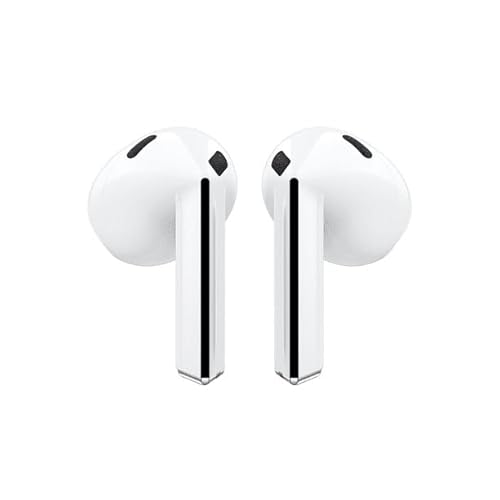
Samsung Galaxy Buds3 — the sibling with most of the story
Badge: Best value inside the Galaxy line
- Design: same stemmed generation, open-leaning fit character
- ANC: active noise cancellation per the listing
- Bluetooth: 5.4 per the listing
- Extras: interpreter features with Galaxy phones per the listing
The standard Buds3 exists to make Pro shoppers do arithmetic, and the arithmetic is closer than Samsung’s pricing suggests. The design language, the wireless generation, the interpreter features and a working implementation of noise cancellation all carry over; what the step down surrenders is the two-way driver system’s treble refinement, some cancellation depth, and a layer of adaptive polish. In a quiet room with good recordings, the Pro’s advantages are audible and real. On a train, in a gym, in the compressed reality of podcasts and calls that dominate most earbuds’ actual hours, the gap narrows to the point where many owners would struggle to justify the premium blindfolded. The Buds3’s fit character also differs subtly — a less sealed, more open feeling that some ears prefer for long wear and situational awareness, at the cost of the isolation the Pro’s deeper fit provides. The honest recommendation is asymmetrical: audiophile-leaning Galaxy owners should pay for the Pro and enjoy the drivers daily, while everyone else in the Galaxy ecosystem should audition the standard model first and let their own ears invoice them for the difference.
Strengths
- Most of the generation’s design and features for less money
- Open-leaning fit suits long wear and awareness
- Same Galaxy ecosystem benefits at the codec and feature level
Trade-offs
- Single-driver sound gives up the Pro’s treble refinement
- Less isolation, in fit and in cancellation depth
- Shares the stem-fit gamble of the whole generation
Best for: Galaxy owners whose listening is calls, podcasts and everyday music. Not suited for: listeners who buy earbuds primarily for sound quality.

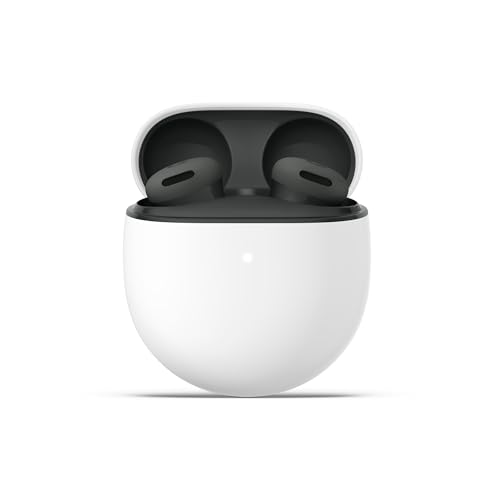
Google Pixel Buds Pro 2 — the ecosystem diplomat
Badge: Best for Pixel owners and cross-platform households
- ANC: pro-level active noise cancellation per the listing
- Fit: twist-to-adjust stabiliser design per the listing
- Battery: up to 30 hours with the case per the listing
- Assistant: Gemini integration per the listing
Google’s flagship plays a different game: instead of a two-way driver story, it bets on fit, cancellation and an assistant that lives in your ear. The twist-to-adjust design, where a stabiliser arc locks the bud into the ear’s geometry with a small rotation, produces one of the most secure and comfortable fits in the class — the anti-gamble to Samsung’s stem — and the cancellation is tuned with a confidence that makes it the default recommendation for travellers who do not own Galaxy phones. Sound is warm, polished and crowd-pleasing, a step behind the Buds3 Pro’s detail at the top end and a step ahead in long-session comfort of tone. Gemini integration gives Pixel owners conversational assistance that feels like the future arriving early, while the buds remain unusually well-mannered with other Android phones and perfectly serviceable with iPhones for basic listening. In the direct comparison this review exists to settle — Buds2a versus Pro 2 is Google’s own internal question, covered in its own article in this cluster — the Pixel Buds Pro 2 is the reference for what a flagship should do when it is not allowed to assume the phone in your pocket.
Strengths
- Twist-lock fit is secure, comfortable and broadly compatible with ears
- Excellent cancellation and polished, fatigue-free sound
- Graceful behaviour across phone ecosystems
Trade-offs
- Top-end detail trails the Buds3 Pro’s two-way system
- Gemini features shine brightest on Pixel phones
- No equivalent to Samsung’s interpreter trick for Galaxy travellers
Best for: Pixel owners, travellers, and mixed-ecosystem households. Not suited for: Galaxy owners who would use Samsung’s codec and interpreter daily.
Buying guidance for flagship true wireless earbuds
Your phone is part of the product
The single most underweighted fact in earbud buying is that the phone is half the system. Codecs decide how much musical information reaches the drivers; ecosystem features — assistants, interpreters, find-my networks, spatial audio with head tracking — live or die by the pairing; even settings depth differs by brand of handset. The correct shopping order is therefore phone first, earbud second: list the flagships your phone fully unlocks, and only then compare sound and fit among them. Cross-ecosystem purchases are not mistakes, but they should be made knowingly, at a discount in your expectations proportional to the features left locked.
Fit is a specification you cannot read
Every other earbud trait can be compared on paper; fit cannot, because ears vary more than any other part of the audio chain. The practical consequences are three. Buy from a retailer whose returns accommodate a genuine fit trial. Use the whole trial — a bud that aches at hour two has failed no matter how it sounded at minute ten. And treat the included tip sizes as a fitting session, not an accessory bag: the seal a tip makes decides bass response and cancellation depth as surely as any driver. Players upgrading within a brand should be especially careful, because generations change geometry — as this one did — and loyalty to a logo is not loyalty to a shape.
Codecs, honestly weighted
High-resolution codecs matter in proportion to your sources and your ears. A listener whose library is streaming at standard quality, in noisy places, will hear little from a premium codec; a listener with lossless files, a quiet room and the flagship’s best drivers is precisely the audience the codec exists for. The mistake is paying for the codec story while listening in the first way — or dismissing it while listening in the second. Samsung’s seamless codec on Galaxy phones and the standard fallbacks elsewhere are the concrete instance in this review, but the principle governs the whole category.
Battery claims and the case’s role
Earbud battery figures quote the buds; the case is the real battery, multiplying the buds’ endurance several times over and deciding whether the product lives in your pocket or on a charger. Judge the pair as a system: buds that survive your longest day, a case that survives your longest trip, and charging — USB-C plus wireless — that fits the pads and cables you already own. All three earbuds in this review pass that system test comfortably, which is why this guide spends its words on sound, fit and ecosystem instead.
Getting the most from the Buds3 Pro
Step one: run the fit like a fitting, not an unboxing
Try every tip size on both ears — ears are asymmetric more often than pride admits — and use the app’s fit test where offered. Walk, talk and chew during the trial, because a seal that survives only stillness will fail you on the first run. The right fit should feel present but not pressurised after twenty minutes; anything else is the wrong tip or the wrong earbud, and the return window is the honest arbiter between those two conclusions.
Step two: set the sound before judging it
Spend ten minutes with the equaliser and the sound presets before forming an opinion, because the factory tuning is a choice, not a verdict. Listeners who find the top end eager can soften it; listeners who want the planar tweeter to show off can lift it. Save a preset for music and a flatter one for podcasts and calls, and let the buds switch your intentions rather than your standards.
Step three: teach the controls your habits
Customise the stem gestures to the actions you actually perform — most owners live on play/pause, volume and ambient toggling, and burying any of those behind an awkward gesture taxes every session. Disable or remap the gesture you keep triggering accidentally while adjusting fit; a week of accidental pauses is a configuration problem, not a character flaw in the hardware.
Step four: if you own a Galaxy phone, unlock the drawer
Enable the high-quality codec in the developer or Bluetooth settings path your phone exposes, turn on the interpreter features before the trip that needs them rather than at the airport, and set up the find-my and wear-detection conveniences while you are calm. The Buds3 Pro’s premium is substantially a software premium; collecting it is a settings session, and owners who skip the session have bought the standard experience at the flagship price.
Side-by-side comparison
| Earbuds | Driver story | Ecosystem centre | Fit character | Headline strength |
|---|---|---|---|---|
| Galaxy Buds3 Pro | Two-way, planar tweeter | Samsung Galaxy | Angled stem, sealed | Detail and Galaxy features |
| Galaxy Buds3 | Single driver | Samsung Galaxy | Stem, open-leaning | Value inside the line |
| Pixel Buds Pro 2 | Single driver, polished tuning | Google Pixel, graceful elsewhere | Twist-lock stabiliser | Fit, ANC and diplomacy |
The table’s lesson is that flagship earbuds have stopped competing on a single ladder. Samsung sells driver architecture and ecosystem depth; Google sells fit and neutrality between ecosystems; the standard Buds3 sells the generation’s design at a gentler price. Your phone and your ears cast the deciding votes, in that order.
Common earbud-buying mistakes
Buying the flagship of someone else’s ecosystem
The most expensive mistake in this category is paying a premium for features gated behind a phone you do not own. The earbuds will still be good — that is what makes the mistake survivable and therefore common — but the value equation quietly collapses. Match the flagship to the phone, or knowingly buy the reduced product at a price that reflects the reduction.
Judging fit in the first five minutes
New earbuds feel strange before they feel wrong, and strange fades. The trial that matters is the two-hour wear, the run, the phone call while walking — the product’s actual life. Buyers who verdict at minute five churn through excellent earbuds searching for a shape their ears would have accepted by day three.
Ignoring the codec your phone actually uses
A flagship’s sound quality is capped by the link feeding it. Check which codecs your phone and your candidate earbuds share before crediting driver specifications with differences the Bluetooth connection will never deliver. The check takes two minutes and prevents the most technical disappointment in the category.
Final recommendation
Galaxy owners: the Buds3 Pro is your flagship, and its two-way sound, cancellation and interpreter features justify the premium over the standard Buds3 for anyone who listens closely; the standard model is the value answer for everyone else in the ecosystem. Pixel owners and the ecosystem-neutral: the Pixel Buds Pro 2 is the safer flagship, with the class’s most diplomatic fit and manners. iPhone owners should shop Apple’s own line first and treat all three of these as capable guests rather than natives. Whichever flag you fly, spend the return window on fit before features — because the earbud you keep is the one your ears forget, and no codec ever written can compensate for a bud that hurts by the second hour.
The sound, examined by genre
Acoustic and vocal recordings
This is where the planar tweeter files its report. Fingerpicked guitar carries the nail along with the string; a choir separates into sections rather than blending into a wash; a well-recorded voice sits in front of the band with its consonants intact, which matters more to intelligibility than any amount of bass warmth. Listeners whose libraries live here — folk, jazz trios, chamber music, singer-songwriters — will hear the Pro’s premium most clearly, and for them the step up from the standard Buds3 is not subtle. The tuning’s slight liveliness can be equalised toward neutrality without losing the detail, which is the correct definition of a flagship driver: resolution that survives your preferences.
Electronic, pop and hip-hop
Produced music flatters the whole Buds3 generation, and the Pro’s contribution is control rather than quantity: sub-bass that starts and stops cleanly, synth textures that stay separate at density, and a top end that keeps hi-hats crisp without turning them into the loudest thing in the mix. The standard Buds3 plays this library nearly as enjoyably, because production polish forgives driver simplicity — which is precisely why this review keeps sorting buyers by library. Your playlists are a specification, and an honest one.
Podcasts, calls and the spoken day
Most earbuds earn most of their hours on speech, and here the flagship gap nearly vanishes: all three earbuds in this review render voices clearly, handle call microphones competently, and disappear during long listening. Buyers whose day is calls and podcasts should weight fit, battery and controls above every driver claim in this article, and should feel entirely licensed to buy the standard model or the Pixel and spend the savings elsewhere. A review that cannot say when its flagship is unnecessary is a sales document; this one says it plainly.
Exercise, weather and the water-resistance reality
The listing’s water resistance covers the life earbuds actually lead: sweat, rain, a splash at the sink. It does not make them swim earbuds, and the distinction matters because Bluetooth itself barely travels through water — no true wireless bud is a lap-swimming product regardless of its rating. For runners, the fit question returns wearing a safety aspect: a bud that loosens at kilometre eight is a bud on the pavement, and the stem design’s security varies by ear exactly as its comfort does. Test with movement during the trial, use the ambient mode for road awareness rather than removing a bud — one-bud listening unbalances both your hearing and your charge levels — and rinse sweat off the buds after hard sessions, because salt is the long-term enemy of every seal and charging contact in the case.
Ownership over a year: batteries, tips and loss
True wireless earbuds age on a faster clock than other audio gear, and a flagship purchase should be made with the year-two picture in view. The buds’ small batteries will hold noticeably less charge by the second year of daily use; the case’s hinge and contacts want an occasional dry wipe; the silicone tips harden slowly and should be replaced when the seal starts needing constant adjustment — a cheap refresh that restores both bass and cancellation more dramatically than any setting. Loss is the category’s distinctive risk: a single bud on a train platform is a replacement purchase, and the ecosystem’s find-my features, set up in advance, are the difference between a retrace and a repurchase. None of this is an argument against the category — it is the maintenance schedule of the most personal audio product ever sold, and owners who run it cheaply and calmly get flagship years out of flagship money.
Spatial audio, head tracking and the features that demo well
Flagship earbuds now ship with spatialised sound and head tracking, and a buyer’s guide owes these features a sober paragraph. For films and the growing catalogue of spatial mixes, the effect is genuinely pleasurable — dialogue anchored to the screen while the score opens around it — and Samsung’s implementation inside its ecosystem is polished. For ordinary stereo music, most listeners end up disabling it after the novelty week, because it trades tonal accuracy for a spatial trick the recording never asked for. Treat spatial features as a bonus for video, never as a reason to choose one flagship over another, and be suspicious of any review that leads with them: the fundamentals in this article — drivers, fit, cancellation, codec — will still be deciding your satisfaction in month six, when the spatial demo has long since stopped impressing anyone.
The travel case for these earbuds, made concretely
Assemble the Buds3 Pro’s travel dossier and it is strong: pocketable case, cancellation that flattens a cabin, an interpreter that speaks into your ear at a foreign ticket desk, water resistance for the destination’s weather, and a phone app that finds a lost bud in a hotel room. The dossier’s one soft page is the same as every true wireless product’s — total battery across a very long travel day depends on the case’s discipline about being recharged at hotels, and the traveller who treats the case like a power bank that also holds earbuds will never be stranded, while the one who treats it as a pebble will, once, memorably. For Galaxy-owning travellers, this review’s recommendation is at its most confident: the interpreter alone can justify the flagship on a single trip, and everything else in the dossier is the sound and silence you would have bought anyway.
How the Buds3 Pro treats the workday
Between the gym and the journey sits the largest block of earbud hours: the working day, with its calls, focus music and half-listened podcasts. The Buds3 Pro’s workday virtues are specific. Multipoint-style convenience inside the Galaxy ecosystem makes the phone-to-laptop hop painless for owners whose computer is also Samsung or whose workflow lives on the phone. The ambient mode’s naturalness matters more at a desk than anywhere — colleagues, doorbells and kettle clicks arrive without the underwater quality lesser transparency modes impose. Callers hear you clearly from a kitchen or a quiet street, which is the workday feature colleagues actually grade. And the fit’s long-wear comfort, for ears that suit it, carries a full day without the ache that sends lesser buds back to their case by lunch. Workers outside the Galaxy ecosystem keep most of this and lose the seamless edges; workers inside it get the product operating at its designed altitude, which is the recurring theme of this review stated one final way.
A word about buying last generation’s Buds instead
The previous Buds2 generation will tempt with discounts, and the guidance mirrors this cluster’s keyboard advice: the old model is a sound product whose discount buys you its known compromises — a different fit philosophy that some ears honestly prefer, an earlier Bluetooth generation, and no interpreter-era features. If your ears loved the bean shape and mourned its passing, a discounted Buds2 Pro is not a compromise at all; it is your shape, still available, and this review’s stem-fit warnings reverse into a recommendation. If you have no shape loyalty, the current generation’s drivers, cancellation and ecosystem features are the better long-term buy at anything like a comparable price, because earbuds age by their batteries and a newer product simply has more life in front of it.
The microphone, tested by the people who have to listen to it
Earbud reviews grade microphones by listening to recordings; your colleagues grade them by enduring your calls, and the Buds3 Pro passes that harsher jury with credit. The stem geometry points the microphone array toward the mouth more honestly than compact buds can, and Samsung’s voice processing isolates speech from room tone with a competence that makes you sound present rather than processed. Outdoors, wind remains the universal enemy — every true wireless microphone fights physics at a disadvantage — but in the moderate breezes of ordinary life, callers report the Samsung among the clearer Android options. Players taking calls in game lobbies and workers taking them in kitchens are buying the same virtue from different directions: being understood the first time. If your current earbuds make you repeat yourself, the microphone upgrade alone can justify this class of purchase, and it is the specification least visible on any box — which is why this review gives it a section instead of a bullet.
Gaming with true wireless earbuds, without illusions
Some readers will buy these as their only audio gear and game in them, so the latency truth belongs in print. Standard Bluetooth audio carries a delay that rhythm games and competitive shooters can expose; Samsung’s gaming mode inside its ecosystem trims that delay to a level casual and mid-core play tolerates happily, while other phones and PCs vary. For films the delay is invisible because players compensate; for ranked FPS, a wired headset or a dedicated low-latency gaming earbud like the Razer model reviewed elsewhere in this cluster remains the correct tool. The Buds3 Pro can absolutely be the earbuds of a gamer — for everything except the matches where milliseconds are the entry fee — and owners who understand that boundary will never be disappointed by a product that never claimed to cross it.
What the numbers on the box cannot tell you about cancellation
Noise cancellation is marketed in decibels, and decibels are the least useful way to compare earbuds, because the figure describes a laboratory moment rather than your commute. What you will actually experience divides into three bands. Low, steady noise — engines, fans, rail hum — is where flagship cancellation earns its reputation, and the Buds3 Pro is exemplary there. Mid-frequency irregular noise — traffic swells, café machinery, a neighbour’s television through a wall — is reduced substantially but not erased, and fit quality moves the result more than brand does. Voices and sudden sounds pass through every current system largely intact, because physics and safety both insist on it; the earbud that promises silence in a crowded room is promising something its microphones cannot deliver. Buyers should therefore rank cancellation by the noise their life actually contains. A long-haul flyer and an open-plan office worker are shopping for different bands of the same specification, and both are better served by this paragraph than by any decibel figure printed anywhere.
The case, considered as a product in its own right
You will handle the case ten times for every time you think about a driver, so its design deserves the scrutiny usually reserved for the buds. Samsung’s case for this generation is pocketable without being slippery, opens with a hinge that feels engineered rather than assembled, charges by USB-C and by wireless pad, and gives the buds a home that reads clearly — which bud, which side, seated or not — at a glance in bad light. Those are small mercies, and they compound across the hundreds of times a year the case is opened. The one habit the case asks of its owner is the occasional cleaning of its charging contacts, a ten-second ritual with a dry cloth that prevents the only common failure this product family knows: a bud that sat down to charge and quietly did not. Build the ritual into the monthly phone-cleaning you already do, and the case will repay you with years of unremarkable reliability — the highest praise available to a box.
For the listener upgrading from bundled or budget earbuds
Many Buds3 Pro buyers are making their first flagship jump, and the differences they will actually notice deserve a forecast, because they are not the ones the box advertises. The first revelation is silence: a train carriage with its engine subtracted is a different place, and concentration in shared spaces stops being an act of will. The second is detail at low volume — flagship drivers let you listen quieter without losing the music’s structure, which your ears will thank you for across years. The third is the case becoming a habit: earbuds that live in a pocket, charged and findable, get used for the hundred small listenings that wired and budget gear made too much trouble to start. What will not change is your library, your ears or your taste, and a flagship will occasionally reveal that a beloved recording was simply made badly — the occupational hazard of resolution. Buyers making this jump should keep their old earbuds as the gym-and-rain pair, because a flagship’s worst enemy is being the only earbuds you own, present for every risk your life contains.
The honest summary for three kinds of shopper
If you carry a Galaxy phone and listen closely, stop deliberating: the Buds3 Pro is the flagship your ecosystem built for you, its drivers justify its premium every quiet evening, and its interpreter will someday justify it in a single foreign conversation. If you carry a Galaxy phone and listen casually, buy the standard Buds3 with a clear conscience and spend the difference on the trips and records the earbuds exist to accompany — your hours are calls and commutes, and the flagship’s margin lives in hours you do not spend. If you carry anything else, buy the Pixel Buds Pro 2 or your own ecosystem’s flagship, not because the Samsung is flawed but because its finest self is addressed to a phone you do not own. Every one of those verdicts is a compliment to the product in its proper home, which is the most that honest reviewing can ever say about an ecosystem flagship — and the Buds3 Pro, in its proper home, is a genuinely excellent one.
Hearing health, volume habits and the flagship’s quiet responsibility
A wellness note belongs in any earbud review read by people who will wear the product for hours daily. Effective noise cancellation is, among its other virtues, a hearing-health feature: by removing the background, it removes the need to outshout it, and owners of good ANC buds consistently listen at lower volumes than owners of leaky ones. Protect that advantage by resisting the slow creep upward — set your volume in a quiet room, note the level, and treat anything dramatically above it in noise as a cue to improve your seal rather than your volume. Take listening breaks during marathon days, keep one ear’s worth of awareness in traffic regardless of what any ambient mode promises, and treat any ringing after a session as information rather than atmosphere. Samsung’s app includes volume and hearing conveniences worth enabling once. None of this diminishes the product; it is how a flagship that cancels this well should be worn — as a tool for hearing more music at less volume, which is the healthiest definition of high fidelity there is.
Why the stem won, and what Samsung’s design bet means
The Buds3 generation’s silhouette is a wager that the market’s centre of gravity has moved: from invisible buds that hide in the ear to stemmed designs that wear their technology openly, gaining microphone geometry, control surfaces and battery room in the trade. Samsung’s version distinguishes itself with the angled blade and its lighting accents rather than by copying the market leader’s white minimalism, and the wager looks increasingly safe — stems are simply the more capable shape, and the category’s remaining bean designs are becoming the exception that proves it. For the buyer, the design’s meaning is practical rather than aesthetic: better calls, more reliable controls, and a fit that hangs partly on the stem’s balance rather than entirely on the tip’s seal. Judge it by those functions and the shape stops being a fashion question at all. It becomes what it was designed to be — the visible part of a microphone and control system that happens also to play music beautifully.
The last word, addressed to the reader still holding two boxes
Flagship earbud decisions stall in the hand more than in the head, so here is the tiebreaker this review trusts. Whichever pair you are holding, put your own phone’s music on, in the noisiest place you regularly inhabit, and listen to one track you know by heart at the volume you would actually use. The pair that makes that track feel like yours again — detailed where you listen for detail, quiet where your day is loud, comfortable enough that the second track starts without an adjustment — is your pair, and no comparison table outranks that minute. For Galaxy owners, this review predicts the minute favours the Buds3 Pro more often than any rival; for everyone else, it predicts a closer contest that the Pixel frequently wins. Either way, the minute is yours to run, the return window is yours to honour, and the flagship that survives both has earned its place in your pocket honestly.
A note on firmware, patience and the product’s second month
Modern earbuds are software that happens to be shaped like hardware, and the Buds3 Pro’s first month will likely include a firmware update that adjusts cancellation behaviour, call processing or both. The disciplined owner’s response is to install updates promptly but not desperately — read what the update claims, apply it at home rather than at an airport, and give the buds a day at the new settings before judging, because cancellation changes are as subject to adaptation as fit changes are. The second month is when the product’s real character emerges: the fit has become invisible, the controls are reflexes, and the only remaining question is whether the sound still delights you in the quiet room where flagships are truly graded. This review’s confidence about the Buds3 Pro rests substantially on that second month — drivers of this quality do not stop rewarding attention — and it is why the article has spent so little of its length on unboxing impressions, which are the least predictive sentences in any earbud review ever written.
Gift-buyers and upgraders from wired earbuds: two short briefings
For gift-buyers, the rule of this category is to match the recipient’s phone before matching their taste in music: a Galaxy owner’s Buds3 Pro is a perfect gift, while the same box given to an iPhone owner is a partial one, however premium it feels to give. When the phone is unknown, the Pixel Buds Pro 2’s diplomacy makes it the safer flagship gift, and a gift receipt is not an insult but an acknowledgement that fit is personal. For upgraders arriving from wired earbuds, expect one week of small strangeness — the absence of a cable is felt mostly when you reach for a pocket that no longer needs untangling — followed by the permanent recalibration every wireless convert reports: wired earbuds start to feel like a tether rather than a connection. Both audiences should know that the case is the product’s centre of gravity; teach the recipient, or yourself, to return the buds to it religiously, and the flagship will be charged, findable and ready every time it is wanted. That single habit, more than any setting in any application, is what separates the owners who describe true wireless earbuds as effortless from the owners who describe them as one more thing to manage — and it costs nothing but a week of deliberate repetition to install for life. Install it, and the flagship’s considerable technology finally gets the chance to be what it was designed to be: unremarkable to manage, remarkable to hear, and present — charged, paired and ready — at every single moment your long and varied day asks for music, silence, real conversation or a voice speaking to you in another language entirely.
Frequently asked questions
Do the Galaxy Buds3 Pro work with iPhones?
They pair and play as standard Bluetooth earbuds, with basic controls and sound intact. What you lose is the Samsung app layer — settings, equaliser depth, codec advantages and the Galaxy AI features — which is a substantial part of the flagship’s price. iPhone owners are better served by earbuds designed for their ecosystem unless the Samsung sound signature specifically draws them.
How much better is the Pro’s sound than the standard Buds3?
The difference lives at the top of the frequency range: the Pro’s planar tweeter adds detail, separation and air that the standard model’s single driver cannot match, most audible in quiet rooms with well-recorded music. In noisy, everyday listening the gap narrows considerably, which is why this review sends casual listeners to the standard model first.
Is the noise cancellation good enough for flights?
Yes — engine and cabin drone are exactly the steady noises this class of ANC handles best, and the Buds3 Pro performs at flagship level there. For maximum isolation on very long flights, some travellers still prefer over-ear headphones, but as pocketable travel gear these are among the strongest options available.
What does the interpreter feature actually do?
With a compatible Galaxy phone, the buds can voice translations into your ears during conversations and calls, turning the phone into a two-way interpreter. It is genuinely useful for travel basics — directions, orders, negotiations — within the limits of machine translation, and it is one of the clearest examples of an ecosystem feature that justifies matching earbud to phone.
Are they comfortable for small ears?
The angled stem design distributes weight differently from compact bean-shaped buds, and small ears split on it: some find the stem relieves pressure, others find the head too large. There is no specification that settles it. Use the return window, test with all tip sizes, and judge by a two-hour wear rather than a first impression.
Can I use one bud at a time?
Yes — mono listening with either bud is supported in this class, with the case keeping the other charged. It is a genuinely useful mode for awareness at work or on the street, though the stereo soundstage and the full cancellation experience naturally belong to the pair.
What should I do if one bud starts draining faster than the other?
Uneven battery drain between two buds feels alarming, yet it usually has an ordinary explanation worth checking before assuming a fault. The bud you habitually take out first often becomes the primary connection for calls and voice assistants, quietly doing more work across the day than its partner. Start by returning both buds to the case together, letting them charge fully side by side, and then deliberately swapping which one you remove first for the next few days. Clean the charging contacts on both the buds and the case with a dry cloth as well, since a film of pocket dust on one contact can leave a single bud starting each morning slightly undercharged, which looks exactly like faster drain by evening. If the imbalance survives these habits unchanged, note roughly how large the gap is after a typical day, because that concrete observation is far more useful to any support conversation than a general feeling that something seems off.
How do these buds fit into a workout routine honestly?
Exercise exposes fit in a way that sitting never will, so test these buds the way you actually train rather than with a polite shake of the head at your desk. Begin with the tip size you chose for music listening, then run, skip or lift through a full session and notice whether one side slowly works loose as you warm up and move, since that slow migration matters more than any dramatic pop-out. Many listeners discover that the secure size for training is one step different from the comfortable size for a commute, and there is no failure in keeping that distinction. Wipe the buds down after sessions before they return to the case, a ten-second habit that protects both the charging contacts and the finish. Finally, be honest about your environment: outdoor runners who need traffic awareness should treat transparency as part of the workout setup, chosen before the first stride rather than negotiated mid-road with a phone in hand.
Related guides
Google Pixel Buds 2a versus Pixel Buds Pro 2
best wireless earbuds we recommend
best wireless earbuds for Android phones
Razer Hammerhead V3 X HyperSpeed reviewed