Disclosure: As an Amazon Associate, reviewstook.com earns from qualifying purchases. Links on this page are affiliate links; they cost you nothing extra. Prices and availability change often, so check the current Amazon listing before you buy.
Few failures are as socially awkward as a headset mic not working: the game is running, your friends are talking, and you are the silent one — typing callouts a beat too late, waving at a webcam, restarting things at random while the lobby waits. The encouraging truth is that a “dead” microphone is rarely dead. Between your voice and your teammates sit a physical connection, a mute state, an operating system’s permission and routing decisions, an application’s own choices, and only at the very end of that chain, an actual broken capsule. Most silent headsets fail at one of the free links. This guide works the chain in the order that finds the fault fastest — physical, mute, system, application, platform quirks — then covers the special cases for consoles, Bluetooth and USB headsets, and finishes with the honest point at which a headset has actually died, together with the verified replacements worth buying when it has.
The answer in brief
Check, in order: that the microphone is physically connected and not muted at the headset, the cable or the boom itself; that the operating system can hear it, using its own input test, with the correct device selected and the input volume raised; that the system has permission to share it, since privacy settings silently block microphones by default on modern systems; and that the game or chat application is using the same device the system is hearing. If the system hears you and the application does not, the fault is the application’s. If nothing hears you on any device, swap the cable or try the headset on a phone — that test separates a dead headset from a confused computer in one minute. The sections below give each step its detail and its traps.
In this guide
Key takeaways
Microphone failure is a chain problem, and the chain is mostly software making reasonable decisions with incomplete information: the wrong input selected after a device change, a privacy permission never granted, a chat application holding last month’s headset as its choice. Physical failure exists but announces itself differently — crackling, intermittence when the cable moves, one device dead everywhere — and the substitution test proves it. Fix in order, test after each step with the same sentence, and the lobby gets its voice back.
Step one: the physical layer and the mute states
Seat, split and inspect the connection
Begin where the signal begins. A detachable boom microphone that is a quarter-turn from seated is the category’s most embarrassing fault and one of its commonest — remove it, reseat it firmly, and feel for the positive stop. A headset cable plugged into a combo jack needs its plug fully home; a headset with separate microphone and headphone plugs, connected to a modern laptop’s single combo port, needs the splitter that reverses the arrangement, and without it the microphone line simply never arrives. On PC cases, use the rear motherboard ports during diagnosis rather than the front panel, whose internal wiring is a known weak link. Inspect the cable along its length for the kink or crush where chairs and wheels do their work; a microphone that crackles or cuts when the cable moves has given you its diagnosis aloud.
Count the mute switches — there are more than you think
A modern headset can be muted at the boom by flipping it up, at an inline control on the cable, at a button on the earcup, in the headset’s own software, in the operating system, and inside the application — six gates, any one of which silences you while the other five look innocent. The diagnostic discipline is to walk them physically: boom down, inline switch open, earcup state checked against its indicator, then the software gates in the steps that follow. Flip-to-mute booms deserve a special note: their mute is mechanical and silent, and headsets get returned as faulty every week for a boom that was simply up.
Step two: make the operating system hear you
Windows: the input device, its level and its test
Open the sound settings and find the input section, which is a different list from the output section you may know better. Select the headset’s microphone by name — after any device change, Windows may be listening to a webcam, a controller or a monitor’s nonexistent microphone with complete confidence. Speak and watch the test meter: movement proves the chain up to the system. If the meter sleeps, open the device’s properties and raise the input volume; microphone levels ship conservatively and some headsets need most of the range. In the classic control panel’s recording tab, set the headset as both the default device and the default communication device, because games and chat applications read those two flags differently and a split decision between them produces exactly the “works in one app, dead in another” haunting this guide exists to cure.
The privacy gate: permission to listen
Modern Windows and macOS both treat the microphone as a privacy-sensitive device, and both will block applications from it — silently, by default, after updates, or after a permission prompt was dismissed in a hurry. In Windows privacy settings, microphone access must be on for the system, on for applications generally, and on for the specific application or its class; on a Mac, the application needs its tick in the microphone section of the privacy settings, after which it usually needs a restart to notice its pardon. A microphone that works in the system’s own test but is dead in every application is this gate’s signature, and it is the single most common cause of the fault on machines that were working last month.
Mac, Linux and the browser variants
On a Mac, the input list and level live in the sound settings, and the same selection discipline applies: choose the headset, speak, watch the meter. Browser-based chat adds a per-site permission layer — the browser’s own microphone grant for that specific site, visible in the address bar’s site settings — and a browser that was told “never” once will obey forever until the grant is changed. Linux users meet the same chain wearing a mixer’s clothes: the input device selection and per-application streams in the sound server’s control panel are where headsets go to be chosen or forgotten. The vocabulary differs by platform; the chain does not.
Step three: the application layer — games, Discord and meeting software
Every voice application keeps its own input selection, and applications are loyal to stale choices with a fidelity operating systems rarely match. In Discord, the voice settings name the input device explicitly; set it to the headset rather than to “default” during diagnosis, run its built-in mic test, and check the input mode — a voice-activity threshold set too high clips a quiet speaker into silence, while push-to-talk enabled and forgotten is the eternal classic. In games, the voice-chat menu has its own device and its own mute, and some titles default voice to a device found at first launch. Meeting software adds noise-suppression processing that, at aggressive settings, can eat a soft voice entirely; disable processing during diagnosis so the raw chain can prove itself. The rule across all of them: the application’s test, not the lobby’s patience, is where you verify, and a device named explicitly beats “default” whenever a fault is being hunted.
Step four: platform and connection special cases
Consoles: controllers, privacy and the headset companion layer
On PlayStation and Xbox, begin with the controller: the headset’s connection to it, the controller’s own mute state — both consoles put a mute within thumb’s reach and both get pressed by accident — and the console’s microphone level and monitoring settings. Console privacy settings govern party chat separately from the system microphone, and an account-level or family setting can silence voice while every device test passes. Xbox adds its headset companion settings for chat balance and mic monitoring; PlayStation adds its own input selection between controller, headset and camera microphones. The console pattern to internalise is that there are two systems — the device chain and the account’s voice permissions — and both must say yes.
Bluetooth headsets: the two-profile trap
Bluetooth audio lives in two profiles: a high-quality stereo profile for listening, and a hands-free profile that carries the microphone at telephone quality. When an application claims the microphone, the headset may switch profiles — which is why game audio sometimes turns thin the moment voice chat engages — and when the profiles negotiate badly, the microphone simply never opens. The practical cures are to prefer the headset’s 2.4GHz dongle connection for gaming where one exists, since it bypasses the profile system entirely; to select the hands-free device explicitly in the application’s input list when Bluetooth is unavoidable; and to accept the category’s physics — Bluetooth voice is a compromise the dongle exists to retire, a theme our gaming-earbud coverage develops from the other side.
USB and wireless headsets: drivers, firmware and dongle discipline
A USB headset is its own sound card, which moves the chain’s ownership: the manufacturer’s software becomes a layer, the operating system sees a device that can vanish if the dongle is in a sleeping hub, and firmware updates genuinely fix microphone faults in this class. Keep the dongle in a direct port during diagnosis, reinstall or update the maker’s software if the system sees the headset but hears nothing, and check the software’s own mute and sidetone settings — headsets with companion applications have a seventh mute gate, inside the app, which step one’s physical walk cannot reach.
Step five: proving death — the substitution test and what follows
When the chain has been worked honestly and silence survives, prove whose silence it is. Plug the headset into a phone or a second computer and record a voice memo: a headset that is dead there too, with its boom seated and its cable swapped if it detaches, has a hardware fault — most often the cable, then the boom’s connector, then the capsule. A headset that records clearly on the phone has acquitted itself, and the fault is in the first machine’s chain, however thoroughly it felt searched; return to the privacy gate and the application layer with that knowledge. If the cable is detachable and a spare exists, swap it before condemning the headset, because cables are the mortality leaders of this entire category and the cheapest resurrection in it.
When it really is time to replace: verified headsets with honest microphones
A replacement should be chosen on the microphone as much as on the sound — which is why the headsets below are the ones whose verified listings put their microphone arrangements in plain view: detachable booms, named microphone features, connections that suit the desk they will serve. Each is linked to its verified listing; the fix-first reader should treat this section as the last resort it is labelled as.

HyperX Cloud III (wired) — the detachable-mic benchmark for the money
Badge: Best straightforward replacement for PC and console desks
- Microphone: ultra-clear 10mm detachable mic (per the verified listing)
- Connections: USB-C, USB-A and 3.5mm (per the verified listing)
- Comfort: memory foam, durable frame (per the verified listing)
- Platforms named in the listing: PC, PS5, PS4, Xbox Series X|S
The Cloud line built its name on being the headset that simply works, and the third generation’s listing reads like a reply to this entire article: a detachable boom — replaceable, reseatable, unmistakable in its mute logic — with a generously sized microphone capsule, every connection a desk or console can ask for in the box, and a frame and foam combination built for the long sessions that expose lesser headsets. As the replacement for a dead wired headset, it is the conservative, correct choice: no software layer to fight, no profile traps, a microphone your teammates will describe as clear without being asked.

HyperX Cloud III S Wireless — the cable-free version of the same discipline
Badge: Best for players replacing a wired headset and leaving cables behind
- Microphone: detachable mic (per the verified listing)
- Connections: 2.4GHz wireless and Bluetooth (per the verified listing)
- Battery: 120-hour class (per the verified listing)
- Compatibility: multi-platform (per the verified listing)
The wireless sibling keeps the family’s detachable-microphone discipline and adds the two connections a modern desk actually uses: the 2.4GHz dongle for the game — which, per this article’s Bluetooth section, is the connection that keeps voice and audio quality in the same profile — and Bluetooth for the phone and the second machine. The battery figure in the listing is the kind that changes habits: charging becomes a weekly errand rather than a nightly one. For the player whose old headset died at the cable, this is the replacement that removes the cause of death.

Razer BlackShark V2 Pro — the voice-first esports choice
Badge: Best for players whose callouts are a competitive instrument
- Microphone: detachable mic (per the verified listing)
- Audio: 50mm drivers, pro-tuned FPS profiles (per the verified listing)
- Battery: 70-hour class (per the verified listing)
- Comfort: noise-isolating memory foam earcups (per the verified listing)
The BlackShark’s design brief is the microphone as a weapon: a detachable boom tuned for the human voice’s competitive frequencies, in a headset light enough for tournament days and isolating enough for loud rooms. Its listing’s emphasis — the mic, the FPS profiles, the endurance — maps exactly onto the frustrations that bring readers to this article. Choose it when voice quality is not a feature but the point, and when your play happens where a boom earns its keep against the room.

Logitech G Pro X 2 Lightspeed — the broadcaster’s boom in a gaming headset
Badge: Best for players who also stream or record their voice
- Microphone: detachable boom mic (per the verified listing)
- Audio: 50mm graphene drivers, DTS:X 2.0 surround (per the verified listing)
- Connections: Lightspeed wireless, Bluetooth, 3.5mm (per the verified listing)
Logitech’s Pro line courts the player whose voice leaves the lobby — the streamer, the clip-maker, the amateur caster — and its detachable boom is the centrepiece of that courtship. The three-connection design covers the pro desk’s whole geography, and the graphene drivers give the audio side a flagship’s credentials. As a replacement purchase it suits the reader who has decided, mid-diagnosis, that the next headset’s microphone will be a reason for purchase rather than an apology — the most common resolution this article’s readers make.
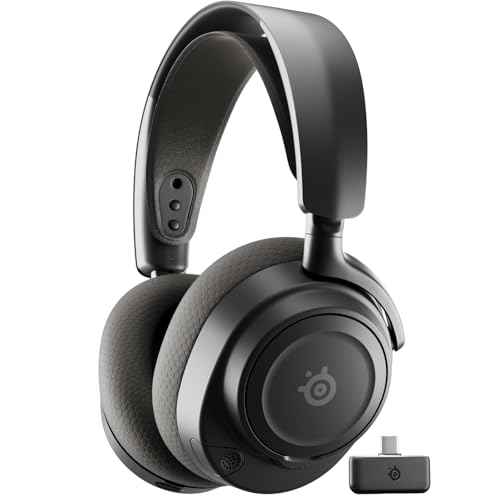
SteelSeries Arctis Nova 7 Gen 2 — the simultaneous-connection all-rounder
Badge: Best for mixed PC, console and phone households
- Connections: mixed 2.4GHz and Bluetooth simultaneously (per the verified listing)
- Battery: 50+ hour class (per the verified listing)
- Control: real-time app control (per the verified listing)
- Platforms named in the listing: PC, PS5, PS4, Switch, mobile
The Nova 7’s party trick — game audio over the dongle and phone audio over Bluetooth at the same time — solves the modern player’s actual interruption pattern, and its retractable microphone design keeps the boom present without making it furniture. The app control earns a mention in an article about settings: the headset’s own layer is unusually legible, which matters to anyone this guide has just taught to count mute gates. For the household whose headset serves every machine it owns, this is the proportionate flagship.
Buying guidance for the replacement you hope not to make again
Choose the connection by the desk: wired for simplicity and permanence, 2.4GHz wireless for freedom without Bluetooth’s profile compromises, Bluetooth as the second connection rather than the only one. Prefer a detachable boom — it can be reseated, replaced and removed, and its mute state is visible — and treat the microphone’s prominence in the listing as evidence of the maker’s priorities. Buy for your loudest room: noise-isolating cups and a voice-tuned boom matter in shared spaces and are wasted in silent ones. And keep the old headset’s cable if it detaches and survives; spares are how a category’s commonest death becomes a thirty-second inconvenience next time.
Mistakes that keep headsets silent
Testing in the lobby instead of in the settings
The lobby is the worst laboratory in gaming: social pressure, a match starting, five variables changing at once. Every step in this guide has a quiet test — the system’s meter, the application’s mic check, the phone’s voice memo — and the discipline of using them converts a public failure into a private procedure. Fix it in the settings; debut it in the lobby.
Reinstalling everything before checking the boom
Driver reinstalls and application resets are the heavy artillery, and they are routinely fired at headsets whose booms were up. The chain’s order is not pedantry; it is the statistical shape of the fault. Physical, mute, system, permission, application — the artillery is step six, and it is reached, in most households, approximately never.
Buying a new headset for a permission’s fault
The privacy gate has sold more headsets than any marketing campaign: a blocked permission survives the new headset’s installation untouched, and the replacement is “dead” on arrival for the same software reason. The substitution test exists to prevent this purchase — a phone recording acquits or convicts the hardware in a minute — and no replacement should be ordered before it has been run.
Final recommendation
Work the chain before you work your wallet: boom and cable, the six mute gates, the system’s input and its privacy permission, the application’s own choices, and the platform’s special cases. That order resurrects the overwhelming majority of silent headsets, because the microphone was almost never the problem — the conversation between the microphone and everything downstream of it was. And when the substitution test does convict the hardware, replace it with a headset whose microphone is a headline rather than a footnote, from the verified set above, chosen for your desk and your room. Your teammates are waiting; they would rather hear the fix took ten minutes than that it took a delivery. Keep this guide’s order somewhere your future frustrated self can find it, because the chain will be re-decided by an update on some future evening, and the self who fixed it once, in order, in minutes, is the best troubleshooter your household will ever employ.
Related guides
gaming earbuds and the microphone compromise
the best gaming earbuds compared
studio headphones for recording your voice properly
fixing HDMI audio on the same setup
the best gaming monitors for the full desk
Voice quality after the fix: from audible to good
A microphone that works is the floor, not the ceiling, and the lobby’s gratitude has levels. Position is the largest free improvement: the boom’s capsule near the corner of the mouth, not in front of it where breath lives, and not beside the cheek where the voice goes to be muffled. Gain is the second: set the system input so normal speech peaks healthily without clipping on a laugh, because a microphone run at maximum to compensate for distance amplifies the room along with the voice. The room itself is the third: a headset microphone rejects off-axis sound by design, but a fan aimed at the player or a mechanical keyboard under the boom will still file their reports; small geography changes beat expensive processing. Processing is the last layer, applied after the physics are right — the application’s noise suppression for the room’s residue, its voice-activation threshold tuned so sentence beginnings survive, and any echo cancellation left to a single owner in the chain, since two cancellers wrestling produce artefacts worse than the echo. Teammates describe the result as “you sound like yourself, but clearer”, which is the entire ambition of headset audio stated in one sentence.
The intermittent microphone: a special clinic
Intermittence — the mic that works until it doesn’t, mid-sentence, mid-match — has its own differential diagnosis, because steady faults and intermittent ones rarely share causes. Cable fatigue at the connector or the yoke is the leader: the conductor holds at rest and opens under movement, which is why the fault keeps appointments with head turns and celebrations. The test is mechanical — speak continuously while gently flexing the cable along its length and rotating the boom — and a crackle or dropout that follows the flex is a conviction. Loose detachable-boom seating produces the same signature at the connector. Wireless intermittence points elsewhere: a dongle in a crowded USB hub, a battery at the edge of its charge, or interference in a dense wireless environment, each testable by moving the dongle to a direct port on an extension, charging fully, and playing a session in a different room. USB headsets add the operating system’s power management, which may sleep the device mid-session until its power saving is disabled in the device’s properties. Intermittence rewards patience and punishes part-swapping; log when it happens, against what you were doing, and the pattern will name its cause the way the handshake guide’s patterns name theirs.
Keeping the next headset alive: a maintenance liturgy
Headsets die by inches and by habits, and the habits are cheap to change. Coil the cable loosely and never wrap it around the headset itself; hang the headset on a hook or stand rather than dropping it on the desk’s geology of mugs and controllers; keep the boom’s connector clean and seat it fully after every removal; charge wireless models before they are empty rather than after, and store them partly charged if they will sit for weeks. Wipe the earcups, check the cable at its two stress points monthly, and keep the detachable cable’s spare — the one this article advised retaining from the old headset — in the drawer where the headset lives. None of this is preciousness. It is the arithmetic of a device whose failure modes are mechanical long before they are electronic, owned by someone who has read the chain and knows which links are theirs to maintain.
The five-minute version, for the reader whose lobby is waiting
Compressed without apology, with the full reasoning in the steps above. One: boom down, boom seated, cable home, inline mute open. Two: phone test — record a voice memo on another device; if it records, your headset lives and the fault is in the machine’s settings. Three: in the system’s sound settings, select the headset as the input, raise its level, and speak at the test meter. Four: check the microphone privacy permission for the system and the application. Five: inside the game or chat application, name the headset as the input explicitly, run its mic test, and check its mute and push-to-talk state. Those five moves, in that order, restore the great majority of silent headsets; the console, Bluetooth and USB clinics above handle their platforms’ variations; and the substitution logic in step five governs anything that survives. Now rejoin the lobby — with your voice.
A worked example: the headset that died every Tuesday
A player’s microphone failed, by their report, constantly — yet every test they ran showed it working. The pattern, once logged as the intermittence clinic advises, was temporal: the failures clustered in the first session after the PC’s weekly update restart. The chain explained it without a single part replaced. Each update re-enumerated the audio devices; the chat application, loyal to a device identifier rather than to the headset’s name, found its saved input pointing at a stale entry and fell silent, while the system’s own test — which the player ran each time, and which used the current default — passed innocently. The cure was embarrassingly small: after each update, the application’s input was re-named explicitly, a ten-second ritual, until a later version of the application learned better manners. The example is printed because it teaches the article’s deepest lesson in miniature: most microphone faults are not things breaking, but decisions being re-made by software that does not know your preferences — and the owner’s job is to make the preferences explicit enough to survive the software’s housekeeping.
Headset microphones, explained: why booms beat buds and beans
The physics underneath this whole guide deserves one plain section, because it explains both the faults and the replacements. A microphone’s clarity is governed above all by distance: halve the distance to the voice and the voice’s advantage over the room quadruples. A boom places its capsule a few centimetres from the mouth, in the voice’s direct weather, which is why even a modest boom outperforms the finest processing applied to a distant microphone. Earbud and headset-cup microphones sit at the ear — twenty centimetres and a jawbone away — and must reconstruct with algorithms what the boom receives by geography. That is the entire reason the replacements in this article are boom headsets, why earbuds carry the microphone caveat our Hammerhead review states, and why a detached boom should be seated and positioned with the respect due to the component that decides whether your team hears a captain or a rumour. Directionality helps the boom further: a cardioid capsule listens forward, toward the mouth, and discounts the keyboard and the room behind it. When a reader’s voice is their instrument — ranked callouts, streaming, a team that depends on them — the boom is not an accessory. It is the product, and the headphones attached to it are the delivery mechanism.
For the household’s other headsets: children, work calls and the shared machine
The chain in this guide governs every microphone in the house, and two neighbouring populations deserve its protection explicitly. Children’s headsets on shared machines fail silently under account and privacy settings designed for adults — school platforms blocked by a family permission, a game’s voice chat disabled at the account level — and the parent’s diagnostic advantage is that the chain can be walked calmly, in settings, rather than in a lobby of classmates. Work headsets on meeting software fail by the same gates with higher stakes and quieter symptoms: the meeting that hears you “faintly” is usually gain and geometry, and the meeting that cannot hear you at all is the privacy permission wearing a suit. The professional habit worth exporting from gaming is the pre-flight test — thirty seconds in the application’s own mic check before the call that matters — which converts the most embarrassing failure in remote work into a settings errand run in private. The chain does not care what the headset cost or who wears it; it cares that each link says yes, in order, and it can be walked for any of them in minutes.
Frequently asked questions
Why can my friends hear my game but not my voice?
Because the application is capturing the wrong source: it has hold of a device or a mix that carries the game’s audio — a monitoring output, a virtual cable, a stereo-mix style input — while your microphone sits unselected. Name the headset’s microphone explicitly in the application’s input settings, as step three teaches, and check that any streaming or recording software in the chain is not intercepting the device first. Game audible, voice absent is a routing signature, and routing faults live in lists, not in hardware.
Why does my mic work in Discord but not in my game?
The game has its own input selection and its own voice settings, and it is using a different device or a muted channel — or the operating system’s communication-device flag points one way while the game reads the plain default. Set the headset as both defaults in the system, then name it explicitly inside the game’s voice menu, and confirm the game’s push-to-talk or voice-activation state. Two applications disagreeing about a working microphone is the application layer’s home fixture, and it is never the capsule’s fault.
My microphone is very quiet even at maximum. Is it dying?
Usually it is geometry or gain, not mortality. A boom positioned beside the cheek rather than in front of the mouth’s corner loses most of its level before any electronics are involved; bend it to its designed position, a finger’s width or two from the corner of your mouth. Then check the input level in the system and any boost the device offers, and the application’s own input volume. A capsule that is quiet on every device, correctly positioned, at full gain, with a swapped cable, has earned its suspicion — in that order, and rarely before it.
Why did my headset mic stop working after an update?
Updates reset the chain’s decisions: default devices revert, privacy permissions are re-asked or silently tightened, drivers are replaced, and applications lose their saved device in favour of a default that points nowhere useful. The fix is the guide’s chain run fresh, in order, which takes minutes precisely because nothing is broken — the system’s memory of your preferences was the only casualty. It is worth re-running the chain after any major update before concluding anything, the way you would re-check a tent’s pegs after weather.
Can I use a separate microphone and keep my headset?
Yes, and for streamers and heavy talkers it is often the best end-state: a USB desk microphone carries the voice with a quality no boom matches, while the headset handles the listening. The chain discipline still applies — the system and each application must be told the microphone is the input and the headset the output, a split that confuses defaults designed for single devices. Set both defaults deliberately, name them in each application, and the hybrid setup becomes the most reliable voice arrangement on the desk.
How do I stop sidetone or monitoring from distracting me?
Mic monitoring — hearing your own voice in your ears — is a feature with a setting, located in the console’s audio menu, the headset’s companion software, or the operating system’s “listen to this device” option, which should never be enabled outside diagnosis. Lower it to a whisper or off entirely according to taste; a little sidetone stops you shouting, a lot makes conversation impossible. If you hear yourself with an echo or a delay, two monitoring paths are open at once — find both, keep one.
My mic picks up my keyboard and my breathing more than my voice. What is wrong?
Geometry and gain, in that order. The capsule is too far from the mouth’s corner, so the system gain has been raised until the room is as loud as you are — and the keyboard, closer to the microphone’s axis than your voice is, wins. Bring the boom to its designed position, lower the input gain back to sanity, and let the application’s noise suppression handle the residue rather than the whole problem. A noise gate or voice-activation threshold set just above the keyboard’s level completes the arrangement. Microphones obey the inverse-square law without exception or malice; the fix is always to give the voice the distance advantage.
Why does my wireless headset’s mic fail only when the battery is low?
Because a dying battery negotiates like a dying device: the radio link degrades, the headset may shed features to preserve audio, and the operating system can lose and regain the input in ways the application does not forgive mid-session. Treat the low-battery warning as the microphone’s deadline rather than the audio’s, charge before sessions that matter, and if the fault appears at healthy charge levels, run the wireless clinic — dongle placement, hub removal, a different room — before suspecting the capsule. Batteries confess early through the microphone, which makes it, accidentally, the headset’s most honest gauge.
The mic works on my PC but not on my console, with the same headset. Why?
The console has its own chain and its own gates: the controller connection, the controller’s mute, the console’s input selection between controller and headset microphones, and the account’s voice-chat permissions, any of which can silence a proven headset. Work the console clinic in step four on the console’s own terms rather than importing the PC’s acquittal as evidence — each platform’s chain must be walked separately, because each platform re-makes every decision the chain contains. The headset is the only constant; everything downstream of it is local law.
Is it worth repairing a headset with a dead microphone?
It depends where the death certificate points. A failed detachable cable or a failed detachable boom is a part, not a headset, and replacing it is the rational repair — one more argument for the detachable designs this article recommends. A capsule dead inside a sealed, fixed-boom headset is usually the end of the economic road, since the repair approaches the replacement’s price while returning an otherwise aged device. Diagnose to the component before deciding, as step five teaches, and let the fault’s address — cable, boom, capsule, electronics — set the repair’s budget ceiling.
Why do I hear an echo of the whole lobby through my own headset?
Someone’s microphone is hearing their speakers or their open headset cups and returning the lobby to itself — and if your teammates say the echo arrives with your voice, the suspect is your setup: speakers playing while the mic is open, cups leaking at high volume beside a sensitive boom, or a monitoring path doubling the signal. Lower the game volume in the cups, move the boom’s axis off the cups’ leakage line, and disable any “listen to this device” path left open from diagnosis. Echo is a chain with a loop in it; the fix is to find the loop, and it is almost always acoustic or a monitoring setting, never a mystery.
Do I need the headset manufacturer’s software installed for the mic to work?
For basic function on most wired and dongle headsets, no — the operating system’s generic audio handles the microphone, which is why the guide’s chain works before any software is mentioned. The maker’s application adds the refinement layer: equalisation, sidetone control, surround processing, firmware updates. Install it for those, keep it updated, and remember its existence in diagnosis — the seventh mute gate lives there, and a headset can be silenced by software its owner forgot they installed. When the chain is being hunted, the maker’s app should be opened exactly once, read carefully, and either acquitted or adjusted.
Is a USB headset’s microphone better than a 3.5mm one?
Different rather than better, with the chain rearranged. A USB headset carries its own conversion and amplification, so its microphone’s character is consistent across machines and immune to a poor motherboard input — at the price of owning a software layer and a firmware to maintain. A 3.5mm headset borrows the machine’s audio hardware, which on a good motherboard or interface is excellent and on a cheap laptop can be the weakest link in the whole chain. For a single good PC, either serves; for a headset that travels between machines of varying quality, USB’s self-containment is the steadier bet — and the Cloud III’s habit of including both connections is the manufacturer’s way of declining to choose for you.
Why do streamers’ microphone setups fail in more complicated ways?
Because a streaming chain inserts extra citizens between the microphone and the audience — capture software, virtual cables, noise-filtering plugins, the platform’s own processing — and each citizen keeps its own device selection, gain and mute state. The guide’s method scales to meet it: verify the raw microphone in the system’s recorder first, then admit one layer at a time, testing the recording after each, exactly as the HDMI handshake method rebuilds a chain. The streamer who builds their audio chain in documented layers can repair it in minutes; the one who assembled it by intuition in one evening owns a machine they are afraid to touch, which is the most expensive kind of audio equipment there is.
What is the fastest way to prove the mic works before an important match or call?
The pre-flight ritual this article has been quietly building: boom seated and down, a ten-second recording in the system’s own voice recorder played back through the headset, and the application’s mic test with your name spoken at match volume. Thirty seconds, three links of the chain verified, and the important session starts with the microphone as a settled question rather than a hope. Pilots do not skip checklists because the aircraft worked yesterday, and the chain — as the Tuesday example taught — is re-decided by software often enough that yesterday’s evidence has an expiry date.
Should I keep my old headset as a spare after replacing it?
If its fault was convicted to a replaceable part — a cable, a boom — then yes, repaired cheaply, it becomes the household’s diagnostic gold: the known-good headset every future chain is tested against, exactly as the proven spare cable serves the HDMI guides. If its capsule died, retire it without sentimentality, but keep its detachable cable and any adapters; spares have a way of acquitting their successors. A household with one proven headset and one proven cable never has to guess which side of the chain a silence lives on, and that certainty is worth a drawer.
How can I tell whether the problem is my headset or my voice being too quiet for voice activation?
Record yourself. The system’s test meter and any voice recorder will show your natural speaking level honestly, and a healthy trace at conversational volume acquits both you and the capsule. Then compare that trace with the application’s voice-activation threshold: if the threshold sits above your ordinary speech — as it does in many default configurations tuned for louder rooms — the application is not deaf, it is gated, and lowering the threshold or choosing push-to-talk is the entire fix. Quiet speakers are a constituency, not a fault, and every layer of the chain can be tuned to admit them once the meter has proven they were there all along.
Why does my mic work everywhere except one specific game?
Because that game keeps its own counsel: its own input device saved from an earlier headset, its own voice channel muted in a menu visited once and forgotten, or an anti-cheat or overlay layer intercepting audio devices in a way other titles do not. Reset the game’s audio settings to defaults as a single deliberate act — the one time in this guide where a reset is the right early move, because a game’s audio page is small and its defaults are sane — then re-select the headset inside it and test in its own voice menu or a private lobby. One game disagreeing with a proven chain is that game’s configuration confessing; believe the chain.
Can a faulty USB port or hub really silence a USB headset?
Yes, and it is one of the wireless-and-USB clinic’s most reliable findings: a hub that sleeps, a port that under-delivers power, or a front-panel connection with tired wiring can leave a USB headset enumerated — visible in the device list, promising in every menu — while its audio path stutters or never opens. The diagnostic is relocation: a rear motherboard port, directly, with nothing between. A headset that resurrects there has convicted the plumbing, and the permanent fix is to give the headset a first-class port of its own and demote the hub to devices that forgive it.
What is mic monitoring, and should I keep it on?
Mic monitoring — sidetone — plays your own voice back into your earcups at low volume, so you can judge your level and stop shouting over the game’s audio. A whisper of it is genuinely useful in long sessions and on isolating headsets, where your own voice otherwise sounds distant and you compensate by volume. Too much becomes an echo-chamber distraction, and a delayed sidetone — the kind that arrives via software rather than the headset’s own hardware path — is worse than none, because delayed self-hearing disrupts speech itself. Set it low, prefer the headset’s or console’s built-in path, and disable any second monitoring route the operating system offers, so the voice you hear is one voice, arriving on time.
My headset is new and the mic has never worked. Should I return it immediately?
Run the chain first — new headsets are silenced by unseated booms, uninstalled splitters and ungranted permissions at a rate that would embarrass the returns department if it kept statistics — and run the phone test, which is the one experiment a return should never precede. If the headset records on the phone, it was never faulty, and the fault is in the machine it will be used with; if it is silent everywhere with the boom seated and a cable swapped where possible, return it with a clear conscience and this guide’s blessing. Either way, the ten minutes of chain-walking are what separate a diagnosis from a superstition with a shipping label.
Why does my voice sound robotic or underwater to my teammates?
Processing, stacked. Noise suppression in the application, enhancement in the operating system, and the headset software’s own effects can each be reasonable alone and absurd together, especially over a Bluetooth hands-free connection whose narrow bandwidth leaves the algorithms nothing to work with. Strip the chain to raw — all processing off, the dongle or wired connection in use — confirm the voice sounds human, then restore one processing layer at a time and keep only the ones your teammates vote for. Robotic voice is the sound of three helpful systems helping simultaneously; the cure is a single owner for each job.