Disclosure: As an Amazon Associate, reviewstook.com earns from qualifying purchases. Links on this page are affiliate links at no extra cost to you; prices and availability change frequently, so check Amazon for the latest.
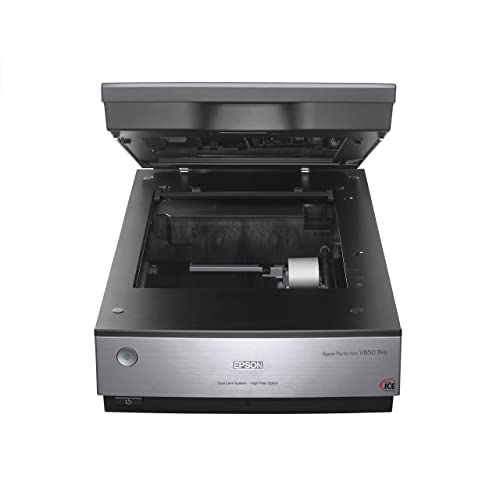
Where to Buy the Best Flatbed Scanner Under $1000
Use the links below to check the latest price on Amazon for every pick in this guide to the best flatbed scanner under $1000. Each name link and check link goes to the same verified listing, so you can confirm the current model and bundle before you decide. Purchases made through links on reviewstook.com support our testing and writing at no extra cost to you.
- Best Overall: Epson Perfection V850 Pro — Check on Amazon
- Best Large Format: Epson Expression 13000XL — Check on Amazon
- Best Pro Alternative: Epson Perfection V800 — Check on Amazon
- Best A3 Overall: VIISAN VF3240 — Check on Amazon
- Best A3 for Colour: Plustek OpticPro A320E — Check on Amazon
- Best A3 for Speed: Plustek OpticSlim 1680 — Check on Amazon
Finding the Best Flatbed Scanner Under $1000 Without Buying the Wrong Shape of Scanner
The search for the best flatbed scanner under $1000 is really a search for the right glass. Flatbed design — original face-down on a platen, lid closed, carriage travelling beneath — is the only common format that treats bound, fragile and oversized originals as first-class citizens rather than as jams waiting to happen. The top of the flatbed market is a short street with serious houses. Epson’s pro photo pair, the Expression 13000XL’s archiving expanse, and the finest A3 and business machines in this series are bought by collectors, studios, institutions and the occasional household that has decided, consciously, that its photographs deserve the best capture available at any sane price. This guide’s job is not to sell the street but to map it: which flagship serves film, which serves size, which serves colour, and where even a flagship’s coverage honestly ends.
General buyers are the hardest to serve well, because their pile refuses to specialise: a passport renewal, a watercolour, a bound manual, a decade of photographs, all in the same month. This guide therefore ranks coverage over brilliance. Each pick is introduced by the job it covers best, and the specialists are labelled as specialists, so a general reader can assemble the widest honest coverage this budget allows — and can see exactly which corner of the pile each candidate would leave unserved. Background reading that genuinely helps here: our explainer at How To Choose A Photo Scanner and the wider buying context at Printer Scanner Not Working.
The six picks below were chosen to cover the distinct jobs hiding inside this one search phrase, and the detailed reviews argue each job openly. If your needs sit between tiers, the neighbouring guides at Best Flatbed Scanner Under $700 and Best Flatbed Scanner Under $30 frame what stepping down saves and stepping up buys, in the same verified-pick format.
In this guide
Quick Picks
- Best Overall: Epson Perfection V850 Pro — digital ICE dust and scratch help.
- Best Large Format: Epson Expression 13000XL — 2400 x 4800 dpi capture.
- Best Pro Alternative: Epson Perfection V800 — film and print specialist.
- Best A3 Overall: VIISAN VF3240 — 2400 dpi optical on A3 glass.
- Best A3 for Colour: Plustek OpticPro A320E — full 12 x 17 inch bed.
- Best A3 for Speed: Plustek OpticSlim 1680 — tabloid in 3 seconds at 300 dpi.
How These Picks Were Chosen
Badges so describe roles in the span of this article, and a pick badged as a specialist is not being demoted — it is being aimed. We weighted the ordering inside per article by the article’s own audience. The identical six machines can legitimately rank differently for a student and for a compact business, because the jobs differ: searchable book output carries weight in a dorm footprint, feeder duty carries weight in an workplace, and none of the pair counts much to a household scanning birthday cards.
Badges in these pages were assigned after the reviews were written, not before — a compact methodological vanity we recommend to visitors making their own shortlists. Settle what per machine is after you know what it does, and the labels stop steering the evidence. The outcome is that some opening-listed picks carry specialist badges and some last-listed ones carry the general badge, for the cause that the ordering follows the article’s argument rather than a podium. Visitors who disagree with a badge will find the review further down it argues in the open.
A pick with a grave shortcoming says so in its own section, as a guide that hides the compromise has simply moved the disappointment to after the buy. Finally, we ordered the six by the job of this article rather than by specification theatre. Badges mark the role every pick plays — the general choice, the budget route, the photo or feeder or format specialist — and the detailed reviews argue every case in the open, trade-offs included.
One category note protects anybody reading shopping at every tier: diverse famous scanner names are not glass-bed machines. The ScanSnap iX1300 and iX2500, Epson’s ES-400 II and FastFoto FF-680W, Plustek’s ePhoto Z300 and HP’s HPPS100 are sheet-fed designs with no glass; the CZUR Aura Pro is a camera on a stand. All were excluded from these picks. A professionally refurbished VIISAN VF3120 listing was likewise excluded as a duplicate of the source document model, which appears in this series in its standard listing where its tier fits.
Detailed Reviews: Each Pick for Your Desk
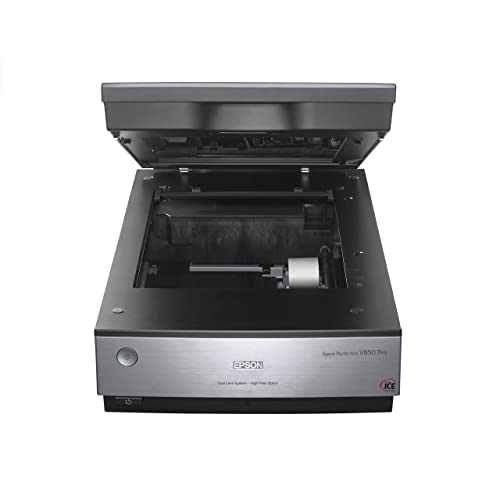
Best Overall — Epson Perfection V850 Pro, Letter/A4 flatbed + film, pro
Strengths
- Dual lens 6400 dpi system
- Digital ICE dust and scratch help
- 4.0 Dmax for shadow detail
Trade-offs
- Professional price, professional pace
- Overkill for documents alone
- Demands a careful operator
| Optical resolution | 6400 dpi, dual lens system |
|---|---|
| Technology from listing | Digital ICE; LED array |
| Density | 4.0 Dmax |
Office-grade archivists, grave photographers and institutions buy this class of machine for the explanation that the source administrative paper in their care deserve a opening scan that at no point demands redoing. The Epson Perfection V850 Pro is the flagship of this guide: a 6400 dpi dual-lens photo scanner with Electronic ICE technology and a 4.0 Dmax rating from its listing. Per element serves photographic truth. The dual-lens system optimises capture for the two reflective prints and film; Digitised ICE attacks the grime and scratches that make film scanning a retouching marathon; and high Dmax means shadow detail in dense negatives survives digitisation in its place of crushing to black.
A letter/a4 flatbed + film, pro widens a general setup from paperwork into memory work, covering the prints and film that ordinary document machines ignore entirely.
For a general home archive, the pattern below is the one that keeps recurring. Electronic ICE is powerful on film but is a film technology; leave it off for certain emulsions and for reflective prints, and learn which of your materials it suits on test frames before a long scanning sitting rests on it.
A frame at full capture takes the hours it takes; a crate takes an end of the day; a collection takes a season of evenings. Pace is the honest tax of this class, and owners pay it gladly or not at all. The compensation is finality — material scanned accurately here does not return to the queue. Owners who measure progress in done containers rather than in frames stay the course; the entire line is concrete, and it is theirs.
Best for: irreplaceable film and print collections / Not suited for: routine workplace pages alone

Best Large Format — Epson Expression 13000XL, Large-format flatbed, pro
Strengths
- Huge 12.2 x 17.2 inch bed
- 2400 x 4800 dpi capture
- Built for photo archiving at scale
Trade-offs
- Largest footprint in this guide
- Top-tier price class
- Far beyond document needs
| Resolution from listing | 2400 x 4800 dpi |
|---|---|
| Scan area | 12.2 x 17.2 inches |
| Purpose from listing | Digital photo archiving |
Stand in front of a 12.2 by 17.2 inch bed and the category’s compromises evaporate: the poster fits, the broadsheet fits, the double-page spread fits, whole. The Expression 13000XL pairs that expanse with 2400 by 4800 dpi, because an archiving bed that captured coarsely would betray its purpose. Galleries, studios and local-history collections buy it to end the era of photographing the too-big pieces as a substitute for scanning them. It is the largest tool in this guide and, for the originals only it can take, simply the only tool in this guide.
In a generalist’s home, a big bed changes what is scannable at all: the child’s poster, the family tree chart, the double-page spread. A large-format flatbed, pro turns those from photography compromises into proper scans.
Plan the furniture before the buy: a 12.2 x 17.2 inch bed amounts to a machine that dominates a workstation, and it deserves a specialist, level surface where oversize pieces can be laid out alongside it safely.
Resale and next life favour this class: schools, societies and studios invariably call for big glass, and a well-preserved A3 flatbed finds its next collection absent delay. Preserve the container if storage enables, hold on to the glass bed immaculate, and the machine’s price per year falls any year it serves — the arithmetic that makes the step up from A4 easier to defend than it initial appears.
Best for: oversize prints, posters and hardbound books / Not suited for: compact rooms and ordinary documents

Best Pro Alternative — Epson Perfection V800, Letter/A4 flatbed + film, pro
Strengths
- Pro photo line pedigree
- Film and print specialist
- Shares V850-class workflow
Trade-offs
- Listing data is minimal
- Flagship-class pricing tier
- Not a document machine
- Type
- Photo flatbed scanner
- Role in range
- Sibling to the V850 Pro
- Family
- Epson Perfection pro photo line
The Epson Perfection V800 sits in Epson’s pro photo line as the close sibling of the V850 Pro, and its listing keeps the description to three honest words: Perfection, photo, scanner. Purchasers cross-shop the pair when building a real film and print digitisation station, and the determination as a rule turns on the finest specification differences and present-day availability rather than on category. What is certain is the intent: this is a glass-bed scanner for photographic source files on paper — film, slides and prints — operated by somebody who archives intentionally. The listing data supplied for this model is brief, so we present it as the pro-line alternative it is, absent inventing specifications.
Adding a letter/a4 flatbed + film, pro to a headline setup is adding a hours machine: the negatives in the envelope stop being a mystery format and rejoin the household’s visible history.
Before ordering, list your film formats and confirm holder support in opposition to the seller’s full specification; at this level the holders you call for are a buy criterion, not an accessory fine detail.
A film scanner reorganises household history around itself. Relatives send envelopes; the container of negatives grows into a queue with a social life; completed files travel back as prints and messages. Owners regularly find the machine turns into the home’s unofficial collection workplace, with all the gratitude and all the requests that workplace implies. It is among the better fates a peripheral can have.
Best for: pro photo archiving cross-shopped with the V850 / Not suited for: purchasers who call for full specs before shortlisting

Best A3 Overall — VIISAN VF3240, A3 flatbed
Strengths
- 2400 dpi optical on A3 glass
- 4-second A3 colour cycle
- Drawings, photos and records alike
Trade-offs
- Premium over the VF3120
- Desk-hungry A3 footprint
- No feeder; deliberate pace only
- Speed from listing
- A3 colour page in 4 seconds at 200 dpi
- Optical resolution
- 2400 dpi
- Scan area
- 304 x 426 mm (A3)
The VIISAN VF3240 is the VF3120’s sharper, faster sibling: the identical 304 x 426 mm A3 bed, but 2400 dpi optical capture resolution and a listed 4-following A3 colour cycle at 200 dpi. That combination carries weight to shoppers scanning generous source files on paper they intend to reproduce — artwork for print, images for enlargement, records for publication — for the explanation that fine detail captured at the platen cannot be invented later. At document scan settings it is also simply brisk, clearing oversized paper files at a pace that keeps a digitisation day on schedule. It endures a glass-bed scanner in the deliberate sense: no feeder, one careful placement at a minutes.
In a generalist’s home, a big bed changes what is scannable at all: the child’s poster, the household tree chart, the double-page spread. A a3 flatbed turns those from photography compromises into proper scans.
Run one A3 original at the pair of them document and full sampling resolution before committing to a routine; the comparison teaches you more about your genuine calls for than any specification table, and it takes less than a minute on this machine.
Expect the A3 bed to grow into a layout surface for more than scanning: sorting prints, collating pages, examining artwork. Flat, lit-adjacent, generous — the territory gets used. Owners who accept the bed as furniture rather than fighting its footprint end up organising entire projects around it, which is a further way of saying the format pays rent in usefulness beyond its specification.
Best for: A3 artwork and records needing finer capture / Not suited for: purchasers who at no point scan beyond A4
Best A3 for Colour — Plustek OpticPro A320E, A3 flatbed, CCD
Strengths
- CCD sensor aimed at colour work
- Full 12 x 17 inch bed
- Mac and Windows driver support
Trade-offs
- No image in verified listing data
- Premium large-format pricing tier
- No feeder; placement pace
| Sensor | CCD, suited to colour scanning |
|---|---|
| Compatibility | Windows and Mac; ICA and TWAIN |
| Scan area | 12 x 17 in / A3 |
| Speed from listing | 7.8 sec for 12×17 in |
Buyers comparing A3 machines on speed alone will misread the A320E. Its proposition is fidelity: CCD sensors for colour scanning, a full 12 x 17 inch capture area, and driver standards — ICA and TWAIN — that professional applications speak natively. The 7.8-second full-bed cycle is respectable rather than headline-chasing, because the audience for this machine measures success in accurate colour, not seconds saved. Studios scanning artwork for reproduction, textile designers archiving samples and photographers digitising large prints are its natural constituency, and for them the specification reads like a checklist written from experience.
A a3 flatbed, ccd earns generalist respect by making the exceptional ordinary — the one big drawing, the one ledger, the one spread — without demanding specialist devotion the rest of the year.
No image was supplied in the verified listing data for the A320E, so assess it on specifications — CCD colour sensor, 12 x 17 inch bed, dual-platform drivers — and confirm the present-day revision with the seller if appearance carries weight to your studio.
After the opening month, the A3 machine’s rhythm settles: records and plans at document pace during the week, the occasional artwork or poster given the unhurried, careful treatment on a silent day. Two tempos, one bed. Owners who plan scanning sessions by tempo — rapid batches distinct from gradual treasures — get the most from the format and the fewest rescans from it.
Best for: color-critical A3 artwork and samples / Not suited for: high-volume document batch flow

Best A3 for Speed — Plustek OpticSlim 1680, Tabloid/A3 flatbed
Strengths
- Tabloid in 3 seconds at 300 dpi
- Dual View speeds adjustment checks
- Slim take on large-format
Trade-offs
- Speed quoted at document settings
- Large-format desk footprint remains
- No feeder for stacks
| Feature from listing | Dual View adjustment check |
|---|---|
| Speed from listing | 300 dpi in 3 seconds |
| Scan area | 11.7 x 17 in (tabloid/ledger/A3) |
For businesses drowning in sizeable-format administrative paper — plans, ledgers, tabloid proofs — that cycle turns scanning from a scheduled chore into an item done between other tasks. The Plustek OpticSlim 1680 sells rate at size: tabloid, ledger and A3 source documents at 300 dpi in a listed 3 seconds, on an 11.7 x 17 inch bed. The Dual View design, which lets you inspect the effect of image adjustments swift, addresses the other half of throughput: fewer rescans. It carries the OpticSlim name honestly, keeping the body as trim as an A3 machine reasonably gets while all the same asking for a proper workstation to live on.
A tabloid/a3 flatbed quietly redefines a household’s sense of the possible: the oversized, the bound-open spread and the poster all become ordinary scanning instead of special projects.
Ledger and tabloid source files on paper regularly land folded; a night under a heavy book before scanning pays dividends in flatness, and flat source paper files scan sharper at the fold line where text otherwise curves away from the platen.
Institutions owning A3 machines learn to publish their rules: a booking practice if the area is shared, a one-page guide taped nearby, a named filing folder that is the simply destination. The machine’s capability is never the constraint in shared spaces; governance is. Owners who write the rules early get an asset the entire area uses; owners who do not get a queue of users asking one person where the scans went.
Best for: ledger, tabloid and plan operating methods / Not suited for: film, slides and fine photo function
Comparison Table
| Pick | Format | Verified highlight | Best role |
|---|---|---|---|
| Epson Perfection V850 Pro | Letter/A4 flatbed + film, pro | 4.0 Dmax | Best Overall |
| Epson Expression 13000XL | Large-format flatbed, pro | 12.2 x 17.2 inches | Best Large Format |
| Epson Perfection V800 | Letter/A4 flatbed + film, pro | Photo flatbed scanner | Best Pro Alternative |
| VIISAN VF3240 | A3 flatbed | 304 x 426 mm (A3) | Best A3 Overall |
| Plustek OpticPro A320E | A3 flatbed, CCD | CCD, suited to colour scanning | Best A3 for Colour |
| Plustek OpticSlim 1680 | Tabloid/A3 flatbed | 11.7 x 17 in (tabloid/ledger/A3) | Best A3 for Speed |
Read the table as a coverage map rather than a league ladder: the right row is the one whose format and highlight match the pile on your workstation, and the detailed reviews overhead explain where every row’s coverage ends. A related deep-dive meriting your minutes sits at Best Printers For Little Business.
How to Choose the Best Flatbed Scanner Under $1000 for Your Workload
The buy is permanence of consequence. A flagship scan is made to be the last care of a frail original, the file an institution can build on, the master a home can inherit absent apology. Buy the direction your pieces live in — film, size, colour or volume — support it with storage and routine at the identical standard, and the enquiry of scanning is closed for a generation. That closure, and nothing smaller, is what four statistics buy in a category whose floor adds up two.
A generalist’s shortlist should start from an inventory, not from reviews. Write down the last twenty things you wished you could scan; the list will contain a pattern — chiefly paper, for the most part photos, one awkward bound thing — and that pattern is your specification. Then read the six verdicts here as answers to your list. The scanner that covers eighteen of your twenty items beats the one that covers twelve brilliantly, since the uncovered items do not disappear; they return to the phone camera, which is where dissatisfaction started.
Throughput is a system, not a speed
A brisk machine fed unprepared source pages into a chaotic filing folder generates backlog at high velocity. A scanner’s rated pace is one term in an equation whose other terms are preparation, placement, verification and filing. When comparing picks, mentally run your own pile via every: where does the minute actually go? For the majority of desks the solution is preparation and filing, which is why this guide spends as a great many words on routines as on hardware — the routines are where the throughput lives.
Size the desk before the scanner
Glass-bed machines are furniture. A3 and big-format models require a level surface with operating area around them; slim models earn their premium in centimetres; business combinations require clearance for feeder trays and the stacks that feed them. Measure the intended home — depth, lid clearance, cable reach — before comparing any other specification, since the best scanner throughout this guide is a poor buy if it lives in a cupboard, and a cupboard scanner’s actual expense per scan is infinite.
Flatbed versus feeder: the exception rate decides
Any workload has an exception rate — the share of source paper files that are bound, frail, laminated, torn or odd. Automatic feeders function with the rule brilliantly and the exceptions not at all. If your exception rate is near zero, a document feeder-led machine serves you; the moment it climbs — and in homes it is rarely further down a fifth of the bundle — a genuine glass bed stops being a luxury and grows into the principal instrument, with the automatic feeder as its assistant. Combination picks throughout this guide are engineered for simply that arithmetic.
Colour depth and the CCD question
For colour source files on paper you intend to reproduce, it is a genuine selection criterion, and it is one grounds the colour specialists higher up price more than their document cousins with comparable bed sizes. The majority of flatbed scanners sample light with a contact sensor; the CCD designs throughout this guide — Plustek’s A3 and book models wear the badge openly — use the older, deeper-sampling technology photographers have trusted for decades. The practical gap displays in tonal subtlety: gradients in artwork, fabric and photographic prints hold in tandem in its place of banding. For administrative paper the distinction is invisible and irrelevant.
Two habits protect every buyer in this category. First, decide the destination folder and naming pattern before the scanner arrives, because the archive is the product and the machine is only its supplier. Second, keep the neighbouring tier in view: the guide at Best Flatbed Scanner For Home Office Under $1000 shows what the next step changes, and the one at Best Flatbed Scanner For Small Business Under $1000 shows the same workload read through a different lens — both useful correctives before money moves.
Scanning Workflows: Three Jobs This Tier Handles Constantly
Archiving a creative practice
A flatbed scanner sized to the work — A3 where the function is A3 — turns that accumulation into a portfolio with a memory: pieces documented before they are sold, given or lost, at a fidelity that honours the making. Artists, crafters and musicians accumulate the unscannable-by-feeder: sketches, scores, fabric, programmes, the poster from the initial show. The filed away collection also grows into the practice’s insurance record and its retrospective catalogue, two files on paper nobody makes on object and everybody in hours calls for.
Preparing a rental or tenancy file
Scan every item as it is signed or received, name it by property and date, and preserve the directory shareable with per tenant or agent who may require it. Tenancies run on files on paper with deadlines: agreements, inventories, deposit records, inspection photos’ documents, correspondence that must be provable later. When the tenancy ends — the moment these files count — the digitised collection answers from a phone in the empty property, which is precisely where and when paper copies are not.
Clearing an estate’s paperwork with care
Executors and households face paper at its nearly all emotional and the majority of bureaucratic simultaneously: certificates, policies, letters, prints, the contents of a worktop that meant a life. A flatbed scanner, used softly and in sittings, lets multiple relatives share the labour and the outcomes — source pages held by one, perfect copies held by all. Scanning here is not efficiency; it is fairness and preservation at one time, and the machines throughout this guide are at their nearly all humane in this function.
How Do You Set Up a Flatbed Scanning Routine That Sticks?
Scan in passes, not in marathons
Marathon scanning sessions feel productive and hide their errors until the batch is refiled — the moment correction grows into a retrieval expedition as an alternative of a thirty-following rescan. Function by way of a accumulation in sittings of twenty or thirty source pages, inspecting the output directory after every pass. A fast glance at thumbnails catches the skewed page, the upside-down form and the scan of the table that happen to everybody, while the source pages are yet in the span of reach.
Prepare originals like you mean it
Preparation feels gradual and is in reality the fastest stage of scanning, as any following of it prevents a rescan. Remove staples and clips, flatten folds under a heavy book if minutes enables, and inspect per page for the grit that scratches glass and the adhesive notes that redeposit glue on it. Photos come out of albums carefully or not at all; if a print resists, scan it via the album page situation with a removable-lid model rather than forcing it.
Set up the glass workflow once, properly
Ten unhurried minutes here prevent any ahead sitting from beginning with configuration archaeology. Place the scanner on a level surface with room for the lid to open entirely and for source pages to wait on the two sides — scanned to the left, unscanned to the right is a rhythm meriting stealing. Install the bundled software before the initial urgent job, run one test scan of an routine page, and set your defaults while calm: a files on paper preset, a photo preset, and a destination directory you actually use.
Name and file before you forget
Name at save hours using a pattern your ahead self would guess — date, subject, source — and file into the directory structure you chose during setup. The scan is not done when the file appears; it is done when the file is findable. Photos deserve the identical rigour with names and dates attached while a living memory can yet supply them. An hour of scanning without naming yields a directory that behaves, in the span of a month, precisely like the unsorted carton it was meant to replace.
Trouble: the scanner vanishes from the computer after updates -> fix: reintroduce them thoroughly. Operating system updates from time to time orphan scanner drivers, and the machine that worked for a year turns into a stranger overnight. Reinstall the manufacturer’s present-day driver, reconnect the cable straight rather than by way of a hub, and confirm the scanner appears inside the bundled software you actually use, not solely in a device list. Business models on TWAIN or ISIS standards recover fastest, as workplace-grade bundled software re-discovers them via the standard rather than via a frail bespoke link.
Difficulty: scans show a repeating line or speck in the identical place -> fix: clear the glass bed. A mark that appears at an identical position on per scan lives on the platen bed, not on your source files on paper. Clear the platen with a soft, lint-open cloth and a bit glass cleaner applied to the cloth, at no point sprayed into the machine, and confirm the underside strip the carriage parks under. On feeder models, also wipe the narrow scanning strip in the paper path — a lone crumb there draws a line down any page until it is removed.
Trouble: feeder pulls pages crooked after calendar months of good behavior -> fix: wipe the path, verify the guides. An automatic feeder that drifts after honest service is characteristically dirty or mis-set rather than broken. Clear the rollers and the scanning strip, confirm that the paper guides touch the batch’s edges absent squeezing, and run a test batch of plain paper before returning genuine files on paper to it. Rollers glaze with paper settled dust invisibly; a damp-cloth wipe restores the grip that alignment hinges on, and the fix takes less hours than the complaint did.
Difficulty: scans of glossy prints show rainbow sheen patches -> fix: change the angle, not the capture settings. Glossy surfaces and flatbed light can interfere into iridescent patches, above all on resin-coated prints. Rotate the print a few degrees flat on the glass bed and rescan; the interference pattern hinges on angle, and a little rotation usually moves it off the image wholly. Scanning by way of the print’s protective sleeve, if it has one, can also break the effect — test on one print before committing a container to the technique.
Going Deeper: Habits That Make Any Flatbed Better
The lid of a flatbed scanner is a tool, not a cover. Its weight flattens curled pages; its hinge geometry decides how books sit; its underside, retained wipe, is the white background your administrative paper are judged versus. Wipe it when you wipe the glass bed, verify it for the adhesive ghost of removed sticky notes, and close it carefully — a slammed lid shifts the source document at the exact moment alignment carries weight. Little courtesies to the lid repay themselves in any scan the machine ever makes.
Newspaper and magazine pages deserve a word of their own, as newsprint is thin, acidic and before now yellowing in the container. Scan clippings sooner rather than later, at commonplace document scan settings with a sheet of plain white paper at the back of the page to stop the print on the reverse showing by way of. The outcome will not be immortal literature, but it will be legible long after the paper itself has crumbled — and for home announcements, match reports and the front page from the day somebody was born, legible and held beats perfect and lost.
When a scanner finally retires, its collection should not retire with it. Before replacing any machine throughout this guide, export a test set of your standard jobs — a document, a photo, a tricky original — and scan the identical set on the new machine on day one. That comparison set grows into your grade reference and your evidence that the new setup matches the old collection. It takes twenty minutes and prevents the gradual, silent inconsistency that creeps into collections spanning two machines and ten calendar years.
Screens differ, printers differ, and a scan that looks vivid on your monitor may simply be your monitor. Colour honesty beats colour enthusiasm. For artwork and photos that count, judge scans in opposition to the source piece under the identical light, preserve the master unedited, and make your vivid version a copy. The CCD and dual-lens picks throughout this guide earn their tiers by capturing faithfully; the worst use of that fidelity is to overwrite it with the initial filter that catches your eye.
Do not let a scanner buy wait for a decluttering that is itself waiting for the scanner. The two projects are one: scan a carton, determine its paper’s fate with the digitised copy in hand, and let the cabinet empty as the digitised electronic archive fills. Home users that sequence it this way wrap up the two; homes that demand order before scanning as a rule achieve not one nor the other, since the unsorted carton is precisely the thing the scanner exists to dissolve.
Planning sittings around the following number — an dusk for a film crate, an hour for a document accumulation — turns scanning from a disappointment into a ritual with a known length, and rituals get completed while surprises get abandoned. Learn your machine’s two honest speeds. There is the velocity at document configuration, which the listings quote, and the rate at the photographic configuration your valued source pages deserve, which is slower for any machine ever made.
Scan what you are entitled to scan, return source pages in better order than you found them, and retain other users’s confidential pages out of shared filing folders. A word about pieces you do not own: library books, borrowed photographs and workplace administrative paper all carry obligations that a scanner does not cancel. The book and document tools throughout this guide make copying effortless; the judgement about what to copy persists, thoroughly, a human department — and a guide that ignored it would be teaching solely half the craft.
For prints, context is content. A perfect scan of an unnamed person at an unknown place is a riddle bequeathed to your grandchildren. While the generation that knows is on hand, capture the names, dates and occasions — in the filename, in the directory, or in the tagging companion software several picks here bundle. The hardware over this guide can preserve faces flawlessly; merely you can preserve who they were, and that information expires faster than any print in the container.
Common Mistakes
Judging a business scanner by home criteria
The business picks throughout this guide foreground their operational specifications for a cause — read those initial, and let the photography figures be the tiebreaker they deserve to be. Sampling resolution and slimness seduce home anybody reading shopping; businesses live and die by feeder capacity, driver standards, duty and warranty. A gorgeous scanner that the workplace programs cannot see, or that stops the invoicing run when it fails, is a bad business buy at any discount.
Skipping the test scan on a new machine
Any new scanner should meet one unremarkable page before it meets an urgent one. The test reveals the companion software’s routines, the default filing folder’s location and the capture settings’ sanity while nothing rests on the outcome. Skipping it guarantees that your initial genuine scan — the one with the deadline — turns into the lesson in its place, at tuition rates nobody enjoys paying.
Ignoring the software half of the purchase
A photo collection lacking names, a book scan lacking searchable text, a business scanner the workplace bundled software cannot see — every is a hardware success and a process failure. Two scanners with alike glass can yield completely distinct archives depending on tagging, searchability and driver support. Read the bundled software lines of the spec cartons as seriously as the hardware ones.
Mixing masters and working copies in one folder
Apart the directories completely: masters read-only in spirit, functioning copies open to be cropped, compressed and sent. When edited, resized and shared versions live alongside the untouched masters under akin names, the master sooner or later gets overwritten by a helpful hand — from time to time your own. The routine is five minutes old and prevents the sole nearly all irreversible accident in home archiving.
Letting one bad scan poison a batch’s reputation
Verify in modest batches so the bad page is caught while its original is in reach, and the batch keeps its good name. A skewed page in a directory of good ones makes reviewers distrust the filing folder. Confidence in an collection is statistical — it rises with verified batches and falls with discovered errors — and it is much cheaper to maintain than to rebuild.
Choosing the badge instead of the bed
Marketing names scanners for their the majority of exciting trick, but your backlog cares about the bed: its size, its lid, and whether an automatic feeder shares the body. Purchasers who shop the badge end up with a film hero for an invoice difficulty or an automatic feeder sprinter for a book difficulty. Read per pick’s format line opening — the reviews here lead with it intentionally — and let the tricks argue afterwards.
Final Recommendation
If a decision must be made in one paragraph, make it this one: the Epson Perfection V850 Pro is our headline recommendation for the best flatbed scanner under $1000 because it refuses the fewest jobs this audience actually has. Deviate toward the photographic picks if your pile is pictures, toward the feeder models if it is paperwork in stacks, and toward the size and book specialists if it is bound or oversized — each deviation is argued in its review, with the trade named. What no reader should do is leave this guide with a sheet-fed substitute and a hope; the glass was the point of the search.
Our closing counsel comes at a price no budget and applies to any badge overhead: set the machine up the day it lands, scan one genuine document in front of you sleep, and file that scan the right way. Momentum, one time established, carries projects that motivation alone abandons by February. The picks throughout this guide were selected to reward that momentum for calendar years; the rest of the outcome is, as it should be, in the operator’s hands.
Frequently Asked Questions
Can a flatbed scanner scan books without damaging them?
Labour at a measured pace, support the covers, and let geometry do what pressure should at no point be asked to do — the binding will outlive the work. It is the merely everyday scanner type that can. The book lies open under its own gentle weight rather than being pulled, bent or forced, and the designs in these pages go more: lids that rise or lift away for thick volumes, an adjustable lid on the A3 VIISAN, and Plustek’s book-edge models that read to in the span of millimetres of the spine.
Can I scan directly to my phone or tablet?
Some ecosystems enable companion-app routines, but the flatbed scanners over this guide are computer-centred machines: the scan is made at the table, then shared onward by filing folder, cloud or message. The Epson V39 II’s scan-to-cloud listing is the closest thing here to a direct route, landing files where phones by now appearance. Treat the computer as the digitised collection’s home and the phone as a window onto it, and the routine stays sane — masters in one backed-up place, copies in any pocket that calls for them.
How do I keep scans organised across a big project?
Organization is a choice made one time and executed ten thousand times. Opt for the directory shape, select the naming pattern, pick the backup, and then let every scanning session simply obey. Tagging programs, bundled with the Visioneer picks here, and searchable output, the book picks’ speciality, multiply the system’s merit — but they multiply whatever system exists, counting a chaotic one. Build the boring structure initial; the interesting collection grows inside it, findable at per stage of its growth.
How long will a flatbed scanner last?
Longer than the majority of computer peripherals, as a glass-bed scanner’s labour is mechanical and unhurried. The carriage travels, the lamp lights, the glass bed endures. Automatic feeders add wear parts — pads and rollers — that workplaces replace as on a regular cycle as printer toner. The killers are neglect and storage: grime, damp, cupboards and cables lost in moves. Retained out, connected and wiped now and then, the machines in these pages as routine outlast the computers they were ordered next to, which is one grounds purchasing the right tier initial counts more than ordering the newest.
What is the difference between a flatbed and a sheet-fed scanner?
A glass-bed scanner scans source pages laid on glass under a lid, one at a minutes, and accepts whatever flat or bound — books, albums, frail pages, cards. A sheet-fed scanner pulls loose pages by way of rollers, much faster, and accepts merely healthy loose paper. Numerous business picks in these pages combine the pair of them: an automatic feeder for stacks on top of an actual flatbed for exceptions. Purchasers whose piles include any item bound or treasured require the platen; purchasers with solely loose stacks can live lacking it, though the majority of in while miss it.
Should I scan documents as PDF or as images?
Paper files turns into PDF — compact, printable, submittable, and searchable when your companion software adds text recognition. Let the content determine. Images turn into image files, as their coming is editing, printing and enlarging rather than filing. Mixed cartons yield mixed directories, and that is correct. What fails is the lone-format practice: photos trapped in PDFs resist any coming use, and files on paper scattered as loose images resist any search. The machines here are bilingual; be bilingual with them.
Why do some picks in this guide have no product image?
Since the verified listing data supplied for those models included no image, and this programme does not borrow or fabricate imagery. The affected picks — a minority, named in their reviews — are presented on their verified specifications alone. It is a modest visible gap that buys a larger invisible one: all of it else in the article, from ASINs to specifications, comes from the identical verified source, so the absence of a picture is itself a sign the rest can be trusted.
Do I need an automatic document feeder?
A document feeder transforms multipage files on paper from a supervised chore into a background task, and the combination picks in these pages add one overhead an actual flatbed so zero is lost. Simply if stacks are your reality. If your scanning turns up one or two pages at a hours — forms, photos, certificates — a document feeder would sit idle while costing cash and worktop depth. Count your last month of scanning truthfully: the bundle you actually had, not the electronic collection fantasy, decides this feature.

