An RGB gaming PC is a desktop built for games, with a glass panel case and programmable lighting on the fans, memory and other parts. Prebuilt systems save the time of picking components and assembling them, and they differ widely in parts and upgrade room. We have not used these products ourselves, so this guide makes no claims about results. It shows how to compare the details in each listing.
Lighting is a style choice, while the parts inside decide how the machine plays. Think about the games you want to run, the screen you will use and your plans for upgrades. Use the checklist below to compare each listing in the same way and weigh trade-offs such as performance against noise, and a flashy case against an airflow friendly one.
As an Amazon Associate we earn from qualifying purchases. Links on this site are affiliate links, and they do not change the information we give.
In this guide
Quick Picks
| Pick | Product | Best For |
|---|---|---|
| Best Overall | CyberPowerPC Gamer Xtreme (GXiVR8080A41) | Ryzen 9 and RTX 5070 flagship specification |
| Best RGB Showcase | Skytech Gaming O11 Vision (ST-O11V-2679-B-AM) | Panoramic glass with ARGB liquid cooling |
| Best for Streaming | iBUYPOWER Slate MESH (SMI7N5701) | 20-core Intel CPU plus bundled peripherals |
| Best Mid-Range Value | Skytech Gaming Azure 3 (ST-AZURE3-2022-B-AM) | RTX 5060 with 32GB of DDR5 6000 memory |
| Best Budget | iBUYPOWER SlateMesh (SlateMeshA5N4601) | AM5 platform with room to upgrade |
Our Picks

1. CyberPowerPC Gamer Xtreme (GXiVR8080A41) — Best overall
The Gamer Xtreme GXiVR8080A41 tops this list because it pairs one of AMD’s fastest gaming processors with a current-generation graphics card. The listing specifies a Ryzen 9 9900X running at 4.4GHz, a GeForce RTX 5070 with 12GB of memory, 32GB of DDR5 RAM and a 1TB PCIe 4.0 SSD, with WiFi and Windows 11 Home included. Following the guide below, the graphics card comes first, and the RTX 5070 is as strong a card as any in this roundup, while the 9900X adds core count for streaming and heavier multitasking. The 32GB of memory avoids the early upgrade a 16GB machine needs, and the terabyte drive holds a reasonable game library before a second drive goes in. CyberPowerPC builds in a tempered glass case with RGB fans, so the lighting side of this category is covered as well. Choose it if you want the strongest all-round specification here and do not plan to change parts for a while.

2. Skytech Gaming O11 Vision (ST-O11V-2679-B-AM) — Best RGB showcase
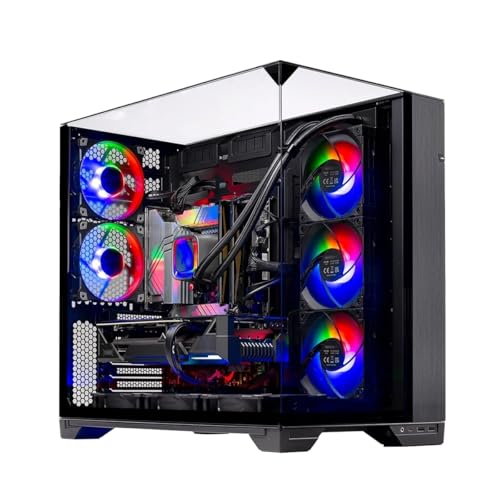
Buyers who care about how the PC looks on the desk should start with the O11 Vision. Skytech builds this system in the O11 Vision case, a panoramic glass design that puts the lit interior on show, and fits a 360mm ARGB liquid cooler whose fans and lighting become part of the display. The specification behind the glass is serious: a Ryzen 7 7700X at 4.5GHz, a GeForce RTX 5070 with 12GB of GDDR7 memory, an X670 motherboard, 32GB of DDR5 5600 RAM and a 1TB Gen4 NVMe SSD. The 850-watt Gold-rated ATX 3.0 power supply is the detail the upgrade-path section below points to, since it leaves real headroom for a stronger graphics card later. Liquid cooling also suits the cooling advice for glass cases, moving heat to a radiator instead of relying on case airflow alone. WiFi and Windows 11 are included. Pick it when the build is part of the room’s look and you still want a high-end card and processor underneath.
View Skytech Gaming O11 Vision on Amazon

3. iBUYPOWER Slate MESH (SMI7N5701) — Best for streaming and multitasking
The Slate MESH SMI7N5701 suits players who stream or keep a lot running alongside the game. Its Intel Core i7-14700F brings twenty cores to the job, which helps when streaming software, chat apps and a browser share the machine with a demanding title. The graphics card is a GeForce RTX 5070 with 12GB of memory, matched with 32GB of DDR5 RGB memory at 5200MHz and a 1TB NVMe SSD, so it gives nothing away to the other RTX 5070 systems here on the two parts the guide below ranks first. The mesh-fronted Slate case favors airflow over a sealed glass front, which fits the cooling advice below, and the RGB memory keeps the lighting theme going inside the case. iBUYPOWER also includes a gaming keyboard and mouse, so the box holds everything needed to start playing. Windows 11 Home is preinstalled. Choose it if your sessions mix gaming with streaming or content work.
View iBUYPOWER Slate MESH on Amazon

4. Skytech Gaming Azure 3 (ST-AZURE3-2022-B-AM) — Best mid-range value
The Azure 3 is the mid-range balance point of this list. Skytech specifies a Ryzen 7 7700 processor, a GeForce RTX 5060 with 8GB of GDDR7 memory, a 1TB NVMe SSD and, unusually at this level, 32GB of DDR5 6000 RGB memory with heat spreaders, where many mid-range listings stop at 16GB. That memory capacity matters for the multitasking point in the guide below, and the 6000 speed is a good match for the Ryzen platform. The 650-watt Gold-rated power supply covers this specification with sensible headroom, though builders planning a much stronger graphics card later should note the wattage before upgrading, as the guide’s upgrade-path section advises. WiFi and Windows 11 are included, and the Azure case carries the RGB fan lighting this category is named for. Pick it for 1080p and 1440p play in current titles, the range the RTX 5060 is aimed at, with enough memory to stay comfortable for longer.
View Skytech Gaming Azure 3 on Amazon

5. iBUYPOWER SlateMesh (SlateMeshA5N4601) — Best budget
The SlateMeshA5N4601 is the budget entry here, and its smartest choice is the platform rather than any single part. The Ryzen 5 7600 sits on AMD’s current AM5 socket, so a stronger Ryzen processor can drop into the same motherboard later, which is exactly the upgrade path the guide below tells you to check. For today’s games it pairs that processor with a GeForce RTX 4060 with 8GB of memory and 16GB of DDR5 memory at 5200MHz, a combination aimed at smooth 1080p play. Storage is the compromise: the 500GB NVMe SSD fills quickly with modern game installs, so plan on adding a second drive, and confirm the open slots on the listing before ordering. The case includes a tempered glass panel and RGB fans, keeping the lit look of this category at the lowest cost in the roundup. Windows 11 Home is included. Choose it as a first gaming PC when the budget is fixed and you want room to grow the same machine over time.
View iBUYPOWER SlateMesh on Amazon
What to Look For
| Factor | Why it matters | What to check |
|---|---|---|
| Graphics card | The graphics card has the biggest effect on frame rates and detail levels in games. | Read the exact card name and its memory amount. |
| Processor | The processor affects game speed, multitasking and streaming. | Compare core counts and the generation named. |
| Memory and storage | Memory capacity and a fast drive affect load times and multitasking. | Check memory size, speed and drive type and size. |
| Cooling | Good airflow keeps parts at steady temperatures under load. | See the fan count and whether it uses air or liquid cooling. |
| Case and lighting | A tempered glass case shows the lighting but can restrict airflow. | Look for the lighting software and mesh front panels. |
| Upgrade path | Power supply wattage and open slots decide how easily you can upgrade. | Check the power supply wattage and free memory and drive slots. |
| Ports and wireless | Ports and network options decide which accessories and displays you can connect. | Count the USB, display and network connections. |
Setup and Care Tips
- Leave space around the case so air can move in and out of the vents.
- Install the latest graphics and chipset drivers from the maker’s own sources.
- Use the lighting software to set a calm default scene, and turn lighting off when you do not need it.
- Clean dust filters on a regular schedule with the power off and the cable unplugged.
- Keep a surge protector between the wall outlet and the machine.
Mistakes to Avoid
- Focusing on lighting while ignoring the graphics card and processor.
- Choosing a glass case with weak airflow for a powerful card.
- Ignoring the power supply wattage when planning upgrades.
- Forgetting to match the PC to your monitor refresh rate and resolution.
- Opening the case without checking how it affects the maker’s coverage terms.
Which RGB gaming PC should you buy?
The best RGB gaming PC for you depends on your games, your screen and how much you value upgrade room. The five systems above suit different buyers, so match your needs to one of them.
- If you want the strongest all-round specification and do not plan to change parts soon, go for the CyberPowerPC Gamer Xtreme (GXiVR8080A41).
- If the lit interior is part of your room and you still want high-end parts, choose the Skytech Gaming O11 Vision (ST-O11V-2679-B-AM), with its panoramic glass and liquid cooler.
- If you stream or run many apps beside your games, look at the iBUYPOWER Slate MESH (SMI7N5701), which also includes a keyboard and mouse.
- If you play at 1080p or 1440p and want generous memory in the middle of the range, the Skytech Gaming Azure 3 (ST-AZURE3-2022-B-AM) fits.
- If your budget is fixed and you want a platform you can grow, choose the iBUYPOWER SlateMesh (SlateMeshA5N4601).
When two systems seem close, compare the graphics card first, then memory and storage, then the power supply. Lighting is the last thing to compare, because it changes the look and not the frame rate. A buyer who games at a modest resolution gains little from the most expensive card, while a buyer with a fast high-resolution monitor may want the stronger system.
Decide your monitor and your top games before you decide on a PC, then pick the system whose parts clearly match both.
How much gaming PC do you actually need?
You need a gaming PC whose graphics card matches your monitor resolution and refresh rate. A system that is too weak for your screen disappoints, and a system that is too strong wastes money.
Think in three tiers, described qualitatively:
- Entry level: aimed at 1080p play in many current games, with modest memory and storage. Good for a first PC or a fixed budget.
- Mid-range: aimed at smooth 1080p and 1440p play, with more memory and a faster drive. Good for most players.
- High end: aimed at high settings at higher resolutions, with strong cooling and a larger power supply. Good for players who want the most headroom.
Match the tier to your display. A monitor with a high refresh rate benefits from a system that can feed it frames, while a basic 60 Hz screen may not show the difference. Also think about the games you play. Competitive shooters often run well on modest hardware, while open-world titles with ray tracing ask more of the graphics card.
Think about the next few years too. Games tend to grow more demanding, so a little extra headroom can extend the life of the machine. That is where upgrade room, power supply wattage and a modern platform matter.
Glass panel vs mesh front: which RGB gaming PC case is better?
A mesh front panel usually moves more air, while a glass front shows off the lighting better. Neither is always better, so the choice depends on how much you value looks against cooling.
Tempered glass cases put the lit parts on display. They look striking, but a sealed front can restrict intake air, so the fans and any liquid cooler matter more. Some glass designs handle this with side or bottom intakes, so read the listing for the fan layout.
Mesh front cases let air pass directly to the front fans. This usually helps parts stay cooler under load, which can mean quieter fans at the same performance. The iBUYPOWER Slate MESH in this guide uses this approach. You still get RGB memory or fans inside, but the view may be less dramatic.
Liquid cooling moves heat from the processor to a radiator. It suits showcase builds such as the O11 Vision, but air coolers can also work well. Check the cooler type and size on the listing.
Whatever you choose, leave space around the case so air can move through the vents. Dust filters also matter. A case that is easy to clean tends to stay cooler over time.
Can you upgrade a prebuilt gaming PC later?
Usually yes, but how easily depends on the motherboard, the power supply and the case. Check the listing for open memory and drive slots, the power supply wattage and the processor socket.
Look at these points:
- Processor socket: a current platform lets you fit a stronger processor later. The SlateMesh budget pick is described as using the AM5 socket for this reason.
- Power supply: a higher wattage gives headroom for a stronger graphics card. A modest unit may need to be replaced before a big upgrade.
- Memory slots: check how many slots are free and the maximum supported memory.
- Drive slots: check for extra M.2 slots or drive bays, especially if the system ships with a small drive.
- Case space: a larger graphics card needs room, so check the clearance.
Some prebuilt systems use custom parts that are harder to replace, so read the details carefully. Also check how opening the case affects the maker’s coverage. If you plan to upgrade yourself, confirm what the coverage terms say before you open the panel.
Upgrading is not required. Many buyers use a system for years without change, but upgrade room gives you more choices later.
What to check before you buy a gaming PC
Before you buy, confirm that the parts, ports and terms match your needs. A short checklist helps you compare listings fairly.
- Exact graphics card: read the full model name and memory amount, not just the brand.
- Processor and memory: note the model, core count, memory size and speed.
- Storage: check drive type and size, and plan for a second drive if the first is small.
- Power supply: read the wattage and efficiency rating on the listing.
- Cooling: check the fan count and whether the cooler is air or liquid.
- Ports and wireless: count the USB, display and network connections you need.
- Included items: check for a keyboard, mouse, Windows license and WiFi, so you know what else to buy.
- Warranty and returns: read the support terms on the listing, since they vary by seller and maker.
- Desk space: measure the area for the case, and plan cable routing.
Also confirm your monitor can use the system. A graphics card with a modern display output connects to most screens, but older monitors may need a cable or adapter.
How do you manage RGB lighting, noise and heat on a gaming PC?
Set one calm lighting scene, keep the case vents clear and watch fan noise under load. RGB gaming PCs are easy to live with when these three habits are in place.
Lighting software lets you pick colors and effects for fans, memory and other parts. Some systems use one program for everything, while others use separate tools for different parts. Check the listing for what controls the lights, and avoid stacking several lighting programs that fight each other.
For noise and heat, a few habits help:
- Keep the case off thick carpet and away from walls so intake fans can breathe.
- Clean dust filters on a schedule, with the power off and the cable unplugged.
- Watch temperatures during long sessions using the tools the part makers provide.
- Keep graphics and chipset drivers current from the maker’s own sources.
If the fans sound loud in games, check the fan curve settings in the motherboard software before you assume something is wrong. A mesh front or a larger cooler often lets fans spin slower for the same temperature. Place the PC where the glass side faces you, but never block the rear exhaust.
Is a prebuilt RGB gaming PC worth it, and who should skip it?
A prebuilt RGB gaming PC is worth it when you want a ready-to-play system with one support contact. It is less suitable if you want full control over every part.
Here are the fair trade-offs:
- Is it worth paying more? A stronger card and processor help in demanding games, but the lighting itself adds little to speed. Pay for parts first and style second.
- Convenience vs control: a prebuilt saves time, while a custom build lets you choose each part.
- Noise and heat: powerful systems produce heat, and fans can be audible under load.
- Software: some lighting programs use background resources, so many owners set a scene and close them.
Who should skip it? Players who only run light games, buyers who want a quiet office machine, and builders who enjoy choosing every part. If a laptop or a console already meets your needs, you may not need a desktop at all.
Compare the picks above, check the current listing for the exact parts and what is included, then choose the system that fits your screen and how you will play.
Choosing RGB gaming PCs in More Depth
The main sections of this guide cover the headline differences between RGB gaming PCs. This section slows down and looks at the decisions underneath those headlines, written for gamers buying a prebuilt system that performs first and lights up second. None of the points below require specialist knowledge. They require something rarer in online shopping: a clear picture of your own situation in desks, gaming rooms, streaming setups and shared family spaces, written down before the comparison tables start to blur together. Work through the four points in order, note which ones matter most to you, and then return to the picks above with those priorities fixed. Buyers who do this usually choose quickly and confidently, because the right answer tends to stand out once the criteria are personal rather than generic.
Graphics card and processor balance for the resolution and refresh rate you play at
Start with graphics card and processor balance for the resolution and refresh rate you play at. This sounds like a small detail when you read a listing, but it is usually the first thing you notice in daily use with RGB gaming PCs. Think about your own routine in desks, gaming rooms, streaming setups and shared family spaces: how often the item is used, who else uses it, and what happens on the busiest or most awkward day, not just on an easy one. Write your real requirements down before you compare models, because listings are written to make every version sound suitable for everyone. If a product page does not state this point clearly, treat that as useful information in itself and check the maker’s own documentation rather than guessing. A choice that matches your written requirements will still feel right months later, while a choice made on a headline feature often disappoints once the novelty fades. Where two models look equal, prefer the one whose approach to this point is simpler to live with, easier to check and easier to put right if your needs change.
Memory and storage capacity, and how easily both can be upgraded later
Next, look closely at memory and storage capacity, and how easily both can be upgraded later. Buyers often skip this because it is less exciting than the main selling point of RGB gaming PCs, yet it quietly decides how much effort each use takes. Picture the whole job from start to finish: getting the item out, using it in desks, gaming rooms, streaming setups and shared family spaces, and putting everything away afterwards. Any step that feels clumsy in your imagination will feel worse on a wet, busy or tiring day. Compare how the picks in this guide handle this point using only what their descriptions actually say, and be wary of vague language that promises convenience without explaining how it is achieved. If you are buying for someone else, ask them about this point directly, because the person using the item every day notices friction that a purchaser browsing photographs never sees. Getting this right rarely costs more money; it mostly costs a few minutes of honest thought before ordering.
Case airflow, cooling and noise under long gaming sessions
Give real weight to case airflow, cooling and noise under long gaming sessions. For gamers buying a prebuilt system that performs first and lights up second, this is where cheaper and better-designed options separate. A useful test is to ask what goes wrong when this aspect is underspecified: usually the answer is wasted time, a workaround you repeat every single use, or an early replacement you did not budget for. Look for clear information in the listing, consistent terminology and a design that does not depend on you being unusually careful or unusually strong. Also consider how this point interacts with the others in this section, because improving one area sometimes compromises another, and the right balance depends on whether your use in desks, gaming rooms, streaming setups and shared family spaces is occasional or daily. If you are torn between two finalists, this criterion is a sensible tiebreaker, since it affects every session rather than only the best or worst ones.
Lighting control, case design and how the system looks where it will live
Finally, do not overlook lighting control, case design and how the system looks where it will live. This is the aspect most likely to decide whether your RGB gaming PC is still in regular use a year from now or sitting in a cupboard, garage or spare room. Think about storage, about who tidies up, and about the small recurring jobs this aspect creates. A design that respects your space and your time earns its place; one that demands a special routine usually gets abandoned, however impressive its main feature looked in photographs. Check dimensions, weights and practical details against your own space in desks, gaming rooms, streaming setups and shared family spaces rather than against a showroom picture, and remember that delivery, packaging removal and the first setup all belong to this point too. Buyers who consider it early rarely regret the purchase, because there are no surprises waiting when the box is opened.
Four Situations Where the Right Choice Matters Most
Specifications only make sense inside a situation. The same RGB gaming PC can be perfect for one household and wrong for another, even when both buyers read the same reviews. Below are four situations that come up again and again for RGB gaming PCs. Find the one closest to your life in desks, gaming rooms, streaming setups and shared family spaces, and let it steer which pick you favour and which features you can safely ignore.
A player moving to high-refresh gaming who needs the hardware to keep up
Consider a player moving to high-refresh gaming who needs the hardware to keep up. In this situation, the priority is rarely the maximum specification; it is a RGB gaming PC that behaves predictably when conditions are not ideal. Work through the sequence of the task before choosing: what you prepare, what can go wrong halfway, and what finished looks like. The picks in this guide suit this scenario in different ways, so match the scenario to the positioning in the Quick Picks table rather than assuming the first-listed option is automatically right for you. If this is your main situation, weight it heavily in your decision and be willing to trade away features aimed at other users. Features you will never use are not value, however impressive they look in a comparison table, and they sometimes bring extra cost, size or complexity that this scenario does not need.
A streamer running the game, capture and chat software at the same time
Now picture a streamer running the game, capture and chat software at the same time. Here the deciding factor is usually fit: fit with the space, fit with the other equipment already there, and fit with the habits of the people involved. Measure and note the constraints honestly, including the awkward ones people tend to ignore, such as doorways, storage corners, other users and the time of day the item gets used. A RGB gaming PC chosen with those constraints in mind slots into the routine; one chosen in the abstract creates a small daily negotiation. This is also the scenario where reading the existing sections of this guide on setup and mistakes pays off most, because the common errors listed there are exactly the ones this situation produces. Take the extra ten minutes to plan, and the purchase tends to succeed the first time.
A first-time buyer who wants a system that upgrades piece by piece
Think about a first-time buyer who wants a system that upgrades piece by piece. The temptation here is to buy for the most demanding version of the task and assume it covers everything else, but with RGB gaming PCs the opposite is often true: an oversized or overcomplicated choice can be slower, heavier or harder to manage in everyday conditions. Judge each pick by how it handles the ordinary version of this scenario repeated many times, since repetition is what turns small inconveniences into reasons to stop using something. Durability of the parts you touch most, clarity of the controls or fittings you use most, and the effort of resetting everything for the next use all matter more here than peak performance on a single occasion. Buyers in this situation usually report the highest satisfaction when they choose the option that feels boringly well matched to the routine.
A shared room where lighting, noise and heat affect everyone else
Finally, imagine a shared room where lighting, noise and heat affect everyone else. This scenario rewards planning for the people and the place as much as the product itself. Think about who maintains the item, who notices when something is wrong, and how problems get fixed when the nearest help is not in the room. Choosing a widely understood design, with straightforward parts and clear instructions, reduces the burden on everyone involved. It also helps to decide in advance where accessories, spares and instructions will live, so the RGB gaming PC can be used properly without a search through drawers and boxes. When this scenario describes you, treat simplicity and support as headline features, and let them outrank marginal gains elsewhere.
Getting Set Up, Everyday Use and Looking After Your RGB gaming PC
Good results with RGB gaming PCs come less from the purchase itself than from the first setup and the small habits that follow. Start by reading the maker’s instructions fully before the first use, even if the product looks self-explanatory, and keep those instructions somewhere you can find them again. Check every part against the contents list while the packaging is still at hand, because reporting a missing piece is far easier in the first days than months later. Set the item up in desks, gaming rooms, streaming setups and shared family spaces in daylight or good light, at a comfortable working height, and give the first use more time than you expect it to need. Rushing the first session is how most early damage and most early frustration happen.
In everyday use, build a short routine and keep it the same each time. Prepare what you need before you start, work in the order the instructions suggest, and pay attention to the first signs that something is not right: unusual resistance, new noises, uneven results or parts that feel loose or strained. Those signals are information, not inconveniences to push through. With RGB gaming PCs, forcing a task almost always costs more than pausing, checking and starting that step again. If other people in the household use the same item, agree on the routine together, because most wear and most breakages come from well-meaning improvisation by someone who was never shown the intended method.
Cleaning and storage decide how long a RGB gaming PC stays pleasant to use. Clean it in the way the maker describes, with the products and tools they allow, and avoid improvised chemicals, abrasive pads or pressure that the instructions do not mention. Let washed or wiped parts dry fully before storage, since trapped moisture quietly damages finishes, fabrics, joints and electrical parts alike. Store the item where it will not be knocked, stacked under heavier things or left in damp, very hot or very cold conditions, and keep its accessories together in one labelled place. A five-minute tidy after use is far cheaper than the repair, replacement part or early new purchase that neglected storage eventually produces.
Once a season, or at the interval the maker suggests, do a slightly deeper check. Look over the parts that move, flex, seal, fasten or carry load, and deal with small issues while they are still small: a loose fitting tightened, a worn accessory replaced, a surface cleaned properly at last. Keep a simple note of when you bought the item, when consumable parts were changed and anything unusual you noticed, because that note turns guesswork into evidence if you ever need warranty help or advice. Finally, be honest about the end of the road: when a RGB gaming PC can no longer do its job safely or reliably despite proper care, replacing it is better value than repeated repairs, and the criteria in this guide will help you choose its successor with the benefit of experience.
How the Picks in This Guide Compare With Each Other
Readers often ask why this guide lists several RGB gaming PCs instead of naming a single winner. The honest answer is that the picks were chosen for different jobs, and the Quick Picks table already signals that: each one is labelled with the use it suits best. Spend on the graphics card, cooling and upgrade room first, because lighting can be changed cheaply later and performance cannot. The paragraphs below restate those differences in plain terms, using only the positioning given earlier in this guide, so you can confirm that the pick you are leaning towards matches the job you actually have.
The CyberPowerPC Gamer Xtreme (GXiVR8080A41) is presented in this guide as ryzen 9 and RTX 5070 flagship specification. Take that label seriously: it describes the buyer who will be happiest with this choice, and by implication the buyer who should look elsewhere in the list. If that description sounds like you, then the detailed review above is the one to re-read most carefully, checking its stated strengths and its honest limitation against your own list of priorities. If the description does not sound like you, do not talk yourself into it because of a single attractive feature; the limitation noted in its review will be the thing you live with every week. The best pick in any guide is the one whose compromises you barely notice.
The Skytech Gaming O11 Vision (ST-O11V-2679-B-AM) is presented in this guide as panoramic glass with ARGB liquid cooling. Take that label seriously: it describes the buyer who will be happiest with this choice, and by implication the buyer who should look elsewhere in the list. If that description sounds like you, then the detailed review above is the one to re-read most carefully, checking its stated strengths and its honest limitation against your own list of priorities. If the description does not sound like you, do not talk yourself into it because of a single attractive feature; the limitation noted in its review will be the thing you live with every week. The best pick in any guide is the one whose compromises you barely notice.
The iBUYPOWER Slate MESH (SMI7N5701) is presented in this guide as 20-core Intel CPU plus bundled peripherals. Take that label seriously: it describes the buyer who will be happiest with this choice, and by implication the buyer who should look elsewhere in the list. If that description sounds like you, then the detailed review above is the one to re-read most carefully, checking its stated strengths and its honest limitation against your own list of priorities. If the description does not sound like you, do not talk yourself into it because of a single attractive feature; the limitation noted in its review will be the thing you live with every week. The best pick in any guide is the one whose compromises you barely notice.
The Skytech Gaming Azure 3 (ST-AZURE3-2022-B-AM) is presented in this guide as rTX 5060 with 32GB of DDR5 6000 memory. Take that label seriously: it describes the buyer who will be happiest with this choice, and by implication the buyer who should look elsewhere in the list. If that description sounds like you, then the detailed review above is the one to re-read most carefully, checking its stated strengths and its honest limitation against your own list of priorities. If the description does not sound like you, do not talk yourself into it because of a single attractive feature; the limitation noted in its review will be the thing you live with every week. The best pick in any guide is the one whose compromises you barely notice.
The iBUYPOWER SlateMesh (SlateMeshA5N4601) is presented in this guide as aM5 platform with room to upgrade. Take that label seriously: it describes the buyer who will be happiest with this choice, and by implication the buyer who should look elsewhere in the list. If that description sounds like you, then the detailed review above is the one to re-read most carefully, checking its stated strengths and its honest limitation against your own list of priorities. If the description does not sound like you, do not talk yourself into it because of a single attractive feature; the limitation noted in its review will be the thing you live with every week. The best pick in any guide is the one whose compromises you barely notice.
If you are still split between two picks after this comparison, choose by tiebreakers that listings rarely mention: which one fits your space better, which one you can return or get serviced more easily, and which one’s routine you can picture yourself following without effort. Those practical points decide long-term satisfaction with RGB gaming PCs far more reliably than small differences in headline features, and they are entirely within your knowledge, even without seeing the products in person.
FAQ
Does RGB lighting affect performance?
Lighting itself has little effect on game speed. Some lighting software uses background resources, so many owners set a scene and close the program.
Is a prebuilt PC or a custom build better?
A prebuilt system saves time and often includes support from one maker. A custom build gives more control over parts. Choose by how much time and knowledge you want to put in.
Is an RTX 5070 enough for 1440p gaming?
The listings above describe the RTX 5070 as a current-generation card, and many players use cards in this class for 1440p. Results depend on the game and settings. Check your favorite titles and the card's memory amount before you decide.
How much RAM does a gaming PC need?
16GB works for many games, but 32GB gives more room for multitasking, streaming and future titles. Several picks above include 32GB. Check the memory speed and whether the slots allow an upgrade.
Do RGB gaming PCs run hotter than other PCs?
Lighting itself adds almost no heat. Temperatures depend on the parts, the case airflow and the cooler. A mesh front or a good liquid cooler can help.
Can you turn off the RGB lights on a gaming PC?
Yes, most systems let you change or switch off lighting through software or a controller. Check the listing for the lighting software. Many owners set a calm scene or turn the lights off when not needed.
Do prebuilt gaming PCs come with Windows?
Many do, and the picks above list Windows 11 as included. Always confirm this on the listing, since it varies by system. Also check whether a keyboard and mouse are included.
How long does a gaming PC last?
It depends on the parts and how demanding your games are. A balanced system with upgrade room can serve for years, and you can replace the graphics card or add memory later. Clean dust filters and keep drivers updated.
Is liquid cooling better than air cooling in a gaming PC?
Not always. Liquid coolers can move heat to a radiator and look good behind glass, while good air coolers are simple and reliable. Check the cooler size and the case airflow in each listing.
What power supply do I need for a gaming PC?
It must supply enough wattage for the graphics card and processor with some headroom. The maker usually lists a recommended wattage for the card. Check the listing, and choose more headroom if you plan to upgrade.
How long should a good RGB gaming PC last?
There is no single honest figure, because lifespan depends on how often it is used in desks, gaming rooms, streaming setups and shared family spaces, how hard each use is, and whether the cleaning and storage advice in this guide is followed. A well-matched RGB gaming PC used as intended and looked after as the maker describes should give years of ordinary service, while one that is undersized for its job, forced through tasks or stored badly can disappoint quickly. Judge value over the whole period of ownership, including any consumable parts, rather than by the purchase day alone.
What should I check first if my RGB gaming PC stops working as expected?
Start with the simplest causes before assuming a fault: read the relevant part of the instructions again, check connections, fittings and settings, and look for blockages, wear or parts that have worked loose. Work through the troubleshooting list in the maker’s manual in order, and do not open or modify anything the manual does not tell you to. If the problem remains, contact the maker or seller with your purchase details and a clear description of what happens. That methodical approach solves most issues with RGB gaming PCs without cost, and it protects your warranty if the fault turns out to be real.
Is the cheapest RGB gaming PC a false economy?
It can be, but not automatically. A lower-priced pick in this guide exists because it suits a lighter or narrower job well, and for that job it is sensible value. It becomes a false economy only when it is asked to do heavier, more frequent work than it was chosen for, so it wears early or needs workarounds at every use. Match the pick to the workload described in the situations section above, and the honest budget option usually performs exactly as hoped.
Which accessories are actually worth having?
Only the ones your routine genuinely uses. Before adding extras, live with the basic RGB gaming PC for a few weeks and note what actually slows you down or feels missing; that short list is your accessory list. Buy accessories designed or approved for your model where the maker requires it, keep them stored with the item itself, and resist bundles bought on the fear of missing out. With RGB gaming PCs, two well-chosen accessories that get used weekly beat a drawer of clever extras that never leave their packaging.
When is it better to replace a RGB gaming PC than to repair it?
Replace it when the fault affects safety, when the same problem keeps returning after proper repair, or when the parts it needs are no longer available or sensible in cost compared with a new purchase. Repair is the better call for single, clearly identified faults on an item that otherwise suits you well. Either way, use what the old item taught you: the criteria and situations in this guide will read differently once you know exactly which compromises you noticed and which you never thought about again.
The Short Version
Choose a gaming PC by looking at the graphics card and processor first, then memory, storage and cooling. Treat lighting as a finishing touch, leave room for upgrades and make sure the machine suits your display. A balanced build will serve you longer than one that looks good but lacks airflow.
Related Guides
- How to Choose the Best Gaming Desks: Buyer's Guide (2026)
- How to Choose the Best L Shaped Gaming Desks: A Buyer's Guide
- How to Choose the Best Standing Gaming Desks: A Buyer's Guide
- 5 Best Gaming Chairs: Footrest, Lumbar and Recline (2026)
- 6 Best Gaming Chairs With Footrest: Recline and Width (2026)


