Disclosure: As an Amazon Associate, reviewstook.com earns from qualifying purchases. Links on this page are affiliate links at no extra cost to you; prices and availability change frequently, so check Amazon for the latest.
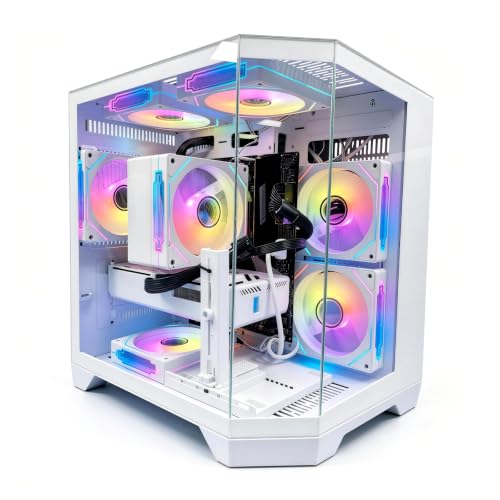
Gaming PC Build Reviews: Six Current Machines, Reviewed Against Each Other
Plural matters: gaming PC build reviews, as a genre, fail when they treat each machine as though it were the only one on sale. This roundup reviews six current builds against each other — an entry tower, two mainstream machines, a creator-leaning system, a transparent-specification AMD build, and a flagship — with every specification verified against Amazon’s catalogue data for the exact model before inclusion. The point of reviewing them together is that a build’s quality is relative: a power supply is generous or tight only beside the alternatives, a memory figure is the floor or the comfort zone only against the market around it.
Each review below follows the same discipline — strengths, trade-offs, the verified specification, and a verdict that names who the machine suits and who it does not — so the six can be compared honestly rather than by whichever description happens to be loudest. After the reviews, a comparison table, a short buying guide distilled from what the reviews taught, and a setup section carry the conclusions. If you read only one section, read the verdicts; if you read two, add the table.
Where to Buy
All six machines are sold through Amazon, where configurations under one model name can differ — verify the exact specification on the listing, a habit this roundup models by checking every machine against catalogue data first. Links from reviewstook.com point to the configurations reviewed here.
- LXZ Prebuilt Gaming PC, Ryzen 7 8700F, RTX 5060, 16GB DDR5, 1TB SSD — entry review
- CyberPowerPC Gamer Xtreme, Intel Core i5-14400F, GeForce RTX 5060 8GB — entry review, Intel route
- iBUYPOWER Element, AMD Ryzen 9 7900X, NVIDIA GeForce RTX 5070 12GB, 32GB DDR5, 1TB NVMe SSD — creator review
- Alienware Aurora, RTX 5070, Intel Core Ultra 7 265F, 32GB DDR5, 1TB SSD — polish review
- KOTIN Gaming PC, Ryzen 7 9700X, RX 9070 XT 16GB, 32GB DDR5, 1TB SSD — specification review
- Alienware Aurora, RTX 5080, Intel Core Ultra 9 285, 32GB DDR5, 1TB SSD — flagship review
In this guide
How These Reviews Were Conducted
Each machine’s specification was verified against the manufacturer’s data as returned through Amazon’s catalogue for that exact model and configuration — the step that separates a review from a paraphrase of a listing title. Claims in these reviews are confined to what that data supports plus reasoned analysis of how the verified components interact: performance class by resolution, adequacy of memory and storage against current game demands, platform longevity, and the planning consequences of anything the data leaves unstated. Where a specification is absent — several power supplies in this roundup — the review says so and treats the absence as a fact about the product, because for a buyer planning upgrades, it is one.
We deliberately publish no star ratings and no benchmark theatre. A fixed score would pretend that six machines built for six different buyers can be ranked on one axis, and invented performance figures would be worse than none. What a roundup can honestly offer is placement: which display each machine belongs to, which buyer each specification serves, and where each machine’s compromises live. That is what follows.
One more methodological commitment, because it shapes every verdict below: these reviews assess the configuration as the unit of judgement, not the brand. The same maker appears in this roundup with both the strongest support proposition and the least standard upgrade story; the same integrator sells both a finished platform and, elsewhere in the category, a current one. Brand loyalty is a shortcut that specification reading exists to replace, and readers will find each machine below praised and criticised strictly on its own sheet — including the two that share a badge and little else.

Entry Review — LXZ Prebuilt Gaming PC, Ryzen 7 8700F and RTX 5060
Strengths
- An AM5 platform at the entry tier, where rivals routinely save money with older sockets.
- A stated 650W power supply — the roundup’s entry machines rarely publish this, and it matters.
- Six RGB fans and a ten-port USB complement cover the practical bases out of the box.
Trade-offs
- Most of those USB ports are 2.0 speed; fast external storage will notice.
- 16GB of memory and 1TB of storage are the floor, as expected at the tier.
- Support runs through the seller rather than a manufacturer’s national network.
| Specification | Detail |
|---|---|
| Processor | AMD Ryzen 7 8700F |
| Graphics | NVIDIA GeForce RTX 5060 |
| Memory | 16GB DDR5 |
| Storage | 1TB SSD |
| Power supply | 650W |
| Ports | 7x USB 2.0, 3x USB 3.0 |
Reviewed on its own terms — a first gaming PC for a 1080p display — the LXZ is the surprise of this roundup, because its compromises are the honest kind. The specification spends its limited budget on the platform and the graphics card, the two components a buyer cannot cheaply revise, and economises on port speeds and brand infrastructure, the things a first-time owner will not miss. The RTX 5060 drives 1080p the way this tier should: competitive titles at high frame rates, demanding releases at high settings with upscaling assisting.
The forward path is what elevates it. AM5 means a processor upgrade exists; a stated power supply means its owner can plan a graphics upgrade with real numbers; free slots, in a standard tower, mean memory and storage grow by errand rather than by replacement. Entry machines are usually bought as disposable first steps. This one is specified like a foundation, and reviewed accordingly: the best starting point in the roundup for a buyer who intends to grow with the machine.
Its noise and presentation deserve a closing word, because entry towers have a reputation to overcome. Six fans is a generous count for the tier and, run at sensible speeds in a case with real intake area, points toward airflow achieved by volume rather than by velocity — which is the quiet way to cool a machine. The RGB presentation will divide households, as it always does; it can be dimmed or disabled, and a review should record that the option exists rather than scoring the machine on a light show its owner controls.
Best for: first-time 1080p buyers who plan to upgrade in place / Not suited for: buyers who need manufacturer-grade support infrastructure

Entry Review, Intel Route — CyberPowerPC Gamer Xtreme, Core i5-14400F and RTX 5060 8GB
Strengths
- Ten-core processor gives this entry machine unusual multitasking ease.
- PCIe 4.0 NVMe storage matches the responsiveness of machines a tier up.
- A major integrator’s consistency, documentation, and warranty handling.
Trade-offs
- The LGA1700 platform is finished; future CPU upgrades mean a new motherboard.
- Power supply unstated in the verified data.
- 16GB of memory is the first upgrade most owners will schedule.
| Specification | Detail |
|---|---|
| Processor | Intel Core i5-14400F |
| Graphics | NVIDIA GeForce RTX 5060 8GB |
| Memory | 16GB DDR5 |
| Storage | 1TB PCIe 4.0 SSD |
| Operating system | Windows 11 Home |
Placed beside the LXZ, the Gamer Xtreme is the same tier viewed through opposite priorities, and reviewing them together is instructive. CyberPowerPC spends on the integrator’s infrastructure and a generously cored Intel processor; the platform underneath is a completed generation. For the buyer who replaces machines whole — a large and perfectly rational population — that trade is invisible in daily use and the machine is simply a well-made 1080p tower from a company that will answer the phone.
There is also a lived-experience point in this machine’s favour that spec sheets flatten: ten cores make the Windows desktop itself feel unhurried in a way that purely gaming-focused entry builds sometimes do not, because the processor is rarely the constraint on the hundred small tasks around the gaming. Owners whose PC is also the household’s general computer — homework, browsing, media, the occasional spreadsheet — will feel that allocation daily, and for a shared machine it may be the most relevant sentence in either entry review.
For the buyer who upgrades in place, the LXZ’s platform wins the comparison, and this review’s verdict splits exactly there. Neither machine misleads; they embody the two honest philosophies of the entry tier, and the roundup’s job is to make the buyer choose the philosophy consciously rather than discover it in year three.
Best for: Intel-preferring 1080p buyers who replace rather than upgrade / Not suited for: in-place upgraders planning a future CPU swap


Creator Review — iBUYPOWER Element, Ryzen 9 7900X and RTX 5070 12GB
Strengths
- Twelve cores make this a genuine dual-purpose machine, not a gaming tower with ambitions.
- The RTX 5070’s 12GB of VRAM is the comfortable specification for 1440p longevity.
- 32GB of memory fitted as standard, and a keyboard and mouse included in the box.
Trade-offs
- Gaming-only buyers fund processor capacity they will never invoice.
- 1TB of storage is tight for a machine meant to hold footage as well as games.
- The bundled peripherals are a starting point, not a destination.
| Specification | Detail |
|---|---|
| Processor | AMD Ryzen 9 7900X |
| Graphics | NVIDIA GeForce RTX 5070 12GB |
| Memory | 32GB DDR5 |
| Storage | 1TB NVMe SSD |
| Operating system | Windows 11 Home |
| Model | Element EWA9N5702 |
The Element reviews differently from everything else here because its centre of gravity is different. Judged purely as a gaming machine it is very good — the 5070 tier sees to that — but judged as the single desk machine of someone who records, edits, renders, or compiles, it is the roundup’s most coherent specification. The processor is the headline, yet the supporting choices are what make the concept work: memory at the comfort figure so the editing timeline and the game can coexist, and peripherals in the box so the machine is genuinely complete on arrival.
Its one specification tension is storage. A creator’s footage library grows faster than a games library, and 1TB will be this machine’s first expansion — fortunately the easiest kind. Buyers whose second workload is real should shortlist it immediately; buyers whose second workload is hypothetical should let the gaming-focused machines have the money instead.
Streaming deserves its own sentence in this review, because it is the creator workload most buyers actually mean. A twelve-core processor absorbs software encoding and busy production scenes without borrowing from the game’s frame rate, and the NVIDIA card offers its hardware encoder as the alternative path — the Element is the one machine in this roundup where both routes are genuinely comfortable, which is why streamers, specifically, should read its specification as the shortlist of one.
Best for: creator-gamers who need one machine to do both jobs properly / Not suited for: pure gaming budgets


Polish Review — Alienware Aurora, RTX 5070 and Core Ultra 7 265F
Strengths
- Wi-Fi 7, Bluetooth, and Killer 2.5Gb Ethernet form the roundup’s best networking set.
- 32GB of DDR5 with the RTX 5070 is the balanced 1440p specification, polished.
- Dell’s support organisation is the strongest any buyer in this roundup can call.
Trade-offs
- 1TB of storage is the specification the rest of the machine outclasses.
- Proprietary design elements narrow the self-service upgrade story.
- Design and brand are part of the price, openly.
| Specification | Detail |
|---|---|
| Processor | Intel Core Ultra 7 265F |
| Graphics | NVIDIA GeForce RTX 5070 |
| Memory | 32GB DDR5 |
| Storage | 1TB SSD |
| Connectivity | Wi-Fi 7, Bluetooth, Killer 2.5Gb Ethernet |
| Model | Aurora ACT1250 |
Reviewing an Alienware fairly means reviewing the whole product, not only the parts list. The specification is strong — the same graphics and memory figures as the roundup’s balanced tier — and the networking is a generation ahead of most of the field. Around that core, Dell sells integration: a designed object, a single support relationship, and the removal of every integration risk from the buyer’s life. Whether that layer is worth its premium is a question about the buyer, not the machine, and this review declines to pretend otherwise.
Where the machine can be criticised on specification alone is storage: 1TB in a system of this ambition will be expanded early by exactly the buyers most likely to choose it. And owners who enjoy opening cases should know the design language is the least standard in the roundup. For the buyer who wants a 1440p machine that arrives as a finished product and stays someone else’s problem when it misbehaves, no other review in this set describes a better match.
The networking lead, finally, is worth translating into lived terms: Wi-Fi 7 future-proofs the wireless side against the router upgrade most households will make within this machine’s life, and the 2.5Gb wired port means the desk connection will not be the bottleneck when game downloads and updates arrive at full line speed. These are unglamorous specifications that owners feel weekly, and their presence here — at full strength, not trimmed — is the clearest evidence that this machine was specified as a complete product rather than a graphics card with a case around it.
Best for: buyers who value design, networking, and support as part of the specification / Not suited for: hands-on upgraders and specification-per-money maximalists

Specification Review — KOTIN Gaming PC, Ryzen 7 9700X and RX 9070 XT 16GB
Strengths
- 16GB of VRAM is the most durable graphics specification in the entire roundup.
- An 850W Gold power supply and 360mm liquid cooler, stated in the open.
- WiFi 7, 32GB of memory, and a newer-generation Ryzen 7 complete the sheet.
Trade-offs
- The brand’s support is seller-scale, not a global service network.
- The 11.3-inch case display and ARGB presentation divide opinion by design.
- AMD’s software ecosystem trails NVIDIA’s in specific titles and streaming features.
| Specification | Detail |
|---|---|
| Processor | AMD Ryzen 7 9700X |
| Graphics | AMD Radeon RX 9070 XT 16GB |
| Memory | 32GB DDR5 |
| Storage | 1TB SSD |
| Power supply | 850W Gold |
| Cooling | 360mm liquid cooler |
| Connectivity | WiFi 7 |
Every roundup has a machine that embarrasses the field on paper, and here it is the KOTIN. Review the specification cold — without the badge — and it reads like the answer to this site’s own buying guides: maximum VRAM, a power supply with genuine headroom, serious cooling, current wireless, memory at the comfort figure. At 1440p it stands with the roundup’s best; for buyers worried about texture memory in future releases, its 16GB is the single most reassuring number in this article.
The review’s reservations are structural rather than technical. Support from a smaller brand is a different promise from Dell’s or MSI’s, and the case — a showcase with a screen of its own — will be either the reason you buy it or the reason you do not, with very little middle ground. Neither reservation touches performance. If your decision method is specification-first and your support expectations are realistic, this is arguably the roundup’s strongest value proposition; the deep single-machine treatment of its closest rival lives in Gaming PC Build Review.
Best for: specification-first buyers who prioritise VRAM and transparency / Not suited for: buyers who need a major brand’s support network or a discreet case

Flagship Review — Alienware Aurora, RTX 5080 and Core Ultra 9 285
Strengths
- The RTX 5080 makes this a true 4K machine, the only one in the roundup that is.
- Wi-Fi 7, 2.5Gb Ethernet, and 32GB of DDR5 keep the supporting cast at flagship level.
- The Core Ultra 9 gives creator workloads genuine headroom alongside gaming.
Trade-offs
- 1TB of storage is the roundup’s most jarring specification relative to tier.
- Much of the processor’s capability is invisible to gaming alone.
- The flagship premium buys capability that 1440p buyers cannot use.
| Specification | Detail |
|---|---|
| Processor | Intel Core Ultra 9 285 |
| Graphics | NVIDIA GeForce RTX 5080 |
| Memory | 32GB DDR5 |
| Storage | 1TB SSD |
| Connectivity | Wi-Fi 7, 2.5Gb Ethernet |
| Model | Aurora ACT1250 |
A flagship review should begin by identifying the buyer for whom nothing else in the set will do, and here that buyer owns — or is imminently buying — a 4K high-refresh display. For them, the RTX 5080 is not an indulgence but the entry ticket, and this Aurora wraps it in the roundup’s most complete supporting specification and its strongest support structure. Creator-gamers at 4K are the second natural audience: the Ultra 9’s cores stop being surplus the moment a render queue shares the desk with a game library.
Everyone else should read this review as a boundary marker. On a 1440p monitor, this machine’s advantage over its own 5070 sibling narrows to headroom you cannot see, while its storage allocation — the roundup’s recurring theme — remains the modest one. Flagships are easy to review badly by simply admiring them; the honest verdict is that this is an excellent machine for a specific, display-defined minority, and an expensive way for everyone else to buy the same experience the tier below provides.
It also closes the roundup’s argument about support: at this price altitude, the warranty and service structure is not an accessory but a substantial fraction of what is being purchased, and Dell’s is the most developed in the set. Buyers comparing this machine against a self-built equivalent of similar specification should weigh that structure honestly — it is the flagship tier’s version of the transparency argument, value that lives outside the parts list entirely.
Best for: 4K high-refresh players and creator-gamers at the top tier / Not suited for: 1440p buyers, who should take the tier below and a second drive

The Performance Classes in Plain Language
Because these reviews reason from verified components, the reasoning should be visible. Here is the performance map the verdicts rest on, stated once, plainly, so every claim in the reviews above can be checked against it.
The RTX 5060 class — the LXZ and the Gamer Xtreme — is the 1080p class. It runs competitive titles at frame rates beyond most panels and modern single-player games at high settings, with upscaling as an occasional assistant. It is not a 1440p class except for lighter games and lowered settings, and no review above pretends otherwise. The RTX 5060 Ti class, represented in this cluster’s wider coverage rather than this roundup’s six, bridges the gap: native 1440p for most titles, with texture discipline in the heaviest. The RTX 5070 class — the Element and the 5070 Aurora — is 1440p’s centre: high settings as the default, ray tracing as a real option, upscaling as headroom rather than necessity. The RX 9070 XT stands in the same class by raw performance and a step beyond it in memory, which is why the KOTIN review treats its longevity as the roundup’s best. The RTX 5080 class is 4K’s entry and 1440p’s overkill, and its review is written for the minority whose displays can tell the difference.
Processors map more simply. Every chip in this roundup feeds its graphics card adequately at its target resolution; the differences that survive contact with real games are the X3D advantage in CPU-limited competitive play (absent from these six, present elsewhere in our coverage), and the multitasking and creation headroom of the twelve-core and Ultra-class parts, which the Element and flagship reviews weight accordingly. Memory and storage, finally, do not appear on this map because they are not performance classes — they are adequacy thresholds, and the reviews treat them as such: 16GB is adequate today, 32GB is adequate for the machine’s life; 1TB is adequate for a curated library, and nothing in this roundup ships more, which remains the set’s most actionable finding.
Cross-Cutting Findings: What Reviewing Six Builds Together Reveals
Individual reviews tell you about machines; a roundup’s real yield is the patterns that only appear when the machines stand side by side. Four emerged from this set, and each is worth more to a buyer than any single verdict above.
Finding one: the market has standardised on adequacy everywhere except storage. Every machine here pairs a current-generation processor with DDR5 memory and NVMe storage — the specification floor has genuinely risen, and the bad old patterns (gaming styling over integrated graphics, spinning disks in new towers) are absent from this verified set. The one specification that has not risen with the rest is capacity: 1TB across all six machines, entry to flagship. Game install sizes have not consulted the market’s convenience, so the practical consequence for buyers is uniform — treat a second drive as a planned purchase with a date on it, whatever tier you buy, and prefer the machines and cases that make adding one trivial.
Finding two: video memory is the new dividing line. The roundup’s graphics range runs from 8GB at the entry tier through 12GB in the 5070 machines to 16GB in the KOTIN, and that spread predicts longevity better than any other single figure. At 1080p the question is settled — 8GB serves the resolution well. At 1440p, the 12GB and 16GB machines hold a structural advantage that will widen as texture budgets grow, and it is the main technical reason the KOTIN’s specification reads a tier above its positioning. Buyers choosing between two otherwise equal 1440p machines should let VRAM arbitrate more often than brand does.
Finding three: transparency is becoming a competitive axis. Two of six makers in this roundup publish their power supply; none of the six hides its processor, graphics card, memory, or storage. A decade ago the hidden list was longer. The direction of travel favours informed buyers, and it is rational to reward it: when two machines are otherwise equal, the one whose maker publishes the full sheet has told you how it expects to be judged. Our reviews weight that behaviour explicitly, and this roundup’s verdicts reflect it — the LXZ’s stated 650W at the entry tier earned it more credit than any RGB fan could.
Finding four: support is the premium tier’s real product. Compare the two Auroras with the field and a pattern emerges: at the top of the market, specification converges — everyone has current silicon, ample memory, fast networking — and what differentiates is the ownership structure around the hardware. Dell’s infrastructure, MSI’s network, the integrators’ flexibility, the small brands’ seller-based promises: these are not marketing garnish but the actual goods at the flagship end, and buyers there should shop them as deliberately as they shop graphics cards. The corollary is that at the entry tier, where specification still diverges sharply, hardware should dominate the decision — which is exactly how the verdicts above are weighted.
Surprises and Disappointments
A roundup that reports neither has not been paying attention. The surprise, already noted in its review, is the LXZ: entry machines are supposed to cut the platform first, and this one cut almost everything else instead. The second surprise is how completely the creator configuration has matured — the Element is not a gaming tower with extra cores bolted on but a coherent dual-purpose specification, peripherals included, and it made the roundup’s gaming-only machines look narrower by comparison.
The disappointment is shared and specific: storage capacity at the flagship tier. A machine with an RTX 5080 and a Core Ultra 9 shipping 1TB is a sports car with a small fuel tank — usable, exhilarating, and guaranteed to interrupt you. The 5070 Aurora repeats the pattern a tier down. Neither fact overturns those machines’ verdicts for their intended buyers, but both belong in a review roundup precisely because headline specifications will never mention them. The runner-up disappointment is quieter: that in 2026 a buyer still cannot learn several of these machines’ power supplies from their own specification pages, a gap this roundup had to report four times.
Longevity Forecast: How Each Review Ages
Reviews are snapshots; ownership is a film. Projecting each machine forward on its verified specification: the entry pair will serve 1080p for years, with the LXZ’s platform giving it a second act via upgrades that the Gamer Xtreme’s finished socket forecloses — expect their ownership stories to diverge around year three despite their identical starting tier. The Element’s twelve cores and 32GB give it the roundup’s longest useful life in absolute terms, because its second workload ages even more slowly than its gaming. The 5070 Aurora’s runway is set by its graphics tier and memory, both strong, with storage the scheduled errand. The KOTIN’s 16GB of VRAM is the single specification in this roundup most likely to look prescient in four years. The flagship’s graphics tier will outlast everything around it, which is precisely why its storage figure will be corrected by its owner first. None of these forecasts requires a crystal ball — they are the specifications, read forward — and they are the reason this roundup weights memory, VRAM, and platform alongside the graphics card’s headline.
Comparison Table
| Machine | CPU | GPU | RAM | Storage | PSU stated? | Natural display |
|---|---|---|---|---|---|---|
| LXZ | Ryzen 7 8700F | RTX 5060 | 16GB | 1TB | Yes — 650W | 1080p |
| CyberPowerPC Gamer Xtreme | Core i5-14400F | RTX 5060 8GB | 16GB | 1TB | No | 1080p |
| iBUYPOWER Element | Ryzen 9 7900X | RTX 5070 12GB | 32GB | 1TB | No | 1440p + creation |
| Alienware Aurora (5070) | Core Ultra 7 265F | RTX 5070 | 32GB | 1TB | No | 1440p |
| KOTIN | Ryzen 7 9700X | RX 9070 XT 16GB | 32GB | 1TB | Yes — 850W Gold | 1440p / 4K-leaning |
| Alienware Aurora (5080) | Core Ultra 9 285 | RTX 5080 | 32GB | 1TB | No | 4K |
Two patterns in that table deserve a sentence each. Storage is the roundup’s universal compromise — every machine ships 1TB, which is why our buying guides keep steering buyers toward the configurations and expansion plans that treat capacity seriously. And the power-supply column splits the field into brands that publish and brands that do not, a division that correlates with nothing else in the table and therefore tells you something real about each maker’s attitude toward informed buyers.
What the Reviews Add Up To: A Short Buying Guide
Distilled from the six verdicts: buy the display’s machine, not the catalogue’s hero. At 1080p, choose between the LXZ’s upgradeable platform and the Gamer Xtreme’s integrator polish according to whether you upgrade or replace. At 1440p, the decision is among personalities — the Element if you create, the Aurora if you value integration, the KOTIN if you buy by specification — because the performance tier is shared. At 4K, the flagship Aurora is the roundup’s only honest answer. Across all of it, budget for storage expansion and verify the exact configuration on the listing, the two habits that would have prevented most of the regrets these reviews were written to pre-empt. The full method, with budgets and tiers, is in Gaming PC Build Buying Guide; the step-by-step version is in How To Choose A Gaming PC Build.
Setting Up Any of These Builds: The Shared First Hour
Whichever review persuaded you, the first hour follows the same script, and getting it right is worth more than the difference between adjacent machines in this roundup. Inspect the interior for shipping displacement and remove all packing material. Connect the display to the graphics card’s outputs — not the motherboard’s — and then set the monitor’s true refresh rate in Windows, which will otherwise assume 60Hz and quietly waste the panel you bought. Complete Windows Update, install the current graphics driver from NVIDIA or AMD directly, and confirm the memory is running at its rated profile with the full capacity recognised. Then play your most demanding game for an hour while the machine is deep inside its easiest return window.
Problem: a new machine benchmarks far below its review’s performance class. Fix: the cable port, the refresh rate, and the driver — check them in that order before contacting support, because they account for nearly every case and each takes under two minutes.
Problem: the tower is louder than expected in menus and light games. Fix: apply the maker’s balanced fan profile and confirm the case’s intakes are unobstructed; new machines frequently ship with performance-biased curves that a single setting civilises.
Common Mistakes When Reading Build Reviews
Comparing scores instead of verdicts. This roundup publishes no scores on purpose. A machine that is wrong for your display is not a slightly worse version of the right one; it is a different purchase, and the verdict lines — who each build suits and who it does not — carry more decision value than any number could.
Treating the flagship review as the recommendation. The 5080 Aurora is the best machine here and the correct purchase for a minority of readers. Reviews are placement exercises; the flagship’s job in a roundup is to mark the ceiling, not to set the default.
Skipping the unstated specifications. The reviews above flag every power supply the data did not publish. If your plans include a future graphics upgrade, that column of the table is not fine print — it is the difference between an upgrade and a rebuild, a theme the Gaming PC Build Pros And Cons ledger develops in full.
What Did Not Make This Roundup, and Why
Six slots cannot hold a whole category, and the exclusions deserve the same transparency as the inclusions. The CyberPowerPC Gamer Master and the two MSI Codex Z2 configurations are reviewed in depth elsewhere in this cluster — the larger Codex receives the full single-machine treatment in our companion review — and duplicating them here would have crowded out the entry and flagship ends of the market that a roundup exists to span. The Skytech Azure 3, built around an X3D processor and the RX 9070 XT, is the roundup’s most arguable omission: it is the esports specialist’s machine, and readers whose gaming is defined by competitive frame rates should treat its absence as a pointer to our buying-guide coverage rather than as a judgement. What unites the six that were included is that each represents a distinct buyer question — first machine, Intel route, creator, polish, specification, flagship — and a roundup organised by questions serves readers better than one organised by catalogue order.
The exclusion rule also worked in the other direction: several widely listed towers were considered and rejected at the verification stage because their catalogue data could not confirm a current-generation graphics configuration or disclosed storage of a type this site will not recommend in a new machine. They are not named here, because the point is the standard rather than the offenders — but buyers applying the same verification step to their own shortlists will meet them, and should respond the same way this roundup did: by moving on to a machine whose specification can survive being read.
How to Use This Roundup Without Reading All of It
Six full reviews is a lot of article, and the honest service is to tell you how to shortcut it. Start from your display, because every verdict in this roundup is indexed to one. Owners of 1080p panels need exactly two reviews: the LXZ and the Gamer Xtreme, plus the comparison table’s power-supply column if upgrades are planned. Owners of 1440p panels need three: the Element, the 5070 Aurora, and the KOTIN, read in the order that matches their secondary priority — creation, integration, or specification. Owners of 4K panels need one review and the honesty to skip the rest: the flagship’s.
Then read the cross-cutting findings regardless of tier, because they describe the market you are buying into rather than any single machine: storage capacity is the universal compromise, VRAM is the longevity figure, transparency is worth rewarding, and support is the top tier’s real product. A buyer armed with their tier’s reviews and those four findings has extracted roughly everything this roundup knows. The remainder — the full text of every review — is for the cross-shoppers, the specification obsessives, and the readers who simply enjoy knowing why, and this site cheerfully admits to being written by their kind.
A Note on Prices, Deliberately Absent
Readers sometimes ask why a reviews roundup contains no prices. The answer is methodological: configurations and prices in this category move faster than articles do, and a printed figure would be wrong in a way that misleads rather than merely dates. What a review can durably provide is the tier logic — which machines compete with which, what each step between them buys, and where the specification jumps are real versus cosmetic — and that logic is what the verdicts and the table above are built from. When you check the current figures on the listings, the structure of your decision will already be made; the numbers will merely confirm which of the machines your display and priorities selected is also the one your budget prefers. If two of your finalists sit within a small margin of each other on the day, let the cross-cutting findings arbitrate: VRAM, transparency, and platform, in that order, are the tiebreakers most likely to still matter in year four.
Final Recommendation
If the roundup must end with names: the LXZ is the entry machine we would hand a first-time buyer, the KOTIN is the specification we would hand a spreadsheet, the Element is the machine we would hand a creator, the 5070 Aurora is the one we would hand a buyer who values polish and support, and the 5080 Aurora is the one we would hand the 4K reader without a moment’s hesitation. The Gamer Xtreme remains the Intel route’s clean answer for replacers. Notice that the list contains all six — that is not indecision, it is what a market with genuinely differentiated machines looks like when the reviews are honest. Still deciding whether the category itself earns its money? Is A Gaming PC Build Worth It is the closing argument. And when the tower is chosen, the mouse is where your hand lives: Best Wireless Gaming Mice is the natural next review to read.
Frequently Asked Questions
Which of these six builds is the best overall?
There is no display-independent answer, which is why this roundup refuses to crown one. For 1440p — the most common serious target — the KOTIN’s specification and the Aurora’s integration lead their respective philosophies; for 1080p the LXZ leads; for 4K only the flagship qualifies. “Best” begins with your monitor.
Why do none of these reviews include star ratings?
Because a fixed score compresses six different machines for six different buyers into a false ranking, and because ratings drift out of date as configurations and prices change. The verdicts in this roundup — who each machine suits, and who it does not — are the durable form of the same judgement.
How were the specifications in these reviews verified?
Each machine’s details were checked against the manufacturer’s data as returned through Amazon’s catalogue for the exact model and configuration reviewed. Anything the data did not state — notably several power supplies — is flagged in the review as unstated rather than estimated.
Is the entry tier actually worth buying, or should everyone save for 1440p?
The entry tier is worth buying when the display is 1080p, full stop. The LXZ and Gamer Xtreme run that resolution the way it should be run, and the LXZ’s platform keeps a growth path open. Saving for a 1440p machine while gaming on a 1080p panel buys capability the panel cannot display.
Which machine will last the longest before needing upgrades?
On specification, the machines with 32GB of memory and the strongest VRAM allocations — the KOTIN’s 16GB graphics memory is the standout figure — have the longest runway, with storage expansion the universal first errand across the whole roundup. Platform choice matters too: the AM5 machines keep a processor swap available that finished platforms do not.
AMD or NVIDIA — which do these reviews favour?
Neither as a blanket position. NVIDIA’s ecosystem advantages are real in specific titles and streaming; AMD’s VRAM allocations at a given tier, exemplified by the RX 9070 XT’s 16GB, are equally real. The reviews place each machine on its total specification, and your games list should arbitrate the rest.
What should I do first when my reviewed machine arrives?
Follow the shared first hour in this article: interior inspection, display cable into the graphics card, refresh rate set, updates and current drivers installed, memory profile confirmed, and a demanding game played inside the return window. It is the highest-value hour in the machine’s life.


