Disclosure: As an Amazon Associate, reviewstook.com earns from qualifying purchases. Links on this page are affiliate links at no extra cost to you; prices and availability change frequently, so check Amazon for the latest.
Gaming PC Build Review: The MSI Codex Z2 With RTX 5070, Taken Apart on Paper
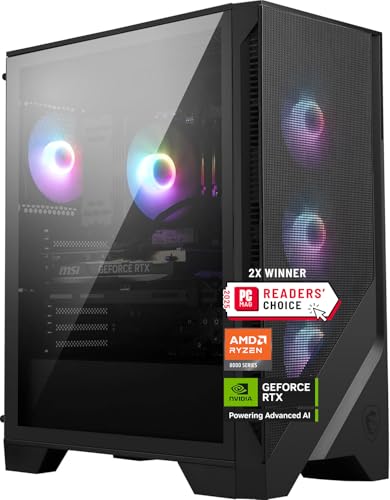
A gaming PC build review has to pick its subject carefully, because the category contains everything from budget towers to liquid-cooled flagships and a review of any one of them is really a review of a philosophy. We chose the configuration that represents the current centre of the market: the MSI Codex Z2 built around AMD’s Ryzen 7-8700F, an NVIDIA GeForce RTX 5070, 32GB of DDR5 memory, and a 2TB solid-state drive. This is the specification our buying guides keep converging on — the build a thoughtful person assembles on paper, whether or not they assemble it in fact — and this review examines it the way we would a parts list: component by component, claim by claim, with every specification verified against Amazon’s catalogue data for this exact model (the Codex Z2 A8NVP-436US) before a word was written.
The short version comes first, because reviews should respect your time: this is the right build for 1440p gaming in 2026, balanced in the ways that matter and compromised in exactly one place we will keep returning to — the unspecified power supply. The long version follows, because a machine you will live with for five years deserves more than a short version.
A word about why a single build merits this depth at all. Most buyers do not experience “the market”; they experience one machine, on one desk, for years. Reviewing the category’s centre — the configuration that the largest number of those buyers will actually live with — is therefore worth more than another tour of the extremes, and everything in this article is written to be checked against the machine that would arrive at your door.
In this guide
Verdict Summary
| Question | Answer |
|---|---|
| What is it? | A mainstream prebuilt gaming desktop: Ryzen 7-8700F, RTX 5070, 32GB DDR5, 2TB SSD, Windows 11 Home |
| Who is it for? | 1440p players who want the balanced specification without assembly |
| What does it do best? | High-settings 1440p across modern releases, with memory and storage headroom that postpones every upgrade |
| What is the honest weakness? | Power supply details are not published in the verified data, and the CPU is not the esports-specialist choice |
| Verdict | The reference build for its tier — check the current configuration on Amazon |
Where to Buy
The Codex Z2 name covers more than one configuration, including a smaller RTX 5060 Ti variant with half the memory and storage, so buy the specification, not the name: the model reviewed here is the A8NVP-436US with the RTX 5070, 32GB, and 2TB. Links from reviewstook.com point to that exact configuration; verify the model code on the listing before ordering, because the two machines are easy to confuse at a glance and the difference between them is the entire point of this review.

MSI Codex Z2, Ryzen 7-8700F, RTX 5070, 32GB DDR5, 2TB SSD — Check on Amazon
Strengths and Trade-Offs at a Glance
Strengths
- The RTX 5070 is the correct graphics tier for 1440p high settings, with ray tracing and modern upscaling in reserve.
- 32GB of DDR5 is the memory figure that removes memory from your concerns for the machine’s whole life.
- 2TB of SSD storage is the capacity that stops library management from becoming a recurring chore.
- The AM5 platform leaves a genuine processor upgrade path open years from now.
- USB Type-C and VR-Ready certification widen what the machine connects to immediately.
Trade-offs
- The power supply’s wattage and rating are not stated in the verified catalogue data.
- The Ryzen 7-8700F trails cache-heavy X3D chips in CPU-limited competitive scenarios.
- Buyers still on 1080p 60Hz displays will pay for capability they cannot see yet.
- As a prebuilt, it carries a maker’s software layer and a fixed configuration.
- Networking specifics are likewise unpublished in the verified data, so wired-dependent setups should confirm before ordering.
The Specification, Verified
| Specification | Detail (from catalogue data) |
|---|---|
| Processor | AMD Ryzen 7-8700F |
| Graphics | NVIDIA GeForce RTX 5070 |
| Memory | 32GB DDR5 |
| Storage | 2TB SSD |
| Operating system | Windows 11 Home |
| Features | USB Type-C, VR-Ready |
| Model | Codex Z2 A8NVP-436US |
| Power supply | Not stated in the verified data |
Read that table as the review’s foundation. Every figure in it comes from the manufacturer’s data as returned for this model; the one absence — the power supply — is recorded as an absence rather than filled with a plausible number, because a review that invents the specification it cannot find has stopped being a review. MSI warrants the machine as a system, so the omission is a planning inconvenience for future upgraders rather than a safety concern, but it recurs in this review because it is the build’s one genuine unknown.

The Graphics Card: Why the RTX 5070 Is the Story
Every gaming PC review is, at its core, a review of the graphics card’s match to a resolution, and the RTX 5070’s match to 1440p is the strongest thing about this build. At 2560 by 1440, this tier runs modern releases at high settings natively, engages ray-traced lighting in the titles where it transforms a scene rather than decorating it, and still holds upscaling and frame generation in reserve for the heavier games of the machine’s later years. That reserve is the difference between a build that feels fast for eighteen months and one that feels fast for four years: the card is not working at its limit on the day it arrives.
At 1080p, the same card is frankly more than the resolution requires — high-refresh competitive play will love it, and a 1080p 60Hz panel will waste it. At 4K, it is a credible participant with upscaling engaged and settings managed, but buyers whose primary display is a 4K high-refresh monitor should be reading about the RTX 5080 tier instead; the Alienware Aurora configuration in our wider coverage exists for exactly that reader. A review’s job is to place the product, and the 5070’s place is unambiguous: it is the 1440p card, and this build is a 1440p machine.
The supporting detail worth noting is VR-Ready certification. It does not guarantee any particular headset experience — headsets vary too much for that — but it confirms the machine clears the throughput and connectivity bar that VR demands, which makes this build a legitimate option for the sim-racing and flight-simulation players who drive so much of PC VR.
The Processor: Capable, Current, and Honestly Placed
The Ryzen 7-8700F is an eight-core AM5 processor, and at 1440p it is the right partner for this graphics card: in GPU-bound gaming — which is most gaming at this resolution — it will not be the component that limits frame rates. Its virtues are platform virtues. AM5 means DDR5 now and a credible drop-in processor upgrade later; the socket’s longevity is the closest thing PC hardware has to a promise, and it converts this machine’s mid-life refresh from a rebuild into a component swap.
The honest limitation is narrow and specific. In CPU-limited scenarios — competitive titles at 1080p chasing extremely high frame rates — AMD’s X3D processors, with their stacked cache, hold a real advantage, and players whose entire gaming life lives in that scenario should weight machines built around those chips, like the Skytech Azure configuration referenced in our cluster coverage. For the mixed library of a typical 1440p player, the 8700F’s placement is correct: the money it saves versus an X3D part is part of how this build affords its memory and storage, and that trade favours the majority of owners every day they use the machine.
Thermally and electrically, this is also the sensible pairing: an eight-core chip of this class does not demand exotic cooling, which keeps the machine’s noise profile and power draw in the moderate band for its performance tier. Reviewers sometimes treat an undemanding processor as a compromise; in a machine designed to be lived with daily, in ordinary rooms, it is better understood as the absence of a problem — the build spends its thermal and acoustic budget on the graphics card, which is where a gaming PC should spend it.
For work beyond gaming, eight modern cores handle streaming, light editing, and ordinary productivity without drama. Dedicated creators with heavy render workloads are a different reader — the twelve-core iBUYPOWER Element configuration exists for them — but the dual-purpose dabbler is well served here.
Memory and Storage: The Two Decisions This Build Gets Exactly Right
If this review has a hero section, it is this unglamorous one. Thirty-two gigabytes of DDR5 is the specification that the rest of the market keeps treating as an upgrade and this build treats as the baseline, and the difference is lived daily: games, a browser full of tabs, voice chat, and recording software coexist without the machine negotiating among them. Memory is also the specification whose inadequacy arrives gradually and then all at once, as texture budgets grow — 32GB is how a build declines to participate in that story.
The 2TB SSD applies the same philosophy to storage. A modern games library is measured in hundreds of gigabytes per handful of titles; 1TB machines — including several good ones in this category — put their owners on a delete-to-install treadmill within the first year. Two terabytes postpones that treadmill past the point where adding a second drive becomes a calm, planned errand rather than an emergency. Loading behaviour, texture streaming, and system responsiveness all assume NVMe-class storage in modern releases, and while the catalogue data for this model states the capacity and SSD type without naming the drive’s interface generation, the performance class is the correct one for the machine’s tier.
Together, these two choices are why we describe this build as the one buyers keep longest in its class. Graphics cards date by generation; memory and storage adequacy date by accumulation, and this machine has bought itself years of both.
There is a subtler benefit worth recording: adequacy is quiet. The owner of a 16GB, 1TB machine develops habits — closing browsers before launching games, curating the installed library, watching a drive gauge — that are individually trivial and collectively a low-grade tax on every session. This build’s owner simply does not develop those habits, and the absence of friction, repeated daily for years, is a large part of what “premium” actually means in a mainstream machine. It is also why this review weights these two specifications above the processor tier, the case, and the lighting combined: they are the specs the owner will feel most often, in the smallest moments, for the longest time.
Performance by Genre: What This Build Actually Feels Like
Specifications describe a machine; genres reveal it. Here is how this configuration’s character shows up across the four kinds of gaming its buyers actually do, reasoned from the verified hardware rather than from benchmark theatre.
Competitive and esports titles. These games are engineered to run fast on modest hardware, and on this build they are limited by your monitor and your settings discipline, not by the tower. At 1440p the RTX 5070 holds frame rates that saturate high-refresh panels in the popular competitive catalogue, and the 8700F’s eight cores keep the simulation side fed. The single scenario where this build is merely excellent rather than optimal remains the one already flagged: 1080p play chasing the absolute ceiling, where X3D cache is the specialist tool. For the 99 percent of competitive players whose bottleneck is a 144Hz or 165Hz display, this machine removes hardware from the list of excuses entirely.
Demanding single-player releases. This is the build’s home ground. The pattern of modern AAA development — large worlds, dense textures, ray-traced lighting options, install sizes that assume fast storage — reads like a description of this machine’s specification sheet. The 5070 runs these titles at high settings at 1440p; the 32GB of memory absorbs their habit of coexisting with browsers and launchers; the 2TB drive means the library, not a shortlist, is installed. Upscaling shifts from necessity to preference here: use it for extra frame rate if you like smoothness, or run native if you prefer the image, because the hardware gives you the choice instead of making it for you.
Simulation and VR. Racing and flight simulation reward exactly this build’s balance: strong single-threaded performance from a modern eight-core, a GPU tier that drives high pixel counts to headsets and triple-screen ambitions, and storage that tolerates the genre’s enormous scenery libraries. VR-Ready certification, noted earlier, is the formal version of the same point. Sim players also tend to keep machines longest and upgrade in pieces — wheel bases, pedals, headsets — which suits a platform with years of headroom in memory and storage already fitted.
Indie, older, and lightweight games. It would be strange to review a machine this capable and ignore the majority of most players’ libraries. Everything in this class runs at the display’s limit, silently, with the fans barely awake. The point of mentioning it is longevity arithmetic: a build that is overqualified for most of your library and correctly qualified for its peak is a build whose performance cliff is far away, because the average demand placed on it sits far below its ceiling.
Design and Build Quality: The Physical Object
The Codex line’s design language is mainstream gaming rather than either extreme of the category — it neither disappears into office furniture nor arrives with the KOTIN’s built-in display and light show. For most desks that is the correct register: a tower that looks intentional without narrating itself. MSI’s advantage as a component manufacturer shows in the unglamorous places a review should check: the machine is built from the same ecosystem of motherboards and graphics cards the company sells to self-builders, which bodes well for documentation quality, BIOS support longevity, and the availability of information when you eventually open the case yourself.
Internal layout follows standard practice for the class, which matters for the ownership section below: this is a machine a competent owner can add storage to, clean, and inspect without proprietary rituals. The contrast within the category is real — some designs in this price neighbourhood treat the interior as a sealed statement — and a reference build earns the title partly by declining that temptation.
Ownership: The First Year, Mapped
Reviews usually end at the unboxing; ownership is where the specification choices in this build compound, so here is the year as we project it from the hardware. Month one is setup and the discovery that nothing needs doing: the memory is already the right amount, the drive already holds the library, the drivers settle. Months two through six are the machine’s invisible period, which is the highest compliment a gaming PC can earn — it disappears into the games. The first maintenance event is dust: a mid-tower under a desk wants its filters and intakes cleared on a quarterly rhythm, a five-minute habit that protects both temperatures and noise levels for years.
Somewhere in the year, most owners add something — a second drive for captures, a capture card, a new peripheral — and this is where the platform choices pay out quietly: slots and ports and headroom, arranged in advance. The year’s realistic failure modes are mundane (a fan bearing, a peripheral, a software quarrel after an update) rather than structural, and the system warranty stands behind the whole machine while it is newest and most valuable. Compare that arc with a 16GB, 1TB machine at any badge: the same year contains a memory decision and at least one storage crisis. This build’s premium over its smaller sibling is, in large part, the purchase of a calmer first year — and second, and third.
The Upgrade Path, Examined Honestly
Every prebuilt claims upgradeability; this one deserves a closer reading because its platform genuinely supports the claim. The AM5 socket and DDR5 memory mean the two most plausible mid-life upgrades — a newer processor, and nothing else, since memory is already at the comfort figure — reduce to a single component swap when the time comes. Storage expansion is the other planned move, and 2TB delays it without eliminating it. The graphics card is the eventual final upgrade, and it is here that the review’s recurring caveat returns for the last time: that upgrade’s ceiling is set by a power supply whose specification MSI does not publish in the catalogue data, so the future upgrader’s first task will be reading the unit’s label inside the case. That is a solvable errand, not a barrier — but a review that has praised this build’s transparency elsewhere should not blur the one place it is absent.
Thermals, Noise, and the Case on Your Desk
A review should be candid about what specification data cannot tell you, and acoustics top that list. The verified catalogue data for this model does not publish noise figures — no maker’s data does — so this section reasons from the configuration rather than pretending to measurements we do not have. An eight-core Ryzen processor and an RTX 5070 are a moderate thermal load by current standards: substantial under a demanding game, trivial at the desktop. A mid-tower with competent airflow handles that load without heroics, and the fan behaviour you experience will be governed more by MSI’s default curves than by the silicon. Expect audible fans under sustained load — that is physics, at every tier — and a machine that is effectively silent for browsing, video, and light games.
Practically: place the tower with clearance at its intakes and exhaust, keep it off deep carpet or use a stand, and use the maker’s control software to select a balanced fan profile if the shipping default prioritises temperatures over quiet. If your desk is in a shared room or you record audio nearby, those placement and profile decisions will matter more to your daily experience than any component choice in this review — a truth that applies to every machine in the category and is worth stating in a review of the category’s reference build.
Size and placement deserve the same practical treatment. This is a conventional mid-tower footprint: it will live under most desks or beside most monitors without negotiation, but measure the depth against your desk’s cable channel and leave the rear exhaust room to breathe. Owners upgrading from a laptop sometimes underestimate a tower’s physical presence for the first week and then never think about it again; owners in small rooms should simply plan the spot before the box arrives, as with any furniture-grade object.
Connectivity and Everyday Details
The catalogue data confirms USB Type-C alongside the conventional port selection, which matters more each year as peripherals, capture devices, and fast external storage standardise on it. VR-Ready status, discussed earlier, doubles as a connectivity assurance. Windows 11 Home is the correct operating system tier for a gaming machine — the Pro edition’s additions are workplace features that do not touch frame rates — and it arrives as part of the system warranty rather than as a separate licence errand, one of the quiet conveniences of the prebuilt route that our Gaming PC Build Pros And Cons ledger counts on the buying side.
Networking specifics are not detailed in the verified data for this model, and we flag that the same way we flag the power supply: if your setup depends on a particular wireless generation or a wired 2.5Gb link, confirm it on the listing before ordering, or plan on the wired connection that most gaming desks should be using anyway. Reviews earn trust by marking the edges of their knowledge, and this model’s edges are its power supply, its networking detail, and its acoustics — everything else in this review rests on verified specification.
Setting It Up: The First Evening, Done Properly
A review of a build should end with the build in use, so here is the setup sequence we recommend for this machine specifically, in order.
First, unbox onto a clear surface, remove all internal packing material, and open the side panel to confirm the graphics card is fully seated and its power connectors are firm — shipping vibration is the one uncontrolled variable in any prebuilt’s journey. Second, connect your display to the graphics card’s ports, never the motherboard’s, and set the monitor’s full refresh rate in Windows display settings, because the operating system will not assume your 165Hz panel means it. Third, run Windows Update to completion, then install the current NVIDIA driver directly, then MSI’s own utilities if you want its fan and lighting control. Fourth, enable the memory’s rated profile in the BIOS if it is not already active, and confirm the full 32GB is recognised. Fifth — and only fifth — install your launcher and your most demanding game, and play it for an hour inside the return window, listening for anything abnormal while every remedy is still easy.
Problem: frame rates far below what this specification should deliver. Fix: check the display cable’s port first, the refresh-rate setting second, and the driver version third; between them they explain nearly every underperforming new machine.
Problem: the second drive you add later does not appear. Fix: initialise it in Windows Disk Management — new drives ship unformatted and invisible to Explorer by design, which alarms more new owners than any actual fault.
How It Compares: The Alternatives a Buyer Should Weigh
No review is complete until the subject survives comparison, so here are the three machines a Codex Z2 buyer most plausibly cross-shops, each verified on the same basis.
The step down is MSI’s own smaller Codex Z2 with the RTX 5060 Ti, 16GB of memory, and 1TB of storage. It serves 1440p respectably and 1080p superbly, and the honest summary is that it is this review’s machine with every comfort figure halved — the right choice if the budget is firm and the display is 1080p, the false economy if the display is 1440p and the machine must last. The step sideways is the CyberPowerPC Gamer Master, whose RTX 5060 Ti and Ryzen 7 8700F pair a similar platform with a smaller graphics tier from a value-focused integrator. The step up in spirit is the KOTIN configuration — a Ryzen 7 9700X with the RX 9070 XT’s 16GB of video memory, a stated 850W Gold power supply, and liquid cooling — which answers this review’s two open questions (VRAM ceiling and PSU transparency) while asking its own about brand support. Buyers torn between the MSI and the KOTIN are really choosing between ecosystem and specification transparency, and our Gaming PC Build Buying Guide works that choice in full.
MSI Codex Z2 RTX 5060 Ti variant — Check on Amazon · CyberPowerPC Gamer Master — Check on Amazon · KOTIN RX 9070 XT — Check on Amazon
The Software Layer and the Day-One Experience
A prebuilt review that ignores software is reviewing a parts list, so: this machine arrives with Windows 11 Home installed and MSI’s software ecosystem available, and the day-one experience follows the modern pattern — an hour of operating system updates, a graphics driver to bring current, and the maker’s control utilities to accept or ignore according to taste. MSI’s centre software handles fan profiles, lighting, and system monitoring in one place, which most owners will use exactly twice: once to set a balanced profile, and once months later when they remember it exists. That is not a criticism; utility software that becomes invisible is doing its job.
The honest note, carried over from our wider coverage of the build-versus-buy question, is that any prebuilt ships with more software than a clean self-install would, and the tidy-minded owner will spend fifteen minutes removing what they do not want. Budget that quarter-hour into the first evening and the point is closed; it is the smallest recurring tax of the prebuilt route and the only one this machine charges in the software column. Thereafter the experience is Windows as you make it — the build imposes no ongoing software personality on its owner, which, for a machine meant to serve five years of changing games and habits, is the correct amount of personality for an operating environment to have.
Value: What the Step Up From the Smaller Codex Actually Buys
Because the two Codex Z2 configurations share a name, buyers will inevitably ask whether the larger machine’s premium is justified, and a review should answer in components rather than adjectives. The step buys three things. A graphics tier: the RTX 5070 over the 5060 Ti is the difference between managing 1440p and owning it, between upscaling as a requirement in heavy titles and upscaling as an option. A memory doubling: 32GB over 16GB is the difference between a machine that thinks about your background applications and one that never does. And a storage doubling: 2TB over 1TB is the difference between a library installed and a library rotated. Each of the three is individually the kind of upgrade owners of the smaller machine commonly buy within two years; bought together, factory-fitted and warrantied, they are the substance of this build’s case.
What the step does not buy is equally clarifying: not a different processor class, not a different platform, not a different case or support structure. The two machines are the same idea at two commitment levels, which makes the choice between them unusually legible — you are not comparing philosophies, only deciding how many of the predictable mid-life upgrades to pre-pay. Our position, stated throughout this review, is that 1440p buyers should pre-pay them, because each one is cheaper inside the original purchase than as a later project, and because together they convert the machine’s first years from a sequence of small compromises into the invisible reliability described in the ownership section. The 1080p buyer should take the smaller machine with a clear conscience and put the difference toward the monitor that will eventually justify this one.
Reliability Considerations and the Warranty Picture
No review can certify an individual unit’s longevity, and this one will not pretend to. What can be assessed is the structure of the risk. The components are mainstream parts from a manufacturer that also sells them retail, which historically correlates with mature drivers, available documentation, and BIOS support that continues after the sale. The system-level warranty consolidates the failure conversation into one relationship during the period when failures are most likely to be infant-mortality events rather than wear. The standard ownership habits apply and are worth the repetition: register the machine in week one, keep the order documentation with the model code visible, run it hard early, and keep the packaging until the first month has passed without incident.
The residual risks are the category’s, not this model’s: a single component failure in year three will be a component conversation, and the unspecified power supply means one specification must be read off a label when upgrade day arrives. Weighed against the specification’s verified strengths, those are acceptable terms — and they are stated here, in the review’s own voice, rather than discovered in a forum thread after purchase, which is the entire difference between a review and an advertisement.
Who Should Buy This Build, and Who Should Skip It
Buy it if your display is 1440p — or a high-refresh 1080p panel with a 1440p upgrade genuinely planned — and your library mixes demanding single-player releases with competitive titles. Buy it if you intend to keep a machine for four-plus years and want the memory and storage specifications to stop being a topic. Buy it if the prebuilt route’s consolidated warranty suits your life and you would rather spend your evenings playing than assembling, a preference our Is A Gaming PC Build Worth It analysis treats with the respect it deserves.
Skip it if your competitive life is lived at 1080p chasing maximum frame rates, where an X3D-processor machine serves you better. Skip it if your primary display is 4K high-refresh, where the RTX 5080 tier is the honest recommendation. Skip it if you are a heavy creator first and a gamer second, where twelve cores change your working day. And skip it — this is the review’s recurring caveat — if you are a committed upgrader who needs the power supply’s specification in writing before purchase; on that single point, the transparent-spec machines in this category serve you better.
Common Mistakes Buyers Make With This Tier
Ordering the wrong Codex. The 5060 Ti variant shares the name and the case. Check the model code — A8NVP-436US is the machine reviewed here — before the order is placed, not when the box feels light.
Judging it on a 1080p 60Hz monitor. This build’s value is invisible on a display that cannot show it. Pair it with the panel it was specified for, or buy the smaller machine and the better monitor.
Assuming the specification ends the setup. Refresh-rate settings, driver updates, and memory profiles are the difference between the machine reviewed here and the machine some owners think they bought. The setup section above takes twenty minutes; skip none of it. The aggregated experiences behind these warnings are surveyed in Gaming PC Build Reviews.
What We Would Change: A Reviewer’s Wishlist
A review that finds nothing to improve has stopped reviewing, so here is the list we would hand MSI. First and loudest: publish the power supply. Wattage and efficiency rating are one line of text, their absence generates the only recurring caveat in this entire review, and the machines in this category that state theirs — the KOTIN’s 850W Gold, the Skytech’s 850W Gold ATX 3 — demonstrate that transparency costs nothing and reads as confidence. Second: publish the networking specification with the same prominence as the graphics card, because wired and wireless capability are daily-experience features that buyers currently have to excavate. Third: state the memory configuration — two sticks of sixteen, one assumes and the performance difference demands — in the headline specification rather than leaving it to be confirmed on arrival.
None of these wishes concerns the machine’s performance, and that is itself the finding: the build’s substance is right, and its documentation lags its engineering. If a future revision of this model shipped with those three lines added to its specification page, this review’s caveats section would shrink to the honest minimum — that no 1440p machine is a 4K flagship or an esports specialist, which is not a flaw but a description of the market working as intended.
The Alternatives in One View
| Machine | CPU | GPU | RAM | Storage | Choose it instead if… |
|---|---|---|---|---|---|
| MSI Codex Z2 (reviewed) | Ryzen 7-8700F | RTX 5070 | 32GB | 2TB | You want the balanced 1440p reference build |
| MSI Codex Z2 (smaller) | Ryzen 7-8700F | RTX 5060 Ti | 16GB | 1TB | Your display is 1080p and the budget is firm |
| CyberPowerPC Gamer Master | Ryzen 7 8700F | RTX 5060 Ti 8GB | 16GB | 1TB | You prefer a value integrator’s mainstream tower |
| KOTIN | Ryzen 7 9700X | RX 9070 XT 16GB | 32GB | 1TB | VRAM and a stated PSU outrank brand infrastructure |
Read the table’s last column as the review’s argument compressed: the alternatives are not better or worse machines, they are answers to differently weighted questions, and the reviewed build’s distinction is that its question — balanced 1440p, kept for years, nothing to upgrade — is the one the largest number of buyers are actually asking.
Final Verdict
The MSI Codex Z2 in this configuration is the build we would hand to the reader who asks the most common question in PC gaming: what should I buy for 1440p that I will not regret in three years? Its graphics tier is correct, its memory and storage are generous in the ways that compound, its platform has a future, and its one documented unknown — the power supply — is a planning caveat rather than a performance flaw. It is not the esports specialist, not the 4K flagship, and not the creator’s workstation, and it does not pretend to be. Within its brief, it is the reference. Check the current price and configuration on Amazon, and if the model code matches this review, buy with confidence.
Review Method: What This Review Is and Is Not
Transparency about method belongs in the review itself. This assessment is a specification-verified desk review: every hardware claim rests on the manufacturer’s data for this exact model as returned through Amazon’s catalogue, checked before writing, and the analysis proceeds by reasoning from those verified components — their known performance class, their interaction, their adequacy against the demands of current games at the resolutions named. Where the data was silent, this review said so in plain text rather than estimating: the power supply, the networking detail, and acoustics are all flagged as unverified rather than decorated with plausible inventions.
What this method does well is eliminate the category’s most common review failure — praising or damning a configuration that is not the one being sold — and it keeps every comparative claim in this article checkable against the same data source. What it cannot do is replace hands-on time for the subjective particulars: fan character at arm’s length, the feel of a side panel, the exact behaviour of a fan curve at 2 a.m. We have marked those territories as reasoning rather than measurement wherever they appear. A review that distinguishes its certainties from its inferences is slower to write and easier to trust, and for a purchase measured in years, trust is the relevant currency.
Frequently Asked Questions
Is the RTX 5070 in this build enough for 1440p gaming?
Yes — it is the tier this resolution currently belongs to. Expect high settings across modern releases, ray tracing in play, and upscaling held in reserve for the heaviest titles rather than required from day one. For 4K high-refresh play, step up to the RTX 5080 class instead.
Why does this review keep mentioning the power supply?
Because it is the one significant specification the verified catalogue data does not state for this model, and a review should distinguish clearly between what it verified and what it could not. The machine is warrantied as a complete system; the caveat matters only to buyers planning a future graphics card upgrade, who would want the wattage in writing.
Is 32GB of RAM overkill for gaming?
For a game running alone, it is headroom. For a real desk — game, browser, voice chat, recording or streaming software together — it is the comfortable specification, and it is the figure most likely to still feel generous in four years. This build including it as standard is one of its strongest points.
How is this different from the cheaper Codex Z2?
The cheaper variant pairs an RTX 5060 Ti with 16GB of memory and 1TB of storage. Same name, same case family, different machine. This review covers the RTX 5070, 32GB, 2TB configuration, model A8NVP-436US — verify the model code on any listing before buying.
Can this build handle VR?
It carries VR-Ready certification, which confirms it clears the performance and connectivity baseline VR platforms require. Individual headset experiences vary by title and headset, but nothing in the specification disqualifies it, and the RTX 5070 tier is a sensible place for PC VR to live.
Should esports players buy this build?
High-refresh 1440p and ordinary competitive play: yes, comfortably. Players whose entire focus is maximum frame rates at 1080p in CPU-limited titles should look at machines built around X3D processors, which hold a specific advantage in exactly that scenario.
What is the first upgrade this machine will need?
On the evidence of its specification, none for a long while — that is the point of the 32GB and 2TB choices. When the day comes, the AM5 platform makes a processor swap plausible, and a graphics card beyond that, subject to confirming the power supply’s capacity at the time. The selection method behind those judgements is laid out in How To Choose A Gaming PC Build.


