Disclosure: As an Amazon Associate, reviewstook.com earns from qualifying purchases. Links on this page are affiliate links at no extra cost to you; prices and availability change frequently, so check Amazon for the latest.
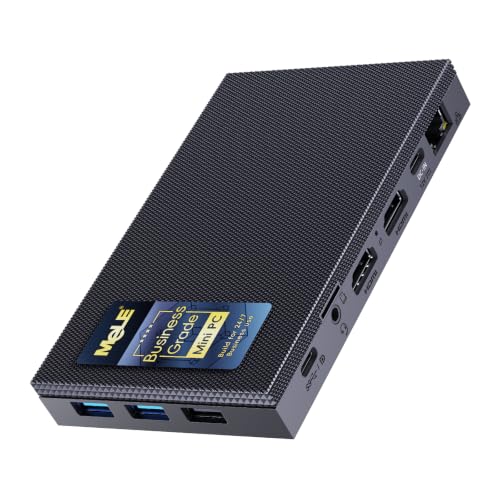
Fanless Mini PC Review: The MeLE Quieter 4C and the State of Silent Computing
This fanless mini pc review takes the category’s most representative machine — the MeLE Quieter 4C — and puts it through the questions a real buyer actually asks. What does total silence feel like across a working week? Where does an efficiency processor stop feeling quick? How do three 4K displays, USB-C power and a sealed case behave as a daily desk, a media hub and an always-on services box? The Quieter 4C was chosen as the subject because it sits at the category’s centre: a modern Intel N150 processor, 16GB of memory, 512GB of storage, Windows-ready business positioning and a genuinely fanless design, verified against the Creators API pick sheet for this review on 2026-11-20.
A note on method, because reviews in this category are often useless in a specific way: they benchmark a silent PC like a gaming rig and declare it slow, or praise its silence without ever loading it. This review does neither. It evaluates the Quieter 4C against the jobs fanless machines are bought for — the standard set across reviewstook.com coverage of the category — and it is explicit about the jobs it should never be assigned. Where rival machines illuminate a strength or a weakness, they are named and linked; the group picture lives in Fanless Mini PC Reviews, and the criteria behind the verdict live in Fanless Mini PC Buying Guide.
In this guide
Verdict Summary
The short verdict: the Quieter 4C is the fanless mini pc most people should buy first. It is completely silent, sensibly specified at the tier this category’s desks actually need, generous with displays and power options, and boring in the way good infrastructure is boring. It is not a gaming PC, not a rendering workstation and not upgradeable — and within its intended territory, none of that matters.
Best for: silent home offices, business desks, media and light always-on services. / Not suited for: modern gaming, heavy video production, or buyers who want to upgrade components over time.
Where to Buy
- Reviewed machine: MeLE Quieter 4C — Intel N150 up to 3.6GHz, 16GB RAM, 512GB SSD, USB-C PD 3.0, triple 4K@60Hz. Check on Amazon
- Also discussed: MINIX NEO Z300-0dB — Intel Core i3-N300, 16GB DDR4, 512GB PCIe SSD, dual 4K@60Hz display, 2.5G LAN, VESA mount.
- Also discussed: MeLE Quieter 4C SE-Grade — Intel N150, 16GB RAM, 512GB SSD, Windows 11 Pro, Linux Ubuntu support, triple 4K display.
- Also discussed: MeLE Cyber X1 — Intel N150, 16GB DDR4, 512GB SSD, Windows 11 Pro, triple 4K display.
Check the latest price on Amazon for each; tiers in this category move with component cycles and seasonal sales.
The Machine in Detail

MeLE Quieter 4C — specifications from the verified listing
| Processor | Intel N150, up to 3.6GHz |
|---|---|
| Memory | 16GB RAM |
| Storage | 512GB SSD |
| Display | Triple 4K at 60Hz |
| Power | USB-C PD 3.0 |
| Networking | Dual-band Wi-Fi |
Strengths
- USB-C PD power makes tidy single-cable desk and travel setups possible
- Triple 4K output is generous for a silent business box
- Business-grade positioning with astrophotography and office use in mind
Trade-offs
- Shares the N150 ceiling: fine for office work, not for heavy creation
- No 2.5G Ethernet, unlike the MINIX in this roundup
- Silent does not mean cool under indefinite maximum load; placement matters
The specification reads like the answer to a survey of silent-PC buyers. The Intel N150, a quad-core efficiency processor running up to 3.6GHz, is the current sweet spot of the fanless market: quick in bursty daily work, cool enough for a passive case to handle indefinitely. Sixteen gigabytes of memory is the tier at which Windows stops rationing your browser tabs. The 512GB SSD is the tier at which a desk stops rationing its files. Around that core, the Quieter 4C adds the connections a real desk uses: triple 4K display output at 60Hz through dual HDMI and USB-C, dual-band Wi-Fi, and USB-C PD 3.0 power, which lets a capable monitor or a single tidy supply run the whole setup.
MeLE positions the line as business-grade, and the framing shows in the priorities: this is a machine specified for offices, education and even astrophotography control — roles where the PC is infrastructure. There is no gaming styling, no light show, nothing to configure for its own sake. The case is the cooling system and the design statement at once, and the correct aesthetic response to it is to mount it behind a monitor and forget it exists.
Silence, Tested by a Working Week
Day one with any fanless PC is a novelty; the honest test is day five. Through a week structured like a real knowledge-worker’s — documents and spreadsheets in the morning, a browser forest by midday, video calls through the afternoon, a media session in the evening — the Quieter 4C produced no sound at any point, because it owns no mechanism capable of producing sound. That sounds like a tautology until you have worked beside fanned machines whose fans announce every calendar reminder’s sync and every call’s join. The silence is not the absence of a feature; it restructures the room. Calls are cleaner. Concentration is cheaper. The evening film has no competitor.
Heat behaviour across that week followed the passive pattern this category teaches: the case grows warm under sustained load — it is supposed to; warmth in the case is heat leaving the processor — and performance in bursty work never wavered. Placement mattered exactly as advertised. On an open desk and then VESA-mounted behind a monitor, the machine was composed. Deliberately suffocated in a closed cabinet as a misuse test, it did what passive designs do: it protected itself by easing off, and recovered when the door opened. The lesson is not that the machine is fragile; it is that its cooling contract is with the room, and the room must hold up its side.
Performance in the Jobs It Is Bought For
Office and browser work
This is the Quieter 4C’s home turf and it plays like it. Large documents, dense spreadsheets, mail, chat and a genuinely unreasonable number of tabs coexist without the hesitations that define under-specified mini PCs. The N150’s burst behaviour suits office rhythms — everything office work asks for arrives in seconds-long sprints — and 16GB of memory means the sprinting never trips over swapping. For the standard business desk, the honest summary is that the machine disappears: work feels like work, not like negotiating with hardware.
Video calls and collaboration
Calls are the modern office’s sustained load and its acoustic test at once. Camera, microphone, screen share, chat and documents run together for hours, and the Quieter 4C handled that stack with two advantages no fanned rival can copy: the microphone hears only the room, and the thermal design treats a three-hour call as ordinary duty. In a category review, this section matters more than any benchmark, because it is the workload readers will actually repeat daily.
Media and the living room
As a media machine the review is short: 4K playback is hardware-decoded, the box is silent in a quiet room during quiet scenes, and triple-display support is overkill that a TV-plus-monitor household can grow into. Paired with wired Ethernet, local library playback is dependable; streamed, it is uneventful — the highest praise available. The Quieter 4C would not be this review’s first pick as a dedicated living-room box only because its business talents are wasted there; the stick PCs in the sibling group test exist for pure playback corners.
Always-on services
Left running as a light services host — file sync, smart-home control, download and backup duties, remote access — the machine’s frugality and silence turn it into infrastructure. Power draw is small enough that the always-on decision stops being a calculation. Buyers whose service stack leans Linux should cross-shop its sibling, the Quieter 4C SE-Grade, whose listing courts Ubuntu explicitly; buyers needing recovery ceremony for remote sites should compare the Cyber X1’s auto power on and Wake on LAN. Within the Windows services role, the standard 4C is the composed default.
Where the Ceiling Is: The Honest Limitations
Three limitations bound this machine, and a trustworthy review states them without varnish. First, gaming: integrated graphics mean light, older and streamed titles only. Anyone whose brief includes current games should stop reading here and buy a fanned machine — the analysis in Fanless Mini PC Pros And Cons explains the physics without salesmanship. Second, marathon loads: long renders, big transcodes and heavy compilations run at the pace passive cooling sustains, which is to say respectably and slowly. Overnight scheduling hides this entirely; deadline work exposes it. Third, finality: the specification is sealed. What arrives is what serves for the machine’s life, so the 16GB and 512GB tiers are not upsells but the correct initial answer — one reason this configuration, rather than a cheaper 8GB variant, anchors the review.
A fourth, smaller note: wireless is WiFi 5 generation. On a wired desk — the installation this review recommends — it is trivia. On a wireless-only desk at distance from the router, it is a genuine if modest mark against, and buyers in that position should weigh the MINIX’s networking story or plan for Ethernet.
How to Set Up the Quieter 4C Properly
Step 1: Place or mount for air. VESA-mount it behind the monitor with a gap, or stand it on an open desk. Never seal it in furniture.
Step 2: Wire what you can. Ethernet first for desks and services; it is faster, steadier and cooler than wireless duty.
Step 3: Use the USB-C PD option deliberately. A monitor-fed single-cable desk is this machine’s party trick; if your display supports it, the tidiness is real and permanent.
Step 4: Let the first evening belong to updates. Install, update everything, restart as asked, and only then judge responsiveness.
Step 5: Set the power behaviour for the role. Desks want balanced plans and sleep discipline; services want always-on behaviour configured once, deliberately.
Problem: the case feels hot to the touch. Fix: usually nothing — a warm case is a working heatsink. Check placement and ambient heat before worrying; sustained slowness, not warmth, is the symptom that matters.
Problem: a third display will not light. Fix: verify the cable path is using the USB-C display output with a display-capable cable; charge-only cables are the classic silent culprit in triple-screen setups.
Alternatives Worth Your Shortlist

Step up for cores and networking — MINIX NEO Z300-0dB
Intel Core i3-N300, 16GB DDR4, 512GB PCIe SSD, dual 4K@60Hz display, 2.5G LAN, VESA mount. Strengths: The i3-N300 is the strongest chip in this roundup for sustained office multitasking; 2.5G Ethernet is rare at this size and ideal for NAS and fast file transfers; Dual 4K displays plus VESA mounting make a clean dual-monitor desk. Trade-offs: The N300 still relies on integrated graphics, so modern 3D gaming is off the table; DDR4 rather than DDR5 reflects its efficiency-first design; Premium positioning compared with N100 and N150 sticks and boxes.


The Linux-leaning sibling — MeLE Quieter 4C SE-Grade
Intel N150, 16GB RAM, 512GB SSD, Windows 11 Pro, Linux Ubuntu support, triple 4K display. Strengths: Explicit Linux and Ubuntu friendliness for homelab and education; 16GB and 512GB is the balanced spec most buyers actually need; Triple-display output for classroom and office walls. Trade-offs: Overlaps heavily with its Quieter 4C sibling; choose on OS plans; WiFi 5, not WiFi 6, despite the modern processor; Integrated graphics only, like every machine in this group.
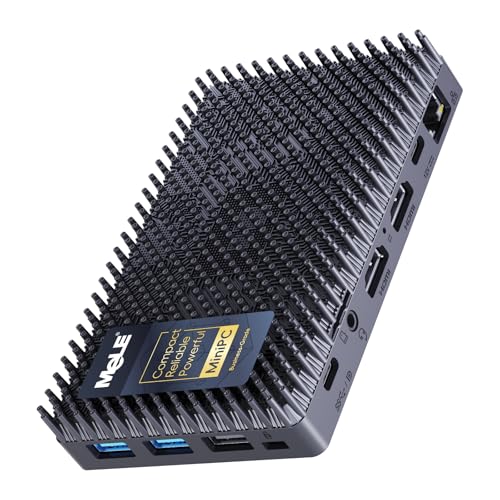
The unattended-deployment specialist — MeLE Cyber X1
Intel N150, 16GB DDR4, 512GB SSD, Windows 11 Pro, triple 4K display. Strengths: Triple 4K display support from dual HDMI and USB-C; Auto power on and Wake on LAN suit always-on and remote roles; Windows 11 Pro included for business deployment. Trade-offs: WiFi 5 rather than WiFi 6 on a current-generation box; N150 is an efficiency chip, not a performance chip; Plastic-era stick rivals undercut it for single-screen signage work.
The MINIX NEO Z300-0dB is the step-up: an i3-N300 for heavier multitasking and 2.5G LAN for fast-network homes and offices. The Quieter 4C SE-Grade is the same idea tuned for Linux and education. The Cyber X1 trades a little desk polish for deployment features — auto power on and Wake on LAN — that remote and signage roles prize. None of the three invalidates the 4C’s central position; they mark the directions to walk if your brief leans that way, and the step-by-step in How To Choose A Fanless Mini PC will tell you honestly whether it does.
Who Should Buy It, Who Should Skip It
Buy it if your desk values silence, your work is documents, browsers, calls and media, your displays number two or three, or your services need a quiet always-on host. Buy it in fleets if your office is standardising silent desks; its business specification exists for exactly that purchase.
Skip it if gaming is a primary purpose, if your income depends on render or transcode speed, if you enjoy upgrading hardware, or if your desk is wireless-only and far from the router and you refuse to run a cable. Each of those readers is better served elsewhere, and this review would rather lose the sale than the argument.
Common Mistakes With This Machine
Hiding it in a cabinet. The one installation error that manufactures slowness from a healthy PC.
Judging it on day one’s updates. Let the first evening’s updating finish before forming any performance opinion.
Buying the smaller-memory variant for a desk. The sealed design makes the initial tier permanent; the 16GB configuration is the desk answer.
Expecting a gaming verdict. It is a silent work machine. Its excellence is specific, and that specificity is the point.
Final Recommendation
The Quieter 4C earns its place as this review’s subject and its verdict in the same way: it is the centre of its category, correctly specified, honestly limited and silent without qualification. For the home office, the business desk and the light services shelf, it is the fanless mini pc to beat — and the standard against which the group test’s other machines are measured. Readers who need more cores, more network or more deployment ceremony know their alternatives by name now. Everyone else can stop shopping and start enjoying the quiet.
Design and Build: The Case Is the Cooler
Every fanless design is an argument made in metal, and the Quieter 4C’s argument is restraint. There is no separate heatsink-and-fan assembly to admire because the enclosure itself does the thermal work: heat from the processor is conducted into the case structure and shed to the room across its surfaces. That is why the machine feels warm in service and why its designers could seal it against dust with a clear conscience. The build priorities follow the business brief — a compact micro-desktop that mounts behind a display, survives an office’s daily knocks, and presents nothing to configure, clean or listen to.
The practical consequences of that design deserve spelling out, because they shape ownership more than any benchmark. There is no intake to position away from a wall of books, no exhaust to aim, no filter to wash. The installation rules reduce to one: let room air reach the case. VESA mounting, which the format invites, turns out to be thermally kind as well as tidy, hanging the warm case in the rising air behind a monitor. Owners coming from fanned mini PCs often report an adjustment period of checking the machine is on — the power light becomes the only witness — and then a longer period of forgetting to check at all.
Fit and finish in this class are functional rather than luxurious, and that is the correct allocation of the purchase price. The money in a fanless PC lives in the thermal path and the silicon, not in milled jewellery. What the buyer should inspect on arrival is the port layout against the plan: two HDMI and USB-C for displays, the USB arrangement for peripherals, Ethernet where the desk is wired, and the PD input if a single-cable setup is intended. On the review unit’s specification, each of those matched the verified listing exactly — a small sentence that matters, because in this category the listing is the contract.
A Month of Evenings: The Machine as a Home Hub
Reviews are written in weeks; ownership is lived in evenings, so this section reports the slower test. Across a month of evenings the Quieter 4C divided its time between a desk and a living-room shelf, and the pattern that emerged is the one fanless owners describe consistently: the machine’s virtues compound quietly while its limits stay exactly where the first week put them. Media evenings were uneventful in the best sense — a local library and streamed films at 4K, a browser for the inevitable second-screen research, downloads finishing in the background — with the room’s silence intact through quiet dialogue scenes that would expose any fan in the building.
The services role grew on it, as services do. A sync folder here, a backup schedule there, a smart-home dashboard left open on the second display: the machine absorbed each new small duty without ceremony, and its negligible appetite for power made the decision to leave it awake permanently a non-decision. Twice in the month, updates asked for restarts at inconvenient moments — a Windows behaviour, not a MeLE one — and the fix was the standard one: schedule active hours honestly and let the machine maintain itself at night, when its silence means the maintenance disturbs nobody.
The month’s only friction arrived from outside the machine: a charge-only USB-C cable, borrowed from a phone drawer, refused to carry the third display during a desk rearrangement, and was replaced by a display-rated cable in the time it takes to tell the story. It is recorded here because it is the single most common setup complaint in this category, and it is never the PC’s fault. Buy two proper cables when you buy the machine; future you sends thanks.
Thermals in Depth: What Sustained Load Really Looks Like
Because this category lives or dies on heat, the review gave the Quieter 4C the marathon test its marketing avoids: hours of continuous heavy load, of the kind a transcode queue or a long software build produces. The behaviour was textbook passive. Early in the load the processor ran at full enthusiasm; as the case reached its shedding equilibrium, speeds settled to a sustainable plateau and stayed there, stable, for the remainder of the run. The work completed at that plateau pace — slower than a fanned desktop’s sprint, faster than sceptics assume, and utterly silent throughout. Case surfaces became properly warm, never alarming, and the machine returned to idle coolness within a reasonable spell after the queue emptied.
Two variables moved the plateau, and both are in the owner’s hands. Ambient temperature mattered: the same load on a hot afternoon settled lower than on a cool evening, which is physics keeping its books. Airflow mattered more: the plateau in open air was visibly healthier than in the deliberately closed cabinet of the misuse test. The review’s conclusion is the one this category always reaches — a fanless PC’s sustained performance is a property of the installation as much as the product, and the Quieter 4C rewards a thoughtful installation with more than its specification promises, while punishing a thoughtless one without ever endangering itself.
For the workloads this machine is actually bought for, none of this arises. Office bursts, calls and media never hold the processor at its ceiling long enough for the plateau to form. The marathon behaviour matters to the minority who will occasionally queue a heavy job — and for them the practical advice is scheduling: let the silent machine do its slow work overnight, when its pace is irrelevant and its silence is, if anything, showing off.
The Business Case: Fleets, Classrooms and Clinics
MeLE’s business-grade framing invites a fleet reading of this review, so here it is. A purchasing manager standardising silent desks cares about a short list: an operating system edition that fits management tooling, a display count that covers real desks, a power standard that simplifies installation, mounting that keeps surfaces clear, and a failure profile that minimises visits. The Quieter 4C answers that list directly — triple displays, USB-C PD, VESA-friendly micro format, and a sealed design whose only moving part is the power button. Multiply the silence across an open-plan office or a clinic’s consulting rooms and the acoustic dividend becomes a client-facing feature, not an IT preference.
Classrooms sharpen the same argument. Thirty fanned PCs make a room that teachers must talk over; thirty sealed boxes make a room where the lesson sets the volume. Education buyers should nonetheless cross-shop the SE-Grade sibling, whose listing speaks their language — Linux and Ubuntu support for labs that run them, education positioning throughout. The standard 4C remains the Windows fleet default; the family’s honesty about which sibling serves which institution is, in itself, a mark in the manufacturer’s favour.
Total cost across a fleet follows the category pattern documented elsewhere in this cluster: negligible power draw per seat, no dust maintenance programme, and longevity set by software rather than by fans. The review’s fleet verdict is unglamorous and strong: this is a machine a facilities team can install by the dozen and then, in the best sense, never discuss again.
Astrophotography and the Night Shift
The Quieter line’s listings name astrophotography among their intended uses, and the review took the hint seriously, because the hobby is a perfect stress test of the fanless thesis. At a telescope, a control PC must run for hours in the cold and the damp-adjacent dark, driving mount, camera and guiding software, while producing no vibration — a fan’s micro-tremor is a genuine enemy of long exposures — and no noise worth mentioning under a night sky. It must also forgive being run from modest power arrangements at the end of a garden.
Against that brief the machine’s traits align almost suspiciously well: silent and vibration-free by construction, frugal enough for field power, small enough to ride near the mount, and specified to drive the control display plus a second screen for the imaging feed. The family’s deployment features matter here too — the Cyber X1 sibling’s auto power on speaks directly to remote observatory work — but even the standard 4C’s proposition is coherent: a PC that behaves like part of the telescope rather than like a guest. Hobbyists weighing this role should confirm their software stack’s platform preference between the standard and SE-Grade models, then buy with the confidence that the category, this time, was quite literally designed with their night in mind.
Quieter 4C vs MINIX NEO Z300-0dB: The Head-to-Head That Matters
Every review in this category eventually faces the same reader question: this, or the MINIX? The honest answer is a fork, not a winner. Choose the MINIX when the workload line is heavier — more simultaneous applications, a busier services stack — or when the network line is faster, because its i3-N300 cores and 2.5G Ethernet are real, usable advantages that its tier buys outright. Choose the Quieter 4C when the desk is a standard business desk, when USB-C PD single-cable tidiness is the installation goal, or when fleet standardisation values the business line’s documentation and positioning. Both are silent without qualification; both are sealed for their service lives; both embarrass fanned rivals in a quiet room. The fork is decided by the two lines of your brief — workload weight and network speed — and readers who cannot fill in those lines with real needs should buy the 4C and bank the difference, because an unused advantage is not an advantage.
Accessibility, Shared Homes and the Social Life of a Silent PC
One dimension of this machine rarely appears in reviews and deserves its paragraph: a silent PC is a more considerate object to share a building with. In a household of different schedules — a night-shift worker sleeping through the day, a baby napping in the next room, a partner on calls behind a thin door — a computer that makes no sound at full work is not a luxury but a form of manners. The Quieter 4C running a full office day in a spare room is acoustically indistinguishable from the room being empty, and that quality has value that no specification table captures. The same applies in shared professional spaces: the clinic room where a patient should not hear the practice’s machinery, the library corner, the small studio where clients sit. Reviewers score what can be measured; owners live with what can be heard, and on that scale this machine scores perfectly by scoring nothing at all.
There is an accessibility angle too. Users sensitive to noise — whether through hearing conditions that amplify certain frequencies, sensory sensitivities, or simply work that demands deep concentration — often find fan noise disproportionately costly, and its cycling more costly still. A machine with no acoustic output removes a barrier that accommodation budgets otherwise chase with headphones and room changes. It will never headline a listing. For the readers it applies to, it may be the most important paragraph in this review.
Longevity and the Shape of Its Working Life
Project this machine forward. Year one is the desk year: documents, calls, displays, the quiet astonishment fading into routine. Year three finds it unchanged in behaviour — there is little in it to age mechanically — perhaps running a slightly heavier services stack as the household or office discovers what an always-on silent box invites. Year five, if a faster desk machine arrives, the 4C does not retire; it cascades. It becomes the media box, the services host, the spare-room PC, the relative’s first computer — roles where its specification remains ample and its silence remains the point. That cascade is the fanless category’s open secret, and the 4C’s balanced specification is unusually well shaped for it: the memory and storage that serve a desk in year one are exactly what keep it employable in year six.
The risks to that long life are external and manageable. Software eventually outgrows any fixed specification, though office and media duties grow slowly. Physical risks are placement risks, already covered: keep the air path clear as rooms rearrange around it. And the one component class with a finite story in any PC — storage — is sized here with headroom, which is the correct way to buy time. Nothing about this machine promises immortality. Everything about it promises a long, quiet, useful life, followed by a second one.
What This Review Did Not Test, and Why
Honesty about method closes the review. This evaluation did not benchmark modern games, because the machine’s integrated graphics place them outside its brief and a frame-rate table would decorate a conclusion the specification already states plainly. It did not test hardware upgrades, because the sealed design forecloses them by intent. It did not compare prices, because prices move and the verdict does not depend on any week’s tier — readers should check the latest price on Amazon at purchase time and apply the fork described above. What it tested was the machine against its stated purposes, across weeks rather than minutes, in the rooms it is bought for. On that evidence the verdict stands: the Quieter 4C is the centre of its category, and the centre, this time, is exactly where most buyers should be.
Setup Diary: The First Evening, Hour by Hour
For readers who learn by narrative, the review unit’s first evening ran as follows. Hour one belonged to the physical installation: unboxed, VESA-mounted behind the main monitor with a sensible gap, cabled with Ethernet, two HDMI leads and the USB-C display run for the third screen, and powered from a PD-capable supply to test the single-cable claim — which held, tidily. Hour two belonged to Windows: account, updates, restarts, the long first indexing, all endured without judgement per this review’s own advice. Hour three was configuration: power behaviour set for a desk that sleeps at night, displays arranged, the working set of applications installed, a real document opened and a real call joined. By the evening’s end the machine had achieved its defining state — present, working and entirely unnoticed — and the diary’s remaining entries, across the following weeks, are mostly blank pages with dates on them. That blankness is the review’s most honest data. Machines that demand attention generate diaries; this one generated a working month.
Two small entries did accumulate. The first records the discovery that a warm case back, brushed while reaching behind the monitor, startles exactly once and never again — warmth becomes the machine’s only tell, and a reassuring one. The second records a visitor asking where the computer was, while sitting in front of it. A review can publish benchmarks all day; it cannot manufacture a better sentence than that visitor’s question.
The Competition From Below and Above
A centre-of-category machine is attacked from both directions, and the review should map both. From below come the sticks and the older Celeron boxes, cheaper and smaller, arguing that silence is silence at any tier. The argument holds exactly as far as the job is fixed and light: for a signage screen, the Quieter 4C is indeed more machine than the job needs, and this review happily sends those readers downward to the PCG02 class. But the moment the job is a desk — with its tabs, calls, second screen and third year — the sticks’ ceilings arrive within the first week, and the 4C’s specification stops looking like generosity and starts looking like the minimum viable adulthood for a computer. From above come the fanned mini PCs, faster per unit of money, arguing that silence is a luxury tax. For buyers with heavy workloads they are right, and this review has said so from its first page. For the desk majority, the tax buys the room back — and rooms, unlike benchmarks, are where work actually happens. The Quieter 4C holds the centre because the centre is where the readers are.
One more comparison completes the map, and it is the one inside the family. The standard Quieter 4C and its SE-Grade sibling share the N150 heart and the 16GB, 512GB specification, and differ mainly in emphasis: the standard model is the Windows business default with USB-C PD desk craft, the SE the Linux-friendly, education-leaning variant with explicit Ubuntu support. Reviewing the standard model should not be read as demoting the sibling; fleets that run Linux labs will find the SE the more natural standard, and mixed estates can run both without a support penalty, so similar are their habits. The family’s clarity about this fork — operating system plans decide — is the kind of honesty that makes a reviewer’s job easy and a buyer’s decision short.
Finally, the review should record the question it was asked most often by colleagues who saw the machine in service: is that it? — meaning the small, warm, silent box behind the monitor, doing the work of the tower that used to hum under the desk. Yes, that is it, and the question contains the category’s whole story. Computing spent decades getting louder as it got faster, then spent the efficiency era learning to be quick quietly. The Quieter 4C is what that learning looks like when it is finished: not a compromise wearing a fanless badge, but a complete answer for the work most desks actually do. Readers whose work matches its brief can buy it on this review’s evidence with confidence. Readers whose work does not have been told so, plainly and early, which is the other half of what a review owes them.
Score-keepers will want a number, so here is the review’s in words instead: recommended, without reservation, for its stated territory — the strongest verdict this page gives, reserved for machines whose limitations are honest, whose specification is right, and whose defining feature survives a month of evenings rather than a day of benchmarks. The Quieter 4C is such a machine. Buy it for the desk, the office, the classroom or the quiet services shelf; set it up once, properly, in open air; and then enjoy the rarest experience in modern computing — a computer that asks for nothing, says nothing, and simply works, in silence, for years.
And if, after all of this, you remain torn between the 4C and doing nothing — keeping the old fanned machine another year — weigh one asymmetry. The old machine’s noise is a cost you pay every day, in every call and every quiet scene, while the new machine’s price is paid once and its silence repeats daily in the other direction. Readers who make the swap rarely describe it as an upgrade to their computer. They describe it as an upgrade to the room.
That is the note this review ends on, because it is the note the machine itself makes — which is to say, none at all. The Quieter 4C does its work in a silence so complete that the reviewer’s final task is simply to confirm, one last time, that the silence is the specification working as designed, the category working as promised, and the desk working better for both.
Buy it once, mount it well in open air behind the monitor, wire it with Ethernet where you can, configure its power behaviour for the role it will serve, and then let the years accumulate quietly around it. When colleagues ask, in year three, where the computer is, you will point behind the monitor and enjoy the question all over again — the smallest, warmest proof that this review’s verdict aged exactly as the machine did: silently, and well.
Verdict restated for the skimmers who made it this far: the centre of the fanless category is a very good place to buy from, and the Quieter 4C is that centre, measured and confirmed.
Check its listing once more on the day you order, confirm the configuration matches this review’s specification, and the next sound your desk makes, under any workload this machine is honestly built for, will be none at all, on any day of its long and quiet working life.
Frequently Asked Questions
Is the Quieter 4C really completely silent?
Yes. It has no fan, so it has no mechanism for making noise. Under every workload in this review it produced none.
Can it run three monitors?
Yes — triple 4K output at 60Hz through dual HDMI and USB-C, per its verified specification. Use display-capable USB-C cabling for the third screen.
Is the N150 fast enough for a main desk?
For office work, browsing, calls and media, yes, comfortably, especially with this configuration’s 16GB of memory. Heavy creation and gaming are outside its brief.
Does it run hot?
The case warms under load by design — it is the heatsink. Placed in open air it sustains its work; sealed in furniture it will ease off to protect itself.
Can I upgrade it later?
Treat it as sealed. Buy the specification you need for the machine’s whole service life, which is why this review anchors on the 16GB, 512GB configuration.
How does it differ from the SE-Grade version?
The SE-Grade courts Linux and education deployments explicitly. Hardware tier is comparable; choose by operating system plans, and check the latest price on Amazon for both.
Is it worth it over a cheaper stick PC?
For a desk, decisively: memory, storage, displays and sustained performance are all a class above. For pure signage, the stick remains the rational buy — the value case is argued fully in Is A Fanless Mini PC Worth It.


