Disclosure: As an Amazon Associate, reviewstook.com earns from qualifying purchases. Links on this page are affiliate links at no extra cost to you; prices and availability change frequently, so check Amazon for the latest.

1080p Gaming PC Reviews: Six Machines, Reviewed and Ranked
These 1080p gaming PC reviews exist because the category’s listings all claim the same thing — smooth gaming, powerful performance, stunning visuals — while delivering wildly different realities. Across the six machines reviewed here, all verified against Amazon’s product data before inclusion, you will find an honest entry tower that does exactly what it promises, a name-brand package with everything in the box, a mid-range machine that represents the category’s sweet spot, an Intel alternative for buyers who prefer that platform, and a premium configuration with no ceiling at this resolution. You will also find, in each review, the weakness we would tell a friend about before they bought it, because a roundup that only praises is just a catalogue with adjectives.
Our ranking logic is simple and stated upfront: we judge each machine against its own tier and price class, not against the most expensive tower on the page. A budget machine that delivers honest esports performance with no hidden flaw outranks a premium machine with a corner cut. The criteria are the ones from our 1080p Gaming PC Buying Guide — graphics card first, processor second, then memory, storage, power supply and platform as pass-or-fail checks — applied uniformly. If you are new to the category, read How To Choose A 1080p Gaming PC first; it teaches the checks these reviews assume. If you want one machine examined exhaustively rather than six examined thoroughly, our single-product deep dive is 1080p Gaming PC Review.
In this guide
Quick Picks
Best Budget: WIWB Gaming PC Desktop (Ryzen 5 5500, RX 6500 XT) — Radeon RX 6500 XT and 16GB DDR4 in a 512GB SSD tower.
Best Complete Package: HP OMEN Gaming Desktop (Ryzen 7 5700X, GTX 1660 Super) — GeForce GTX 1660 Super 6GB and 16GB RAM in a 512GB PCIe SSD tower.
Best Storage Value: ZYNEEX Prebuilt Gaming Desktop (Ryzen 5 5500, RTX 3050) — GeForce RTX 3050 6GB and 16GB DDR4 3200MHz in a 1TB NVMe SSD tower.
Best Mid-Range: ZOTAC MEK Gaming PC (Ryzen 5 5500, RTX 5060) — GeForce RTX 5060 8GB and 16GB DDR4 in a 1TB NVMe SSD tower.
Best Intel Option: CyberPowerPC Gamer Xtreme (Intel Core i5-14400F, RTX 5060) — GeForce RTX 5060 8GB and 16GB DDR5 in a 1TB PCIe 4.0 SSD tower.
Best Overall: KOTIN Gaming PC Desktop (Ryzen 7 8700F, RTX 5060 Ti, 32GB) — GeForce RTX 5060 Ti 8GB and 32GB DDR5 in a 1TB SSD tower.
Where to Buy These Machines
Each review below links to the exact verified configuration discussed. Prebuilt pricing moves frequently — sometimes weekly — so check the latest price on Amazon rather than anchoring on any figure you may have seen quoted elsewhere; this page deliberately prints none. reviewstook.com may earn a commission on qualifying purchases, and the trade-offs sections below are where we prove that the commission does not edit the reviews.
WIWB Gaming PC Desktop (Ryzen 5 5500, RX 6500 XT) — AMD Ryzen 5 5500, Radeon RX 6500 XT, 16GB DDR4, 512GB SSD. Check on Amazon
HP OMEN Gaming Desktop (Ryzen 7 5700X, GTX 1660 Super) — AMD Ryzen 7 5700X, GeForce GTX 1660 Super 6GB, 16GB RAM, 512GB PCIe SSD. Check on Amazon
ZYNEEX Prebuilt Gaming Desktop (Ryzen 5 5500, RTX 3050) — AMD Ryzen 5 5500, GeForce RTX 3050 6GB, 16GB DDR4 3200MHz, 1TB NVMe SSD. Check on Amazon
ZOTAC MEK Gaming PC (Ryzen 5 5500, RTX 5060) — AMD Ryzen 5 5500, GeForce RTX 5060 8GB, 16GB DDR4, 1TB NVMe SSD. Check on Amazon
CyberPowerPC Gamer Xtreme (Intel Core i5-14400F, RTX 5060) — Intel Core i5-14400F, GeForce RTX 5060 8GB, 16GB DDR5, 1TB PCIe 4.0 SSD. Check on Amazon
KOTIN Gaming PC Desktop (Ryzen 7 8700F, RTX 5060 Ti, 32GB) — AMD Ryzen 7 8700F, GeForce RTX 5060 Ti 8GB, 32GB DDR5, 1TB SSD. Check on Amazon
How These Reviews Were Put Together
Every machine here was selected from currently listed, verified configurations — the specifications quoted are taken from the manufacturers’ own data as returned by Amazon’s product API on the check date in our sources file, not from marketing summaries. We assessed each tower on the performance class of its exact processor and graphics pairing at 1920 by 1080, the adequacy of its memory and storage for a modern game library, the quality signals in its power supply and platform, and the honesty of its positioning: a machine marketed for casual play is judged as a casual machine, while one marketed for everything is judged against everything. Machines we excluded are as instructive as the ones we kept — integrated-graphics towers marketed for gaming, and decade-old graphics cards at modern prices, were cut at the door, and our reasoning is documented in 1080p Gaming PC Pros And Cons.
The Reviews

Best Budget — WIWB Gaming PC Desktop (Ryzen 5 5500, RX 6500 XT)
Strengths
- A sensible entry point into discrete-graphics 1080p gaming without paying for power you will not use at this resolution
- The Ryzen 5 5500 has enough cores for modern esports titles plus Discord, a browser and recording software running alongside
- WiFi 6 is built in, so the machine works in a bedroom or rental where running an Ethernet cable is not realistic
Trade-offs
- The RX 6500 XT is a 1080p card, full stop — it is not a sensible path to high-refresh 1440p later
- 512GB of storage fills quickly once two or three large modern games are installed
- The DDR4 platform is mature and affordable, but it is a dead end for future CPU upgrades
| Component | Specification (verified) |
|---|---|
| Processor | AMD Ryzen 5 5500 |
| Graphics | Radeon RX 6500 XT |
| Memory | 16GB DDR4 |
| Storage | 512GB SSD |
| Other | WiFi 6; Windows prebuilt tower (black) |
A first-time PC gamer, a student, or an esports-focused player whose library is Valorant, League of Legends, Rocket League, Fortnite and similar titles, and who wants a tower that simply works at 1080p on day one.
In daily terms, this is the machine we recommend when someone says “my kid plays Fortnite and Valorant and the family laptop is dying”. It boots fast, it runs the popular catalogue at settings that look good, it handles school and office work without noticing, and its WiFi 6 means it can live in a bedroom far from the router. What it will not do is impress anyone chasing maximum settings in the newest releases — and it never claimed to. Entry-tier honesty is rarer than entry-tier performance, and this tower has both.
Storage is the honest limitation: budget for a second SSD sooner rather than later, because 512GB disappears fast with today’s install sizes.
Best for: the buyer in the description above. / Not suited for: buyers whose monitor, library or budget contradicts it — see the trade-offs.

Best Complete Package — HP OMEN Gaming Desktop (Ryzen 7 5700X, GTX 1660 Super)
Strengths
- The Ryzen 7 5700X is a strong, proven gaming CPU that will not bottleneck anything at 1080p
- A keyboard and mouse are in the box, so the machine is genuinely playable the day it arrives
- HP’s OMEN line has mature cooling design and a large support organisation behind it
Trade-offs
- The GTX 1660 Super has no DLSS and no ray-tracing hardware — in the newest releases you will lower settings sooner than with newer cards
- 512GB of storage is tight for a modern game library
- The platform is DDR4-era, so the long upgrade path belongs to the DDR5 machines in this list
| Component | Specification (verified) |
|---|---|
| Processor | AMD Ryzen 7 5700X |
| Graphics | GeForce GTX 1660 Super 6GB |
| Memory | 16GB RAM |
| Storage | 512GB PCIe SSD |
| Other | RGB lighting; wired keyboard and mouse included |
A buyer who wants a complete, supported, name-brand package for smooth 1080p gaming in established titles, and who values the included peripherals and HP support.
The OMEN’s charm is completeness and provenance. HP’s support organisation, a mature case design and peripherals in the box make it the lowest-friction purchase in this roundup — the machine a non-technical buyer can order with the least anxiety. The 5700X processor is genuinely strong and will outlast the graphics card, which makes this an interesting upgrade candidate later: a future GPU swap turns it into a thoroughly modern machine, provided the power supply in the exact unit supports it — verify before planning around it. As shipped, it is a smooth, supported 1080p experience for established games.
The graphics card is the ageing part: fine for esports and slightly older AAA games, not the choice for max settings in brand-new releases.
Best for: the buyer in the description above. / Not suited for: buyers whose monitor, library or budget contradicts it — see the trade-offs.

Best Storage Value — ZYNEEX Prebuilt Gaming Desktop (Ryzen 5 5500, RTX 3050)
Strengths
- A full 1TB NVMe SSD at this tier is the standout — many rivals ship half the storage
- The RTX 3050 brings DLSS support, which stretches this budget card further in supported games
- The Ryzen 5 5500 and RTX 3050 pairing is well matched, with neither part obviously holding the other back
Trade-offs
- The RTX 3050 is an entry-level card: expect sensible settings, not maximum settings, in demanding 2025-era releases
- Smaller assembler brands mean a smaller support footprint than HP, MSI or CyberPowerPC
- DDR4 platform limits future CPU upgrade options
| Component | Specification (verified) |
|---|---|
| Processor | AMD Ryzen 5 5500 |
| Graphics | GeForce RTX 3050 6GB |
| Memory | 16GB DDR4 3200MHz |
| Storage | 1TB NVMe SSD |
| Other | ARGB air cooling; Wi-Fi |
A value-focused buyer who plays a mix of esports and mainstream titles and would rather have double the storage than a flashier case.
The ZYNEEX earns its place on arithmetic: at its tier, rivals make you choose between storage and a current-ish graphics card, and this machine declines the choice. A terabyte of NVMe storage changes daily life more than buyers expect — no uninstalling one game to install another, no library anxiety — and DLSS support gives the RTX 3050 a second wind in modern titles that older cards in this price area simply do not have. The brand is smaller than the giants in this list, so read the warranty terms with care, but the hardware proposition is the strongest value argument in the roundup.
Graphics ceiling is the compromise: this is a medium-high settings 1080p machine, not a max-settings one.
Best for: the buyer in the description above. / Not suited for: buyers whose monitor, library or budget contradicts it — see the trade-offs.
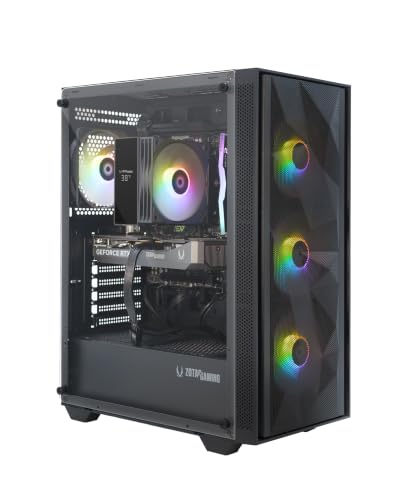
Best Mid-Range — ZOTAC MEK Gaming PC (Ryzen 5 5500, RTX 5060)
Strengths
- An RTX 5060 with GDDR7 memory is current-generation graphics with DLSS support — the strongest GPU story in the mid tier here
- A 650W 80+ Gold power supply is properly specified, not a corner cut, which protects the whole system
- WiFi 6E is the newest wireless standard in this roundup, useful if your router supports it
Trade-offs
- The Ryzen 5 5500 is a generation behind the 8700F machines; in CPU-heavy simulation and strategy games it will show
- DDR4 memory again means the platform, not the GPU, is what ages first
- ZOTAC’s prebuilt support network is smaller than the biggest brands’, though the company is a long-standing graphics specialist
| Component | Specification (verified) |
|---|---|
| Processor | AMD Ryzen 5 5500 |
| Graphics | GeForce RTX 5060 8GB |
| Memory | 16GB DDR4 |
| Storage | 1TB NVMe SSD |
| Other | 650W 80+ Gold PSU; WiFi 6E; Windows 11 Home; GDDR7 memory |
A buyer who wants current-generation graphics and DLSS in a mid-tier tower, and mostly plays GPU-bound titles at 1080p.
If we had to name the specification we would hand a typical buyer in 2026, it would look like this: a current-generation 60-class NVIDIA card with modern memory, a terabyte of storage, a Gold-rated 650W power supply and fast wireless. The ZOTAC MEK is that specification. Its compromises are generational rather than cynical — a Ryzen 5 5500 and DDR4 memory are yesterday’s platform, not cut corners — and at 1080p their practical cost is small today, growing only when upgrade day eventually arrives. For a buyer who plays GPU-bound games and wants the newest graphics features at a mid price, this is the review to underline.
The CPU is the modest part of the spec; competitive players chasing extremely high frame rates in CPU-bound esports titles should step up to an 8700F machine.
Best for: the buyer in the description above. / Not suited for: buyers whose monitor, library or budget contradicts it — see the trade-offs.

Best Intel Option — CyberPowerPC Gamer Xtreme (Intel Core i5-14400F, RTX 5060)
Strengths
- The Intel route in a sea of Ryzen machines: the i5-14400F is a strong, efficient gaming CPU on a current DDR5 platform
- RTX 5060 graphics with DLSS keeps demanding games smooth at 1080p high settings
- CyberPowerPC’s scale means documentation, drivers and community answers for this exact model are easy to find
Trade-offs
- 16GB of RAM is the standard caveat for streamers and heavy multitaskers
- Intel’s platform path differs from AMD’s — compare upgrade plans before committing to either camp
- As with all 5060-class machines, it is more than a basic 60Hz monitor can display
| Component | Specification (verified) |
|---|---|
| Processor | Intel Core i5-14400F |
| Graphics | GeForce RTX 5060 8GB |
| Memory | 16GB DDR5 |
| Storage | 1TB PCIe 4.0 SSD |
| Other | WiFi ready; Windows 11 Home; model GXiVR8060A47 |
A buyer who prefers Intel, or simply wants a current-platform, current-GPU tower from a major builder with no weak line in the spec.
Every roundup needs its control sample, and the Gamer Xtreme is ours: the Intel-platform, RTX 5060 machine against which the AMD builds are compared. The i5-14400F is an efficient, modern gaming processor, the DDR5 platform gives it the same upgrade future as the Ryzen 8000-series machines, and CyberPowerPC’s scale brings the quiet benefits of volume — documentation, community knowledge, parts availability. There is no single headline here, and that is the headline: a current, balanced, big-builder tower with no line in its specification that requires an apology.
No single flaw — the caveats are the shared ones of its tier: memory size and a monitor that needs to be high-refresh to do it justice.
Best for: the buyer in the description above. / Not suited for: buyers whose monitor, library or budget contradicts it — see the trade-offs.


Best Overall — KOTIN Gaming PC Desktop (Ryzen 7 8700F, RTX 5060 Ti, 32GB)
Strengths
- This is the no-compromise configuration in the roundup: top CPU tier, top GPU tier and 32GB of DDR5 in one tower
- 32GB of memory removes the one caveat attached to the other 5060 Ti machines — streaming, mods and multitasking are all covered
- DLSS 4 and a 650W Gold PSU give it both performance longevity and upgrade headroom
Trade-offs
- It is the most machine here, and priced like it — at a 1080p monitor much of its power is reserve capacity
- If you never stream, mod or multitask, the 16GB version delivers the same in-game frame rates
- ARGB showpiece presentation will not suit every room
| Component | Specification (verified) |
|---|---|
| Processor | AMD Ryzen 7 8700F |
| Graphics | GeForce RTX 5060 Ti 8GB |
| Memory | 32GB DDR5 |
| Storage | 1TB SSD |
| Other | WiFi 6; Windows 11 Home; DLSS 4; ARGB cooling; 650W Gold PSU |
A streamer, creator or heavy multitasker who wants the strongest 1080p machine in this list and a real option on 1440p later.
This is the configuration the other reviews keep gesturing at. Take the premium formula — 8700F, RTX 5060 Ti, DDR5, Gold-rated power supply — and remove its one asterisk by doubling the memory to 32GB, and the result is a machine with no configuration-level criticism left to make at this resolution. Streamers can stream, modders can mod, multitaskers can leave everything open, and the graphics card still has 1440p in its pocket for a future monitor. The only remaining question is budgetary, and it is a real one: pure gamers will never use the extra memory, and for them the 16GB sibling delivers identical frame rates. Buy this one for the whole workload, not just the games.
The limitation is economic, not technical: you pay for headroom that pure 1080p gaming alone will not use.
Best for: the buyer in the description above. / Not suited for: buyers whose monitor, library or budget contradicts it — see the trade-offs.
Comparison Table
| Machine | Processor | Graphics | Memory | Storage |
|---|---|---|---|---|
| WIWB Gaming PC Desktop (Ryzen 5 5500, RX 6500 XT) | AMD Ryzen 5 5500 | Radeon RX 6500 XT | 16GB DDR4 | 512GB SSD |
| HP OMEN Gaming Desktop (Ryzen 7 5700X, GTX 1660 Super) | AMD Ryzen 7 5700X | GeForce GTX 1660 Super 6GB | 16GB RAM | 512GB PCIe SSD |
| ZYNEEX Prebuilt Gaming Desktop (Ryzen 5 5500, RTX 3050) | AMD Ryzen 5 5500 | GeForce RTX 3050 6GB | 16GB DDR4 3200MHz | 1TB NVMe SSD |
| ZOTAC MEK Gaming PC (Ryzen 5 5500, RTX 5060) | AMD Ryzen 5 5500 | GeForce RTX 5060 8GB | 16GB DDR4 | 1TB NVMe SSD |
| CyberPowerPC Gamer Xtreme (Intel Core i5-14400F, RTX 5060) | Intel Core i5-14400F | GeForce RTX 5060 8GB | 16GB DDR5 | 1TB PCIe 4.0 SSD |
| KOTIN Gaming PC Desktop (Ryzen 7 8700F, RTX 5060 Ti, 32GB) | AMD Ryzen 7 8700F | GeForce RTX 5060 Ti 8GB | 32GB DDR5 | 1TB SSD |
Read the table vertically and the roundup’s story tells itself: graphics generations climb from the RX 6500 XT and GTX 1660 Super through the RTX 3050 to the 5060 class; memory doubles exactly once, at the top; storage doubles early and stays doubled. The two older-GPU machines (the WIWB and the OMEN) remain recommendable because their positioning is honest and their supporting specifications are sound — proof that our objection to ageing hardware is about pricing and marketing, not about the hardware’s existence.
How to Choose Among These Six
Match the monitor first. On a 60Hz or 75Hz display, the first three machines cover every need in this roundup, and spending beyond them buys invisible frames. On a 144Hz or faster display, start at the ZOTAC and CyberPowerPC and let your other work decide between them: Intel or AMD platform preference, and whether the KOTIN’s 32GB and 5060 Ti justify themselves through streaming, modding or a planned 1440p move. Then match the library: esports-heavy readers should weight the entry reviews more generously than their tier suggests, because those games flatter modest hardware; day-one AAA readers should treat the mid tier as their floor. Finally, sanity-check the complete system budget — tower, monitor, peripherals — because the best system in this roundup is a mid-tier tower behind a great 144Hz monitor, not a premium tower behind an old office screen. Our full decision framework is in How To Choose A 1080p Gaming PC, and once the machine arrives, How To Set Up 1080p Gaming PC gets it configured correctly on the first evening.
Common Mistakes When Reading Gaming PC Reviews
- Comparing machines across tiers as if they were rivals. A budget tower is not a failed premium tower. Judge each against its own class and your own monitor.
- Skipping the trade-offs. Every machine here has them printed. The right purchase is the one whose trade-offs you genuinely do not care about.
- Anchoring on a price you saw last month. Prebuilt pricing moves constantly. Verify the current figure for the exact configuration before deciding anything.
- Assuming the strongest GPU wins. Storage, memory, power supply and platform decide daily satisfaction and upgrade options; the comparison table exists to keep them visible.
- Forgetting the variant trap. Listings host sibling configurations under similar names. Confirm CPU, GPU, RAM and storage on the final page before ordering.
Final Recommendation
Forced to hand out one default recommendation from these reviews, we give it to the mid tier — the ZOTAC MEK and CyberPowerPC Gamer Xtreme — because current-generation graphics, a terabyte of storage and properly rated power supplies make them the machines least likely to be replaced early or regretted at any point. The KOTIN 32GB configuration is the roundup’s best machine outright, and the correct buy for streamers, heavy multitaskers and future 1440p planners. At the other end, the WIWB and ZYNEEX prove that the entry tier, bought honestly, is a pleasure rather than a compromise. That spread — no bad machines, clear reasons to choose each — is what a healthy category looks like, and it is why 1080p remains the easiest resolution in PC gaming to buy well.
Also Considered: the Machines That Just Missed the Main Six
A roundup’s credibility lives as much in its exclusions as its inclusions, so here are the verified machines that were assessed for this page and where each one lands. The Skytech Azure 3 pairs a Ryzen 7 5700 with an RTX 5060, a terabyte of storage and a 650W Gold power supply from an established prebuilt specialist; it missed the main six only because the ZOTAC and CyberPowerPC cover its tier with newer platforms, and its Wi-Fi 5 — a generation behind — is the small print to know. The YAWYORE tower, a Ryzen 7 5700X with an RTX 5060 and a generous 32GB of memory, is arguably the multitasker’s mid-tier pick and was a genuine finalist; buyers who stream or mod should treat it as a co-equal of the main six rather than a reject. The second CyberPowerPC in the wider list, the Gamer Master with the same 8700F and 5060 Ti core as our premium tier, is the like-for-like alternative to the KOTIN for buyers who prefer a high-volume builder’s support ecosystem.
Further down the tiers, the BYTE DEPOT Gamer Xtreme is the roundup’s most interesting specialist: an Intel Core i7 machine with 32GB of memory, a terabyte of storage, Windows 11 Pro and an RTX 3050 — the configuration for the buyer whose day job shares the machine, discussed with real respect in our buying guide’s tier analysis. The white WIWB tower and the second LXZ configuration cover the same entry ground as our budget pick with different casings and processor pairings; either is a reasonable buy at the right day’s pricing. At the very bottom, the Volt tower built around a GTX 1070 and the LXZ machine built around an RX 580 represent the previous era’s hardware still on sale: functional for older and lighter libraries, priced correctly only when they are priced as what they are. And the integrated-graphics listings that fill this category were excluded without a review, as a matter of policy explained in our pros and cons ledger: a tower with no graphics card is not a gaming PC that scored badly, it is a different product wearing the category’s clothes.
What Each Tier Feels Like Day to Day
Specifications describe machines; routines describe ownership, so here is the honest translation. On the entry machines — the WIWB and ZYNEEX class — the daily feeling is: everything popular plays well, the newest flagship asks for settings judgment, the SSD makes the machine feel quick in every non-gaming moment, and storage management is a mild background chore if you chose 512GB. On the mid machines — ZOTAC and CyberPowerPC class — the feeling changes in kind rather than degree: settings menus become a formality, the frame counter stops being a thing you check, and the machine disappears into the games for years at a time. On the premium KOTIN, the feeling is the mid tier’s, plus the absence of a ceiling: streaming, recording, modding and multitasking stop being negotiations, and the only remaining question the machine ever asks you is whether the monitor deserves an upgrade. Buyers choosing between tiers should choose between those routines, not between benchmark charts — the routine is what you purchased.
One cross-tier observation from assembling this roundup deserves emphasis: the supporting specifications have quietly become the differentiators. A decade ago, budget towers cut the graphics card and premium ones flaunted it; today the graphics tiers are predictable, and the machines separate themselves on storage size, memory generosity, power-supply honesty and wireless standards — the lines of the specification that decide daily satisfaction and upgrade options. That is why every review above prints a full specification table and why the trade-offs sections dwell on PSUs and platforms. The category has matured, and reviewing it properly means reviewing the whole machine.
A Note on Pricing and Timing
These reviews deliberately contain no prices, and this note explains the discipline so readers can apply it themselves. Prebuilt pricing moves with component costs, retailer events and simple competition between near-identical listings, sometimes weekly; a figure printed in a review is a rumour by the following month, and buying decisions anchored to stale numbers are how readers overpay for last month’s bargain. The durable information is the tier structure and the specification relationships — which machine is the entry point, which is the sweet spot, what the premium adds and what it costs in relative terms — because those relationships hold while individual prices dance around them. The practical routine: shortlist from reviews like these, then compare the exact configurations’ current prices on the day you buy, and let that day’s arithmetic arbitrate between near-equals such as the ZOTAC and the CyberPowerPC. If one of two equivalent machines is meaningfully cheaper on your day, that is not a compromise; that is the market working, and you should take the win without second-guessing the review that shortlisted both.
How the Rankings Would Change for Different Readers
A roundup that ranks for one imaginary reader serves nobody, so here is how this page’s order flexes for the readers we actually hear from. For the streamer, the KOTIN 32GB configuration’s lead grows, the YAWYORE from our also-considered list climbs into the main six on memory alone, and every 16GB machine’s trade-off section deserves a second read. For the purely competitive player, the ranking inverts at the top: the entry machines deliver the relevant experience, the premium tier’s advantages are invisible in their titles, and the correct “best overall” for their library is the WIWB or the ZYNEEX with the savings spent on the fastest monitor the desk can hold. For the buyer whose machine is also the household’s computer, the HP OMEN’s completeness and support climb sharply, and the BYTE DEPOT’s Windows 11 Pro and 32GB configuration becomes a main-six machine rather than a specialist mention. For the upgrader — the buyer explicitly purchasing a five-year platform — the DDR5 machines (KOTIN, CyberPowerPC, MSI class) separate from the field, and the DDR4 machines’ trade-offs, gentle for everyone else, become the deciding factor. Rankings are arguments, not facts; these are the same reviews, re-argued for four honest briefs, and the machine that wins yours is the one whose strengths match the brief you actually live.
What We Would Buy With Our Own Money, Stated Plainly
Reviewers are often asked the question directly, so here it is answered directly, with the reasoning exposed. For a single default purchase — one machine, mixed library, 144Hz monitor, no streaming — we would buy from the mid tier: the ZOTAC MEK or the CyberPowerPC Gamer Xtreme, decided by the day’s pricing between them, because that specification is the point where additional spending stops buying visible experience at this resolution. For a machine intended to be kept and upgraded for the longest possible time, we would buy the KOTIN 32GB configuration and consider the premium a platform fee, paid once, that converts every future improvement into a component swap. For a first machine on a strict budget, we would buy the ZYNEEX for its storage and DLSS, or the WIWB if the budget would not stretch, and we would buy either without the slightest sense of having settled — the entry tier of this category, honestly specified, is a genuinely good gaming experience that a decade ago would have required a flagship. Three answers for three briefs, none of them evasive: that is what a roundup owes its readers, and it is why the trade-offs in every review above were written before the strengths were finalised.
Longevity Forecast: How This Roundup Ages
Reviews are read on the day they are published and acted on for months afterwards, so a responsible roundup should say how its judgments are expected to age. The structural calls here are durable: the tier relationships — entry honesty, mid-tier sweet spot, premium headroom — will hold as long as the current graphics generations are on sale, because they are relationships rather than prices. The machines most likely to age out of recommendation first are the older-GPU entries, the GTX 1660 Super class, whose lack of modern upscaling gives them the shortest runway in new releases; they are recommended today for defined libraries, and that definition will narrow year by year. The machines most likely to be recommended longest are the DDR5-platform, current-graphics configurations — the KOTIN and CyberPowerPC class — whose upscaling support and upgrade paths are built for exactly the future that is coming. The mid-tier RTX 5060 machines on DDR4 platforms sit between: their graphics will age gracefully while their platforms will not accept new processors, making them excellent four-year machines rather than six-year platforms. Readers returning to this roundup in a year’s time should trust the tier logic completely, re-verify individual listings’ current configurations — prebuilts are revised silently — and apply the day’s pricing to the same shortlist method. The method is the durable product; the models are its current examples.
The Roundup’s Own Trade-Offs: What This Format Cannot Tell You
Honesty about method belongs in a roundup’s closing pages. A reviews roundup compares specifications, positioning and value across machines; it cannot tell you how a specific unit’s fans sound in your room, how a builder’s support treats your specific problem, or what any machine costs on the specific day you buy — and those three unknowns are real components of a purchase. Our mitigations are stated rather than hidden: specifications are verified rather than repeated from marketing, positioning is judged against the manufacturer’s own claims, and pricing is deliberately excluded so that no stale figure can masquerade as a finding. What remains for the reader is the final ten percent of diligence that no publication can perform on their behalf: read recent owner reports for the exact model, confirm the warranty terms on the product page, and check the exact configuration’s price on the day. A roundup that has done its ninety percent and says so is more useful than one claiming a hundred — and the ninety percent here is consistent: six machines, no weak specifications, clear tiers, and trade-offs printed where praise would have been easier.
The Roundup in One Paragraph Per Reader
For the reader who arrived with a decision to make and limited patience, the whole roundup compresses honestly. Budget buyer: the WIWB for pure entry value, the ZYNEEX if storage and DLSS matter — both honest, neither a trap. Family buyer: the HP OMEN, because completeness and support are features when the buyer is not the user. Value buyer: the ZOTAC MEK, the specification this roundup would hand a friend. Platform buyer: the CyberPowerPC Gamer Xtreme, current Intel hardware from a builder of scale. Multitasker and streamer: the KOTIN 32GB, the only machine here with nothing left to upgrade on day one. Everyone else — the large middle of the market with a high-refresh monitor and a mixed library — should shortlist the ZOTAC and the CyberPowerPC, compare their exact configurations’ prices today, and buy the cheaper of two genuinely equivalent excellences. Six reviews, six trade-off sections and one comparison table exist to justify those sentences; the sentences exist so that the justification is available at the speed of an actual purchase. Both speeds are legitimate, and this page has tried to serve them equally.
How to Use This Roundup on the Day You Buy
A closing piece of practical choreography, because roundups are read in armchairs and acted on in checkouts. On the day: open the product pages for your two finalists from this page’s links, and before looking at any price, re-verify the four configuration lines that define each machine — processor model, graphics card, memory size, storage size — against the review above, because listings are revised and variants multiply. Then look at the prices, and let them arbitrate only between machines the reviews have already certified as equivalents for your brief. Check the delivery and return terms with the same two minutes of attention you gave the warranty discussion, and place the order in the morning of a day when the machine’s first fortnight of heavy use can actually happen — a tower that arrives before a holiday and sits unopened is a return window wasted. When it arrives, this cluster’s setup guide takes over, step by step, from the box to the first verified session. Reviews end; ownership begins; and the measure of a roundup is not how it reads today but how the machine it chose is performing in year three. On the evidence assembled here — verified specifications, honest tiers, trade-offs in print — these six were chosen to be performing very well indeed.
Afterword: the Roundup’s Confession
Every roundup secretly believes one of its picks will be discontinued first, one will be discounted into a bargain, and one will be revised into a slightly worse machine wearing the same name — and none of that invalidates the work, because the reviews were written against specifications and tiers rather than against a frozen market. Readers who return to this page across the coming months should treat it as a map whose roads are accurate even where individual buildings change: verify the exact configuration, apply the tier logic, and the roundup will keep making correct decisions long after its examples have been superseded. That is the most any honest roundup can promise, and this one promises it on the record.
One sentence more, because it is the sentence readers actually act on: shortlist two, verify the configurations, compare today’s prices, and buy — the difference between the right machine and the perfect machine is smaller than the value of the month spent hunting for it.
Frequently Asked Questions
Which of these 1080p gaming PCs is best overall?
The KOTIN configuration with 32GB of DDR5 and an RTX 5060 Ti is the strongest machine reviewed, with no weak line in its specification. Whether it is best for you depends on workload: pure gamers get identical frame rates from its 16GB sibling, and mid-tier machines satisfy most buyers for less.
What is the best budget 1080p gaming PC here?
The WIWB tower with a Ryzen 5 5500 and RX 6500 XT is the honest entry point, and the ZYNEEX is the budget pick we would stretch to for its terabyte of storage and DLSS-capable RTX 3050.
Are the older graphics cards in this roundup worth buying?
The GTX 1660 Super in the HP OMEN remains fine for esports and established titles, and the machine around it is well supported. Buy it for what it is — a complete, supported package — not as a max-settings machine for new releases.
AMD or Intel for a 1080p gaming PC?
Both platforms in this roundup perform excellently at 1080p. Choose by the total specification and your upgrade preferences: the Ryzen 8700F and Core i5-14400F machines here are effectively peers for gaming, separated by platform ecosystems rather than frame rates.
How much storage do I need in 2026?
1TB is the comfortable standard and the size most machines here ship with. 512GB works for small or esports-focused libraries, with a second drive as an easy later addition in a tower case.
Do these reviews include prices?
Deliberately not. Prebuilt prices change too frequently for a printed figure to stay honest, so each review links to the exact configuration for the current price instead. Judge value by tier and specification, which change slowly, rather than by a number that changes weekly.
Can I trust prebuilt reviews that use affiliate links?
Judge any review by whether it prints the weaknesses. Every machine here carries a trade-offs section written to the same standard as its strengths, and our selection excluded popular listings that failed basic specification checks — which is what editorial independence looks like in practice.

