Disclosure: As an Amazon Associate, reviewstook.com earns from qualifying purchases. Links on this page are affiliate links at no extra cost to you; prices and availability change frequently, so check Amazon for the latest.
Workstation PC Pros and Cons: The Honest Ledger
Every buying decision has two columns, and workstation PCs have a more interesting ledger than most. The workstation PC pros and cons do not line up as good versus bad so much as insurance versus cost: nearly everything in the pros column is a form of assurance — certified drivers, error-correcting memory, sustained performance, business support — and nearly everything in the cons column is the price of that assurance, in money, in flexibility or in both. Whether the ledger balances depends entirely on whether your work ever cashes the insurance in. This article works through both columns honestly, with real machines as evidence, so you can decide with your workload in front of you rather than a vendor’s brochure.
Two companion pieces bracket this one. The Workstation PC Buying Guide turns a positive decision into a specification, and Is A Workstation PC Worth It asks the money question directly. This page is the weighing itself — the advantages a workstation genuinely delivers, the disadvantages buyers genuinely discover, and the middle cases where the honest answer is ‘it depends, and here is what it depends on.’ If you are cross-shopping against ordinary desktops at fixed budgets, the tiered lists such as Best Workstation PC Under $800 show what the workstation premium buys at a given tier once the decision is made. Read it with a pencil if you can.
In this guide
The Pros: What a Workstation PC Genuinely Does Better
Pro 1: Sustained performance under real professional loads
A workstation is engineered for the fourth hour of a render, not the first ninety seconds of a benchmark. Cooling, power delivery and component selection are all aimed at holding performance under loads that run for hours or days, and that consistency is the least advertised and most professionally valuable trait in the category. Consumer machines are optimised for burst responsiveness and headline numbers; workstations are optimised for Tuesday’s deadline behaving exactly like Monday’s test. Anyone whose work involves long renders, big compiles, simulations or overnight batch jobs has felt the difference, usually by owning the wrong machine first.
Pro 2: Certified graphics and a support path that knows your software
For CAD and engineering professionals, this is the pro that justifies the category on its own. Professional GPUs — the RTX Ada and RTX PRO families, and Quadro cards before them — ship with drivers that application vendors have tested and certified against specific software versions. When a viewport corrupts or a feature misbehaves, ‘certified configuration’ is the difference between a support case that gets solved and a shrug. No consumer card, however fast, buys that. It is also a genuinely bounded pro: it only exists if your software is on a certification list, which is why this article keeps returning to the workload as the arbiter.
Pro 3: Memory capacity and ECC correctness
Workstations treat memory as a professional resource: capacities of 64GB, 128GB and far beyond are normal configurations rather than exotic options, and professional platforms add ECC — error-correcting memory that detects and fixes the random bit errors any large memory array accumulates. For long, unattended, correctness-sensitive work, ECC converts a silent corruption risk into a logged non-event. Even without ECC, the sheer capacity headroom changes working life: large assemblies, datasets, virtual machines and local AI models stop being negotiations with the swap file. Several machines in the shortlist below ship with 128GB or more because the professional market has voted on this point with its orders.
Pro 4: Build quality, serviceability and business support
Workstation lines are built for fleets: tool-less chassis, standard parts, published service manuals, diagnostics baked into firmware, and support organisations that expect the caller to be a professional with a deadline. The practical yield is a machine that is easier to maintain, easier to upgrade and easier to get help with — and, in the renewed market, a machine that survives its first corporate life with enough integrity to be worth buying for a second one. The entire renewed-workstation value case, represented below by the HP Z4 G4 and the Precision T5810, rests on this pro: these machines were built well enough that age matters less than it should.
Pro 5: Expansion and longevity
A tower workstation is a platform, not a snapshot: PCIe slots for future graphics and accelerators, bays for storage growth, memory slots for capacity growth, power supplies sized for all of it. Bought with headroom, a workstation amortises over four to six years of professional life, absorbing upgrades that would force a lesser machine’s replacement. Longevity is also an economic pro — the cheapest workstation is usually the one you do not have to replace in year three — and an environmental one, for buyers who count such things. The honest caveat, developed in the cons, is that this pro belongs to towers; sealed compact machines trade it away deliberately.
The Cons: What a Workstation PC Genuinely Costs You
Con 1: The price premium is real, and part of it buys things you may never use
Workstations cost more than consumer desktops of similar headline speed, and the premium is itemised in the pros above: certification programmes, ECC platforms, business support, conservative engineering. If your work never invokes certification, never runs long enough to fear a bit error, and never calls support, you have paid for insurance you did not need — competently built insurance, but unused all the same. This is the single most common workstation regret, and it is a buying error, not a product flaw: the machine did exactly what it promised, for a buyer who never needed the promise.
Con 2: Raw performance per unit of money can favour consumer hardware
Professional graphics carry professional pricing, and for GPU-agnostic work — Blender rendering, video editing, game development, most AI experimentation — a consumer card typically delivers more frames and faster renders for the same spend. The same applies at the extremes of CPU pricing, where flagship workstation platforms charge heavily for core counts that only parallel workloads can use. A buyer whose software is indifferent to certification and ECC should run the consumer comparison honestly before paying the workstation premium; sometimes the ledger’s answer is a fast consumer machine and money left over for storage and displays.
Con 3: Size, noise and power are professional-grade too
Full workstations are large, and under sustained load they are audible and warm. A tower built to cool a flagship processor and professional GPU through a summer render is not a silent desk ornament, and dual-socket or Threadripper-class machines draw power like the industrial tools they are. Home-office buyers, small-room buyers and anyone sensitive to noise should count this con at full weight. The compact end of the market answers it — the mini workstations in the shortlist are quiet and tiny by comparison — but they answer it by surrendering the expansion pro, which is the category’s eternal trade in miniature.
Con 4: The renewed market’s configuration lottery
Renewed workstations are the category’s great value and its great caveat in one. The same model name covers different processors, memory capacities, storage and graphics across sellers and listing options; cosmetic condition and testing standards vary; the warranty is the seller’s, not the original manufacturer’s. None of this is hidden, but all of it is on the buyer to verify. Professionals who run the verification discipline get remarkable machines for the money. Buyers who order on the headline get a lottery ticket. The T5810 below is the honest emblem of this con: a 12-core Xeon workstation that ships, per its listing, with no operating system — a perfectly good purchase for a prepared buyer and a nasty surprise for an unprepared one.
Con 5: Capability you cannot grow into
The mirror image of the expansion pro: some modern workstations — chiefly the compact AI machines — are sealed propositions. Memory is soldered, graphics are integrated, and the configuration you buy is the configuration you retire. Bought at the right capacity, that is no flaw at all; the machines are fast, quiet and complete. Bought optimistically, it converts a growing workload into a replacement purchase. The con is not the sealing; it is the mismatch between a fixed machine and an unfixed future, and it is entirely avoidable at the moment of purchase by buying the capacity the next three years need.
The Ledger, Machine by Machine
Abstract pros and cons persuade nobody, so here is the ledger applied to six verified machines — each one a case where the balance tips a different way. All were checked against Amazon’s product data on 2026-11-20.

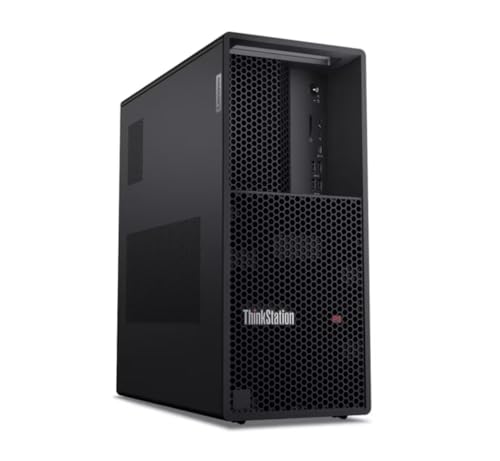
The Assurance Buy — Lenovo ThinkStation P3 Tower Gen 2
Strengths
- Flagship Core Ultra 9 vPro processor, 128GB of memory and Gen 5 storage: the full professional stack, current generation
- vPro management and Lenovo’s workstation support embody the category’s support pro
- A tower platform keeps the expansion and longevity pros intact
Trade-offs
- No discrete professional GPU in this configuration — the certification pro must be added via the RTX 4000 Ada variant
- Premium positioning: buyers who never use the assurance are paying for the category’s most expensive con
- Full-size tower, with the size and presence that implies
| Processor | Intel Core Ultra 9 285 vPro |
|---|---|
| Memory | 128GB DDR5 4400MHz |
| Storage | 2TB NVMe Gen 5 SSD |
| Networking | Wi-Fi 7 |
| Operating system | Windows 11 Pro |
The P3 Tower Gen 2 in this configuration is the pros column in hardware form: current platform, deep memory, fast storage, business management and support. Its ledger balances for professionals whose work is CPU- and memory-led and whose employers or clients value the support structure — the assurance is the product.
Its honest weakness is the mirror of Con 1 and the graphics question: without the professional GPU fitted, the certification pro is potential rather than actual, and buyers should either step to the graphics configuration or be sure their software never asked. Judged as a platform purchase with a long life ahead of it, the balance is strongly positive.
Best for: CPU- and memory-led professionals who value platform and support / Not suited for: buyers paying the premium for certification they will not fit or use

The Compact AI Case — GEEKOM A9 Mega AI Workstation PC
Strengths
- Ryzen AI Max+ 395 with 128GB of fast unified memory is a local-AI configuration few towers match at any size
- 126 TOPS of local AI performance per the listing, in a machine that disappears on a desk
- Dual 2.5GbE networking, USB4 and Wi-Fi 7 give it connectivity beyond its size class
Trade-offs
- Con 5 in full: soldered memory and integrated graphics mean zero internal growth
- No certified professional graphics path — the certification pro is simply absent
- Sustained loads in a compact chassis will be audible and warm relative to a tower
| Processor | AMD Ryzen AI Max+ 395 |
|---|---|
| Graphics | Radeon 8060S integrated |
| Memory | 128GB LPDDR5X 8000MHz |
| Storage | 2TB SSD |
| AI performance | 126 TOPS local AI (per listing) |
| Networking | Dual 2.5GbE, Wi-Fi 7 |
| Ports | USB4 |
The A9 Mega is the clearest modern argument that the workstation category is changing shape. Its pros are the new ones — unified memory for AI, flagship efficiency, minimal footprint — and its cons are the new ones too: a sealed configuration whose 128GB must be right not just now but for the machine’s whole life.
For the local-AI developer, the ledger is not close: the capability per unit of desk is remarkable, and the tower alternative buys expansion the buyer may never use. For the CAD professional, the same ledger fails at the certification line. Same machine, opposite verdicts — which is the thesis of this entire article.
Best for: local AI development and heavy work in minimal space / Not suited for: certified CAD work or any plan that involves internal upgrades

The Renewed Value Case — HP Z4 G4 Workstation (Renewed)
Strengths
- The build-quality pro, verified by survival: a Xeon workstation platform still working professionally years on
- 64GB of memory and professional graphics lineage at renewed entry positioning
- Two-tier storage already fitted, Windows 11 Pro included
Trade-offs
- The configuration-lottery con applies: verify the exact unit class, condition and returns
- Previous-generation per-core speed and a display-class Quadro card bound its ambitions
- Seller warranty replaces manufacturer support — the support pro is diluted
| Processor | Intel Xeon W-2133, 6-core, up to 3.9GHz |
|---|---|
| Memory | 64GB DDR4 |
| Storage | 512GB NVMe SSD + 2TB HDD |
| Graphics | NVIDIA Quadro P400 2GB |
| Operating system | Windows 11 Pro |
| Condition | Renewed |
The Z4 G4’s ledger is the renewed market in one machine. The pros are inherited — platform, memory, build — and the cons are transactional: age, verification burden, a thinner support story. For buyers who run the checks, the balance is among the best value propositions in this article.
It is also the machine that most punishes carelessness, because every one of its cons is a surprise only to buyers who did not read the listing. Read it, verify on arrival, and the Z4 is a professional tool at a hobbyist’s entry price. Skip the reading and the same machine becomes the cautionary tale in someone else’s pros-and-cons article.
Best for: value-led professionals and studios willing to verify what they buy / Not suited for: buyers who want a purchase that requires no diligence at all
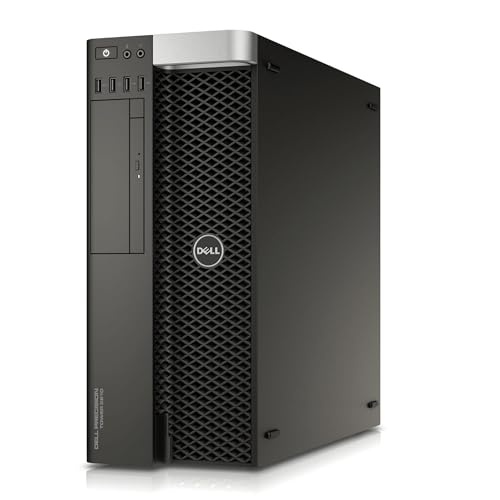
The Prepared-Buyer’s Machine — Dell Precision T5810 (Renewed)
Strengths
- 12-core Xeon and 64GB of memory deliver real parallel throughput at renewed prices
- Precision build quality and a proper workstation chassis with room to add storage and graphics
- An honest listing: what it is and is not is stated plainly for buyers who read it
Trade-offs
- Ships with no operating system, per the listing — budget the time or licence to make it a working machine
- The Quadro NVS 315 is a display card only; any GPU work requires an upgrade on arrival
- An older platform with the power draw and noise of its era
| Processor | Intel Xeon E5-2680 v3, 12 cores, 2.5GHz |
|---|---|
| Memory | 64GB DDR4 |
| Storage | 480GB SSD |
| Graphics | NVIDIA Quadro NVS 315 |
| Operating system | None included |
| Condition | Renewed |
The T5810 is included because it is the cons column’s best teacher. Every drawback is declared in its own listing: no operating system, a display-class graphics card, a previous-generation platform. A prepared buyer — a Linux workstation builder, a home-lab builder, a render-node builder — reads that list as a specification and buys happily. An unprepared buyer reads the words ’12-core workstation’ and buys a project they did not intend.
That is not a flaw in the machine; it is the renewed market’s nature, printed in plain sight. Its presence in this article is the argument for the verification habit, made concrete.
Best for: Linux builders, home labs and parallel-work buyers who prepare properly / Not suited for: anyone expecting a finished, supported machine out of the box

The Sealed Flagship Mini — MINISFORUM MS-S1 MAX (128GB)
Strengths
- 128GB of LPDDR5x unified memory and a 16-core AI Max+ processor: flagship capability, mini footprint
- PCIe x16 slot and dual 10GbE partially refund the expansion con — rare in this class
- Dual M.2 storage and USB4 v2 keep fast external growth open
Trade-offs
- The memory is soldered at purchase: 128GB is generous, and it is also final
- Integrated RDNA graphics are strong, not certified — the CAD ledger fails here
- Flagship mini pricing competes with towers that offer more growth
| Processor | AMD Ryzen AI Max+ 395, 16 cores / 32 threads |
|---|---|
| Graphics | RDNA 3.5 integrated GPU |
| Memory | 128GB LPDDR5x |
| Storage | 2TB SSD, dual M.2 PCIe 4.0 |
| Expansion | PCIe x16 slot |
| Networking | Dual 10GbE, Wi-Fi 7 |
| Ports | USB4 v2 80Gbps |
| Power supply | 320W |
The 128GB MS-S1 MAX answers Con 5 the only way a sealed machine can: by shipping so much memory that the ceiling stops mattering for most buyers’ planning horizons. Add the PCIe slot and genuinely fast networking, and its cons column is the shortest of any compact machine in this article.
What remains is the certification absence and the flagship-mini pricing question — whether this much capability in this little space is worth more to you than a tower’s growth path. For AI-led and development-led buyers the answer is increasingly yes, and this machine is a large part of why.
Best for: AI and development professionals who want maximum compact capability / Not suited for: certified-graphics buyers and staged-upgrade planners

The Quiet Pragmatist — Dell OptiPlex 7070 SFF (Renewed)
Strengths
- Eight-core i7, 32GB of memory and a 1TB NVMe drive pass every floor a light professional workload sets
- Small, quiet and deployable anywhere, with Wi-Fi 6E and Windows 11 Pro
- Renewed pricing makes it a rational second seat or starter machine
Trade-offs
- Integrated graphics bound it to light visual work — the GPU pros never arrive
- An 8th-generation platform’s ceiling is visible in heavy or parallel work
- Renewed verification applies, as with every machine in this class
| Processor | Intel Core i7-9700, 8 cores, up to 4.70GHz |
|---|---|
| Memory | 32GB DDR4 |
| Storage | 1TB NVMe M.2 SSD |
| Networking | Wi-Fi 6E (AX210) |
| Operating system | Windows 11 Pro |
| Included | Wireless keyboard and mouse |
| Condition | Renewed |
The OptiPlex 7070’s ledger is the shortest in this article because its ambitions are the most honest: it does not claim the certification pro, the expansion pro or the flagship pros at all. What it offers — a properly specified, quiet, professional small machine at renewed money — it delivers completely.
Its inclusion is a reminder that the pros-and-cons question is always relative to a job. Judged as a flagship, it fails. Judged as the second seat, the office-plus machine or the first professional desktop, its balance sheet is cleaner than machines costing several times more.
Best for: second seats, office-plus professionals and quiet-desk buyers / Not suited for: primary 3D, rendering or AI workloads
Where to Buy
All six machines above are sold through Amazon; the reviewstook.com listings are the exact configurations verified for this article, and each pick links to its listing so you can check the current configuration and terms yourself — a habit this article has recommended roughly once per section.
Lenovo ThinkStation P3 Tower Gen 2 — Check on Amazon
GEEKOM A9 Mega AI Workstation PC — Check on Amazon
HP Z4 G4 Workstation (Renewed) — Check on Amazon
Dell Precision T5810 (Renewed) — Check on Amazon
MINISFORUM MS-S1 MAX (128GB) — Check on Amazon
Dell OptiPlex 7070 SFF (Renewed) — Check on Amazon
Pros and Cons by Buyer: The Same Machine, Four Different Ledgers
The CAD professional’s ledger is the simplest: certification dominates it. A workstation with professional graphics is not competing with a gaming PC on speed; it is competing with the cost of an unsupported configuration failing during a client deadline. For this buyer, Con 1 barely exists — the premium is a support contract that happens to include a computer — and the renewed market’s lottery is the only con that needs managing, usually by buying current or verifying hard. Every other consideration in this article is commentary on a decision the certification list already made.
The video editor and 3D creator’s ledger is the most genuinely contested. Their software is largely certification-free, their workloads are GPU- and storage-hungry, and consumer hardware bids aggressively for their money. The workstation’s surviving pros are sustained performance, memory capacity and build quality; its cons are the graphics premium and the opportunity cost of storage and displays not bought. This buyer should run both configurations to a full system price — tower, storage, displays, backup — before deciding, because the workstation’s case often strengthens when the comparison is honest and complete, and weakens when it is a tower-to-tower beauty contest.
The developer and data professional’s ledger turns on memory and cores. Compilation, containers, virtual machines and datasets reward exactly what workstations sell — capacity, ECC where correctness matters, sustained multi-core performance — and barely touch the graphics question at all. For this buyer the cons shrink to price and physical presence, and the renewed market is unusually kind: yesterday’s many-core Xeon platforms run today’s development stacks very well. The compact AI machines complicate this ledger pleasantly, adding local-model capability that no previous generation of any desktop offered at desk scale.
The small studio equipping several seats has a ledger nobody else has: consistency itself is a pro. Identical machines mean identical behaviour, one support relationship, one spare-parts story and no per-desk surprises. That fleet logic favours workstation lines — new or renewed — over a miscellany of consumer bargains, even when a single consumer machine might win a one-off comparison. The studio’s binding con is capital: the premium multiplies by the seat count, which is why so many studios land on the renewed tier for secondary seats and current workstations for the primary ones. It is not inconsistency; it is the ledger, applied per desk.
The Pros and Cons Nobody Prints on the Box
Resale and second-life value is a quiet pro. Workstation lines hold value in a way consumer desktops do not, precisely because the renewed market exists and trusts the build quality; a workstation retired from a primary seat commonly serves years more as a secondary machine, a render node, a home server or a saleable asset. The machine’s total cost should be reckoned across that whole life, not its first assignment. Relatedly, parts availability is a pro with a long fuse: enterprise lines keep documented, obtainable components for years, which is why a decade-old Precision can still be repaired economically while a same-age consumer tower cannot.
Power consumption is a quiet con that compounds. A workstation under professional load draws professional power, eight or more hours a day, and in warm rooms it also taxes cooling you pay for twice. Buyers running several seats, or one heavy machine around the clock, should count electricity as a line in the ledger — it occasionally justifies the efficient compact machines or a newer platform on running costs alone. Firmware and driver longevity cut both ways: professional lines receive long, conservative support (a stability pro) that can lag consumer features (a freshness con) — the same conservatism, experienced differently depending on whether your priority is that nothing changes or that everything is new.
There is also a psychological line in the ledger, worth naming because it moves real purchases. A workstation feels like a commitment to the work — a tool bought deliberately, specified seriously, expected to last. For professionals whose income runs through the machine, that feeling tracks reality. For buyers purchasing the feeling ahead of the workload, it is the most expensive con in this article, because it cannot be returned. The workload table, once again, is the antidote: it converts identity back into requirements, where the decision belongs.
Workstation vs Gaming PC vs Ordinary Desktop: The Three-Way Ledger
Most buyers are not choosing between a workstation and nothing; they are choosing among three overlapping categories, and a three-way ledger clarifies what a two-way one hides. The ordinary desktop wins on price and simplicity and loses on everything professional: capacity ceilings, no certification path, consumer support, components chosen for cost. It is the correct machine for ordinary work, and the wrong one to stretch into professional duty — the stretch always shows up as a memory ceiling, a throttling afternoon or an unsupported driver.
The gaming PC wins on GPU performance per unit of money and on high-refresh responsiveness, and it draws with the workstation on raw CPU speed in many configurations. It loses on certification, ECC, business support and — in many though not all builds — sustained-load conservatism and serviceability. For certification-free professional work it is a legitimate rival, which is why this article refuses to dismiss it; for certified or correctness-critical work it is not a rival at all, whatever its benchmark numbers say.
The workstation wins exactly where this article’s pros said it would, and pays exactly the cons. The three-way view’s real lesson is that the categories overlap in the middle — a high-end gaming PC and an entry workstation can be near-identical machines wearing different support structures — and in that overlap zone the decision should be made on the support, certification and memory questions rather than on the hardware, because the hardware has already tied. Buyers in the overlap who ask those three questions honestly rarely regret the answer, whichever badge it wears.
How the Balance Shifts Over the Machine’s Life
Pros and cons are not static; they mature at different rates, and a wise buyer weighs the year-three ledger as well as the day-one one. The premium con is paid once, in full, at purchase — and then never again. The assurance pros pay out continuously: every uneventful overnight render, every support call that ends in a solution, every project that fits in memory without negotiation. This asymmetry is why workstation owners so often report satisfaction that puzzles spec-sheet readers: they are not rating the machine’s numbers, they are rating the absence of incidents across thousands of working hours, and absence is invisible in a benchmark table.
Other lines move the other way. The expansion pro decays if it is never used — an unopened tower’s slots are worth nothing at retirement — while the sealed mini’s fixed-configuration con grows teeth only if the workload grows. The renewed machine’s age con compounds slowly: driver support thins, per-core gaps widen, and a machine that was a bargain in year one can be a bottleneck by year four, which is why renewed purchases should be planned as three-year tools rather than six-year ones. The noise and power cons, by contrast, are flat: they cost the same in year four as in week one, and buyers who underestimated them rarely stop resenting them.
The practical use of this time-view is sequencing. If your workload is growing, weight the cons that grow — sealed configurations, ageing platforms — and discount the premium, which shrinks in memory. If your workload is stable and your environment is fixed, weight the flat cons — noise, size, power — and treat expansion promises with suspicion, including your own. A pros-and-cons list read through time stops being a tally and becomes what it should be: a forecast.
When Each Major Con Stops Mattering
It helps to state the exit conditions explicitly. The premium con stops mattering the first time certification, ECC or support saves a deadline — for professionals who face those moments, the question is not whether the insurance pays out but when. The raw-performance con stops mattering when the comparison is made at system level, because the workstation’s memory and platform headroom routinely outlast the gaming machine’s benchmark lead across a working life. The size and noise con stops mattering in a studio, a machine room or any desk where the tower lives out of earshot — one reason the same machine can be unbearable at home and invisible at work.
The renewed-lottery con stops mattering the moment the verification discipline is applied; it is the only con in this article that the buyer can personally abolish. The sealed-configuration con stops mattering when the machine is bought at its final capacity with open eyes — at 128GB of memory, most buyers’ growth anxiety is theoretical. And the capability con — paying for features never used — stops mattering when the buyer runs the workload table before the purchase rather than after it. Notice the pattern: most cons are not properties of machines. They are properties of mismatches, and mismatches are decided at the moment of choosing, which is the one moment this article can still reach.
How to Weigh the Ledger for Your Own Work
Convert this article into a decision with three questions. First: does any application you depend on certify professional graphics? If yes, the pros column wins almost automatically, because no consumer saving compensates for an unsupported configuration in deadline week. Second: does your work run long, unattended or correctness-critical? If yes, ECC, sustained-performance engineering and support stop being luxuries and become the product. Third: is your workload GPU-led but certification-free — editing, Blender, AI experimentation? If yes, run the consumer comparison at full seriousness, because Con 2 is aimed at you, and the workstation premium may genuinely be better spent on storage, displays and backup.
If all three answers are no, you are in the broad professional middle, and the ledger usually resolves to a balanced workstation — new if the budget allows, renewed if it does not — specified generously on memory and modestly on everything else. The worked decision sequence in How To Choose A Workstation PC will take you from those answers to a specific machine, and the streaming-focused shortlist at Best Workstation PC For Streaming Under $1200 shows the ledger applied to one particular workload in detail.
One last weighing tip: count the cost of the con you are accepting, not just its existence. Noise costs a home-office buyer daily and a studio buyer nothing. A sealed configuration costs a growing practice a replacement and a stable practice nothing. The premium costs a certification-free buyer real money and a certified buyer nothing at all, because the alternative was never available. Pros and cons are not tallies to be counted; they are prices to be compared against your own working life.
Common Mistakes in Weighing Workstation Pros and Cons
- Counting pros and cons instead of pricing them against your own workload — five irrelevant pros lose to one decisive con.
- Assuming the certification pro applies to you without checking your software’s certified list.
- Dismissing renewed machines for their cons without running the verification that neutralises most of them.
- Treating a sealed mini’s fixed configuration as a con when your workload is stable — or ignoring it when your workload is growing.
- Comparing a workstation’s price to a gaming PC’s price without comparing what the premium actually buys.
Four Buyers, Four Verdicts: The Ledger Decided
Buyer one is a structural engineer running a certified CAD suite for paying clients. Her ledger has one heavy line — certification — and everything else is rounding. Verdict: a current professional-graphics workstation, bought new, with the premium classified in her accounts as insurance. The cons she accepts (price, size) are the cheapest lines in her working life. Buyer two is a freelance editor cutting 4K commercial work on certification-free software. His ledger is genuinely split: the workstation offers memory, sustained performance and build; the gaming alternative offers more GPU for the money. Verdict: decided at system level — he prices both with the storage and displays he needs, and the workstation’s platform headroom wins by a nose. Either machine would have worked; the method, not the badge, is what he bought.
Buyer three is a developer building a home lab and compile server on a strict budget. Her ledger is dominated by value: cores and memory per unit of money, with certification absent and noise irrelevant in a spare room. Verdict: renewed, verified, unapologetic — a Xeon platform with deep memory, bought with the full verification discipline, delivering professional capability at a fraction of the new price. Buyer four is an AI hobbyist-professional in a one-room flat, experimenting with local models after hours. His ledger is dominated by footprint, noise and unified memory. Verdict: a sealed compact AI machine at full memory capacity — the cons he accepts (no growth, no certification) are ones his workload will never present for payment.
Four buyers, four different correct answers, one shared method. If your own verdict differs from all of theirs, that is not a problem with the ledger; it is the ledger working. What matters is that the lines you weighted heaviest are the lines your working week actually presents — and that you can say, as each of these buyers can, exactly which pro you are paying for and exactly which con you have decided to afford.
Final Recommendation
The workstation ledger balances in favour of the workstation whenever the work is professional in the specific senses this article has used: certified software, long and correctness-critical loads, memory-hungry projects, support that matters. It balances against whenever the work is really just fast general computing wearing a professional title. Neither answer is a judgement on the machines; both are judgements about fit, and fit is the only thing a pros-and-cons analysis can honestly sell you.
If you are still undecided after the three questions, default to the balanced middle — a current tower with generous memory, or its renewed Xeon equivalent — and let the first year of real work teach you which column your next purchase should weight. That default is not a dodge: the balanced workstation is the machine whose pros are the broadest and whose cons are the most evenly survivable, which is precisely what an undecided buyer needs. Decide the memory generously, decide the graphics by your software’s list, and let the rest be ordinary. Readers ready to act will find the specification work done in Workstation PC Buying Guide and the hands-on category view in Workstation PC Reviews; readers still on the money question should go straight to Is A Workstation PC Worth It.
Frequently Asked Questions
What is the biggest advantage of a workstation PC?
Assurance under professional load: sustained performance over hours, certified graphics drivers for professional software, ECC memory options and business support. Any one of those can be decisive for the buyer who needs it; together they are what the workstation premium actually purchases.
What is the biggest disadvantage of a workstation PC?
Cost relative to consumer hardware of similar headline speed — a premium that is wasted if your work never uses certification, ECC or professional support. The second-place disadvantage is physical: full workstations are large, warm and audible under load.
Is a workstation PC better than a gaming PC for work?
For certified CAD, long renders, large-memory work and supported professional deployments, yes. For GPU-led creative work on consumer software, a gaming PC often delivers more performance for the money. The deciding factors are your software’s certification list and your need for ECC and support, not the labels on the boxes.
Do the pros of a workstation apply to renewed machines?
Mostly, with diligence. Build quality, memory capacity and platform capability carry over; manufacturer support and configuration certainty do not, fully. Renewed buyers trade verification effort for price, and the trade is a good one when the verification actually happens.
Are mini workstations a good compromise?
They are a different compromise, not a lesser one: they trade the expansion and serviceability pros for silence, size and — in the AI generation — remarkable unified-memory capability. For stable workloads bought at full capacity, their ledger is excellent. For growing workloads, the sealed configuration is a real con.
Who should definitely not buy a workstation PC?
Buyers whose work is office applications, browsing and light media on a tight budget, and gamers who do no professional work at all. Both are better served by a good consumer desktop, with the savings spent on the monitor, storage and backup they will actually feel.
Does a workstation PC hold its value better than a regular desktop?
Generally yes, and it is one of the category’s quieter pros. Because enterprise workstation lines are trusted by the renewed market, a retired workstation commonly finds a second life — as a secondary seat, a render node, a home server or a resale — that a consumer desktop of the same age does not. Reckoned across that whole life rather than its first assignment, the workstation’s effective cost is often lower than the day-one price gap suggests.
Who should definitely buy one?
Professionals whose income depends on certified software, long unattended computation, very large memory footprints or vendor support — the buyers for whom a single avoided failure pays the premium. If that sentence describes your working week, the ledger has already balanced itself.


