Disclosure: As an Amazon Associate, reviewstook.com earns from qualifying purchases. Links on this page are affiliate links at no extra cost to you; prices and availability change frequently, so check Amazon for the latest.
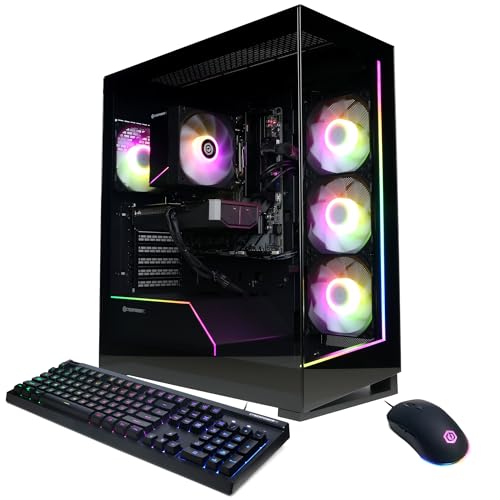
Gaming PC Pros and Cons: The Full Ledger, Weighed Honestly
The gaming pc pros and cons are easy to list badly and surprisingly hard to weigh well. Advocates recite the pros — performance, freedom, upgradeability — as if they settle the question, while sceptics recite the cons — cost, complexity, desk space — as if they settle it the other way. Neither list settles anything, because the same fact often appears on both sides depending on who you are: a machine you can upgrade is a blessing to a tinkerer and a chore to someone who wants an appliance. This page works through the gaming PC pros and cons one at a time, with verified current machines as evidence for each claim, so you can weigh the ledger against your own habits instead of borrowing someone else’s conclusion. By the end you should know not just what the trade-offs are, but which side of each one you personally live on.
A note on evidence before the ledger opens. Every machine named and linked on this page was verified against the publisher’s catalogue on reviewstook.com, and only those verified listings carry links. Machines discussed without links are mentioned in prose because they illustrate a point, not because we are steering you to a listing we have not checked. Prices are never printed here — they move too fast to be honest in static text — so each linked machine invites you to check the latest price on Amazon and weigh the pro or con at the number that is actually true today.
In this guide
The Pros: What a Gaming PC Genuinely Does Better
Pro 1: Performance headroom no other gaming device matches
The headline pro is real. A current mid-range tower such as the CyberPowerPC Gamer Master, with its Ryzen 7 8700F and RTX 5060 Ti, plays modern games at high settings and high refresh rates that fixed-hardware devices simply cannot reach, and the ceiling rises from there: the iBUYPOWER Element with a Ryzen 9 7900X and RTX 5070, or the Acer Nitro 85 with an RX 9070 XT, operate in a performance class with no console equivalent at all. High refresh is the part newcomers underestimate. Doubling the frame rate does not just look smoother; it makes aiming, tracking and reacting measurably easier, and once your eyes adjust, going back feels like playing through syrup.
Pro 2: One machine replaces several devices
A gaming PC is also a work PC, a study PC, a streaming studio, a video editor and a media centre. The student who games at night writes essays on the same tower in the morning; the streamer plays and broadcasts from one box; the parent edits family video on hardware bought for games. This consolidation is the strongest economic argument in the entire pros column, and it is why the value question in Is A Gaming PC Worth It so often resolves in the PC’s favour for households that would otherwise buy two machines.
Pro 3: The games library is bigger, older and cheaper to feed
PC gaming’s catalogue stretches back decades and forward to day-one releases across multiple storefronts that compete with each other on price. Sales are frequent and deep, older classics remain playable instead of being stranded on dead hardware, and entire genres — strategy, simulation, modded sandboxes — exist primarily or only on PC. Your library also survives hardware upgrades: the games you buy today install unchanged on the tower you own in six years, which is not a promise the closed platforms have historically kept.
Pro 4: You can upgrade it piece by piece
When a gaming PC starts to feel slow, you rarely replace it. You add memory, fit a bigger SSD, or swap the graphics card, and the rest of the machine carries on. This turns ownership from a single large purchase repeated on a cycle into a series of small, timed purchases matched to your actual bottleneck. The DDR5 platforms among the machines below are especially kind here, because their sockets and memory standards have years of life left in them.
Pro 5: Mods, settings and control belong to you
On PC you choose your resolution, your frame-rate target, your field of view, your control scheme — keyboard, controller, wheel, stick — and you can modify games themselves. Modding communities extend the lives of popular titles by years, sometimes by decades. For players who like a game to bend toward their taste rather than the reverse, this freedom is not a feature on a list; it is the whole point.
Pro 6: Displays and peripherals are your choice, at your pace
A gaming PC drives everything from a modest desk monitor to an ultrawide or a living-room television, at refresh rates you select, with peripherals you upgrade one at a time. Nothing in the ecosystem forces a matched set. That freedom pairs naturally with the setup discipline in How To Set Up Gaming PC: the same tower can start life on a small desk and end it as the heart of a full simulator rig without ever being replaced.
The Cons: What a Gaming PC Genuinely Costs You
Con 1: The upfront price is the highest in gaming
There is no honest way around the first con: a worthwhile gaming PC costs more upfront than any console, and the peripherals, monitor and desk furniture that complete it add to the bill. Entry towers soften this — the ZYNEEX and STGAubron machines below exist precisely at this pressure point — but a buyer comparing only sticker prices will always find the PC wanting. The counterargument lives in total cost over years, covered under the worth-it analysis, but the upfront hurdle is real and it is the con that stops the most people.
Con 2: Complexity never fully goes away
Drivers update, launchers multiply, settings menus sprawl, and occasionally something breaks in a way that requires diagnosis rather than a helpline. Modern prebuilts and Windows have shrunk this burden enormously — the setup guide linked above is an afternoon, not a weekend — but a gaming PC will never be the pure appliance a console is. If the idea of a settings menu fills you with dread rather than curiosity, weigh this con heavily; it is the one most correlated with abandoned PCs.
Con 3: The market is polluted with misleading listings
Scroll any marketplace and you will find towers wearing gaming language over hardware that cannot game: integrated graphics sold beside RGB fans, decade-old processors described by core count alone, memory figures inflated while the graphics card hides in small print. The OKAMUS machine examined below is a catalogue-verified example of the pattern — honest in its own listing text, which literally says integrated graphics only, yet dressed exactly like the real gaming PCs around it. New buyers get caught by this constantly, and it is a genuine structural con of an open market.
Con 4: Space, noise and heat are yours to manage
A tower needs a desk or floor space, ventilation, and tolerance for fan noise under load, and it warms the room it sits in. Small flats, shared bedrooms and living-room setups all feel this con more than a spare-room battlestation does. Consoles are not silent or cool either, but they are smaller and simpler to place, and pretending otherwise would make this ledger worthless.
Con 5: Portability is poor
A gaming PC stays where you put it. Taking it to a friend’s house is a project; taking it to university and back each term is a chore with genuine breakage risk. Laptop gaming exists as the compromise, with its own pros and cons, but within this page’s subject — the desktop tower — immobility is a fixed property, and students and frequent movers should count it honestly.
Con 6: Choice itself can become a burden
Thousands of configurations, contradictory advice, and a community that argues about everything can turn buying into a research project with no natural end. This page is part of that ecosystem and therefore part of the problem it describes; the defence is curation. Six verified machines, honestly annotated, beat six hundred listings sorted by whoever paid for placement — which is exactly the approach taken in Gaming PC Reviews as well.
The Evidence: Six Verified Machines, Weighed on Both Scales
Abstract pros and cons persuade nobody. Here are six real, verified machines, each one illustrating where the ledger tips and why.

The balanced mid-range case for the pros — CyberPowerPC Gamer Master
Listing: CyberPowerPC Gamer Master — Check on Amazon for current availability.
Strengths
- Performance pro in its purest current form: Ryzen 7 plus RTX 5060 Ti
- Upgrade pro: DDR5 platform with memory and storage headroom
- Library pro: plays everything, at settings worth seeing
Trade-offs
- Cost con: mid-range money, before monitor and peripherals
- Complexity con: 16GB memory means an upgrade decision in a year or two
- Space con: a full tower that wants a proper desk
| Processor | AMD Ryzen 7 8700F |
|---|---|
| Graphics | NVIDIA GeForce RTX 5060 Ti 8GB |
| Memory | 16GB DDR5 |
| Storage | 1TB PCIe 4.0 SSD |
| Connectivity | WiFi Ready |
| Operating system | Windows 11 Home |
| Model | GMA2900A3 |
If the pros column had a poster machine, this is close to it. The Gamer Master demonstrates performance headroom, platform longevity and library freedom in one box, and its compromises are the generic ones of its class rather than anything specific to the model. As evidence, it shows the pros at their most achievable: you do not need the flagship tier to collect them.
Its role in the cons column is equally instructive. Nothing about it is cheap once the monitor joins the bill, and its 16GB of memory guarantees one future upgrade conversation. Buyers who accept those two facts get the full PC experience; buyers who resent either should look hard at whether the cons column describes them better, as the single-machine deep dive in Gaming PC Review explores from another angle.
See the current listing for the CyberPowerPC Gamer Master: Check on Amazon.
Best for: readers whose personal ledger matches this machine’s balance / Not suited for: readers for whom its listed trade-offs are the deciding factors

The premium case: pros amplified, cost con amplified — iBUYPOWER Element (Ryzen 9 7900X, RTX 5070)
Listing: iBUYPOWER Element (Ryzen 9 7900X, RTX 5070) — Check on Amazon for current availability.
Strengths
- Twelve-core Ryzen 9 and RTX 5070 — performance pro at full strength
- 32GB of memory deletes the most common upgrade chore
- Bundled keyboard and mouse soften the peripheral bill
Trade-offs
- The cost con at its steepest on this page
- Performance a modest monitor literally cannot display
- 1TB storage fills fast at this tier’s game sizes
| Processor | AMD Ryzen 9 7900X |
|---|---|
| Graphics | NVIDIA GeForce RTX 5070 12GB |
| Memory | 32GB DDR5 |
| Storage | 1TB NVMe SSD |
| Operating system | Windows 11 Home |
| Included | Gamer keyboard and mouse |
| Model | EWA9N5702 |
The iBUYPOWER Element with the RTX 5070 exists to test whether more money keeps buying more pro. Up to a point, yes: the 32GB of memory and twelve-core processor make it the best multitasking and streaming machine among these six, and the graphics card holds high settings at 1440p without pleading. As evidence for the pros, it is superb.
As evidence for the cons, it is equally clear. The price climbs into territory where the total-cost defence must be made carefully, and the machine demands a monitor worthy of it, which climbs further. This is the tier where the pros stop being automatic and start being a deliberate purchase — delightful for the committed, questionable for the curious.
See the current listing for the iBUYPOWER Element RTX 5070: Check on Amazon.
Best for: readers whose personal ledger matches this machine’s balance / Not suited for: readers for whom its listed trade-offs are the deciding factors

The entry-level case: cost con shrunk, longevity con exposed — ZYNEEX Prebuilt (Ryzen 5 5500, RTX 3050)
Listing: ZYNEEX Prebuilt (Ryzen 5 5500, RTX 3050) — Check on Amazon for current availability.
Strengths
- A genuine RTX 3050 — the performance pro survives at entry price
- 16GB memory and 1TB SSD refuse the usual budget corner-cutting
- Simple air cooling keeps the complexity con low
Trade-offs
- DDR4 / AM4 platform caps the upgrade pro
- 1080p is its ceiling; 1440p ambitions need not apply
- The replace-rather-than-upgrade lifecycle is a real long-term con
| Processor | AMD Ryzen 5 5500 |
|---|---|
| Graphics | NVIDIA GeForce RTX 3050 6GB |
| Memory | 16GB DDR4 3200MHz |
| Storage | 1TB NVMe SSD |
| Cooling | ARGB air cooling |
| Connectivity | Wi-Fi |
| Platform | DDR4 / AM4 |
The ZYNEEX is the strongest evidence that the cost con, while real, has a floor lower than many assume. A real graphics card, proper memory and a full terabyte of storage at an entry tier means the essential PC experience — the library, the freedom, the settings control — is fully present. Students and first-time buyers collect most of the pros here.
What they surrender is time. The older platform shortens the upgrade path that is itself one of the headline pros, so this machine’s ledger balances only if you accept a replace-in-years model rather than an evolve-forever one. For a first PC that teaches you whether you love this hobby, that is a rational trade, and a common one.
See the current listing for the ZYNEEX Prebuilt: Check on Amazon.
Best for: readers whose personal ledger matches this machine’s balance / Not suited for: readers for whom its listed trade-offs are the deciding factors
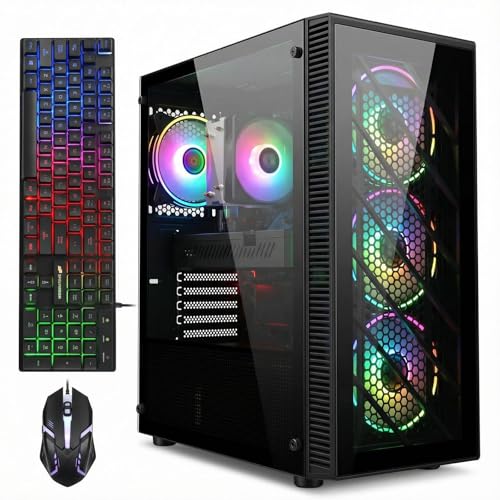
The second-hand-parts case: value pro, age con — STGAubron Gaming PC (Core i7, RX 590)
Listing: STGAubron Gaming PC (Core i7, RX 590) — Check on Amazon for current availability.
Strengths
- 32GB of memory and 1TB SSD at a budget tier
- RX 590 still plays esports and older titles happily
- WiFi 6 and Bluetooth 5.0 are modern where it is cheap to be modern
Trade-offs
- Older processor and graphics architecture — the age con in full
- upgrade path is effectively closed; this is a finished appliance
- Power efficiency and heat trail modern parts noticeably
| Processor | Intel Core i7 (up to 3.9GHz) |
|---|---|
| Graphics | Radeon RX 590 8GB |
| Memory | 32GB RAM |
| Storage | 1TB SSD |
| Connectivity | WiFi 6, Bluetooth 5.0 |
| Outputs | DisplayPort (4K), HDMI |
| Operating system | Windows 11 Home |
STGAubron’s tower is built from yesterday’s parts bin, and its ledger is the mirror image of the ZYNEEX’s. Where the ZYNEEX is modern but modest, this machine is generous but old: lots of memory, lots of storage, a graphics card that was a hero in its day. For esports, schoolwork and a back catalogue, the pros still land.
The cons are about trajectory. There is nowhere sensible to upgrade to from this platform, the newest demanding games are beyond it, and its efficiency belongs to an earlier era. As a cheap, honest stopgap it earns its place on this page; as a five-year foundation it does not, and its listing’s own specification — read carefully, as this page teaches — tells you so.
See the current listing for the STGAubron Gaming PC: Check on Amazon.
Best for: readers whose personal ledger matches this machine’s balance / Not suited for: readers for whom its listed trade-offs are the deciding factors

The cautionary case: the misleading-market con, verified — OKAMUS Pre-Built PC (Integrated Graphics)
Listing: OKAMUS Pre-Built PC (Integrated Graphics) — Check on Amazon for current availability.
Strengths
- Cheapest route to a Windows 11 tower with modern WiFi 6
- RGB presentation shows how gaming styling is applied
- Its listing is literally honest: ‘Integrated Graphics Only’
Trade-offs
- No discrete graphics card — the defining gaming component is absent
- 8GB memory and 256GB storage are below gaming minimums
- 400W power supply leaves almost no upgrade room
| Processor | Intel Core i5 (up to 3.6GHz) |
|---|---|
| Graphics | Integrated graphics only — no discrete GPU |
| Memory | 8GB RAM |
| Storage | 256GB M.2 SSD |
| Power supply | 400W |
| Connectivity | WiFi 6, Bluetooth 5.3 |
| Operating system | Windows 11 Home |
Every ledger needs its warning entry, and the OKAMUS is this page’s. Verified and real, it demonstrates the market-pollution con better than any hypothetical: three RGB fans, gaming language everywhere, and no graphics card at all. Integrated graphics run desktop software and the lightest games; they do not make a gaming PC in any sense the other five machines on this page would recognise.
The lesson is not that this tower is a scam — its own title admits the truth — but that the burden of reading falls on the buyer in an open market. Check for a named discrete graphics card, check the memory figure, check the storage figure. Thirty seconds of that discipline, applied to any listing, neutralises this entire con, which is why we keep this machine on the page rather than pretending the category is spotless.
See the current listing for the OKAMUS Pre-Built PC: Check on Amazon.
Best for: readers whose personal ledger matches this machine’s balance / Not suited for: readers for whom its listed trade-offs are the deciding factors

The flagship case: ceiling pros, matching cons — Acer Nitro 85 (Ryzen 9 9900X, RX 9070 XT)
Listing: Acer Nitro 85 (Ryzen 9 9900X, RX 9070 XT) — Check on Amazon for current availability.
Strengths
- RX 9070 XT — the strongest graphics pro available in this set
- Ryzen 9 9900X pairs flagship gaming with serious creation power
- Wi-Fi 7 removes the networking con for equipped homes
Trade-offs
- Flagship cost con, plus a flagship monitor to match
- 16GB memory is the one figure that belongs a tier down
- Its abilities are wasted on casual or purely esports play
| Processor | AMD Ryzen 9 9900X |
|---|---|
| Graphics | AMD Radeon RX 9070 XT |
| Memory | 16GB DDR5 |
| Storage | 1TB Gen 4 SSD |
| Connectivity | Wi-Fi 7 |
| Operating system | Windows 11 Home |
| Model | N85-100-UR37 |
The Acer Nitro 85 closes the evidence with the ceiling case. Its graphics card and processor deliver the performance pro in its most complete current form, and Wi-Fi 7 genuinely retires one of the classic PC cons for homes with a matching router. If your question is ‘how good can the pros get’, this is the answer on this page.
Its cons are the cons of altitude: price, the monitor required to honour it, and a memory figure that will be its first upgrade. Flagships never repeal the ledger; they just move the numbers. Buyers who game at high refresh, create content, and keep machines for years will find its balance right. Everyone else is paying for pros they will never switch on.
See the current listing for the Acer Nitro 85: Check on Amazon.
Best for: readers whose personal ledger matches this machine’s balance / Not suited for: readers for whom its listed trade-offs are the deciding factors
How to Weigh the Ledger for Your Own Life
Lists do not decide; weightings do. Take the six pros and six cons above and score each one against your actual habits. Do you already own a monitor, or does one join the bill? Do you play the genres that live on PC, or is your whole gaming life two annual console franchises? Is your desk in a room of your own, or a corner of a shared space where fan noise is a negotiation? Will the machine earn its keep in work, study or creation, or is it purely for play? Each answer moves weight between the columns, and the honest total is different for a student, a parent, a streamer and a returning lapsed gamer — which is why any page that gives you a universal verdict without asking these questions is selling something.
Two weightings deserve special emphasis because buyers get them wrong most often. First, time horizon: nearly every PC con is front-loaded — the price, the setup afternoon, the learning curve — while nearly every pro compounds over years of library sales, incremental upgrades and multi-use value. Judging the ledger at month one and at year four gives different answers, and year four is the one you will live with longer. Second, temperament: the complexity con is really a temperament test. Some people experience a settings menu as friction; others experience it as the hobby itself. Know which person you are before the money moves, because no specification can answer that for you. The guided first-week process in How To Set Up Gaming PC shows the complexity at its real, modest size.
How a Gaming PC Compares With the Alternatives
Against a console, the PC wins on performance ceiling, library breadth, multi-use value and upgrade path, and loses on upfront price, simplicity and living-room effortlessness. Against a gaming laptop, the desktop wins on performance per money, cooling, noise and upgradeability, and loses entirely on portability. Against cloud gaming, the PC wins on latency, ownership and offline play, and loses on zero-hardware convenience. None of these rivals is foolish; each is the right answer for somebody. The PC’s distinctive claim is that it is the only option that is simultaneously the best-performing, the most open and the most useful for everything else in your digital life — and its distinctive cost is that it asks the most of you in money, space and attention to claim those titles.
Common Mistakes When Judging Gaming PCs
The classic error is comparing a PC’s full setup price against a console’s box price while forgetting the television, the subscription years and the second device for work that the console household also buys. The reverse error exists too: PC advocates who price a console household’s needs at flagship PC levels and declare victory. Both are rigged ledgers. Other frequent mistakes: treating the misleading-listing con as a reason to avoid PCs rather than as a reading skill to learn; assuming the complexity con still looks like it did a decade ago; and ignoring the multi-use pro because the purchase conversation started in a gaming context. A machine that games at night and earns, studies or creates by day is not a gaming expense with side benefits — it is a household tool with a gaming talent, and it should be budgeted as one.
Final Recommendation
Weigh the ledger honestly and the answer usually announces itself. If you value performance, freedom, a compounding library and a machine that works as hard as it plays — and you can absorb the upfront cost and an afternoon of setup — the pros win, and a balanced verified tower like the CyberPowerPC Gamer Master is where most readers should start. If you want an appliance, game on a sofa, and play a narrow slice of annual releases, the cons win and you should let them, without apology. The worst outcome is not choosing either side; it is buying the flagship while living the appliance life, or buying the cautionary integrated-graphics tower while expecting the flagship one. Match the machine to the person, using the roundup in Gaming PC Reviews and the deep dive in Gaming PC Review, and the ledger balances itself.
The Pros and Cons Nobody Puts on the Box
The hidden pro: your skills and standards transfer everywhere
Owning a gaming PC teaches a literacy that pays out far beyond games. You learn what a processor does, why memory matters, how storage speeds differ, how to read a specification without being hypnotised by its biggest number. That literacy transfers to every technology purchase in your life — laptops, phones, the family computer, the machine your employer hands you — and it inoculates you against the misleading-listing con for good. Nobody lists this on a box, because it cannot be sold as a feature, but ask any long-term PC owner what the hobby quietly gave them and this answer surfaces constantly. It also compounds socially: the PC owner becomes the household’s technology counsel, the person who knows why the WiFi is slow and which laptop a sibling should buy. That role is a genuine, if unglamorous, return on the complexity con — the same learning curve, viewed from the far side, is an asset.
The hidden pro: your back catalogue becomes an appreciating asset
Every game you buy on PC joins a library that future hardware renders better. The title you bought five years ago for a modest tower runs at higher frame rates and resolutions on its replacement, without a remaster fee, a re-release or anyone’s permission. Consoles have grown kinder about this, but the PC’s version is total and unconditional, stretching back decades. Over a long ownership this changes buying psychology entirely: a game on sale is not a rental of present entertainment but a permanent addition to a collection that improves with your hardware. Players with libraries in the hundreds feel this pro in their wallets every time a new tower arrives and their entire history installs onto it, better than it has ever looked.
The hidden con: the upgrade itch is a recurring expense of attention
The upgrade path is a headline pro, but it has a shadow: the permanent awareness that your machine could be better. There is always a newer graphics card, a faster drive, a monitor with one more feature, and a community ready to explain why your current parts are the bottleneck. For some owners this is the hobby’s joy. For others it becomes a low-grade dissatisfaction that no purchase fully cures — the machine is never finished, so it is never quite enough. The honest mitigation is a rule set in advance: upgrade when a game you love demands it, on a cycle you choose, and let the rest of the market’s noise pass. Buyers who cannot set that rule should weigh this con seriously, because it taxes attention long after the money is spent.
The hidden con: your gaming becomes desk-shaped
A console colonises the sofa; a gaming PC anchors you to a desk, a chair and a room. For focused play that is a virtue. For social play — a partner beside you, friends dropping in, a family that games together in the living room — it can isolate the hobby in a way nobody warns you about. The mitigations are real (a long cable to the television, a second controller, a living-room placement) but each is a small project, and households where gaming is a shared social ritual should weigh this con at full strength. It is also why many mature households end up owning both: the PC for depth, the console for company, each covering the other’s weakest column in the ledger.
Pros and Cons by Player Type: The Ledger, Personalised
The competitive player. For the esports-focused player the ledger is lopsided: high refresh rates, low latency, precise mouse control and settings freedom are not luxuries but the terms of competition itself, and every serious scene in those games lives on PC. The cons reduce to cost and desk space. Verdict: pros, overwhelmingly.
The story-driven player. For the player who lives for big single-player releases, the PC offers the definitive versions — best visuals, mods that extend and repair games, a permanent library — at the price of the highest upfront cost and the settings-menu temperament test. If you finish the games you start and replay favourites for years, the library pro compounds beautifully. Verdict: pros, provided the budget is honest.
The family household. Here the multi-use pro does the heavy lifting: one machine for games, homework, work-from-home days and family media out-earns its price against the alternative of several lesser devices, and parental familiarity with the platform is itself a supervision tool. The cons are placement and shared-access negotiation. Verdict: pros, with the desk question answered first.
The student. Portability is the student’s loudest con and the budget the second; a desktop that cannot travel between home and term-time housing starts with two weights against it. Yet a student in stable housing, studying anything computational, collects the multi-use pro at maximum strength. Verdict: genuinely split — housing decides it.
The creator and streamer. For anyone who makes things — video, music, code, streams — the PC is not competing with consoles at all; it is the workstation that also games, and the ledger collapses into a purchasing decision about specifications rather than platforms. Verdict: pros, by definition; spend your deliberation on the tier, using the reviews linked from this page.
The returning lapsed gamer. Adults returning to the hobby after years away often misjudge the complexity con, remembering the PC of a decade ago. The modern prebuilt experience — an afternoon of setup, automatic updates, launchers that manage themselves — is gentler than memory insists, and the library pro means their taste, not a release calendar, drives their play. Verdict: pros, with the caveat to buy mid-range and stop researching.
How the Ledger Changes Over Time
Weigh this ledger at three moments and it gives three answers, which is why so many arguments about it are really arguments about time. On day one the cons dominate the felt experience: the money is spent, the desk is rearranged, the settings menus are new. At year one the balance has quietly flipped for most owners — the library has grown through sales, the setup chores have shrunk to minutes a month, and the machine’s second jobs have woven it into the household. At year four the pros stand almost alone: the console bought the same week is fixed at its launch specification, while the PC has absorbed an upgrade or two, its library has appreciated onto better hardware, and its replacement cost — when it finally comes — will reuse the monitor, peripherals and games already owned. Anyone selling you a verdict that ignores which year you are asking about is selling you their year, not yours. The wisest buyers decide at the horizon they actually intend to keep the machine, and let the day-one cons be what they are: the entry fee, not the experience.
The Environmental and Practical Footnotes
Two smaller entries belong in a complete ledger. On the con side, a gaming PC consumes more electricity under load than a console and generates real heat; in a small, warm room that is a comfort consideration, and across years of heavy use it is a modest but nonzero running cost. On the pro side, that same standardised hardware has the longest second life in consumer electronics: a retired gaming tower becomes a home server, a media box, a first computer for a relative, or a source of standard parts — drives, memory, power supplies — that fit the next machine. E-waste arguments cut in the PC’s favour more often than its critics expect, precisely because nothing in the box is glued shut or cryptographically married to the rest.
There is also a resilience pro worth naming in an era of shuttered online services: a PC’s games, saves and software do not depend on a single company’s storefront staying open or a subscription staying paid. Your library is files on a drive you own, playable offline, portable to your next machine. When a closed platform eventually retires its store — and history says they all do — its library’s fate is a corporate decision. Yours is a copying decision, and you are the one who makes it. For collectors and the long-horizon players this page keeps returning to, that quiet sovereignty may be the most underpriced pro in the entire ledger.
A Short History of This Ledger, and Why It Keeps Being Rewritten
It is worth remembering that this exact argument has been had in every hardware era, and the ledger’s shape survives while its numbers change beyond recognition. In earlier decades the PC’s cons included genuine fragility — driver conflicts that ate weekends, components that failed in ways requiring real expertise — and its pros included entire genres that existed nowhere else. Consoles answered with simplicity and price, and for many households in many years they were the right answer. What the modern era has changed is not the structure of the trade but the weight of its heaviest items: the complexity con has shrunk to an afternoon and a monthly driver check, the reliability con has faded as prebuilts matured, and the performance pro has widened into territory — high refresh, ultrawide, simulation scale — that fixed hardware does not attempt. Meanwhile the PC’s oldest pros, the permanent library and the open platform, have appreciated exactly as predicted by the people who cited them twenty years ago. The lesson for today’s buyer is not that the PC always wins; it is that the ledger should be re-weighed with current weights rather than inherited ones. Households still declining PCs on the strength of a 2009 experience are making a 2009 decision, and households buying one on the strength of a 2009 promise of endless tinkering joy may be equally surprised — pleasantly — by how appliance-like the modern tower has become. Weigh the machine that exists, in the year you are buying it, against the life you are actually living. That discipline, more than any single pro or con on this page, is what separates the buyers who love their machines in year four from the ones still arguing about them.
The One-Line Version of the Whole Ledger
If this page must shrink to a sentence, it is this: a gaming PC trades money, space and a little complexity for performance, freedom, longevity and usefulness that nothing else in gaming offers — and whether that trade profits you depends on how often you play, what else the machine will do, and how long you keep it. Everything above is the evidence; the sentence is the verdict form. Fill it in with your own numbers, and you have done what this page exists to help you do.
Frequently Asked Questions
What is the biggest pro of a gaming PC?
For most owners it is the combination rather than any single item: performance headroom, a vast and durable games library, freedom of settings and controls, and a machine that also handles work, study and creation. If forced to name one, longevity through upgrades is the pro that keeps paying longest after the purchase glow fades.
What is the biggest con of a gaming PC?
Upfront cost, honestly counted with a monitor and peripherals. Complexity is the runner-up, though modern prebuilts have shrunk it to an afternoon of setup and occasional driver updates. Both cons are front-loaded, while most pros compound over years, which is why time horizon changes the verdict so often.
Is a gaming PC better than a console?
It is more powerful, more open and more useful beyond games; it is also more expensive, larger and more involved. Players who want maximum performance and a multi-use machine should choose the PC. Players who want the simplest route to the sofa and a fixed set of releases are better served by a console. Neither answer shames the other.
Do gaming PCs last longer than consoles?
Typically yes in useful terms, because you can upgrade the limiting component instead of replacing the whole machine, and your games library carries forward unchanged. A well-bought tower commonly serves five years or more with one mid-life upgrade, while a console generation is fixed from launch day to its end.
Are cheap gaming PCs worth it?
Some are: a budget tower with a real discrete graphics card, 16GB of memory and adequate storage — the ZYNEEX pattern — delivers the genuine PC experience. The trap is the gaming-styled tower with integrated graphics and minimal memory, which delivers the styling only. The graphics card’s presence is the line between the two.
How much maintenance does a gaming PC need?
Less than its reputation suggests: automatic updates, an occasional driver update, a dust clean a few times a year, and sensible storage housekeeping. The setup and care routine in our how-to guide covers the whole burden, and most owners measure it in minutes per month rather than hours.
Who should not buy a gaming PC?
Anyone who wants a pure appliance, games only on a television with a controller, travels constantly, or would resent an afternoon of setup and the occasional settings menu. The cons column describes real people accurately, and the right purchase for them is a different device entirely.


