Disclosure: As an Amazon Associate, reviewstook.com earns from qualifying purchases. Links on this page are affiliate links at no extra cost to you; prices and availability change frequently, so check Amazon for the latest.
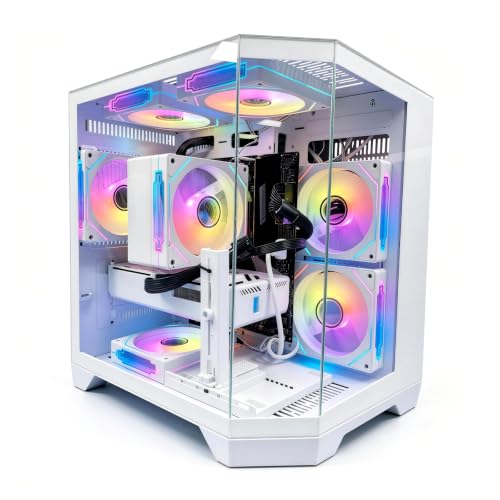
How to Choose a Gaming PC Build: A Step-by-Step Method That Actually Works
Learning how to choose a gaming PC build is mostly learning what order to make decisions in. Most regret in this hobby comes from sequencing errors: falling for a graphics card before knowing your monitor’s resolution, or spending the memory budget on case lighting. This guide lays out the selection process as six steps, in the order experienced builders actually follow them, and illustrates each step with real machines whose specifications we verified against Amazon’s catalogue data before recommending them.
Work through the steps in order and write your answers down. By step six you will not have a vague sense of what you want — you will have a configuration: a resolution target, a graphics card class, a platform, memory and storage figures, and a shortlist of machines that meet them. That shortlist discipline is the whole secret. Buyers who start from a configuration choose well; buyers who start from a sale page choose whatever the sale page wanted.
In this guide
Key Takeaways
- Choose in this order: display target, graphics card, processor platform, memory, storage, then power and case.
- Your monitor’s resolution and refresh rate together define the graphics card class you need — nothing else does.
- Prefer a platform with an upgrade story (current socket, free memory slots, spare storage bays) over a marginally faster dead-end configuration.
- Verify the exact configuration on the exact listing before buying; model names repeat across different specifications.
- Six verified machines are referenced throughout, one for each realistic outcome of the process.
- Write your answers down as a configuration before opening a single listing; the document, not the storefront, is in charge.
- Re-run the verification step on the day you actually order, because configurations and stock rotate faster than articles do.
Where to Buy the Machines Referenced in This Guide
Each step below points at one or more of these six verified machines. Configurations and stock change, so confirm the specification on the listing itself before ordering. Links referenced from reviewstook.com always point at the exact configurations described.
- Entry outcome — LXZ Prebuilt Gaming PC, Ryzen 7 8700F, RTX 5060, 16GB DDR5, 1TB SSD
- Entry outcome, Intel route — CyberPowerPC Gamer Xtreme, Intel Core i5-14400F, GeForce RTX 5060 8GB
- Mainstream outcome — CyberPowerPC Gamer Master, AMD Ryzen 7 8700F, GeForce RTX 5060 Ti 8GB
- Creator-leaning outcome — iBUYPOWER Element, AMD Ryzen 9 7900X, NVIDIA GeForce RTX 5070 12GB, 32GB DDR5, 1TB NVMe SSD
- Polished 1440p outcome — Alienware Aurora, RTX 5070, Intel Core Ultra 7 265F, 32GB DDR5, 1TB SSD
- Enthusiast outcome — Skytech Azure 3, Ryzen 7 9850X3D, RX 9070 XT, 32GB RAM, 2TB SSD
Step One: What Resolution and Refresh Rate Are You Really Targeting?
Stand in front of your monitor — or the monitor you have genuinely committed to buying — and note two numbers: its resolution and its refresh rate. These two numbers, multiplied together, describe how much work your graphics card must do every second, and they sort the entire market into three honest bands.
At 1080p, the workload is light enough that the RTX 5060 class is the correct tool: it drives competitive titles at very high frame rates and modern single-player games at high settings. The LXZ and the CyberPowerPC Gamer Xtreme in our reference list are both built to exactly this specification, and choosing more card than this for a 1080p 60Hz or 75Hz panel buys nothing visible. At 1440p, the workload grows by about three quarters; the 5060 Ti class becomes the entry point and the RTX 5070 class the comfortable centre. At 4K, or at 1440p with a 240Hz panel, you are in 5070-and-above territory, where the Skytech and Alienware configurations live.
The mistake to avoid at this step is answering with the monitor you vaguely hope to own someday. If a display upgrade is budgeted and imminent, target it. If it is a wish, target the screen on your desk and put the savings toward the components you will feel every day. Our broader Gaming PC Build Buying Guide works through the same decision from the budget side if you want a second pass.
Step Two: Which Graphics Card Class Follows From That Target?
Translate step one’s answer into a card class, and hold the line when listings try to move you. For 1080p: RTX 5060. For 1440p at conventional refresh rates: RTX 5060 Ti as the floor, RTX 5070 or RX 9070 XT as the comfort zone. For 4K or very high-refresh 1440p: RTX 5070 minimum, RTX 5080 class if high settings without aggressive upscaling are the goal.
Video memory deserves its own sentence at this step, because it is the sub-specification that dates a card. Eight gigabytes is serviceable at 1080p and workable at 1440p with texture discipline; twelve gigabytes, as in the iBUYPOWER’s RTX 5070, is the current comfort point; sixteen gigabytes, as in the Skytech’s RX 9070 XT, is the allocation most likely to still feel generous in four years. When two otherwise similar machines differ mainly in VRAM, the higher figure is usually the better long-term buy at 1440p and above.
Also decide at this step whether NVIDIA-specific features matter to you — its upscaling ecosystem and NVENC encoding for streamers are the usual reasons — or whether AMD’s typically stronger VRAM allocation at a given tier matters more. There is no universal right answer; there is only your games list and your streaming habits. Decide it here, once, rather than relitigating it on every listing page.
One modern complication belongs in this step: upscaling and frame generation have blurred the old resolution boundaries. A card rendering internally below 1440p and upscaling intelligently can deliver an image most players find indistinguishable from native at couch distance, and a sharper-eyed player at a desk monitor may disagree. Treat these features as a quality dial that extends a card’s useful life rather than as a reason to buy a tier lower than your target demands. The machines that age best are the ones that run your display well natively and treat upscaling as reserve capacity for the heavier games of year three and four — not the ones that need it on day one to reach the frame rate on the box.
Step Three: Which Processor Platform Gives You a Future?
With the graphics class fixed, the processor decision becomes simpler than marketing suggests. For gaming, any modern six-to-eight-core desktop chip keeps a midrange GPU fed; the differences that matter are platform longevity and secondary uses. The reference machines illustrate the three live options. AMD’s AM5 platform (the LXZ, Gamer Master, iBUYPOWER, and Skytech) pairs DDR5 with a socket that supports newer processors later. Intel’s LGA1700 (the Gamer Xtreme’s i5-14400F) is mature and excellent value but a finished platform. Intel’s current Core Ultra line (the Alienware’s Ultra 7 265F) brings the newest connectivity, including Wi-Fi 7.
Two buyer profiles should deliberately spend more here. Competitive players chasing the highest possible frame rates at 1080p benefit from cache-heavy X3D processors like the Skytech’s Ryzen 7 9850X3D, because at low resolution the CPU becomes the bottleneck. Creator-gamers — anyone editing video, rendering, or compiling on the same machine — benefit from core counts like the iBUYPOWER’s Ryzen 9 7900X. Everyone else should let the GPU have the money and take the competent eight-core.
Write down your platform answer as a commitment, because it constrains everything after it: memory generation, motherboard features, and whether a mid-life CPU swap is a drop-in or a rebuild.
Step Four: How Much Memory and Storage Should You Specify?
Memory first. Specify 16GB of DDR5 only if the budget is genuinely tight and the machine is purely for gaming; specify 32GB if the machine will stream, run mods, host a voice call and a browser, or simply be expected to feel fast in year four. Four of our six reference machines ship with 32GB, which tells you where the market’s centre has moved. Whichever figure you choose, insist on a two-stick configuration — dual-channel operation is free performance that single-stick machines leave unclaimed.
Storage second. One terabyte of NVMe is the floor for a new machine; two terabytes, as in the Skytech, is the figure that stops storage management from becoming a hobby. Audit your current library honestly: count the installed sizes of the games you actually rotate, add the operating system and launchers, and double the result if you capture video. Most buyers who do this arithmetic land on 2TB and are quietly grateful for years.
Also confirm the physical room to grow: a free M.2 slot or an accessible 2.5-inch bay turns a future storage upgrade into an errand. Sealed or fully occupied storage is a hidden deadline on the machine’s usefulness, and it never appears in the title of a listing.
Step Five: What Should You Check About Power, Cooling, and Connectivity?
This is the step skimmers skip and regretters remember. Find the power supply’s wattage and efficiency rating. Some makers state it plainly — the LXZ declares a 650W unit, the Skytech an 850W Gold ATX 3 supply — and that transparency is itself a quality signal. Where a listing is silent, as with the CyberPowerPC machines, the machine remains warrantied as sold, but you should mentally price a PSU replacement into any future GPU upgrade plan.
Cooling follows the processor. The eight-core chips in most reference machines are comfortably served by competent air cooling or a modest liquid loop; the Skytech’s 360mm AIO suits its enthusiast positioning and sustained loads. Judge the case by its front panel: mesh intakes and multiple fans mean lower temperatures and lower noise than sealed glass, whatever the render photographs suggest.
Connectivity is the final check, and it is refreshingly concrete. Count the USB ports your desk actually uses — the LXZ’s ten USB ports (seven USB 2.0 and three USB 3.0) are typical of value builds and worth totalling against your peripherals. Note the networking: WiFi Ready on the CyberPowerPC pair, Wi-Fi 7 and Killer 2.5Gb Ethernet on the Alienware. If your router is wired-distance away, ethernet capability matters more than any wireless generation number.
Close the step with the tape measure. Note the case’s depth and height, where its side panel window faces, and whether the front intake will sit against a wall or a desk leg. Enthusiast towers with 360mm radiators, like the Skytech, are physically large objects; the entry towers are not small either. More first builds are compromised by furniture than by silicon, and the time to discover a two-centimetre conflict is while the machine is still a listing, not a delivery.
Step Six: How Do You Verify the Exact Machine Before Paying?
The last step is a discipline, not a component. Before ordering, extract the full configuration from the specific listing you are buying — processor, graphics card and its memory, RAM capacity and configuration, storage type and size, operating system — and compare it against the configuration you wrote down across steps one to five. Model families span multiple configurations; the Codex Z2 name in this category covers both a 5060 Ti machine and a 5070 machine with double the memory and storage. The title of the listing in your cart is the only specification that counts.
This guide practised the same discipline on itself: every reference machine’s specification was checked against Amazon’s catalogue data for that exact model before it was allowed into the text, and where the data did not state a figure — several power supplies — we said so instead of estimating. Hold any seller to that standard. A configuration that cannot be verified should not be purchased on the strength of its photographs.
Then, and only then, compare prices among the machines that passed — and remember that peripherals are part of the true total. The iBUYPOWER includes a gaming keyboard and mouse in the box; if your shortlist’s other machines do not, the honest comparison adds a set to their side of the ledger. Our Gaming PC Build Review applies this verification-first approach to a single build in depth.
The Six Outcomes: What the Process Produces at Each Level
Run the six steps honestly and you land in one of six places. Here is what each landing looks like as a real, purchasable machine — with the reasoning exposed, so you can see the method working rather than just its results.
Read the outcomes comparatively even if your steps pointed elsewhere. The distance between adjacent outcomes is the real price of each ambition: one card class, one platform decision, one memory doubling. Buyers who can name exactly what the next outcome adds — and what it costs — rarely overbuy, because the upgrade has to justify itself in components rather than in the vague currency of “better.” If none of the six matches your written configuration precisely, the closest one is your template; adjust its memory or storage configuration rather than starting the search over.

Entry Outcome — LXZ Prebuilt Gaming PC, Ryzen 7 8700F and RTX 5060
Strengths
- An AM5 platform at the entry price, which almost no budget machine manages.
- The power supply is stated plainly at 650W — rare transparency at this level.
- Six RGB fans and ten USB ports cover cooling and connectivity without add-ons.
Trade-offs
- Seven of those USB ports are USB 2.0 speed, fine for peripherals but slow for storage.
- 16GB of memory and 1TB of storage are the floor specification, as step four predicts.
- A smaller brand’s support is seller-based rather than a national service network.
| Specification | Detail |
|---|---|
| Processor | AMD Ryzen 7 8700F |
| Graphics | NVIDIA GeForce RTX 5060 |
| Memory | 16GB DDR5 |
| Storage | 1TB SSD |
| Power supply | 650W |
| Ports | 7x USB 2.0, 3x USB 3.0 |
This is what step one’s 1080p answer looks like when it is built with unusual honesty. The processor platform is the headline: most entry machines save money with an older socket, and this one does not, which means its owner keeps the drop-in CPU upgrade that step three values. For a first gaming PC bought with a plan to grow, that single decision outweighs small specification deficits elsewhere.
Best for: first-time buyers on 1080p who want an upgradeable foundation / Not suited for: buyers who need fast USB storage transfer speeds daily

Entry Outcome, Intel Route — CyberPowerPC Gamer Xtreme, Core i5-14400F and RTX 5060 8GB
Strengths
- Ten processor cores give everyday multitasking unusual ease at this level.
- PCIe 4.0 NVMe storage keeps loading behaviour identical to pricier machines.
- A large integrator’s build consistency and warranty handling.
Trade-offs
- LGA1700 is a finished platform; a future CPU change means a motherboard too.
- The verified catalogue data does not state the power supply.
- 16GB of memory will be the first upgrade most owners make.
| Specification | Detail |
|---|---|
| Processor | Intel Core i5-14400F |
| Graphics | NVIDIA GeForce RTX 5060 8GB |
| Memory | 16GB DDR5 |
| Storage | 1TB PCIe 4.0 SSD |
| Operating system | Windows 11 Home |
Choose this outcome when step three’s platform question resolves differently: you value today’s price and a big integrator’s consistency over tomorrow’s drop-in upgrade. That is a legitimate resolution — many owners replace whole machines rather than upgrading them — and this is the cleanest expression of it at 1080p in our reference set.
Best for: 1080p buyers who prefer Intel and replace rather than upgrade / Not suited for: tinkerers planning a mid-life processor swap


Mainstream Outcome — CyberPowerPC Gamer Master, Ryzen 7 8700F and RTX 5060 Ti 8GB
Strengths
- The 5060 Ti is the correct card class for the step-two 1440p answer.
- AM5 platform and DDR5 keep every step-three option open.
- Specification balance: no component embarrasses another.
Trade-offs
- The 8GB variant of the card asks for texture awareness in the heaviest games.
- Memory and storage sit at the floor figures step four warns about.
- Power supply unspecified in the verified data.
| Specification | Detail |
|---|---|
| Processor | AMD Ryzen 7 8700F |
| Graphics | NVIDIA GeForce RTX 5060 Ti 8GB |
| Memory | 16GB DDR5 |
| Storage | 1TB PCIe 4.0 SSD |
| Operating system | Windows 11 Home |
The mainstream outcome is where the method sends the largest number of readers, and this machine is its archetype: the right GPU class for 1440p, the right platform for the future, and floor-level memory and storage that are cheap to raise later. If your written answers say 1440p, AM5, and “I will add a second SSD myself,” your process has already chosen this tower.
Best for: 1440p buyers following the full six-step method / Not suited for: buyers who want 32GB and 2TB fitted from the factory

Creator-Leaning Outcome — iBUYPOWER Element, Ryzen 9 7900X and RTX 5070 12GB
Strengths
- Twelve processor cores change the machine’s character for editing and rendering work.
- The RTX 5070’s 12GB of VRAM is step two’s comfort specification for 1440p.
- 32GB of memory fitted as standard, plus a keyboard and mouse in the box.
Trade-offs
- Pure gamers pay for cores their games will rarely use.
- Storage is 1TB where this guide’s step four prefers two.
- The bundled peripherals are starters, not endgame gear.
| Specification | Detail |
|---|---|
| Processor | AMD Ryzen 9 7900X |
| Graphics | NVIDIA GeForce RTX 5070 12GB |
| Memory | 32GB DDR5 |
| Storage | 1TB NVMe SSD |
| Operating system | Windows 11 Home |
| In the box | Gamer keyboard and mouse |
This outcome appears when step three’s secondary-use question gets a serious answer. The person who edits the videos they record, renders the models they design, or compiles between matches is not buying a gaming PC with extras — they are buying a workstation that games superbly, and the specification reflects that dual citizenship honestly.
Best for: creator-gamers whose second workload is real / Not suited for: pure gamers, who should let the GPU have this money instead


Polished 1440p Outcome — Alienware Aurora, RTX 5070 and Core Ultra 7 265F
Strengths
- Wi-Fi 7, Bluetooth, and Killer 2.5Gb Ethernet are the best networking set in this guide.
- 32GB of DDR5 and the RTX 5070 match step two and step four’s comfort answers exactly.
- Dell’s support structure is the strongest available to a buyer in this category.
Trade-offs
- 1TB of storage is the specification step four would raise first.
- Proprietary design elements can complicate some self-service work.
- The Ultra 7’s strengths are partly in workloads beyond gaming.
| Specification | Detail |
|---|---|
| Processor | Intel Core Ultra 7 265F |
| Graphics | NVIDIA GeForce RTX 5070 |
| Memory | 32GB DDR5 |
| Storage | 1TB SSD |
| Operating system | Windows 11 Home |
| Connectivity | Wi-Fi 7, Bluetooth, Killer 2.5Gb Ethernet |
| Model | Aurora ACT1250 |
Some buyers run the six steps and discover that their deciding factor is not a component at all but the ownership experience: one number to call, a mature support organisation, a machine designed as a single product rather than an assembly. For that buyer this Aurora is the method’s answer at 1440p, and its specification needs no apology anywhere except storage capacity.
Best for: buyers who weight support and polish alongside specification / Not suited for: buyers maximising raw specification per unit of budget

Enthusiast Outcome — Skytech Azure 3, Ryzen 7 9850X3D and RX 9070 XT
Strengths
- The X3D processor is step three’s competitive-play answer, full stop.
- 16GB of VRAM, 32GB of DDR5 5600, and 2TB of Gen4 NVMe satisfy every step at its comfort setting.
- An 850W Gold ATX 3 power supply and 360mm AIO are stated, not assumed.
Trade-offs
- Wi-Fi 5 is a generation behind the Alienware’s networking.
- The specification’s ambition is wasted on a 1080p 60Hz display.
- AMD’s feature ecosystem differs from NVIDIA’s in specific titles and streaming tools.
| Specification | Detail |
|---|---|
| Processor | AMD Ryzen 7 9850X3D |
| Graphics | AMD Radeon RX 9070 XT |
| Memory | 32GB DDR5 5600 |
| Storage | 2TB Gen4 NVMe SSD |
| Power supply | 850W Gold ATX 3 |
| Cooling | 360mm ARGB AIO |
| Operating system | Windows 11 |
The enthusiast outcome is what the method produces when every step is answered at its most demanding: high-refresh targets, a cache-heavy processor, maximum memory and storage, and a power supply with genuine headroom. It is not the recommendation for most readers, and the method itself tells you so — if your step-one answer was modest, this machine is a wonderful answer to a question you did not ask.
Best for: high-refresh competitors and 4K-curious enthusiasts / Not suited for: 1080p 60Hz players, for whom it is pure surplus
Red Flags: Listings the Method Tells You to Walk Away From
The six steps assume a good-faith market, and most of it is — but a minority of listings are engineered to fail exactly the checks this guide teaches, and naming their patterns is part of the method. Learn to spot them and your shortlist improves before you read a single specification.
The first pattern is the unnamed graphics card: titles that say “dedicated graphics” or lean on integrated-GPU model numbers dressed in gaming language. Step two cannot be completed for such a machine, which is the point of the omission. The second pattern is the storage shell game — a large number in the title that resolves, three clicks deep, into a small SSD paired with a large hard drive. Step four’s insistence on NVMe type, not just capacity, exists because of this listing style. The third pattern is the phantom configuration: a famous model name whose specification table quietly describes a much weaker machine than its photographs and headline imply. Step six was written for it.
The fourth pattern is subtler because it uses true facts: a previous-generation graphics card described accurately but priced as though it were current, counting on the buyer to recognise the brand and not the generation. The defence is the same as everywhere else in this guide — the written configuration from your own steps, compared line by line, with no credit given for atmosphere, lighting, or the word “gaming” in a font. Machines that survive that comparison, like the six referenced here, have earned your money’s attention. Machines that rely on you skipping it have told you what they are.
When Should You Run This Process? A Note on Timing
The steps are season-proof, but their answers are not, and timing deserves one honest paragraph. New graphics generations reset the tier map; a configuration written the month before a launch may point at a card class that is about to be replaced or repriced. If a launch is publicly imminent and your need is not urgent, running the process twice — now, and again at launch — costs an evening and can change step two’s answer materially. Conversely, a machine needed for a birthday, a term start, or a long-planned game release should be chosen with the market that exists, because a perfect configuration delivered late is worse than a very good one delivered on time. The method’s job is to make whichever market you face legible, not to make you wait for a better one that may not arrive on schedule.
A Worked Example: Three Players Run the Same Six Steps
Abstract steps stick better with faces on them, so here are three composite buyers — drawn from the questions readers actually send us — running the identical process to three different machines.
The esports student. Her display answer is a 1080p 240Hz monitor she already owns, bought for competitive shooters. Step two gives her the RTX 5060 class with a note that frame rates at 1080p lean on the processor. Step three is where her money moves: a cache-heavy or high-clock CPU matters more to her than to anyone, but her budget forces a choice, and she takes the competent eight-core AM5 route in the LXZ, banking the platform for an X3D upgrade when funds allow. Steps four and five are floor-level by necessity — 16GB, 1TB, a stated 650W supply — and step six confirms the listing matches. Her machine is the entry outcome, but chosen with an upgrade map already drawn, which is a completely different purchase from the same box bought blindly.
The living-room 4K player. His display is a 4K television, refresh-limited and viewed from a couch. Step two dominates his process entirely: the RTX 5070 class is his floor, and he weighs the Alienware’s 5070 configuration against stepping further up. Step three resolves to “any modern platform,” because at 4K the processor is rarely the constraint, and he values the Aurora’s networking for a wired connection to the router behind the TV. Step four’s arithmetic surprises him — his library of large single-player games argues for 2TB — and he accepts 1TB with a planned second drive rather than shrinking the GPU to afford storage today. That prioritisation is the method working as intended: the component that decides his experience got protected, and the component that is cheap to expand absorbed the compromise.
The streaming parent. Her machine must game at 1440p, encode a stream, and survive family use between broadcasts. Step two lands on the 5070 class partly for NVENC encoding. Step three’s secondary-use question is decisive — multitasking headroom is her daily reality — and step four is answered at the comfort settings without debate: 32GB, because a stream, a game, a browser, and chat software together punish 16GB machines in ways benchmarks never show. She lands between the iBUYPOWER and the Alienware outcomes, and chooses on support preference, which step six’s verification then confirms. Three buyers, one method, three defensibly different computers — that is what a selection process is for.
How Should the Budget Divide Across the Build?
Percentages are a crude tool, but they catch gross imbalance before it ships, so here is the allocation pattern the six reference machines share. The graphics card is the largest single share in every one of them — roughly a third or more of the machine’s value — because it does the work the purchase is for. The processor takes the next share, with the platform (motherboard and memory generation) bundled into that thinking. Memory and storage together claim a meaningful slice that has grown as game sizes have, and the remainder — case, cooling, power supply, assembly, warranty — is the slice buyers most often try to compress to zero and most often regret compressing.
Use the pattern diagnostically. If a listing’s implied allocation puts the processor clearly ahead of the graphics card for a gaming machine, the configuration was designed for a spec-sheet photograph rather than a player. If memory and storage look starved beside a flagship GPU, the maker has moved costs into your future. The reference machines pass this test in different proportions — the Skytech spends enthusiastically everywhere, the LXZ concentrates on platform and GPU — but none of them inverts the order, and that inversion test alone will filter out most of the market’s bad configurations before the detailed steps even begin.
Where Does the Build-Versus-Buy Decision Fit?
Readers sometimes arrive at this guide mid-argument with themselves about assembling a PC instead of buying one, so let us place that decision correctly: it comes after the six steps, not before them. The steps produce a configuration — a target specification that exists independently of who assembles it. Only with that specification written down can you price it both ways honestly: as a parts list with an operating system and your time included, and as the verified prebuilts that match it.
Assembly rewards buyers who enjoy the work and want component-level control, including the power supply choice that prebuilt listings so often obscure. Buying rewards buyers who want one warranty, one delivery, and a machine that is someone else’s problem when it misbehaves. Neither answer is the sophisticated one; the sophisticated move is refusing to have the argument until the configuration exists. Our Gaming PC Build Pros And Cons lays out the full ledger of that decision for readers still torn between the two routes.
What Goes Wrong After Choosing? A Troubleshooting Pass
Choosing well ends at the order confirmation; the machine still has to survive its first week in your home. These are the problems new owners actually report, in the order they usually appear.
Problem: the PC arrives and games run at a fraction of expected speed. Fix: check where the display cable is plugged in. The motherboard’s video port is the classic trap — the cable belongs in the graphics card’s outputs, and moving it takes ten seconds.
Problem: the monitor is a high-refresh model but motion looks ordinary. Fix: Windows often defaults to 60Hz. Open advanced display settings, select the panel’s full refresh rate, and enable adaptive sync in the GPU control panel.
Problem: the machine is louder than expected under load. Fix: confirm all shipping foam and internal packaging is removed, check that case fans are connected and spinning, and apply the maker’s balanced fan profile before concluding anything is faulty.
Problem: storage fills within months. Fix: this is step four’s arithmetic arriving late. Add an NVMe drive in the spare slot you verified at step five — or, if none exists, move the game library’s least-played titles to an external drive and prioritise the internal disk for current games. Prevention beats cure here, which is why the method front-loads the capacity question; the balance of the build-versus-buy argument is covered in Gaming PC Build Pros And Cons.
Common Mistakes When Choosing
Starting from a sale instead of a specification. A discount on the wrong configuration is not a saving. Run the steps, write the configuration, then hunt for its price.
Letting the processor headline outrank the graphics card. Listings lead with CPU model numbers because they sound technical. At 1440p and above, the GPU decides your experience; choose it first.
Skipping the verification step because the brand is famous. Famous brands sell multiple configurations under one model name. The check in step six takes three minutes and is the difference between the machine you chose and a machine you merely received. Readers who want the value verdict on the whole category should read Is A Gaming PC Build Worth It next.
How Long Should the Chosen Machine Last? Draw the Upgrade Map Now
A well-chosen build is not a finished object; it is the first state of a machine you will revise. The choosing process goes better when you sketch that revision path before buying, because it converts vague hopes about “future-proofing” into specific, checkable features. An upgrade map has three standard moves, and your chosen machine should make at least two of them easy.
Move one is storage: a second NVMe drive when the library outgrows the first. It requires a free M.2 slot, which is why step five asks about it while you can still choose a different tower. Move two is memory: doubling from 16GB to 32GB, which requires free slots and is the cheapest meaningful refresh in computing. Move three, years later, is the graphics card — the move that depends on the power supply’s headroom and the case’s clearance, and the reason the enthusiast machines in this guide state 850W supplies and full-size cooling.
The platform decision from step three decides whether a fourth move exists. On AM5, a processor swap can join the map as a drop-in event; on a finished socket, it cannot, and the honest buyer prices that absence at purchase time rather than discovering it in year four. None of this requires buying the flagship today. It requires buying the machine whose future is a sequence of small, affordable moves instead of a single large replacement — which is, in the end, most of what “choosing well” means.
What About the Rest of the Desk?
The tower is the decision this guide exists for, but it is not the whole purchase, and step six’s honest-total principle extends to the desk. A monitor that undersells the build wastes the build; the step-one discipline runs both directions. A mouse and keyboard you will touch for thousands of hours deserve more than the afterthought budget they usually receive — the iBUYPOWER’s bundled set is a reasonable start and an obvious first upgrade, in that order. surface and space quietly govern how precise a good mouse can actually be, so leave desk area in the plan rather than discovering the tower consumed it.
Budget the unglamorous remainder too: a surge protector worthy of the machine plugged into it, a headset or speakers if the current ones were borrowed from a laptop’s dignity, and the cables of the right length for where the tower will actually live. None of these change frame rates. All of them change whether the first evening with the new machine feels like an arrival or an errand list.
Final Recommendation
Print the six steps, answer them in writing, and buy the machine your answers describe — for most readers that will be the mainstream outcome, a 5060 Ti or 5070 class tower on a current platform with a plan to raise memory and storage. The method matters more than any single model named here, because models rotate with the seasons while the order of decisions does not. When you are ready to see the same process applied to budgets and tiers in full, Gaming PC Build Buying Guide is the companion read, and Gaming PC Build Reviews surveys how owners rate the outcomes months later. Once the tower is chosen, finish the desk properly with a keyboard and mouse combination that suits your games rather than whatever was nearest the till.
Frequently Asked Questions
What is the very first thing to decide when choosing a gaming PC build?
The display target: your monitor’s resolution and refresh rate. That single answer determines the graphics card class, which determines the sensible processor tier and budget split for everything else. Every other decision in this guide is downstream of it.
How do I know if 16GB or 32GB of RAM is right for me?
If the machine only games, 16GB works today. If it also streams, runs mods, keeps communication apps and browsers open during play, or is expected to serve four-plus years without upgrades, choose 32GB. Four of the six reference machines ship with 32GB because that is where the market’s centre now sits.
Is an X3D processor worth choosing for gaming?
For high-refresh competitive play, particularly at 1080p, yes — the extra cache directly raises frame rates where the CPU is the limit. At 1440p and 4K in GPU-bound games, the benefit shrinks and the money usually serves better in the graphics tier.
Why does this guide care so much about the power supply?
Because the PSU sets the machine’s upgrade ceiling and its stability under load, and because it is the component listings most often leave vague. A stated wattage and efficiency rating — 650W in the LXZ, 850W Gold in the Skytech — is information you can plan around; silence is a plan you cannot make.
Should I choose AMD or NVIDIA graphics?
Choose by feature needs and VRAM at your tier. NVIDIA’s upscaling ecosystem and streaming encoder are the common reasons to prefer it; AMD’s larger VRAM allocations at a given tier, like the RX 9070 XT’s 16GB, are the common reason to prefer Radeon. Both run the same games; the differences live at the margins that matter differently to different players.
What if my budget falls between two of the outcomes?
Split the difference by component, not by compromise: take the lower machine but in its higher memory or storage configuration, or take the higher machine when the gap is mainly the graphics card. Never split it by accepting a weaker GPU on a stronger everything-else — balance is what the six steps exist to protect.
How can I be sure the listing I buy matches the machine reviewed?
Compare the full configuration on the exact listing — CPU, GPU and its memory, RAM, storage, operating system — against the verified specification, the way this guide checked each reference machine against catalogue data before including it. Model names repeat across configurations; only the listing’s own specification table is authoritative.


