Disclosure: As an Amazon Associate, reviewstook.com earns from qualifying purchases. Links on this page are affiliate links at no extra cost to you; prices and availability change frequently, so check Amazon for the latest.
Fanless Mini PC Buying Guide: Silence, Specs and the Trade-Offs Nobody Puts on the Box
This fanless mini pc buying guide starts with a simple promise and a simple warning. The promise: a fanless mini pc gives you a real Windows or Linux desktop that makes literally no noise, sips power, hides behind a monitor, and asks for almost no maintenance. The warning: silence is bought with thermal headroom, and every buying mistake in this category comes from ignoring that exchange. Choose a machine whose passive cooling matches your workload and you will forget it exists for years. Choose one that is too weak or sealed too tightly for the job and it will slow down exactly when you lean on it. Everything in this guide — the criteria, the picks, the setup advice — is organised around that one trade.
A fanless mini pc replaces the fan with metal. The case is the heatsink: fins, thick aluminium walls and heat pipes move processor heat into the room without moving parts. That is why these machines dominate bedrooms, recording corners, living-room TV cabinets, classrooms, clinics and factory floors where dust, noise or reliability rules fans out. It is also why the honest version of this category, the one you will find across reviewstook.com coverage and in this guide, talks about sustained loads and placement as much as about processors and ports.
Who is this guide for? Home-office workers who take calls all day and cannot have fan noise on the microphone. Media lovers who want a silent box under the TV. Homelab tinkerers building always-on services that must not whine at 3 a.m. Businesses deploying signage, kiosks and point-of-sale terminals that should run for years untouched. If that sounds like you, read the criteria first, then the picks. If you mainly want to play demanding modern games, read the honesty section near the end before you spend anything, and compare with the broader machines in Best Mini Pcs as well.
In this guide
Key Takeaways Before You Spend Anything
Silence is total, not partial. A true fanless mini pc has no fan at all, so its noise output is zero decibels in every workload. If a listing says silent but describes a quiet fan, it is a different product category wearing this one’s clothes.
The processor class decides everything. Intel’s N100 and N150 chips are the modern efficiency sweet spot for office, browsing, media and light services. The Core i3-N300 adds cores and headroom for heavier multitasking. Older Celeron parts in stick PCs are signage-grade. The industrial Core i5 and i7 boxes trade age for ports and rugged metal.
Heat is the specification nobody lists. Passive machines sustain their rated performance only when air can move around the case. Budget ten minutes for placement and you protect years of performance.
Buy the ports, not the promise. Displays, Ethernet speed, serial ports and power delivery are fixed at purchase on sealed mini PCs. The right port mix matters more than a small processor difference.
16GB of memory and 512GB of storage is the comfortable tier. Every pick in this guide was checked against the assignment pick sheet verified through the site’s Creators API on 2026-11-20, and the machines below were chosen because their verified specifications fit real fanless roles rather than headline chasing.
Where to Buy
The six machines in this guide, each linked to its Amazon listing so you can check the latest price on Amazon before deciding:
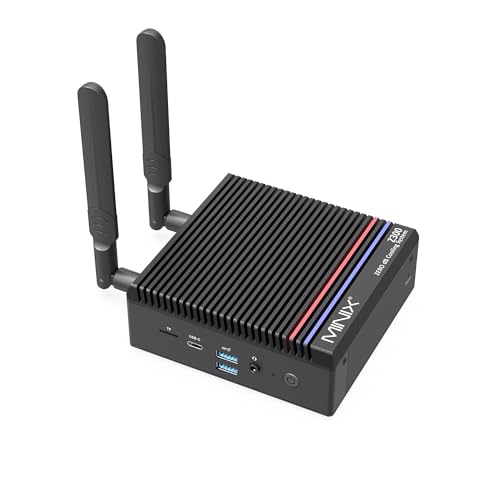
- Best Overall: MINIX NEO Z300-0dB — Intel Core i3-N300, 16GB DDR4, 512GB PCIe SSD, dual 4K@60Hz display, 2.5G LAN, VESA mount.
- Best for Home Office and Linux: MeLE Quieter 4C SE-Grade — Intel N150, 16GB RAM, 512GB SSD, Windows 11 Pro, Linux Ubuntu support, triple 4K display.
- Best for Triple Displays: MeLE Cyber X1 — Intel N150, 16GB DDR4, 512GB SSD, Windows 11 Pro, triple 4K display.
- Best for Industrial and Legacy Ports: KINGDEL Fanless Industrial Computer (Core i7) — Intel Core i7 8th Gen, 16GB RAM, 512GB NVMe SSD, metal case, dual COM ports.
- Best Stick PC: MeLE PC Stick PCG02 — Intel N100, 8GB RAM, 128GB storage, Windows 11 Pro, USB-C PD 3.0, dual 4K display.
- Best Business All-Rounder: MeLE Quieter 4C — Intel N150 up to 3.6GHz, 16GB RAM, 512GB SSD, USB-C PD 3.0, triple 4K@60Hz.
How to Choose a Fanless Mini PC: The Five Criteria That Matter
Top pick
1. Processor class and core count
Start with the chip, because on a sealed fanless box you will never change it. The Intel N100 and N150 are quad-core efficiency processors designed for exactly this category: they run office suites, browsers with many tabs, video calls, 4K media playback and light services while producing little enough heat for a finned case to shed. The Core i3-N300 in the MINIX below adds core count and burst headroom, which shows up when you keep a dozen applications open or run a heavier always-on workload. At the other end, the Celeron J4105 and N5100 in the stick PCs are honest signage and kiosk chips: fine for one focused job, frustrating as a general desktop. The industrial KINGDEL boxes use older desktop-class Core i5 and i7 processors; they are less efficient per watt but bring metal cases and legacy ports that the modern chips’ reference designs rarely offer.
2. Memory and storage floors
For a Windows desktop in 2026, 8GB of memory is the floor for a single-purpose machine and 16GB is the comfortable tier for a real desk. Storage splits by type as much as size: a 512GB SSD in the small boxes is a different experience from 128GB of eMMC in a stick, both in capacity and in how the machine feels after a year of updates. If the PC will hold a media library, a photo archive or several user accounts, treat 512GB as your starting point. If it will stream everything and run one kiosk application, a stick’s storage is a fair trade for its size and price tier.
3. Display outputs and desk layout
Count your screens before you shop. Single-display buyers can choose anything here, including the sticks. Dual-display desks should look at the dual-HDMI and HDMI-plus-USB-C machines. Triple-display setups narrow the field to the MeLE Cyber X1, the Quieter 4C models and their dual-HDMI-plus-USB-C layouts. Remember that a VESA mount turns any of the small boxes into a monitor-back PC, which is the cleanest silent desk of all: no visible computer, no audible computer.
4. Networking: wired speed and wireless generation
Fanless mini PCs often live as always-on infrastructure, so networking deserves more attention than it gets. The MINIX’s 2.5G Ethernet matters if you move files to a NAS or run the box as a small server. Gigabit Ethernet on the sticks and industrial boxes is plenty for signage, kiosks and media. Most of the current MeLE machines ship WiFi 5 rather than WiFi 6; for a wired-first silent PC that is a minor point, but a wireless-only desk should note it. Dual NICs on the larger KINGDEL make it a natural firewall or gateway appliance.
5. Ports, power and the physical installation
Finally, shop for the installation you will actually build. USB-C Power Delivery models like the Quieter 4C and the PCG02 stick let you power the PC from a capable monitor or a single tidy supply, which simplifies signage and desk wiring. Serial COM ports — two on the i7 KINGDEL, four on the i5 — are non-negotiable for industrial controls, older point-of-sale gear and lab instruments, and no dongle fully replaces them. Wake on LAN and auto power on, offered on the Cyber X1, decide whether a remote or unattended deployment restarts gracefully after an outage.
The Shortlist: Six Fanless Mini PCs for Six Different Jobs
Each pick below was verified against the Creators API pick sheet for this guide. Badges reflect roles, not a league table: the best fanless mini pc for a factory floor is a poor choice for a bedroom desk, and the guide says so in each verdict.

Best Overall — MINIX NEO Z300-0dB, Intel Core i3-N300, 16GB DDR4, 512GB PCIe SSD, dual 4K@60Hz display, 2.5G LAN, VESA mount
Strengths
- The i3-N300 is the strongest chip in this roundup for sustained office multitasking
- 2.5G Ethernet is rare at this size and ideal for NAS and fast file transfers
- Dual 4K displays plus VESA mounting make a clean dual-monitor desk
Trade-offs
- The N300 still relies on integrated graphics, so modern 3D gaming is off the table
- DDR4 rather than DDR5 reflects its efficiency-first design
- Premium positioning compared with N100 and N150 sticks and boxes
| Processor | Intel Core i3-N300 |
|---|---|
| Memory | 16GB DDR4 |
| Storage | 512GB PCIe SSD |
| Display | Dual display, 4K at 60Hz via HDMI and USB-C |
| Networking | 2.5G LAN |
| Mounting | VESA mount support |
As a buying decision, the MINIX NEO Z300-0dB is the easiest recommendation in this guide for a main desk. The Core i3-N300 gives it the most multitasking headroom of any modern-chip machine here, and that headroom is exactly what a silent primary PC needs, because you cannot fix a slow fanless box later with a cooler upgrade. Pair it with two 4K displays, hang it on a VESA mount, and you have a silent workstation that behaves like a conventional desktop until you push it into gaming or heavy rendering, which no machine in this guide pretends to do.
The 2.5G LAN port is the quiet differentiator. Buyers building a small home server, a fast NAS companion or a download and sync box will feel that port every day, while buyers on a simple wireless desk may never use it — in which case the Quieter models below compete hard. Judge it by your network, not by the spec sheet. For placement and heat advice that applies to every pick, see How To Choose A Fanless Mini PC.
Best for: buyers who match the badge role above and want a silent, verified machine in this tier. / Not suited for: demanding 3D gaming or heavy video rendering.


Best for Home Office and Linux — MeLE Quieter 4C SE-Grade, Intel N150, 16GB RAM, 512GB SSD, Windows 11 Pro, Linux Ubuntu support, triple 4K display
Strengths
- Explicit Linux and Ubuntu friendliness for homelab and education
- 16GB and 512GB is the balanced spec most buyers actually need
- Triple-display output for classroom and office walls
Trade-offs
- Overlaps heavily with its Quieter 4C sibling; choose on OS plans
- WiFi 5, not WiFi 6, despite the modern processor
- Integrated graphics only, like every machine in this group
| Processor | Intel N150 |
|---|---|
| Memory | 16GB RAM |
| Storage | 512GB SSD |
| Operating system | Windows 11 Pro, Linux Ubuntu support |
| Display | Dual HDMI plus USB-C, 4K triple display |
| Networking | Ethernet LAN, WiFi 5 |
Choose the Quieter 4C SE-Grade when your buying plan includes Linux. Its explicit Ubuntu support and education-and-office positioning make it the natural pick for classrooms, labs and homelab services where Windows is optional. The specification — N150, 16GB, 512GB — is the balanced tier this guide recommends for most people, and triple-display output means it can drive a teaching wall or a three-screen desk without adapters.
Against its own sibling, the standard Quieter 4C, the decision is about operating system and deployment style rather than hardware drama. Both are silent N150 boxes with the same memory and storage tier. If your fleet is Windows-only and you value USB-C PD power above all, compare the two listings side by side; if Linux is anywhere in your future, the SE-Grade is the one to shortlist.
Best for: buyers who match the badge role above and want a silent, verified machine in this tier. / Not suited for: demanding 3D gaming or heavy video rendering.
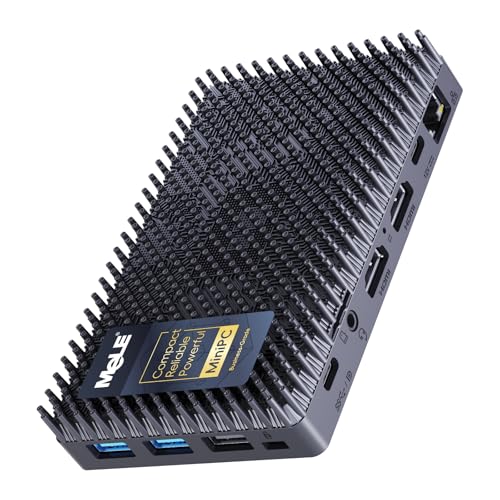
Best for Triple Displays — MeLE Cyber X1, Intel N150, 16GB DDR4, 512GB SSD, Windows 11 Pro, triple 4K display
Strengths
- Triple 4K display support from dual HDMI and USB-C
- Auto power on and Wake on LAN suit always-on and remote roles
- Windows 11 Pro included for business deployment
Trade-offs
- WiFi 5 rather than WiFi 6 on a current-generation box
- N150 is an efficiency chip, not a performance chip
- Plastic-era stick rivals undercut it for single-screen signage work
| Processor | Intel N150 |
|---|---|
| Memory | 16GB DDR4 |
| Storage | 512GB SSD |
| Operating system | Windows 11 Pro |
| Display | Dual HDMI plus USB-C, 4K triple display |
| Networking | WiFi 5, Bluetooth 5.1 |
The Cyber X1 earns its place in a buying guide for one practical reason: unattended reliability features. Auto power on and Wake on LAN sound like footnotes until a signage player, astrophotography rig or remote office box needs to recover from a power cut without a site visit. Add triple 4K display support and Windows 11 Pro, and this is the deployment manager’s pick — the machine you buy when the PC will live somewhere you are not.
As a plain desk PC it is also perfectly capable, with the same N150, 16GB and 512GB core specification as the Quieter models. The honest buying note is WiFi 5: wire it where you can, which its always-on roles encourage anyway. Buyers weighing silence against flexibility should also read Fanless Mini PC Pros And Cons before committing a whole fleet.
Best for: buyers who match the badge role above and want a silent, verified machine in this tier. / Not suited for: demanding 3D gaming or heavy video rendering.

Best for Industrial and Legacy Ports — KINGDEL Fanless Industrial Computer (Core i7), Intel Core i7 8th Gen, 16GB RAM, 512GB NVMe SSD, metal case, dual COM ports
Strengths
- A desktop-class i7 gives it the most single-box headroom here for legacy workloads
- Two RS232 COM ports and VGA serve industrial and legacy equipment directly
- The metal case is both the heatsink and the protection in harsh spaces
Trade-offs
- An 8th-generation platform means older connectivity standards throughout
- Larger and heavier than the stick PCs in this group
- Overkill, in size and capability, for a simple signage or kiosk job
| Processor | Intel Core i7, 8th generation |
|---|---|
| Memory | 16GB RAM |
| Storage | 512GB NVMe SSD |
| Display | 4K output, HD port and VGA |
| Ports | 4 x USB 3.0, 2 x COM RS232 |
| Case | Metal industrial enclosure |
Some purchases are decided by a single port. If your work involves serial-controlled equipment, an older VGA display, or a metal box that must survive a dusty workshop, the KINGDEL i7 is not one option among many — it is close to the only option in this guide. Its 8th-generation Core i7, 16GB of memory and 512GB NVMe drive give legacy workloads genuine speed, and the metal enclosure is engineered as the cooling system, not decoration.
The buying caution is generational. You are purchasing an older platform for its ports and case, so do not expect the newest wireless or display standards. For an office desk, the modern N-series boxes are better buys. For industry, this is the correct buy, and pairing it with the analysis in Is A Fanless Mini PC Worth It helps justify the tier to whoever signs the order.
Best for: buyers who match the badge role above and want a silent, verified machine in this tier. / Not suited for: demanding 3D gaming or heavy video rendering.

Best Stick PC — MeLE PC Stick PCG02, Intel N100, 8GB RAM, 128GB storage, Windows 11 Pro, USB-C PD 3.0, dual 4K display
Strengths
- The N100 is a modern, efficient chip in a true stick format
- USB-C PD power simplifies signage and kiosk wiring
- Dual 4K display support from something that fits in a pocket
Trade-offs
- 128GB of storage fills quickly once Windows updates accumulate
- 8GB of RAM caps serious multitasking
- Stick thermals throttle sooner than the finned boxes under load
| Processor | Intel N100, 4 cores / 4 threads, up to 3.4GHz |
|---|---|
| Memory | 8GB RAM |
| Storage | 128GB |
| Operating system | Windows 11 Pro |
| Display | 4K dual display |
| Power | USB-C PD 3.0 |
A stick PC is a buying category of its own, and the MeLE PCG02 is the modern way to buy one: an N100 processor instead of an ageing Celeron, USB-C PD power, and dual 4K display support in something that plugs behind a screen and disappears. For digital signage, kiosk displays, reception screens and a spare TV computer, that invisibility is the entire point, and no finned box matches it.
Buy it with clear eyes about storage and memory. 128GB and 8GB suit a defined, single-purpose deployment; they do not suit a family desktop. Keep its workload fixed, let it do one job silently for years, and it is among the best-value shapes in this guide. Keep a browser with forty tabs as the plan, and step up to the 16GB boxes instead.
Best for: buyers who match the badge role above and want a silent, verified machine in this tier. / Not suited for: demanding 3D gaming or heavy video rendering.


Best Business All-Rounder — MeLE Quieter 4C, Intel N150 up to 3.6GHz, 16GB RAM, 512GB SSD, USB-C PD 3.0, triple 4K@60Hz
Strengths
- USB-C PD power makes tidy single-cable desk and travel setups possible
- Triple 4K output is generous for a silent business box
- Business-grade positioning with astrophotography and office use in mind
Trade-offs
- Shares the N150 ceiling: fine for office work, not for heavy creation
- No 2.5G Ethernet, unlike the MINIX in this roundup
- Silent does not mean cool under indefinite maximum load; placement matters
| Processor | Intel N150, up to 3.6GHz |
|---|---|
| Memory | 16GB RAM |
| Storage | 512GB SSD |
| Display | Triple 4K at 60Hz |
| Power | USB-C PD 3.0 |
| Networking | Dual-band Wi-Fi |
The standard Quieter 4C is the business all-rounder of this guide: N150 performance, the recommended 16GB and 512GB tier, triple 4K output and USB-C PD 3.0 power in a business-grade silent case. For a small office rolling out quiet desks, that combination simplifies everything — one image, one cable standard, no fan noise in calls, and enough display support for the two- and three-screen desks staff actually use.
Its limitation is the family’s limitation: integrated graphics and an efficiency processor define a clear ceiling. Within that ceiling — documents, browsers, calls, media, light services — it is a composed, silent tool. The single-product deep dive in Fanless Mini PC Review looks at this class of machine in more detail if you want a second opinion before a bulk buy.
Best for: buyers who match the badge role above and want a silent, verified machine in this tier. / Not suited for: demanding 3D gaming or heavy video rendering.

Comparison Table
| Pick | Processor | Memory | Storage | Best role |
|---|---|---|---|---|
| MINIX NEO Z300-0dB | Intel Core i3-N300 | 16GB DDR4 | 512GB PCIe SSD | Silent main desk, 2.5G networking |
| MeLE Quieter 4C SE-Grade | Intel N150 | 16GB RAM | 512GB SSD | Linux, education, homelab |
| MeLE Cyber X1 | Intel N150 | 16GB DDR4 | 512GB SSD | Unattended and triple-display deployment |
| KINGDEL Fanless Industrial Computer (Core i7) | Intel Core i7, 8th generation | 16GB RAM | 512GB NVMe SSD | Industrial and legacy serial work |
| MeLE PC Stick PCG02 | Intel N100, 4 cores / 4 threads, up to 3.4GHz | 8GB RAM | 128GB | Invisible signage stick |
| MeLE Quieter 4C | Intel N150, up to 3.6GHz | 16GB RAM | 512GB SSD | Business desks, USB-C PD power |
Three of the picks above are linked again here for convenience; every other machine is one click away in its review section. When you compare, weight the role column more heavily than any single specification: fanless buying is role buying.
What Your Budget Actually Buys in a Fanless Mini PC
Without printing prices — they move constantly, so check price on Amazon for the current position of each pick — the tiers in this category are consistent. The entry tier buys stick PCs and older Celeron boxes: single-purpose machines for signage, kiosks and light media. The middle tier, where most readers should shop, buys the modern N100 and N150 boxes with 16GB of memory and 512GB of storage; that is the tier that feels like a real desktop. The upper tier buys headroom and specialisation: the N300’s extra cores, 2.5G networking, or the KINGDELs’ industrial ports and metalwork. Money spent above the middle tier should always buy a named feature you will use, never a vague sense of future-proofing.
One budget trap deserves its own warning: the almost-fanless listing. Some low-cost mini PCs advertise silence while hiding a small fan that runs under load. If zero noise is the reason for your purchase — a bedroom, a studio, a clinic — verify that the product is described as fanless or 0dB by design, as every pick in this guide is, rather than merely quiet.
Fanless Mini PC vs a Conventional Mini PC: Which Should You Buy?
A conventional mini PC with a fan will always offer more peak performance for the same tier, because active cooling lets a processor sustain higher speeds. Buy one if your workload is bursty and heavy: compiling large projects, editing video, or gaming. Buy fanless when the operating conditions matter more than the benchmark: silence, dust, sealed environments, 24/7 unattended running, or a PC that must disappear behind a display. Many households end up with both — a fanned machine on the main desk and a fanless box doing quiet, constant work elsewhere. The group test in Fanless Mini PC Reviews explores that split in more depth.
How to Set Up a Fanless Mini PC for Maximum Sustained Performance
Step 1: Give the case air. Place the PC where air can rise past its fins or case walls — on an open shelf or VESA-mounted behind a monitor with a gap, never sealed inside a drawer or stacked under other hot equipment.
Step 2: Connect wired networking where the role allows. A cable removes wireless heat and variability, and it unlocks Wake on LAN for remote roles.
Step 3: Finish all updates before judging speed. A new Windows machine spends its first hours indexing and updating, which loads a passive case. Let it finish overnight, then evaluate.
Step 4: Match the power plan to the job. Balanced mode suits desks; signage and kiosk roles benefit from configuring auto power on and recovery behaviour in the BIOS where offered.
Problem: the PC feels slower in summer. Fix: check placement first. A fanless case in direct sun or a closed cabinet will throttle; shade and airflow restore performance more reliably than any software tweak.
Problem: a stick PC runs hot behind a TV. Fix: use a short HDMI extension to move it out of the TV’s own heat pocket and into open air behind the panel.
Common Mistakes
Buying a stick for a desktop’s job. Sticks are brilliant single-purpose tools and miserable general computers. Match the format to the role.
Ignoring the display count. Adapters and docks are poor substitutes for native outputs. Count screens first, then shop.
Sealing the PC away. Hiding a fanless PC inside furniture defeats its cooling. Invisible is good; enclosed is not.
Expecting gaming performance. Every machine here uses integrated graphics. They play light and older titles and stream games happily, but they are not gaming PCs, and this guide will not pretend otherwise.
Skipping the wired option. For always-on roles, Ethernet is reliability. Use it where the installation allows.
Final Recommendation
For most readers, the buying decision resolves to one of three machines. The MINIX NEO Z300-0dB is the silent main-desk choice, with the strongest modern chip and the fastest networking. The MeLE Quieter 4C family is the business and Linux-friendly middle, with the SE-Grade for Ubuntu plans and the standard model for USB-C PD desks. The MeLE PCG02 stick owns invisible signage. The KINGDEL pair serve industry, and the Cyber X1 serves unattended triple-display deployments. Pick by role, place the case with respect for its cooling, and a fanless mini pc will repay you with the rarest feature in modern computing: a computer you never hear and rarely think about.
Processor Generations Explained in Plain Language
Listings in this category span nearly a decade of Intel design, and the generation matters as much as the badge. The oldest chips here, the Celeron J4105 in the HiGOLE stick class and the 8th-generation Core i5 and i7 in the KINGDEL boxes, come from an era when efficiency cores did not exist in this segment. They still perform their designed jobs — signage, serial control, single applications — but they draw more power per task and lack modern media and connectivity features. The Celeron N5100 in the PCG02 Pro is a step newer, a low-power design that sips electricity and handles dual displays, though it remains a focused-job processor.
The current generation is the N100, N150 and i3-N300 family. These chips were designed for exactly the fanless brief: quad-core layouts (eight cores on the N300), strong integrated media engines for 4K playback, and heat output low enough for a finned case to shed indefinitely. For a general desktop, that generation gap is the single biggest quality-of-life difference in this guide — snappier browsing, smoother video calls, faster updates — and it is why the modern MeLE and MINIX boxes anchor the recommendations even though the older KINGDEL machines carry grander Core i5 and i7 badges. Badge nostalgia is a poor buying strategy; architecture age is a good one.
Ports and Connections: A Buyer’s Glossary
2.5G Ethernet moves files two and a half times faster than standard Gigabit when the rest of your network supports it. It matters for NAS-heavy desks and small servers, and it is the MINIX’s headline networking feature.
USB-C with Power Delivery lets one cable carry power into the PC, and on some layouts display and data as well. Desks get tidier and signage installs get simpler. The Quieter 4C and PCG02 families build around this.
COM RS232 serial ports look antique and are irreplaceable in industry. Scales, PLCs, older point-of-sale hardware and lab instruments still speak serial, and the KINGDEL boxes speak it natively — two ports on the i7, four on the i5.
Dual NICs mean two independent network connections, the hardware basis for a firewall, gateway or segmented test bench. The larger KINGDEL is the pick when that is the job.
VESA mounting bolts the PC to the back of a monitor. It is the cheapest cable-management and desk-space upgrade in computing, and it suits passive cooling because the case hangs in open air.
Wake on LAN and auto power on decide how a machine recovers and resumes without a human present. For any PC deployed in another room, another building or another city, treat them as headline features, not fine print.
Three Buyers, Three Correct Answers
The home-office professional. Your day is documents, a browser that never closes, video calls and a second screen. Your enemy is noise on calls and a desk that looks like a cable spill. The correct answer is a 16GB N150 or N300 box on a VESA mount: the Quieter 4C for a USB-C powered tidy desk, or the MINIX when you also keep heavy multitasking and a NAS in the picture. Both stay silent through every meeting, and both drive your two displays natively.
The living-room and bedroom user. Your PC is a media source and a light desktop that must never be heard over a film or a sleeping household. A small box near the TV or a stick behind it both work; choose the box if you browse and download on it, the stick if it purely plays and displays. Wired Ethernet to the router, where the layout allows, makes 4K streaming boringly reliable, which is the highest praise a media PC can earn.
The operator. You run signage, a kiosk, a workshop controller or a small always-on service. Your priorities are recovery behaviour, ports and years of unattended running. The Cyber X1’s auto power on suits remote displays, the PCG02 stick disappears into installations, and the KINGDEL machines own any job involving serial hardware or a metal case in a hard environment. Buy the recovery features first and the processor second; your future self, spared a site visit, will approve.
Ownership: Living With a Fanless PC for Five Years
Ownership is where fanless machines quietly outscore everything else. There is no fan to clog, whine or fail, and dust — the slow killer of small PCs — has no intake path pulling it across the board. Maintenance reduces to wiping the case, keeping its surroundings clear, and letting the operating system update. Power draw at idle is a handful of watts, so an always-on fanless box costs very little to run around the clock compared with a conventional desktop left awake for the same services.
The one ownership habit to build is thermal respect. Every year or so, check that the PC’s surroundings have not crept inward — books stacked against the fins, a cabinet door added, a hotter device parked on top. Passive cooling fails by suffocation, not by surprise, and a ten-second visual check prevents the only failure mode the design really has. Storage health is the other slow variable: sticks with small eMMC drives reward tidy habits, so offload archives to external or network storage and let the little drive breathe.
Resale and reuse follow naturally. A silent, low-power box that outgrows desk duty becomes a media player, a smart-home hub, a network service box or a relative’s first computer. Few technology purchases age this gracefully, and that second life belongs in any honest buying calculation.
Workload by Workload: What Each Job Demands
Documents, email and browsing. The lightest real workload, and the one every machine in this guide handles. The differentiators are memory for tab-heavy browsers and a second display for side-by-side work, not raw processor speed. Even so, buy the modern chips if this is a primary desk: the N150 and N300 generation simply feels faster everywhere, every day.
Video calls and remote work. Calls are sustained, mixed loads — camera, microphone, screen sharing, chat and documents at once — and they punish weak single-core performance and noisy fans alike. Fanless design is a genuine advantage here: your microphone hears the room, not your computer. The 16GB boxes are the safe buy; sticks are not call machines.
4K media playback. Modern Intel integrated graphics decode mainstream 4K video in hardware, so the N-series boxes and even the sticks play films smoothly. The buying variables are storage for local libraries, wired networking for reliability, and display outputs that match your screen.
Always-on services. File sync, smart-home control, download queues, small web services and astrophotography control — the workload this category was born for. Prioritise recovery features, Ethernet and power frugality over peak speed. The Cyber X1 and Quieter models are built for exactly this, and the industrial KINGDELs cover the same ground where the environment is harsher.
Light photo work and documents with large files. Feasible on the N300 and the 16GB N150 boxes for casual volumes. Professionals with heavy catalogues should buy active cooling and more processor; honesty about that boundary is what makes the rest of this guide trustworthy.
Gaming. Integrated graphics across this entire guide means light, older and streamed games only. If gaming is a primary purpose, a fanless mini pc is the wrong tool, full stop — look at conventional mini PCs and small desktops instead, including the options gathered in Best Mini Pcs.
The Pre-Purchase Checklist
Before you order, walk this list once. Count your displays and confirm native outputs for each. Decide wired or wireless networking and check the Ethernet speed and WiFi generation against that decision. List every device that must plug in — especially anything serial — and match it to the port layout. Confirm the memory and storage tier against your real habits, not your tidiest intentions. Check the power arrangement: a standard supply, or USB-C PD from a monitor or dock. Decide where the case will physically live and confirm air can move around it. Verify the operating system edition suits your software and, for business use, your management tools. Finally, confirm the machine is genuinely fanless by design rather than merely advertised as quiet. Ten minutes on this list prevents nearly every return this category generates.
If two machines still tie after the checklist, break the tie with generation and support: the newer processor platform first, then the clearer Linux or business support story, then the mounting and recovery features. Price tier breaks the final tie — check the latest price on Amazon for each finalist on the day you buy, because this category’s pricing moves with component cycles and seasonal sales.
Buying for a Team or a Fleet: Notes for Offices, Schools and Clinics
Everything above scales, but fleets add three variables worth naming. The first is standardisation: one model, one image, one power standard and one mounting method turns a hundred desks into a single support problem. The Quieter 4C family exists for this buyer, and its USB-C PD power and triple-display support cover the widest range of desk layouts with the fewest accessories. The second variable is environment. Clinics and classrooms value silence for the same reason studios do — the room’s sound floor is part of the service — and sealed fanless cases tolerate the dust of real buildings better than any fanned alternative.
The third variable is failure behaviour. In a fleet, the question is never whether a machine will lose power, but what it does when power returns. Auto power on, Wake on LAN and a BIOS configured before deployment decide whether an outage is a non-event or a hundred site visits. Build those settings into your master image and your installation checklist, and keep one spare unit per site: at these sizes and tiers, a swap-first support model is cheaper than any repair workflow. Document which serial or legacy devices hang off the industrial units, because the KINGDEL boxes often become invisible infrastructure — until the day someone unplugs the wrong cable, when your documentation becomes the most valuable page in the building.
Finally, plan the refresh honestly. Fanless boxes age by workload growth, not by mechanical failure, so a five-year planning horizon is realistic for office and signage roles. When a unit is eventually retired from a desk, cascade it to signage or service duty rather than disposing of it; the fleet that buys with that cascade in mind spends less across the decade and throws away far less working hardware.
One last buying note: keep your receipt and your configuration notes together. Record the model, the port layout you used, the BIOS settings you changed and where the unit is mounted. Fanless PCs are set-and-forget machines, and that is their charm — but when you return to one after three silent years, your own short note is the difference between a two-minute job and an afternoon of rediscovery.
Frequently Asked Questions
Are fanless mini PCs fast enough for office work?
Yes. The N150 and N300 machines in this guide handle documents, browsers, video calls and 4K media with ease. The ceiling appears with heavy creation work and modern gaming, not with office workloads.
Do fanless mini PCs overheat?
They are designed to shed heat through the case. They throttle rather than damage themselves if placed badly, so airflow around the case is the owner’s one responsibility.
Can a fanless mini pc run all day and night?
That is one of its best roles. No fan means no fan bearing to wear out, and the efficiency chips sip power. Features like auto power on and Wake on LAN support unattended running.
Is a stick PC a real computer?
Yes — a complete Windows PC in stick form. Its limits are storage, memory and sustained-load headroom, so it suits defined jobs like signage rather than general desks.
Fanless or fanned for a home server?
Fanless suits light services — file sync, media, smart-home controllers — especially in living spaces. Heavy transcoding or virtualisation fleets favour active cooling.
What should I check before buying for a business fleet?
Operating system edition, display count per desk, power delivery standard, mounting, and recovery features such as auto power on. Standardising those matters more than small processor differences.
Where can I compare more silent options?
Start with the sibling guides in this cluster and the wider silent-PC coverage linked throughout this page, then verify each candidate’s current specification on its listing before ordering.


