Disclosure: As an Amazon Associate, reviewstook.com earns from qualifying purchases. Links on this page are affiliate links; they cost you nothing extra. Prices and availability change often, so check the current Amazon listing before you buy.
A zsa moonlander vs kinesis advantage360 compared search is really a question about two philosophies of ergonomic typing wearing keyboard costumes. The ZSA Moonlander is a flat, columnar, fully split board whose halves you position freely and whose tenting you build from adjustable legs and thumb clusters. The Kinesis Advantage360 is a sculpted, contoured board whose key wells, fixed geometry, and adjustable tenting bring the keys to your fingers instead of asking your fingers to travel. Both are premium, programmable, and aimed at people whose hands have filed a formal complaint about ordinary keyboards. This comparison explains where each philosophy wins — and states one fact up front: the Moonlander is sold directly by its maker and has no verified marketplace listing, so it is covered in prose only here, while both Advantage360 versions below are confirmed picks.
That asymmetry is not a verdict. Many excellent ergonomic products sell direct-only, and the Moonlander’s absence from the link table says something about distribution, not quality. What it does mean is that this page will never attach a Kinesis link, or a generic split board’s link, to the Moonlander’s name — a small honesty that matters when money follows clicks. Judge the Moonlander on the prose case made for it here and on its maker’s own materials; judge the Kinesis boards on the confirmed listings shown with their official images.
Key Takeaways
- Choose the Moonlander philosophy if you want flat, freely positioned halves, columnar key stagger, hot-swappable experimentation, and a famous training ecosystem.
- Choose the Advantage360 philosophy if you want sculpted key wells that shorten finger travel, a fixed repeatable geometry, and tenting built into the body.
- The Advantage360 comes in a wired USB-C form and a Professional Bluetooth form with backlighting and quieter switches; both are verified picks here.
- Either board demands an adaptation period measured in weeks, and either rewards it with a typing posture ordinary boards cannot offer.
- Comfort claims on this page stay in the realm of comfort: no keyboard here is presented as a treatment for any medical condition, and persistent pain deserves professional advice.
- Your current pain points — shoulder width, finger travel, wrist angle — should choose the philosophy, not brand loyalty or aesthetics.
In this guide
Quick verdict and comparison table
| Criterion | ZSA Moonlander (prose only) | Kinesis Advantage360 |
|---|---|---|
| Form philosophy | Flat split halves, position them anywhere | Contoured key wells, fixed sculpted geometry |
| Key arrangement | Columnar with thumb clusters | Concave wells with thumb keys |
| Tenting | Adjustable legs and accessories | Adjustable tenting built in |
| Programmability | Deep, configurator-led, layers celebrated | Fully programmable per its listings; Professional is open-source led |
| Availability here | Maker-direct only; no verified listing | Two confirmed listings below |
| Learning curve | Steep for touch-typists changing stagger | Steep for anyone new to contoured wells |
If you already know you want the contoured route, the two picks follow immediately. If you are still deciding, the criterion sections after them argue each philosophy in turn and end with a decision guide — read those before spending, because returns on premium ergonomic boards are a slower teacher than an honest hour of reflection.
How were the linked picks verified?
Both Advantage360 listings were confirmed through marketplace data with exact titles naming the model, its connection type, its mechanical switches, its contoured shape, and its adjustable tenting, and each appears with an official image before its review. A search for the Moonlander returned no listing from its maker at all — only unrelated split keyboards — which is why no link on this page wears its name. That is the whole method, stated plainly so you can hold the page to it.

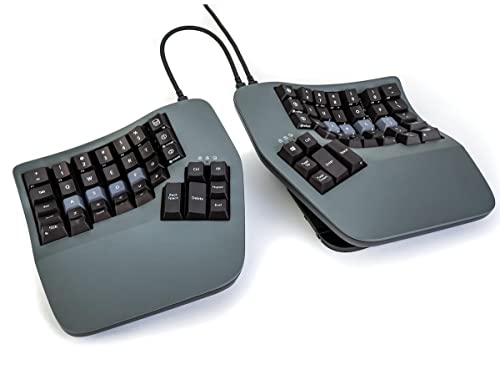
Kinesis Advantage360, USB-C — the contoured route, wired
Badge: Best for buyers who want the sculpted wells without wireless complexity. The standard Advantage360 brings the famous contoured geometry — concave key wells, thumb keys, adjustable tenting, PBT keycaps, mechanical switches — in a fully programmable USB-C form that simply works wherever it is plugged in.
- Form: split ergonomic, contoured wells, adjustable tenting
- Connection: USB-C wired
- Switches: mechanical
- Keycaps: PBT
- Programming: fully programmable per the listing
- Halves: link together as one system with set-apart flexibility
Strengths
- The wells place keys at varied depths matched to finger lengths, shortening travel for the shorter fingers ordinary boards neglect.
- Wired operation removes battery management and pairing from a setup already asking you to relearn typing.
- PBT caps and mechanical switches give the board a durable, serviceable, long-life character worthy of its tier.
Trade-offs
- The fixed sculpted geometry cannot flatten for a bag the way a flat split board can, so travel typing means carrying a shape.
- A cable is a cable: desk tidiness purists will eye the Professional’s Bluetooth with envy.
- The adaptation period is real, and the first week’s typing speed will humble experienced touch-typists.
This is the Advantage360 in its purest form, and for a single-desk professional it may be the wisest form: one less battery in your life, one less wireless variable when something feels odd, and the full ergonomic argument intact. The wells either convert you or they do not, and if they convert you, this board can plausibly be a decade-long companion rather than a gadget-cycle purchase.
Best for: desk-based writers, programmers, and professionals choosing the contoured philosophy for one workstation. / Not suited for: frequent travellers, wireless minimalists, or anyone unwilling to fund a few slow typing weeks.

Kinesis Advantage360 Professional — the contoured route, wireless
Badge: Best for multi-device and backlit, quiet-switch preferences. The Professional keeps the sculpted geometry and adds Bluetooth, backlighting, quiet mechanical switches, and an open-source programming story per its confirmed listing — the same wells, wearing a more flexible suit.
- Form: split ergonomic, contoured wells, adjustable tenting
- Connection: Bluetooth wireless
- Switches: quiet mechanical
- Lighting: backlit
- Programming: fully programmable, open-source led
- Halves: adjustable separation as one system
Strengths
- Bluetooth frees the sculpted halves to sit exactly where your shoulders want them, with no cable negotiating the space.
- Quiet switches respect shared offices and households during early-morning writing sessions.
- Backlighting keeps the legends readable in dim rooms while you are still learning the geometry by sight.
Trade-offs
- Wireless adds charging and pairing to the adaptation project, a small but real overhead in the first month.
- It occupies the higher tier of an already premium family, so the wired model’s value argument remains respectable.
- Backlighting and Bluetooth do nothing for the learning curve, which remains the true price of admission.
Choose the Professional if your desk hosts several machines, if your typing happens while others sleep, or if you simply know that a cable across the sculpted halves would irritate you daily for years. Small daily irritations are exactly what ergonomic spending exists to remove, so honouring that instinct is rational rather than indulgent — within a tier where every option is already a considered purchase.
Best for: multi-device professionals, shared-space typists, and wireless devotees choosing the contoured route. / Not suited for: buyers who want the simplest possible setup, or budgets that the wired model already stretches.
The Moonlander case, argued fairly in prose
Since no listing carries it here, the Moonlander deserves its strongest honest paragraph. Its halves are independent, so shoulder width — not a hinge — sets your typing posture, and each half can be tented with its legs to the angle your wrists prefer. Its columnar layout aligns keys in columns matched to how fingers actually extend, and its thumb clusters move heavy-duty keys like space, enter, and backspace onto the strongest digit you own. The maker’s configurator culture and training materials are widely praised, layers are a way of life, and the flat halves travel in a case like a laptop’s companion rather than a sculpture. For a travelling programmer or a tinkerer who wants to sculpt a layout over months, this philosophy is not the consolation prize; it is the point.
Its honest costs mirror the Kinesis costs in a different accent. The flat board offers no wells to shorten finger travel, so fingers do more reaching than on the contoured design. The stagger change alone can take weeks. The thumb clusters delight some hands and bewilder others. And buying direct means marketplace conveniences — one-cart checkout with the rest of your life, certain returns rhythms — do not apply. None of that diminishes the board; all of it belongs in a comparison that respects your money.
Criterion by criterion: which philosophy wins where?
Shoulder and posture freedom leans Moonlander, because fully independent flat halves can sit at any width and rotation without a linking geometry. Finger travel and effort leans Advantage360, because wells and thumb keys are engineered around unequal finger lengths. Tenting is a genuine contest: the Kinesis builds adjustable tenting into a stable sculpted body, while the Moonlander invites experimentation with legs and angles that can go further for some wrists. Portability leans Moonlander clearly. Layout customisation is deep on both sides, with the Moonlander’s configurator culture famous among enthusiasts and the Kinesis Professional’s open-source programming answering in kind. Desk permanence leans Kinesis: a sculpted board declares a workstation, and rewards the declaration with repeatable geometry every single day.
Notice that no criterion produced a rout. That is because the two products are answers to two different questions that share vocabulary. Yours is the question that matters: is your discomfort mostly about where your arms and shoulders sit, or mostly about how far your fingers travel and how your wrists meet a flat plane? The first discomfort shops flat and free; the second shops sculpted. Readers still orienting in the wider category can browse best ergonomic keyboards before committing to either philosophy, and gamers cross-shopping should remember these are typing instruments first — the gaming boards at best gaming keyboards solve a different problem.
How to adapt to either board without misery
Whichever you choose, schedule the adaptation like a training block rather than suffering it like a side effect. Keep your old keyboard within reach for deadline emergencies during the first fortnight, and do your learning in low-stakes typing — notes, messages, practice drills — for set periods daily. Expect speed to fall before it rises, and measure progress weekly rather than hourly, because hourly measurement of a weeks-long process manufactures discouragement. Use the maker’s training resources where offered; both ecosystems provide them because both makers know the curve is the product’s real gatekeeper.
Set the physical scene properly from day one: halves at shoulder width, tenting modest at first, chair and desk heights arranged so elbows rest near a right angle, and the board close enough that shoulders stay down. Photograph your setup once it feels right, because a bumped desk or a borrowed chair can silently undo a posture you spent weeks finding. And keep the comfort framing honest throughout: these boards aim to make typing more comfortable, and if you have persistent pain, numbness, or a diagnosed condition, a clinician or ergonomics professional belongs in the decision alongside any product page, this one included.
Common mistakes in premium ergonomic buying
Buying both philosophies’ vocabulary at once — demanding wells, flat travel, columnar stagger, and sculpted thumbs in one product — guarantees disappointment, because the geometries contradict each other. A second mistake is judging adaptation at day three; every serious owner of either board describes a turning point that arrives later than impatience prefers. A third is neglecting the rest of the workstation: a sculpted keyboard under a badly placed monitor, typed from a collapsing chair, is an orchestra with one tuned instrument. The seating side is treated seriously in best chair for CS2 for desk workers generally, whatever their game or profession.
Fourth, do not let a comparison page’s link table vote on your behalf. Here, only the Kinesis side could be verified for linking; that is a fact about distribution channels. A reader who needs the Moonlander’s flat freedom should buy it from its maker with this page’s blessing and its criterion sections as a checklist. Fifth, resist flipping layouts weekly once you commit. Layers and remaps are powerful precisely when they stabilise into muscle memory, and muscle memory is a savings account that only accepts deposits in one currency at a time.
Decision guide: answer three questions
First, where do you type? One desk, daily, for years leans Kinesis; several places, a bag, and a laptop leans Moonlander. Second, what complains loudest — shoulders and arm angle, or fingers and wrist plane? Shoulders lean flat and free; fingers lean sculpted. Third, how do you feel about a visible learning project? Both boards ask for one, but the Moonlander’s configurator culture makes the project itself a hobby, while the Kinesis asks you to learn a geometry and then forget it for a decade. Answer honestly and the comparison usually resolves itself without a tiebreaker.
Final recommendation
For the desk-based professional whose fingers travel too far on flat boards, the Advantage360 is the recommendation this page can stand behind with verified listings: the wired model for simplicity, the Professional for wireless, quiet switches, and backlighting. For the traveller, the tinkerer, and the shoulder-first typist, the Moonlander remains a first-class answer available from its maker — and this comparison’s criterion sections are written to help you choose it knowingly if it fits. Either way, you are choosing a philosophy your hands will live inside; choose the one that matches your discomfort, fund the adaptation weeks, and let the keyboard become invisible, which is the shared destination of both designs.
What does a working day feel like on each board?
On the Advantage360, the day feels sculpted. Your fingers rest in wells whose depths were decided by someone who measured hands, the thumbs find their keys without travel, and the board’s fixed geometry means your tenth hour is typed in exactly the posture of your first — a repeatability that professionals who bill by the word quietly treasure. The board occupies its desk territory like a piece of studio equipment, and the day organises itself around it. On the Moonlander, the day feels arranged. The halves sit where this morning’s shoulders wanted them, the layers you have built over months bring your symbols and navigation under your strongest fingers, and when the day ends the board can slide into a case and leave the desk empty. One day feels like a well-built chair; the other feels like a well-organised workshop, and both metaphors flatter their subject honestly.
The evening test separates them further. After six hours, which board’s compromises have you stopped noticing? Kinesis owners tend to report forgetting the board exists — the wells simply become where keys live. Moonlander owners tend to report enjoying the board’s configurability as an ongoing craft, tweaking a layer the way a guitarist tweaks a pedal chain. Forgetting and tinkering are both legitimate relationships with a tool; knowing which one you want is the deepest version of the buying question, and no specification table can answer it for you.
How do switches, keycaps, and sound enter the decision?
Both families take mechanical switches seriously, and the confirmed Kinesis listings make the point concretely: mechanical switches with PBT keycaps on the wired model, quieter mechanical switches with backlighting on the Professional. Sound is a workstation feature, not a garnish — the Professional’s quiet switches exist for shared rooms and sleeping households, and they can be the deciding row of the whole comparison for a night-shift writer. Keycap material matters across years, because PBT resists the shine and legend wear that make lesser boards feel tired, and on a board bought as a decade companion, tired is the enemy.
The Moonlander’s hot-swappable culture invites switch experimentation as a hobby in itself, which delights tinkerers and should be weighed as a real feature if you are one. The Kinesis answer is curation: switches chosen to suit the board’s purpose, fitted, and finished. Neither approach is more serious; they are serious about different things — one about the journey of preference, the other about arriving. As with the geometry, let your temperament arbitrate, and let this page’s honesty about both temperaments stand in for the showroom visit neither board easily offers.
Frequently asked questions
Why is there no purchase link for the Moonlander?
Because no verified marketplace listing from its maker could be found for this guide — the search returned only unrelated split keyboards. ZSA sells its boards directly, so the Moonlander is covered in prose here, argued fairly and at length. Attaching another product’s link to its name would be exactly the kind of quiet substitution this page refuses to perform.
Which board is easier to learn?
Neither is easy in week one, and claims otherwise should be distrusted. The Moonlander asks you to learn columnar stagger and thumb clusters on a familiar flat plane; the Advantage360 asks you to learn sculpted wells that change where every key lives. Most typists report a few weeks to comfortable speed on either, with full fluency following over the first season of daily use.
What is the difference between the two Advantage360 listings?
Connection and trim. The standard model is USB-C wired with PBT keycaps and mechanical switches; the Professional is Bluetooth with backlit keys, quieter mechanical switches, and an open-source programming emphasis. The contoured geometry, split design, and adjustable tenting — the ergonomic heart of the product — are shared between them.
Can either keyboard help with wrist pain?
Both are designed around typing comfort — split postures, tenting, reduced finger travel — and many users find such designs more comfortable for long sessions. This page makes no medical claims, and no keyboard should be bought as a treatment. If you have persistent pain, numbness, or a diagnosis, involve a clinician or qualified ergonomics professional in the decision.
Are the halves of the Advantage360 fully separate?
The design is a split system whose halves can be positioned apart to suit your shoulders, working together as one keyboard with adjustable tenting. It offers meaningful placement freedom within a linked, sculpted architecture — different in character from the Moonlander’s wholly independent flat halves, which is precisely the philosophical fork this comparison is built around.
Which is better for programming?
Both are popular with programmers for the same reasons: deep programmability, layers that bring symbols and navigation closer, and postures that survive long sessions. The Moonlander’s configurator culture appeals to those who enjoy sculpting layouts; the Advantage360’s wells appeal to those who want the geometry decided brilliantly in advance. Your discomfort profile, not your language of choice, should arbitrate.
What should you do in the first thirty days with either board?
Days one to ten are for humility: drills, easy typing, and a kept log of speed and comfort that future-you can trust more than memory. Keep the old board plugged in for genuine emergencies and notice, with interest rather than shame, when you reach for it. Days eleven to twenty are for commitment: move the old board to a cupboard, set your tenting and spacing deliberately, and begin shaping one — only one — layer or remap that answers your most frequent annoyance. Days twenty-one to thirty are for consolidation: stop changing things, let the savings account of muscle memory accumulate interest, and schedule the photograph of your final setup that the earlier section recommended.
At day thirty, write the verdict down. If the board has disappeared from your attention during work, it has won, whichever philosophy it carries. If a specific, nameable friction persists — a thumb cluster your hand cannot love, a well depth that fights your shortest finger — you have learned something purchasable: which philosophy your body actually speaks. That knowledge, bought with one honest month, will steer every keyboard decision for the rest of your typing life, and it is available from either side of this comparison. The worst outcome was never choosing the second-best board; it was never running the experiment at all, typing on a rectangle forever because the rectangle was familiar.
How do the two boards handle tenting and wrist angle in practice?
Tenting — raising the inner edges of the halves so the hands rest in a more natural, handshake-like tilt — is where marketing photographs and lived anatomy most often part company. On the Kinesis, tenting is a designed property of the sculpted system: adjustable, stable, and integrated with the wells, so the angle you set in the morning is the angle your wrists meet all day, every day, without drift. On the Moonlander, tenting is an experiment you conduct with legs and accessories, capable of reaching angles the fixed system may not, but asking you to find and maintain them yourself. One approach trusts the maker’s research; the other trusts your curiosity. Wrists differ enough that both trusts are sometimes rewarded, which is why this comparison refuses to crown a tenting winner and instead asks which kind of trust you prefer to place.
The practical advice is to begin modestly on either board. Extreme tenting adopted on day one, in the enthusiasm of unboxing, can trade one unfamiliar strain for another while your hands are already busy relearning key positions. Raise the angle gradually across the adaptation month, letting comfort rather than ambition set the pace, and keep notes the way this guide keeps prescribing — because the angle that felt revelatory in week one is occasionally the angle week four quietly corrects, and a written trail turns that correction from a mystery into a method.
What about noise, neighbours, and the shared-office test?
A keyboard is a musical instrument whether it wants to be or not, and premium ergonomic boards are bought disproportionately by people who type near others — partners, flatmates, open-plan colleagues, sleeping children. The Advantage360 Professional’s quiet mechanical switches speak directly to that reality, and its backlighting serves the same household at the other end of the day, when the typist works in a dim room so as not to flood a shared space with light. The wired model’s standard mechanical voice is honest office equipment: present, purposeful, and worth a thought if your desk shares a wall with a nursery. The Moonlander’s switch culture lets a buyer chase quiet as a specification of its own, at the cost of becoming, briefly, a student of switch acoustics.
Whichever board you choose, do the household the courtesy of a sound check during the trial period, at the hours you actually type. A board that delights you at noon and exiles you from the bedroom desk at midnight has failed a test no benchmark publishes. Ergonomics, pursued seriously, turns out to be a household discipline as much as a personal one — a truth that applies equally to the chair beneath you and the calls you take, and one this comparison is glad to end on before its verdict sections do their work.
How do the two boards age, and what does ownership cost over years?
Premium ergonomic boards should be audited on a decade’s ledger, because that is the service life their prices quietly promise. The Kinesis side of the ledger is reassuringly plain: mechanical switches that can be serviced, PBT keycaps that resist shine and legend wear, a sculpted body with nothing fashionable to date, and a wired model whose entire failure surface is a cable. The Professional adds batteries and radios to that surface, the standard toll for wireless freedom, and pays it knowingly. The Moonlander side trades on modularity — switches that invite replacement, a maker whose parts and support culture are part of the product’s fame — and on a flat format that travels, with travel’s attendant knocks, as a way of life.
On either side, the dominant cost is not money but the adaptation month, paid once and amortised across thousands of typing days. That arithmetic is why this comparison keeps steering you away from bargain logic: a board that fits your philosophy at a premium will cost you less, in every currency that matters, than a board that fights your philosophy at a discount. It is also why the second-hand market in both boards is unusually civilised — owners sell because their philosophy changed, rarely because the hardware failed — and a patient buyer can sometimes let another typist fund the experiment. If you buy used, apply the same verification discipline as anywhere: exact model, connection type, and switch story confirmed in writing before money moves.
What do programmers, writers, and gamers each get from this comparison?
Programmers live in symbols and navigation, so layers are their native country: both boards let them build a personal capital city of brackets, arrows, and shortcuts under the home row, and the choice between them is the geometry question wearing a lanyard. Writers live in prose flow, where the prize is a board that never interrupts a sentence with a reach or an ache; the wells’ shortened travel and the flat board’s shoulder freedom court that prize from opposite banks of the same river. Gamers, arriving from the gaming-keyboard world, should notice what neither board offers — neither is a rapid-trigger gaming instrument — and what both offer instead: a typing life that leaves hands fresher for the evening’s matches, which for the many readers whose keyboards serve a job first and a game second is not a consolation but the actual requirement.
That spread of readers is the final argument for the comparison’s even-handedness. A page that crowned one board would fail two of those three audiences. A page that maps philosophies to discomforts, verifies what it links, argues the unlinked side fairly, and hands you three questions at the end serves all of them — and leaves the decision, properly, in the hands it will be typed by.
How do the two boards fit different rooms and lives?
The Advantage360 is a resident. It suits the study, the dedicated office, the corner of a bedroom that has been honestly surrendered to work — places where a sculpted instrument can hold its territory and be met there daily. Its presence in a room announces a serious typing life, and households tend to organise around it accordingly, the way a piano organises a lounge. The Moonlander is a citizen of several rooms. It suits the kitchen-table freelancer, the hot-desking consultant, the student whose library carrel changes by the day, because its flat halves and case make the ergonomic posture portable rather than architectural. Neither life is more legitimate; they are different answers to where typing happens, and a buyer who misjudges their own geography — buying the resident for a nomadic life, or the traveller for a settled one — will feel the error daily in ways no switch choice can soothe.
Households add a second geography: other people. A sculpted board in a shared space invites questions and occasional borrowed typing sessions that its learning curve makes comical; a flat split board invites less sculpture-envy but the same borrowed-typing comedy. If your desk is genuinely communal, keep the old rectangle in a drawer for guests, on either philosophy. Ergonomic boards are personal instruments, closer to a bicycle’s fit than to a household appliance, and treating them that way — one rider, tuned once, left alone — is part of how their owners stay happy with them for years.
What is the role of layers, and which board teaches them better?
Layers turn a keyboard into several keyboards stacked in the same place: hold a key and the number row becomes function keys, the letter block becomes a navigation cluster, the thumbs become a control room. For programmers and heavy shortcut users, layers are the difference between a hand that travels and a hand that stays home, and both boards here treat layers as a first-class citizen rather than a party trick. The Moonlander’s configurator culture makes layer design feel like a creative practice, with a community swapping layouts the way photographers swap presets. The Kinesis approach — fully programmable on the wired model, open-source led on the Professional — makes layers feel like infrastructure: built once, documented, and relied upon.
Beginners should adopt layers the way this guide advised adopting tenting: one at a time, answering a named annoyance, with a week of consolidation between additions. A layout that grows by evidence becomes an extension of thought; a layout imported wholesale from an enthusiast’s screenshot becomes a memorisation debt. Whichever board you choose, let your own typing nominate each layer, and the board — flat or sculpted — will gradually disappear under a system of your own design, which was the destination both makers were building toward all along.
How do the two boards handle the number row, symbols, and the edges of the layout?
The margins of a keyboard are where philosophies confess. On a contoured board, the wells dictate an orderly geography: every key has a depth and a place assigned by the sculpture, and the edges of the layout are where the maker’s decisions are most visible — which keys earned a place in the wells, which were exiled to the periphery, and how the thumbs’ cluster handles the heavy traffic of space, enter, and deletion. On a flat columnar board, the margins are a negotiation the user conducts with the configurator: keys can be promoted, demoted, layered, or banished according to the evidence of your own typing, and the board’s edge is wherever your layout says it is. Neither confession is a flaw. One says the maker studied hands so you do not have to; the other says the maker built you a laboratory because studying your own hand is the hobby.
Practical buyers should interrogate the margins with their own rarest keystrokes in mind. Where will your brackets live, your backtick, your escape, your screenshot chord? Walk a day of your real work across both layouts mentally, keystroke by keystroke, and notice which board keeps asking your fingers to travel and which keeps surprising you with a key already under the right digit. That mental walk, done honestly for ten minutes, predicts month-three satisfaction better than any review’s starless verdict — including this one’s, which is why this comparison keeps handing you instruments instead of answers.
What if you type in more than one language or layout tradition?
Multilingual typists and layout migrants — the Dvorak devotees, the Colemak converts, the programmers who live in two alphabets — should weight programmability even more heavily than this comparison already does, because their board must hold multiple personalities without hardware complaint. Both philosophies serve them, in their characteristic accents: the flat board’s configurator culture treats alternative layouts as a first-class joy, while the sculpted board’s programmability, open-source led in its Professional form, treats them as a serious engineering feature. The deciding factor returns, as ever, to geometry — a second layout learned in wells is a different physical skill from the same layout learned on a flat columnar plane — and to which learning investment your hands would rather make once and keep for a decade.
A worked example: three typists, three verdicts
Typist one is a software engineer with broad shoulders, a standing desk, and a history of aching across the upper back by Thursday. Her discomfort lives in her shoulders’ address, not her fingers’ travel, and the flat board’s freely placed halves — set wide, tented gradually, layered for symbols — answer it in its own language; she buys direct, adapts in a month, and her Thursday ache becomes a memory she tells new colleagues about. Typist two is a legal writer whose fingers tire on flat boards and whose desk has not moved in six years; the wells’ shortened travel and fixed geometry are his answer, the wired Advantage360 keeps his setup priestly simple, and by the second month he is typing at his old speed with a new absence at the day’s end. Typist three is a doctoral student who types in libraries across two cities; portability disqualifies the sculpture before the contest begins, and the flat board travels with her like a second laptop. Three readers, one comparison, three different correct endings — the signature of a decision that was always about the typist, never about the keyboards.
Closing note: choose the philosophy, fund the month
Whichever name ends up on your desk, the purchase is really two purchases: the board, and the month of adaptation you must fund with patience. Buyers who budget for both succeed with either philosophy; buyers who budget only for the hardware fail with both and blame the geometry. Choose by your discomfort’s address, verify what you buy under its exact name, set the scene like you mean it, and give your hands the month they are owed. The board that disappears under your work — flat or sculpted, wired or wireless — is the right one, and it was never going to be chosen by anyone’s hands but yours.
One more test: the borrowed-hands experiment
Before committing, borrow the philosophy if you cannot borrow the board. Type for a day with your ordinary keyboard’s halves — or any split board a colleague owns — pulled apart to shoulder width, and notice whether your shoulders file a thank-you or a complaint. Rest your hands in shallow bowls on the desk, fingers curled at unequal depths, and feel whether the well idea reads as relief or as confinement to your particular fingers. Neither pantomime decides the purchase, but both generate the only data that cannot be found in any review: your own body’s first reaction to each geometry, unmediated by price, brand, or prose. Readers who run even this crude experiment choose better than readers who read ten comparisons — a sentence this comparison is happy to print about itself, because its purpose was never to be believed. It was to be used, and then superseded by your hands.
Frequently revisited: the wired or the Professional, one last time
For readers who have chosen the sculpted philosophy, the remaining decision deserves its own rule of thumb. One desk, one machine, and a preference for a setup that can be forgotten entirely argue for the wired Advantage360: no charging, no pairing, no radios to wonder about, forever. Several machines, a shared room where quiet switches earn their keep after dark, or a desk whose cable would cross the very space the split halves liberated argue for the Professional with equal force. Neither answer is the premium one in any sense that matters — they are the same wells wearing the connection your life actually needs — and a buyer who chooses by counting their machines and their roommates, rather than by counting features, will choose correctly in a single pass. The geometry was the decision; this is merely its signature.
The glossary this comparison deserves
Columnar stagger: keys arranged in columns that follow the fingers’ natural extension, rather than the offset rows typewriters inherited. Key well: a concave bowl in a sculpted board, placing keys at depths matched to finger lengths. Tenting: raising the halves’ inner edges toward a handshake angle. Thumb cluster: the group of keys assigned to the thumbs, carrying the keyboard’s heavy traffic. Layer: an alternative personality for the whole board, summoned by holding a key, where symbols and navigation live within home-row reach. Split: a keyboard in two halves, positioned for the shoulders rather than for a desk’s centre line. Hot-swappable: switches that can be exchanged without soldering, the tinker’s door. With those seven terms in hand, the entire comparison can be reread as one sentence — flat freedom with columns and clusters, against sculpted wells with thumbs and tenting — and your hands, consulted honestly, will know which half of the sentence is theirs.
What a great ergonomic board should leave behind
Judge either of these boards, a year from now, by what is absent. Absent: the end-of-day inventory of aches you used to take without noticing, the shoulder hunch that crept in by Thursday, the sense that typing is a toll your body pays for your mind’s work. Absent, too, the equipment restlessness — the tabs of rival boards, the switch samplers, the layout envy — because a board fitted to your philosophy stops being a purchase and becomes a place. In their stead, whichever geometry you chose, a typing life conducted in a posture your body would have chosen for itself, at a desk arranged like a considered sentence. That is the destination both makers are driving toward from their opposite directions, and it is why this comparison declined to crown either: the destination is personal, and the roads genuinely differ.
So let the last word belong to the method rather than to a model. Name your discomfort’s address. Choose the philosophy built for that address. Verify the exact product, fund the adaptation month, arrange the scene, and write the verdict down at day thirty. Do those things and the board — flat or sculpted, wired or wireless, linked from this page or bought direct from its maker — will take care of the decade. Your hands have a great deal left to type; give them the home they have been asking for.
A parting checklist for the day you decide
Name your discomfort’s address in one sentence and keep the sentence where you can see it while you shop. Run the borrowed-hands experiment, however crude, and write down what your shoulders and fingers reported. Choose the philosophy that matches the reports, then the connection and trim that match your machines and your roommates. Verify the exact model in writing before money moves — on the linked side through the confirmed listings, on the direct side through the maker’s own store. Clear the adaptation month in your calendar the way you would clear it for a course or a training block, because that is what it is. Photograph the final setup, save the layout, and write the day-thirty verdict in the same durable place. A keyboard chosen with that much intention tends to stay chosen for a decade, and a decade of comfortable typing is among the highest-yield purchases a knowledge worker can make — which is why two very different boards, argued fairly, can both be the right ending to this page.
How either board rewards the typist who keeps a log
Adaptation generates data faster than memory can hold it: which tenting angle survived week two, which layer earned its place, which key still gets hunted for on deadline mornings. A single page of notes, kept with the same discipline this site recommends for mice and chairs, converts that data into a curriculum. On the sculpted board the log tracks geometry — spacing, tenting, the day the wells stopped feeling foreign. On the flat board it tracks architecture — layers added, layouts revised, the week the thumb clusters became home. Either way, the page becomes the board’s true manual, written by its only qualified author. Start it on day one, while the strangeness is still quotable, and by day thirty you will hold the evidence for the verdict this comparison asked you to write — plus a document that will make your next keyboard decision, years from now, start from knowledge instead of from folklore.
What to do in the first ten minutes after it arrives
Whichever board you chose, spend the first ten minutes on geography, not typing. Place the halves at your shoulders’ honest width, set the tenting modestly, arrange the chair and desk heights around the board rather than the reverse, and rest your hands in position without pressing a key — feeling, in advance, the posture you are about to spend a month learning. Then type one slow, familiar paragraph, badly, and smile at the evidence that the project is real. Write the log’s first line. The month begins from that paragraph, and it ends, if the philosophy fits, with the board forgotten under flowing work — the only unboxing video that was ever worth making, and the one nobody films.