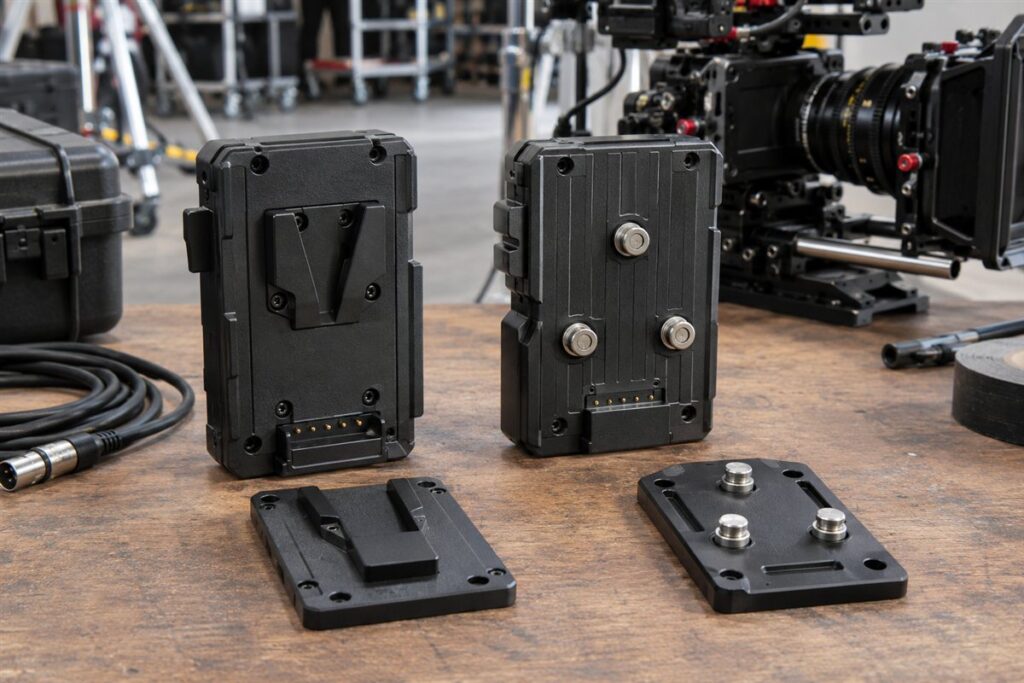
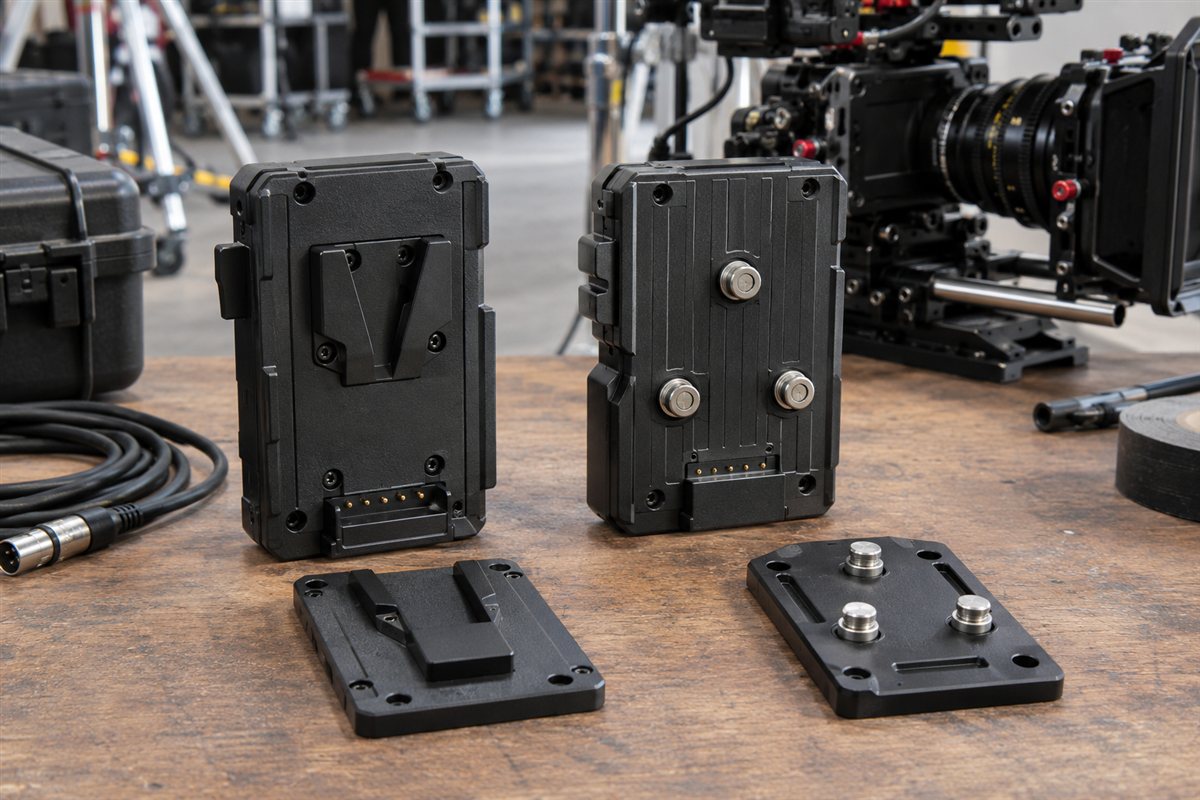
V-mount and gold mount are two battery plate systems used to power cameras, monitors and lights on video sets. They are different physical designs, so a battery of one type will not fit a plate of the other without an adapter or a combined plate. Choose by the plate your camera cage, lights and accessories already use, and confirm compatibility on the maker’s page before buying.
What the Two Systems Are
V-mount, sometimes called V-lock, was developed for professional broadcast and cinema work and is common across camera rigs and power accessories. Gold mount, from Anton Bauer, is the other long-standing plate system and has a loyal following in broadcast and field work. Both let you clip a large battery onto the back of a camera and often provide extra outputs for powering accessories.
In this guide
Key Differences
| Trait | V-mount | Gold mount |
|---|---|---|
| Plate shape | Two-prong V-shaped plate with a lock | Gold-colored plate with a slide-on lock |
| Where it is common | Cinema rigs, lights, monitors | Broadcast and news style cameras |
| Accessory ecosystem | Wide range from many makers | Wide range, often tied to one family of products |
| Adapters | Plates and cables are widely available | Adapters exist, but check carefully |
| Typical fit | Independent filmmakers and crews | Crews with existing gear in that system |
What to Check Before You Choose
- Look at the gear you own. Cages, battery plates, chargers and light kits are often built around one system.
- Check what your lights and monitors accept. Many LED panels and cinema lights have a plate on the back that suits one mount.
- Think about capacity. Batteries are labeled in watt-hours, and larger capacity runs your rig longer. Compare the numbers listed by the maker.
- Look at outputs. Some batteries offer D-tap ports, USB ports or regulated voltage outputs for accessories.
- Check the camera’s power draw so the battery and plate can supply the load you need.
- Note travel rules. Airlines limit the watt-hour capacity of batteries you can carry, so read the current rules before flying.
Working Habits
- Use a matched charger and follow the maker’s instructions for charging and storage.
- Label batteries and rotate them, so you know which ones have been used on set.
- Use a plate with a reliable lock, and check it clicks into place before you roll.
- Carry a spare plate or adapter cable in your kit bag.
- Keep contacts clean and free from dust.
Cabling should be neat and strain-relieved, and cables should follow the cage to avoid snags when the camera moves.
Estimating Runtime Before You Rent or Buy
Battery capacity is quoted in watt-hours, and the simplest way to turn that number into something useful is to compare it with the power your rig actually uses. Runtime in hours is roughly the battery’s watt-hours divided by the total draw in watts. A battery rated at a given watt-hour figure will run a load of half that many watts for about two hours, in an ideal case.
In practice, you will get less than the ideal. Conversion losses, cold weather, battery age and spikes in draw all reduce the real figure, so leave a safety margin. A common approach is to plan for noticeably less than the label suggests, and to carry more capacity than the simple calculation requires. Check the manuals for each device to find its power draw. Camera draw varies with the recording mode, resolution, frame rate and use of fans or external recorders. Monitors vary with brightness settings. Lights vary enormously, and a bright LED panel at full output can use far more power than the camera and monitor combined.
Add up everything the battery will feed: camera, monitor, wireless video transmitter, follow focus motor, recorder and any lights. If a single battery powers all of them through a plate and distribution cables, the total matters. If you split the load across several batteries, each one only needs to cover its own devices.
Make a short list for each shot type. A lightweight interview setup, a handheld documentary day and a long locked-off live event will need different amounts of power.
- Write down the draw of each device from its manual.
- Plan a margin for cold, age and surprises.
- Test a battery with your full rig before an important shoot to see how long it really lasts.
Outputs, Plates and Powering Accessories
A battery plate is more than a place to clip the battery on. The plate, the battery’s outputs and the cables you use together decide what you can power and how neatly. Look closely at what each battery offers, since models differ.
Common outputs include D-tap ports, USB ports and sometimes regulated voltage outputs for specific devices. A D-tap port is widely used to power monitors, small lights and recorders through a cable. USB ports are convenient for charging phones or powering small devices, though their power limits vary. Some batteries offer more than one voltage, so check which one your devices need. Using a voltage outside the accepted range can damage equipment, so read the label on each device.
Plates differ too. Some have built-in outputs, some simply pass power to the camera, and some include a way to hold up the camera while you swap the battery, often called hot-swapping. Check the manufacturer’s information on whether your plate supports this, because it can be valuable on long takes. Also consider how the plate attaches to your camera or cage, and whether its position leaves room for other accessories.
For cables, choose short, quality ones with secure connectors, and secure them along the cage to avoid strain. Avoid tangled cable runs that can pull on a port.
- Match the voltage and connector to each device.
- Check the current rating of each output and cable.
- Carry spare cables, since a broken cable can stop a shoot.
Read the instructions for your specific products before connecting.
Charging, Storage and Battery Health
Large lithium batteries are expensive and last longer with good habits. The manufacturer’s instructions are the final word, but a few general practices are widely recommended.
Use the charger intended for the battery, and check that its connector and rating match. Charging on a hard, fireproof or non-flammable surface and away from clutter is sensible, and so is never leaving batteries to charge unattended in an unsafe place. Allow batteries to cool before charging after heavy use if the instructions say so.
For storage, many makers suggest keeping batteries partly charged rather than full or empty when they will sit for a long time, in a cool, dry place away from heat and direct sunlight. Check the manual for the recommended level and interval. Do not store batteries in a hot car or a cold, damp case. Avoid dropping, crushing or puncturing them, since damage can create a safety risk.
Inspect batteries regularly. Look for swelling, cracks, leaking fluid, a hot casing during normal use or contacts that look burned or corroded. Stop using any battery that shows these signs and follow the maker’s guidance for safe disposal or service. Labeling each battery with a number or date helps you track which are older and which have shown problems.
- Rotate batteries so usage is even.
- Note the runtime of each over time and retire those that drop sharply.
- Follow airline and transport rules when traveling, and check them well before a flight.
Planning Power for a Whole Shoot Day
A power plan turns a collection of batteries into a reliable system. Start by listing the devices, their expected draw and the hours you will shoot. Then decide how many batteries you need, how they are shared and where charging will happen.
A practical approach is to assign batteries to roles. Keep camera batteries separate from light batteries, so a heavy lighting draw does not cut the camera short. Label each battery by role or number, and keep charged and used batteries in separate, clearly marked pouches or cases to avoid mix-ups. Plan a charging schedule so that batteries are being charged while others are in use. If you only have one charger, remember that charge time can be long, so schedule the swap points.
Think about the worst case. What happens if the camera battery fails mid-take? Having a spare within reach and a plate that supports quick swaps cuts the downtime. If you have a hot-swap system, test it before the shoot. For remote locations, consider a larger-capacity battery or more units and check the maker’s guidance on use in cold weather, since low temperatures can shorten runtime.
At the end of the day, record which batteries were used, which need charging and any problems. This simple log keeps the next shoot on track.
- Bring more capacity than your calculation says.
- Keep a spare plate and cables in a known pocket.
- Brief the crew on where charged and used batteries go.
Adapters, Mixed Kits and Safety
Many crews end up with a mix of mounts. Rented lights might use one plate while your camera cage uses another. Adapters can bridge the gap, but they deserve careful attention.
Before using an adapter plate, read the maker’s compatibility notes. Confirm that it supports the voltage and current your equipment needs, and that it locks the battery securely. A loose battery can disconnect during movement and cut power to your camera mid-take. Check that polarity is correct and that the plate is rated for the battery’s output. If you are unsure, ask the manufacturer or the rental house, which will usually know which combinations are safe.
Be careful with chaining. Plugging one device into another to extend power can overload cables or ports. Use distribution boxes made for the purpose and respect the rating of every connector. Avoid using damaged cables, taped connectors or improvised adapters on powered gear.
In wet or dusty conditions, protect connectors with covers where possible and keep the contacts clean. After exposure to rain, dry the battery and plate before use, and follow the maker’s guidance. Keep a fire-safe approach in your kit bag routine, such as storing batteries in suitable cases, and report any heat or smell immediately.
- Test every adapter with your full rig before the shoot.
- Do not exceed ratings on cables or ports.
- Replace worn plates that no longer hold the battery firmly.
A Pre-Shoot Power Checklist
Battery problems rarely show up at your desk; they appear on set at the worst moment. A written checklist for each job prevents most of them. Fill it in the day before, and compare it with what you actually packed.
- List every device that will draw from a battery, including camera, monitor, light, wireless video and recorder
- Note the voltage each device accepts, which the maker prints in the manual or on the label
- Estimate how many hours you will shoot and whether you can recharge mid-day
- Count batteries, plates, cables and chargers, and add spares for the cables
- Confirm that every battery is fully charged and labeled by number
- Check any rules for carrying batteries on a flight or by courier
Keep the sheet in your kit case so a colleague can see what is packed and what is missing.
How to Compare the Two Systems on Paper
Both mounting systems exist to attach a battery to a camera or a plate and to feed power to accessories. The main differences appear in the plate design, the connector style and the way each fits into existing kits. Rather than relying on general statements, compare the same few facts for each battery you consider.
| Question | Why it matters | Where to check |
|---|---|---|
| Capacity in watt hours | Sets how long it can supply a given load | Label and product page |
| Maximum continuous output | Tells you whether it can run a camera and a light together | Maker specification |
| Output ports | Decides how many accessories you can power directly | Product photos and listing |
| Plate or mount compatibility | Confirms the battery fits your cage or camera | Maker compatibility notes |
| Weight and size | Affects balance on a handheld or gimbal rig | Specification sheet |
Common Mistakes on Battery Setups
The biggest mistake is guessing runtime from capacity alone. A battery may list a high capacity, but a camera with a monitor, a light and a wireless transmitter can drain it far faster than you expect. Always add up the load of every device and give yourself margin.
Another common error is mixing batteries of different ages and capacities in one kit and expecting the same performance. Label each one and rotate them. People also forget cable length and connector style, then discover a cable is too short for the rig or does not match a device. Finally, avoid improvised connections. If a plate or cable is not designed for your equipment, ask the maker rather than adapting it yourself.
A Short Glossary for Newcomers
- Watt hour: a measure of stored energy, used to compare capacity between batteries.
- Plate: the mounting piece that attaches the battery to the camera or cage.
- D-Tap: a common output connector used to power accessories.
- Hot swap: changing the main battery while the camera stays powered, usually through a secondary source.
- Cell protection: circuits that guard against over-drain and overheating, described by the maker.
- Cycle count: how many charge and discharge rounds a battery is built to handle.
If a listing uses a term you do not recognize, check the manufacturer documentation instead of assuming.
Storage, Transport and Care Basics
Store batteries in a cool, dry place away from direct sunlight, and follow the maker guidance on the charge level to keep them at between jobs. Inspect them before every shoot for swelling, cracks or damaged terminals, and retire any that show damage. Transport them in a case that stops terminals from touching metal objects.
Rules for carrying batteries on aircraft are set by the airline and by aviation authorities and change over time. Check the current guidance before you travel rather than relying on memory, and keep batteries with you in the cabin when the rules allow.
When to Ask the Maker or a Rental House
If you are unsure whether a battery can supply a particular rig, send the maker a short list of devices and ask. A rental house can also advise on kit combinations and charging plans for a long shoot. For repairs, swelling or any sign of a failing cell, stop using the battery and contact the maker; do not open or modify it.
A Day-of-Shoot Routine for Batteries
On the morning of a job, charge every battery fully if you have not already, then check each one for damage and seat each plate firmly on the camera or cage. Run the rig for a few minutes at the load you expect to see on set, with the monitor, light and wireless video all switched on, so any weakness appears before the client arrives.
During the day, keep charged and used batteries in separate, clearly marked places. A simple colored tape system works well: one color for ready and another for used. Swap batteries at natural breaks, not when the camera is about to shut down, and note the time of each swap. If the crew is large, give one person responsibility for the battery case so that nothing is left behind.
- Charge and label every battery before the call time.
- Run the full rig briefly on set before the first take.
- Separate ready and used batteries with a visible marker.
- Swap at natural breaks and record the time.
- Recharge and check each battery at the end of the day.
Deciding Between Systems for a Small Crew
A small crew often prioritizes simple logistics. If you already own a matching set of plates, chargers and cables, adding batteries of the same type is easy and keeps your kit consistent. If you rent most gear, ask what the rental house stocks, since matching their system lets you borrow extra batteries when a job grows.
Think about how many accessories you will power from the battery rather than from a wall outlet. A rig with a camera, light and monitor needs more output ports and a higher output limit than a lean documentary rig. Choose based on your real use, not on what looks powerful on a page.
Products Worth a Look
As an Amazon Associate, Reviews Took earns from qualifying purchases. These picks come from our guide: 4 Best Camera Chargers and Dummy Batteries (2026).
-
LP NP-FW50 Dual Battery Charger
-
K&F Concept NP-FZ100 3-Slot Charger
-
King Ma Dummy Battery (Type-C Power)
Going Deeper: Power as Part of the Camera, Not an Accessory
On a professional rig, the battery is not an accessory bolted to the camera; it is the heart of a small power station feeding the body, the monitor, the wireless systems, the follow focus and sometimes the lights. Thinking about the mount choice at that level changes the questions you ask. Instead of asking which plate a battery clicks into, you ask how power will be distributed, monitored and swapped across a twelve-hour day without ever stopping the work. The two mounts answer that question with different hardware habits, different accessory ecosystems and different rental availability, and those system qualities matter more over a career than the shape of the connector itself. A mount is a commitment to an ecosystem of plates, chargers, travel cases and colleagues’ spares, and ecosystems are chosen for their depth, not their brochures.
Reliability thinking belongs here too. Contacts that are protected from dust and knocks, latches that confirm positively even with gloves, and batteries that report their state honestly to the camera or a display all reduce the small failures that eat shooting time. On a set, power failures are rarely dramatic explosions; they are a monitor that dies mid-take, a battery that reported half and delivered a tenth, a plate whose loose contact resets the camera when the rig is shouldered. Choosing a system with a reputation for boring reliability, and maintaining it like it matters, is a creative decision, because nothing is less creative than troubleshooting electricity while the light goes.
Runtime Arithmetic You Can Trust
Estimating runtime from capacity figures fails because rigs do not draw power the way brochures imagine. The honest method is empirical: run your actual rig, configured as you shoot it, from a full battery and time it, in the conditions you work in, since cold sets and bright monitors both change the answer. Write the result on the battery’s record and repeat for each battery type you own. Those personal numbers, not the theoretical ones, should drive how many batteries travel to a job. Build in a reserve for the day that runs long, because the final hour of a shoot is rarely the hour you can afford to lose, and a battery plan with no margin is a plan to improvise under pressure.
Rotation discipline keeps the arithmetic true. Number your batteries, use them in order, and retire them in order, so the whole set ages evenly and no single battery becomes the mysterious weak one. Log obvious changes in a battery’s behaviour, swelling, heat, sudden capacity loss, and act on them early; a battery that misbehaves on a shelf is an inconvenience, while the same battery on a remote location is a crisis with a call sheet.
Charging Infrastructure Is Half the System
Batteries get the attention, but chargers decide whether a multi-day shoot is calm or chaotic. Simultaneous charging of the whole set overnight is the baseline a working kit should meet; sequential charging turns sleep into a shift system. Consider where charging will physically happen: a hotel room’s two sockets, a location with a generator, a vehicle between moves. Power strips, labelled cables and a charging station that travels as one unit transform an evening chore into a ten-minute routine. Chargers also differ in how kindly they treat batteries and how honestly they report progress; a charger that lies about completion is worse than a slow one, because it corrupts the rotation you are trusting.
Travel rules deserve a permanent place in the kit’s documentation. Airline limits on battery capacity and carriage, the requirement to protect terminals, and the differences between checked and cabin baggage are not details to rediscover at check-in. Keep a printed summary with the battery case, sized to the batteries you actually own, and pack so that inspection is easy; crews who make security simple get through security simply.
Mixed Fleets, Rentals and Helping Hands
Few working crews own everything they use, so your mount choice will meet the rental market regularly. Choosing the mount your local rental houses stock deeply means a forgotten case or a sudden extra camera body is a phone call rather than a disaster. It also means your batteries can rescue a colleague and theirs can rescue you, a form of insurance no purchase provides. When a job forces a mixed fleet, plan the adaptation deliberately: which rig gets the native batteries, which gets adapters, who carries the extra chargers, and how the two sets are labelled so nothing is cross-charged or mis-seated in the dark. Adapters are tools, not sins, but they add a contact, a latch and a failure point, so they belong where their convenience is worth their complexity, not sprinkled everywhere by default.
Handing a rig to another operator, a trainee, a rental client, a friend, is the final test of a power system. If the safe way to mount, check and swap a battery cannot be explained in two minutes, the system will eventually be defeated by a tired human at the worst moment. Choose hardware whose correct use is obvious, label everything that is not, and treat every confused question from a colleague as free consulting about where your system needs a label, a coloured tape marker or a better habit.
Safety Habits That Never Get a Day Off
Lithium batteries concentrate a great deal of energy, and professional respect for them is a habit, not a fear. Inspect for swelling, cracked cases and damaged contacts before every job. Charge on surfaces that can take heat, away from flammables, and never leave a damaged battery in the working set hoping it will behave. Transport terminals protected, keep batteries out of crushing loads and standing water, and dispose of retired units through proper channels rather than the general bin. These routines cost minutes across a year and prevent the rare event that costs everything. A crew that sees its lead modelling calm battery discipline adopts it without being lectured, which is how safety cultures actually form.
Extended Questions on Video Batteries
How many batteries does a one-person crew really need?
Enough for the longest day you realistically shoot, plus one in reserve, based on your own timed runtime tests rather than theory. For most solo shooters that means a small rotation in constant use, charged nightly as a set, rather than a large fleet ageing unevenly on a shelf.
Can I leave batteries on the charger between jobs?
Modern chargers manage this safely, but long-term storage is kinder at a partial charge in a cool place, as the main article’s storage guidance explains. For working sets in weekly use, charger storage is a practical compromise; for batteries resting for months, follow the storage routine instead.
What should I do if a battery swells?
Remove it from service immediately, do not charge or use it, keep it somewhere cool and non-flammable away from other batteries, and dispose of it through a proper battery recycling or hazardous waste channel. Swelling is the battery announcing internal failure, and it does not heal.
Does the mount choice affect image quality?
Not directly; both systems deliver the same electricity. Indirectly, a power system you trust affects quality by keeping rigs running, monitors bright and crews calm, and by never forcing a rushed compromise mid-take. Judge mounts on that operational reliability rather than on any promise about the picture itself.
Going Further: Power Planning for Real Productions
Scale changes everything about battery decisions, and a guide that serves the solo shooter should also map the territory beyond. On a multi-camera production, power becomes logistics: a cart, a charging station with a named owner, a rotation that survives lunch breaks and company moves, and a reserve that nobody touches without telling the person in charge. The mount choice echoes through all of it, because a production running one mount can pool every battery, charger and plate across every department, while a mixed fleet fragments into labelled islands that must never meet. This pooling effect is the deepest argument for choosing the mount your local professional community already runs: it converts colleagues’ kits into your reserve and yours into theirs, a mutual insurance that no single purchase can replicate. When you are the visitor on someone else’s production, the professional move is to adapt to their system gracefully, bringing your rig’s plates and a humble attitude, because power etiquette is set etiquette, and the guest who creates a charging drama is remembered for the wrong reason.
Documentation scales with the production. A simple power plan, who owns charging, where the station lives, what the rotation is, what the reserve is for, written on one page and taped near the batteries, prevents the slow chaos of everyone assuming someone else is minding the electricity. It also protects the day when the plan’s author is busy elsewhere, which on a real set is most of the day.
Failure Drills: The Ten Minutes That Save the Shoot
Every power system fails eventually, and professional crews rehearse the failures in calm conditions so the real ones are boring. Drill the dead battery mid-take: who calls it, who swaps, how the camera’s settings survive, how quickly the rig is rolling again. Drill the failed charger discovered at dawn: which batteries are truly full, what the day looks like rationed, which lights or accessories lose their power allocation first. Drill the damaged cable, the plate that will not latch, the adapter left in another city. Each drill writes a small protocol and, just as usefully, a shopping list: the spare cable, the extra plate, the one more battery that turns a crisis into an anecdote. Ten minutes of rehearsal per production is the cheapest insurance in the entire budget, and the crews who skip it are simply choosing to rehearse during the shoot instead, with the cast watching.
Keep a small failure kit as standard: gaffer tape, contact cleaner approved for your gear, a spare short cable of each type you depend on, printed airline and safety summaries, and the charger’s manual on your phone. The kit weighs little and answers most of the questions electricity asks at inconvenient hours.
The Human Side of the Battery Cart
Power systems are operated by tired people at the ends of long days, and design that respects that fact wins. Labels readable in dim light, colours that mean the same thing every day, a spent-battery bin that is physically separate from the full-battery shelf so no hand can confuse them at 2 a.m.: these are not fussiness but safety and reliability engineering at human scale. If you lead a crew, teach the system explicitly to every new member rather than letting them absorb it by osmosis, and thank the people who flag a swelling battery or a fraying cable, because a culture that rewards reporting gets reports, and reports are how small problems stay small. The mount on the battery will never appear in the credits, but the habits around it are in every frame the production completes, which is a fair definition of professional infrastructure.
Battery Wisdom for Specific Kinds of Shoots
A wedding videographer and a documentary filmmaker can own identical batteries and need opposite virtues from them. The wedding day is a marathon with no retakes: power must be boring, abundant and invisible, with swaps rehearsed to the point of thoughtlessness and a reserve guarded like the rings. The documentary day is an expedition: weight is rationed, charging opportunities are rumours, and the battery plan is a negotiation with distance, weather and the probability that the story will happen an hour after the plan said it would end. Commercial sets invert both: power is plentiful, the pace is bursty, and the battery system’s job is to keep several hungry rigs fed through long lighting waits and sudden flurries of takes, which argues for depth of stock and a charging station run like a small utility. Naming your genre’s power profile, marathon, expedition or utility, clarifies every purchasing and packing decision downstream, because a kit built for the wrong profile fails in characteristic ways: the expedition weighed down by marathon abundance, the marathon embarrassed by expedition thrift.
Music and live events add a fourth profile: the siege. Access is limited, the decisive moments are unannounced, and the rig must simply endure, which prizes the largest sensible capacity, the most honest remaining-charge information, and a swap plan that can be executed in the dark by touch. If your work includes sieges, test your system literally in the dark, at home, until the swap is a reflex; the middle of a headline set is a poor classroom.
Environmental Responsibility and the End of a Battery’s Life
Professional batteries are consumables with long lives, and their end deserves the same professionalism as their prime. A battery retired early, at the first sign of swelling, heat or dishonest reporting, protects the kit and the crew; a battery nursed past its dignity endangers both. Recycling channels for lithium cells exist in most regions through retailers, municipal schemes and manufacturers, and using them is part of the licence to enjoy the technology’s benefits. Studios can formalise the virtue: a retirement log, a designated disposal route, and a purchasing habit that favours makers with take-back programmes and honest capacity ratings. None of this will ever be the reason a client hires you, and all of it is the kind of invisible integrity that keeps a practice sustainable in every sense, including the literal one. The mount debate will be settled by your work; the stewardship question is settled by your character, and it is answered one retired battery at a time.
While they live, batteries also deserve honest bookkeeping about their environmental cost in use: charging from the grid where possible, avoiding the waste of half-used disposables elsewhere in the kit, and keeping cells in service for their full safe life rather than replacing them on fashion’s schedule. Longevity is the greenest specification a battery can have, and the rotation and storage disciplines in this guide serve it directly.
The Two-Minute Expert: Teaching Power to Clients and Students
Sooner or later, someone will hand you their rig and ask why it died, or a student will ask which mount to buy, and the answer that serves them is the framework rather than a verdict: count the load, time the rig, plan the day, respect the chemistry, choose the ecosystem your community runs. Teach the arithmetic, not the allegiance, because allegiances expire with product cycles while arithmetic is forever. The same generosity applies inside a crew: the trainee who understands why the rotation works will maintain it when you are busy directing, while the trainee who was merely ordered to will improvise at the worst moment. Power, in the end, is a culture before it is a product, and every experienced operator is either building that culture or borrowing against it. Choose, mount and maintain accordingly, and the electricity will take care of the one thing you actually bought it for: disappearing completely, so the work can appear.
A Power Audit You Can Run This Week
Before buying anything in this category, audit the power you already live with, because most battery misery is organisational rather than electrical. Time your main rig from a full battery in real conditions and write the number down. Count your batteries, their ages and their honest health, and retire the liars. Photograph your charging setup as it actually exists, cables and all, and ask whether a tired version of you could run it correctly at midnight in a strange hotel; if not, simplify it until the answer is yes. List every device the rig feeds and the order in which they may be sacrificed when power runs short, deciding in calm what panic would otherwise decide badly. Finally, write the one-page plan: rotation, reserve, charging owner, failure protocol. Photographers and crews who run this audit discover, with suspicious regularity, that they needed one cable, one label maker and one retired battery, not a new system, and the money saved can go where it belongs, into the work the batteries exist to serve.
If the audit does convict your mount or your stock, it will also have written the purchase specification for you: the runtime your days demand, the ecosystem your community runs, the charger count your evenings require. Buy to that specification, from evidence, and the new system will feel inevitable rather than fashionable. Then rerun the audit in a season, because power, like every infrastructure, drifts, and the audit is the instrument that notices the drift while it is still cheap to correct. That rhythm, audit, adjust, forget until the next audit, is the mature form of every technical topic in this guide’s family, and batteries reward it as faithfully as any of them.
There is a temptation, in a topic built on hardware, to end with the hardware, but the honest ending is about attention. Batteries fail shoots not when they are badly made but when nobody was minding them, and they serve shoots invisibly when somebody was. The mount you choose, the rotation you keep, the charger you trust, are all just forms that attention takes, and a modest system attended to will defeat an excellent system neglected, on every set, in every country, at every hour of the call sheet. So choose with the care this guide recommends, set the system up once with real diligence, and then give the batteries the greatest compliment a professional can pay any infrastructure: forget about them completely, because they have been made forgettable, and spend the reclaimed attention on the only thing the audience will ever see, which is the work.
Keep one tradition from the film era as a closing ritual: at the end of each shoot day, before the cases close, walk the power system once, batteries counted, charger running, reserve intact, anomalies noted. Two minutes, no exceptions. Crews adopt the ritual from whoever models it calmly, and the day it catches the swelling cell or the forgotten charger, it pays for every performance of itself forever.
The lights will go up, the camera will roll, and nobody in the audience will ever think about the battery that made it possible. That anonymity is not the system’s failure; it is its triumph, and it is available to any crew willing to earn it in advance.
New crew members deserve one explicit paragraph in any battery system, because they inherit its risks before they inherit its wisdom. Pair every newcomer with the system’s owner for their first full day, let them run the rotation under supervision, and invite their questions as the free audit they are, since fresh eyes notice the unlabelled battery and the ambiguous shelf that veterans have stopped seeing. A system that can be taught in a day and questioned safely will outlive any individual’s memory, and on a long production, that teachability is the difference between infrastructure and folklore. Write the newcomer’s best question into the one-page plan before the week is out.
Infrastructure that teaches itself is the final form of every discipline in this guide, and the battery cart, humble as it looks, is as good a place as any to achieve it.
FAQ
Can I use a V-mount battery on a gold mount plate?
Not directly. You need a plate or adapter made for that purpose, and you should confirm that it supports the power level your equipment needs.
Which is better for a small independent crew?
Many small crews pick up V-mount because many lights and accessories use it, but the best choice is the one that matches your existing kit.
How do I estimate how long a battery will last?
Divide the battery's watt-hours by the total draw of your devices in watts for an ideal figure, then allow a margin for cold, age and losses. Check each device's manual for its power draw. Testing your full rig is the most reliable way.
What is hot-swapping?
It is a plate feature that holds the camera powered while you replace the battery, so you do not need to shut down. Support depends on the plate and setup, so check the maker's information and test before relying on it.
Can I power lights from the same battery as the camera?
It is possible with the right outputs, but lights can draw a lot of power and shorten camera runtime. Many crews use separate batteries for lights. Check your equipment's ratings.
How should I store batteries between jobs?
Follow the maker's guidance, which often suggests a partial charge, a cool and dry place and protection from damage. Check them periodically and keep them out of hot vehicles.
When should I replace a battery?
Replace it if you see swelling, cracks, leaks, burned contacts or abnormal heat, or if runtime has dropped sharply compared with similar batteries. Follow the maker's advice for safe disposal.
Are adapters between the two systems safe?
They can be if designed for the purpose and rated for your load. Check compatibility, voltage, current and locking, and avoid improvised solutions. Ask the maker or a rental house if unsure.
What should I check before flying with batteries?
Read the current airline and aviation authority rules for watt-hour limits and packing, and check the battery's label. Rules change and differ between carriers, so confirm before you travel.
The Short Version
V-mount and gold mount do the same job with different plates. Choose the system your camera, cage and lights already support, compare capacity and outputs, and confirm compatibility on the maker’s page.