Disclosure: As an Amazon Associate, reviewstook.com earns from qualifying purchases. Links on this page are affiliate links; they cost you nothing extra. Prices and availability change often, so check the current Amazon listing before you buy.
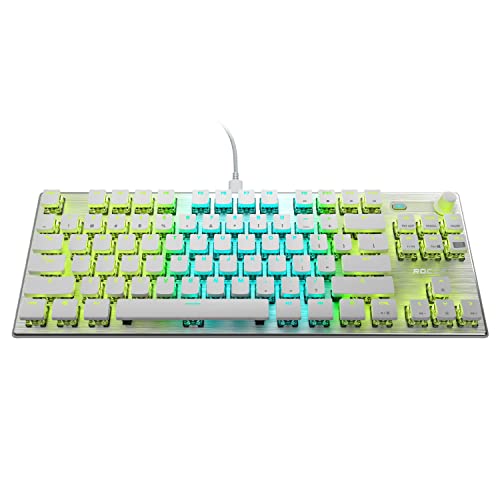
This roccat vulcan tkl pro review examines one of the most recognisable gaming keyboards ever designed — a tenkeyless board that looks like a piece of laboratory equipment, with its switches exposed on a brushed aluminium plate, its keycaps floating low over the deck, and light pouring from underneath every key. The Vulcan TKL Pro pairs that design with Roccat’s Titan Switch Optical, a linear optical switch built for speed, and it asks a question this review will answer in full: beneath one of the great keyboard silhouettes, is there a typing and gaming instrument that justifies choosing a finished, fixed-switch design in a market that has moved on to adjustable magnetic switches? The Turtle Beach Vulcan II TKL Pro — the successor sold under Roccat’s parent brand — and the SteelSeries Apex Pro TKL Gen 3 stand in this review as the modern alternatives, so the question gets a fair hearing.
The short answer: the Vulcan TKL Pro remains a superb fixed-point design. Its optical switches are fast, consistent, and durable by design, its low-profile deck is genuinely easier on the wrists than the tall boards it competed against, and its build — aluminium plate, floating caps, a volume wheel where your hand expects it — still feels like equipment rather than merchandise. What it does not offer is adjustability: no actuation-point tuning, no rapid trigger, no per-key analogue tricks, because its switches are optical rather than magnetic and its era valued a perfected fixed point over a configurable range. Whether that trade is a flaw or a relief depends on the buyer, and this review’s job is to make the dependence obvious.
Key takeaways
- The Vulcan TKL Pro is a tenkeyless gaming keyboard with linear Titan Switch Optical switches and a signature exposed, low-profile design.
- Optical actuation is fast and contact-free, so the switch feel stays consistent over a very long service life.
- The aluminium top plate, floating keycaps, and low deck height make it one of the most distinctive and wrist-friendly gaming boards of its generation.
- There is no adjustable actuation or rapid trigger; buyers who want magnetic-switch tuning should look at the two alternatives in this review.
- The Turtle Beach Vulcan II TKL Pro is the direct successor, adding Hall-effect switches with adjustable actuation and rapid trigger under the parent brand.
- Buy the Roccat original for design, feel, and simplicity; buy a successor for configurability.
What is the Vulcan TKL Pro in its line and its moment?
The Vulcan family was Roccat’s flagship keyboard design, and its look was a thesis: that a gaming keyboard could be engineered like an instrument instead of decorated like a toy. The switches sit exposed on the deck rather than buried in a case, each one visible in its housing, with low-profile keycaps floating above them and the light source unobstructed beneath. The top plate is aluminium, the profile is dramatically lower than the tall gaming boards of its era, and the whole object reads as machined rather than moulded. The TKL Pro is the tenkeyless, optical-switch expression of that thesis — the number pad deleted for mouse room, the Titan Switch Optical fitted for speed, and a detachable cable and media controls completing a desk professional’s checklist.
The moment matters too. The Vulcan TKL Pro comes from the optical era of gaming switches, when the race was to actuate with light — no metal contacts, no debounce delay, actuation at the speed of the beam being broken. Magnetic Hall-effect switches later changed the race’s terms, adding adjustable actuation points and rapid trigger, and the market’s attention moved with them. That context frames this review’s central honesty: the Vulcan is not an outdated keyboard so much as a perfected answer to the previous question, and whether the new question matters to you — whether you would ever actually tune an actuation point — is a more personal matter than the marketing of either era admits.
Roccat itself has since been folded into Turtle Beach, and the Vulcan line continues under the parent name in its second generation. The original board reviewed here is therefore a finished design, stable and knowable, sold in the verified listing in white. Finished designs have a particular virtue this series keeps noting: the keyboard you research is the keyboard that exists, permanently, with no revision waiting to change its character mid-ownership.
How the picks in this review were chosen
The subject is the ROCCAT Vulcan TKL Pro in its verified listing, white finish, with the linear optical Titan Switch. The Turtle Beach Vulcan II TKL Pro is included and labelled as what it is — the successor alternative, carrying the Vulcan name into the Hall-effect generation with magnetic switches, adjustable actuation, and rapid trigger. The SteelSeries Apex Pro TKL Gen 3 is included as the mainstream magnetic alternative, the category’s reference for adjustable actuation. Every linked product was confirmed against catalogue data and appears under its exact listing name; no product is presented as another, and the succession between the two Vulcans is stated wherever they meet.
In this guide
Quick picks at a glance
| Keyboard | Switch | Adjustable actuation | Choose it if |
|---|---|---|---|
| ROCCAT Vulcan TKL Pro | Titan Switch Optical, linear | No | You want the design icon with a perfected fixed feel |
| Turtle Beach Vulcan II TKL Pro (successor) | Hall-effect magnetic | Yes, with rapid trigger | You want the Vulcan idea, configurable |
| SteelSeries Apex Pro TKL Gen 3 | OmniPoint 3.0 magnetic | Yes, with rapid trigger and tap features | You want the mainstream magnetic flagship |

ROCCAT Vulcan TKL Pro — the subject: the design icon
Badge: The instrument. Type on the Vulcan and the design stops being a photograph. The low deck means your wrists sit flatter without a rest than on tall boards, the exposed switches give each keystroke a clean, direct landing, and the linear optical switch travels smoothly with the consistency that contact-free actuation promises across the whole deck and the whole of its life. The AIMO lighting, unobstructed by a case, is the most luminous presentation of its era — light as a material of the design rather than a bulb behind plastic. The volume wheel falls where a hand reaching blind expects it. As a complete object, the Vulcan TKL Pro is what happens when a keyboard company spends its budget on the keyboard, and it remains the one to beat for buyers whose priorities are feel, design, and a fixed point perfected.
- Switch: Titan Switch Optical, linear, per the listing
- Layout: Tenkeyless
- Connection: USB-C, per the listing
- Lighting: AIMO RGB
- Design: Low-profile, exposed switches, aluminium plate character
- Finish of verified listing: White
Strengths
- A design that is functionally better, not merely prettier: lower deck, flatter wrists, unobstructed light, easy-clean exposed switches.
- Optical switches with fast, consistent, contact-free actuation that will not develop contact wear or chatter with age.
- Build and detailing — aluminium plate, media wheel, detachable cable — at the level of equipment rather than accessory.
Trade-offs
- No adjustable actuation, rapid trigger, or analogue features; the fixed point is perfected but fixed.
- The low-profile keycaps are the design’s signature and its lock-in: replacement cap options are narrower than standard-profile boards enjoy.
- A finished design from a retired brand means the software era is fixed; set-and-forget owners will not care, tinkerers might.
Best for: Gamers and typists who value design, a fast linear feel, and a keyboard that needs no configuration to be itself. / Not suited for: Players who compete on rapid-trigger features, or customisers who want standard keycap ecosystems.

Turtle Beach Vulcan II TKL Pro — the successor alternative
Badge: The heir, labelled as such. When Turtle Beach retired the Roccat badge, the Vulcan name continued in this second-generation TKL Pro, and the succession is a genuine changing of the guard: Hall-effect magnetic switches replace the optical design, bringing adjustable actuation, rapid trigger, and swappable keycaps in a standard ecosystem, while the family’s low-profile, light-forward design language carries over. Judge it as the answer to the question the original cannot answer — what if this design, but configurable? Buyers who love the Vulcan idea and compete in titles where rapid trigger is now table stakes should start here, understanding that they are buying the successor, a different switch technology wearing a familiar silhouette.
- Switch: Hall-effect magnetic, per the listing
- Features: Adjustable actuation, rapid trigger
- Keycaps: Swappable, per the listing
- Layout: Tenkeyless
- Finish of verified listing: White
Strengths
- Adjustable actuation and rapid trigger bring the Vulcan line into the magnetic era’s competitive feature set.
- Swappable, standard-profile keycap compatibility opens the customisation ecosystem the original’s design closes.
- Carries the family’s design language forward under a living brand with current software support.
Trade-offs
- A different switch feel from the optical original; Vulcan loyalists should not assume the heir types identically.
- Configurability is a workload as well as a feature — profiles and actuation settings reward owners who maintain them.
- Costs current-generation money, where the original increasingly trades on design value.
Best for: Competitive players who want the Vulcan look with magnetic features, and customisers. / Not suited for: Buyers specifically seeking the original’s optical feel and finished-design simplicity.

SteelSeries Apex Pro TKL Gen 3 — the mainstream magnetic alternative
Badge: The reference. The Apex Pro line is where adjustable actuation became a mainstream promise, and the Gen 3 TKL carries the mature version: OmniPoint 3.0 magnetic switches, rapid trigger, the tap-and-SOCD features competitive titles now argue about, an OLED display, and PBT keycaps per its listing. It is included so the Vulcan’s fixed point can be judged against the configurability category at its most developed, rather than against a straw man. The comparison is genuinely close on everything except philosophy: the Apex Pro is a platform for tuning, the Vulcan a finished instrument, and the better keyboard is the one whose philosophy matches the hands buying it.
- Switch: OmniPoint 3.0 magnetic, adjustable, per the listing
- Features: Rapid trigger, rapid tap features, protection mode, OLED
- Keycaps: PBT, per the listing
- Connection: USB-C
- Layout: Tenkeyless
Strengths
- The deepest mainstream implementation of adjustable actuation and rapid trigger, refined over generations.
- Per-key tuning lets one board serve a twitch shooter and a typing day with different actuation personalities.
- A living flagship line with current software, support, and an enormous knowledge base of shared settings.
Trade-offs
- Its design is handsome but conventional beside the Vulcan’s instrument-panel theatre.
- The feature depth is a standing invitation to tinker, which some owners experience as homework.
- Flagship pricing for capabilities a fixed-point player may never switch on.
Best for: Competitive players who will genuinely use actuation tuning and rapid trigger. / Not suited for: Buyers who want a keyboard that is finished when it leaves the box.
How does the Titan Switch Optical actually feel?
The Titan Switch Optical actuates with light: a beam inside the switch is interrupted by the stem’s travel, registering the press without metal contacts meeting. The consequences you can feel are three. First, consistency — with no contacts to age unevenly, the hundredth key feels like the first, and the board’s thousandth hour feels like its tenth. Second, smoothness in the linear variant fitted here — a clean travel with a defined landing on the Vulcan’s low deck, none of the scratch or ping that haunts lesser linear switches. Third, a sound with a distinctive character, the Vulcan’s exposed design letting the switch speak plainly: a crisp, mechanical voice that owners tend to love and that shared rooms should be warned about, because an exposed-switch board does not muffle itself.
Against the magnetic successors, the honest feel comparison is this: the optical switch’s fixed actuation point was chosen by engineers who tuned it for exactly this board, and it feels chosen — decisive, repeatable, boring in the way good tools are boring. A magnetic switch at its default setting feels very good and slightly generic, because its personality is a setting rather than a decision, and it becomes personal only when its owner does the tuning work. Players who do that work swear by the result, and they are right to. Players who would never open the software are buying a promise they will not redeem, and for them the Vulcan’s pre-made decision is not a limitation but the entire point.
Is the low-profile design practical, or just beautiful?
Practical, in three measurable ways. The low deck reduces wrist extension — the upward bend that tall keyboards impose and that a wrist rest usually compensates for — so the Vulcan is comfortable flat on a desk in a way tall boards are not. The exposed switches and floating caps make the board the easiest gaming keyboard in its class to clean: crumbs, dust, and hair have nowhere to hide, and a brush and a can of air restore it completely, where a cased board traps its history under the keycaps. And the unobstructed light path makes the per-key lighting genuinely legible in a lit room, not just in a dark one, which is when most people actually use their desks. The costs are the keycap lock-in already noted and a sound that carries, since nothing encloses the switches. Beauty that also works is not a compromise; it is the definition of good industrial design, and the Vulcan remains the category’s standing example.
How do you set the Vulcan up, and what should you tune first?
Setup is the wired ritual at its shortest: USB-C cable, a moment for the system to recognise the board, and typing. The tuning that matters is not in the switches — they are decided — but in the software’s lighting and key assignments, and in your desk’s geometry. Set the board flat or at the slight negative tilt your wrists prefer rather than reflexively raising the rear feet, because the low deck was designed to make feet unnecessary for many typists. Assign the media wheel and any secondary functions you will actually use, and leave the rest alone; a finished keyboard rewards restraint. Then give the linear switch a week of honest typing before judging its lightness, because optical linears reveal themselves across days of prose, not in an afternoon of key-mashing in a shop.
What should you check before buying a tenkeyless gaming keyboard?
The Vulcan generalises into the category’s checklist. Decide your switch philosophy first — fixed and perfected, or adjustable and maintained — because it determines the entire product class. Confirm the layout honestly against your work: tenkeyless frees the mouse hand and deletes the number pad, which spreadsheet-heavy buyers feel daily. Read the keycap situation before falling for a design, since non-standard profiles narrow your replacement and customisation future. Weigh the deck height against your wrist habits. Check the cable — detachable is the modern courtesy — and the media controls your hand will actually reach for. And decide how you feel about companion software, because in the magnetic era the keyboard increasingly lives there, while the fixed-point boards ask almost nothing of it.
What are the common mistakes buyers make here?
Buying the Vulcan for its looks and discovering the linear switch is not their taste is the classic, avoidable by an honest hour on any linear board first. Buying a magnetic flagship for rapid trigger and never opening the software is its mirror. A third mistake is assuming the successor is the same keyboard with more features, when the switch technology — and therefore the feel — changed underneath the familiar name; this review labels the succession precisely so that error has no shelter. A fourth is raising the rear feet out of habit and then blaming the low deck for wrist angles the feet created. And a fifth is cleaning an exposed-switch board like a cased one, with liquids and enthusiasm, when a brush and air are both safer and more effective on a design that hides nothing.
How does the Vulcan age?
Its ageing curve is the optical switch’s promise made visible: no contacts to wear, no chatter to develop, a feel that stays itself. The aluminium plate shrugs off the desk’s small violence, the floating caps can be removed and washed like dishes, and the exposed deck means the board never accumulates the hidden stratum of dust that makes old cased keyboards feel tired. The honest wear points are the keycap legends’ and surfaces’ slow polishing under your most-used keys — a patina owners tend to read as character — and the cable, replaceable by design. A Vulcan bought today and kept clean should type in five years almost exactly as it types this week, which is the deepest argument for a perfected fixed point: it does not drift, in specification or in feel.
Final recommendation
The ROCCAT Vulcan TKL Pro is the keyboard for the buyer who wants the decision already made — beautifully. Its design is functional, its optical switches are fast and ageless, and its tenkeyless deck remains one of the most satisfying objects a gaming desk can hold. If your competitive life runs on rapid trigger and per-key tuning, the Turtle Beach Vulcan II TKL Pro carries this family’s name into that era, and the SteelSeries Apex Pro TKL Gen 3 is the mainstream reference for it. But if the phrase adjustable actuation makes you tired rather than excited, the original Vulcan is not the older option. It is the finished one, and finished, here, is a compliment with an aluminium plate.
Vulcan TKL Pro, Vulcan II, or Apex Pro — criterion by criterion
Switch feel. The original’s optical linear is the most decisive of the three out of the box: a fixed point, tuned by its maker, with contact-free consistency. The Vulcan II’s magnetic switches feel modern and smooth with their personality stored in settings, and the Apex Pro’s OmniPoint implementation is the most refined of the magnetic school. Verdict: original for the buyer who wants the decision made; Apex Pro for the buyer who wants to make it repeatedly.
Competitive features. Rapid trigger and adjustable actuation live exclusively on the magnetic side of this table, and in titles that reward counter-strafing precision and instant key resets, they are real capabilities rather than brochure lines. The original counters with actuation speed and consistency that were the competitive standard of their era and remain beyond reproach for the overwhelming majority of players. Verdict: successors for the feature, original for everyone the feature does not describe.
Design and desk presence. The original Vulcan wins this row outright and it is not close: the exposed-switch, aluminium-plate, floating-cap design is a piece of industrial design the successors quote rather than equal, the Vulcan II carrying the language forward in a more conventional register and the Apex Pro dressing handsomely in the standard gaming style. Verdict: original, for any desk that is also a room’s furniture.
Customisation. The order reverses completely. The successor’s swappable standard keycaps and magnetic tuning, and the Apex Pro’s deep per-key platform, open ecosystems the original’s integrated design deliberately closes. Verdict: successors, decisively, for the hobbyist.
Ownership and support. The magnetic pair are living products with current software and support. The original is a finished design whose software era is fixed — a stability the set-and-forget owner experiences as peace and the tinkerer as a closed door. Verdict: successors for the supported present, original for the buyer who prefers a product that cannot change under them.
How does the Vulcan perform across games and across prose?
In shooters, the linear optical switch’s virtues are the practical ones: a smooth, fast press with no tactile interruption, identical on every key, so movement and ability keys behave as one instrument. The tenkeyless width returns mouse room that players feel in their shoulders by the second hour. In strategy and simulation titles, the board’s media wheel and clear legends serve the long, quiet sessions, and the lighting stays legible in a lit room while you think. In rhythm and typing games — the secret examination room of any keyboard — the consistency of the optical deck is the whole story: no key surprises you, ever, and high-speed repetition exposes lesser switches within a single song.
Across prose, the Vulcan divides writers the way all linear boards do, with a twist. The low deck and flat wrist posture earn genuine affection from long-form typists, and the switch’s smoothness suits speed. Writers who bottom out heavily will hear the exposed design’s voice across a whole manuscript, and writers who rely on a tactile event to pace their fingers may find a pure linear too permissive. Neither reaction is a defect; both are information about the writer. The review’s standing advice applies with extra force here: an hour on any linear board, writing something real, predicts your Vulcan ownership better than any specification in this article.
The desk around the Vulcan: making the design work
The Vulcan rewards a desk arranged for it. Its low profile pairs naturally with a thin or absent wrist rest — try it bare first, since the deck was designed to make the rest optional — and its lighting is at its best against a desk surface that does not compete, matte and mid-toned rather than mirror-bright. The white finish of the verified listing suits bright, minimal setups and shows dust sooner in dark, moody ones, where the exposed design at least makes that dust a thirty-second brush’s problem rather than a disassembly. Cable routing deserves one thought: the detachable USB-C lead can be swapped for a coiled or angled cable in the custom tradition, one of the few personalisation avenues the design leaves open, and owners who take it tend to complete the instrument look the board begins. None of this is necessary. All of it is the difference between owning a Vulcan and presenting one, and the board — unusually — rewards presentation, because its design was the point all along.
The Roccat story, and why the original still matters
Roccat built its reputation in Hamburg on design seriousness — peripherals that looked engineered because they were — and the Vulcan line was its manifesto. The brand’s absorption into Turtle Beach and the badge’s retirement could have orphaned the design; instead the name continued in a successor that changed the switch technology underneath it, which tells you the parent company judged the silhouette worth keeping and the switches worth modernising. Both judgements can be honoured at once, and this review has tried to: the successor is the right product for the magnetic era’s players, and the original remains the purest expression of the idea, from the era when the idea was new. Finished designs from retired badges have a way of becoming reference points, and the Vulcan TKL Pro is now the reference for a question the category keeps asking: how much of a keyboard is the keyboard, and how much is the software it increasingly ships with? The Vulcan’s answer — nearly all of it is the keyboard — is why it still matters, and why it will still be on desks when several configurable flagships have been configured into obsolescence.
What should you verify at checkout?
Read the listing title fully and confirm three things: that it names the ROCCAT Vulcan TKL Pro rather than its Turtle Beach successor — the names are close and the products are different, as this review has taken pains to establish; that the switch named is the linear optical Titan, the configuration reviewed here; and that the finish is the white of the verified listing if that is the version you intend. Confirm your desk’s USB-C situation suits the detachable cable, and decide the wrist-rest question after the board arrives rather than before, since its low deck surprises most buyers pleasantly. A minute of this diligence protects the entire purchase, because the Vulcan itself, once correctly identified, is one of the most consistent products in its category.
Your first week with the Vulcan: a running order
Day one is for posture and plain typing. Set the board flat, feet down, and write or play something long and familiar; the low deck’s wrist geometry is the first thing to learn, and it is learned by the body rather than the eye. Resist adding a wrist rest today, because the experiment the design proposes — that you may not need one — deserves a fair first hearing. Day two belongs to the media wheel and the practical keys: build the blind-reach habit for volume now, while it is a game, rather than during the first call that needs it. Midweek, clean the board once with a brush and air, not because it needs it but because the ritual teaches you the design’s great maintenance truth — everything is visible, everything is reachable — and sets the monthly habit that keeps it looking like the photograph. By the weekend, set the lighting once, properly: a scheme that suits the room’s actual light rather than the dark-room drama of the product page, at a brightness your peripheral vision can live with for eight hours. Owners who run this week tend to keep the board for years; owners who skip it sometimes return a superb keyboard for reasons that were really an unrun experiment.
Troubleshooting: the complaints Vulcan owners actually have
The board feels too light to type on. A linear switch asks for a different contract than a tactile one: trust the actuation, which happens early in the travel, and stop pressing through the landing. A week of prose at your normal speed recalibrates most typists; the board is not too light, it is earlier than your habit. It is louder than expected. The exposed design speaks plainly, as this review warned; a desk mat under the board absorbs more of the voice than any setting, and is the first remedy to try before judging the board in a shared room. The lighting washes out in daylight. That is physics greeting a feature honestly: raise the brightness for lit-room use or accept the lighting as an evening instrument, and note that the Vulcan’s unobstructed light path performs better here than cased rivals do. A key feels different from its neighbours. On an optical deck, first suspect debris in the exposed switch area — the design’s openness cuts both ways — and clean before concluding anything; a brush and air resolve most cases, because there are no contacts to have failed. The software does not offer a feature you saw on a newer board. It will not: rapid trigger and actuation tuning are magnetic-switch capabilities, and the finished design’s honesty is that its feature set is the one in this review, complete.
Who should skip the Vulcan TKL Pro?
Skip it if your competitive titles and your own technique genuinely use rapid trigger — you know who you are, and the successor exists for you. Skip it if keycap customisation is your hobby’s centre, because the design’s integrated caps will frustrate a collector’s instincts daily. Skip it if your keyboard works in a quiet shared office where its voice would be a social cost, or beside a sleeping household’s thin wall. Skip it if you need a number pad weekly and have no room for a separate one. And skip it if you dislike finished products — if the pleasure of a peripheral, for you, is its next update — because the Vulcan will never surprise you again after the first week, and for its intended owner that is the highest praise available. Everyone outside that list is choosing between three excellent keyboards on philosophy, and philosophy, unlike specifications, cannot be returned for being wrong about yourself.
Frequently asked questions
Are optical switches better than magnetic Hall-effect switches?
They are better at different things. Optical switches actuate with light, giving fast, consistent, contact-free performance at a fixed actuation point chosen by the maker, with nothing to configure and nothing to drift. Magnetic switches sense position continuously, which enables adjustable actuation and rapid trigger at the cost of software and settings to maintain. Competitive players who use those features gain a real capability; everyone else gains a menu. Choose by whether you will genuinely tune, not by which technology is newer.
Is the Turtle Beach Vulcan II TKL Pro the same keyboard as the Roccat original?
No, and this review labels it as the successor for exactly that reason. The Vulcan II carries the family name and design language into a new generation under the parent brand, but its Hall-effect magnetic switches are a different technology with a different feel and a configurable actuation the optical original does not offer. It is the right buy for players who want the Vulcan idea with magnetic features, and the wrong assumption for anyone expecting the original’s exact typing character.
Can you change the Vulcan TKL Pro’s keycaps?
Within limits set by its design. The low-profile floating caps are part of the Vulcan’s signature — its look, its light, and its deck height all depend on them — so the wide standard-profile keycap ecosystem does not apply the way it does to the swappable successor. Replacement caps in the correct profile exist, but buyers whose hobby is keycap customisation should choose the Vulcan II or another standard-profile board with open eyes, and let the original’s caps be what they are: a finished design decision.
Is a tenkeyless board enough for work as well as gaming?
For most work, yes, and the mouse room it returns is a daily ergonomic dividend. Writing, coding, browsing, and communication lose nothing to the missing number pad. Sustained numeric entry — accounting, heavy spreadsheet modelling, data processing — is the exception that feels the deletion hourly, and that buyer should either keep a separate number pad for the season’s heavy weeks or choose a full-size board. The honest test is your last month of work, not your intentions for the next one.
How loud is the Vulcan TKL Pro?
Louder than a cased keyboard, by design. The exposed switches have no enclosure to muffle them, so the board speaks with a crisp, mechanical voice that owners enjoy and shared rooms hear clearly. It is not the loudest class of keyboard — there are no click mechanisms here — but it will not pass as silent in an open-plan office or a sleeping household. Buyers in shared spaces should weigh the sound as seriously as the lighting, since both are unobstructed on this design, gloriously and literally.
Does the Vulcan need its software to work well?
No. The keyboard’s essential character — switch feel, layout, media controls — is in the hardware, and it types exactly itself with no software installed. The suite adds lighting customisation and assignments for those who want them, in the set-and-forget pattern this review recommends: configure in the first week, then let the board be a board. That independence is part of the finished-design appeal, and a genuine contrast with magnetic boards whose personalities live in their profiles.
The lighting, honestly appraised
AIMO was Roccat’s name for an ecosystem lighting idea — devices reacting and harmonising rather than merely glowing — and on the Vulcan it found its best canvas, because the exposed design gives light nowhere to hide and nothing to diffuse it into mush. The honest appraisal has two halves. As presentation, it remains among the finest lighting implementations on any keyboard: per-key colour with genuine clarity, effects that read as designed rather than as a screensaver, and on the white deck a luminous quality that turns a desk into a set. As utility, it does what keyboard lighting honestly does — it identifies keys in the dark, it pleases its owner, and it is invisible to the typist’s performance either way. Buyers should price it as presentation and enjoy it as such, without pretending it is a feature of the typing. The Vulcan’s distinction is that its presentation was engineered into the product’s structure rather than sprayed onto it, which is why it still photographs like the future several years after its launch — and why this review, which has discounted lighting everywhere else, makes an exception for the one keyboard where light is load-bearing design.
Value, in tiers and in years
The Vulcan’s value argument is a longevity argument. As a finished design from a retired badge, it increasingly trades at tiers below the living flagships it is compared against in this review, while offering a switch technology whose consistency does not decay and a build that shrugs off years. Cost-per-year is the honest metric for a keyboard, and on that metric a durable board bought at a design-classic tier outperforms a configurable flagship replaced at the next feature cycle — for the owner who never needed the features. The same arithmetic reverses completely for the player who competes on rapid trigger, for whom the original is not cheap at any tier because it cannot do the job. Value, in keyboards as in headsets before them in this series, is the match between the product’s fixed character and the buyer’s fixed habits. The Vulcan’s character is unusually fixed. That is either its discount or its premium, and you already know which one it is for you.
The Vulcan at work: the second job
Flagship gaming keyboards moonlight as office boards in most real desks, and the Vulcan’s second job deserves its paragraph. For writing and coding, its virtues are the low posture, the consistent deck, and media controls that serve a working day as faithfully as a gaming night. Its costs at work are the two already confessed: a voice that carries in quiet rooms, and a silhouette that announces its hobby to a video call — though of all gaming silhouettes, the Vulcan’s instrument aesthetic is the one most likely to be mistaken for professional equipment by a client who does not know keyboards. The linear switch at work divides by profession: programmers and writers who type in long, fast runs tend to adopt it happily, while those whose work is bursty and shortcut-driven may miss a tactile event. None of this changes the recommendation’s shape. It simply confirms that the Vulcan, like every honest tool in this series, is one product with one character, succeeding or failing by the match — and that its character, unusually, was designed to be seen.
Optical versus magnetic, one last time, without the marketing
Strip both technologies of their eras’ slogans and the difference is a single sentence: an optical switch knows whether the key has passed one point, and a magnetic switch knows where the key is at every moment. From that one fact everything else follows. Knowing one point perfectly makes the optical switch fast, simple, consistent, and finished — the point is chosen once, by the maker, and the switch’s whole life is the faithful repetition of that decision. Knowing every position makes the magnetic switch configurable — the point can move, the reset can chase the release, the key can behave as an analogue input — at the price of a sensor’s complexity and a software layer to hold the owner’s decisions. Neither fact is a virtue by itself. The virtues appear when the fact meets a player: the one-point switch serves the player who wants the decision made, the every-position switch serves the player who wants to make it. The Vulcan TKL Pro is the one-point philosophy built into the most beautiful housing its era produced, and the two alternatives in this review are the every-position philosophy at its current best. The market will keep arguing the technologies. Your hands settled the argument the first time you either opened a tuning suite with pleasure or closed it with relief, and this review’s final service is to tell you that reaction was data.
A closing note for the design-minded buyer
There is a kind of buyer this review has been quietly written for: the one who believes the objects on a desk should be good objects, that a keyboard used for a decade owes its owner beauty as well as function, and that the current market’s sameness — capable, configurable, interchangeable — leaves that belief underfed. The Vulcan TKL Pro feeds it without apology, and does so while remaining, on the evidence assembled here, a fast, consistent, comfortable instrument by the cold criteria as well. That combination is rarer than either quality alone, and it is why a keyboard from a retired brand still anchors a comparison against two living flagships without embarrassment. If you are that buyer, the decision procedure in this review can be shortened to a sentence: confirm the linear switch suits your fingers, and then let the design do what it was built to do, every day, in plain sight.
Keeping the white deck white, and other finish care
The verified listing’s white finish deserves its own honest paragraph, because a white keyboard is a commitment device: it shows its owner’s habits back to them daily. The Vulcan’s design is, paradoxically, the best possible chassis for the colour, because nothing about it traps grime — the exposed deck and floating caps give dirt no hidden reservoir, and a monthly ritual of brush, air, and a barely damp cloth on the caps restores the board to its photograph in minutes. The habits that matter are the small ones: hands washed after the snack rather than during it, drinks placed on the far side of the mouse rather than behind the board, and the board’s cleaning treated as a calendar event instead of a crisis. Owners who keep those habits report white Vulcans that still look like launches years later; owners who do not were always going to prefer the darker finishes other listings offer, and choosing the finish that forgives your actual desk is, as this series keeps concluding, a specification like any other. The board will tell the truth about your habits either way. Choose the colour whose truth you enjoy hearing.
Finally, for the reader who has followed the argument and still hesitates between the icon and its heir: the hesitation usually resolves the moment you ask which regret you would rather own. Regret for the Vulcan sounds like wishing, some nights, for a rapid trigger you would have used in one game. Regret for the successor sounds like looking at your desk, some nights, and missing the instrument. Both regrets are small, because both keyboards are good; but they are different in kind, and your instinct about which one stings more is the most reliable buying data in this entire article. Trust it, order the board it names — slowly, by its full listing title — and then stop reading keyboard reviews for a year. The Vulcan’s owners, by every account this review could gather, did exactly that.
There is one more desk the Vulcan deserves to be pictured on before this review closes: the battlestation that is also a room’s centrepiece, where the keyboard is seen by everyone who enters and used by one person for a decade. Most gaming boards age out of that role — their styling dates, their lighting yellows in the imagination, their switches develop the small inconsistencies that turn equipment into clutter. The Vulcan’s design has the quality the centrepiece role actually requires, which is not fashion but resolution: it looks finished from every angle, in every light, at every distance, the way a well-made watch or a good lamp does. That is a rare property in a category addicted to the new, and it compounds with the optical switch’s refusal to drift into a ownership proposition few rivals can match — a keyboard that will look deliberate and type identically in year five. Buy it for the feel, by all means. Keep it for the resolution.
One more consideration belongs to the buyer choosing between the original and the successor as a gift. The original suits a recipient whose taste you know — the design lover, the linear devotee, the desk that is also a room’s furniture — because its character is fixed and must match. The successor suits a recipient whose habits you know less precisely, because its configurability forgives a mismatch the fixed board cannot. Gifts fail on fit more often than on quality, and in this family fit is a philosophy before it is a specification. Choose the philosophy that fits the person, and either Vulcan will be received as what it is: one of the best-looking serious keyboards its generation produced, in whichever dialect the recipient speaks.
Related reading
wireless gaming keyboards for FPS play Realforce versus HHKB compared the split ROG Falcata examined external keyboards for a home office keyboard and mouse combos for office work wireless gaming keyboards at the value end


