A label printer is worth it when you make labels often enough that sheet printing, taping and trimming slow you down. If you print a label only now and then, a regular printer or a print service may serve you well. The honest answer comes from your own habits, so ask the questions below.

Three Questions to Ask
Question One: How Often Do You Print Labels?
Count the labels you made over the last month, then think about the month ahead. A handful suggests occasional use. A steady stream, especially at the same size, is where a dedicated machine saves effort. I will not quote money figures here, since costs vary; compare current figures yourself.
Question Two: What Do You Lose Now?
- Time spent loading sheets, trimming and taping.
- Paper and sticky sheets used for one small label.
- Misprints from scaling or smudged ink.
- Waiting for a printer that is busy with other work.
Question Three: What Else Would You Label?
Shipping labels are only one use. If you also label storage boxes, shelves, tool drawers, cables or files, a label printer gets more use. If shipping is the only need, the case is narrower.
In this guide
A Simple Comparison
| Your situation | Likely fit |
|---|---|
| A few labels a year | Regular printer or print service |
| Weekly labels, one size | Worth considering a label printer |
| Daily or batch labels | Label printer is usually a sensible tool |
| Many sizes, odd shapes | Check which sizes the printer supports first |
Costs That Are Not Obvious
Look beyond the machine to the recurring supplies. Think about stock, possible ribbon, cleaning materials and the space on your bench. Heat-based stock also needs storage that is cool and dry. Check current supply details from the maker, and read the guide for the media each model supports before you decide.
A Practical Test
- Write down the label types you make and their usual size.
- Estimate how many you will make in a normal month.
- Check whether one label printer can handle those sizes.
- Compare that with your present routine.
- Decide, and revisit the decision after a few months.
Be honest about convenience as well. Some people value the calm of a machine that simply produces a label every time, even if the numbers are close. Others prefer to keep their desk simple and use a service when needed. Both are reasonable choices; the right one is whichever fits how you really work.
Direct Thermal Versus Thermal Transfer
If you decide a label printer is worth considering, the first technical choice is how it makes the image. A direct thermal printer heats special coated stock, and the coating darkens where heat touches it. There is no ink, toner or ribbon, which keeps the machine simple and the supplies to a single item: the labels themselves. The trade-off is that the coating can fade with heat, light and friction, so labels meant to last a long time may suffer.
A thermal transfer printer uses a ribbon. Heat transfers ink from the ribbon onto the label, which usually produces a more durable image that suits long storage or harsher handling. The cost is another consumable to buy and change, and a slightly more involved setup.
For many shipping uses, labels are applied and read within days, so direct thermal is often a sensible fit. For shelf labels, asset tags, cable labels and anything that must survive for a long time, a printer that uses ribbon, or one that offers more durable media, may be worth a closer look. Product listings and manuals should say which method a model uses and which media it supports.
- Match the method to how long the label has to last and where it will live.
- Check whether the printer supports the label material you need, such as paper, film or tags.
- Ask what you will have to restock regularly, and whether it is easy to find.
- Keep direct thermal stock away from heat, sunlight and rubbing.
Size and Compatibility Checks Before Buying
A label printer is only worth the money if it fits the labels you really need. Start with your carriers and your own uses. Find out what label sizes and formats your shipping accounts offer, then check which of those the printer supports. Maximum label width, minimum and maximum length and the type of roll it accepts all vary between models, and the listing or manual states them.
Think about the software side too. Some printers work directly with common shipping platforms and marketplaces, while others need a driver or an app. Check the listing for supported operating systems and apps, and make sure your computer or phone can run them. If you want to print from several devices, find out how the printer connects, whether by cable, wireless network, Bluetooth or a combination.
Consider the media supply as well. Some printers work with many third-party rolls, while others are designed for the maker’s own. Neither is automatically better, but it affects availability, choice and flexibility over the years. Compare what is stocked locally and online before you commit.
- Write down the exact label sizes you will print and compare them with the printer’s range.
- Confirm that your shipping account lets you choose a format that suits roll labels.
- Check the connection types against the devices you own.
- Look at the core size and roll diameter the printer can hold.
Speed, Volume and Durability
Print volume is the quiet factor behind most good and bad purchases. Someone who prints a few labels per week will rarely notice print speed. Someone who prints a stack at the end of every day will. Speed is listed on product pages, but how it feels in practice also depends on your computer, the connection and how the label files are prepared.
Think about the work pattern, not only the maximum. Batch printing is helpful if you pack in a single session. If you print one label at a time, a printer that wakes quickly and loads easily may matter more than raw speed.
Durability depends on build and use. A printer in a dusty garage or a busy packing area will need regular cleaning, and a printer that is jarred, dropped or overloaded may jam more often. Look for a sturdy case, a clear way to open and clean the print path and a roll holder that keeps stock aligned.
Compare noise and size, too. A loud printer next to a work desk can be tiring, and a large printer may not fit a small bench. Think about where it will actually live.
- Estimate your busiest day, not just the average.
- Check how easy it is to load a new roll without fiddling.
- Read the manual’s cleaning steps to see whether you can do them yourself.
- Look for stable feet or a footprint that suits your bench.
Alternatives to Consider Before You Spend
A dedicated machine is not the only way to get tidy labels. Plain paper with tape, adhesive sheets, half-sheet labels, a print service and even a pickup option at a shipping counter each solve the same problem in a different way. Weigh them honestly against how you work.
Sheet labels can be a reasonable middle step. They work in a normal printer and give you a sticky, ready-to-peel label without a new machine. The downside is waste when you print one label on a sheet, and you may have to align the sheet carefully. Plain paper with clear tape is cheap and available, but it can look messy and may not scan as well if the tape wrinkles.
Some shipping counters and print shops will print a label from a file or a code on your phone. This avoids owning any hardware, though it needs a trip and relies on their opening hours. If you ship rarely, this can be the most sensible approach.
Ask which problem you are trying to solve. If the problem is smudged print, a clean printer or better stock may help. If it is wasted sheets, a half-sheet layout may fix it. If it is speed and the time spent taping, a label printer starts to look more attractive.
Signs It Is Time to Upgrade or Replace
Once you own a label printer, the question changes to whether it still serves you. A few clear signs suggest it is time to act. Labels that print faint even after cleaning the head and trying new stock may indicate a worn head. Frequent jams, misfeeds or labels that drift out of alignment after calibration point to wear in the rollers or sensors.
Your needs can also outgrow a machine. If you now handle larger batches, need wider labels, want a faster connection or have to print different media, a more capable model could save time. Compare these needs with the specifications on the listing and the manual.
Before replacing the printer, try the basics:
- Clean the print head and rollers as the manual describes.
- Run the calibration routine for your label stock.
- Try a fresh roll of supported stock to rule out the label media.
- Update the driver or app if the maker provides updates.
- Check whether replacement parts, such as a roller or a print head, are available and sensible to fit.
When a repair costs nearly as much effort as a new printer, or when the model is no longer supported by your software, replacing it is reasonable. Recycle old electronics through the local program rather than throwing them out.
Break-Even Thinking Without Guessing Prices
Prices change often, so rather than quote figures, here is a method you can fill in with today’s numbers. The idea is to compare what you spend now on labels with what you would spend with a dedicated machine, and to count your time as part of the cost.
Start with your current cost per label. Add the price of the sheet or paper you use, the share of ink or toner, the tape, and any fee if you use a print service. Then add time. If you spend a minute more per label loading sheets, trimming and taping, multiply that by the number of labels you print each month and decide what that time is worth to you.
Next, estimate the new cost. Add the purchase price of the printer, the price of a roll of labels divided by the number of labels on it, and any extras such as a ribbon or cleaning supplies. Divide the purchase price by the number of months you expect to use the machine to get a monthly share.
Keep the comparison honest by using the same time period for both sides, such as one month or one year, and by counting only costs that really change.
Compare the two monthly totals. If the printer’s monthly cost is lower, or close enough that the saved time makes up the difference, the case is strong. If it is clearly higher, the machine may still be worth it for convenience, but be honest that you are paying for comfort and not for savings. Check current prices from the sellers and the maker before you decide.
Be careful not to overestimate your volume. People often buy for their busiest week and then print far fewer labels in a typical month. Use an average over several months if you have the data, and treat a seasonal rush as a reason to plan for capacity, not as the basis for the whole calculation. If your volume is uncertain, a cheaper machine or a trial with a print service may be the sensible first step.
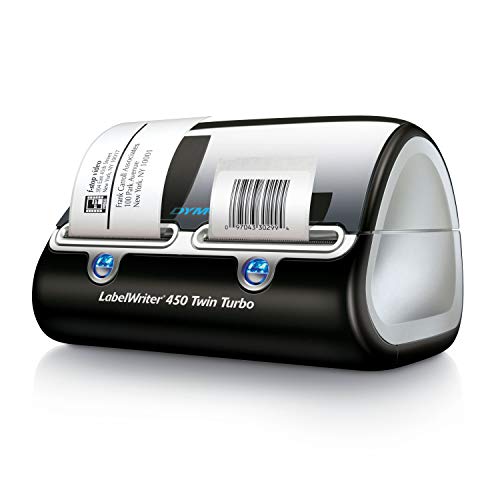
Numbers to Gather Before You Calculate
- How many labels you print in a normal month and in your busiest month.
- The label sizes you use and how many each roll holds.
- What you pay now per label, including any print service fee.
- How long a label takes you from file to finished parcel.
Who Gets the Most Out of One
Different users get very different value from the same machine. Looking at the main groups can help you place yourself.
Online sellers who ship several parcels a day benefit most. The printer sits next to the packing table, produces a label in seconds and uses a roll that can be changed in under a minute. Time saved on every parcel adds up, and the tidy labels look professional and scan reliably.
Households with occasional parcels, such as returns or gifts, may find a machine hard to justify. A shipping counter or a print service can handle the occasional label, and sheet labels cover small jobs. The exception is a household that also uses labels to organize storage, pantry items, cables and files.
Small offices often use labels for mailing, filing and equipment tags. A printer with a flexible size range can serve all of these. Offices that print the same shipping label size every day get a steady benefit, while those with many types of labels need to check which sizes the printer supports.
Workshops and makers use labels for part bins, tool outlines and product tags. For them, durability matters more than speed, so look at the label material and the printing method. A label that peels or fades in a damp garage is not much use.
Setting Up and Keeping It Running
A label printer is a simple tool, but small habits keep it working well. Following the maker’s manual is the best guide, and these general points apply to many models.
Place the printer on a flat, stable surface close to where you pack, with room to open the cover and change the roll. Keep it away from dust, direct sunlight and heat sources, since heat-sensitive stock can darken or curl. Use the correct roll core size and guides so the labels feed straight.
Run the calibration routine whenever you change to a different label type or size. This teaches the printer where the gaps between labels are, which prevents labels from printing off-center. If labels drift, recalibrate before you assume something is broken.
Clean the print path as the manual describes, usually with an approved cleaning swab or wipe. Do this on a regular schedule if you print daily, and sooner if print quality drops. Use only the cleaning products the maker recommends, and switch the printer off and unplug it before cleaning if the manual says so.
- Keep spare rolls in a cool, dry place in their wrapper until needed.
- Do not leave the printer on a pile of cardboard dust or packing debris.
- Update the driver or app when the maker provides a new version.
- Keep the manual or a link to the support page where you can find it.
Fixing Print Quality Problems
Most print problems have simple causes. Work through them from easiest to hardest, and change one thing at a time so you can tell what helped.
| Problem | Common cause | What to try |
|---|---|---|
| Faint or patchy print | Dirty print head or low-quality stock | Clean the head and try a fresh roll of supported stock |
| Streaks or lines | Debris on the print head | Clean carefully and check the path for dust |
| Labels print off-center | Needs calibration | Run the calibration routine for your stock |
| Labels jam or feed crooked | Roll not seated or guides loose | Reload the roll and adjust the guides |
| Barcode will not scan | Print too light or label too small | Increase darkness a little and check the size setting |
If a problem continues after cleaning, calibrating and trying new stock, look at the maker’s support page for your model. Some issues need a firmware update or a replacement part. If the printer is under warranty, contact the seller or maker before you open it up.
A Final Checklist Before You Buy
When the questions and numbers point toward buying, use this short list to avoid common regrets.
- Confirm the printer supports the label sizes your shipping accounts and uses require.
- Check that it works with the computer or phone you will use, and with your shipping platform.
- Look at the cost and availability of replacement rolls before you choose a model.
- Read about the printing method, and whether it suits the lifespan you need.
- Check the warranty terms and the maker’s support information.
- Decide where it will sit, and make sure there is power and room to change rolls.
Think about the end of the machine’s life too. Printers wear out, software support ends and your needs change. A model from a maker that publishes drivers, manuals and support pages for several years is easier to live with than one that vanishes. When you eventually replace it, recycle it through an electronics program, and use up or pass on the leftover label rolls.
If most boxes are ticked, the purchase is probably a good fit. If several are unclear, take a bit more time to read the manuals and listings. A short delay costs little compared with returning an unsuitable machine.
Ready to Buy? Start Here
If this guide helped you decide what to look for, these products are a place to start.

As an Amazon Associate we earn from qualifying purchases. Prices and availability are shown on Amazon.
A Decision Framework You Can Run With Your Own Numbers
The three questions earlier in this guide point you in a direction. This section turns them into a small framework you can work through on paper, using your own counts rather than anyone else’s thresholds, because the right answer depends on your parcels, your current printer and your patience, in proportions no general guide can know.
Step one: count your real volume for a month
For one typical month, count every shipping label you print, including returns and reprints. Use records you already have, such as order histories or postage receipts, rather than guessing. Then note how that volume is spread: a steady few each day behaves very differently from the same total arriving in two frantic afternoons. A dedicated label printer earns most where volume is both meaningful and repeated, because its advantages are speed of setup, labels that peel and stick without cutting or taping, and a station that is always ready. A handful of labels a month rarely repays the shelf space, however appealing the idea feels during one busy weekend.
Step two: price your current method honestly, in time and supplies
Without fixing on any particular prices, list what your current method consumes. There is the obvious part: paper or label sheets, ink or toner share, tape or wallets for attaching paper labels. Then the quieter part: the minutes per parcel spent cutting, taping, reprinting misfeeds, and walking a general printer back to life between its other jobs. Multiply your minutes by a realistic sense of what your time is worth to you, even informally. Many people discover their current method is cheap in supplies and expensive in minutes, while others find the opposite. The framework does not judge; it simply insists both halves appear on the page before any decision is made.
Step three: sketch the break-even in labels, not money
Break-even, at a concept level, is the point where the savings from the new method have repaid what the change cost. You can estimate it with your own figures: take the total cost of switching, including the printer and an initial supply of labels, and divide it by the saving per label, where the saving per label is what one label costs you now, in supplies and time, minus what one label would cost with the dedicated printer, again in supplies and time. The result is a number of labels. Divide that by your monthly volume and you have a rough number of months to break even. Treat the answer as a range rather than a promise, and ask whether that horizon feels short or long for a tool you would use most days. The arithmetic is deliberately simple; its job is to replace a vague feeling with a figure you can argue with.
Step four: weigh what numbers leave out
Some benefits resist the calculation: fewer misprints on expensive sheets, a tidier packing area, labels that survive rain on the doorstep, the small pleasure of a tool that does one job well. Some costs resist it too: shelf space, one more device to maintain, and rolls to store correctly. List these honestly on both sides. A decision that survives both the arithmetic and the honest list is usually the right one, and if the two disagree, the disagreement itself tells you whether you are really buying efficiency or buying convenience, either of which can be a perfectly good reason when it is chosen openly.
Three Common Situations, Worked Through
The occasional seller
A few parcels a month, printed on a home printer that also serves the household, usually points to staying put. The current method’s flaws are real but rare, and the companion guides on printing labels at home can remove most of the friction for very little. Revisit the question if the monthly count climbs or if a regular selling rhythm appears, because the framework’s answer changes when the volume input changes.
The steady small shop
Daily parcels in modest numbers are where the calculation most often tips. The time saved per label is small, but it repeats every day, and the always-ready station removes the setup friction that quietly delays dispatch. For this situation, compatibility with the platforms and carriers actually used matters more than any headline feature, and the break-even sketch usually matters more than the purchase debate.
The seasonal surge sender
Volume that sleeps for months and then erupts argues for care in both directions. A dedicated printer can transform the surge weeks, but it must be stored, kept supplied and brought back to life reliably after idle months, and its labels must be stored so they survive the quiet season too. Some surge senders decide the transformation is worth it; others improve their general-printer routine instead and accept a slower surge. The framework supports either answer, provided the idle months are counted as honestly as the busy ones.
Costs in More Detail, Still Without Guessing Prices
The comparison earlier in this guide named the obvious costs. This section unpacks the less visible ones on both sides of the decision, because a fair framework counts the frictions of the new option as carefully as the frictions of the old one.
What the current method quietly charges you
Beyond paper, sheets and ink or toner, a general printer charges in setup time: the tray swapped, the settings changed, the first sheet sacrificed to a mistake, the label sheets that cannot be reused once partially printed. It charges in attachment time, cutting and taping or sliding labels into wallets, multiplied by every parcel. It charges in errors, the misfed sheet during a rush, the parcel delayed because the household printer was busy or out of ink on the one evening it mattered. And it charges in a subtler currency: the slight reluctance to list an item, accept an order or send a return because the label step is a faff. That reluctance never appears in a spreadsheet, but regular sellers recognise it instantly, and removing it has genuine value.
What the dedicated printer quietly charges you
The other side has its own quiet ledger. Shelf or desk space in the room where packing happens, which is rarely free. Stock discipline: rolls stored correctly, in the right sizes, reordered before they run out rather than after. Maintenance minutes: cleaning, the occasional jam cleared carefully, a print head that will not last forever. Learning time at the start, and the small risk that your chosen model and your main selling platform disagree about something. And an opportunity cost worth naming: money spent on a printer is money not spent on packaging, photography or stock, which for a very young shop may matter more. A decision framework that hides these costs to make the answer feel cleaner is not helping you; the purchase should survive them being written down.
Renting, borrowing and second-hand routes
Between buying new and not buying sit several middle paths worth a thought. Borrowing a printer for your busiest month tests your real workflow at almost no commitment. Buying second-hand lowers the switching cost in the break-even sketch, provided you can test the machine printing your own label file and barcode before paying, and provided rolls for it are easy to obtain. Sharing a printer between two small sellers in the same building can work where volumes are modest and the station rules are agreed in writing. Each path changes the numbers in the framework without changing the framework, which is exactly what a good decision tool should allow.
After the Decision: Making Either Answer Work
If the framework says buy, spend the first week as the companion guide on using a shipping label printer suggests: one perfect reference label, small watched batches, settings noted. Judge the purchase after a month of real work, not after the first delighted afternoon, and judge it against the costs you wrote down beforehand. If the framework says wait, invest the same energy in your current method instead: fix the paper and settings routine, prepare a small packing station, and set a volume trigger at which you will rerun the numbers. A decision to wait, with a trigger attached, is a plan. A decision to wait vaguely is how sellers end up re-asking the same question every busy month for years. Either way, write the decision and its date down. Future you, facing a surge and a tempting advertisement, deserves to know it was already considered carefully, and on what evidence.
Questions Worth Asking Before Any Money Moves
Compatibility questions that decide everything
If the framework points toward buying, the next questions are practical, and they come before any comparison of features. Does this printer work with the platforms and carriers you actually use, in the way you actually use them, from the device you actually print from. Does it take the label size your main service expects, and are rolls of that size easy to obtain from more than one source. How does it connect, and does that connection suit the room where packing happens. What does the maker say about cleaning and print head replacement, because a printer whose head cannot be serviced is a printer with a built-in retirement date. Each answer is a fact to gather, not an opinion to collect, and a model that fails one of them fails entirely, however charming its other qualities.
Total cost of ownership, in plain language
Beyond the purchase itself, a printer owns a small ongoing budget: labels in the sizes you use, cleaning supplies, eventual parts, and the electricity and space it occupies, which are minor but real. Set against that, your current method also owns a budget, counted earlier in this guide. Comparing the two budgets over a year of your real volume, rather than over a single exciting month, is the honest version of the decision. If the dedicated printer’s yearly budget surprises you, better to be surprised on paper. If your current method’s yearly budget surprises you more, the decision has effectively made itself.
The trial mindset
Wherever possible, treat the first period with a new printer as a trial with a review date, not a marriage. Keep your old method intact for the first weeks, note where the new one genuinely saves effort and where it merely changes it, and review against the numbers you wrote before buying. This mindset protects you in both directions: it stops a hasty return during the learning week, when everything is slower because it is new, and it stops a stubborn denial months later if the fit is genuinely wrong for your volume. Tools earn their place by use, and a fair trial is how a tool gets to prove it.
The Emotional Side of the Decision
It is worth admitting, in a guide about arithmetic, that this purchase has an emotional layer. A dedicated printer feels like a declaration that the shop is real, and that feeling has value, but it is a poor substitute for volume. Equally, some sellers resist a purchase their numbers clearly justify, because the general printer has always coped, and coping has become part of their identity as a thrifty operation. Both feelings deserve a hearing and neither deserves the final vote. Run the framework, write the honest lists, look at the break-even horizon, and then notice which answer you are relieved by. Relief is information too. If it agrees with the numbers, decide with confidence. If it disagrees, find out why before deciding, because the reason, once named, usually turns out to be a real cost or benefit the framework had missed, and it can be added to the page where it belongs.
A Worked Example of the Framework, in Round Terms
Imagine a seller who sends a steady handful of parcels most days. Their current method works, but each label involves the shared household printer: fetching it to the right paper, printing a sheet for a single label, cutting, taping, and occasionally reprinting when a sheet misfeeds. Timed honestly across a week, the label step takes several minutes per parcel once the fetching and fixing are counted, and a meaningful share of label sheets is wasted to partial use. Their break-even sketch, using their own supply costs and their own valuation of those minutes, produces a horizon they consider short for a tool used daily, and the honest list adds a real item: dispatch has started slipping to the next day when the household printer is busy, which costs goodwill no spreadsheet captured. The framework says buy, and, importantly, it says why, in writing, in their own numbers.
Now change one input: the same seller, but sending in bursts separated by quiet weeks. The arithmetic horizon stretches, the idle-month storage and revival costs join the ledger, and the honest list changes too, because the household printer is rarely busy when they need it. The framework now says wait, with a trigger: rerun the numbers if the bursts merge into a weekly rhythm. Same printer, same seller, opposite answers, both correct. That is the test of a decision framework worth using: it responds to your facts, not to the loudest opinion in the room.
The Decision, Summarised as Three Sentences
If your labels are few and your current printer copes without stealing time you miss, the answer is to keep your money and improve the routine you have. If your labels are many, repeated and quietly taxing every dispatch day in minutes, misprints and delays, a dedicated printer usually repays its place, and your own break-even sketch will show roughly when. If your volume sits between those poles, decide by the trend rather than the snapshot: a shop growing into daily dispatch is buying for the shop it is becoming, while a shop winding down a line is not. Whatever you decide, write it down with its date and its evidence. A recorded decision can be revisited intelligently when the facts change; an unrecorded one must be re-argued from the beginning, usually at the busiest and worst possible moment.
FAQ
Can I try the idea before buying?
You can use a print service for labels at the size you need, to see how often you reach for it.
Will a label printer fix bad addresses?
No. It prints what it receives, so check your address data first.
Do label printers need ink?
It depends on the type. Direct thermal printers use heat-sensitive labels and need no ink or ribbon, while thermal transfer printers use a ribbon. Check the product listing for what a model needs.
Can a label printer print on regular paper?
Usually not as a normal printer would. They are designed for label stock or specific media, and some models handle continuous rolls. Read the manual for the supported media.
Will it work with my shipping account?
Many accounts offer a roll-label format, but support varies. Check your shipping platform for the label sizes it offers and the printer listing for supported formats and software.
How long do the labels last?
That depends on the stock, the printing method, and how they are stored and handled. Direct thermal labels can fade with heat and light, so store them as the maker advises and use them in a reasonable time.
Is a wireless label printer better?
It is more convenient if you print from several devices or want to keep cables off the desk, but it adds setup and potential connection problems. A wired connection can be simpler and steady. Pick the one that matches your space and devices.
Can I print other things besides shipping labels?
Many printers handle storage labels, address labels, name tags and barcode labels, depending on the label sizes they support. Check the supported width and software before planning other uses.
What should I do with leftover rolls if I stop using the printer?
Check whether the stock fits another printer you own, share it with someone who uses the same size or use it up for storage labels. Store unused rolls in a cool, dry place.
How many labels a month make a label printer worthwhile?
There is no single number, because it depends on your current cost, your time and the machine’s price. As a rough guide, people who print labels most days tend to see a clear benefit, while those who print a few a month often do not. Run the break-even steps above with current prices.
Do I need a special printer for each shipping carrier?
Usually not. Many carriers accept a standard label size, and a printer that supports that size can print them. Check the label formats your carrier or platform offers and match them to the printer’s supported sizes and software before you buy, since the details vary.
Are third-party label rolls safe to use?
Many work well, but compatibility varies. Check that the size, core and material match what the printer supports, and read the maker’s guidance. Some makers advise using their own rolls for best results. If you try a third-party roll, test a few labels before ordering many.
Can a label printer replace my regular printer?
No. A label printer prints on label stock and is built for small, fast jobs. A regular printer handles documents, forms and photos, which most label machines cannot do well. Many people keep both, using the regular printer for paper and the label machine for labels.
Where should I store spare label rolls?
Keep them in a cool, dry place away from sunlight, in their original wrapper if possible. Heat and moisture can affect the adhesive and, for heat-sensitive stock, can darken the labels. Check the maker’s storage advice, and use older rolls first.
Can I apply the break-even idea if my time feels free?
Yes, but be honest about what free means. If packing time genuinely relaxes you and displaces nothing, value it low and let supplies dominate the sketch. If it displaces paid work, family time or rest, it has a value whether or not money changes hands, and the sketch should reflect that.
What if I only ship in one short season each year?
Use the season’s real label count as your volume, and add the costs of storage and revival after idle months to the switching side. A short, intense season can still justify the change, but the honest version of the calculation includes waking the setup up again each year.
Should I count labels I print for organising, not just shipping?
Count them separately. Storage and workshop labels add real value for many owners, but they arrive on a different rhythm from shipping labels and often use different stock. Seeing the two totals side by side shows whether you are justifying a shipping tool, an organising tool, or genuinely both.
The Short Version
It is worth it when you print labels often, in a few set sizes, and want tidy, repeatable results. If you do not, a regular printer is probably enough.

