Disclosure: As an Amazon Associate, reviewstook.com earns from qualifying purchases. Links on this page are affiliate links; they cost you nothing extra. Prices and availability change often, so check the current Amazon listing before you buy.
Here is the short version first. When people say google adds real time audio translation to any headphones, they are talking about a live translation feature inside the Google Translate app that listens to speech around your phone, translates it as the person is still talking, and plays the translated voice straight into whatever headphones you already have connected. The headphones themselves do not translate anything. Your phone, the Translate app, and Google’s Gemini translation models do the work, and the headphones are simply the private speaker that delivers the result to your ear. That distinction matters, because it explains both why the feature is so widely compatible and why it has real limits around internet connections, background noise, and conversation flow.
This explainer walks through what the feature is, how the audio pipeline works, what you need before it will appear in your app, and where it genuinely helps: travel, lectures, guided tours, family conversations, and work calls with a colleague in another country. It also covers the honest caveats that headlines skip. Live translation through headphones is a listening tool first, not a full two-way interpreter living in your ear, and the delay, accuracy, and privacy trade-offs decide whether it is the right tool for a given moment. Further down you will find a small set of headphones that suit this job particularly well, a buying guide for translation-friendly listening, practical techniques for getting cleaner translations in noisy real-world places, and answers to the questions readers ask most.
Google Adds Real Time Audio Translation To Any Headphones: What Actually Changed
Google Translate has offered conversation translation for years, but the older flow was turn-based. One person spoke, paused, waited for the app to process the sentence, and then listened to the translation played aloud from the phone speaker while the other person waited. It worked, but it felt like passing notes back and forth, and everyone nearby heard both sides of the exchange. The newer live mode changes the rhythm of that exchange. Instead of waiting for a complete turn, the app streams the translation into your headphones a short moment behind the speaker, so you can follow a lecture, a tour guide, a train announcement, or a relative telling a story with something close to the pace of natural listening.
Three things make this version different from the older conversation mode. First, the output is private. The translation goes to your earbuds or headphones instead of the phone speaker, which makes the feature usable in a museum, on a train, in a classroom, or beside a hospital bed without broadcasting to the room. Second, the processing is continuous rather than turn-based, which removes the awkward stop-start pattern that made long explanations painful to follow. Third, Google built the feature on its Gemini models, and the company says the system tries to preserve the speaker’s pace, emphasis, and tone rather than flattening every sentence into the same robotic delivery. Treat that last point as Google’s stated design goal rather than a guarantee: emphasis and emotion do carry through better than in older text-to-speech pipelines, but a flat or oddly stressed sentence still happens, especially with quiet or distant speakers.
The compatibility headline is the part that surprised people. Because the translation happens in the app and in the cloud, the feature does not care whether your headphones are premium noise cancelling flagships, a budget pair of earbuds, or a wired set plugged in through an adapter. If your phone can play ordinary audio through them, it can play translated audio through them. Google described support for more than seventy languages at announcement, with the feature starting as a beta on Android in a limited set of countries and iOS support and wider availability planned to follow in stages. Rollout details like that change over time and differ by region, so the practical advice is simple: update the Translate app, connect your headphones, and look for the live translation option inside the app. If it is not there yet, your account, region, or app version has not received it, and no pair of headphones can switch it on early.
Key takeaways
- The translation happens in the Google Translate app using Gemini models; your headphones only play the result, which is why almost any pair works.
- The live mode streams translation into your ear a short moment behind the speaker instead of waiting for a full conversational turn.
- It is primarily a listening tool: it helps you understand speech around you far more than it helps you speak back.
- You need an internet connection, a reasonably quiet signal for the phone microphone, and realistic expectations about idioms, names, and numbers.
- Headphone comfort, transparency mode, battery life, and clear voice reproduction matter more for this job than audiophile sound quality.
In this guide
How the live translation pipeline works, step by step
Understanding the pipeline explains most of the feature’s strengths and failures. When you start a live translation session, your phone’s microphone captures the speech around you. That audio is streamed to Google’s servers, where speech recognition converts it into text in the source language. A Gemini-based translation step then converts that text into your chosen language, working in small chunks so it does not have to wait for the end of every sentence. Finally, a speech synthesis voice speaks the translation and sends it back to your phone, which plays it into your headphones. Each stage adds a little delay, which is why the translation trails the speaker instead of landing at exactly the same moment.
That short lag is not a defect you can buy your way out of with better headphones. It is the physics of the pipeline: recognition, translation, and synthesis each need a slice of audio before they can produce something sensible. In practice the delay feels like listening to a simultaneous interpreter at a conference, which is the right mental model. Conference interpreters also work a few words behind the speaker, and they also struggle most with the same things this system struggles with: overlapping voices, mumbling, heavy background noise, sudden topic changes, and sentences where the meaning only becomes clear at the very last word. Languages that place key verbs or negations at the end of a sentence force any streaming translator, human or machine, to guess or wait, and occasional rephrased translations are the visible result.
The microphone matters more than the headphones in this chain. Your phone has to hear the speaker clearly before anything downstream can work, so distance and noise dominate accuracy. A tour guide three metres away in a windy square is a hard input. A colleague across a desk in a quiet office is an easy one. This is why the technique section later in this article focuses on phone placement and speaker distance rather than on headphone upgrades: the best money and effort go into giving the microphone a clean signal. Headphones enter the picture at the other end of the chain, where their job is to make a synthesized voice easy to follow for an hour at a time without fatigue, and to let the real world in when you need it through a good transparency mode.
One more pipeline detail is worth knowing: the system is cloud-based, so a live translation session uses mobile data and stops being useful when your connection drops. Downloaded language packs in Google Translate help with typed and camera translation offline, but you should not assume the live headphone mode works the same way without a connection. Test it on your own network before a trip, and treat any offline behaviour as a bonus rather than a plan. Roaming travellers should also remember that a long translated lecture is a long streaming session, with the data and battery costs that implies for the phone, not the headphones.
What you need before the feature appears
The requirements list is short, and none of it is exotic. You need a smartphone running the current Google Translate app, a pair of headphones or earbuds connected by Bluetooth or cable, an internet connection, and microphone permission granted to the app. Google launched the headphone translation beta on Android first, and said iPhone support would follow; depending on when and where you read this, your platform may already have it or may still be waiting. Because staged rollouts vary by country and account, two identical phones can show different options in the same week, which is normal and not a fault with your headphones.
Setup, in general terms, follows the same pattern as the app’s other speech features. Update the app first, because beta features ride on recent versions. Connect your headphones before opening the translation session, so the app routes audio to them from the start. Choose the language you are listening to and the language you want to hear, or let the app detect the spoken language if you are unsure. Then start the live listening mode and speak a test sentence, or have a companion say a few lines, to confirm the translated voice arrives in your ears at a comfortable volume before you rely on it in a real conversation. If the translated voice comes out of the phone speaker instead, your headphones were not the active audio output; reconnect them and check the phone’s audio output selector.
A quick pre-flight check saves most frustrations. Confirm the phone is not in a battery-saver state that throttles background audio, confirm the microphone is not covered by a case lip or your own hand, and confirm you have headroom on your data plan if you are roaming. If you wear one earbud only, which many people prefer for conversation so one ear stays open to the room, check whether your earbuds play a clean mono mix in single-ear mode; most modern sets do, but the setting sometimes lives in the companion app. Finally, set the headphone volume for the translated voice, not for music: a synthesized voice that is slightly louder than feels musical is usually easier to follow against street noise.
What live headphone translation does well, and where it stops
The feature shines in one-directional listening. Guided tours are the clearest win: the guide talks continuously, you mostly listen, and a few seconds of lag costs nothing because you are looking at the same building the guide is describing. Lectures, conference talks, sermons, training sessions, and school meetings in another language follow the same pattern. So do service encounters where understanding matters more than replying fluently: a pharmacist explaining dosage timing in general terms, a landlord walking through a rental contract’s routine clauses, a mechanic describing what a noise means. In each case you can nod, take notes, and ask your questions afterwards with the app’s regular conversation mode or a phrase you prepared.
Family and social settings are the second strong case. Many households span two or three languages, and grandparents telling stories do not speak in neat turns with pauses for an app. A continuous translated feed in one ear lets you follow the story while the room hears nothing artificial. Watching a speech, a film without subtitles, or a live broadcast in another language works similarly, provided the phone sits close enough to the speaker or television for the microphone to hear clean dialogue rather than room echo.
The limits are just as consistent. Fast two-way conversation is the weak case, because the system is built around your listening; the other person hears nothing unless you switch to a speaker-based conversation mode or hand over your phone. Group conversations with overlapping speakers confuse the recognition stage, which expects one voice at a time. Heavy accents, strong dialect, slang, and rapid speech all reduce accuracy, and proper names, addresses, platform numbers, and prices are exactly the details most likely to be mangled, so always confirm critical specifics by sight: ask the speaker to show the number, point at the departure board, or write the address down. For medical, legal, immigration, or safety-critical communication, treat machine translation as a comfort aid only and use a qualified interpreter; a misunderstood negation in those settings is not a minor error. Privacy deserves a thought too: your speech audio is processed in the cloud, so a confidential business negotiation is not the place for a consumer translation stream.
Google’s approach compared with the alternatives
There are three broad ways to buy or use live translation today, and the headphone feature sits in the most flexible of them. The first approach is app-based translation through hardware you already own, which is Google’s route here and also describes the conversation features in several rival translate apps. Its strengths are cost and compatibility: nothing new to buy, a long language list, and updates that arrive through the app. Its weakness is dependence on your phone, your data connection, and a staged rollout you do not control.
The second approach is platform translation tied to specific earbuds, the route Apple took with live translation through its own earbuds and phones. When it works, the integration is polished, but the compatibility list is short by design: you need the right phone, the right operating system, and the right earbuds together. Google’s any-headphones framing is a direct contrast to that model, trading some polish for the freedom to use the budget earbuds already in your pocket. The third approach is dedicated translator earbuds and handheld translator devices, sold specifically for travel conversation. Those products bundle microphones, speakers, and sometimes offline language packs into one gadget, and some offer two-earbud modes where each person wears one bud. They can be excellent for face-to-face chat, but they are another device to charge, carry, and replace, and their language engines vary widely in quality.
| Approach | What you need | Best at | Main trade-off |
|---|---|---|---|
| App-based, any headphones | Smartphone, Translate app, any connected headphones, internet | Listening: tours, lectures, family talk, broadcasts | Cloud-dependent; listening-first rather than two-way |
| Platform earbud translation | Matched phone and earbuds from the same ecosystem | Polished in-ecosystem calls and conversation | Short compatibility list; you buy into one brand |
| Dedicated translator devices | A separate translator gadget or earbud set | Face-to-face travel conversation, sometimes offline | Extra cost and charging; engine quality varies |
For most readers, the sensible order is to try the free app route with headphones you already own, learn its rhythm on a low-stakes outing, and only consider dedicated hardware if your travel pattern involves constant two-way conversation in places with poor connectivity. Spending money before you know whether the lag and accuracy suit your ears is the most common mistake in this category.
Headphones that make translation listening easier
No headphone can add translation to the app, but the right pair makes long listening sessions clearer and less tiring. Priorities for this job are a natural, forward voice presentation rather than heavy bass, a transparency mode that lets you hear the speaker’s real voice and the room alongside the translation, all-day comfort, long battery life, and controls you can operate without looking. The four sets below were verified against the manufacturer’s listings through the Creators API on the date recorded in this article’s source notes, and each suits a different budget and ecosystem. Check price on Amazon for the current figure on any of them, since pricing in this category moves constantly.

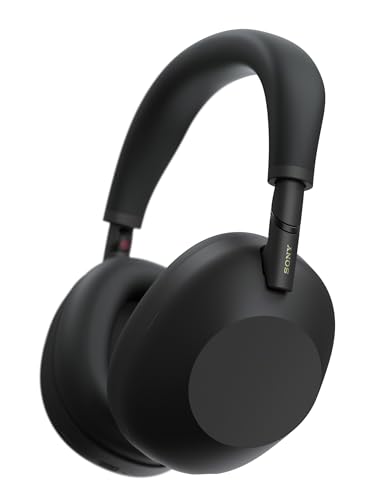
Sony WH-1000XM6 — the long-session comfort pick
Badge: Best for all-day listening
- Form: over-ear, Bluetooth wireless
- Noise cancelling: adaptive, per the manufacturer’s listing
- Battery: up to 30 hours per the listing
- Microphones: 12-microphone array per the listing, aimed at clear calls
A flagship over-ear set like this one earns its place in a translation kit through comfort and control of your listening environment. Strong noise cancelling quiets a train carriage or aircraft cabin so the translated voice sits on a silent background, while the transparency mode lets the speaker’s actual voice and the room back in when you need both layers at once. The voice-forward tuning of Sony’s flagship line suits speech intelligibility, and multipoint connection lets the same headphones stay paired to your phone and a laptop across a work trip.
- Strengths: excellent noise cancelling for noisy venues; comfortable for multi-hour wear; clear, speech-friendly tuning
- Strengths: multipoint pairing for phone plus laptop; strong call microphones if you switch to conversation mode
- Strengths: folds into a proper travel case, which protects it in a day bag
- Trade-offs: flagship-tier pricing; over-ear size is bulky beside earbuds
- Trade-offs: touch controls take practice with gloves or in a crowd
- Trade-offs: no advantage over cheaper sets for translation itself, only for comfort and quiet
Best for: travellers and students who will listen for hours and want the quietest background. Not suited for: buyers who mainly need a pocketable set for short exchanges. Check price on Amazon

Apple AirPods Max 2 — the iPhone listener’s pick
Badge: Best for iPhone owners who want one premium set
- Form: over-ear, Bluetooth wireless for iPhone
- Noise cancelling: active, with Adaptive Audio per the listing
- Extras per the listing: Personalized Spatial Audio; Live Translation listed among its features
This listing is interesting for this article because Apple’s own live translation support appears right in the product description, which gives iPhone owners two translation routes through one pair of headphones: Apple’s ecosystem feature where it is available, and the Google Translate app route, which treats these like any other Bluetooth headphones. The build, headband comfort, and polished transparency make long listening easy, and the digital crown style volume control is simple to adjust mid-sentence without breaking your attention.
- Strengths: seamless pairing and switching across Apple devices; natural-sounding transparency for hearing the room
- Strengths: premium build that tolerates daily travel; precise physical volume control
- Strengths: works with both major translation approaches, so you are not locked to one app
- Trade-offs: premium-tier pricing; heavier than most rivals on long days
- Trade-offs: the case offers less protection than a hard travel case
- Trade-offs: best experience assumes an iPhone at the centre of your kit
Best for: iPhone owners who want one high-end set for music, calls, and translation listening. Not suited for: Android-first buyers or anyone watching the budget. Check price on Amazon

Soundcore Q30 — the value pick for trying the feature
Badge: Best budget way in
- Form: over-ear, Bluetooth wireless with wired option
- Noise cancelling: hybrid active noise cancelling with multiple modes per the listing
- Battery: 50 hours of ANC playtime per the listing
- Extras per the listing: custom EQ through the app, multipoint connection
If you want to experiment with live translation without a flagship budget, this is the sensible shape of purchase: a comfortable over-ear set with real noise cancelling, long battery life, and an app EQ you can nudge toward vocal clarity by trimming bass and lifting the midrange slightly. It also works wired, which rescues a dead battery on a long-haul day and plugs straight into seat-back entertainment between translation duties.
- Strengths: long battery life outlasts multi-day trips between charges; effective cancelling for the tier
- Strengths: app EQ lets you tune for speech clarity; multipoint at a budget tier
- Strengths: wired fallback keeps it useful when the battery runs out
- Trade-offs: build materials feel a step below flagship sets
- Trade-offs: call quality in wind is ordinary; the phone microphone still does the translation listening
- Trade-offs: ear cushions run warm on summer walking tours
Best for: first-time users and travellers who want one affordable set for music and translation. Not suited for: buyers expecting flagship build or the strongest cancelling. Check price on Amazon

JBL Tour One M2 — the business traveller’s pick
Badge: Best for work trips and calls
- Form: over-ear, Bluetooth wireless
- Noise cancelling: adaptive noise cancelling per the manufacturer’s range positioning
- Focus: call clarity and travel features in JBL’s flagship travel line
JBL’s travel flagship suits the reader most likely to use translation at work: someone moving between airports, client sites, and hotel desks. Its call-focused microphone tuning helps when you flip from listening mode into a spoken conversation, and the travel feature set, including ambient awareness controls, maps well onto days that alternate between quiet focus and announcements you cannot afford to miss.
- Strengths: strong call performance for the conversation half of a trip; comfortable travel fit
- Strengths: ambient sound control helps you balance translation against the room
- Strengths: folds flat for a laptop bag; reliable physical and touch control mix
- Trade-offs: sound signature leans lively rather than neutral, which some listeners tire of
- Trade-offs: app features differ slightly between phone platforms
- Trade-offs: sits in the upper tier, so it competes with flagship rivals on price
Best for: business travellers mixing meetings, calls, and translation listening. Not suited for: buyers who only need a simple budget set for holidays. Check price on Amazon
our guide to the best noise cancelling headphones
ANC picks for flights and long journeys
Buying guide: what actually matters in headphones for translation
Translation listening is a speech task, not a music task, and the buying criteria shift accordingly. Start with voice clarity. A headphone tuned with thunderous bass can make a synthesized voice sound thick and tiring; a balanced or slightly midrange-forward tuning keeps consonants crisp, and consonants carry meaning. If the companion app offers an equalizer, a gentle bass trim and a small lift in the presence region is the classic speech-intelligibility recipe, and it is worth setting up a dedicated translation preset so you are not re-tuning before every session.
Transparency mode is the second criterion, and for conversation it may be the first. A good transparency mode lets you hear the speaker’s real voice, your own voice, and the room at a natural level while the translation plays. That matters for safety when crossing streets, for politeness when someone addresses you directly, and for the simple ability to tell who is speaking in a group. Test it in the shop or during a returns window: transparency that sounds like a cheap intercom will make you take the headphones off, and headphones you remove translate nothing.
Comfort and battery come next, because translation sessions are long and unglamorous. A two-hour guided tour, a full lecture, or a family lunch will expose a tight clamp or a hot ear cushion far more than a twenty-minute commute does. Over-ear sets spread pressure best for long sessions; earbuds win on pocketability and on the one-ear technique many people use for conversation. Battery claims should cover your longest realistic day with cancelling on, plus a margin for the phone-side drain of streaming. Fast charging matters more than headline capacity for travellers: a short top-up during a coffee stop should buy back an afternoon of listening.
Controls and connection behaviour round out the list. You need volume and pause you can find by touch, because fishing for a phone mid-sentence breaks the thread of what you are hearing. Multipoint connection helps if your day alternates between phone translation and laptop calls. A wired fallback, whether through a cable or a USB connection, is cheap insurance on planes and in conference venues with crowded radio spectrum. Finally, manage expectations about price tiers: budget sets now deliver perfectly intelligible speech and useful cancelling, the mid tier buys comfort and better transparency, and the flagship tier buys the quietest background and the most polished controls. None of the tiers buys better translation, because translation never happens in the headphones.
budget ANC options that keep speech clear
earbuds that pair cleanly with Android phones
How to get cleaner translations in the real world
Technique beats hardware in this category, and a few habits transform the experience. Give the microphone a chance: place the phone between you and the speaker, closer to the speaker than to you, with the microphone end unobstructed and pointing at the sound source. On a table, that means sliding the phone toward the other person rather than keeping it beside your own plate. In a hall, sit nearer the front or near a loudspeaker, because the phone hears what your ears hear and distance blurs both.
Manage the conversation, kindly. One speaker at a time is the rule that makes everything else work, so in groups, gently steer people toward taking turns, and expect accuracy to dip when two voices overlap. Ask speakers to keep a natural pace rather than shouting or over-enunciating; recognition systems are trained on normal speech and often do worse with theatrical delivery. Where you can choose the setting, choose the quiet corner over the echoing hall, and step away from kitchen noise, traffic, and music, all of which compete directly with the voice band the recognizer cares about.
Build verification into your routine for anything that matters. Numbers, dates, names, addresses, and platform or gate information deserve a visual check: a shown ticket, a written note, a finger pointed at a board. Names of medicines and anything health-related deserve extra care, and for anything where a misunderstanding carries real consequences, use the translation as a first pass and confirm with a person qualified to interpret. Keep your own contributions simple when you reply through conversation mode: short sentences, one idea at a time, no idioms, and place names spoken slowly. Simple input is not dumbing down; it is how professionals brief interpreters too.
Prepare before you travel. Download the languages you need for the app’s offline features, save the addresses of your hotel and key destinations in both scripts, and run one practice session at home with a video in your target language so the lag feels familiar before it matters. Check that your headphones hold a charge, pack their cable, and know where the live mode lives in the app so you are not hunting through menus while a guide is already talking. A screenshot of your booking details in the local language, shown on the phone screen, quietly resolves many situations that voice translation handles clumsily.
Common mistakes to avoid
The most common mistake is buying dedicated translator hardware before testing the free feature already on your phone. The second is blaming headphones for translation errors that began at the microphone: if the phone could not hear the speaker, no earbud at any price fixes the output. Third is trusting a single pass for critical details; the system is a comprehension aid, and treating it as a certified interpreter invites exactly the errors it is known for, in names, numbers, and negations. Fourth is forgetting the social layer. Wearing both earbuds with cancelling on while someone speaks to you reads as disengaged in many cultures; one earbud, transparency on, and a brief explanation that you are listening through translation keeps people on your side. Fifth is ignoring data and battery planning on roaming trips, then losing the feature mid-afternoon when it was the plan for the whole day. Sixth is assuming availability: staged rollouts mean a friend’s phone may show the feature while yours does not, and the fix is patience and app updates, not new hardware.
Live listening mode or conversation mode: which one should you use?
Google Translate effectively gives you two different speech tools, and choosing the right one for the moment is most of the skill involved. The live listening mode covered by this article is a one-way feed: speech around you is translated continuously into your headphones. Reach for it whenever your role is to absorb information: tours, lectures, presentations, ceremonies, announcements, television, and the storytelling side of family life. Because nobody else hears anything, it is also the polite choice in quiet public spaces, and because it never waits for a pause, it copes with speakers who talk in long, unbroken stretches.
Conversation mode is the turn-taking tool. You and the other person alternate, each speaking toward the phone, and the app plays each side’s translation aloud or shows it as text. Reach for it when you need something back: asking directions, negotiating a taxi route, explaining a problem at a hotel desk, or checking an allergy concern with a waiter in general terms. It is slower and more public, but it is genuinely two-way, and the text on screen gives both of you a chance to catch errors before they matter. Many real encounters blend the two: listen live while the mechanic explains the fault, then switch to conversation mode to agree on the work and the timing.
A third pattern deserves a mention because travellers discover it quickly: reading. Menus, signs, forms, labels, and screenshots often carry the information you actually need, and the app’s camera and text translation handle those without any audio at all. When a spoken exchange stalls, switching to typed or camera translation is not a failure of the headphone feature; it is using the toolbox properly. The strongest users of these tools move between listening, conversation, and camera modes without thinking of any one of them as the main event.
Privacy, data, and battery: the practical costs nobody puts in the headline
Because the translation pipeline runs in the cloud, a live session sends the speech your phone hears to Google’s servers for processing. For a tour commentary or a family story that is a reasonable trade. For a confidential negotiation, a sensitive workplace discussion, or anything covered by a professional duty of confidence, it is not, and you should use an interpreter bound by the appropriate obligations instead. The same logic applies to the people around you: in some settings and some jurisdictions, streaming or recording other people’s speech carries legal and social expectations, so a brief explanation of what you are doing is both courteous and prudent. People are generally kind about translation aids when they understand them, and noticeably less kind when they discover them.
Data consumption follows from the same design. A live session is a continuous audio stream in both directions for as long as it runs, so a translated afternoon can use a meaningful slice of a roaming allowance. Download maps and language resources on hotel Wi-Fi, consider a local data plan or eSIM for long trips, and keep an eye on usage during the first days until you know your own pattern. Battery drain lands mostly on the phone, which is streaming, processing, and holding a Bluetooth link at the same time; a small power bank in the day bag is the standard traveller’s answer, and lowering screen brightness helps because the screen is not doing anything useful while you listen. Your headphones, by contrast, sip power during playback, and any of the picks above will outlast the phone across a long day.
There is also an attention cost worth naming honestly. Listening to a voice that trails the room by a few seconds, while the speaker’s real voice reaches your other ear or leaks through transparency, is a skill that improves with practice and tires you faster than ordinary listening at first. Build in breaks on long days, use one earbud when the setting allows it, and do not schedule your hardest translated meeting in your first hour with the feature. Like simultaneous interpretation for humans, it rewards pacing.
Three real trips, and how the feature behaves on each
Abstract limits are easier to judge through concrete days. Consider a guided museum tour in a language you read slightly but cannot follow at speech speed. This is the feature’s home ground: one speaker, a steady pace, long explanations, and a phone held or pocketed near enough to hear clearly. Expect to follow the substance of everything, to miss some jokes and most asides, and to confirm names and dates from the labels in front of you, which the museum has thoughtfully printed. By the second room, the lag stops feeling strange, and the main discipline is resisting the urge to remove the headphones whenever the guide pauses, because the next sentence is already being translated.
Now consider a family lunch where three generations mix two languages and everyone talks at once. The feature helps least exactly where the emotion is highest: overlapping speakers, laughter cutting sentences in half, dialect words, and speakers turning away from the phone. You will still gain a great deal, enough to follow the thread, laugh a beat late, and know which story is being retold, but the winning technique is social rather than technical: sit beside the main storyteller, keep the phone near them, and accept the role of listener. For the one-to-one conversation afterwards, on a walk or over washing up, conversation mode takes over and the exchange becomes genuinely two-way.
Finally, consider a work trip with a client-site visit conducted in another language. Here the feature earns professional respect with professional caveats. It will keep you oriented through a factory tour, a safety briefing in general terms, and a presentation, and that orientation changes how much value you get from the day. It should not carry a negotiation, a contract discussion, or anything where a softened condition or a dropped negative changes money or liability; those deserve a professional interpreter, booked the way you would book any other critical supplier. Used inside those boundaries, the feature is not a toy. It is the difference between attending a day and merely being present at it, and that difference is why the rollout drew attention far beyond gadget circles.
Setting it up well: a short field guide before your first trip
The feature described in this article lives or dies on setup details that take five minutes at home and save real frustration abroad. Work through these steps before you travel, while you have calm, connectivity, and time to experiment.
Prepare the languages you will actually need
Translation quality and speed are best for widely spoken language pairs, and downloading language data ahead of time, where the app offers it, protects you when connectivity is poor. Think in itineraries rather than countries: the airport language, the hotel language, and the language of any rural excursion may all differ. Add the languages for each leg of the trip, and practise a few ordinary exchanges at home — ordering food, asking directions, confirming a price — so the rhythm of speaking, pausing, and listening is familiar before it matters.
Choose the right headphones for translation, not just for music
Almost any headphones can carry the audio, but the practical winners share three traits: a fit that stays comfortable through long conversations, controls you can operate without looking, and a case that makes them easy to reach quickly. Open and situational-aware styles suit face-to-face conversation because you still hear the other person’s real voice and the room around you. Strongly isolating styles suit announcements and guided audio in noisy places. Many travellers end up using the pair they already own for music and accepting the trade-offs, which is fine — the point of the feature is that it works with what you have.
Microphone reality: your phone does the listening
Because the phone captures speech, where the phone sits matters as much as what is in your ears. Hold it naturally between you and the other speaker, keep it out of pockets and bags, and avoid covering its microphones with a case lip or your fingers. In a loud market or station, moving half a step closer and turning slightly away from the noise source improves recognition more than any setting. If recognition keeps failing, shorten your sentences before you blame the language support; short, complete sentences translate far more reliably than long, winding ones.
Etiquette that keeps conversations human
Show the other person what you are doing. A smile, a gesture at the phone, and the first translated sentence usually turn suspicion into amusement and cooperation. Speak at a normal pace, one person at a time, and expect to confirm numbers, names, and times explicitly — those are the details translation handles worst and travel needs most. For anything official, medical, or legal, treat translated audio as a way to arrange proper help, not as a substitute for it.
A fallback plan for when it fails
Connectivity drops, batteries die, and some environments defeat any microphone. Keep a written card with your hotel name and address in the local language, save the same details offline in your phone, and learn the handful of courtesy phrases that open every interaction warmly. The feature is a powerful layer on top of ordinary travel preparation, not a replacement for it, and the travellers who enjoy it most are the ones who packed the fallbacks anyway.
Frequently asked questions
Do the headphones themselves translate the speech?
No. The Google Translate app and Google’s cloud models do the listening, translating, and speaking. Your headphones only play the translated voice, which is why wired sets, budget earbuds, and flagship noise cancelling models all work with the same feature. Any product claiming the headphones alone provide this exact Google feature is describing something else, usually its own separate translation app or service.
Which headphones work with live translation in Google Translate?
Any headphones or earbuds that connect to your phone and play ordinary audio should work, because the app simply routes the translated voice to the active audio output. Comfort, transparency quality, and battery life separate a good experience from a poor one, but compatibility itself is broad. If the translated voice plays through the phone speaker instead, reconnect the headphones and check the phone’s audio output selection.
How many languages does the live headphone translation support?
Google described support for more than seventy languages when it announced the feature, and the list has room to grow as the rollout widens. The practical check is inside your own app: open the live translation mode and look at the language picker for your pair, because availability can vary by region and by whether a language supports the live listening mode rather than only typed translation.
Does live headphone translation work offline?
Plan on needing an internet connection. The recognition and translation happen in the cloud, so a dropped connection interrupts the live feed even though other parts of Google Translate, such as downloaded language packs for typed text, can work offline. Test your exact setup before a trip, download what the app offers for offline use, and do not build an itinerary that depends on live translation in places with no signal.
Can the other person hear a translation of me through my headphones?
Not through the listening mode described here. That mode translates incoming speech for your ears only. To reply, you switch to the app’s conversation-style flow, where your translated words are played from the phone speaker or shown as text for the other person to read. Dedicated translator earbuds with a shared-bud mode handle two-way exchanges differently, which is their main reason to exist.
Is it appropriate to use for medical or legal conversations?
Use it only as a comfort aid in those settings, never as the sole channel for decisions. Machine translation can drop negations, garble names and dosages, and smooth over uncertainty that a qualified interpreter would flag. Hospitals, courts, and government offices can usually provide professional interpretation; ask for it, and let the app help you follow along rather than carry the conversation.
Can I use the feature with only one earbud in?
Yes, and for conversation it is often the better arrangement. One earbud carrying the translation while the other ear stays open to the room keeps you aware of traffic, announcements, and the other person’s natural voice, and it reads as more polite in face-to-face exchanges. The trade-off is clarity in very noisy places, where two earbuds and stronger isolation make the translated audio easier to follow. Try both arrangements at home with a video in another language so you know your preference before you are standing at a ticket counter.
What happens to translation when my phone loses signal mid-conversation?
Expect the feature to pause, degrade, or fall back to any downloaded language support, depending on how the service is configured and how much was downloaded beforehand. The practical defence is preparation: download what you can before you leave, finish important conversations — bookings, directions, medical or money matters — while you have a solid connection, and keep the written fallback details mentioned above for the moments when the connection disappears entirely. A dropped translation mid-sentence is an inconvenience; a dropped translation with no fallback plan can become a genuinely difficult situation.
Can the feature help with learning a language, not just surviving one?
Yes, used deliberately. Travellers who repeat a translated exchange — hearing the local phrase, then saying it themselves — turn a survival tool into a patient tutor, and many language learners use conversation translation to attempt their own sentence first and check what the machine heard. The feature lowers the cost of trying, which is the real barrier for most learners abroad. Just keep the relationship healthy: let it rescue you and check you, but keep attempting the greetings, thanks, and small courtesies yourself, because those attempts, however imperfect, are what people remember about you long after the translation is forgotten.
Final recommendation
The real story behind the headline is a shift in where translation lives. It used to live in special hardware; now it lives in an app you probably already have, delivered through headphones you already own. Try it first with your current set on a low-stakes outing, a tour, a lecture, or a family call, and judge the lag and accuracy with your own ears. If the experience works for you, spend money only on the listening side of the equation: comfort for long sessions, transparency that keeps you present in the room, battery that outlasts your day, and controls you can work blind. The four picks above cover that range from a budget starting point to flagship quiet, and each one leaves the translation itself exactly where it belongs, in the app.
how the Bose QuietComfort fixes compare for troubleshooting