The Fujifilm X-H2S and the Panasonic Lumix S5 II are both hybrid cameras that take stills and video seriously, but they differ in sensor size and lens system. The X-H2S uses an APS-C sensor and the Fujifilm X mount, while the S5 II is a full-frame body on the L mount. Choose based on the lenses you want and the kind of footage you shoot.

What Each Camera Is For
The X-H2S is Fujifilm’s speed-focused flagship for the X system. It is built for action, events and video work where fast response and a robust body matter, and it carries Fujifilm’s film simulations for color.
The S5 II is a full-frame hybrid body from Panasonic, a brand with a long history in video-friendly cameras. It appeals to filmmakers and photographers who want a larger sensor and a body that fits a video-first workflow.
In this guide
Where They Differ
| Factor | Fujifilm X-H2S | Panasonic S5 II |
|---|---|---|
| Sensor size | APS-C | Full frame |
| Lens mount | Fujifilm X | L mount |
| Design emphasis | Speed and stills plus video | Video-friendly hybrid |
| Color character | Film simulations | Panasonic color and log options |
| Lens size | Often more compact | Often larger for equal reach |
Specifics such as burst speed, recording formats and recording time limits change with firmware, so confirm them on each maker’s page.
Questions That Help You Decide
- Do you want shallow depth of field and wide-angle coverage from a larger sensor, or do you prefer smaller lenses and extra reach from APS-C?
- Which lenses are on your wish list? The L mount is shared by several makers, and the X mount has a deep native catalog.
- How much video will you shoot? Check codec options, log profiles and heat handling for the clips you plan to record.
- Do you like dials or menus? Fujifilm leans on physical controls, and Panasonic bodies follow a more conventional layout.
Who Should Choose Which
- Choose the X-H2S if you value a compact lens kit, quick handling and Fujifilm color straight out of camera.
- Choose the S5 II if you want a full-frame sensor, plan to shoot a lot of video or like the L mount lens options.
- If you shoot mostly stills of moving subjects, spend your time comparing autofocus behavior in current sample footage.
Video Workflow, Codecs and Heat Management
Both cameras are marketed to people who shoot video, so look beyond headline resolution. Start with the recording formats you plan to use. Check the maker’s pages for the codecs, bit depths, color sampling options and log profiles offered, and whether certain modes limit frame rate or crop the image. These details determine how much flexibility you have in color grading and how big your files will be.
Heat handling is a practical concern for long clips. Cameras with active cooling or generous ventilation may record longer in warm conditions, but results vary with settings and environment. Check the maker’s statements about recording limits and cooling accessories, and look for user discussions that describe real conditions similar to yours, remembering that anecdotes vary.
Storage is another factor. High-bitrate video fills cards quickly, and some modes need fast cards of a specific type. Confirm card slot types and whether both slots can be used for video. Plan your backups on location, since video files are large.
Consider the post-production side. Check whether your editing software supports the camera’s formats without conversion, and whether a computer you own can play them back smoothly. If not, you may need proxy workflows. Finally, think about audio: look at microphone inputs, headphone monitoring and options for external audio adapters, which matter for interviews and event work.
Autofocus and Stills Performance for Moving Subjects
Autofocus affects both photo and video, and each camera takes its own approach. Review what each maker says about subject detection, such as people, animals and vehicles, and how well tracking holds when a subject turns or is partly hidden. Descriptions can sound similar, so the best test is to watch current, unedited sample footage in conditions like yours.
For stills of moving subjects, consider burst rate, buffer depth and shutter options. Mechanical and electronic shutters behave differently, and the electronic one can show distortion with fast motion on some cameras, so check how each model handles it. Look for notes on rolling shutter and flash compatibility with electronic shutters.
The sensor size influences how you work. A larger sensor can give shallower depth of field, which looks attractive but makes focus placement more critical at wide apertures. A smaller sensor offers more depth of field at the same framing, which can help with focus tolerance in action. Neither is better in general.
When you test or try either camera, check how quickly it wakes, how it handles half-pressing the shutter, how easy it is to switch focus areas, and how its buttons are laid out for sports or events. Customization matters: assign function buttons for the settings you change most. Handling speed often decides keepers more than a minor autofocus difference.
Lens Ecosystem and Future Costs
The camera body is only part of the investment, so look at the lens options you would actually buy. The X mount has a broad native catalog, with many compact primes and zooms, and a strong set of third-party options. The L mount is shared among several manufacturers, which broadens the pool of lenses and bodies that can use it. Check both catalogs for the focal lengths and apertures you need.
Full-frame lenses are often larger and heavier than comparable APS-C lenses, which affects travel and carrying. However, the equivalent look of a full-frame lens at a given field of view and aperture can differ in depth of field and light gathering. Compare options in terms of what you will shoot, not just formal equivalence.
Think about adapters. Some users adapt older or other-brand lenses, and compatibility and autofocus functionality vary. Confirm that an adapter supports the features you need, such as autofocus and stabilization, before relying on it.
Include used lens availability in your plan, since second-hand options can reduce costs. Consider future needs, such as telephoto reach for sports or fast wide lenses for video. A body will probably be replaced in a few years, while lenses can stay with you longer, so favor the system whose lens roadmap and range match your long-term interests.
Stabilization and Handheld Shooting
Stabilization determines how steady your handheld footage and slow-shutter photos can be. Both cameras are described as having in-body stabilization, but the actual benefit depends on lens, focal length and how still you hold the camera. Check each maker’s page for what stabilization modes exist for video, including electronic stabilization and its crop, and how in-body and in-lens systems cooperate.
For video, electronic stabilization can add smoothness but may crop the frame and affect resolution or frame rate options. Test the stabilized modes with a lens you plan to use. For walking shots, consider adding a gimbal or a stabilized grip, which often gives a more reliable result than relying solely on built-in systems.
For stills, stabilization lets you use slower shutter speeds in dim light, which helps with static subjects, though it does not freeze moving subjects. Use a fast shutter speed for action regardless of stabilization.
Handheld technique still matters. Brace your elbows, use a strap or a viewfinder to add contact points, and breathe out before pressing the shutter. For video, keep movements slow and consider a shoulder rig or a cage for better balance. Think about weight, too. A heavier setup is steadier in some respects but tiring for long events. Try the bodies with lenses you own or plan to buy so you can judge how they balance in your hands.
Body Features, Weather Sealing and Durability
Check practical body features before deciding. Look at the screen design, whether it articulates or flips for vlogging, the viewfinder size and brightness, and the quality of buttons and dials. Check the ports: headphone and microphone sockets, the type of video output and USB charging options. If you plan to mount accessories, look at available cages, handles and cold shoe features.
Weather sealing is relevant if you shoot outdoors. Read the maker’s description of dust and splash resistance, and remember that sealing is not the same as waterproofing. Lenses must also be sealed to benefit. Wipe the camera after rain, and avoid changing lenses in wet or dusty places.
Battery life and charging are another consideration. Compare the number of shots or minutes of recording the makers state, bearing in mind that real use differs. Check whether the camera can run on external power for long video recording, and whether batteries are shared with other bodies you own.
Ask about firmware support and service. Makers often add features through updates, but this is not guaranteed. Check warranty terms and service availability in your region. Finally, think about how comfortable the grip is during long sessions, and whether the menu system makes sense to you. Try both if you can, and decide whether you would be happy to use either one for years.
Think in Terms of a Whole System, Not Two Bodies
Hybrid cameras are chosen for what they can do together with lenses, accessories and software. Looking only at the two bodies misses most of the picture. Before comparing details, list the lenses you would buy for each system, plus accessories such as a cage, a grip, an external recorder and a microphone. Then compare the total cost, size and weight of the full kit. This broader view often changes the answer.
Also consider the user community. A large ecosystem means more lenses, more tutorials, more used gear and more accessories. A smaller ecosystem may offer unique advantages, but you may need to search harder for what you want. Both systems here have active communities, and each has its own strengths, so look at the specific items you need.
Comparison Table of System-Level Questions
| Question | Why it matters | How to check |
|---|---|---|
| Which lenses do I need? | Lenses define your look and cost | List and compare native options |
| How big is the full rig? | Affects portability | Add up bodies, lenses and accessories |
| Which recording formats do I need? | Affects editing workflow | Check each maker’s specification page |
| How do I power and cool the camera? | Affects long recording | Read about heat handling and power options |
| What accessories are available? | Affects flexibility | Look at cages, grips and mounts |
| What are my storage needs? | Video files are large | Check card types and speeds |
Planning a Video Workflow Before You Buy
If you record video, plan the full path from camera to final file. Decide on the resolution and frame rate you need, the formats your editing computer can handle and the storage required. High-quality formats produce large files, and editing them smoothly may demand a powerful computer or a proxy workflow. Think about audio too, since good sound often matters more to viewers than slight differences in image quality.
- Choose your delivery resolution and frame rate.
- Check that your computer can edit the camera’s files.
- Plan card capacity and backup for each shoot.
- Include a microphone and monitoring in your plan.
Stills Work: Burst, Focus and Files
For stills, two traits stand out: how quickly the camera can shoot a series of frames, and how reliably it can keep a moving subject in focus. The two cameras take different approaches. One is built around speed with a stacked sensor design that supports fast readout, while the other emphasizes a larger sensor and balanced performance. Think about your subjects. Fast action calls for speed and tracking. Portraits and landscapes may benefit more from the larger sensor and its tonal qualities.
Check the number of frames the buffer holds before slowing, the card types supported and the file formats available. Try to see sample files from both cameras, and judge them at a size relevant to your uses. If you print large or crop heavily, resolution and noise handling matter more.
- Decide which subjects matter most.
- Look at burst speed and buffer depth for those subjects.
- Examine sample files at the size you use.
- Check card requirements and costs.
- Consider the color style of each system.
Heat, Power and Long Recording Sessions
Video work stresses cameras. Heat can limit recording time, and battery life may be shorter than for stills. Read the maker’s notes on recording limits and cooling options, and consider external power or accessory cooling if you record long interviews or events. Plan breaks, and test your kit before a paid job. A camera that runs for hours in a cool room may behave differently in a hot outdoor setting.
- Test the camera in conditions similar to your shoot.
- Carry spare batteries and power options.
- Use shade and ventilation when possible.
- Follow the maker’s guidance on working temperature range.
Worked Example: A Small Production Company
Consider a two-person production company that makes short documentaries and event videos. They need a main camera and a second camera. Their clients value clean audio and steady footage. They list the lenses they use: a standard zoom, a wide prime and a short telephoto. They check native lens availability in each system and find that either can cover their needs, though the lens sizes differ.
They also consider the second camera. If both cameras are from the same system, they can share lenses, batteries and accessories, which simplifies the kit. They calculate the total weight of the rig and find that one system produces a lighter outfit with the lenses they like. They rent each camera for a weekend and shoot a short interview and a moving event. After comparing footage and handling, they choose the one that suits their workflow and budget.
Their decision was based on a plan, a trial and an honest look at their business.
Common Mistakes
- Choosing based on a single feature that rarely matters.
- Forgetting the cost and size of lenses.
- Ignoring editing computer limits when choosing formats.
- Skipping a heat and battery test.
- Neglecting audio, which viewers notice quickly.
Glossary
- Hybrid camera: a camera designed for both stills and video.
- Stacked sensor: a sensor design that supports faster readout.
- Buffer: memory that holds images before writing to the card.
- Proxy workflow: editing with smaller copies of video files and relinking to originals.
- Cage: a frame that holds a camera and accessories.
Stabilization and Handheld Technique
Both cameras include in-body stabilization, but they differ in how it combines with lenses and software. For handheld video, good technique remains important: keep elbows tucked, walk with bent knees and move smoothly. Consider a gimbal or shoulder rig for long takes. Test how each camera handles walking shots, and check whether electronic stabilization crops the image.
- Record the same walking shot on each camera.
- Compare smoothness with stabilization on and off.
- Check how much the image is cropped.
- Consider adding a gimbal for demanding shots.
Lens Costs and Future Plans
Think about the lenses you may want in three years. A system with affordable primes and zooms leaves room to grow, while a system with costly lenses may limit your expansion. Consider the used market as well. Examine how lens sizes differ between the sensor formats, since smaller sensors can allow smaller lenses for the same field of view, though this is not always true in practice.
Deciding With a Short Trial
If you can, rent both cameras for a weekend each. Shoot a mix of stills, interviews and moving scenes. Keep a log of what you liked and disliked. Look at footage on your editing computer to see how smoothly it plays. Ask yourself which camera you looked forward to picking up. That feeling, backed by a plan and a short trial, is a reliable guide.
- Use the same lenses or equivalent views.
- Record in the formats you intend to use.
- Test audio, battery life and heat.
- Note menu clarity and handling.
Audio and Monitoring for Better Video
Viewers forgive soft footage more readily than poor sound. Plan for a proper microphone, a way to monitor audio with headphones and a method for setting levels. Check each camera’s audio inputs, whether a headphone jack is present and how audio is recorded. If you need more channels or higher quality, consider an adapter or external recorder, and confirm compatibility on the makers’ pages. Record a few seconds of room tone at every location, which helps greatly in editing.
- Use a microphone close to the speaker.
- Monitor with headphones during recording.
- Set levels so loud moments do not distort.
- Carry spare cables and batteries for audio gear.
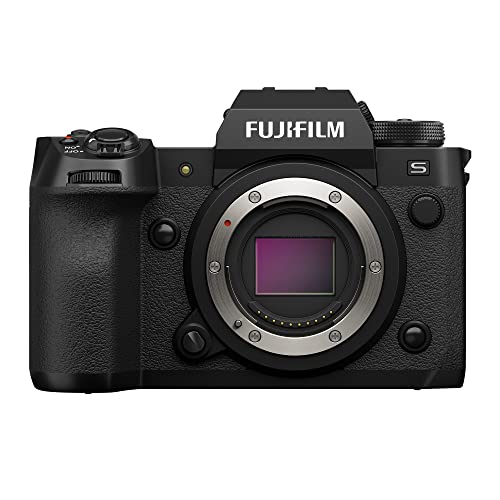
Check Current Listings
As an Amazon Associate, Reviews Took earns from qualifying purchases.
Both options are sold on Amazon. Check the current listing, what is included in the box and the seller before you decide.
Fujifilm X-H2S
Panasonic S5 II
Production Realities: A Day on Set With Each System
Specifications meet their test on a working day, when the camera must start quickly, keep up with a schedule, and hand over files that an editor can use without complaint. Both of these systems can run a professional day, but they pace it differently. One brings the responsiveness and burst discipline of a body designed around speed, thriving when the day is full of moments that happen once. The other brings the image quality headroom and video tooling of a full-frame hybrid, thriving when the day is planned, lit, and shot with deliberation. A producer choosing between them is really choosing which kind of day the production mostly has.
Crew familiarity is a production reality too. If your regular collaborators know one system’s menus, color, and quirks, that fluency is worth real money in saved minutes and avoided errors. Solo operators should weigh their own fluency just as honestly: the camera you can operate half-asleep at the end of a long day is a production asset, and switching systems resets that asset to zero for a season.
Deliverables close the day. Know what the client or platform needs, in resolution, in file type, and in turnaround, and let those needs discipline the choice. A system whose files arrive already close to the delivery look saves grading time on every project, while a system with more flexible files rewards productions that budget for post. Neither is superior in the abstract; each is superior inside a particular pipeline.
Low Light Without the Panic
Low light separates marketing claims from working truth. What matters is not a single sensitivity figure but the whole chain: how cleanly the sensor records, how reliably focus finds its target in dim venues, how stabilization steadies a tired hand, and how gracefully the files accept editing afterward. Both systems have earned respect in this territory, with the larger sensor holding an inherent advantage in image quality and the speed-focused body countering with focus and handling tuned for exactly these pressured moments.
Technique remains the largest variable. Add light when you are allowed to, even a small continuous source or a carefully bounced flash, and both cameras improve more than any body swap could achieve. When light cannot be added, work deliberately: brace, choose shutter speeds for the subject’s movement rather than for hope, and accept a thoughtful exposure that protects the important tones. Review at magnification during breaks so a systematic problem is caught while the event can still be re-covered.
For video, low light adds the audio and monitoring dimension: gain staging, a microphone close to the subject, and the discipline to check recordings rather than trusting meters alone. A production that handles those basics will produce watchable low-light work on either system, while one that neglects them will struggle on any camera.
The Lens Conversation for Hybrid Shooters
Hybrid shooters ask lenses to do double duty, and the two mounts answer with different catalogs and characters. Judge a lens for hybrid work on more than sharpness: how smoothly it focuses during video, how quietly it works near a microphone, how its focus breathing behaves when focus pulls between subjects, and how its size balances on the body for a full day. A lens that is magnificent for stills can be merely adequate for video, and the reverse is also true, so hybrid buyers should test with both crafts in mind.
Build the kit around the work’s grammar. Interviews and pieces to camera favor a small set of focal lengths used constantly; events favor versatile zooms that reduce lens changes in public; narrative work favors primes with consistent rendering. Both systems can furnish each grammar, but the total weight, cost, and handling of the furnished kit differ, and those differences are what your shoulders and your accountant will actually experience.
Adapted and third-party lenses widen both catalogs, with the usual advice: test the specific combination for focus behavior and video manners before trusting it to paid work. A lens that performs beautifully on your own test chart and your own typical subject has earned its place, whatever its badge.
Heat, Power and the Long Take
Long recording sessions are a systems problem disguised as a camera problem. Power, media, heat, and monitoring all have to last as long as the performance does, and the weakest element sets the limit. Plan the chain: external power where the situation allows, media sized with generous margin, a monitoring setup that does not cook the camera in its own accessories, and a rehearsal at home that runs the full expected duration. A rehearsal sounds excessive until the first time it saves a ceremony, a concert, or a keynote.
Heat management is partly environmental. Shade, airflow, and sensible settings choices extend sessions more than anxiety does, and knowing your own body’s behavior in your climate, from your own tests, replaces rumor with knowledge. If a production genuinely demands unlimited continuous recording in harsh conditions, that requirement should be stated at the choosing stage, because it may point toward a different class of tool altogether, and discovering it on the day helps nobody.
Build the schedule around the equipment’s honest limits rather than pretending they do not exist. Breaks between sessions, a second body for critical coverage, and a simple audio recorder running as backup are the marks of productions that never have disaster stories. Audiences remember the disaster, not the specification that caused it.
Choosing for the Work You Actually Book
Lay your last year of work on the table and sort it: how much was speed-critical, how much was planned and lit, how much was video-led, and how much was stills-led? That honest sort usually makes this comparison decide itself, because the two systems are optimized for different centers of gravity. Buy for the center of your work, rent for its edges, and the kit will feel right on most days rather than perfect on a few and wrong on the rest.
Consider also the work you are turning away. If you decline jobs for want of a capability, that is evidence; if you merely imagine grander work, that is marketing. Equipment should follow evidence. When the evidence is genuinely mixed, choose the system whose lenses and support you prefer to live with, because you will live with them daily while the exceptional assignments remain exceptional.
Then commit, learn the tool until it disappears, and let your portfolio make the next decision when the work itself changes. Systems serve careers in chapters, and this choice, made honestly, will serve its chapter well whichever badge it carries.
Insurance, Spares and the Professional Safety Net
Professional use asks questions that hobby comparisons skip: what happens when the body fails on a booked day, how quickly can a replacement be in your hands, and does your insurance understand your kit’s real value? Build the safety net deliberately. A serviceable second body, even an older one from the same system, a relationship with a rental house that stocks your mount, and an insurance schedule that lists lenses accurately together cost less than one lost wedding or one cancelled production day. Both of these systems can be wrapped in such a net; the difference is how deep your local rental and service support runs, which is a question to answer in your own city before buying.
Spares extend below the body. Cables, cards, batteries, and a backup audio recorder are the small items whose failure ends days, and they are cheap compared with the work they protect. Professionalism is mostly this inventory of unglamorous redundancies, maintained quietly and checked before every job.
Review the net annually. Kit changes, new lenses, and new kinds of work all alter what needs insuring and duplicating, and an annual review keeps the paperwork as current as the bag. It is an hour that protects the whole practice.
Client Communication and Managing Expectations
Clients rarely care which of these cameras you use, but they care intensely about what the work will look like and when it will arrive. Translate your system choice into client language: the style of the images, the formats you will deliver, the turnaround your workflow supports, and the backup arrangements that protect their day. A photographer who can explain those things calmly will win work against a technically better equipped rival who cannot, because clients buy confidence as much as photographs.
Show relevant work rather than equipment lists. A portfolio made on either of these systems, presented well, answers every question a client actually has. If a client does ask about gear, answer briefly and return to the pictures; the gear is your concern, the pictures are theirs.
Underpromise on the schedule your post-production honestly supports and overdeliver when you can. Flexible files and demanding workflows are a fine choice for your craft, provided the delivery promise accounts for them. The system decision and the client promise are linked, and professionals keep them consistent.
The Two-Year Review: Knowing When to Change
Set a date, roughly two years out, to review the system decision against your work rather than your feelings. Ask what the archive shows: which assignments strained the kit, which capabilities you rented repeatedly, which lenses never left the bag. Repeated rentals are the market telling you what to own; unused lenses are your own work telling you what to sell. A system that still fits the evidence deserves continued investment, and one that no longer fits deserves an honest, planned change rather than a frustrated impulse.
Change, when it is justified, should be orderly: sell into the healthy used market, move the lenses first if the new work allows a staged transition, and keep shooting throughout so the portfolio never pauses for the equipment. Photographers who treat system changes as rare, evidence-based events protect both their money and their momentum.
Most two-year reviews, honestly conducted, end in staying. Skills have deepened, the kit has been tuned by real assignments, and the system’s remaining limitations have workarounds you know by heart. That is not inertia; that is mastery compounding, and it is the state every equipment decision is ultimately trying to buy.
Mentors, Second Shooters and Learning on the Job
The fastest way to learn either of these systems professionally is to assist someone who already runs one well. A mentor’s setup, copied shamelessly at first, gives you a working configuration on day one, and their habits around power, media, and backup are worth more than their settings. If your local working community leans heavily toward one of these ecosystems, that lean is practical evidence in the comparison, because it describes the help, the loaners, and the second-shooter opportunities actually available to you.
Second shooting is the apprenticeship’s sharp edge: you must match a lead photographer’s files while operating under their schedule, which teaches profile discipline, exposure consistency, and the humility of the supporting role. Photographers who have second-shot successfully can walk onto any set and be useful within minutes, a skill no equipment confers. Choose early jobs for the people you will learn from rather than for the prestige of the event.
When you become the lead, repay the structure: brief your second shooter in writing, share your settings and your expectations, and review their files with the same generosity your mentor showed you. Systems knowledge compounds through people, and the ecosystem you help build locally becomes part of your own professional equipment.
The Archive as a Business Asset
Footage and photographs accumulate into an asset whose value depends entirely on whether it can be found, trusted, and reused. Both systems produce files that will outlive their bodies, so the archive discipline matters more than the badge: consistent naming, honest logging, duplicated storage, and delivery masters kept in durable forms. A production archive in good order can be relicensed, re-edited for new platforms, and mined for portfolio material for years; a disordered one is a cost wearing an asset’s clothes.
Review the archive’s health annually, as you would any business asset: Are the backups verified, are the oldest projects still readable, are the licenses and releases filed with the work they cover? That last item is the one professionals most often neglect and most bitterly regret, because a wonderful old frame without its paperwork is a frame you cannot use.
Teach the discipline to anyone who touches the files. Archives are destroyed by small inconsistencies repeated by many hands, and they are preserved by simple rules repeated by everyone. The camera systems in this comparison will be replaced in time; the archive is the part of the purchase that is forever.
The Rental Shelf and the Specialty Day
Both ecosystems make their peace with the specialty day, the assignment whose demands exceed the everyday kit, through the rental shelf, and a wise owner plans around that shelf rather than pretending it does not exist. The extreme lens, the second body for the unrepeatable event, the support gear for one demanding production: renting them keeps the owned kit lean and the budget sane, and it converts terrifying one-off requirements into a line item. Check what your local rental houses actually stock for each mount before buying, because the shelf you can reach is part of the system you are choosing.
Build the rental relationship before the emergency. Register, learn the house’s routines, and do one small, low-stakes rental to test the process end to end, so the first time you depend on rented gear is not also the first time you meet the paperwork. Professionals treat this as ordinary preparation; amateurs treat it as an admission, and the difference shows on the day.
After each rental, record what the specialty tool taught you: whether the need is recurring enough to justify ownership, and whether the owned kit’s workaround was closer than you feared. Rentals are tuition as well as equipment, and the lessons should be banked with the same care as the footage.
A system whose local rental shelf is deep can be the right choice even for a photographer whose daily needs are modest, because it insures the exceptional days that define reputations. Ask the question locally, answer it honestly, and let it weigh what it weighs.
The owned kit, meanwhile, should be the kit of your ordinary excellence: maintained, familiar, and complete for the work you do every week. Excellence on the ordinary days is what gets a photographer trusted with the exceptional ones.
Choose the system that supports both halves of that sentence in your city, and the choice will keep looking wise long after the specifications are forgotten.
Choosing With a Partner, a Studio, or a Future in Mind
Few professionals choose equipment in a vacuum. A business partner’s existing kit, a studio’s house style, a spouse who also shoots, or a mentor whose second-shooter work you hope to join all exert legitimate gravity on the decision, because shared mounts mean shared lenses, shared batteries, shared knowledge, and files that behave alike in the edit. If your working life is genuinely intertwined with another photographer’s system, that intertwinement can outweigh a modest personal preference, and honoring it is not weakness but arithmetic: the combined kit is larger than either of its halves.
Have the conversation explicitly rather than letting it happen by assumption. Lay both systems’ claims on the table, name where your work is shared and where it is separate, and agree on the degree of alignment the shared work actually needs. Some partnerships need identical bodies; most need only a shared mount and a shared color discipline, which leaves room for individual preference inside the agreement.
Where the future is the partner in question, a photographer’s own trajectory, choose the system whose next steps you can imagine without strain: the body you would upgrade to, the lenses you would grow into, the support you would rely on when the work becomes demanding. A system is a road as well as a tool, and it is reasonable to ask where the road goes before walking it for years.
Then walk it. Roads reveal themselves to walkers, not to map collectors, and either of these roads, walked with commitment, leads to serious work.
The Work Will Decide the Next Question
Buy for the work in front of you, master the tool until it disappears, and let the work itself pose the next equipment question in its own time. That rhythm, evidence, mastery, evidence again, is how serious photographers equip themselves across whole careers, and it protects them from both stagnation and restlessness. Either of these systems can start that rhythm honorably; what matters is that the rhythm, not the marketplace, sets the tempo of your decisions from here on.
When the next question does arrive, you will meet it with an archive full of evidence and a clear head, and you will recognize the feeling: not hunger for a new object, but a specific need named by specific photographs. That is the only buying signal worth obeying, and learning to hear it is worth more than either camera in this comparison.
FAQ
Is full frame always better than APS-C?
No. A larger sensor gives different depth of field and low-light characteristics, but APS-C offers smaller lenses and more reach. The better fit depends on your subjects.
Can the lenses be swapped between the two cameras?
No. They use different mounts, so lenses are not interchangeable without a system change.
Which camera is better for video?
Both are aimed at video users, so the answer depends on the formats, heat handling and lenses you need. Compare the recording modes on each maker's page and test footage in your own conditions.
Does a bigger sensor always mean better low-light performance?
A larger sensor can gather more light overall, but results also depend on the lens, processing and settings. Compare real sample files rather than relying on size alone.
Can I use my old lenses with an adapter?
Often yes, but autofocus and stabilization may be limited. Check the adapter's compatibility notes for your specific lenses and camera.
Do I need a gimbal if the camera has stabilization?
For walking shots, a gimbal or stabilized grip often gives smoother results. For static handheld shots, built-in stabilization may be enough.
Is weather sealing the same as waterproofing?
No. Sealing protects against dust and splashes, but it does not mean the camera can be submerged. Check the maker's wording and use sealed lenses.
Which has better battery life?
Check the figures each maker publishes and keep in mind that real use varies. Carry a spare battery for video and long events.
Should I choose by lens catalog or by body?
Lenses usually last longer than bodies, so the catalog and its fit with your subjects should weigh heavily in the decision.
Which system handles a mixed wedding day better?
Both are used professionally for exactly that work. The deciding factors are usually your lens kit, your low-light technique, and your backup plan rather than the badge. Choose the system whose files and handling you trust at the end of a long, emotional day.
Do I need a second body for professional video work?
For critical, unrepeatable events, a second angle or backup is close to essential, whatever the main camera is. It can be a modest body; its job is insurance and coverage, not heroics.
How should I test heat behavior before an important shoot?
Rehearse at home under similar conditions: same settings, same duration, same accessories attached. Note when warnings appear and how the setup behaves, then design the real schedule with margins around what you measured.
Can one lens kit really serve both stills and video well?
Yes, if the lenses are chosen for both crafts: smooth, quiet focusing and manageable size matter alongside sharpness. Test candidate lenses with a short video of your typical subject before committing the kit.
How do I explain a system limitation to a client without sounding unprofessional?
Translate it into a plan: describe what you will do to cover the need, such as renting a specific lens or bringing a second body, rather than dwelling on the limitation itself. Clients respond to arrangements, not apologies.
Is a two-body kit from the same system always better than one body from each?
For working photographers, almost always yes, because lenses, batteries, menus, and color all match when it matters most. Mixed kits have niche uses, but shared systems are the professional default for good reasons.
The Short Version
The X-H2S is a fast APS-C body with Fujifilm color and compact lenses. The S5 II is a full-frame hybrid with a video-friendly design. Choose the system whose lenses and workflow match what you shoot most.
Related Guides
- Fujifilm X-T3 vs Sony A7 III: APS-C or Full-Frame Choice
- Fujifilm X-H2S vs Sony a6700: Two APS-C Bodies Compared
- Canon 6D vs 80D: Full-Frame or APS-C DSLR for You?
- Canon EOS R7 vs Canon EOS R8: APS-C Reach or Full-Frame Look
- Fuji 16-55 vs Sony 24-70: APS-C and Full Frame Zooms
