CFexpress and SD are different card formats, and your camera accepts only the types its slots were built for. CFexpress is designed for very fast writing, while SD is the familiar, widely used format that suits most everyday photography. The quickest way to know what you need is to look at the slot and your camera’s specifications.

How the formats differ
- Shape: SD is the familiar thin card; CFexpress cards are thicker and come in Type A, B and C shapes.
- Speed: CFexpress has much higher speed headroom, because it uses a faster connection than SD.
- Reach: SD cards are sold almost everywhere and read by many computers, while CFexpress needs a matching reader.
- Use: SD fits general photography, CFexpress fits heavy video and long raw bursts.
In this guide
How to find out what your camera needs
- Open the card door and look at the slot labels, which often show an icon or a type name.
- Read the specification section of your manual for supported card types.
- Check the maker’s page for any recommended card list.
- Note whether certain video modes require a specific format.
Reading the SD labels
SD cards carry several markings: a bus type such as UHS-I or UHS-II, a UHS speed class shown as a U with a number, and a video speed class shown as a V with a number. The V number tells you the minimum sustained write speed the maker claims, which matters for video. A camera with a UHS-II slot can use faster SD cards than one limited to UHS-I.
Which suits which shooter
| If you shoot | Often fits |
|---|---|
| Casual travel and family photos | SD |
| Portraits and landscapes | SD, ideally a faster class |
| Action with long bursts | Either, depending on the camera buffer |
| High-bitrate or raw video | CFexpress, if the camera offers it |
Capacity is the other half of the choice. Raw files and video clips grow quickly, so think about how many frames or minutes you need per session, and carry more than one card instead of relying on one large card. Format the card in the camera before each shoot, since that sets up the folder structure the camera expects and avoids errors caused by files written by other devices.
Matching Card Speed to What You Record
Two different speed ideas get mixed together when people shop for cards. The first is burst performance: how quickly the card accepts a rapid run of raw stills before the camera buffer fills and the shooting rate slows down. The second is sustained write speed: how steadily the card can keep up while a long video clip is recording. A card can look good on one and be merely adequate on the other, so decide which one you actually depend on.
For video, start from the bitrate of the mode you plan to use. Your camera manual or the maker’s page usually lists a minimum card class or a recommended card type for each high-bitrate mode. Pick a card that meets that requirement with some margin, because a card that is only just fast enough can drop out mid-clip if it heats up or fills with fragmented data.
For stills, the question is how long a burst you really need. A wedding photographer rarely fires fifty frames in a row, while a wildlife or motorsport shooter might. If your bursts are short, a faster card helps you clear the buffer sooner, but the gains are most visible when the buffer is the bottleneck. Many cameras also have an internal limit on how fast they can write, so a card faster than the camera can use brings no extra benefit. Check the manual for the fastest card standard the slot supports before paying for headroom you cannot use.
Capacity Planning and Dual-Slot Habits
Capacity is easiest to plan by working backward from a typical day. Estimate how many raw frames you take at a normal event, note the file size your camera reports in its card-capacity readout, and add a generous margin. For video, multiply the bitrate of your chosen mode by the minutes you expect to record. The camera often displays remaining time for the inserted card, which is a quick way to learn what a given size really holds in your settings.
Several mid-sized cards are generally a safer approach than one very large card. If a single card is lost, damaged or corrupted, you lose less. Swapping cards at natural breaks, such as between ceremony and reception, also gives you a tidy way to keep sessions separate.
If your camera has two slots, use them on purpose. Typical options include writing the same files to both cards for instant backup, writing raw to one and JPEG to the other, or filling one card then moving to the next. Mirrored recording is worth the cost for jobs you cannot repeat. Some cameras with two different slot types may limit certain video modes to one slot, so read the manual before you rely on a particular arrangement for an important shoot.
- Label cards or keep used and unused cards in separate pouches.
- Do not erase a card until the files are copied to at least two places.
- Replace the whole card, not just the files, if you ever see repeated errors.
Readers, Cables and Getting Files Off the Card
A fast card is only useful if the rest of your chain can keep up. Many laptops include an SD slot, but their built-in readers vary in how quickly they move data, so a separate reader may be quicker if the built-in one is limited. CFexpress cards need a reader made for their shape, such as one for the specific type your card uses, and these usually connect by USB. Check that the reader and the port on your computer both support the speed you expect, because a fast reader plugged into a slow port will run at the slow port’s pace.
Connecting the camera directly with a cable is possible on many models, but it can be slower and drains the camera battery. A dedicated reader is generally the more reliable route and keeps the camera free to use.
Think about storage afterward as well. Large raw and video files fill drives quickly, so plan for a main drive and a separate backup. Cards are a transport medium, not an archive, and should be wiped only after files are verified. When copying, let the transfer finish and eject the card through the operating system before pulling it out. Interrupted copies and removed cards are a common source of corrupted folders, and prevention costs only a few seconds.
Avoiding Counterfeits and Reading Listings Carefully
Memory cards are a product where mislabeled or fake listings exist, so a little caution pays off. Buy from retailers you trust or the maker’s authorized channels, and be wary of a price that is far below what comparable cards cost. When the card arrives, check the packaging and the printing on the card against the maker’s own page, and test it by copying a large amount of data and reading it back to confirm it holds the stated capacity.
When reading a listing, look for the format and type in plain words rather than just a headline speed number. For SD, find the bus type and the video class. For CFexpress, find the type letter and whether your camera supports it. Maximum read speed is the number most often shown in large print, but write speed is usually what matters when recording, so look for the write figure and for any minimum sustained rating the maker states.
Be careful with bundles that include an adapter or a reader, as the adapter may limit speed. If anything in the listing is unclear, check the maker’s page or ask the seller before buying, and keep your receipt so a return is straightforward if the card fails.
Care, Heat and Signs a Card Needs Replacing
Cards last a long time with ordinary care, but they are not permanent. Keep them in a case when not in use, away from moisture, sand and static. Avoid removing a card while the camera is writing, and turn the camera off before swapping if you want to be safe. Format the card in the camera rather than on the computer, and do it each time you start fresh after backing up.
High-bitrate recording generates heat, and the camera, card and reader can all become warm. If your camera has a heat warning, take it seriously and let things cool. Some users find that a card from a different maker behaves differently in the same camera, so if you see unexplained stops, check the maker’s list of tested cards.
Signs that a card should be retired include the camera reporting read or write errors, files that will not open, slowing performance that returns after a fresh format, or folders that vanish. Do not keep using a card that has misbehaved on an important job just because it recovered once. Copy everything off it, format it in the camera, test it with a few trial clips, and if problems return, replace it. A card is inexpensive compared with the loss of an irreplaceable shoot.
A Card Checklist Before You Buy Anything
Memory cards look like simple accessories, yet the wrong one can limit what your camera can do or cause lost files. Before you shop, run through the checklist below using your camera manual and the maker website.
- Find the card slot types in your camera and write them down. Some bodies have two slots of the same type, others mix types.
- Check which card standards each slot supports, since the physical shape alone does not tell you everything.
- Look up the maker recommendations for video modes you plan to use, including high bit rate or high frame rate recording.
- Estimate how much you shoot in a typical session and how large each file is in your chosen format.
- Decide whether you want one big card or several smaller ones, based on your risk comfort.
- Think about how you will transfer files, and whether your computer has a suitable reader.
- Consider the environment: dust, moisture, heat and cold affect how long cards last.
This list keeps you from buying a card that is faster than your camera can use or slower than your recording mode needs. Matching the card to the camera is the real goal.
Mistakes People Make With Memory Cards
Cards are small and easy to ignore. These slips cause the most heartache.
Assuming any card of the right shape will work
A card that fits the slot may not support the speed or features your camera needs. Check the labels and the manual.
Never formatting in the camera
Formatting in the camera creates the right file structure. Do it before each important shoot after backing up files.
Removing the card while it is writing
Wait for the access light to go off and power the camera down before removal, to avoid corrupted files.
Trusting one card for everything
Cards can fail. For important work, use two slots in backup mode or swap cards regularly.
Buying from unclear sources
Counterfeit cards exist. Buy from reputable sellers and test new cards with a tool that checks real capacity.
Comparing the Two Families in Everyday Terms
The two families serve different needs. The table below uses general descriptions, and you should confirm the exact capabilities of your camera with the maker.
| Aspect | SD family | CFexpress family |
|---|---|---|
| Typical use | Wide range of cameras, from simple to advanced | High-end cameras with demanding recording modes |
| Speed range | Varies widely by class and standard | Generally designed for very high data rates |
| Size | Small and light | Larger shell, depending on the type |
| Readers | Common in laptops and readers | Needs a compatible reader |
| Heat | Usually modest | Can run warmer during heavy use |
| Fit with camera | Depends on the slot type and standard supported | Depends on the slot type and card type supported |
The right choice is the one your camera supports and your recording mode demands, not simply the fastest label on the shelf.
A Glossary of Memory Card Terms
- Write speed: how fast a card can store data from the camera.
- Read speed: how fast data can be copied from the card to a computer.
- Sustained speed: the speed a card can maintain over a longer recording, rather than a brief burst.
- Video speed class: a label showing the minimum sustained write speed.
- UHS bus: an interface standard for certain SD cards.
- Form factor: the physical shape and size of the card.
- Buffer: the camera memory that holds images temporarily before saving.
- Wear leveling: a technique that spreads writes across the card to extend its life.
These terms appear on packaging and in camera manuals, so knowing them speeds up decisions.
Decision Guide by Type of Shooter
- Casual photographer: choose a reliable card that meets the camera requirements, and carry a spare.
- Action and wildlife shooter: consider cards with fast sustained writes and deep buffer support, within what your camera allows.
- Video shooter: read the recording mode requirements in the manual and match them carefully.
- Travel shooter: use several smaller cards and keep them in a protective case.
- Event professional: use two slots in backup mode and a disciplined card handling routine.
Looking After Cards in Hot and Dusty Places
Keep cards in a protective case, away from moisture and static. Do not bend them or leave them in a hot vehicle. After long recording, heat may build up, so handle with care. Watch for warning signs such as unexpected errors, slow writes, missing files or the camera asking to format a card that previously worked. If you notice any of these, copy files off the card immediately and retire it. Replace cards on a sensible schedule if you shoot heavily, and keep a record of which card was used for which job, so you can trace problems.
Working Out How Many Cards a Shoot Will Fill
A little arithmetic prevents running out of space at the worst moment. Check the typical file size at your chosen quality setting, either from the manual or from a test shoot, and multiply by the number of frames you expect. For video, find the bit rate for your recording mode, then estimate the minutes you will record. Add a generous margin, since interesting events often last longer than planned. Divide the total by the capacity of your cards and plan to carry at least one spare. If you use two slots in backup mode, remember that the smaller card sets the limit.
Copying Files Safely After the Shoot
The moment after a shoot is when mistakes happen. Return home, connect the card using a reliable reader, and copy the whole folder to your computer. Verify that the number of files matches, open a few at full size and then copy to a second drive. Only after both copies are confirmed should you consider formatting the card, and many photographers wait until after the files have been backed up a second time. Eject the card properly through your computer, and keep a written note of which card has been backed up. Use clear labels on cards so you never confuse a full one with an empty one.
When to Retire or Replace a Card
Cards do not last forever. If you see repeated errors, files that will not open, or sudden drops in write performance, copy the data immediately and stop using the card for important work. Heavy users may replace cards on a schedule based on the maker recommendations. Keep old cards separate from active ones so they do not get mixed up. Dispose of cards responsibly, and make sure sensitive data is removed using the formatting method recommended by the maker.

Products Worth a Look
As an Amazon Associate, Reviews Took earns from qualifying purchases. These picks come from our guide: 3 Best SD Cards for Mirrorless Cameras: V60 and UHS-II (2026).
-
Lexar 128GB SILVER PRO SD (V60)
 Lexar 128GB ARMOR SILVER PRO SD Memory Card
-
Lexar 128GB SILVER PRO SD 2-Pack
-
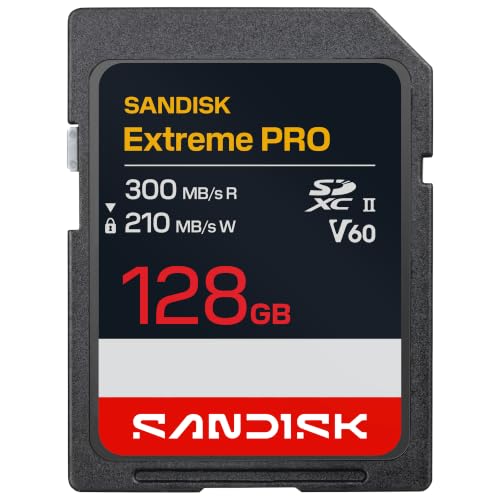
SanDisk 128GB Extreme PRO SD (UHS-II)
 SANDISK 128GB Extreme PRO SD Memory Card
How to Identify Your Camera’s Card Slot With Certainty
Everything in this comparison begins with a fact you can verify in a minute: what your camera accepts. Open the card door and look at the slot’s shape and size, then find the diagram or label the maker printed nearby, which most bodies carry. Your manual’s specifications page names the media types plainly, and the maker’s website repeats them for every model. If your camera has two slots, check each one separately, because many bodies mix formats deliberately. Never rely on a card looking about right; the formats discussed here are not interchangeable, and forcing media is a reliable way to damage both card and camera.
Once you know your slots, write the information where future you will find it: a note in your camera bag, a line in your kit list, or a label inside the card wallet. This sounds trivial until you are buying media in an airport, lending a body to a friend, or ordering a spare under time pressure. Photographers who record their slot types once never waste money on the wrong format, and they can help other photographers do the same. Certainty about slots is the cheapest upgrade in this entire subject.
What the Speed Ratings on a Card Actually Mean
Card packaging carries several different speed claims, and knowing which one matters saves money and disappointment. Headline speeds describe the best a card can do briefly, usually when reading. Sustained write figures describe what it can hold during long bursts or continuous video, and dedicated video ratings guarantee a minimum write speed for recording. For stills photography at a normal pace, almost any genuine modern card keeps up. For long bursts and demanding video, the sustained and video ratings are the numbers to match against your camera manual’s recommendations.
Your manual is the referee here. It will state the card types and ratings the body was designed around for its most demanding modes. Buying comfortably above that line gives you headroom and calm; buying below it invites warnings and interrupted recordings. Buying vastly above it, for a camera that cannot use the performance, mostly buys a faster download, which may still be worthwhile if you move large volumes of files. Match the card to the manual, the reader to the card, and your expectations to both, and media stops being a source of surprises.
Capacity: Planning Around Your Shooting Habits
The right capacity is a property of your habits, not of the shop shelf. Look at your recent shoots and measure how much space an outing actually uses. A family day, a landscape trip and a sports tournament differ wildly, so plan for your largest regular case and keep a spare beyond it. Photographers who shoot video should think in terms of their longest single recording, while stills shooters should think in terms of a full session between backups. In both cases, splitting your total across two or more cards adds resilience that a single giant card cannot offer.
There is also a psychological benefit to moderate capacities: a card that fills during a long day prompts a natural pause to swap and, ideally, to back up. Endless capacity encourages endless postponement of backup, which is how large losses happen. Treat card changes as scheduled maintenance rather than interruptions. Your future self, downloading a tidy set of labelled cards each holding one part of a trip, will be grateful for the structure that moderate capacities quietly impose on your archive.
Everyday Reliability Habits
Reliability is a routine, not a product feature. Format each card in the camera that will use it, after its previous contents exist in two safe places. Keep cards in a wallet with a fresh-and-used system you never break, such as fresh cards facing up and used cards facing down. Handle cards by their edges, keep them in their cases when loose, and never leave the only copy of a shoot in a bag that leaves your sight. Download promptly, verify the copy opens, and only then return the card to the fresh side of the wallet.
When a card misbehaves, believe it the first time. Stop, set it aside, recover what you can at home, and retire it from important work. Cards are among the cheapest components in a camera system and hold the most valuable thing in it, your photographs. Photographers who internalise that asymmetry, spending freely on media discipline while economising elsewhere, lose dramatically less work over a career than those who treat cards as an afterthought. Either format rewards this discipline equally.
Readers and Moving Files to Your Computer
Your reader is the bridge between the two formats’ worlds, and it deserves the same care as the cards. Choose a reader that matches your slot types and your computer’s ports, from a maker with a reputation to protect, and test it with your largest card before it matters. A reader that runs extremely hot, disconnects when nudged or transfers far below expectations is telling you to replace it while the lesson is cheap. Keep its cable with it, labelled if your desk hosts several similar cables.
Build one download routine and use it for every card and format: same destination folders, same naming, same verification, same backup step. Routine is what survives tiredness. After a long event, the photographer who follows a fixed sequence loses nothing, while the improviser eventually formats the wrong card or overwrites a folder. Your archive’s long-term health is decided in these unglamorous minutes, and a consistent routine is worth more than any difference between the card formats themselves.
Deciding What to Buy Next
If you are buying a camera, choose it for handling, lenses and the subjects you love, then let its slots dictate your media, and price a sensible card kit and reader into the purchase from the start. If you are buying cards for a camera you own, let your most demanding real mode set the rating, your longest real day set the capacity, and your backup discipline set the quantity. If you are simply curious about the faster format while your current camera cannot use it, the patient answer is to wait; media bought ahead of need tends to be bought twice.
Above all, keep the whole question in proportion. Cards are plumbing: essential, unglamorous and best chosen once, correctly, then forgotten. The photographers whose work you admire are not thinking about their memory cards while they shoot, and that invisibility is the true goal. Get your slots confirmed, your ratings matched, your wallet organised and your backups habitual, and whichever format your camera uses will quietly do its job for years.
A Beginner’s First Card Purchase, Done Right
If you are buying your first card for a new camera, the process is mercifully short. Confirm the slot type from the manual. Choose a capacity that holds a generous day of your shooting, based on the file sizes your camera produces, which the manual also estimates. Choose a rating that meets the manual’s recommendation for the modes you will use, with a little headroom if you plan to try the demanding video modes. Buy it from a seller you trust, test it, label it, and buy a second identical card as your spare when you can. That is the entire art, and it works for either format.
Resist the upsell fog: enormous capacities you will never fill, speeds your camera cannot use, bundles with accessories you did not want. A beginner’s money works harder in a second battery, a comfortable strap or simply saved toward a lens, once the card basics are covered. The photographers who start with this calm approach tend to keep it, and their media drawers stay small, labelled and sufficient for decades. Starting right is easier than recovering from starting confused, which is why this simple checklist deserves its place in a comparison article.
How File Sizes Shape Your Real Needs
Card decisions become concrete when you know your own file sizes. Check a recent shoot: how large is a typical raw file from your camera, how much space does a minute of your usual video occupy, and how many of each does a big day contain? Multiply honestly and you have your capacity target, with no reference to anyone else’s habits. Photographers are routinely surprised in both directions: stills shooters discover their days are smaller than they feared, while new video shooters discover an hour of footage is larger than they imagined.
Revisit the arithmetic whenever your camera or your habits change. A new body with larger files, a new interest in video, or a new willingness to shoot bursts all rewrite the answer. Keep the numbers in your kit list beside your slot types, and buying media becomes a two-minute task of reading your own data rather than an evening of comparison anxiety. Your photographs are unique; your file sizes are the part of this subject that should be, too.
Travelling With Cards: A Small System That Works
Travel tests media habits, so travel with a system. Cards live in one wallet with a fresh and used side. Each evening, the day’s card is downloaded to your laptop or a portable drive, verified, and a second copy made to a separate device that sleeps in a different bag. Only then does the card return to the fresh side. On a long trip this ritual takes ten minutes with a drink in hand and converts the trip’s photographs from a single point of failure into a small, distributed archive that can survive a lost bag, a failed drive or a stolen camera.
Pack readers and cables as deliberately as cards, with one spare cable, because cables fail quietly and completely. Keep the wallet on your person during transit days. If you shoot two formats across two bodies, the same system holds, with the wallet divided by format and the ritual unchanged. Travellers who adopt this routine stop telling stories about lost photographs, which is the highest praise any media system can earn, on any format, anywhere on earth.
Helping Family and Friends With Their Cameras
You will become, if you have not already, the person family asks about cards. Help them the way this guide helps you: identify the slot, match the manual’s rating, buy genuine from a proper seller, and set up the simplest backup habit they will actually keep, even if that is just copying photos to a computer folder monthly. Label their spare card and tape a note inside their camera bag with the card type written plainly, so a replacement can be bought without you.
Resist giving them your cast-off cards of unknown history for their important events; a new, tested card is a small gift that prevents a large sadness. And teach the one rule that matters most, in either format, in any camera: the photos are not safe until they exist in two places. If your family learns only that sentence from your expertise, your expertise has done its finest work.
The Formats in Perspective: A Closing View
It is easy, reading comparisons, to feel that card formats are a grand decision. They are, in truth, one of photography’s smallest: dictated by your camera, satisfied by a genuine card honestly rated, and thereafter invisible. The grand decisions are elsewhere: what to photograph, how to see light, when to press the shutter, how to keep the results safe for the people who will want them in thirty years. Let the formats take their proper, tiny place in your thinking and your budget.
When your camera changes one day, as cameras do, its new slots will ask you the same small questions, and you will answer them in minutes with the habits in this guide. That is the sign the subject has been mastered: not that you can argue it, but that you no longer need to. Confirm the slot, buy the card, label it, back everything up, and go and make photographs worth the keeping.
Cards and the Environment: Small Responsibilities
A word on the material side of media. Cards are small electronics with real footprints, so buy what you need, keep it working for its full life, and retire it responsibly through electronics recycling once its data has been securely dealt with. The rotation and care habits in this guide are also environmental habits: well-kept cards are replaced rarely, and a spare that prevents an emergency purchase prevents a courier trip too. Modest, planned consumption is good practice for a photographer’s budget and for the world their photographs celebrate.
When you lend or give away a healthy older card, wipe it properly and pass on the habits with it: format in camera, back up first, treat it kindly. Media culture, like photographic culture, is transmitted person to person. The beginner who receives a card and a routine from you has received something more valuable than the card, and it cost you only the breath to explain it.
FAQ
Can I put an SD card in a CFexpress slot?
No. The slots are physically different, and each accepts only its own format. Some cameras have one slot of each.
Does a faster card make my photos better?
No. Card speed affects how quickly files are written and how fast the buffer clears. Image quality is determined by the camera and the lens.
Do I need a card reader for CFexpress?
Usually yes, because most computers do not have a slot for it. You need a reader made for the card type you own, such as Type A or Type B, and it normally connects by USB. Check that both the reader and the computer port support the speed you want.
What does the V number on an SD card mean?
It is the video speed class, and it indicates the minimum sustained write speed the maker states for recording video. A higher number suits more demanding video modes. Check your camera manual for the class it asks for in each mode.
Should I buy one big card or several smaller ones?
Several mid-sized cards are generally safer, because losing or corrupting one costs you less. They also let you separate sessions neatly. A single large card can be fine for casual use if you copy files off it regularly.
Can a faster card than my camera supports still be used?
Often yes if the format fits the slot, but the camera will only write as fast as its own limits allow. You may be paying for speed you never use. Check the manual for the fastest standard the slot supports.
Should I format cards in the camera or on a computer?
In the camera is the safer habit, because it creates the folder structure that camera expects. Copy and verify your files first, since formatting erases everything on the card.
Is it worth recording to both slots at once?
For work you cannot repeat, such as weddings or events, mirrored recording gives instant backup and is usually worth it. Be aware that some cameras limit certain modes to a single slot, so check the manual.
How can I tell if a card is failing?
Warning signs include write errors, missing or unreadable files, and slowdowns that return after a format. If you see them, copy off your files, format the card in the camera and test it. Retire it if the problems come back.
How can I tell what card my camera takes without the manual?
Look at the slot itself: its shape and any diagram printed beside it show the intended format, and the camera’s menu usually names the media it detects. The maker’s website also lists your model’s specifications. When in doubt, confirm before buying, because the formats cannot be interchanged by force or optimism.
Is a bigger card always better than several smaller ones?
Not necessarily. Several moderate cards spread risk, create natural backup points and are easier to organise by shoot or day. One enormous card is convenient but concentrates everything in a single place. Most experienced photographers prefer a small set of cards matched to a day’s shooting, rotated and backed up daily.
What should I do with old, small cards?
Keep them as emergency spares, lend them to family cameras that use the format, or dedicate them to non-critical tasks like firmware updates. Mark them clearly so they do not sneak back into important work. A labelled spare in the bag has rescued many a forgotten-card morning.
How do I avoid buying a counterfeit card?
Buy from established sellers, be suspicious of prices far below the normal range, and test any new card by filling it and reading the data back before trusting it. Keep packaging and receipts until the card has proven itself in real use. Counterfeits fail by losing your photographs, so the test is worth the minutes it takes.
Does card speed affect image quality?
No. A faster card changes how quickly files are written and downloaded, never what the files contain. Image quality is decided by the camera, lens, light and photographer. Buy speed for workflow comfort and demanding modes, not in the hope of better-looking photographs.
Why does my camera say a card is slow when it is new?
Check that the card’s rating suits the mode you are using, that it is formatted in the camera, and that it is genuine and healthy. Some demanding video modes require specific ratings. If a properly rated, freshly formatted card still warns you, test it in the reader and consider exchanging it while the receipt is fresh.
How should I store cards at home?
In their cases, in a dry drawer or box, labelled and organised by camera or format. Keep them away from heat, moisture and loose metal objects. A small, boring storage system means the card you want is findable in seconds, which matters on the morning of a trip.
When should I upgrade my cards rather than my camera?
When your current camera is being held back in ways you can name: buffers that clear too slowly for your subjects, video modes your cards cannot support, or downloads that eat your evenings. If none of those bite, your cards are fine, and your money will work harder elsewhere in your photography.
My camera takes both formats in different slots. Which should I fill first?
Follow your manual’s guidance and your chosen slot configuration: mirror for safety, or the faster slot for demanding work with the second as overflow. Set it deliberately and check it in your preparation routine. The right answer is the one you chose on purpose, not the one the camera happened to remember.
How do I explain card formats to a beginner I am teaching?
Tell them the camera chooses, the card obeys, and their job is habits: buy genuine, format in camera, back up before anything else. Beginners drown in specifications and thrive on routines. Once the routine is automatic, the curious ones will learn the formats on their own, in the right order.
What is the cheapest meaningful upgrade to my card setup?
Usually a better reader or a second card for rotation, not a faster card. Both remove real bottlenecks and risks for modest money. Diagnose where your workflow actually waits or worries, and spend there. Upgrades aimed at a measured problem satisfy; upgrades aimed at a vague feeling rarely do.
How long do cards realistically last in a home photographer’s bag?
Years, often the life of the camera, when bought genuine and handled kindly. Home photographers shoot less volume than professionals, so wear accumulates slowly. Age alone is not a reason to replace a healthy card; errors and damage are. Keep a spare and let condition decide.
Should I write on my cards to label them?
A small number in the label area with a fine permanent marker is common practice and helps rotation enormously. Keep writing off the contacts and the edges that slide into the slot. Alternatively, numbered cases achieve the same organisation without marking the card itself. Either system works if it is used consistently.
What do I do if I insert the wrong card and it will not fit?
Stop. Never force media. A card that resists is telling you it is the wrong format or the wrong orientation. Remove it gently, check the slot diagram, and try the correct card. More card slots are damaged by impatience than by any other cause, and the repair costs more than any card.
What is the one habit that prevents most card disasters?
Backing up before formatting, verified, every single time, without exceptions for tiredness or hurry. Disasters cluster around the exceptions. A rule kept at midnight after a wedding is a rule; a rule kept only when convenient is a hope, and photographs deserve better than hope.
How can I make my future camera purchase easier regarding cards?
Keep your current kit list updated with slot types, card inventory and reader details. When the new camera arrives, you will know instantly what media it needs and what you already own. Five minutes of record-keeping today removes a week of confusion at upgrade time, on any format.
The Short Version
Your camera’s slot decides the format, so check the manual before buying. SD handles most photography well, and CFexpress is worth it when your camera supports it and your work involves heavy video or long bursts. Confirm exact speeds on the maker’s page.
Related Guides
- CFexpress Type A vs Type B: Which Card Fits Your Camera?
- B+W XS-Pro vs F-Pro Filters: Differences and Who Needs Which
- Canon SL2 vs SL3: Small DSLR Differences and Who Needs Which
- microSD vs SD Card: Differences and Format Tips (2026)
- Camera Accessories Every Beginner Needs to Own First