The Canon EOS 7D Mark II is an APS-C DSLR designed for fast action such as sports and wildlife. It combines a rugged body, a fast burst rate and a capable autofocus system with the reach advantage of a smaller sensor. It is an older camera now, so the question is whether its strengths still fit what you shoot. This is a general guide, since we have not used the camera ourselves.

What the Camera Is Known For
- A durable body with weather sealing described by Canon.
- Fast continuous shooting, roughly ten frames per second according to the maker.
- An autofocus system with many focus points designed to track moving subjects.
- Dual card slots, so you can record to two cards.
- An optical viewfinder and EF and EF-S lens compatibility.
Confirm all figures on Canon’s specification pages.
In this guide
Who It Suits
The 7D Mark II appeals to photographers who shoot birds, field sports, motorsport and other fast subjects. The crop factor of about 1.6 extends the reach of telephoto lenses, so a 300mm lens frames like a much longer one. Its large grip and button layout also suit people who wear gloves or shoot for hours.
Settings That Suit It
These are general baselines for action work, so adjust them to the light and the subject.
- Shutter speed of roughly 1/1000 or faster for birds in flight and quick sports.
- Continuous autofocus with a tracking-friendly focus area mode.
- High-speed continuous drive, with a fast card to keep the buffer clear.
- Auto ISO with a sensible ceiling, so the shutter speed stays high.
Limits to Consider
Newer cameras have moved ahead in several areas, so weigh these points.
- Autofocus tracking in newer mirrorless cameras can follow subjects more intelligently, including eyes and animals.
- Low-light image quality may trail modern bodies at high ISO.
- Video features are limited compared with newer hybrid cameras.
- The body is large and heavy compared with mirrorless options.
- Used examples vary in condition, so shutter counts and care matter.
What to Check on a Used Body
- The shutter count, if the seller can provide it.
- Both card slots and the memory cards they accept.
- Autofocus accuracy with a few of your own lenses.
- The battery and charger, and the condition of the weather seals.
- Sensor cleanliness and wear on the grips and buttons.
Lens Pairings for Sports and Wildlife
A fast APS-C body is only as capable as the lens you put on it, and the crop factor of about 1.6 changes what you need. A 300mm lens frames like a much longer lens, so a compact telephoto zoom can cover many wildlife and sports situations. That makes the camera attractive for people who cannot carry or afford the longest lenses.
For field sports, a 70-200mm zoom is common, and on this body it frames like a longer lens. For birds, a telephoto zoom reaching 400mm or beyond gives a very long effective view. Consider maximum aperture: a wider aperture lets in more light and allows faster shutter speeds, which is useful at dusk or in covered stadiums, while a smaller aperture lens is lighter and easier to carry.
Check each lens for stabilization and autofocus motor type. Lenses with ultrasonic-style motors are generally quicker and quieter than older designs, but this varies by lens, so look at the listing. Teleconverters can extend reach but reduce light and may restrict autofocus on some focus points, so check Canon’s notes for the lens you want. Think about weight and balance, since a long lens on a large body is tiring, and consider a monopod or a harness. If you are unsure, rent the lens for a weekend before buying.
Memory Cards, Buffer and File Handling
Burst shooting fills the camera’s internal buffer, then writes to the card. When the buffer is full, the camera slows down. A faster card helps the buffer clear sooner, but only up to what the camera can accept, so check the manual for supported card types and any recommended speed ratings. A card that is faster than the camera can use does not improve performance.
The camera has two slots, and you can set them up in different ways, such as recording to both cards for backup or using one for overflow. For important events, dual recording is a safeguard against card failure. Format cards in the camera rather than on a computer, and do it before each outing. Use cards from reputable sources, since counterfeit cards are a known problem.
File format is a decision too. RAW files hold more information for editing but are larger and fill the buffer faster than JPEGs. Some photographers shoot RAW plus JPEG so they can send quick previews. Plan storage and backup, with at least two copies of important files, and keep your editing software up to date so it supports the camera. Label cards, keep them in a case, and never delete images in the camera during a shoot, as that risks mistakes.
Using Autofocus Modes Effectively
The camera offers a range of autofocus area modes, and picking the right one is a major factor in your keeper rate. Single-point mode gives precision for static or slow subjects. Zone or expanded modes give some tolerance when you cannot keep a point on a small subject. The widest area modes give the most forgiveness but may choose a different subject from the one you intended.
The camera has settings that adjust how focus behaves while tracking. They govern the stickiness of focus when an obstacle appears, the response to speed changes, and how the system switches between points. The default settings are a sensible start. Change one setting at a time and note the results, because changing several simultaneously makes it difficult to learn what helped.
Practice before important events. Birds in flight make good practice, as do dogs or cyclists. Use back-button focus if you like to separate focusing from firing. Check the focus accuracy with each lens, and use the camera’s micro-adjustment feature if a lens consistently front- or back-focuses. Keep the viewfinder clean and your eye position consistent, since poor contact may produce focus errors. The best way to learn is to review images at full size after each outing.
Weather, Dust and Field Care
The body has weather sealing described by Canon, which gives some protection but is not a guarantee of waterproofing. The seal depends on the lens as well, so a weather-sealed body with a non-sealed lens leaves a gap. Check the lens listing for sealing and use a rain cover in heavy weather.
Dust is a common issue for DSLRs. Change lenses in sheltered spots, with the camera facing downward. Dust on the sensor shows up as dark spots, most visible at small apertures against bright backgrounds, such as a blue sky. The camera has a sensor-cleaning feature, but stubborn dust may need a manual clean using a blower, or a professional service. Avoid compressed air cans, which can spray propellant.
After shooting in rain, sea air or mud, wipe the camera and let it dry fully before putting it away. Moving from cold to warm air can cause condensation, so allow the camera to warm gradually in its bag. Clean the contacts and mount with a dry cloth if needed. Keep the rubber grip clean, as dirt and sunscreen can degrade it. A routine check of the buttons, dials and doors for looseness helps you catch wear early and decide when servicing is due.
Deciding Whether It Still Fits Your Needs
An older camera is a good buy if its strengths match your shooting and its limits do not hurt you. Ask yourself concrete questions. Do your subjects move fast enough that frame rate matters? Do you shoot in bright conditions where high ISO is rarely needed? Do you already own EF telephoto lenses? If the answers are yes, the camera may serve you well for years.
On the other hand, if you often shoot at night, make a lot of video, or want advanced subject detection, a newer body may be a better investment. Look at the features you miss and note what you would gain from an upgrade. Do not upgrade because a newer model exists, but because a specific limitation costs you shots.
Compare total cost. A used camera in good condition costs less, leaving more budget for lenses, cards and travel. Consider warranty options, the availability of service, and the resale outlook. Rent a newer body for a weekend to test whether the difference matters in your own photos. The most useful decision tool is your own experience: shoot a real assignment with each option and compare keeper rates, handling and ease of editing.
How the Camera Fits Into Today’s Market
The Canon EOS 7D Mark II belongs to an earlier generation of cameras built around a mirror and optical viewfinder. Many photographers now look at mirrorless systems, which offer advanced subject detection and electronic viewfinders. That does not make a well-built DSLR obsolete. It continues to produce good files, handle fast bursts and work with a large range of lenses, many of them available used at attractive cost. The key question is whether its strengths still match your needs and whether its limits will frustrate you.
Consider that DSLR autofocus relies on a dedicated sensor, which behaves differently from the on-sensor systems of newer cameras. It works well for tracking a moving subject through the viewfinder, but in live view or video mode the focus system is different and may feel slower. If you mainly want to photograph sport and wildlife through the optical viewfinder, the camera suits that style.
Reading the Body: Controls and Layout
The camera has a robust body with a layout that rewards familiarity. Dedicated buttons and dials give direct access to key functions, and the grip is deep and secure for use with large lenses. Spend time customizing the buttons so that your most-used functions sit under your fingers, particularly the back-button focus control and the area selection tools. A good setup saves precious fractions of a second when the action begins.
- Assign autofocus activation to a back button if you prefer keeping it apart from the shutter release.
- Save custom modes for sport, wildlife and low light so you can switch quickly.
- Learn the menu structure before an important shoot.
- Check the battery grip options if you want extra life and a vertical grip.
Example Settings for Common Subjects
| Subject | Typical approach | Reason |
|---|---|---|
| Field sport in daylight | Fast shutter speed, continuous focus, burst mode | Freeze action and keep the subject sharp |
| Birds in flight | Very fast shutter, tracking mode, wide aperture | Capture wings and eyes with detail |
| Indoor sport | Higher ISO, fastest practical shutter | Poor light needs compromise |
| Wildlife at rest | Moderate shutter, careful focus on the eye | Detail matters more than speed |
| Casual portraits | Wide aperture, single-point focus | Soft backgrounds and sharp eyes |
These are broad suggestions. Always adjust to the light and the movement of your subject, and consult the camera manual for exact menu locations.
Image Quality Expectations
The sensor produces good detail in daylight and respectable results at moderate ISO values. As you raise ISO in dim places, noise increases, and the file has less latitude for heavy editing. For sport and wildlife, where speed matters more than pixel peeping, this is often acceptable. For large prints or demanding commercial work, a camera with a more recent sensor may offer more headroom. Look at sample images at the ISO values you expect to use, and judge them against your standards.
Buying Smart in the Used Market
Because the camera is no longer new, most buyers will shop second hand. Ask for the shutter count, since the shutter is a wear item with an expected lifespan listed by the maker. Examine the body for dents, worn rubber and loose parts. Test the autofocus on several subjects, check that both card slots work, and look into the viewfinder for dust or scratches. Ask about the return policy, and keep records of the transaction. A little patience can save you from a disappointing purchase.
Accessories That Add Real Value
- A fast, reliable card and a reader for quick downloads.
- A second battery or a grip for long days.
- A sturdy strap or harness for heavy telephoto lenses.
- A monopod for supporting long lenses during extended sessions.
- A rain cover for outdoor work.
Where the Camera Struggles
Be honest about its limits. Live view autofocus and video autofocus are less advanced than in modern mirrorless cameras. Wireless features may be limited compared to newer models. The camera is large and heavy by modern standards. If you value light travel, video features or the latest autofocus tracking, a different body may suit you better. If you value a rugged design, strong battery life and a proven approach to action photography, the camera remains a capable tool.
Building a Practical Learning Routine With the Camera
Learning to use a fast action camera is a matter of repetition. Pick a simple subject that moves, such as cyclists, a local sports team, birds at a park or a dog running, and shoot a series of bursts each week. Afterward, look at the sharpest frames and note the settings that produced them. Compare the images that missed focus, and try to work out why. Was the shutter too slow, was the focus point on the wrong area, or did the subject change direction suddenly? Each outing teaches you something about how the camera behaves.
- Pick one subject and one setting to change per outing.
- Record notes about light, shutter speed, aperture and ISO.
- Check results on a large screen at full magnification.
- Adjust one thing at a time to understand its effect.
File Handling and Editing Workflow
Bursts produce many near-identical frames, so plan a method for culling. Import into your editor, sort by capture time, and mark the sharpest frame from each sequence. Delete the rest only after backing up the keepers. Shooting raw gives you the flexibility to adjust exposure and white balance, while JPEG is quicker for direct delivery. Many photographers shoot both, keeping raw files for the best images. Make sure your storage space and backup routine can handle the volume.
Looking After the Camera Over Time
Clean the exterior with a soft cloth after outdoor use, and store the camera in a dry place with its battery removed if you will not use it for a while. Have the sensor cleaned by a professional if dust spots appear and you are not confident doing it yourself. Update the firmware as the maker recommends, and keep an eye out for official service notices. A well-kept body can keep working for many years.
Lenses That Pair Well With a Fast Crop Body
Because the sensor is smaller, telephoto lenses gain extra reach, which is helpful for sport and wildlife. A mid-range telephoto zoom is a popular first companion for field sports, while a longer zoom or prime serves birds and distant animals. For general use, a standard zoom covers everyday needs, and a fast prime gives you a low-light option and soft backgrounds. Check the focal range and the maximum aperture of each lens, and consider weight, since long lenses on a heavy body tire your arms quickly. Look for stabilization on longer lenses, which helps when you cannot use a support.
Third-party lenses can offer good value, but confirm compatibility with the camera, and check reports on autofocus accuracy. Some lenses need fine adjustment to focus properly, and the camera offers tools for it. Take time to calibrate a lens that is slightly off, because sharp results depend on accurate focus.
Power, Storage and Travel Tips
Bring spare batteries and cards, particularly for bursts and long days. Store memory cards in a protective case, and avoid deleting images on the camera, which risks mistakes. When traveling, carry the camera in your hand baggage and protect the lens mount with caps. Use a padded bag that fits your kit, and keep silica packets in it if you travel through humid regions. A little preparation prevents the disappointment of a dead battery at the best moment.
- Charge all batteries the night before.
- Format cards in the camera before a shoot.
- Pack a rain cover and a microfiber cloth.
- Carry a small card reader for backups on the road.
Who Should Probably Look Elsewhere
If you mainly shoot video, travel with minimal gear, rely on advanced subject recognition for animals and people, or want the latest connectivity, a modern mirrorless body is a better match. If you often shoot in very dim light and print large, a camera with a larger sensor or a more recent design may serve you better. Be clear about your priorities, and do not buy an older camera only because it looks like a bargain.

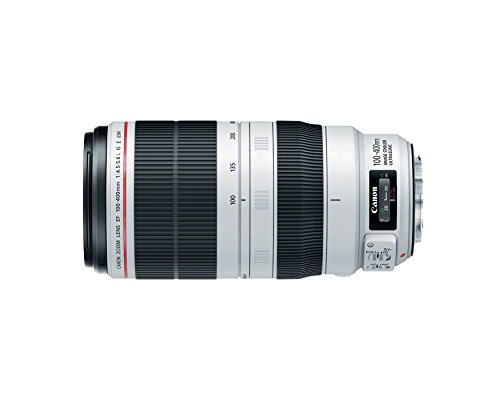
Ready to Buy? Start Here
If this guide helped you decide what to look for, these products are a place to start.


As an Amazon Associate we earn from qualifying purchases. Prices and availability are shown on Amazon.
Looking Past the Headline Features
With the Canon EOS 7D Mark II and what it still offers today, the features that dominate a product page are rarely the ones that decide whether you still enjoy the camera a year later. What matters in daily use is how quickly the camera wakes, how confidently it focuses on your real subjects, how the files behave when you edit them and whether the controls fall under your fingers without a search. Those qualities are harder to print in a comparison table, which is why they deserve more of your attention than one more burst mode or menu option.
Begin by naming your three most common subjects and the light you usually find them in. A parent photographing children indoors, a traveller walking cities all day and a birder at dawn need different strengths from Canon EOS 7D Mark II or any alternative, even when all three are reading the same article. Write those subjects down and judge every feature against them. A capability that does not serve your list is not a benefit, however impressive it sounds, and a modest feature that serves your list every day is worth real money.
Then consider the system around the body. Lenses you will actually buy, a flash you may add later, the editing software you already know and the cards and batteries you will need all shape the true cost and the true convenience of a choice. Cameras are bought as bodies but lived with as systems, and the photographers who stay happy longest are usually the ones who planned the system, however simply, from the start.
Autofocus in Practice, Not in Advertisements
Modern autofocus is best judged by how it handles your mistakes and your subjects, not by how it performs on a test chart. Subject detection helps most when it quietly does the obvious thing: finding the eye of a person who turns their head, holding a dog as it runs at an angle, or picking a bird out of branches. What you want to learn, from handling the camera or from careful reading, is how the system behaves when the subject is partly hidden, backlit or moving across the frame rather than towards you, because those are the frames you currently lose.
Equally important is how easily you can take control back. A camera that lets you move the focus point quickly, limit the area the system searches in and switch between detection and a plain single point without menu diving will frustrate you less over years of use. Set the camera up so the method you trust is one button away. Many photographers keep detection on for people and animals, a small zone for general scenes and a single point for still subjects behind clutter, and they practise switching until it becomes reflex.
Technique still carries much of the load. Half-press early to let the system settle, keep the subject inside the active area instead of expecting the camera to search the whole frame, and review missed shots honestly to see whether focus, shutter speed or your own movement caused the softness. Autofocus improvements are real, but they reward a photographer who works with the system rather than one who points and hopes.
Image Quality Where It Actually Shows
Differences in image quality between modern cameras are most visible at the extremes: deep shadow recovery, very high sensitivity settings, harsh backlight and large prints. In ordinary light at sensible settings, technique, lens quality and light itself separate photographs far more than one sensor separates from another. That is liberating news for buyers, because it means you can choose on handling, lenses and reliability with a clear conscience and still expect excellent files.
Learn to judge files by looking at your own likely output. If your photographs live on screens and in modest prints, noise that alarms pixel-level inspection will never be seen by anyone, including you. If you print large or crop heavily, resolution and lens sharpness move up your priority list and deserve a bigger share of the budget. Either way, shooting carefully exposed raw files, or well-exposed JPEGs when you prefer them, matters more than chasing a small laboratory advantage.
Colour is the other half of perceived quality. Some photographers love a camera whose JPEGs are ready to share with no work; others prefer a neutral raw file and a consistent editing style of their own. Neither route is more correct. Decide which you are before you buy, because it changes how much you should weight in-camera colour against editing flexibility, and it changes how happy you will be on the first evening of sorting a big shoot.
Handling, Menus and the Setup That Sticks
A camera you understand is a camera you use well under pressure. During your first week, set the basics deliberately: your preferred focus mode, the drive setting you use most, a sensible auto sensitivity range and the file type you intend to keep. Save those choices, then change one thing at a time as you learn. Random menu wandering creates mystery settings that surface at the worst moment, usually as a camera that suddenly behaves strangely at an event you cannot repeat.
Custom buttons earn their place when they answer problems you actually have. Assign the functions you reach for mid-shoot: focus area changes, exposure compensation if your dial layout needs it, or a quick switch between stills and video settings. Resist filling every button in the first week. A small number of customisations you remember beats a clever layout you forget, and you can always add more once a real need appears twice.
Ergonomics deserve the same patience. Grip depth, viewfinder size and weight distribution decide whether Canon EOS 7D Mark II disappears in your hand or nags at it through a long day. If you can, hold the camera with the lens you expect to use most, not the smallest lens in the shop, because balance changes completely with real glass attached. A body that feels right tends to be carried more, and carried cameras take the photographs.
Lenses: Where the Budget Usually Belongs
Experienced photographers repeat that lenses outlast bodies, and the reason is simple: a good lens bought today will still be serving several camera generations from now, while bodies are replaced as autofocus and video features move on. When you divide a budget, protect the lens share. A mid-range body with a lens that suits your subjects will usually produce a more satisfying year of photography than a flagship body limited to a lens that does not.
Choose focal lengths from your own photographs rather than from habit. Look at the pictures you already take and notice whether you cluster around wide scenes, natural perspectives or compressed telephoto views. Buy for that pattern first and let unusual needs be met later, perhaps by renting. One lens you use constantly teaches you more, and produces more keepers, than a bag of options you deliberate over at every outing.
Also check the unglamorous details before buying any lens: filter size, weight on a long walk, how the zoom and focus rings feel with gloves, and whether weather sealing matches the body if you shoot outdoors. Those details decide whether a lens lives on the camera or in a cupboard, and a lens that lives on the camera is the only kind worth paying for.
Video Without the Headache
If video matters to you, judge it by the whole task rather than by a headline specification. Think about how long you record in one take, whether the camera stays comfortable and cool doing it, how the autofocus behaves with faces at conversational distance and whether the audio plan is as simple as an onboard microphone or needs an external one. A camera that records beautifully for a short clip but fights you on a longer piece will shape your habits in ways you may not want.
Stabilisation is the other practical divider. Smooth handheld footage depends on the combination of body and lens working together, plus your own technique: elbows in, a gentle grip and planned movements rather than wandering pans. Practise a slow walk and a simple reveal shot at home before an important shoot, and check the results on a larger screen, where wobbles that a small display hides become obvious.
Finally, keep video settings boringly consistent. One frame rate for a project, one colour approach you understand and a card routine that never leaves footage sitting un-backed-up overnight will prevent most beginner disasters. Sophistication can grow later; reliability should be there from the first recording.
Troubleshooting the Problems New Owners Meet
Most early complaints trace back to a short list of causes. Soft pictures usually mean a shutter speed too slow for the subject, focus landing on the background, or a lens that needs a quick clean rather than a replacement. Check those three, in that order, before suspecting the camera. Strange colours usually mean a white balance setting left over from different light, and inconsistent exposure often means a metering mode or compensation dial was changed and forgotten.
Build a reset habit. When the camera behaves unexpectedly, note what changed, return exposure compensation to zero, confirm the focus mode and area, and check that image stabilisation is set appropriately for handheld or tripod use. Photographers who keep a short mental checklist solve in seconds what others lose a session to, and the habit matters more as cameras gain features.
Battery and card surprises are equally preventable. Format cards in the camera after your files are safely copied, carry a spare battery on any shoot that matters, and treat a card that has ever produced an error as retired from important work. Storage is the cheapest insurance in photography, and the only copy of a file should exist for as short a time as you can manage.
Making the Decision About Canon EOS 7D Mark II
If you are weighing Canon EOS 7D Mark II against a newer mirrorless alternative, run a simple test of fit. List the last ten photographs you took or tried to take, and mark which camera would have made each one easier and why. Then list the next ten you hope to take. The pattern that emerges is more truthful than any generic ranking, because it is built from your subjects, your light and your patience rather than from someone else’s priorities.
Consider total cost honestly, including the lens, a spare battery, cards and a bag that fits the kit. A choice that leaves nothing for the accessories that make shooting comfortable often disappoints more than a slightly humbler body bought as a complete, ready kit. And consider support: a system with lenses and service readily available where you live removes friction you will feel for years.
Whichever way you decide, commit for a season. Learn the camera deeply, shoot regularly and judge it by the photographs you bring home rather than by the next announcement. Cameras improve every year, but photographs are made by the camera you know, carried on the day the light was right.
A Practice Routine That Builds Skill Faster Than Gear
Choose one subject you can reach easily, a garden, a street, a pet or a family member who tolerates you, and photograph it weekly in whatever light the day offers. The repetition removes novelty and exposes technique: you will see your framing tighten, your exposures steady and your timing improve across a season. Photographers often credit a new camera for growth that was really this quiet accumulation of practice, which is good news, because practice is available with the camera you already own.
Keep a short review ritual. After each session, choose your three best frames and write one sentence about why each works, then choose the most instructive failure and write one sentence about its cause. That five-minute habit compounds astonishingly over a year, and it creates a personal record of progress that no equipment purchase can give you.
Prints, Backups and Enjoying the Results
Photographs that live only on a card or a crowded phone gallery tend to vanish from your life even when they are backed up. Print a handful from each good session, even cheaply, and put them where you will see them. Prints teach composition brutally and kindly at once: distractions announce themselves, strong frames glow, and your sense of what to look for next time sharpens without effort.
Back the files up with a rule simple enough to survive tired evenings: copies in two places, one of them not in the same building as the camera, checked occasionally to be sure they open. Future you, searching for a picture of someone who matters, will care nothing for the camera settings and everything for the fact that the file still exists.
Shooting in Difficult Light Without Panic
Difficult light is where camera craft earns its keep. In harsh midday sun, look for open shade, expose for the subject rather than the background and accept contrast as part of the story. Indoors, move the subject towards a window before reaching for settings, because better light beats cleverer settings almost every time. At night, steady the camera against something solid, watch shutter speeds honestly and let sensitivity rise rather than returning home with elegant, blurred failures.
Backlight deserves its own habit. A subject against a bright background will fool an unwary meter into silhouette, which is sometimes beautiful and often accidental. Decide which you want before the shot: expose for the background and embrace the shape, or add exposure, or fill light, and keep the face. Naming the intention turns the most common beginner disappointment into a creative choice you control.
Mixed lighting, the orange room with blue window light, tests colour judgement. Sometimes the honest answer is to choose one source as your main light and let the other become atmosphere. Sometimes black and white removes the argument entirely. Cameras give you the tools to handle these scenes, but the decision is always the photographer’s, and making it deliberately is the skill worth practising.
Protecting Your Work: Cards, Copies and Calm Habits
A photograph does not fully exist until it exists twice. Build the simplest backup routine you will actually keep: copy cards the day you shoot, keep the copies in two places, and only then format the card in the camera. Cloud storage, a drive at home and a drive elsewhere all work; the best system is the one that survives your tired evenings without negotiation.
Treat memory cards as working tools with a lifespan. Retire any card that has produced an error, keep cards in a case rather than loose in pockets, and avoid filling a card completely on an important shoot. These habits sound fussy until the first time they save an irreplaceable set of pictures, after which they feel like the cheapest insurance you own.
File organisation repays a few minutes per shoot. A consistent naming habit, a folder per event and a ruthless early cull make finding and enjoying pictures years later a pleasure instead of an excavation. Your archive is the real product of your photography, and a little order at the start protects it better than any software bought later.
Knowing When an Upgrade Is Actually the Answer
Upgrade honestly by naming the photograph you cannot currently take. If the answer is a kind of picture your present camera genuinely prevents, through focus speed, low-light ability or lens availability, an upgrade has a case. If the missed pictures trace back to shutter speed choices, hesitant timing or a camera left at home, the honest purchase might be a course, a smaller bag or simply a season of practice.
When you do upgrade, change one thing at a time where you can. A new body with familiar lenses shows you exactly what the body added. A new lens on a familiar body teaches its character cleanly. Changing everything at once feels exciting and teaches slowly, because every result has too many explanations.
And keep the old camera’s fate simple. A backup body, a gift that starts someone else’s photography or a fair sale all beat a shelf of guilt. Cameras earn their keep by being used, by you or by the next person, and passing a good tool along is part of the culture that keeps photography alive.
Composition Habits That Outlast Any Camera
Whatever body you choose, a few composition habits will improve your photographs more this month than any setting in the menu. Move closer before you zoom, because proximity changes perspective and simplifies backgrounds in a way cropping never quite matches. Watch the edges of the frame as carefully as the centre, since most disappointing pictures fail at their edges: a bright distraction, a cut-off hand, a horizon quietly tilting. And wait, briefly, before pressing the shutter when people are involved, because expressions gather and settle, and the frame a breath later is often the honest one.
Light deserves the same deliberate attention. Notice where it comes from before you raise the camera, and ask whether stepping around your subject would put that light to better work. Front light is safe and flat, side light gives shape and texture, and back light creates drama at the price of care with exposure. Choosing among them consciously, even roughly, is the moment a snapshot becomes a photograph, and it costs nothing but a few seconds of looking.
Finally, edit your own work kindly and firmly. Keep the frames that say something, let go of the near-duplicates, and study the keepers for what they share. Your patterns will emerge: the distances you like, the light you chase, the subjects you return to. A camera serves those patterns, and knowing yours is the surest guide to every future decision this article has discussed.
One More Consideration Before You Decide
It is worth pausing on the role of patience in any equipment decision. Photography rewards the person who knows a small kit deeply far more than the person who owns a large kit shallowly, and every topic in this article, from handling and lenses to care and troubleshooting, points back to that same truth. Time spent shooting, reviewing honestly and adjusting one habit at a time compounds quietly, and after a season it shows in your pictures in ways no purchase receipt ever has. If a choice in this comparison tempts you mainly because it is new, give your current intentions a month of real use first and see whether the temptation survives contact with actual photographs.
Community helps that patience along. Photographers who talk with other photographers, share prints, join a walk or simply show their work to friends tend to keep shooting, and keeping shooting is the whole game. Ask questions where experienced users gather, lend your experience to someone newer when you can, and let other people’s pictures stretch your sense of what your own camera might do. Equipment sits inside a practice, and a healthy practice makes modest equipment look remarkable while a neglected practice makes remarkable equipment look ordinary.
So make the decision this article has been circling, make it for the photographer you are and the subjects you love, and then go and use the result this week. A walk, a family afternoon, an hour in good evening light: any of them will teach you more about whether you chose well than another evening of comparison. And if the pictures please you, which they very likely will, you will have your answer in the only form that finally counts.
FAQ
Is it still a good choice for wildlife?
It can be, particularly if you already own EF telephoto lenses. Newer mirrorless cameras offer more advanced subject detection, so compare them if autofocus is your priority.
Which lenses work with it?
EF and EF-S lenses work natively. Because it is a DSLR, RF lenses will not fit.
Does a faster memory card make the camera shoot faster?
Only up to the speed the camera can accept. Check the manual for supported cards, and note that a faster card helps clear the buffer.
Should I record to both card slots?
For important events, recording to both gives a backup in case one card fails. For casual use, one card may be enough.
Can I use a teleconverter with this camera?
It depends on the lens and converter, and autofocus may be limited. Check Canon's compatibility notes before buying.
How do I find dust on the sensor?
Shoot a plain bright surface at a small aperture and look for dark spots at full size. Use a blower for light dust, or have it professionally cleaned.
Is the weather sealing enough for rain?
It offers some protection, but the lens must also be sealed. Use a rain cover in heavy weather and dry the camera afterward.
What is back-button focus?
It moves focusing to a rear button so that the shutter button only takes the picture. Many action shooters prefer it for continuous tracking.
The Short Version
The 7D Mark II remains a rugged, fast APS-C DSLR for action photography, especially if you own EF lenses. Weigh it against newer mirrorless options for autofocus and low-light needs, and inspect any used body carefully before you buy.
