A WiFi speaker plays music over your home network instead of a direct Bluetooth link. That usually means steadier playback, the freedom to leave your phone in another room and the option to group several speakers so the same song fills the whole house. It also means the speaker depends on your router and an app.
We have not used these products ourselves, so this guide makes no claims about sound quality. It sets out how to choose by looking at the services you use, the rooms you want to cover and the controls you prefer. Begin by listing where you listen, since a kitchen shelf and a living room call for different designs.
As an Amazon Associate we earn from qualifying purchases. Links on this site are affiliate links, and they do not change the information we give.
In this guide
Quick Picks
| Pick | Product | Best For |
|---|---|---|
| 1 | Sonos Era 100 | Best Overall |
| 2 | Amazon Echo (4th Gen) | Best for Alexa and Smart Home Control |
| 3 | Bose Home Speaker 500 | Best for Wide Stereo Sound |
| 4 | JBL Authentics 300 | Best Portable WiFi Speaker |
| 5 | Denon Home 150 | Best for Hi-Res Audio and Wired Inputs |
Our Picks

1. Sonos Era 100 — Best for most rooms
The Era 100 is the compact starting point of the Sonos system and a strong default choice for a kitchen, bedroom or home office. Two angled tweeters and one midwoofer produce genuine stereo separation from a single small cabinet, and WiFi 6 keeps streams steady even on a busy network. The Sonos app brings together Spotify, Amazon Music, Apple Music, TIDAL, internet radio and many other services, while AirPlay 2 covers anything you send from an Apple device. Alexa and Sonos Voice Control are built in, and a physical microphone switch on the back answers the privacy question raised in the guide above. Two units can be stereo paired or used as rear speakers with a Sonos soundbar, and the USB-C port accepts the optional Sonos Line-In Adapter if you later want a wired source such as a turntable.

2. Amazon Echo (4th Gen) — Best for Alexa and smart home control
The fourth-generation Echo wraps a 3.0-inch neodymium woofer and two 0.8-inch tweeters in a compact sphere, and it doubles as far more than a music player. Alexa is built in for hands-free playback from Amazon Music, Spotify, Apple Music, Pandora and other services, and the Alexa app can group several Echo speakers for multi-room music or pair two for stereo. Uniquely at this size, it also works as a smart home hub with Zigbee, Matter and Thread support plus a built-in temperature sensor, so it can run routines as well as playlists. A 3.5mm jack handles line in or out for wired flexibility, Bluetooth streaming is there as a backup, and a microphone off button addresses privacy. At 5.7 inches wide it sits easily on a shelf or side table.
View Amazon Echo (4th Gen) on Amazon

3. Bose Home Speaker 500 — Best for wide stereo sound
Bose takes a different approach to sound layout: two custom drivers point in opposite directions and bounce audio off your walls, giving a single box a wider stereo image than most rivals manage. Both Alexa and Google Assistant are built in, backed by an eight-microphone array designed to hear commands over loud playback. The Bose Music app streams Spotify, Amazon Music, Pandora and internet radio over WiFi, AirPlay 2 and Bluetooth are also on board, and a color LCD display on the front shows what is playing. Six preset buttons on top start favorite stations or playlists with one touch, a 3.5mm aux input covers wired sources, and the speaker groups with other Bose smart speakers and soundbars for multi-room listening. Its anodized aluminum finish comes in silver or black.


4. JBL Authentics 300 — Best portable WiFi speaker
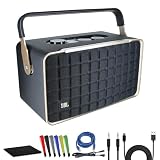
The Authentics 300 pairs retro styling with a feature none of the other picks match: a built-in rechargeable battery rated for up to 8 hours, plus a carrying handle, so a network speaker can move from kitchen to patio without a power cord. Inside are two 1-inch tweeters, a 5.25-inch woofer and a down-firing passive radiator for fuller bass. It was part of the first speaker line to offer Google Assistant and Amazon Alexa simultaneously on the same device, and the JBL One app handles setup and multi-room grouping. WiFi streaming includes AirPlay, Chromecast built-in and Spotify Connect, Bluetooth 5.3 serves as backup, and the back panel adds an Ethernet port, a 3.5mm aux input and USB-C for wired connections. It also recalibrates its tuning automatically when you set it down in a new spot.

5. Denon Home 150 — Best for hi-res audio and wired inputs
The smallest member of Denon’s Home family is the pick for listeners who keep their own music library. A 1-inch tweeter and a 3.5-inch woofer each get their own Class D amplifier, and HEOS Built-in groups the speaker with other Denon and Marantz HEOS products around the house. Over dual-band WiFi it streams Spotify, Amazon Music HD, TIDAL, TuneIn and more, and it can play high-resolution files up to 192kHz/24-bit (FLAC, WAV, ALAC and DSD) from your network or a USB stick. Alexa is built in, with Google Assistant and Siri via AirPlay 2 also supported, and three quick-select buttons store favorite sources for one-touch playback. A 3.5mm aux input, USB port and Ethernet socket give it the strongest wired options here, two units can form a stereo pair, and the compact 120 x 187 x 120 mm body fits small shelves.

What to Look For
| Factor | Why it matters | What to check |
|---|---|---|
| Service support | The speaker must work with the music you already use | Check the supported streaming services and whether your own library can play |
| Multi-room grouping | Lets several speakers play together or separately | Confirm that the app can group speakers and that mixed models can join the same group |
| Voice and app control | Decides how you pause and skip | Look for built-in voice assistants, a microphone switch and a clear app |
| Sound layout | Drivers and enclosure shape the sound | Compare the number of drivers, stereo pairing and the maker’s notes on bass |
| Inputs and outputs | Gives you a way to connect other gear | Look for an aux or optical input, a network port and Bluetooth as a backup |
| Size and finish | It sits in plain view | Check dimensions, colors, shelf fit and whether a wall mount is offered |
Setup and Care Tips
- Place the speaker where your WiFi signal is strong, and give it a little space from walls for cleaner sound.
- Keep the app and the speaker software up to date.
- Name each speaker after its room so grouping is easy later.
- Use a stereo pair in one room if the maker offers it, and keep the two units at similar distances from where you sit.
- Wipe the grille gently with a dry cloth and keep drinks away from the unit.
Mistakes to Avoid
- Choosing a speaker that does not support your music service.
- Putting it in a corner with a weak WiFi signal, which causes dropouts.
- Mixing brands and expecting every one to group together.
- Ignoring the microphone controls if privacy matters to you.
- Skipping a wired input you might want for a turntable or television later.
How Streaming Over WiFi Actually Works
The phrase WiFi speaker covers several different technologies, and which one a speaker uses decides how it behaves day to day. Understanding the difference helps you avoid frustration after the box is open.
Direct streaming from the service
With some systems, your phone only tells the speaker what to play. The speaker then fetches the stream from the internet itself. That is why music keeps going when you leave the house, take a call or let your phone battery run low. Spotify Connect and the built-in apps from the major speaker makers work this way.
Casting from a phone or computer
Other protocols, such as AirPlay 2 or Chromecast built-in, send audio from a device to the speaker over the network. The phone stays involved, but the quality is usually better than Bluetooth, and several rooms can play in sync. If your household mixes iPhones and Android phones, check that the speaker supports the protocols both groups use, or that it has an app that does the same job for everyone.
Bluetooth as a backup
Many network speakers also include Bluetooth. This is useful when the WiFi is down, when you are away from home or when a guest wants to play a song without joining your network. It does not give multi-room playback, and the sound path is more compressed than a network stream.
Wired inputs
An analog or optical input turns the speaker into a TV or turntable companion. The Denon Home 150 in this guide is listed for its wired inputs, which is a good example of why this matters. If you have a record player or an old CD player, an input saves you from buying more equipment.
Ecosystems, Assistants and Privacy
Your phone, your music service and the speaker should agree with each other. That sounds obvious, but it is where many purchases go wrong.
- Voice assistants. The Amazon Echo is built around Alexa, and the Bose Home Speaker 500 lists both Alexa and Google Assistant. The Sonos Era 100 is part of a system that supports voice control but also works well from the app. If you do not want a microphone in the kitchen at all, look for a hardware mute switch or a model that lets voice features stay off.
- App quality. You will use the app for setup, grouping and service sign-in. A good app is quick to connect and does not drop speakers from the list. Read recent user feedback for stability, and check that the app supports your phone’s operating system version.
- Account requirements. Some systems ask you to create an account or link a subscription. Decide whether you are comfortable with that.
- Brand lock-in. Speakers from one company usually group together, but speakers from different companies often do not. Buy into one system if you plan to expand over time.
- Long-term support. Network speakers rely on firmware and apps. Ask how long the maker keeps updates coming, since a speaker that loses its app can lose its main features.
Network Basics That Prevent Dropouts
Most WiFi speaker complaints come from the network, not the speaker. A few settings help.
- Signal strength where the speaker lives. Check your phone’s WiFi strength at the exact spot. A shelf behind a metal appliance or a garage far from the router can be a weak point.
- Bands. Some older speakers connect only on the 2.4 GHz band, which has longer range but more interference from microwaves and neighbors. Newer models, such as one that supports WiFi 6 like the Era 100, handle busy networks better.
- Mesh systems. If your house has dead spots, a mesh router or a second access point is a better fix than a repeater. Wired Ethernet, when a speaker offers a port, is the most stable choice.
- Router settings. Guest networks and client isolation can stop your phone from finding speakers. Put the phone and the speakers on the same network when you set them up.
- Battery models. A portable model like the JBL Authentics 300 can move from room to room, but it needs a signal wherever it goes. On the patio, the signal may fade, and a Bluetooth connection is the fallback.
Matching a WiFi Speaker to a Room
Think about the room and what you want from it before you think about the model.
- Kitchen. Steam, splashes and noise matter. Voice control is useful when your hands are busy, and a compact size saves counter space.
- Bedroom or home office. A small speaker with a good stereo spread is enough. Look for a night mode, an alarm function and a quiet standby.
- Living room. You may want more power, a stereo pair or a link to the TV. Check whether the speaker accepts TV audio, and whether the model you choose can work with a soundbar or subwoofer from the same family.
- Patio or workshop. A battery and a handle help, but a speaker meant for indoors is not weatherproof. Check the water resistance rating before taking it outside.
- Record or CD listeners. Look for a line-in so you do not rely on a streaming service alone.
Stereo Pairs and Multi-Room Playback
Two identical speakers can often be paired for a left and right channel. This gives a wider image than any single box, even if the single box has two tweeters. Keep them at similar distances from where you sit, and give each one some room to breathe.
For multi-room playback, a group of speakers plays the same track at the same time. Timing is kept in sync by the app and the network, and a weak signal in one room shows up as echo or a short pause. If you want to play different songs in different rooms, check that the system supports separate streams and that your music service allows more than one at once, since some plans restrict simultaneous playback.
Questions to Ask Before You Order
- Which streaming services and protocols does it support, and does it work with my phone?
- Can I use it without a voice assistant, and is there a physical microphone switch?
- Does it have an Ethernet port, an analog input or an optical input?
- Can I pair two for stereo, and can I group it with other speakers I might add?
- How long will the maker support it with updates?
Judging Sound Without Hearing It First
Since you usually buy a speaker before you hear it, a few clues from the listing help narrow the field.
- Driver layout. Separate tweeters and a woofer generally give clearer treble and fuller bass than one small full-range driver. The picks here use anything from a single woofer with two tweeters to a pair of side-firing drivers.
- Amplifier design. Each driver having its own amplifier, as described for the Denon Home 150, allows better control than one shared amplifier.
- Room-adaptive tuning. Some systems use a microphone, either in the speaker or in your phone, to adjust the sound to its surroundings. This helps most with speakers placed near walls or on shelves.
- Size and weight. A heavier cabinet resists vibration and usually plays deeper. A small cube can sound surprisingly full, but physics limits the bass.
- Stereo or mono. A speaker with a stereo setup in one box creates a wider image, while a mono speaker is best used in pairs.
Reading several independent reviews and watching placement demos gives a better sense than any spec. Test with a song you know well, at low and medium volume, and listen for bass that stays tight and voices that sound natural.
Power Cords, Standby and Running Costs
Network speakers stay powered on so they can respond to the app, and that keeps a small amount of energy flowing around the clock. Standby draw is usually a few watts, which adds up to little over a year, but it is worth checking if you plan many speakers. Battery models such as the JBL Authentics 300 let you cut the cord for a while, then charge between uses. Place a plugged-in speaker near an outlet you can reach, avoid long extension cords and use a surge protector in storm-prone areas.
Going Deeper: A WiFi Speaker Is a Small Computer That Plays Music
A Bluetooth speaker is a loudspeaker with a radio for one job: play what a nearby phone sends it. A WiFi speaker is something more ambitious — a small networked computer with its own connection to your streaming services, its own software, often its own voice assistant, and the ability to cooperate with other speakers around the house. That difference explains both the delights and the frustrations of the category. The delights: music that continues when your phone leaves or rings, several rooms playing together, a speaker that answers questions and runs routines. The frustrations: an app to learn, an account to keep, a network to depend on, and software that changes under you over the years.
Understanding the speaker as a computer also sets the right buying questions. Which services does it speak to directly, and in whose ecosystem does it live most comfortably? How does its maker treat software updates — as a years-long commitment or as an afterthought? What happens to the speaker if the maker’s app changes, a service closes or you change your phone’s platform? These are not reasons to avoid the category; they are the reasons one pick in this guide will age gracefully in your home while another, equally good-sounding on day one, becomes a small source of friction by year three.
The network itself is part of the instrument. A WiFi speaker lives or dies by the quality of the wireless in the room where it sits, which is why this guide’s network sections matter as much as its sound sections. A speaker in a Wi-Fi shadow will stutter, drop and fall out of groups no matter how fine its drivers are, and the fix will be found in router placement or a mesh node, not in the speaker’s settings. Before blaming any speaker, stand in its spot with your phone and judge the network it is being asked to sing over.
Finally, privacy is a real dimension of the choice, because many of these speakers listen for a wake word with microphones that live in your kitchen and bedroom. Every pick handles this differently — physical mute switches, indicator lights, account controls — and households differ in their comfort. Decide your household’s position deliberately, choose the ecosystem whose controls match it, and use the mute when you want certainty. A speaker you trust is a speaker you will keep unmuted, placed well and used daily, which is where all its value lives.
How the Picks in This Guide Compare in Practice
The Sonos Era 100, listed as the best for most rooms, represents the dedicated multi-room ecosystem at its most polished: a speaker designed from the start to work alone, in a stereo pair or across a house of siblings, with streaming handled natively and an app whose whole purpose is music around the home. The Denon Home 150 argues a related case from the hi-fi tradition, adding high-resolution audio support and wired inputs that suit the listener who wants a speaker to serve sources beyond streaming — a turntable’s preamp output, a computer, a legacy player. Between these two, the question is whether your listening is streaming-centered and house-wide, or source-centered and quality-focused.
The Amazon Echo is the smart home citizen of the list: a speaker whose music is good and whose second job — voice control of lights, routines, timers and questions — is for many households the main job. It earns its place where an Alexa-centered home wants a capable speaker in a room, rather than where a music-first listener is building a system. The Bose Home Speaker 500 is the sound-first alternative in the voice-assistant world, chosen by listeners who prioritize a wide, room-filling presentation from a single box. The JBL Authentics 300 breaks the pattern of the others by being portable within the home — battery as well as mains, a handle, a retro presence — for the household whose listening moves between kitchen, garden room and workshop rather than living in fixed rooms.
Notice the real dividing line: ecosystem first, acoustics second. A speaker’s sound can be judged in a minute of listening descriptions, but its ecosystem — the app, the assistants it hosts, the siblings it can pair with, the services it speaks — will govern your daily experience for years and will make mixing brands across rooms a compromise every time you group them. Choose the ecosystem your household already leans toward, or the one whose future you trust, and then choose rooms and models within it. The guide’s picks are best read as five doors into five households, not as five rungs of one ladder.
Setting Up a Speaker So It Stays Set Up
Begin with the network, in the speaker’s intended room, before the speaker comes out of its box. If your phone shows a weak or wavering signal in that spot, solve that first — a small router placement change or a mesh node is a musical upgrade, not just a networking one. Place the speaker itself with a little acoustic sense: out of corners unless you want the bass emphasis corners give, away from being boxed in by shelves, at about the height of the listeners’ ears when seated, and with the space its design expects around it. Many of these speakers tune themselves to the room or offer tuning in their app; run it after placement, not before, and re-run it if the speaker moves.
During setup, do the account work carefully and once: the streaming services linked, the household members added as the ecosystem allows, the voice assistant’s settings chosen deliberately, including what it may purchase or control. Name each speaker by its room in the app, in the words your household actually uses, because voice control and grouping both depend on those names making sense at the moment someone shouts them from another room. Test the speaker from each household member’s phone before calling the job done; the second phone is where most setup surprises live.
Then use the speaker hard for a week in the ways it will really be used — morning radio, cooking music, a film’s sound if that is its job, a group with another room if that is planned — and fix what annoys you while the settings are still fresh in your mind. Speakers fail socially before they fail technically: a speaker that is fiddly to start gets bypassed, and a bypassed speaker is furniture. The goal of the first week is a household that reaches for it without thinking.
Troubleshooting the Problems People Actually Report
The speaker stutters, drops or falls behind the others
Suspect the network in that room before the speaker. Move the speaker temporarily near the router and see whether the fault vanishes; if it does, the cure is coverage — placement, a node, or a wired connection where the model allows one — and not a replacement speaker. Check also for the crowded hours: a speaker that fails only in the evening is competing with the whole street’s streaming, and a router improvement will help it more than any setting. In groups, one weak member can make the whole group look broken, so test speakers one at a time to find the room that needs help.
The voice assistant misunderstands or will not answer
Noise and distance are the usual authors: a speaker asked to hear you over its own music, a extractor fan and a boiling kettle is being set an examination no microphone passes reliably. Lower the competition, speak toward the speaker, and check that the microphone has not been muted by a helpful guest — the mute control is the most common cause of a suddenly deaf speaker. Confirm also that the assistant is signed in and that the service it needs is linked, since an assistant that answers some things and not others is usually reporting an account problem, not a hearing problem.
Sound is boomy, thin or oddly unbalanced
Placement writes most of a small speaker’s sound. A corner or a cupboard-like shelf inflates bass into boom; a position far out in a large room can leave a compact speaker sounding thin and brave. Move it, re-run the room tuning if it offers one, and adjust the app’s tone controls in small steps with familiar music. Judge with the material you actually play — speech for a kitchen speaker, full music for a living room — because a setting that flatters a test track may tire you over a morning of radio voices.
Living With WiFi Speakers: Pairs, Groups and Graceful Growth
The natural growth of a WiFi speaker household is a second speaker, and the order matters. A stereo pair in the main listening room transforms music more completely than a second single speaker in another room, because two speakers playing as a pair create the soundstage that one box, however clever, only suggests. Multi-room comes next, and with it the pleasure of a house moving to one soundtrack. Grow within your ecosystem, room by room, and resist the bargain orphan from another system that will never group, pair or share an app with the rest — the saving is small and the friction is forever.
Keep the software tended. These are computers, and their makers refine, secure and occasionally rearrange them through updates; let the updates happen, glance at what changed, and re-check your groups and pairs afterward, since an update is the usual suspect when a pair unpairs itself overnight. Keep the app on the household’s phones current as well. Five minutes of tending after an update is the rent these speakers charge for their cleverness, and it is cheaper than the mystery faults that accumulate when updates are deferred for a year and then arrive all at once.
Plan for the long term with clear eyes. Services change, ecosystems evolve, and a speaker’s wired inputs or Bluetooth fallback — where your pick offers them — are its insurance policy, the means by which a fine loudspeaker outlives any particular app arrangement. That is one more reason the source-friendly pick in this guide holds its value for certain listeners. Buy the ecosystem for today with confidence, keep the fallback in mind for tomorrow, and the speakers will serve through both.
Three Rooms, Three Sensible Speakers
A kitchen wants a speaker that hears over noise, survives splashes of steam at a distance from the stove, answers timers with its hands full — the household’s cooks covered in flour — and sounds clear at speech and modest music levels. That is voice-assistant territory, and the Echo-class pick or a compact ecosystem speaker placed out of the splash zone serves it best. A living room devoted to music wants the pair: two ecosystem speakers as a stereo couple, placed symmetrically, tuned once, and thereafter simply enjoyed; this is where the dedicated music ecosystems justify themselves most completely. A movable listening life — kitchen to garden room to workshop — wants the portable pick, charged where it sleeps, carried where it plays, forgiven its compromises because its location is its feature.
A bedroom deserves its own sentence: choose with privacy and gentleness in mind — a mute you trust, a volume that behaves at whisper level, an alarm and sleep sounds if those are wanted — and let those qualities outrank raw power, since a bedroom speaker’s finest hours are its quietest. In every room, the pattern of this guide repeats: the room’s real life chooses the speaker, and the specifications applaud from the sidelines.
More Questions Worth Asking
Can a WiFi speaker work during an internet outage?
Streaming stops when the internet does, but the speaker itself is not useless: sources on your home network, wired inputs and Bluetooth fallbacks — where your pick offers them — keep music possible, and downloaded material on a phone can still be played through the routes the ecosystem supports locally. If outages are common in your area and music matters during them, weigh those fallbacks as real features when you choose, rather than discovering their absence during the first long evening without a connection.
Is one larger speaker better than two smaller ones?
For a single room’s music, two smaller speakers as a stereo pair usually give the more convincing musical picture, because stereo is a property of two sources, not of one box’s effort. For even coverage of a large or divided space, or for speech and background listening, one larger speaker placed well can serve better. Decide by the room’s shape and the listening you do there — devoted and seated argues for the pair; spread out and moving argues for the single.
How do I stop the speaker hearing everything?
Use the tools the maker provides, in order of strength: the account’s privacy settings and history controls for the record, and the physical microphone mute for the moment — a muted speaker cannot hear a wake word, and the better designs make the mute’s state visible at a glance. Place speakers with the same sense you would apply to any guest: welcome in the kitchen and living room, a more considered invitation in the bedroom. Trust, in this category, is a feature you configure, and households that configure it once, together, argue about it never.
Reading a Listing Like a Skeptic: Wattage, Ecosystems and the App’s Future
Speaker listings lead with sound claims that are almost impossible to compare honestly on paper, so read for the verifiable things instead. Which streaming services does the speaker play natively, without your phone acting as a middleman? Which assistants does it host, and can they be muted physically as well as in software? Does it offer wired inputs or a Bluetooth fallback — the insurance policies discussed earlier — and does the maker describe a stereo pair and multi-room grouping in its own ecosystem plainly, with the app’s name and history there for you to inspect? A listing that answers those questions specifically is describing a system; one that confines itself to adjectives about sound is describing a hope.
Treat the app as a product you are also buying, because you are. Look at how long the maker has maintained it, whether its recent history shows features being tended or quietly removed, and whether the speaker can do its basic work if the app is unavailable for a day. Households keep speakers for many years, across several phones and several versions of every service; the speaker whose maker has a record of carrying its products through those changes is the safer long-term instrument, even when a rival sounds marginally sweeter in a demonstration neither of you can reproduce at home.
Size and placement claims deserve the same calm reading. A compact speaker described as filling a large room is making a promise about volume, not about the ease and body that make music satisfying at that volume, and the honest test is the room you own: its size, its surfaces, your distance from the speaker. Where possible, let the guide’s room-matching sections arbitrate — a speaker chosen for the room it will actually serve, within the ecosystem your household will actually use, will outperform a more celebrated speaker chosen against both.
The Listening Test You Can Actually Trust: Your Rooms, Your Music, Your Week
If you can arrange any trial — a return window, a borrowed unit, a demonstration in a room resembling yours — spend it on your own material rather than on impressive test tracks. Play speech first if the speaker will serve radio and podcasts, because voices expose a speaker’s character quickly and mercilessly. Play the music you know best, at the volumes you actually use, including the quiet evening level where many small speakers lose their balance and become thin or boomy. Sit where you will sit, not where the speaker sounds best, and if the speaker will pair or group, test that too, since the cooperation is part of the product.
Then live with it for days, not minutes. A speaker’s first hour flatters almost everything; its fifth day, starting cold in the morning, joining the group, hearing a shouted request over a running tap, is where its real quality lives. Note the frictions in writing as they occur — the app step that annoys, the name it mishears, the room where it drops — because those notes, and not the first impression, are the evidence on which a keeper is distinguished from a return. The households that love their speakers chose them the way they would choose a housemate: on a week’s acquaintance, in the rooms where life actually happens.
One Last Decision: Choose the Household It Will Join
Before you order, describe your household’s listening in one honest sentence: who listens, in which rooms, to what, controlled by whom, with which phones and which assistant already living in your pockets and on your counters. That sentence contains your ecosystem, your room sizes and your control habits, and it will still be true when the specifications are forgotten. Choose the pick in this guide that answers that sentence most directly, place it where the room flatters it, give it a network worthy of it, and let the first week’s small frictions be fixed while they are small. A speaker chosen that way stops being a gadget auditioning for your approval and becomes part of the house’s furniture of sound — which is all any of these five, in the right home, ever wanted to be.
FAQ
What is the difference between a WiFi and a Bluetooth speaker?
A Bluetooth speaker links directly to one device. A WiFi speaker joins your home network, so it can be controlled by several people, grouped with other speakers and used while your phone is busy with other tasks.
Do I need a strong router for several speakers?
A steady network helps. Most homes manage a few speakers well, but a weak signal in a far room can cause pauses, so consider a mesh setup if a room is out of reach.
Do WiFi speakers work without internet?
Some features do and some do not. Streaming services need the internet, but you can often play music from a local library or a wired input. Many models also have Bluetooth for a direct connection when the network is down.
Is a WiFi speaker better than Bluetooth for sound quality?
Often, yes. A network stream can carry higher quality audio than standard Bluetooth, and the speaker pulls the stream itself rather than using your phone. The speaker design and tuning still matter more, so compare models, not just connections.
Can I use a WiFi speaker with my TV?
Some models accept TV audio through a line-in or optical port, and others do not. A WiFi speaker alone is a poor TV solution if it has no wired input, because wireless audio from a TV can lag behind the picture. Check the inputs before you order.
Can I mix WiFi speakers from different brands?
Usually not through one app. Protocols like AirPlay 2 let you group different brands from an Apple device. Otherwise, each brand only groups its own speakers, so it is best to choose one system if you want whole-home audio.
Why does my WiFi speaker keep disconnecting?
The common causes are a weak signal, router interference and old firmware. Move the speaker closer to the router, restart the router and speaker, update both and check that the phone and speaker are on the same band. A mesh node near the speaker can fix stubborn rooms.
The Short Version
Match the speaker to your music services and rooms, then compare grouping, controls, inputs and size. A WiFi speaker works best when your network is steady and the app is simple enough that everyone in the house will use it.
Related Guides
- How to Choose the Best Wifi 6 Routers: Buyer's Guide (2026)
- How to Choose the Best Wifi 6e Routers: Buyer's Guide (2026)
- How to Choose the Best Wifi 7 Routers: Buyer's Guide (2026)
- How to Choose the Best DJ Speakers: Buyer's Guide (2026)
- How to Choose the Best Car Speakers: Buyer's Guide (2026)