A speed booster is a lens mount adapter with extra optical glass inside. It fits a lens designed for a bigger sensor onto a smaller-sensor mirrorless body, reducing the crop factor a little. The usual figure is 0.71x, so a lens behaves as a slightly wider one, and makers say it also lets in about one stop more light.
The six adapters below all take Canon EF lenses and cover Sony E, Fujifilm X, Canon EF-M, Nikon Z and Micro Four Thirds bodies. Details come from each product’s listing page. We have not used these adapters ourselves. Autofocus and optical statements are the makers’ own, and several listings contradict themselves, which we note.
As an Amazon Associate we earn from qualifying purchases. Links below are affiliate links, and they do not change the product information we give.
What to Look For
| Feature | Why it matters |
|---|---|
| Camera mount | The adapter must match your body, such as Sony E, Fuji X or Nikon Z |
| Reduction ratio | 0.71x widens the view of the lens |
| Autofocus support | Some adapters pass autofocus and aperture control; others are manual |
| Image circle | Boosters can be designed for smaller sensors and may vignette on full frame |
| Firmware port | A USB port lets the maker update compatibility |
In this guide
Specs at a Glance
| Adapter | Camera mount | Focus | Notes |
|---|---|---|---|
| Viltrox EF-E II | Sony E | Autofocus (CDAF and PDAF) | 268 g; USB upgrade |
| Viltrox EF-FX2 Pro | Fujifilm X | Autofocus | 162.5 g; micro USB |
| Viltrox EF-EOS M2 | Canon EF-M | Autofocus | 145 g; 1/4 inch tripod socket |
| Metabones T Speed Booster ULTRA | Canon EF-M | Conflicting listing | 10.4 oz; tripod foot |
| Viltrox EF-Z2 | Nikon Z | Autofocus | 268 g; zinc alloy; USB upgrade |
| Viltrox EF-M2 Pro | Micro Four Thirds | Autofocus | Rotating lock; USB-C upgrade |
The 6 Best Speed Boosters for Mirrorless Cameras

Top pickBest for sony E-mount APS-C bodies
1. Viltrox EF-E II (Canon EF to Sony E)
A 0.71x booster of CNC aluminum weighing 268 grams, with four glass groups, gold-plated contacts, autofocus using CDAF and PDAF and a USB port for updates. The maker says it covers an APS-C image circle, so on a full-frame Sony body the camera needs its APS-C or Super 35 mode set to Auto or On. The bullets mention an aperture gain of 3 stops, which does not match the usual one-stop figure on other listings, so treat it with caution.
Suits: Sony E-mount APS-C bodies. Strengths: autofocus and firmware updates. Weaknesses: an unclear stop gain. Skip it if you shoot full frame without a crop mode.


Best for fujifilm APS-C bodies
2. Viltrox EF-FX2 Pro (Canon EF to Fuji X)
A 162.5 gram all-metal adapter that passes autofocus, aperture control and EXIF data to Fujifilm X-mount bodies, with a micro USB port for updates. The maker explains that the focal length is multiplied by 0.71 and then by the 1.5 crop factor. The spec table describes it as waterproof, but the bullets do not, so we make no weather claim.
Suits: Fujifilm APS-C bodies. Strengths: a light all-metal body at 162.5 grams. Weaknesses: contradictory weather wording. Skip it if you use another mount.


Best for canon EOS M bodies
3. Viltrox EF-EOS M2 (Canon EF to EF-M)
A 145 gram all-metal adapter with chrome-plated brass mounts, a 0.71x reduction, a stated one-stop aperture gain, autofocus and aperture control from the EOS M body, and a 1/4 inch tripod socket on the bottom. It lists the EOS M, M2, M3, M5, M6, M10, M50 and M100 series among compatible bodies.
Suits: Canon EOS M bodies. Strengths: the lightest listed weight and a tripod socket. Weaknesses: it fits EF-M bodies only. Skip it if you are not using an EF-M body.

Best for heavier EF lenses on an EOS M body
4. Metabones T Speed Booster ULTRA 0.71x (EF to EF-M)
A heavier 10.4 ounce adapter with 5 elements in 4 groups, a 0.71x ratio, an f/0.9 maximum output the maker highlights, a built-in tripod foot, a 1/4 inch tripod thread and front and rear caps. The spec table lists manual focus and a teleconverter type, yet the item highlight mentions autofocus, so confirm the focus behavior with the seller.
Suits: heavier EF lenses on an EOS M body. Strengths: a tripod foot and multi-element optics. Weaknesses: conflicting focus information. Skip it if you need confirmed autofocus.

View Metabones T Speed Booster ULTRA 0.71x Adapter for Canon EF to -M Camera on Amazon
Best for nikon Z bodies, including the APS-C Z50 and Zfc
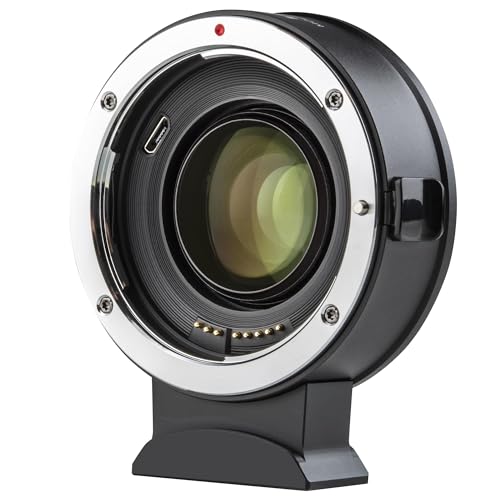
5. Viltrox EF-Z2 (Canon EF to Nikon Z)
A 268 gram (13.44 ounce) zinc alloy adapter with a brass-plated bayonet, 0.71x reduction, autofocus through copper contacts, a USB port for firmware updates and 1/4 inch tripod holes. The listing names the Z5, Z50, Z6, Z6II, Z7, Z7II, Z8, Z9 and Zfc as compatible.
Suits: Nikon Z bodies, including the APS-C Z50 and Zfc. Strengths: a broad body list and a firmware port. Weaknesses: the heaviest in the group. Skip it if you want a light adapter.
Best for panasonic and OM System bodies
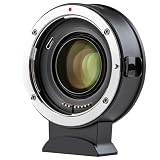
6. Viltrox EF-M2 Pro (Canon EF to Micro Four Thirds)
A Micro Four Thirds adapter with a 0.71x reduction, autofocus, aperture control, a rotating lock buckle and a USB-C firmware port. The bullets give 181 grams while the table shows 0.3 kg, and the table says no image stabilization while the bullets mention an IS function, so these details are unclear. Micro Four Thirds sensors are smaller than APS-C.
Suits: Panasonic and OM System bodies. Strengths: a lock buckle and a long body list. Weaknesses: conflicting weight and stabilization details. Skip it if you shoot APS-C.
Best Picks by Category
These labels group the picks by use case and price tier. They summarize listing data and are not hands-on test results.
- Highest listed rating (limited feedback): Metabones T Speed Booster ULTRA 0.71x (EF to EF-M) — check price on Amazon. This is not an independent product-quality award.
- Most reviewed: Viltrox EF-FX2 Pro (Canon EF to Fuji X) — check price on Amazon.
- Best value: Viltrox EF-Z2 (Canon EF to Nikon Z) — a mid-range pick; check price on Amazon.
- Lowest price: Viltrox EF-EOS M2 (Canon EF to EF-M) — the lowest-priced pick in this group; check price on Amazon.
- Premium option: Metabones T Speed Booster ULTRA 0.71x (EF to EF-M) — a premium-tier pick; check price on Amazon.
Price, Rating and Review Comparison
The table groups the picks by price tier. Prices change often, so confirm the current price on Amazon.
| Product | Price | Rating | Ratings | Price tier |
|---|---|---|---|---|
| Viltrox EF-EOS M2 (Canon EF to EF-M) | Check price on Amazon | — | — | Mid-range |
| Viltrox EF-E II (Canon EF to Sony E) | Check price on Amazon | — | — | Mid-range |
| Viltrox EF-FX2 Pro (Canon EF to Fuji X) | Check price on Amazon | — | — | Mid-range |
| Viltrox EF-Z2 (Canon EF to Nikon Z) | Check price on Amazon | — | — | Mid-range |
| Viltrox EF-M2 Pro (Canon EF to Micro Four Thirds) | Check price on Amazon | — | — | Mid-range |
| Metabones T Speed Booster ULTRA 0.71x (EF to EF-M) | Check price on Amazon | — | — | Premium |
How Much Feedback Backs Each Rating
A high average from a handful of ratings is weaker evidence than a slightly lower average from thousands. Here is how the sample size looks for each pick.
- Viltrox EF-E II (Canon EF to Sony E): only a small sample of ratings, so treat its average cautiously.
- Viltrox EF-FX2 Pro (Canon EF to Fuji X): a large sample of ratings.
- Viltrox EF-EOS M2 (Canon EF to EF-M): a large sample of ratings.
- Metabones T Speed Booster ULTRA 0.71x (EF to EF-M): only a small sample of ratings, so treat its average cautiously.
- Viltrox EF-Z2 (Canon EF to Nikon Z): a moderate sample of ratings.
- Viltrox EF-M2 Pro (Canon EF to Micro Four Thirds): a large sample of ratings.
Care and Setup
- Update the adapter firmware through its USB port if the maker offers it.
- Keep both mounts capped when the adapter is not in use.
- Support heavy lenses by the lens barrel or a tripod foot, not the adapter.
- Wipe the electronic contacts with a dry cloth only.
Mistakes to Avoid
- Buying for the wrong camera mount.
- Expecting autofocus from every lens.
- Using an APS-C booster on full frame without a crop mode.
- Trusting one listing line when the details conflict.
How does a speed booster for a mirrorless camera work?
A speed booster is an adapter with optical glass that condenses the image from a lens onto a smaller sensor. The result is a slightly wider view and, according to the makers, a brighter image than the same lens on a plain adapter.
A plain mount adapter only changes the mount. It holds the lens at the right distance and adds nothing optically. A speed booster adds glass, so it bends the light cone from the lens to fit the smaller sensor in your mirrorless body. That is why a lens designed for a larger sensor feels less cropped on an APS-C or Micro Four Thirds camera.
Think of it as two benefits at once:
- Wider field of view: the reduction ratio listed on these adapters is 0.71x, so a lens behaves as a somewhat wider one.
- More light: makers describe about one stop of extra light, which can help in dim rooms. One listing in this guide quotes a different figure, so read that listing carefully.
The trade-off is added glass. More elements between the lens and the sensor can affect sharpness at the edges, flare and contrast, depending on the design. That is why it is worth reading how the maker describes the optics and what image circle the adapter is built to cover.
If you only want to use an old lens and do not care about field of view or light, a plain adapter is simpler. A speed booster makes sense when you want to keep the look of a lens designed for a larger sensor.
Speed booster vs regular lens adapter: which should you choose?
Choose a speed booster if you want a wider view and extra light from your Canon EF lenses. Choose a regular adapter if you want the simplest, lightest and most predictable option.
A regular adapter keeps the lens at its normal field of view, with the crop factor of your sensor applied. It has no extra glass, so it adds no optical softening from the adapter itself, and it is usually lighter and simpler.
A speed booster changes the view and adds glass, which brings benefits and risks.
- Pick a booster when you shoot wide-angle video or interiors on an APS-C or Micro Four Thirds body and want to recover width.
- Pick a booster when you shoot in low light and every bit of light helps.
- Pick a regular adapter when you want a tele effect, since the crop helps reach.
- Pick a regular adapter when you do not want any extra glass in the path.
Autofocus is another factor. Several Viltrox listings in this guide mention autofocus and aperture control, while the Metabones listing contradicts itself on focus. If autofocus matters to you, read each listing and manual closely, and confirm with the seller where details conflict.
In short, a booster is a specialist tool. It solves a specific problem, and when that problem is not yours, a plain adapter may be the better buy.
Will a speed booster fit your camera and lenses? Compatibility checks
A speed booster fits only the camera mount it is made for, and it works best with the lenses the maker lists. Check the mount, the lens type and the sensor size before you buy.
These adapters take Canon EF lenses and attach to one specific body mount. Buying the wrong mount is the most common mistake, so match the name exactly: Sony E, Fujifilm X, Canon EF-M, Nikon Z or Micro Four Thirds.
- Camera mount: confirm that your body uses the mount shown in the product name.
- Lens type: the guide notes that one listing mentions EF and EF-S lenses. Check whether yours is named.
- Sensor size: boosters can be designed for smaller sensors. The Sony E listing says an APS-C or Super 35 mode may be needed on full-frame bodies.
- Body list: read the compatible camera list on the listing, since some models may not be named.
- Firmware: several Viltrox adapters have a USB port for updates, which can improve compatibility over time.
Autofocus and aperture control rely on electronic contacts and on the lens itself, so older or third-party lenses may behave differently. If you plan to use stabilization from the lens or body, check the listing, because one adapter in this guide shows conflicting stabilization notes.
When in doubt, ask the seller which of your lenses and bodies they have confirmed working.
Which speed booster should you buy?
The right speed booster is the one that matches your camera mount, so start there. After that, choose by weight, focus support and extras.
- If you shoot Sony E-mount, go for the Viltrox EF-E II. Remember the crop mode note if your body is full frame.
- If you shoot Fujifilm X, choose the Viltrox EF-FX2 Pro. It is listed as a light all-metal body with autofocus.
- If you shoot Canon EF-M and want a light option with a tripod socket, go for the Viltrox EF-EOS M2.
- If you shoot Canon EF-M with heavy lenses and want a built-in tripod foot, choose the Metabones T Speed Booster ULTRA. Confirm focus behavior first.
- If you shoot Nikon Z, go for the Viltrox EF-Z2, which lists a broad body list and a firmware port.
- If you shoot Micro Four Thirds, choose the Viltrox EF-M2 Pro, which lists a lock buckle. Check the weight and stabilization details with the seller.
Because each pick suits a different mount, the choice is mostly decided by your camera. If you have two bodies, you will need two adapters.
When feedback counts for you, check how many people rated each product. A few listings here had much smaller samples than others, so read comments about focus accuracy and fit.
What to check before you buy a speed booster
Confirm the mount, the lens support, the focus behavior and the return terms on the listing before you order. These small adapters are easy to get wrong.
- Exact camera model: look for your body in the compatibility list.
- Lens support: check the lens types named, and whether your lens has an aperture ring or needs electronic control.
- Focus and aperture control: note whether the listing promises autofocus, manual focus or both, and verify if it contradicts itself.
- Weight and balance: think about how the adapter plus a heavy lens will sit on your body.
- Tripod support: if you use long lenses, a tripod foot or socket helps protect the mount.
- Caps and contents: check for front and rear caps, and for any cables.
- Firmware updates: see whether the maker offers updates and how they are installed.
- Warranty and returns: read the terms, since fit problems can show up only after you mount the adapter.
After it arrives, test the adapter with your own lens and body at different apertures. Look for vignetting at the corners, and check that the focus and exposure behave as the listing says.
Is a speed booster worth the money, and who should skip one?
A speed booster is worth it if you already own Canon EF lenses and want their look on a smaller sensor. It is not worth it if you would be buying lenses just to use with an adapter.
The downsides are real. The extra glass can affect edge quality, and not every lens focuses well through an adapter. Listings sometimes contain conflicting details, so you must do some checking. Adapters also add length and weight to the lens, which can throw off balance on a small body.
Is it worth paying more? A higher price may bring a different build, extra optical elements or a tripod foot, but it does not automatically mean better results. Compare focus support, build and the details on the listing, not only the label.
Who should skip it?
- Anyone who owns native lenses for their camera and has no EF glass to adapt.
- Photographers who want guaranteed fast autofocus for sports or action, where adapted lenses may lag.
- Full-frame users who do not want to deal with crop modes.
- Buyers who want a no-fuss setup with no updates or testing.
If a booster still fits your lenses and camera, compare the picks above, check the current listing for the mount and what is included, then choose the one that fits how you will use it.
Speed Booster FAQ
Does a speed booster add light?
Makers say it gains about one stop, although one listing here claims three. Check the maker’s own notes.
Can I use EF-S lenses?
One listing mentions EF and EF-S lenses; check each listing for the lens types it names.
Does a speed booster change image quality?
It can, because it adds glass between the lens and the sensor. The effect depends on the design and the lens. Check the maker's description and test with your own lens.
Will a speed booster work on a full-frame camera?
Only some will, because many are made for smaller sensors. On a full-frame body they may vignette unless a crop mode is used. The Sony E listing in this guide mentions setting an APS-C or Super 35 mode.
What does 0.71x mean on a speed booster?
It is the reduction ratio, which means the view becomes wider by that factor. A lens behaves like a slightly wider one on your camera. It also concentrates light on the smaller sensor.
Can I use a speed booster for video?
Yes, many people use them for video to regain width and gain light. Check focus behavior and any stabilization notes in the listing. A tripod foot helps with heavy lenses.
Do speed boosters support autofocus?
Some do, and several Viltrox listings in this guide mention autofocus. Results depend on the lens and body. One listing here has conflicting focus details, so confirm before you buy.
Do I need to update the firmware on a speed booster?
Only if the maker provides updates and you see a compatibility problem. Adapters with a USB port can be updated, which may add support for new bodies or lenses. Follow the maker's instructions closely.
Can a speed booster damage my camera or lens?
A well-made adapter that fits correctly should not, but heavy lenses can strain the mount. Support the lens barrel or use a tripod foot. Never force the adapter onto a mount that does not fit.
The Short Version
For Sony E, the Viltrox EF-E II. For Fuji X, the EF-FX2 Pro. For a light Canon EF-M option, the EF-EOS M2. For a tripod foot, the Metabones. For Nikon Z, the EF-Z2. For Micro Four Thirds, the EF-M2 Pro.
How to Judge speed booster adapter Quality Beyond the Headline Features
The headline features of any speed booster adapter are the easiest part to compare, but they are rarely what decides whether you still enjoy using it a year from now. When you are mounting full-frame lenses on a smaller-sensor mirrorless body, the details that matter most tend to be the ones you feel every single day: how smoothly parts move, how predictable the behaviour is, and how much small friction builds up between you and the job you actually want to do. A sensible way to judge quality is to separate the purchase into three layers. The first layer is the core job, the one task the product exists to do. The second layer is everything that supports that job, such as handling, build, compatibility and ease of cleaning or maintenance. The third layer is ownership over time: spare parts, support, and how gracefully the product ages when it is used hard rather than admired on a shelf.
A useful exercise before you buy is to write down the three situations in which you will use the product most often, in plain language, and then test every candidate against those situations rather than against an idealised best case. Products that look similar on a comparison table often separate quickly once you ask concrete questions. What happens on a rushed morning, on a long day, or in awkward conditions? Does the design still make sense when you are tired, hurried or working in a tight space? The options in the main list above were chosen because they cover different answers to those questions, from simple and robust to feature-rich and specialised, so the honest comparison is not which one is best in the abstract but which one matches your three situations most closely.
It also helps to distinguish between limitations you can work around and limitations you cannot. A workaround you perform once, such as an initial setup step or buying one inexpensive accessory, is a minor cost. A workaround you must repeat every single session is a design mismatch, and it will quietly push the product into a drawer or onto a resale listing. As you read the individual reviews above, pay attention to the skip-if notes: they exist precisely to flag those repeat-every-time mismatches, and they are usually a more reliable guide than the headline strengths.
Setting Up and Getting the First Week Right
The first week with a new speed booster adapter teaches you more than any specification sheet, provided you use that week deliberately. Start with the simplest possible version of your routine for mounting full-frame lenses on a smaller-sensor mirrorless body. Resist the urge to test every feature at once, because when something disappoints you will not know whether the cause was the product, your settings, or simple unfamiliarity. Change one variable at a time, keep the rest of your routine constant, and note what actually changed. A few lines in a notebook or phone note, written immediately after a session, are worth more than a detailed memory reconstructed days later.
Pay attention to the order in which problems appear. Early problems are usually fit and familiarity problems: things feel awkward because your hands, your workspace or your habits were built around different equipment. Those problems often fade within days. Problems that persist into the second week, and that you find yourself planning around, are the real signals. If you bought from a retailer with a returns window, treat that window as part of the product test rather than as an embarrassment to avoid. A return made for a clear, observed reason is a successful test, not a failed purchase.
Finally, set the product up for the way you will actually store and reach for it. Equipment that lives in its working position gets used; equipment that must be unpacked, assembled or fetched from another room gets skipped on busy days. Where your speed booster adapter lives, how it is stored between sessions, and how quickly it returns to a ready state will shape your results as much as any feature on the box.
Technique Matters More Than Most Upgrades
Experienced mirrorless shooters tend to agree on an unglamorous point: technique explains more of the final result than the difference between good products in the same class. That is good news, because technique is free. The core skill in mounting full-frame lenses on a smaller-sensor mirrorless body is consistency: doing the same sensible steps in the same order until they become automatic, so that when you do change something, the effect is visible and repeatable. Random variation hides cause and effect; consistency reveals it.
Build a short baseline routine and write it down. Include the preparation steps people usually skip, the order of operations, and the one or two checks you perform before you start and after you finish. Then, when a result disappoints, walk the routine backwards and find the first step that differed from the baseline. Most disappointments trace back to a hurried preparation step, a skipped check, or an environmental factor such as temperature, light, clutter or fatigue, rather than to the product itself. Fixing the step is cheaper and more satisfying than replacing the product.
When you do upgrade, upgrade the bottleneck. If your routine is consistent and one specific step still limits you, that step is where money earns its keep. If your routine is inconsistent, a better product mostly gives you more expensive inconsistency. This is why the picks above are organised by use case rather than by a single ranking: the right upgrade for a beginner building consistency is rarely the right upgrade for an experienced user chasing a specific capability.
Common Mistakes and How to Avoid Them
The most common mistake with any speed booster adapter is buying for an imagined routine instead of a real one. It is easy to picture the ambitious version of mounting full-frame lenses on a smaller-sensor mirrorless body: the big project, the demanding trip, the elaborate session. Most of life, though, is the ordinary version, and a product optimised for the rare ambitious day often performs worse on the ordinary days that make up ninety percent of its use. Buy for the routine you have, and let the ambitious version be the pleasant surprise rather than the design brief.
A second mistake is ignoring compatibility until after the purchase. Compatibility is not only about whether two things physically connect or fit. It is also about sizes, clearances, weights, power, software, and the accessories you already own. Before ordering, list what the new product must work with, measure the spaces it must fit into, and check the makers’ own compatibility notes rather than relying on a marketplace answer written about a different model. Five minutes with a tape measure and a compatibility list prevents the most frustrating category of return.
A third mistake is neglecting the boring consumables and care items that keep the product working: the correct cleaning method, the replacement part that wears out, the storage condition that prevents damage. Owners who build a tiny maintenance habit, a few minutes on a regular rhythm, routinely get years more service from mid-range products than careless owners get from premium ones. The premium price buys capability; the maintenance habit is what lets you keep it.
Matching the Picks Above to Real Situations
Because the list above covers several different approaches to the same job, it helps to translate the picks into situations. If your priority is simplicity and reliability above all else, favour the pick whose review emphasises straightforward operation and easy care, even if its feature list looks shorter. Features you never use do not merely add nothing; they add weight, cost, cleaning burden and failure points. If your priority is room to grow, favour the pick with the widest compatibility and the most standard fittings, because it will absorb future accessories and changes of routine without forcing a replacement.
If you work in demanding conditions, heat, cold, moisture, dust, travel or long continuous sessions, weight the durability and protection notes in each review more heavily than the convenience notes. Convenience features are designed for comfortable conditions; protection features earn their value precisely when conditions stop being comfortable. Conversely, if your use is entirely at home or in a studio, protection you will never need is dead weight, and the lighter, simpler, easier-to-clean option is usually the smarter buy.
Budget deserves a situation-based answer too. Spending more makes sense when the expensive pick removes a step you perform constantly, solves a compatibility problem you definitely have, or survives conditions you definitely face. Spending more makes little sense when the difference is a capability you might use someday. A practical rule: pay for the problems you already have, not for the problems you can imagine. The comparison notes in each review above are written to help exactly that judgement, pick by pick.
Care, Cleaning and Long-Term Ownership
Long-term ownership of a speed booster adapter is mostly a story of small habits. Clean the product the way the maker directs, with the materials the maker approves, and be suspicious of aggressive shortcuts: harsh chemicals, abrasive pads and improvised tools cause more cumulative damage than the dirt they remove. Where the maker is silent, the conservative default is warm water, a soft cloth, mild detergent where appropriate, and patience. Let things dry fully before storage, because trapped moisture is a slow and silent enemy of metals, fabrics, seals and electronics alike.
Inspect wear points on a schedule rather than waiting for failure. Straps, hinges, seals, threads, contacts, edges and moving joints all announce their decline gradually: stiffness, play, fraying, discolouration, roughness or a new noise. Catching wear early usually means a cheap replacement part or a small adjustment; catching it late can mean a ruined session or a damaged companion product. Keep the small spares and tools that came in the box together in one labelled place, because the day you need them is never the day you want to search for them.
Storage deserves the same thought as use. Store the product clean, dry, unloaded where the maker advises it, and away from extremes of heat and damp. If it travels with you, protect it from the two forces that damage equipment most in transit: impact and abrasion. A modest case, wrap or divider system, used consistently, preserves both function and resale value far better than careful intentions.
Understanding the Trade-Offs in This Category
Every speed booster adapter design is a bundle of trade-offs, and understanding the main ones makes the reviews above much easier to use. The first trade-off is capability versus simplicity. More capability usually means more adjustments, more modes or more parts, and each addition asks something of you: learning time, setup time, or attention during use. The second trade-off is size and weight versus capacity and comfort. Bigger and heavier designs can carry more, reach further or run longer, but they ask more of your body, your vehicle and your storage space. The third trade-off is specialisation versus versatility. A specialised product does one job beautifully and other jobs reluctantly; a versatile product does everything adequately and nothing perfectly.
None of these trade-offs has a universally right answer, which is why honest reviews describe them instead of hiding them. When a review above lists a limitation, read it as a coordinate rather than a verdict: it tells you where that product sits on the trade-off map. Your job as a buyer is simply to know where you sit on the same map. If you are unsure, versatility and simplicity are the safer defaults, because most people overestimate how specialised their routine really is, and an adequate tool used constantly beats a perfect tool used rarely.
Price interacts with trade-offs in a way worth stating plainly. Higher prices in this category usually buy refinement: smoother operation, better materials, tighter tolerances, better support. They rarely buy a different category of result. A careful user with a mid-priced pick and a consistent routine will outperform a careless user with the flagship almost every time, which is another way of saying that the reviews above matter less than the habits in these added sections.
A Practical Checklist Before You Buy
Before ordering any speed booster adapter, run through a short written checklist. First, state the job in one sentence: what will this product do, how often, and where. Second, list everything it must be compatible with, including sizes, fittings, power and the accessories you already own. Third, measure the space it will live in and the space it must pass through. Fourth, decide which single trade-off you care about most, capability, size, simplicity or specialisation, and let that decision rank the shortlist. Fifth, check what ownership requires: cleaning method, wear parts, warranty terms and the maker’s support route.
Sixth, re-read the review of your leading candidate and look specifically for the skip-if line. If it describes you, believe it and move to the next candidate; reviewers include those lines because they are the most common source of returns and regret. Seventh, if two candidates still tie, choose the one that is easier to return, easier to service, or already owned and understood by people whose use resembles yours. Ties are broken better by ownership practicalities than by one more comparison video.
Finally, plan the first week when you order, not when the box arrives. Decide your baseline routine, what you will keep constant, and what single thing you will test first. A purchase approached this way rarely disappoints, because even if the product turns out to be wrong for you, you will know exactly why, and the next choice will be right.
Questions Worth Asking That Spec Sheets Do Not Answer
Specifications answer the questions makers find easy to print. Ownership raises different questions. How does the product behave at the end of a long day rather than the start of a short one? What does it feel like to clean after the messiest realistic session, not the tidiest? Which part will wear first, what does that part cost, and can you replace it yourself? How does the product behave slightly outside its intended conditions, because real life will take it there? The reviews above try to answer several of these from listing information and category knowledge, and where a listing is silent, that silence is itself worth noticing.
Another under-asked question is what the product demands of the rest of your kit. Some products quietly require companions: a particular fitting, a stronger support, a bigger bag, a different workflow. Total cost of ownership is the purchase price plus those companions plus the wear parts over the years you will keep it. A seemingly expensive pick that needs nothing extra can be cheaper to own than a bargain that drags three accessories behind it. When you compare the picks above, compare whole systems, not single items.
The last question is about exit. If your routine changes, can the product adapt, be handed on, or be sold without embarrassment? Standard fittings, transferable warranties and durable construction all preserve options. Unusual proprietary choices can be worth it for a committed specialist, but they narrow your future, and that narrowing should be a conscious decision rather than a surprise.
Building a Routine That Gets the Most From Your Choice
Whichever pick you choose from the list above, the return on it will be decided by the routine you build around mounting full-frame lenses on a smaller-sensor mirrorless body. Keep the routine short enough to survive a busy day: a preparation step you can do in minutes, a consistent working method, and a two-minute reset afterwards that leaves everything ready for next time. Routines fail when they depend on motivation; they succeed when they depend on arrangement. Put things where the routine needs them, in the order the routine needs them, and remove every step that exists only because it has always existed.
Review your routine monthly with fresh eyes. Ask which step produces the most value and which produces the most friction, and be willing to move effort from the second to the first. Small routine improvements compound quietly: a slightly better arrangement, a slightly earlier check, a slightly more consistent setting. Over a season, those small improvements are worth more than most equipment upgrades, and they transfer free of charge to whatever equipment you own next.
Share the routine if you work or live with others who use the same equipment. A shared baseline means anyone can pick up the kit and get a predictable result, and it means problems get diagnosed against a known standard instead of against five private habits. Consistency is a team sport as much as a personal one, and the best-equipped households and studios are usually the ones where the routine is written down, visible and boringly reliable.
More Questions, Answered
How long should a good speed booster adapter last with regular use?
With regular use and the basic care described above, a well-made speed booster adapter should serve for years rather than months. Lifespan depends far more on handling, cleaning and storage than on the purchase price alone. Wear parts are the exception: items designed to be replaced should be replaced on the maker’s schedule, and doing so on time is what allows the main product to reach its full lifespan.
Is it worth paying more for a premium speed booster adapter?
It is worth paying more when the premium version removes friction from a step you perform constantly, solves a compatibility need you definitely have, or offers support and spare parts you will actually use. It is rarely worth paying more for a capability you expect to grow into someday. Buy for the routine you have now, and let a proven, repeated limitation, not enthusiasm, trigger the next upgrade.
What should I check first if results disappoint?
Check your routine before you blame the product. Return to your written baseline, confirm each preparation step was done properly, and change only one variable in the next session. Most disappointing results trace back to a skipped preparation step, an environmental factor, or an unfamiliarity that fades with practice. If the same problem survives several careful, consistent sessions, then the product itself is the likely cause and a different pick from the list is justified.
Can one speed booster adapter suit both beginners and experienced users?
Sometimes, but the honest answer is that beginners benefit most from simplicity and forgiveness, while experienced users benefit from control and compatibility. A versatile mid-range pick often serves both reasonably well, which is why several options above aim at that middle ground. What a beginner should avoid is a highly specialised product whose strengths only appear inside a narrow, advanced routine.