Disclosure: As an Amazon Associate, Reviews Took earns from qualifying purchases. Links to Amazon on this page are affiliate links; they cost you nothing extra.
Check shielding and length.
This guide is built from Amazon product listings and maker specs, not our own testing, so confirm size, contents and current price on each product page. Health products are for general information and are not medical advice.
Check the current price on Amazon before you buy.
Last updated: November 2, 2026.
In this guide
Quick Picks
| Product | Type | Best for |
|---|---|---|
| SHULIANCABLE 1/4 to RCA Cable 6.35mm to Dual RCA Stereo Audio | RCA cable | connecting audio gear |
| KabelDirekt RCA/Phono Cable 15ft 2×2 | RCA cable | connecting audio gear |
| JSAUX RCA to 3.5mm Cable 6.6ft 2RCA Male to Aux Audio Adapter | RCA cable | connecting audio gear |
| KabelDirekt RCA/Phono Cable 6ft 2×2 | RCA cable | connecting audio gear |
| KabelDirekt RCA/Phono Cable 3ft 2×2 | RCA cable | connecting audio gear |
| Tan QY 2 RCA Stereo Audio Cable 3Ft-Gold Plated for Amplifier | RCA cable | connecting audio gear |
| Amazon Basics 2 RCA Audio Cable for Amplifier Active Speakers | RCA cable | connecting audio gear |
| Amazon Basics 2 RCA Stereo Audio Cable for Hi-Fi System Amplifier | RCA cable | connecting audio gear |
Our Picks

Top pickBest for connecting audio gear
1. SHULIANCABLE 1/4 to RCA Cable 6.35mm to Dual RCA Stereo Audio
A SHULIANCABLE 1/4 to RCA Cable 6.35mm to Dual RCA Stereo Audio (rca cable), per the listing. Check price on Amazon.
Good for: connecting audio gear. Watch out: Check length and connectors.


Best for connecting audio gear
2. KabelDirekt RCA/Phono Cable 15ft 2×2
A KabelDirekt RCA/Phono Cable 15ft 2×2 (rca cable), per the listing. Check price on Amazon.
Good for: connecting audio gear. Watch out: Check length and connectors.


Best for connecting audio gear
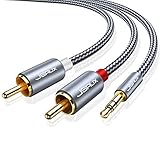
3. JSAUX RCA to 3.5mm Cable 6.6ft 2RCA Male to Aux Audio Adapter
A JSAUX RCA to 3.5mm Cable 6.6ft 2RCA Male to Aux Audio Adapter (rca cable), per the listing. Check price on Amazon.
Good for: connecting audio gear. Watch out: Check length and connectors.
Best for connecting audio gear
4. KabelDirekt RCA/Phono Cable 6ft 2×2
A KabelDirekt RCA/Phono Cable 6ft 2×2 (rca cable), per the listing. Check price on Amazon.
Good for: connecting audio gear. Watch out: Check length and connectors.
Best for connecting audio gear
5. KabelDirekt RCA/Phono Cable 3ft 2×2
A KabelDirekt RCA/Phono Cable 3ft 2×2 (rca cable), per the listing. Check price on Amazon.
Good for: connecting audio gear. Watch out: Check length and connectors.
Best for connecting audio gear
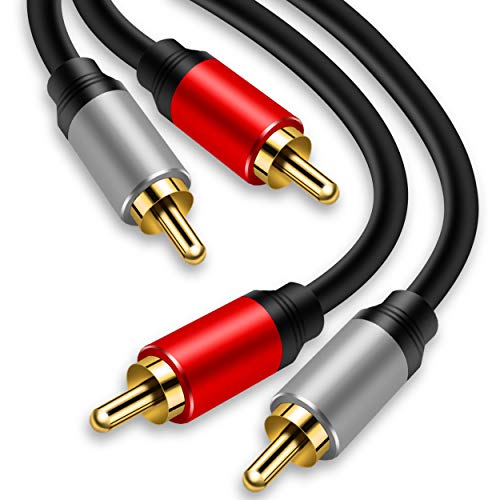
6. Tan QY 2 RCA Stereo Audio Cable 3Ft-Gold Plated for Amplifier
A Tan QY 2 RCA Stereo Audio Cable 3Ft-Gold Plated for Amplifier (rca cable), per the listing. Check price on Amazon.
Good for: connecting audio gear. Watch out: Check length and connectors.


Best for connecting audio gear
7. Amazon Basics 2 RCA Audio Cable for Amplifier Active Speakers
An Amazon Basics 2 RCA Audio Cable for Amplifier Active Speakers (rca cable), per the listing. Check price on Amazon.
Good for: connecting audio gear. Watch out: Check length and connectors.


Best for connecting audio gear
8. Amazon Basics 2 RCA Stereo Audio Cable for Hi-Fi System Amplifier
An Amazon Basics 2 RCA Stereo Audio Cable for Hi-Fi System Amplifier (rca cable), per the listing. Check price on Amazon.
Good for: connecting audio gear. Watch out: Check length and connectors.
How to Choose
Size and fit
Check dimensions for your space or vehicle.
Build and materials
Durable materials last longer.
Ease of use
Simple setup and cleaning help.
Cable Types and What Each End Does
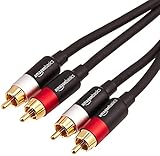
RCA cables look simple, but the family has several variants and the connectors at each end decide what a cable can do. A standard stereo pair has two plugs on each end, one for the left channel and one for the right, and joins devices that both have RCA sockets, such as an amplifier and a source. Other cables have two RCA plugs on one end and a headphone-style plug on the other, which is useful for connecting a phone, laptop or portable player to a stereo. Another type uses a larger quarter-inch plug on one end for gear such as mixers and some instruments.
The post lists examples of several of these types, so read each product title carefully. A cable meant to link a headphone-style output to RCA inputs will not work between two RCA devices, and a pair of RCA plugs will not fit a headphone socket without an adapter.
Also note whether the plugs are male on both ends. Extension-style cables have a male and female end and are made to lengthen another cable. Choosing the wrong form is one of the most common returns, so write down the sockets on both devices before you shop.
Shielding and Interference
Audio cables carry low-level signals that can pick up unwanted noise from power cords, wireless devices and nearby electronics. Shielding is a layer of conductive material around the wires that helps block it. A well-shielded cable is especially useful for long runs, for sources with weak output levels, and where cables must pass near power supplies.
Signs of poor shielding or a bad connection include hum, buzz, crackling, or a faint radio-like sound. Before blaming the cable, check for a ground loop, which often produces a steady hum when two devices share power through different outlets. Plugging both devices into the same power strip or using a ground loop isolator may help, but isolate the cause first.
Keep audio cables apart from mains leads when you can, and cross them at right angles if they must meet. Do not tightly bundle signal cables with power cables. The listing may describe the shielding type, but descriptions vary, so use them as a clue rather than proof of quality.
Choosing the Right Length
Measure the path the cable will take, not just the straight-line distance. Add extra length for routing around furniture, up walls and into the back of equipment, then allow some slack so the plugs are not under strain. A cable that is too short pulls on the sockets, while one that is far too long leaves a tangle that can pick up interference.
For desktop or shelf setups, short runs are usually tidy and enough. For a subwoofer or a distant turntable, a longer cable may be required. The post shows several lengths from the same maker, so compare them against your measurements rather than buying the longest one just in case.
Think about the future too. If you may rearrange your equipment, a bit of extra length gives you flexibility. Cable ties or hook-and-loop straps keep the extra neat. Avoid sharp bends right behind the plug, where the cord is under the most stress. Right-angle plugs can help in tight spaces behind a cabinet or a wall-mounted TV.
Plating, Conductors and Build Quality
Many listings highlight plating on the connectors, with gold being common. Plating can resist corrosion and keep contact surfaces clean, which is a practical benefit in humid places. It does not turn a poorly made cable into a good one, so look at the whole build: how the plug is attached to the cord, how thick and flexible the jacket is, and whether there is strain relief where the cable meets the plug.
The conductor material and thickness affect resistance, but for typical home use over modest lengths, a sound, well-made cable is rarely the weak point in a system. Be skeptical of claims that a cable will dramatically transform sound. The best use of a budget is a cable that fits well, is sturdy, and suits the length you need.
A snug fit matters. The plugs should grip firmly, not wobble or fall out. Some designs have a tight grip that holds well but can be hard to remove, so pull on the plug body, not the cord. Check the maker’s description for the intended use, such as turntable, subwoofer or general audio.
Troubleshooting and When to Replace
If audio cuts out or one channel is missing, start with the basics. Reseat both ends firmly, check that you used the right input on the receiver, and make sure the input selection matches. Swap the left and right plugs to see whether the problem follows the cable or stays with the device. Try another cable if you have one.
Crackling when you move the cable usually points to a damaged plug or a break in a conductor, and crackling when you turn the volume knob may be the device rather than the cable. A cable that works only when held at a certain angle is nearing the end of its life.
Replace cables that have cracked jackets, bent or loose plugs, exposed wire, or signs of corrosion. Keep a spare short cable for testing. When buying a replacement, match the connector types and length, and consider keeping the old cable for non-critical use only if it is not physically damaged. Dispose of damaged cables with other electronic waste where local rules require it.
Common Setups and Which Cable They Need
RCA cables are used in more rooms than people realize, and the right choice depends on what you are connecting. The simplest case is a pair of plugs at each end, red and white, running between a source such as a turntable preamp, CD player or streamer and the inputs of an amplifier or receiver. Longer runs might serve a pair of powered speakers across a desk, or a stereo hidden in a cabinet while the source sits on a shelf.
Some setups need a different ending. A phone, tablet or laptop with a headphone jack calls for a cable with a 3.5mm plug on one end and two RCA plugs on the other, like the JSAUX type in this guide. A mixer, keyboard or guitar-effects unit with quarter-inch outputs calls for the 1/4 inch to RCA style such as the SHULIANCABLE cable listed above. Check whether the quarter-inch jacks are mono or stereo, because a mono output will feed only one channel.
- Turntable to phono preamp: a standard two-plug RCA pair, plus a separate ground wire if the turntable has one.
- Streamer or CD player to receiver: standard RCA pair at a moderate length.
- Powered speakers from a computer: a 3.5mm to RCA cable of the right length.
- Mixer or keyboard to amp: quarter-inch to RCA, matching stereo or mono ends.
- Subwoofer: a single RCA for the LFE input, or a Y-adapter if the sub has two inputs; see the manual.
Draw out the signal path on paper before ordering. Note which end of each device is an output and which an input, and confirm the connector types, then the cable choice becomes obvious.
Reducing Noise, Hum and Interference in a Real Room
Most noise complaints trace back to layout and grounding rather than cable quality. Analog audio signals are small, and anything that radiates a field can add to them, including power supplies, dimmer switches, wireless routers and the power cords themselves. A few habits reduce trouble.
- Keep signal cables away from power cords. If they must cross, cross at a right angle rather than running in parallel.
- Do not coil excess cable tightly behind equipment; loose loops are better.
- Plug all components into the same power strip or circuit when possible, so that they share a ground reference.
- Check that plugs are fully seated and that the sockets are clean.
- If you hear a hum from a turntable, make sure its ground wire is connected to the preamp or receiver terminal.
When hum persists, isolate it. Disconnect sources one at a time, and unplug the cable from the amplifier input. If the noise disappears with the cable removed, the cable or the source is involved. If it remains, the amplifier or its power is the source. A ground-loop isolator is a common fix for hum caused by differing grounds, but use it as a diagnostic step rather than a first purchase.
How Much to Spend on a Stereo Cable
For most home systems, line-level analog signals are forgiving. A well-made cable with snug connectors, adequate shielding and sensible strain relief handles everything a typical living-room system can reveal. Spending more buys better materials and finish, and it can matter for durability, but claims of dramatic sound changes should be treated with caution. Plating, conductor count and jacket texture help the cable last, yet there is no replacement for a clean room layout and proper levels.
Where it makes sense to spend a bit more is on the physical side. Look for firm plug bodies that grip the socket, flexible but sturdy jackets, and clear left and right color marking. If you plan to move equipment often, cables with good strain relief hold up. For a fixed installation behind furniture, length accuracy matters more than finish. Buy what fits and spend the leftover on a spare in case of failure.
Reading the Back Panel: Inputs, Outputs and Labels
Confusion at the back of a stereo is the most common cause of silence or poor sound. Look at the labels. A socket marked Out sends audio away from the device, and one marked In receives it, so a cable normally runs from an Out to an In. Receivers also have sockets labeled Phono, which expect the tiny signal from a turntable and should not be used for ordinary sources. Others may be labeled Tape, CD, Aux or Line, all of which are line-level inputs that accept a standard RCA pair.
Color coding helps: red for the right channel and white or black for the left. Match them on both ends. If sound seems lopsided or vocals seem off-center, swapped channels or a loose plug is the likely cause. When a socket is recessed, check that the plug barrel reaches fully into the jack, and give it a gentle push. If a source has a switch for line or phono output, set it to match the input you chose.
Going Deeper: What an RCA Cable Actually Has to Do Well
An RCA cable carries a delicate, low-level analogue signal between components, and its whole job is to deliver that signal unchanged: no hum added, no detail lost, no intermittent crackle when something moves. That sounds simple, and at short lengths in a tidy system it mostly is, which is why honest advice about these cables starts with context. The differences that matter are the ones that protect the signal in real rooms: decent shielding where cables run near power leads, connectors that grip firmly without being brutal to remove, and construction that survives being plugged, unplugged and rerouted as your system changes. Judge every pick in this guide against those practical virtues rather than exotic claims.
Shielding and the hum problem
The classic RCA complaint is a low hum or buzz through the speakers, and the cable is often blamed when the true cause is the system around it. Shielding helps a cable reject interference picked up along its run, which matters most when a cable passes behind a tangle of power cords, a television and a router all sharing one corner. But hum frequently comes from grounding interactions between components, and no cable, however well made, can cure that on its own. If you hear hum, work methodically: swap in a cable you know is sound, reroute cables away from power supplies, and change one thing at a time. A well-shielded cable from this list removes the cable itself from the list of suspects, which is genuinely valuable even when the fault lies elsewhere.
Connectors: grip, strain relief and repeated use
Connectors are where RCA cables live or fail. A plug that grips too loosely invites crackle and channels dropping out when the cable is nudged; one that grips too tightly can stress the socket on older equipment. Look at the strain relief where the cable meets the plug, because that flex point is where internal conductors eventually break after years of being bent behind a cabinet. Systems that are set up once and never touched forgive almost anything, while systems that are rearranged for testing, cleaning or upgrading reward the better-built options in this guide. If you swap components often, connector quality is not a luxury; it is the product.
Length: buy the run you need, not the longest available
Excess cable is not harmless. Long runs pick up more interference, and the surplus has to live somewhere, usually coiled behind equipment where it tangles with power leads and traps dust. Measure the actual path the cable will take, including the drop down the back of a stand and the slack needed to pull a component forward for connection, then choose the closest length above that. The KabelDirekt options in this guide exist in several lengths for exactly this reason: the shorter lengths suit components stacked together, while the longer one serves a turntable or source that sits apart from the amplifier. A cable that fits its run neatly also looks better, which matters more to most living rooms than any specification.
Matching the Cable to the Job in Your System
Not every connection in a system asks the same of a cable. A short link between a CD player and an amplifier sitting directly below it is the easiest duty imaginable, and any sound cable in this guide will do it well. A turntable connection is more demanding, because the signal from a cartridge is far weaker than a line-level source and the run often includes a separate ground wire; keep that run short and tidy, and treat crackle or hum there as a routing problem first. Connecting a television’s audio output or an adapter cable from a phone or computer headphone socket, like the RCA-to-3.5mm option above, brings its own consideration: those sources get plugged and unplugged constantly, so durability at the small plug end matters most.
Subwoofer and longer single runs are the other case worth planning. A cable crossing a room to reach a subwoofer or a powered speaker passes skirting boards, doorways and power outlets, and benefits from robust shielding and a jacket that tolerates being walked near and vacuumed around. Where a cable must run a long way, keep it away from mains cabling where the layout allows, and cross power leads at right angles rather than running alongside them when the two must meet. These are old installer habits, and they prevent more problems than any premium material claim.
Setting Up and Checking Your Work
Connect everything with the system switched off, seat each plug fully with a gentle push and slight twist, and route cables before you push furniture back into place. Then test deliberately: play something quiet and familiar, turn the volume up a little with the source paused to listen for hum, and gently move each cable near its plugs to check for crackle that would betray a failing connection. Test both channels separately if your amplifier allows it, because a fault that silences or thins one channel is easy to miss in a quick stereo listen. If you are adding a cable to an existing system, change only that one connection, so any difference you hear, good or bad, has an obvious cause.
Care, Storage and Troubleshooting
RCA cables ask for almost no maintenance beyond being handled properly. Unplug by gripping the plug body, never by pulling the cable, and avoid tight bends, especially near the connectors. Store spare cables loosely coiled in a drawer rather than wound tightly around a hand, which twists the internal conductors over time. Dust on plugs can be wiped away with a dry cloth; if a system that has sat for years develops crackle, simply unplugging and reseating each connector often restores a clean contact.
One channel quieter or missing
Swap the left and right plugs at one end only. If the problem moves to the other speaker, the cable is implicated; if it stays put, look at the source or amplifier channel instead. This two-minute test has saved more unnecessary purchases than any other in home audio.
Hum that appeared after adding equipment
New hum after a change usually follows the change: a new component, a new power supply, or a cable rerouted during installation. Retrace your steps, separate the signal cables from the new item’s power lead, and try the components from a shared power strip so their grounds sit at the same point.
How the Picks in This Guide Differ in Practice
The KabelDirekt cables in several lengths are the straightforward, well-made default for standard stereo links, and choosing among them is mostly a matter of measuring your run honestly. The Amazon Basics options serve the same everyday purpose and make particular sense for secondary systems, spare links and anyone equipping several connections at once. The adapter-style cables solve different problems: the RCA-to-3.5mm cable bridges phones, computers and portable players into an amplifier, while the quarter-inch-to-RCA cable connects instruments, mixers and studio-style equipment to home audio. The remaining stereo cables in the list cover the classic amplifier-and-speakers setup in rooms where a compact length keeps everything tidy. Read that way, the list is less a ranking than a set of tools, and the right choice is the one whose shape matches the connection in front of you.
More Questions Worth Asking Before You Decide
Do expensive RCA cables sound better?
At ordinary lengths in a normal room, the audible differences between sound, well-made cables are small to non-existent for most listeners. What better construction reliably buys is durability, firm connectors and good shielding. Spend for those practical qualities rather than for promised transformations.
Can I use a spare video or subwoofer cable as a stereo RCA cable?
The plugs fit and a single cable can carry one channel in a pinch, but a matched stereo pair keeps lengths, routing and connections tidy and avoids confusion later. For a permanent setup, a proper pair is the cleaner answer.
How do I know a cable has failed rather than a component?
Use the swap test described above: exchange channels or substitute a cable you trust. Cables fail at the connector ends most often, so crackle when the cable moves near a plug is the classic symptom.
Should both cables in a pair be the same length?
Yes, as a pair they are made that way, and keeping runs similar avoids a tangle of surplus on one side. There is no practical benefit to mismatched lengths in a home system.
Planning a Whole System’s Cabling Without Waste
People usually buy RCA cables one at a time, in a hurry, when a new component arrives, and the result over years is a drawer of mismatched lengths and a cabinet full of awkward runs. A calmer approach pays off: when you add or rearrange equipment, sketch the system first, list every analogue connection, and measure each run in one session. You will often find that a system needs fewer cables than you feared, because some connections you assumed were analogue are better made digitally between modern components, and the remaining analogue links can be served by two or three well-chosen pairs. Buying with the whole map in mind also stops the common pattern of ordering a long cable just in case, then living with the coil of surplus forever.
Label both ends of each cable while you install it, with a small tag or a note in your phone. Six months later, when you are reaching behind an amplifier in poor light, those labels turn a frustrating half hour of tracing into a two-minute job. Photograph the back of the system once everything is connected and working, too. That single picture is the reference you will want when something is unplugged for cleaning or a house move and needs to go back exactly as it was.
When a cable run crosses a room
Occasionally a connection cannot be short: a turntable on a sideboard, powered speakers either side of a fireplace, a subwoofer in the corner where it sounds best. For those runs, plan the route as carefully as the cable. Follow skirting boards where possible, keep the cable flat and untwisted, and avoid trapping it under heavy furniture legs or door thresholds that close on it. If the run passes a radiator or a sunny window, remember that heat and sunlight age cable jackets over years, so a route in shade lasts longer. Test the full run before you commit to fixing it in place, listening for hum with the system at normal volume, because moving a fixed cable afterwards is the job everyone regrets.
Keeping spares that actually help
One known-good spare stereo pair is worth keeping, not as clutter but as a diagnostic tool: it is the cable you substitute when any connection in the system is suspected, and its trustworthiness is the whole point. Mark it clearly, store it loosely coiled, and resist borrowing it for permanent duty, because a diagnostic spare that has been absorbed into the system is no longer a spare. Alongside it, the adapter cables from this guide earn their drawer space, since the day a friend wants to play music from a phone through your amplifier, or a keyboard needs connecting for a family event, is always the day nobody wants to wait for a delivery.
Thought about as a whole, cabling is the least glamorous part of a hi-fi system and the part most likely to cause its everyday annoyances. A modest investment in the right lengths, sound construction and tidy routing, exactly what the picks in this guide are aimed at, removes the cable from your list of worries and leaves you free to think about the music instead.
Reading Cable Descriptions Without Being Misled
Cable listings are full of impressive-sounding language, and learning to translate it saves money and disappointment. References to precious-metal plating usually describe a very thin surface layer whose practical benefit is resistance to tarnish on the contact surface, a modest and real advantage, rather than a transformation in sound. Claims about exotic conductor geometry matter at frequencies and in applications far removed from a two-metre link between a streamer and an amplifier. What deserves your attention instead is plain information: the length, the connector style, whether the cable is a proper stereo pair, how the shielding is described, and whether the maker states basic facts clearly instead of hiding behind adjectives. A listing that tells you exactly what the cable is, without promising miracles, is usually a good sign about the company behind it.
It is also worth keeping a sense of proportion about where cables sit in a system’s budget and its sound. Speakers, their placement, and the room itself shape what you hear far more than any interconnect, and the source and amplifier follow after that. The sensible order of spending reflects that: secure competent cables of the right lengths first, the kind gathered in this guide, and direct any remaining budget toward the components and the setup work that genuinely change the result. Listeners who approach cables that way rarely feel short-changed, because their expectations were set by physics rather than by marketing, and their systems stay free of the hums, crackles and dropouts that are the only cable problems most people will ever actually hear.
A note on older and second-hand equipment
Vintage amplifiers and receivers bring one extra cable consideration: their sockets have often lived through decades of plugs, and may be looser or lightly oxidised compared with new equipment. A cable whose plugs grip firmly and evenly is the kind choice for such sockets, and a gentle clean of the socket itself, with power off and the equipment unplugged, can restore a connection that crackles. If you run a mix of older and newer components, as many enjoyable systems do, expect to spend a few extra minutes on these contact points whenever you rearrange things; it is normal maintenance for older gear, not a sign that anything is broken.
Finally, remember that a cable you forget about is a cable doing its job. The goal of every pick in this guide is that quiet reliability: connect it, route it sensibly, and then let the system get on with playing music while the interconnect disappears from your attention entirely. If you are choosing between two similar options and cannot decide, let the practical details break the tie, the length that fits your furniture, the connector that suits how often you swap equipment, and the construction that matches how the cable will live. Those small, unglamorous considerations are the ones you will still be benefiting from years after the purchase, long after the wording on the box has been forgotten.
It also helps to re-check your connections once a year or so, in the same spirit as any household maintenance. Behind a cabinet, cables slowly gather dust, plugs can be knocked when furniture moves, and a connection that was firm in January may be slightly loose by December without anyone noticing until a channel starts to fade during a quiet passage. A five-minute pass with the system off, reseating each plug and confirming every run still sits where you routed it, prevents those small degradations from ever becoming faults you have to hunt down, and it keeps a good cable performing exactly as it did on the day you installed it.
Choose with that long view in mind, and the cable stops being a purchase you second-guess and becomes simply part of a system that works every time you sit down to listen.
That is, in the end, all anyone reasonably asks of it.
Frequently Asked Questions
Is it easy to install?
Check the manual.
Is it worth the price?
Budget options cover basics.
How do I care for it?
Clean as directed.
Are all RCA cables the same?
No. They differ in connector types at each end, length, shielding and build. Some are made for audio and others for composite video or digital audio, so check the intended use before you buy.
Which plug goes into which socket?
Colors usually mark the channels, with red for right and white or black for left. Match the colors on both devices. A swapped pair will not damage most equipment but will reverse the stereo image.
Do gold-plated connectors sound better?
Plating mainly helps resist corrosion and keep the contact clean. It is not a guarantee of better sound. A solid fit and good construction matter more.
Can I use an RCA cable for a subwoofer?
Many subwoofers use an RCA input, and a single cable may be made for that. Check the socket on your subwoofer and the listing for the intended use, and consider a shielded cable for longer runs.
Why do I hear a hum through my speakers?
A hum can come from a ground loop, a poor connection, or cables running near power cords. Try reseating the plugs, moving cables apart, and plugging devices into the same power strip.
Can I connect a phone to an RCA input?
Yes, with a cable that has a headphone-style plug on one end and two RCA plugs on the other. Set the phone volume moderately and control the loudness from the receiver.
How long can an RCA cable be?
Short and moderate runs generally work fine. Longer cables are more exposed to noise, so choose a shielded one and keep it away from power leads.
How do I connect a turntable to a receiver with RCA cables?
Connect the turntable output to a phono input or an external phono preamp, using a standard RCA pair, then run the preamp to a line input. Attach the turntable ground wire to the ground terminal. Do not plug a turntable into a line input without a preamp.
Can I use one RCA cable for a subwoofer?
Many subwoofers have a single LFE or line input fed from a receiver subwoofer output, so one RCA works. Some have left and right inputs, in which case a Y-adapter or a stereo pair may fit. Check the subwoofer manual for the correct input.
What does a ground loop isolator do for RCA audio?
It breaks the ground connection between two components while passing the audio signal, which can stop a hum caused by differing grounds. Use it to confirm the cause of the noise, and also check the layout, ground wire and power arrangement first.
Will a longer RCA cable hurt the sound?
For ordinary home runs at line level, length rarely causes audible loss when the cable is well shielded. Long runs near power cords or routers can pick up more noise. Buy a length that fits the path without strain, and avoid excess cable bundled tightly behind gear.
Questions to Ask Before You Buy
- What are the connectors on each end of the run: two plugs, a headphone-style plug, or a larger jack?
- How far apart are the two devices?
- Will the cable pass behind furniture or through a tight space?
- Do I need the ends to be straight or angled?
- Is the connection for a turntable, an amplifier, a subwoofer or a television?
- Does the maker’s listing describe the cable’s intended use?
Compatibility Checks
Look at the sockets on both devices before ordering. Colors usually mark left and right channels, so match them carefully. Some equipment uses a similar-looking connector for a different signal, such as video or digital audio, and these are not interchangeable. If you are connecting a record player, check whether a separate phono stage or ground wire is involved. Adapters can bridge different plug sizes, but each extra link adds another point that can come loose. Read the maker’s description to confirm it is meant for the job you have in mind. A tidy layout behind the equipment also makes later changes easier.
Storage and Care Notes
Coil spare cable loosely in wide loops rather than tight bends, which can strain the wire near the plug. Pull on the connector body, never the cord, when unplugging. Keep cables away from mains leads where practical, and avoid trapping them under chair legs or door edges. Wipe dusty plugs with a dry cloth, and keep spare cables in a labeled bag. If you hear crackling or one channel drops out, check the plugs and sockets first, then consult the manual.
Bottom Line
Gold plating matters less than a solid fit.
More Audio & Video Guides
- Best Adjustable iPad and Tablet Holders
- Best Bluetooth Turntables for Beginners
- Best Bluetooth TV Adapters
- Best Karaoke Speakers with Microphones
- Best Foldable and Stand Projector Screens
- Best Full-Motion TV Mounts
- Best HDTV Antennas for Local Channels
- Best Roku and Google TV Streaming Devices