Disclosure: As an Amazon Associate, reviewstook.com earns from qualifying purchases. Links to Amazon on this page are affiliate links; they cost you nothing extra.
Razer’s keyboard line covers full-size macro boards, TKL optical models, a compact 60% and a wireless TKL. The right one depends on layout, switch type and whether you want wireless.
This guide covers four Razer keyboards sold on Amazon. It is built from product listings, not our own testing, so confirm details on each product page.
New to gaming keyboards? Read our gaming keyboard buying guide.
By the Reviewstook Editorial Team. Last updated: October 31, 2026.

In this guide
Quick Picks
| Keyboard | Type | Best for |
|---|---|---|
| Razer BlackWidow V4 X | Full-size mechanical keyboard | Linear switches and six macro keys |
| Razer Huntsman V2 TKL | TKL optical keyboard | Clicky optical switches and 8000 Hz polling |
| Razer Huntsman Mini | 60% optical keyboard | A compact 60% with linear optical switches |
| Razer BlackWidow V4 TKL Wireless | TKL wireless mechanical keyboard | HyperSpeed wireless and a long battery |
Best Razer Gaming Keyboards

Top pickBest for gamers who use macros and want fast linear switches
1. Razer BlackWidow V4 X
A wired mechanical keyboard with yellow linear switches (1.2 mm actuation and reset, 45 g), six dedicated macro keys, a multi-function roller and Chroma per-key RGB, per the listing.
Good for: Gamers who use macros and want fast linear switches. Strengths: Macro keys, roller and per-key RGB. Weaknesses: Full-size and wired; a premium-tier price. Skip it if you want a compact layout.

Best for competitive players who want fast optical switches
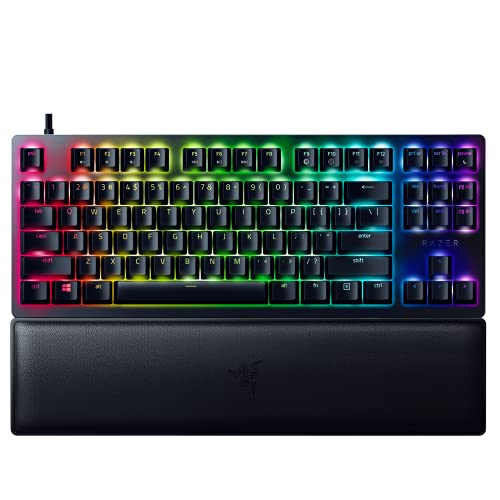
2. Razer Huntsman V2 TKL
A TKL keyboard with clicky optical switches, up to 8,000 Hz polling, doubleshot PBT keycaps, a detachable USB-C cable, a wrist rest and five on-board profiles, per the listing.
Good for: Competitive players who want fast optical switches. Strengths: Optical switches, 8,000 Hz polling and PBT keycaps. Weaknesses: Wired and clicky. Skip it if you want wireless or quiet keys.

Best for gamers who want a premium 60%
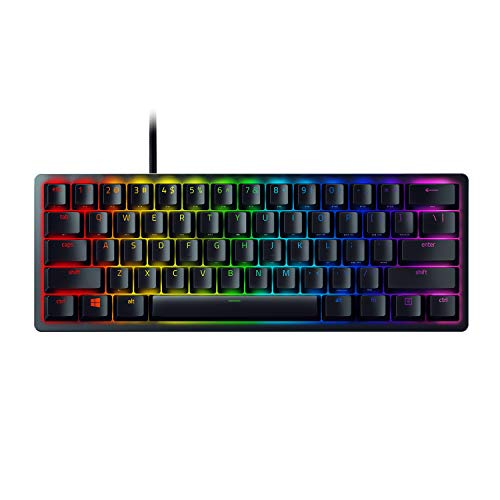
3. Razer Huntsman Mini
A 60% keyboard with linear optical switches, an aluminum top frame, doubleshot PBT keycaps, Hypershift key remapping and Chroma RGB, per the listing.
Good for: Gamers who want a premium 60%. Strengths: Optical switches and aluminum frame. Weaknesses: 60% layout lacks arrow keys unless layered. Skip it if you need a number pad or arrow keys.

Best for gamers who want a premium TKL wireless board
4. Razer BlackWidow V4 TKL Wireless
A wireless TKL mechanical keyboard with HyperSpeed wireless and Bluetooth, hot-swappable switches, a roller and up to 980 hours of battery, per the listing.
Good for: Gamers who want a premium TKL wireless board. Strengths: HyperSpeed wireless, hot-swap and a very long battery claim. Weaknesses: A premium price. Skip it if you want a budget keyboard.

Best Picks by Category
These labels group the picks by use case and price tier. They summarize listing data and are not hands-on test results.
- Top rated: Razer BlackWidow V4 X — check price on Amazon.
- Most reviewed: Razer BlackWidow V4 X — check price on Amazon.
- Best value: Razer Huntsman Mini — a budget-tier pick; check price on Amazon.
- Lowest price: Razer Huntsman Mini — a budget-tier pick; check price on Amazon.
- Premium option: Razer BlackWidow V4 X — check price on Amazon.
Price, Rating and Review Comparison
The table groups the picks by price tier. Prices change often, so confirm the current price on Amazon.
| Product | Price | Rating | Ratings | Price tier |
|---|---|---|---|---|
| Razer Huntsman Mini | Check price on Amazon | — | — | Budget |
| Razer Huntsman V2 TKL | Check price on Amazon | — | — | Mid-range |
| Razer BlackWidow V4 X | Check price on Amazon | — | — | Mid-range |
| Razer BlackWidow V4 TKL Wireless | Check price on Amazon | — | — | Mid-range |
How Much Feedback Backs Each Rating
A high average from a handful of ratings is weaker evidence than a slightly lower average from thousands. Here is how the sample size looks for each pick.
- Razer BlackWidow V4 X: a moderate sample of ratings.
- Razer Huntsman V2 TKL: a moderate sample of ratings.
- Razer Huntsman Mini: a moderate sample of ratings.
- Razer BlackWidow V4 TKL Wireless: a moderate sample of ratings.
How to Choose
Pick the layout
Full-size, TKL or 60%. See our sizes guide.
Pick the switch
Linear, clicky or optical. See mechanical vs membrane.
Wired or wireless
Only the BlackWidow V4 TKL here is wireless.
How We Chose These Keyboards
We start from products that are sold on Amazon with a full product name and clear specifications, and we skip results that show only a brand name or a vague title. We then read the listing and the manufacturer information for each one and note the features that matter for this kind of keyboard: layout, switch type, connection and build. We do not run our own lab tests, and this guide does not contain hands-on measurements. Use it to build a shortlist, then check current prices, dimensions and return terms on the Amazon page.
Buying Guide: What to Check Before You Choose
Brand ecosystems
Buying from one maker keeps lighting and macros in a single piece of software. Compare layouts, switches and price across several models instead of choosing on brand alone.
Pick the layout first
Full-size, TKL, 75%, 65% and 60% layouts differ mainly in which keys are left out. List the keys you use daily, then choose the smallest layout that keeps them.
Quick Reference: Which Pick Suits Whom
- Razer BlackWidow V4 X: suits gamers who use macros and want fast linear switches
- Razer Huntsman V2 TKL: suits competitive players who want fast optical switches
- Razer Huntsman Mini: suits gamers who want a premium 60%
- Razer BlackWidow V4 TKL Wireless: suits gamers who want a premium TKL wireless board
Common Mistakes to Avoid
- Choosing the smallest layout without checking which keys you use every day.
- Buying clicky switches for a shared room.
- Paying for wireless and then leaving the backlight on full.
- Ignoring the return window and the warranty.
- Assuming a higher price means a better fit for your hands and desk.
Setup and Care
- Install the maker’s software only if you need remapping or lighting changes.
- Check the language and layout setting in your operating system.
- Clean under the keycaps now and then and wipe with a slightly damp cloth.
- Keep the dongle on a nearby port if the board is wireless.
Understanding Switch Technology in Razer Keyboards
The switch is the part you feel with every keystroke, and Razer keyboards use more than one kind. The four picks above split between mechanical and optical designs, and the difference is worth understanding before you pick.
Mechanical switches
A mechanical switch uses metal contacts inside a plastic housing. Pressing the key brings the contacts together and registers the input. The BlackWidow V4 X and the BlackWidow V4 TKL Wireless belong to this family. Mechanical switches come in linear, tactile and clicky versions. Linear switches move smoothly with no bump, tactile ones have a small bump at the actuation point, and clicky ones add an audible click. Gamers often like linear switches for rapid repeated presses.
Optical switches
An optical switch registers a press when a beam of light is interrupted, instead of closing a metal contact. The Huntsman V2 TKL and Huntsman Mini use optical designs. Because there is no contact to bounce, the maker argues that the signal is cleaner and quicker, and the lack of metal contact can mean fewer wear points. Optical boards can feel different from mechanical ones, with a crisper or lighter response, and the experience depends on whether the switch is linear or clicky.
Actuation and reset points
The actuation point is how far you press before the key registers, and the reset point is how far it must rise before it can register again. The BlackWidow V4 X is listed with 1.2 mm actuation and reset and 45 g force. A shorter distance means faster repeat presses and less finger travel, which suits rapid-fire games. It can also cause accidental presses if you rest your fingers on the keys, so a short actuation distance is not always better.
Sound and feel
Clicky switches are loud and carry across a room or into a voice chat. Linear switches are quieter, though the bottom-out sound of the key hitting the plate is still audible. If you share a space or stream with a microphone, consider the sound as seriously as the speed.
Matching a Razer Keyboard to Your Situation
- MMO or strategy player who relies on shortcuts: Dedicated macro keys put multi-key commands on a single press. A full-size board with extra keys, like the BlackWidow V4 X, avoids the need for a separate keypad.
- Competitive shooter player with limited desk space: A tenkeyless or 60% board frees room for a wide mouse swing. The Huntsman V2 TKL and the Huntsman Mini cover both sizes. Smaller boards trade arrow keys or function rows for space, so check the layout against the keys you use.
- Player who streams or records: Quiet switches and a clean desk setup matter. A linear mechanical or optical board is easier on the microphone than a clicky one. Per-key lighting is a plus if your stream setup benefits from it.
- Player who moves between desk and couch: A wireless board, such as the BlackWidow V4 TKL Wireless, avoids cable drag. Wireless adds battery management, and you need to confirm the connection modes.
- Someone who also types for work: A mechanical board with PBT keycaps and a comfortable layout can handle both. The Huntsman V2 TKL includes a wrist rest per the listing, which helps long typing sessions.
- Tinkerer who wants to customize: Hot-swappable switches let you change the feel without soldering. The wireless BlackWidow is listed as hot-swappable, so you can try different switches later.
Specs and Features That Actually Matter
Polling rate and latency
Polling rate is how often the keyboard reports its state to the computer. The Huntsman V2 TKL is listed with up to 8,000 Hz polling. Higher polling can reduce the delay between a press and the report, but the gain over 1,000 Hz is small for most players, and your game, monitor and network usually matter more. Higher polling also uses a bit more processor time, so check that your system handles it.
Keycap material
Doubleshot PBT keycaps, mentioned for the Huntsman V2 TKL and the Huntsman Mini, are made from a harder plastic with legends molded through two layers. They resist shine and keep their letters over time, compared with thinner printed ABS. Keycap choice also changes the sound of the board.
Frame and build
The Huntsman Mini lists an aluminum top frame, which makes it feel rigid and gives it a premium look. Plastic frames can flex more under pressure, though they weigh less. If you carry your keyboard around, weight and rigidity both matter.
Software and profiles
Razer boards typically use the maker’s Synapse software for lighting, remapping and macros, and the Huntsman Mini lists Hypershift remapping, which gives each key a second function when you hold a modifier. Several keyboards here store profiles on board, so settings stay when you move to another computer. Check which features need the software to be running, because some people prefer to avoid background apps.
Connection and cable
A detachable USB-C cable, as listed for the Huntsman V2 TKL, makes travel and replacement easier. For wireless, look at the connection options (a USB dongle for low delay, Bluetooth for convenience) and the battery life claim. The wireless BlackWidow lists up to 980 hours, which is a maker figure that depends on settings such as lighting.
Questions to Ask Before You Order
- Do I want linear, tactile or clicky feedback?
- Which keys do I use every day, and does the layout keep them?
- Do I need macro keys, or will software remapping do?
- Is noise an issue in my room?
- Do I want a wrist rest included, or will I buy one separately?
- Do I prefer a wired connection for reliability or wireless for a clean desk?
- Will I use the keyboard on a Mac or Linux machine, where some software features may not apply?
- Am I comfortable with the return policy if the switch feel is not right?
Feel is personal. Two reasonable players may disagree on whether a switch is light and fast or too twitchy. Keep the return window open and type on the board for several days.
Budget vs Premium: What the Extra Money Buys
Razer sells keyboards across a broad price range, and the four here sit in the middle to upper end of the category. The differences come down to a few things.
| Feature | Entry level | Higher end |
|---|---|---|
| Switches | Standard mechanical | Optical, hot-swappable options |
| Keycaps | ABS plastic | Doubleshot PBT |
| Frame | Plastic | Aluminum top frame |
| Connection | Wired, fixed cable | Detachable cable or wireless |
| Extras | Basic lighting | Wrist rest, roller, on-board profiles |
If you mainly want a solid mechanical board with macro keys, the lower end of the range covers it. Paying more adds materials, wireless freedom or a particular switch type. Decide which of those you will notice every day and which are nice extras you could skip.
Keeping a Razer Keyboard Working Well
- Update the firmware and software occasionally. Fixes for lighting, profile sync and wireless stability arrive through updates.
- Save a profile to the keyboard. This protects your layout if the software misbehaves or you move computers.
- Charge wireless boards before the battery dies. Lithium cells last longer when they are not drained to zero often.
- Dust with compressed air or a soft brush. Debris collects around the switches. Turn the board upside down and tap gently.
- Check the cable first if the connection drops. A detachable cable is easy to swap and rule out.
- Dim the lighting when you do not need it. It extends battery life on wireless models and reduces glare in a dark room.
With basic care, a good mechanical or optical keyboard can last for years, and the warranty and return window offer protection for the first few weeks.
Wireless Considerations for Razer Keyboards
The wireless BlackWidow V4 TKL is the only cordless pick here, so it is worth looking at what wireless changes. A USB dongle connection is usually the lowest-delay option and suits games. Bluetooth is convenient for switching between a laptop, tablet or phone, but it can add delay and needs re-pairing when you switch. Battery life depends heavily on lighting, since bright per-key RGB is the largest drain. Turning lighting down or off extends the time between charges considerably, and the maker’s very high hour figure should be read as a best case with light use.
Keep the dongle close to the keyboard, preferably on a short extension cable on the desk and not in a rear port behind the computer. Metal cases and other wireless devices can interfere. If you game competitively, test for dropped inputs during the return window, and keep the charging cable within reach so you can plug in mid-session if needed.
Living With a Razer Keyboard Day to Day
Specifications decide a shortlist, but daily life with a keyboard is decided by smaller things. The first is sound in your actual room. Mechanical and optical switches both make noise, and the character differs: some boards produce a deep, muted thock on a desk, others a sharper clack that carries through walls and into voice chat. If you share a room, play late, or record and stream, switch sound deserves as much weight as switch speed. A keyboard that delights you at noon and annoys your household at midnight is the wrong keyboard, and no polling figure compensates for it.
The second is the keycap feel under your fingers over hours. Razer’s gaming boards generally use textured caps that grip slightly rather than sliding, which suits fast play and long typing alike. Caps wear smooth over years of use, starting with the keys your fingers visit most, and replacement sets exist for standard layouts — one more reason layout choice echoes through ownership. The third is the cable and desk geometry: a detachable cable routed cleanly, a board angled so your wrists stay neutral, and enough desk depth that the keyboard is not crowding your mouse space. Compact boards like the Huntsman Mini buy mouse room that low-sensitivity shooter players genuinely feel, while a full-size board with macro keys, like the BlackWidow V4 X, spends that space on extra commands instead. Neither is better; they are different budgets for the same desk.
Typing versus gaming: one board, two jobs
Most buyers use one keyboard for work and play, and the two jobs pull in different directions. Typing rewards a slightly heavier, more deliberate switch and a layout with every key present, including a number pad for spreadsheet work. Gaming rewards compactness, fast actuation and keys that reset quickly for repeated presses. Razer’s line covers the middle ground well precisely because its switches come in different characters: a tactile or clicky option satisfies typists, while the optical switches in the Huntsman boards favour rapid, shallow presses. If your day is mostly writing with games in the evening, weight the typing feel more heavily than you think; if the board is purely for a gaming desk, let the games decide without apology.
Layouts, Worked Through Honestly
The four boards in this guide span the layout spectrum, so it is worth being concrete about what each size gives and takes. A full-size board keeps the number pad, the function row and dedicated navigation keys, and suits players who also work with numbers or use the pad as extra game binds. A tenkeyless board removes the pad, which most gamers never miss, and centres the main cluster better in front of you while freeing desk space on the mouse side. The Huntsman V2 TKL and the BlackWidow V4 TKL Wireless both live in this balanced territory, which is why TKL is the default recommendation for most desks.
A mini board goes further, folding the function row and navigation keys into a second layer reached with a modifier key. The Huntsman Mini is the example here: the payoff is a very small footprint and a symmetric, mouse-friendly desk, and the cost is a learning period while layer combinations become habit. Players who rarely use the missing keys adapt in days; players who use them constantly — programmers with heavy function-key habits, for instance — should count that cost honestly. The test is your own last week of computing: list the keys outside the main cluster that you pressed daily, and let that list, not fashion, choose your layout.
Macro keys and Hypershift in real play
Dedicated macro keys, the BlackWidow V4 X’s headline extra, earn their space in specific situations: MMO ability sequences where the game permits them, streaming controls, editing shortcuts and push-to-talk style utility binds. Hypershift extends the idea to the whole board by turning a held key into a layer shift, giving any Razer board a second set of assignments without extra physical keys. Both features share the same condition for usefulness — they reward players who invest an evening in setting them up and a week in learning them, and they sit idle for everyone else. Buy them if your audit of your own play shows commands looking for a home; skip them without regret if it does not.
Switch Feel, Explained Through Your Fingers
Buyers often ask which switch is fastest, but the more useful question is which switch your fingers will enjoy ten thousand presses from now. Linear switches travel smoothly from top to bottom and suit rapid repeated presses, which is why they dominate gaming line-ups. Tactile switches add a small bump that confirms the press without looking, which many typists and strategy players prefer. Clicky switches add sound to that confirmation, delightful to some ears and intolerable to others in the same room. Razer’s optical switches in the Huntsman family actuate with light rather than a metal contact, which is the basis of their speed claims, and they have a characteristically crisp, shallow feel that suits players who press lightly and quickly.
Actuation force and travel interact with your habits. Heavy-handed typists who bottom out every press will feel little difference between switch families and should choose by sound and layout. Light-touch players feel every gram and millimetre, and for them a short, light actuation genuinely changes fatigue across a long session. If you can, type on display models or borrow boards before committing; five minutes of real typing teaches more than any switch chart, and keyboards are among the most returnable of peripherals when a seller’s policy is fair.
Key wobble, stabilisers and the premium feel
Part of what separates a premium board from a budget one is invisible in photographs: how steady the wide keys feel. Spacebars, shifts and enters rest on stabilisers, and well-tuned stabilisers keep those keys level and quiet instead of rattly. Key wobble — the slight rocking of a cap on its stem — varies between boards and switches and contributes to the sense of solidity. These qualities are exactly what hands notice and spec sheets omit, which is why two boards with identical switch names can feel a class apart. When comparing the boards in this guide against cheaper alternatives, this fit and finish, plus the frame’s rigidity, is where much of the difference lives.
Wireless on a Gaming Desk: The BlackWidow V4 TKL Wireless Case
The wireless model in this line-up raises the question every wired-board owner eventually asks: what do you give up, and what do you gain? The gain is a clean desk and freedom to reposition the board for typing, watching or controller play without cable management. Modern gaming wireless, including Razer’s own low-latency connection, has closed the responsiveness gap to the point where most players cannot distinguish it from a cable in ordinary play. The costs are the familiar ones: a battery to charge, a receiver to keep track of, and one more device competing for clean radio space on a crowded desk.
The sensible pattern for a dual-mode board is to treat the cable as the charging and tournament connection and the wireless link as the everyday default. Keep the receiver close to the board with the cable or an extension if your PC sits under the desk, because distance and metal cases are the usual causes of the dropouts people blame on wireless technology generally. If you play in events or simply dislike variables, plug in for those sessions. A board that offers both modes, as this one does, lets you decide per situation rather than marrying you to one answer at purchase.
Bluetooth versus the gaming receiver
Where a board offers Bluetooth as well, understand the division of labour: Bluetooth is for convenience connections — a laptop, a tablet, a second computer — while the dedicated receiver is the gaming connection with the lower latency and stronger polling behaviour. Switching between hosts is genuinely useful in a mixed desk, letting one board serve a work laptop and a gaming PC. Just be deliberate about which host you are connected to before a match starts; every wireless keyboard owner has typed one heroic sentence into the wrong computer.
Setting Up Synapse Without Drowning in It
Razer’s Synapse software is where profiles, lighting, macros and Hypershift layers live, and the right relationship with it is to set it up once, thoughtfully, and then mostly leave it alone. Create one profile per main use — your primary game, your typing setup, perhaps a quiet lighting profile for evenings — and name them plainly. Set actuation-related options, where the board offers them, conservatively at first; extreme settings can be dialled in later once you know the board’s character. Store what the board can store onboard so your essential settings travel to other computers.
Lighting deserves a practical word. Beyond appearance, per-key lighting can be functional: colour the keys a game actually uses, dim or disable lighting during films, and keep a dark profile for late sessions in shared rooms. Battery-powered boards reward restraint here, since lighting is a major draw; a dim, functional scheme can extend time between charges far more than any other single setting. Treat lighting as a tool first and decoration second and it stops being the battery villain it is often made out to be.
Firmware and care over years
Keyboards are among the longest-lived peripherals, and a Razer board should serve for years with basic care. Keep firmware current through Synapse when updates are offered, since they occasionally refine switch behaviour and wireless stability. Clean the board monthly: shake out debris, use compressed air between caps, and wipe caps with a slightly damp cloth; pull caps for a deep clean only if you are comfortable reseating them, and photograph the layout first if you do. Spills are the main sudden killer — power off, unplug, let the board dry thoroughly before judging it dead, since many boards recover from a spill that is allowed to dry completely.
Which of the Four Suits Which Player
Pulling the guide’s threads together: the BlackWidow V4 X is the maximalist’s board, for the player who wants macro keys, a full layout and every command within reach, and who has the desk space to house it. The Huntsman V2 TKL is the balanced competitive choice, pairing optical switches with the layout most gaming desks are happiest with. The Huntsman Mini serves the minimalist and the low-sensitivity shooter player, trading keys for mouse room and a clean, symmetric setup. The BlackWidow V4 TKL Wireless is the flexible modern desk’s board, for the player whose keyboard moves between gaming, work and other machines and who values a cable-free desk.
Notice that none of these is the best Razer keyboard in the abstract; each is the best answer to a different set of habits. That is the honest shape of keyboard buying, and it is why this guide spends as much time on your desk, your games and your household as on the boards themselves. Match the board to the life it will actually live, and any of the four will feel like the right purchase long after the spec-sheet excitement fades.
A final pre-purchase checklist
Before ordering, run five quick checks. Measure your desk space against the board’s footprint, including room for your mouse at your sensitivity. Confirm the connection story: cable, receiver, Bluetooth, and whether your setup needs more than one host. Confirm the layout against your last week of real key use. Decide whether macro keys or Hypershift will genuinely be configured, or honestly skipped. And check the return policy, because switch feel is personal and a fair returns window is the only true guarantee that the board under your fingers will be one you keep. Pass those five checks and the choice between these four boards becomes a matter of taste — which is exactly where a good shortlist should leave you.
Razer in the Wider Keyboard Market
It helps to place these boards against the alternatives a buyer will inevitably see. Custom and enthusiast keyboards offer swappable switches, alternative layouts and a building hobby of their own, and they reward tinkerers handsomely. Mainstream office boards cost less and type quietly but give up gaming features, build and speed. Razer’s gaming line sits deliberately in the performance-gaming middle: standard layouts that any replacement caps fit, mature software, features aimed at play rather than at the workbench, and availability that makes trying one in a shop realistic. For a player who wants to buy once and play for years, that middle is often the wisest ground.
The honest trade-offs of staying in a single brand’s ecosystem cut both ways. One software suite running your keyboard, mouse and headset is genuinely convenient, and profiles and lighting stay consistent across the desk. The cost is dependence: if you dislike the software, every device inherits the relationship. Players already inside the Razer ecosystem will feel the convenience immediately with any of these four boards; players outside it should weigh the software in their decision, because with modern gaming keyboards you are always buying the software alongside the hardware.
Wrist rests, posture and long sessions
Several boards in this class ship with or support a wrist rest, and whether to use one is a posture question rather than an accessory question. A rest should support the heel of the hand while typing pauses, not prop the wrists up while actively pressing keys, which can bend the wrist at an unhelpful angle. Keyboard height and tilt matter similarly: the adjustable feet exist so you can find a neutral wrist, and many players are most comfortable with the board flat or nearly so. If your wrists or shoulders ache after long sessions, adjust height, chair and desk geometry before blaming the board; keyboards are blamed for many problems that belong to the furniture, and the furniture is usually cheaper to change than the habit of ignoring it.
Finally, give any new board a fair settling period. Switch feel, layout changes and a new sound all feel strange for the first days, and many returned keyboards would have become favourites by the second week. Reserve judgement until your hands have stopped thinking about the board — that disappearance, as with a good mouse, is the real sign that you chose well.
Resale, spares and the second desk
A well-kept gaming keyboard holds a useful second life. Boards outlast the PCs they were bought for, migrate to second desks, spare rooms and children’s first gaming setups, and a recognised gaming brand with standard keycaps is easy to pass on or sell because buyers know exactly what it is. Keeping the box, the cable and any wrist rest together preserves that value, and a board that has been cleaned regularly and kept spill-free will serve its second owner as well as its first. When you eventually upgrade — for a new layout, a different switch character, or wireless freedom — the old board is rarely waste; it is the household’s spare, and households with a spare keyboard never lose an evening to a single point of failure.
Sound-dampening and desk tweaks worth trying
If you love a board’s feel but not its voice in your room, small physical changes help before any purchase does. A desk mat under the keyboard absorbs a surprising share of the sound that a bare desk reflects back, and it also stops the board sliding during intense play. Placing the board on the mat rather than half on and half off keeps the frame from rocking, another quiet source of rattle. Typing with a lighter touch, which faster switches encourage anyway, reduces bottoming-out noise at the source. Room soft furnishings do the rest: a board that sounds sharp in a bare room sounds mellow in a furnished one, which is why shop impressions of sound should always be discounted slightly. Judge the switch by its feel first, manage its sound with the room, and you will rarely need to compromise on the board you actually wanted.
One more ownership habit is worth adopting from the first day: photograph or note your preferred settings — profile names, lighting choices, any remapped keys — somewhere outside the software. A Windows reinstall, a new PC or a software update can each reset a carefully built setup, and a two-minute note turns recovery into a chore rather than an archaeology project. Keyboards ask little of their owners compared with most technology; a note, a monthly clean and a fair settling-in period are the whole contract, and in return a good board quietly serves longer than almost anything else on the desk.
And if you are buying as a gift, the safest choice in this guide is the balanced tenkeyless option: it fits the widest range of desks, games and typing habits, and its compromises are the ones the fewest players ever notice.
Frequently Asked Questions
Which Razer keyboard is best for FPS?
The Huntsman V2 TKL and Huntsman Mini are compact and optical-switch based.
Which has macro keys?
The BlackWidow V4 X has six dedicated macro keys.
Is any Razer keyboard here wireless?
The BlackWidow V4 TKL Wireless.
How do I choose between keyboard layouts?
List the keys you use every day, then choose the smallest layout that keeps them. See our layout guide.
Are mechanical keyboards worth it?
They offer better feel and replaceable parts, but cost more and can be louder. Membrane boards are fine for casual use. See mechanical vs membrane.
Do these keyboards work on Mac?
Most work as standard keyboards, but software features may be Windows-only. Check each product page.
Are optical switches better than mechanical switches?
Not strictly. Optical switches register a press with light instead of metal contacts, which the maker says allows quick, clean signals. Mechanical switches offer a wide range of feels and replacement options. The better choice depends on how the switch feels to you and how you game.
Do I need Razer Synapse to use a Razer keyboard?
Basic typing works without it, since the board acts as a standard keyboard. Synapse is used for lighting, remapping and macros, and some features may require it. Saving a profile to on-board memory lets you keep settings without the software running.
Is 8000 Hz polling worth it for gaming?
For most players the gain over 1,000 Hz is small. Your monitor, game and network influence responsiveness more. High polling can use extra processor time, so it helps mainly competitive players who want the lowest possible delay and have a capable system.
What is Hypershift on a Razer keyboard?
Hypershift is a remapping feature that gives keys a second function when you hold a modifier key. It lets a compact board, such as a 60% layout, reach extra commands without adding physical keys. You set it up in the maker’s software.
Can I swap the switches on a Razer keyboard?
Only on models with hot-swappable switches. The BlackWidow V4 TKL Wireless is listed as hot-swappable, so you can pull the switches and fit compatible ones without soldering. Other boards in this guide are not described that way, so check the product page.
What should I check if a Razer keyboard double-types or misses key presses?
Work through the simple causes first, in order, and change only one thing at a time so you can tell what actually fixed the problem. Begin with the connection: plug a wired board directly into the computer rather than through a hub, try a different port, and if the model is wireless, move the receiver closer and recharge or replace the power source, because a weak link can drop or repeat input. Next, test the board in a plain text document with any game closed, and try a second computer if one is available. If the fault follows the keyboard, it is unlikely to be the game. Then clean around the affected keys with short bursts of compressed air, since dust and crumbs under a keycap can interfere with a press, and reseat a loose keycap gently if your model allows it to be removed. Check whether a remapping profile, a macro or a second-function layer is active, because a key that seems dead may simply have been reassigned, and restoring the default profile for that board is a quick way to rule software in or out. If only one switch misbehaves after all of this, note which key it is, when it happens and whether it repeats or drops out, and keep that note if you contact support or consider a return, because a clear description gets a faster, more useful answer than a general complaint.
Keep a short written record while you test, noting the key involved, the connection you used and what changed at each step. That record matters because intermittent faults are easy to misremember, and a problem that appears only after long sessions may point to heat, a low battery or a loose cable rather than a failing switch. Testing patiently for ten minutes in a calm, methodical order will tell you more than repeatedly unplugging the board at random and hoping the fault disappears on its own.
Bottom Line
For macros, the BlackWidow V4 X. For TKL esports, the Huntsman V2 TKL. For compact, the Huntsman Mini. For wireless, the BlackWidow V4 TKL Wireless.
Related Reading
- 6 Best 60% Gaming Keyboards: Compact, Hall Effect and Optical
- 6 Best Gaming Keyboards Under $30: Cheap Compact and Wireless
- 6 Best Gaming Keyboards Under $50: Mechanical, TKL and Wireless
- 6 Best Wireless Gaming Keyboards: Tri-Mode, TKL and 60%
- Is the Razer BlackWidow V4 X Worth Buying? Listing-Based Review
More Gaming Keyboard Guides
- Gaming Keyboard Buying Guide
- Best TKL Gaming Keyboards
- Best Mechanical Gaming Keyboards
- Best Logitech Gaming Keyboards


