The best premium PC cases are the ones that make a high-end build look good, run cool, and stay easy to work on. A premium case is not just a box: it is the airflow that keeps a hot graphics card cool, the cable management that keeps the build tidy, the glass panel that shows off the parts, and the build quality that makes the whole PC feel like it was worth the money. A cheap case can choke a powerful PC, while a good case lets every part run at its best, and it is the part of the build you see every day.
Every case below is a premium mid-tower PC case, and every linked model was checked against its listing title for brand and model before it was included. There is the Lian Li O11 Dynamic EVO for a dual-chamber showcase case, the Fractal Design North for a wood-front case that looks like furniture, the NZXT H7 Flow for an airflow-first mid-tower, the Phanteks XT Pro Ultra for a case with four large fans included, the Lian Li Lancool 216 for a high-airflow case with big front fans, and the NZXT H5 Flow for a compact airflow case. All six are ATX mid-tower cases, and all six were verified as new listings with their full model names in the titles.
Before you buy, check three things: the size of your graphics card and cooler against the case, the airflow against the heat your parts make, and the look against the room the PC will sit in. A long graphics card will not fit a short case, a hot CPU and GPU need real airflow rather than a glass box, and a case that looks wrong in your room will annoy you every day. The sections below walk through the choice step by step, so you can check your own parts against each pick before you order.
In this guide
Quick picks: best premium pc cases
| # | Product | Where to buy |
|---|---|---|
| 1 | Lian Li O11 Dynamic EVO | Check on Amazon |
| 2 | Fractal Design North | Check on Amazon |
| 3 | NZXT H7 Flow | Check on Amazon |
| 4 | Phanteks XT Pro Ultra | Check on Amazon |
| 5 | Lian Li Lancool 216 | Check on Amazon |
| 6 | NZXT H5 Flow | Check on Amazon |
How the picks were chosen for the best premium PC cases
Airflow came first. A premium case has to cool a high-end build, so the picks favour cases with mesh fronts, large fans, and room for radiators, over cases that are all glass and no air. The H7 Flow is described as an airflow-first ATX mid-tower, the H5 Flow is a compact airflow case, and the Lancool 216 is an airflow-focused case with two 160mm front fans. A case with a solid front panel and no intake was left out, because a premium case that cooks the parts inside it is not a premium case at all.
Build quality and design came second. A premium case should feel solid, with thick steel or aluminium, tempered glass that does not flex, and details like cable channels, dust filters, and a clean interior. The Fractal North has a genuine walnut wood front, which is the most distinctive design here, the O11 Dynamic EVO has a flexible dual-chamber layout with tempered glass, and the Phanteks XT Pro Ultra has four 140mm fans included, which is the most generous fan bundle here. A case with thin panels or a flimsy frame was left out.
Finally, we checked that every pick is a complete PC case sold as a new listing, with a brand and model that match the listing title exactly. Two cases that were considered, the Corsair 4000D Airflow and the be quiet! Pure Base 500DX, had no genuine new listing for the exact model: the Corsair results were the newer 4000D RS Frame and the 4000D RGB Airflow, which are different models, and the be quiet! results were the newer Pure Base 501 DX, so they were left out. Renewed listings were avoided in favour of new ones, and every pick below is a new case with its full model name in the title.
Showcase, wood, or airflow: which premium case fits your build
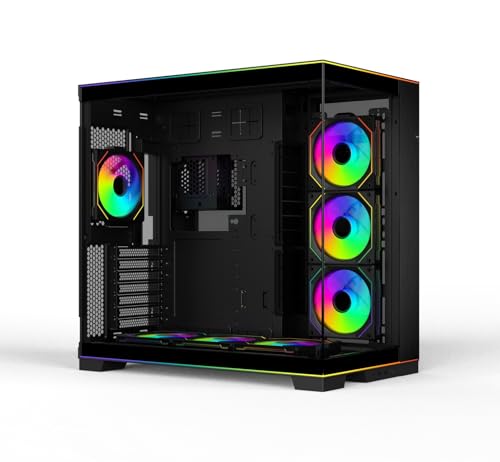
A showcase case is the right fix when you want to show off the parts. The Lian Li O11 Dynamic EVO is the showcase pick here: a dual-chamber case with tempered glass panels, a flexible layout, and room for three large radiators. It is the case for a build with RGB lighting, a liquid cooler, and a graphics card you want to see, and it looks best on a desk where the glass is visible. If your build is meant to be seen, this is the case to buy.
A wood-front case is the right fix when you want a PC that looks like furniture, not like a gaming machine. The Fractal Design North is the wood pick here: a genuine walnut wood front, a tempered glass side panel, two 140mm fans, and a Type-C USB port, in an ATX airflow mid-tower case. It is the case for a living room or an office where a normal gaming case would look out of place, and it proves that a premium case can be beautiful without RGB lighting everywhere.
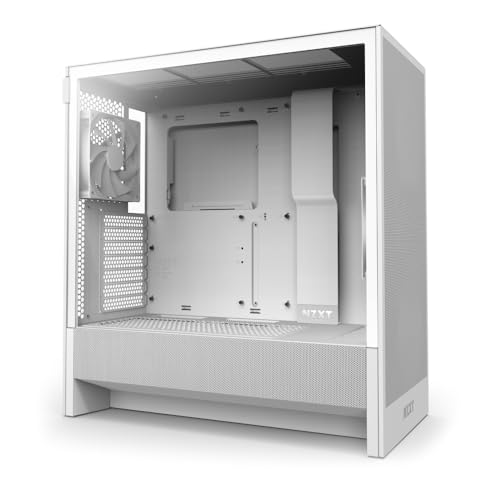
An airflow case is the right fix when your parts run hot and you want the coolest temperatures. The NZXT H7 Flow is the airflow pick here: an airflow-first mid-tower with bottom-mount fans for direct GPU cooling and support for a 420mm front radiator. The Lian Li Lancool 216 and the NZXT H5 Flow are the other airflow picks, with big front fans and mesh panels that let air through. If you have a hot graphics card or a powerful CPU, buy an airflow case, because cool parts run faster and last longer.
How size, cooling, and cable management change the choice
Size matters because a premium case has to fit your parts, and a case that is too small for your graphics card is useless. All six cases here are ATX mid-towers, which fit most graphics cards and coolers, but you still need to check the maximum GPU length and the maximum cooler height in the listing. The O11 Dynamic EVO is the roomiest here, with space for large radiators, while the H5 Flow is the most compact, so check your parts against the case dimensions before you buy.
Cooling matters because a premium case should come with good fans and room for more. The Phanteks XT Pro Ultra comes with four 140mm fans, which is the most generous bundle here, the Lancool 216 comes with three PWM fans including two 160mm front fans, and the Fractal North comes with two 140mm fans. A case with no fans included costs more by the time you buy them, so count the fans in the listing, and check the radiator support if you plan to use a liquid cooler.
Cable management matters because a tidy build runs cooler and is easier to work on. The O11 Dynamic EVO has a dual-chamber layout that hides the cables behind the motherboard tray, the H7 Flow has clean cable routing with channels, and the Lancool 216 has room for up to ten fans with space to route their cables. A case with no cable channels will look messy no matter how careful you are, so check the interior photos in the listing before you buy, and buy a case with room to hide the cables.
Matching the case to your parts, your desk, and your room
Your parts are the first check. Measure your graphics card, your CPU cooler, and your power supply, and compare them with the case dimensions in the listing. A long graphics card needs a long case, a tall air cooler needs a wide case, and a large power supply needs room in the basement. Do this check first, because it rules out more options than any other single step, and a case that does not fit your parts is a return.
Your desk is the second check. A premium case is bigger than a cheap one, so check that it fits on or under your desk, and that there is room for air to flow in and out. This check takes two minutes and saves a return, so do not skip it even if the listing looks right: a case that is too big for the desk will end up on the floor, where it collects dust and gets kicked.
Your room is the third check. If the PC sits in a living room, a wood-front case like the Fractal North will look better than a glass showcase case, and if it sits in a gaming room, a showcase case like the O11 Dynamic EVO will look right at home. If any of these three checks fails, keep looking: a case that fails one of them will annoy you for as long as you own it, and a PC case is something you see every day.
Quick picks at a glance
| Product | Design and size | Airflow and fans | Best for |
|---|---|---|---|
| Lian Li O11 Dynamic EVO | Dual-chamber showcase, E-ATX | Glass, radiator room | Showcase builds |
| Fractal Design North | Wood front, ATX mid-tower | 2x 140mm fans, glass | Living-room builds |
| NZXT H7 Flow | ATX airflow mid-tower | Bottom fans, 420mm radiator | Coolest temperatures |
| Phanteks XT Pro Ultra | Mid-tower, mesh front | 4x 140mm fans | Ready out of the box |
| Lian Li Lancool 216 | Mid-tower airflow, white | 2x 160mm + 1x 140mm fans | Big-fan airflow |
| NZXT H5 Flow | Compact ATX mid-tower | 2x 120mm fans, 360mm radiator | Compact airflow |
The best premium PC cases

LIAN LI O11 Dynamic EVO Gaming PC Case E-ATX Desktop Computer Case – Mid Tower Chassis
The Lian Li O11 Dynamic EVO is the showcase pick in this guide and the one to buy when you want to show off a high-end build. The listing describes an E-ATX desktop computer case, a mid-tower chassis with a flexible mode and configuration, a tempered glass panel, and a USB Type-C port, in black, with fans. It is a dual-chamber case that puts the motherboard and the graphics card on display behind glass, while the power supply and the cables hide in the back chamber, so the build always looks tidy.
In daily use, the O11 Dynamic EVO is the case for a build that is meant to be seen. The flexible layout lets you mount the graphics card vertically or horizontally, the tempered glass shows off the parts, and the room for three large radiators means even a hot build stays cool. The trade-off is size and price: it is a large case, and it costs more than the others here. For a showcase build on a desk, though, it is the most impressive case in this guide, and the one that makes a high-end build look like it cost what it did.
Key specs:
- E-ATX mid-tower chassis
- Flexible mode and configuration
- Tempered glass panel
- USB Type-C port
- Black, with fans
Strengths:
- Dual-chamber layout hides cables
- Tempered glass shows off the build
- Room for large radiators
Trade-offs:
- Large case, needs desk space
- Premium price
- Glass panels need cleaning
This case fits showcase builds, liquid-cooled PCs, and anyone who wants their build on display.
Best for: a showcase build on display
Not suited for: small desks, budget builds, or dusty rooms
Check price on Amazon: Lian Li O11 Dynamic EVO

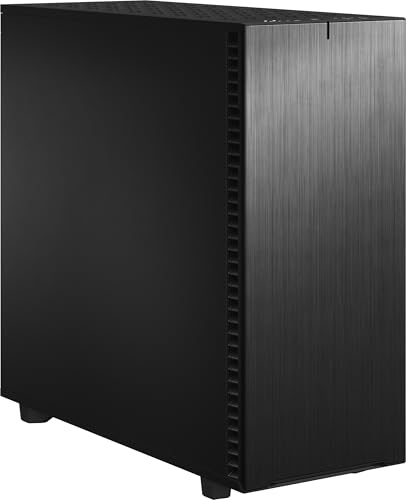
Fractal Design North Charcoal Black Tempered Glass Dark – Genuine Walnut Wood Front
The Fractal Design North is the wood-front pick in this guide and the one to buy when you want a PC that looks like furniture. The listing describes a charcoal black case with a tempered glass dark side panel, a genuine walnut wood front, a glass side panel, two 140mm Aspect PWM fans, and a Type-C USB port, in an ATX airflow mid-tower PC gaming case. It is the most distinctive case in this guide, and the only one with real wood, which makes it look at home in a living room or an office.
In daily use, the North is the case for a PC that does not look like a PC. The walnut front is warm and elegant, the tempered glass shows the parts without shouting about them, and the two 140mm fans keep the build cool and quiet. The trade-off is airflow: the wood front is beautiful, but it is not as open as a full mesh front, so a very hot build will run warmer than in the H7 Flow. For a living-room PC, though, it is the best-looking case in this guide by a long way.
Key specs:
- Charcoal black, tempered glass dark
- Genuine walnut wood front
- Two 140mm Aspect PWM fans
- Type-C USB port
- ATX airflow mid-tower case
Strengths:
- Real walnut wood front is beautiful
- Looks like furniture, not a gaming PC
- Quiet with two 140mm fans
Trade-offs:
- Wood front limits airflow slightly
- Premium price
- Glass needs regular cleaning
This case fits living-room PCs, offices, and anyone who wants a beautiful PC without RGB everywhere.
Best for: a beautiful PC for the living room
Not suited for: very hot builds, or gamers who want maximum airflow
Check price on Amazon: Fractal Design North

NZXT H7 Flow – Mid-Tower ATX Airflow PC Case – Black
The NZXT H7 Flow is the airflow pick in this guide and the one to buy when you want the coolest temperatures for a high-end build. The listing describes a mid-tower ATX airflow PC case in black, as an airflow-first ATX mid-tower, with bottom-mount fans for direct GPU cooling, 420mm front radiator support, and clean cable routing. It is the case for a hot graphics card, because the bottom fans blow cool air straight onto the GPU, which is where the heat is.
In daily use, the H7 Flow is the case for a powerful build that runs cool. The airflow-first design keeps temperatures down, the 420mm radiator support means a large liquid cooler will fit, and the clean cable routing keeps the interior tidy. The trade-off is the look: it is a clean, simple case, without the glass showcase of the O11 or the wood of the North. For a build where cooling matters more than looks, though, it is the best case in this guide.
Key specs:
- Mid-tower ATX airflow case
- Airflow-first design
- Bottom-mount fans for GPU cooling
- 420mm front radiator support
- Clean cable routing, black
Strengths:
- Best airflow in this guide
- Bottom fans cool the GPU directly
- Room for a 420mm radiator
Trade-offs:
- Plain look, no showcase glass
- No fans listed as included
- Large for a mid-tower
This case fits hot high-end builds, overclocked PCs, and anyone who puts cooling before looks.
Best for: maximum airflow for hot builds
Not suited for: showcase builds, or living-room PCs
Check price on Amazon: NZXT H7 Flow

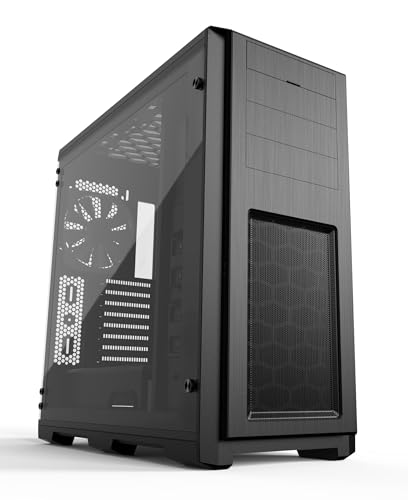
Phanteks XT Pro Ultra, Mid-Tower Gaming Chassis, 4X M25-140 Fans Included
The Phanteks XT Pro Ultra is the best-fans-included pick in this guide and the one to buy when you want a case that is ready to build in straight out of the box. The listing describes a mid-tower gaming chassis with four M25-140 fans included, a high-airflow performance mesh, a tempered glass window, and a USB-C 3.2 Gen2 port, in black. Four 140mm fans is the most generous fan bundle in this guide, and it means you do not have to buy extra fans to get good airflow.
In daily use, the XT Pro Ultra is the case for a builder who wants everything in the box. The four fans give strong airflow from the start, the mesh front lets air through, and the tempered glass window shows the build. The trade-off is the size: it is a mid-tower, so it is not as roomy as the O11 Dynamic EVO, and the fan bundle is the main feature, so the case itself is simpler than the Fractal North. For a first high-end build, though, it is the easiest case in this guide to get right.
Key specs:
- Mid-tower gaming chassis
- 4x M25-140 fans included
- High-airflow performance mesh
- Tempered glass window
- USB-C 3.2 Gen2, black
Strengths:
- Four 140mm fans included
- Mesh front for strong airflow
- Ready to build, no extra fans needed
Trade-offs:
- Less roomy than the O11 EVO
- Simpler design than the North
- Fans are the main feature
This case fits first-time high-end builders, gamers who want strong airflow out of the box, and anyone who dislikes buying extra fans.
Best for: strong airflow with fans included
Not suited for: showcase builds, or living-room PCs
Check price on Amazon: Phanteks XT Pro Ultra

Lian Li Lancool 216 Mid-Tower Airflow Case-3 PWM Fans-White-LANCOOL 216R-W
The Lian Li Lancool 216 is the big-fan airflow pick in this guide and the one to buy when you want the most air through the front of the case. The listing describes a mid-tower airflow case with three PWM fans, in white, as model LANCOOL 216R-W, with high cooling performance, dual front 160mm PWM fans and one rear 140mm PWM fan, an airflow focus, and room for up to ten fans. Two 160mm front fans move a lot of air quietly, which is the simplest way to keep a hot build cool.
In daily use, the Lancool 216 is the case for a build that needs air. The two 160mm front fans are larger and quieter than standard 120mm fans, the mesh panels let air through, and the white finish looks clean in a light-coloured build. The trade-off is the colour: this listing is white, so it suits a white build, and the case is focused on airflow rather than on showing off the parts. For a hot build in a white setup, though, it is the best airflow value in this guide.
Key specs:
- Mid-tower airflow case, white
- 3 PWM fans included
- Dual front 160mm PWM fans
- 1 rear 140mm PWM fan
- Up to 10 fans, LANCOOL 216R-W
Strengths:
- Two 160mm front fans move lots of air
- Quiet for the airflow
- White finish suits light builds
Trade-offs:
- White only in this listing
- Airflow focus, not showcase
- Needs a white build to look right
This case fits hot builds in white setups, airflow-focused builders, and anyone who wants big, quiet front fans.
Best for: big quiet front fans for airflow
Not suited for: black builds, or showcase PCs
Check price on Amazon: Lian Li Lancool 216


NZXT H5 Flow – Compact ATX Mid-Tower PC Case – Black
The NZXT H5 Flow is the compact airflow pick in this guide and the one to buy when you want a premium case that does not take up much room. The listing describes a compact ATX mid-tower PC case in black, with two included 120mm fans, 360mm front radiator support, and tempered glass. It is the smallest case in this guide, and it is the one to buy when your desk is small but your parts are powerful, because it fits a full ATX build in a compact body.
In daily use, the H5 Flow is the case for a small desk with a powerful PC. The compact size fits where a larger case will not, the two included fans and the 360mm radiator support keep it cool, and the tempered glass shows the build. The trade-off is room: a very long graphics card or a very large cooler may not fit, so check the dimensions before you buy. For a compact premium build, though, it is the best small case in this guide, and a great first airflow build.
Key specs:
- Compact ATX mid-tower case
- 2 included 120mm fans
- 360mm front radiator support
- Tempered glass side panel
- Black
Strengths:
- Compact size fits small desks
- Good airflow for its size
- Tempered glass shows the build
Trade-offs:
- Less room for very long GPUs
- Only two fans included
- Compact means tighter cable space
This case fits small desks, compact premium builds, and anyone who wants airflow in a small case.
Best for: a compact premium airflow build
Not suited for: very long graphics cards, or showcase builds
Check price on Amazon: NZXT H5 Flow
Buying guide
Measure your parts first
Measure your graphics card, your CPU cooler, and your power supply, and compare them with the case dimensions in the listing. A long graphics card needs a long case, a tall cooler needs a wide case, and a large power supply needs room in the basement. A case that does not fit your parts is a return, not a squeeze, so measure twice and order once.
Plan the airflow
Decide where the air comes in and where it goes out: front and bottom fans should bring cool air in, and rear and top fans should push hot air out. A case with a mesh front, like the H7 Flow or the Lancool 216, lets air through easily, while a case with a solid front needs more fans to compensate. Keep the cables tidy, because a mess of cables blocks the airflow you paid for.
Count the fans
Check how many fans the case includes, and how many more you need. The Phanteks XT Pro Ultra includes four fans, the Lancool 216 includes three, and the Fractal North includes two, while the H7 Flow lists no fans as included, so budget for them. A case with no fans costs more by the time you buy them, so count the total cost, not just the case price.
Check the radiator support
If you plan to use a liquid cooler, check the radiator support in the listing: the H7 Flow supports a 420mm front radiator, the H5 Flow supports a 360mm radiator, and the O11 Dynamic EVO supports three large radiators. A radiator that does not fit the case is a return, so check the size and the mounting points before you buy the cooler.
Think about dust
A case with dust filters on the intakes will stay cleaner longer, and a case without them will fill with dust in months. Check the filters in the listing, clean them every month or two, and keep the PC off the floor, because the floor is where the dust is. A clean PC runs cooler and quieter than a dusty one.
Build in the right order
Install the power supply and the motherboard first, then the cooler, then the graphics card, and cable-manage as you go, not at the end. A build that is cabled as you go is tidier than one that is cabled afterwards, and a tidy build is easier to upgrade later. Take your time, because a rushed build is a messy build, and a messy build runs hotter.
Setting up and everyday care
Keep the case clean and the fans working. Clean the dust filters every month or two, and blow the dust out of the case with compressed air every few months, holding the fans still while you do it. Check that the fans are spinning freely and not making noise, because a noisy fan is usually a dusty fan, and a fan that stops spinning will let the parts overheat. A clean case is a cool case, and a cool case is a fast case.
Look after the glass and the cables. Wipe the tempered glass with a microfibre cloth, not with paper towels, because paper can scratch it, and do not use cleaning sprays with ammonia on it. Check the cables every few months, and make sure none of them has come loose or is touching a fan, because a loose cable in a fan is noisy and can damage both. If you move the PC, take the graphics card out first, because a heavy card can damage the slot if the case is bumped.
Common mistakes to avoid
Buying a case that does not fit the GPU
A long graphics card will not fit a short case, and a case that is 5 mm too short is a return. Measure the card and the case before you buy, because the graphics card is the most expensive part, and the case has to fit it, not the other way around.
Ignoring airflow for looks
A case that is all glass and no air will cook the parts inside it. Buy a case with mesh and fans, not just glass, because cool parts run faster and last longer than hot parts, and a beautiful case with a throttling GPU is a bad case.
Forgetting the fans
A case with no fans included costs more by the time you buy them, and a case with too few fans will run hot. Count the fans in the listing, budget for extras if you need them, and remember that a fan is cheaper than a new graphics card.
Skipping the dust filters
A case without dust filters will fill with dust in months, and a dusty PC runs hot and loud. Buy a case with filters on the intakes, clean them regularly, and keep the PC off the floor, because the floor is where the dust is.
Building in the wrong order
A build that is cabled at the end is a mess, and a messy build runs hotter and is harder to upgrade. Install the parts in order, cable-manage as you go, and take your time, because a rushed build is a messy build.
Our recommendation
For most high-end builds, the NZXT H7 Flow is the pick: the best airflow in this guide, room for a 420mm radiator, and a clean design that fits any room. If you want to show off the build, buy the Lian Li O11 Dynamic EVO instead, because its dual-chamber layout and tempered glass make a high-end build look like it cost what it did. If you want a PC that looks like furniture, the Fractal Design North with its walnut front is the most beautiful case here.
If you want the best value, the Phanteks XT Pro Ultra comes with four fans and strong airflow out of the box, and the Lian Li Lancool 216 is the best airflow value with its two 160mm front fans. For a small desk, the NZXT H5 Flow is the most compact premium case here. Whichever you choose, measure your parts first, plan the airflow, and count the fans before you order.
Related reading on Reviewstook: For the rest of the build, see our guides to the best airflow PC cases, the best full-tower PC cases, and the best mid-tower PC case for beginners under 100.
Frequently asked questions
What is the best premium PC case?
The NZXT H7 Flow is the best all-round premium case, with the best airflow in this guide and room for a 420mm radiator. The Lian Li O11 Dynamic EVO is the best showcase case, the Fractal Design North is the best-looking case, and the Phanteks XT Pro Ultra is the best value, with four fans included.
How big a case do I need for a high-end GPU?
It depends on the card: measure the graphics card and compare it with the maximum GPU length in the case listing. All six cases here are ATX mid-towers, which fit most graphics cards, but a very long card may need the roomiest case, like the O11 Dynamic EVO. Measure before you buy, because a card that does not fit is a return.
Is airflow or looks more important in a PC case?
Airflow is more important, because a case that cooks the parts will throttle them, and a throttling GPU is slower than a cool one. A case can have both, like the Fractal North, which looks beautiful and cools well, but if you have to choose, buy the case with better airflow, because cool parts run faster and last longer.
Do I need extra fans for a premium case?
It depends on the case: the Phanteks XT Pro Ultra includes four fans, the Lancool 216 includes three, and the Fractal North includes two, so those are ready to build in. The H7 Flow lists no fans as included, so budget for fans if you buy it. Count the fans in the listing before you order.
What is the difference between a mid-tower and a full-tower case?
A mid-tower case fits an ATX motherboard and most graphics cards in a medium-sized body, while a full-tower case is larger, with room for more drives, more radiators, and bigger parts. All six cases here are mid-towers, which suit most high-end builds, and a full-tower is only needed for very large builds with many drives or radiators.
Can I fit a liquid cooler in a premium case?
Yes. The H7 Flow supports a 420mm front radiator, the H5 Flow supports a 360mm radiator, and the O11 Dynamic EVO supports three large radiators. Check the radiator support in the listing before you buy the cooler, because a radiator that does not fit the case is a return.
How do I keep a PC case clean?
Clean the dust filters every month or two, and blow the dust out of the case with compressed air every few months, holding the fans still while you do it. Keep the PC off the floor, because the floor is where the dust is, and wipe the tempered glass with a microfibre cloth, not with paper towels.
Is tempered glass safe on a PC case?
Yes. Tempered glass is strong and safe in normal use, but it can shatter if it is dropped or hit hard, so handle it carefully when you build. Do not overtighten the screws, do not put the panel on a hard floor, and if you move the PC, take the glass panel off first or carry the case carefully.