The best PC cases with optical drive bays are getting harder to find, because most modern cases have dropped the 5.25-inch bay entirely in favour of glass panels and airflow. That is a problem if you still use a Blu-ray drive, a DVD burner, a disc-based game or movie collection, or a front-panel card reader that needs a 5.25-inch slot. It is also a problem for builders who keep a hot-swap bay or a fan controller in that slot. The six cases in this guide still include real 5.25-inch bays, and they are not leftover stock: they are current, well-built cases from Fractal Design, Phanteks, be quiet!, Cooler Master, and Thermaltake that happen to respect the fact that some builders still use discs.
The six cases below cover every size and budget a disc-using builder needs. There is the Phanteks Enthoo Pro for full-tower builders who want room for everything, the be quiet! Pure Base 600 for quiet office builds, the Fractal Design Define 7 XL and Define 7 for silent modular builds in two sizes, the Cooler Master Silencio S400 for compact sound-dampened builds, and the Thermaltake Versa H21 for the lowest sensible budget. Every case in this guide is a complete PC case, not a part or an accessory, and every linked model was checked against its listing title for brand and model before it was included. Every case here has at least one real 5.25-inch external bay for an optical drive.
Before you buy, check three things: whether the case fits your motherboard size, whether it has enough 5.25-inch bays for the drives you own, and whether your graphics card and cooler fit inside it. A case that is too small for your board, a case with one bay when you need two, or a graphics card that is too long for the case are the three most common ways a case purchase goes wrong. The best PC cases with optical drive bays in this guide were chosen for real 5.25-inch bays, solid build quality, sensible airflow, and the kind of plain, durable design that looks right in a home office or a studio, not just in a gaming room.
In this guide
Quick picks: best pc cases with optical drive bay
| # | Product | Where to buy |
|---|---|---|
| 1 | Phanteks Enthoo Pro | Check on Amazon |
| 2 | be quiet! Pure Base 600 | Check on Amazon |
| 3 | Fractal Design Define 7 XL | Check on Amazon |
| 4 | Fractal Design Define 7 | Check on Amazon |
| 5 | Cooler Master Silencio S400 | Check on Amazon |
| 6 | Thermaltake Versa H21 | Check on Amazon |
How the picks were chosen for the best PC cases with optical drive bays
A real 5.25-inch bay came first, and it was a hard requirement, not a nice-to-have. Every case in this guide has at least one external 5.25-inch bay that accepts a standard optical drive, and most have two. Cases that only offer a slim laptop-style slot, a 3.5-inch bay with an adapter, or no bay at all were excluded, no matter how good they are in other respects. The bay count was recorded for each case, because a builder with a Blu-ray drive and a fan controller needs two bays, while a builder with one DVD burner needs only one.
Build quality and airflow came second, because a case with bays is useless if it cooks the components inside it. Every case in this guide is a steel chassis from an established maker, with proper fan mounts, dust filters, and cable management, and every case was checked for a sensible balance between silence and airflow. The silent cases in this guide use sound-dampening material and solid front panels, while the airflow cases use mesh fronts and room for large fans. A case that looks good on a desk but runs hot was excluded, because a hot case throttles the graphics card and shortens the life of every part inside it.
Finally, we checked that every pick is a complete PC case sold as a new listing, with a brand and model that match the listing title exactly. Case accessories such as dust covers, drive cages sold separately, and fan packs were excluded, and renewed listings were avoided in favour of new ones. Size and compatibility were recorded from each listing: ATX, micro-ATX, and full-tower support, the number of pre-installed fans where stated, and the front-panel features the case actually provides, so the comparison table reflects what the seller states, and buyers should confirm the current specifications, including graphics card clearance, on the product page before ordering.
Why optical drive bays disappeared, and why they still matter
Optical drive bays disappeared from most cases for a simple reason: most buyers stopped using discs. Games moved to downloads, movies moved to streaming, and operating systems moved to USB installers, so case makers traded the 5.25-inch bays for glass side panels, vertical GPU mounts, and front radiators. That trade makes sense for most builders, but it leaves a real minority without a home: archivists with Blu-ray collections, musicians with CD libraries, offices with disc-based software, and anyone who still burns discs for clients or family. For those builders, a case without a bay is not a case at all.
The 5.25-inch bay is also useful for more than discs. It is the standard slot for hot-swap drive cages, fan controllers, card readers, and front-panel USB hubs, and builders who use those accessories need the bay just as much as disc users do. A case with two 5.25-inch bays gives you options: a Blu-ray drive in one and a card reader or fan controller in the other. The cases in this guide keep that flexibility, which is why they remain popular years after their release, even as newer cases drop the bay entirely.
The practical lesson is to buy the bay before you need it, not after. Adding an optical drive to a case without a bay means an external USB drive on the desk, with its own cable and power supply, which is slower and messier than an internal drive. An internal drive costs less, runs faster, and stays out of sight, and a case with bays costs no more than a case without them. If there is any chance you will use a disc in the next few years, buy a case with at least one 5.25-inch bay, and buy two if you use a card reader or a fan controller as well.
How many 5.25-inch bays do you actually need
One bay is enough if you only need a single optical drive. A Blu-ray drive or a DVD burner takes one 5.25-inch slot, and a single-bay case such as the Cooler Master Silencio S400 in this guide is the right choice for a compact build where space matters more than expansion. One bay keeps the case small and the front panel clean, and it is all most disc users will ever need. If you only burn the occasional disc or watch the occasional Blu-ray, one bay is the sensible choice.
Two bays are the sweet spot for most builders, because they cover a drive plus one accessory. The Phanteks Enthoo Pro, the be quiet! Pure Base 600, the Fractal Design Define 7, the Define 7 XL, and the Thermaltake Versa H21 in this guide all offer two 5.25-inch bays, which means a Blu-ray drive and a card reader, or a DVD burner and a fan controller, or two optical drives for disc-to-disc copying. Two bays also give you a spare slot for the future, which is worth having in a case you will keep for five years or more.
Three or more bays are rare in modern cases, and they belong to full-tower builds with serious expansion needs. The full-tower cases in this guide, the Enthoo Pro and the Define 7 XL, offer the most room for drives, radiators, and storage, and they suit builders who keep a large drive collection or run a home server alongside a desktop. For most buyers, two bays are enough, and the extra size of a full tower is only worth it if you genuinely need the room. Buy the bays you need, not the bays you might imagine needing.
Silent cases or airflow cases: which suits a disc build
Silent cases suit disc builds in offices, studios, and living rooms, because an optical drive spinning up is already audible, and a quiet case keeps the rest of the system from adding to the noise. The Fractal Design Define 7 and Define 7 XL, the be quiet! Pure Base 600, and the Cooler Master Silencio S400 in this guide are all sound-dampened cases, with solid panels and damping material that absorb fan noise. They run a few degrees warmer than mesh cases, but for a productivity or media PC that is a fair trade, and the drive noise stays contained.
Airflow cases suit disc builds with powerful graphics cards, because a hot graphics card needs fresh air more than it needs silence. The Phanteks Enthoo Pro and the Thermaltake Versa H21 in this guide favour airflow and space, with room for large fans and radiators, and they suit builders who game or render video as well as using discs. The trade-off is noise: an airflow case is louder under load, and the optical drive will be more audible. For a gaming PC that also burns discs, airflow is the right priority.
For most buyers, the decision comes down to where the PC lives and what it does. A PC on a desk in a quiet room should be a silent case. A PC under a desk in a gaming setup should be an airflow case. Either way, check the fan mounts and the dust filters before you buy, because a case that cannot be cleaned will get louder and hotter over time. The cases in this guide all have proper filtration and sensible fan layouts, so the choice is about your room, not about the case.
Quick picks at a glance
| Product | 5.25-inch bays | Size and style | Best for |
|---|---|---|---|
| Phanteks Enthoo Pro | Two 5.25-inch bays | Full tower, tempered glass | Maximum room builds |
| be quiet! Pure Base 600 | Two 5.25-inch bays | ATX midi tower, silent | Quiet office builds |
| Fractal Design Define 7 XL | Two 5.25-inch bays | E-ATX full tower, silent | Large silent builds |
| Fractal Design Define 7 | Two 5.25-inch bays | Mid tower, silent | Balanced quiet builds |
| Cooler Master Silencio S400 | One 5.25-inch bay | Micro-ATX, silent | Compact quiet builds |
| Thermaltake Versa H21 | Two 5.25-inch bays | ATX mid tower, steel | Budget ATX builds |
The best PC cases with optical drive bays

Phanteks Enthoo Pro ATX Chassis, Tempered Glass
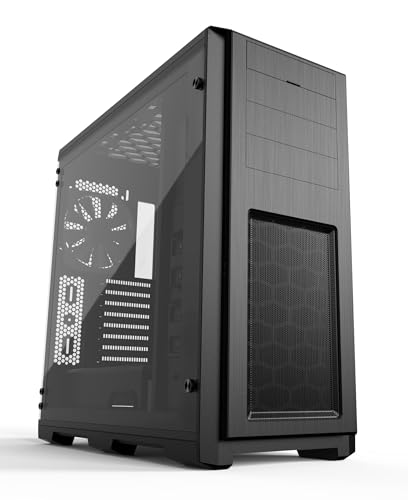
The Phanteks Enthoo Pro is the full-tower pick in this guide and the case for builders who want room for everything. The listing describes an ATX chassis with a tempered glass side panel, integrated RGB lighting, and a black finish. The Enthoo Pro is a classic full tower, with two 5.25-inch external bays for optical drives, room for large radiators and long graphics cards, and space for a large drive collection. It is the case for a builder who keeps a Blu-ray drive, a card reader, and a big storage array in the same machine, and who wants a full tower that will last through several upgrades.
Where the Enthoo Pro earns its place is space. A full tower gives you room to work, room for cables, and room for air, which means the build goes together easily and the components stay cool. The tempered glass panel shows off the build, and the integrated RGB lighting adds a touch of style without taking over the design. For a home server, a media editing rig, or a gaming PC with a disc collection, the Enthoo Pro is the case that never runs out of room, and the two 5.25-inch bays mean the optical drives fit alongside everything else.
Key specs:
- Full-tower ATX chassis
- Two 5.25-inch external bays
- Tempered glass side panel
- Integrated RGB lighting
- Black finish
Strengths:
- Full-tower space for drives, radiators, and long graphics cards
- Two 5.25-inch bays for an optical drive plus an accessory
- Tempered glass panel shows off the build
Trade-offs:
- Large and heavy, so it needs desk or floor space
- Full-tower size is overkill for a simple office build
- RGB lighting may not suit a plain office setup
This case fits builders who want a full tower with room for everything: optical drives, a card reader, large radiators, and a big drive collection.
Best for: full-tower builds that need two 5.25-inch bays and maximum room
Not suited for: compact desks, small rooms, or builders who only need one drive bay
Check price on Amazon: Phanteks Enthoo Pro

be quiet! Pure Base 600 Black ATX Midi Tower PC Case
The be quiet! Pure Base 600 is the quiet pick in this guide and the case for builders who want a silent PC that still takes discs. The listing describes a black ATX midi tower PC case with two pre-installed fans, designed for office and gaming use, with a repositionable hard drive cage. The Pure Base 600 has two 5.25-inch external bays, sound-dampening material on the panels, and a clean, plain design that fits a home office without drawing attention. It is the case for a builder who burns discs, edits audio, or works in a quiet room and wants the PC to stay out of the way.
What makes the Pure Base 600 work so well is that be quiet! built it for silence first. The sound-dampening material absorbs fan noise, the two pre-installed fans move enough air for a productivity build without spinning fast, and the repositionable hard drive cage lets you arrange the interior for airflow or for storage. The two 5.25-inch bays sit behind a clean front panel, so the optical drive is there when you need it and invisible when you do not. For a home office machine, a music production PC, or a family desktop that also plays Blu-ray discs, this is the case that keeps the room quiet.
Key specs:
- ATX midi tower PC case
- Two 5.25-inch external bays
- Two pre-installed fans
- Sound-dampening material
- Repositionable hard drive cage
Strengths:
- Two 5.25-inch bays in a quiet, sound-dampened case
- Two pre-installed fans, so it works out of the box
- Plain design fits a home office
Trade-offs:
- Solid front panel means less airflow than a mesh case
- Midi tower size limits the largest radiators
- No tempered glass panel for showing off the build
This case fits builders who want a quiet ATX PC for a home office or studio, with two 5.25-inch bays for an optical drive and a card reader.
Best for: quiet office builds that need two 5.25-inch bays
Not suited for: builders who need maximum airflow, or a showcase glass panel
Check price on Amazon: be quiet! Pure Base 600

Fractal Design Define 7 XL Black Solid E-ATX Silent Modular Full Tower Computer Case
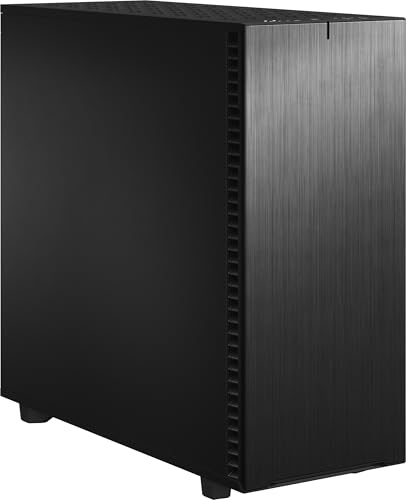
The Fractal Design Define 7 XL is the big silent pick in this guide and the case for builders who want the largest quiet case available. The listing describes a black solid E-ATX silent modular full tower computer case, built from brushed aluminium and steel. The Define 7 XL has two 5.25-inch external bays, room for E-ATX motherboards, and a modular interior that can be rearranged for storage, water cooling, or airflow. It is the case for a builder who wants a full tower that stays quiet, holds a large drive collection, and still takes an optical drive.
Where the Define 7 XL earns its premium is the combination of size and silence. The solid panels and sound-dampening material keep the system quiet, while the modular interior lets you remove drive cages, move panels, and arrange the case for the build you actually have. The two 5.25-inch bays sit behind the front door, so the optical drive is accessible and hidden at the same time, and the E-ATX support means the largest boards fit without compromise. For a home server, a media workstation, or a high-end build with many drives, the Define 7 XL is the case that holds everything and stays quiet doing it.
Key specs:
- E-ATX silent modular full tower
- Two 5.25-inch external bays
- Brushed aluminium and steel construction
- Solid side panel
- Black finish
Strengths:
- Largest silent case in this guide, with room for E-ATX boards
- Two 5.25-inch bays behind a clean front door
- Modular interior adapts to storage or cooling builds
Trade-offs:
- Very large and heavy, so it needs floor space
- Solid panel means no window to show the build
- The most expensive case in this guide
This case fits builders who want the biggest quiet case available, with two 5.25-inch bays, room for many drives, and support for E-ATX boards.
Best for: large silent builds and home servers with optical drives
Not suited for: small desks, tight budgets, or builders who want a glass showcase case
Check price on Amazon: Fractal Design Define 7 XL
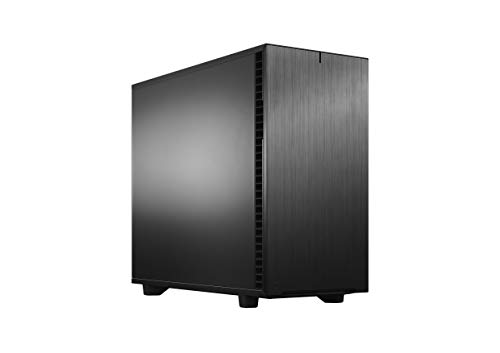
Fractal Design Define 7 Black Solid E-ATX Silent Modular Mid Tower Computer Case
The Fractal Design Define 7 is the balanced pick in this guide and the case most builders should buy. The listing describes a black solid E-ATX silent modular mid tower computer case, built from brushed aluminium and steel. The Define 7 has two 5.25-inch external bays, a modular interior, and the same silent design as its larger XL sibling, in a mid-tower size that fits on or under most desks. It is the case for a builder who wants a quiet, well-built case with optical drive bays, without the size and weight of a full tower.
In daily use, the Define 7 is the case that disappears. The solid panels and damping material keep fan and drive noise down, the modular interior lets you arrange the drive cages for the storage you have, and the two 5.25-inch bays take a Blu-ray drive and a card reader without a fuss. The mid-tower size fits standard ATX boards and long graphics cards, so it suits gaming PCs, editing rigs, and home office machines alike. For a builder who wants one case that does everything well, with optical drive bays included, the Define 7 is the safest choice in this guide.
Key specs:
- E-ATX silent modular mid tower
- Two 5.25-inch external bays
- Brushed aluminium and steel construction
- Solid side panel
- Black finish
Strengths:
- Two 5.25-inch bays in a quiet mid-tower size
- Modular interior adapts to storage or cooling
- Solid, well-built chassis from brushed aluminium and steel
Trade-offs:
- Solid panel means no window to show the build
- Mid-tower size limits the largest water cooling setups
- Heavier than a basic steel case
This case fits builders who want a quiet, well-built mid-tower case with two 5.25-inch bays, for gaming, editing, or office work.
Best for: balanced quiet builds that need two 5.25-inch bays
Not suited for: builders who want a glass panel, or the largest full-tower room
Check price on Amazon: Fractal Design Define 7

Cooler Master Silencio S400 Micro-ATX PC Case Tower
The Cooler Master Silencio S400 is the compact pick in this guide and the case for builders who want a small, quiet PC that still takes a disc. The listing describes a micro-ATX PC case tower with sound-dampening material, a reversible front panel, and an SD card reader. The Silencio S400 has one 5.25-inch external bay, which is the right count for a compact case, and it pairs that bay with a built-in SD card reader, which is exactly the combination a photographer or media worker needs. It is the case for a small desk, a small room, or a living-room PC that also burns discs.
What makes the Silencio S400 work so well in a small build is that Cooler Master did not waste the space. The sound-dampening material keeps the system quiet, the reversible front panel lets you choose which way the door opens, and the SD card reader means you can move photos from a camera without a separate adapter. The single 5.25-inch bay takes a Blu-ray drive or a DVD burner, and the micro-ATX size fits smaller motherboards and shorter graphics cards. For a compact home office machine, a media PC, or a photographer's workstation, the Silencio S400 is the case that fits the desk and the work at the same time.
Key specs:
- Micro-ATX PC case tower
- One 5.25-inch external bay
- Sound-dampening material
- Reversible front panel
- Built-in SD card reader
Strengths:
- Compact micro-ATX size with a real 5.25-inch bay
- Built-in SD card reader for photographers
- Sound-dampening material keeps it quiet
Trade-offs:
- Only one 5.25-inch bay, so no room for a second drive
- Micro-ATX size limits motherboard and graphics card choices
- Smaller interior is harder to build in than a mid tower
This case fits builders who want a compact, quiet PC with one optical drive bay and a built-in SD card reader, for a small desk or a media setup.
Best for: compact quiet builds with one optical drive and an SD reader
Not suited for: builders who need two drive bays, or full-size ATX boards
Check price on Amazon: Cooler Master Silencio S400
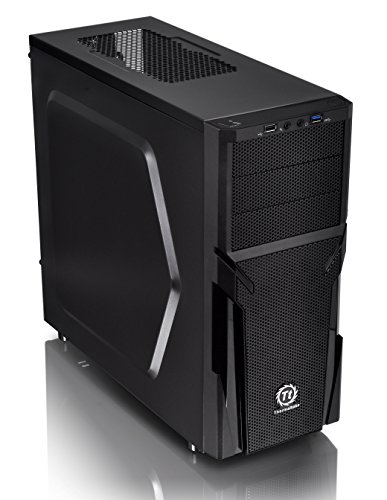
Thermaltake Versa H21 SPCC ATX Mid Tower Computer Chassis
The Thermaltake Versa H21 is the budget pick in this guide and the proof that a cheap case can still have real drive bays. The listing describes an SPCC steel ATX mid tower computer chassis, model CA-1B2-00M1NN-00, in black. The Versa H21 has two 5.25-inch external bays, room for a full-size ATX board, and a straightforward steel design with no frills. It is the case for a builder on a tight budget who needs an optical drive, a second bay for a card reader or fan controller, and a case that costs as little as possible while still doing the job properly.
In a budget build, the Versa H21 earns its place by spending nothing on looks and everything on space. The two 5.25-inch bays take a Blu-ray drive and an accessory, the ATX size fits standard boards and long graphics cards, and the steel chassis is sturdy enough to last through several upgrades. There is no tempered glass, no RGB, and no sound damping, but for a budget office machine, a family PC, or a first build, those extras do not matter. What matters is that the optical drive fits, the parts fit, and the case costs little enough to leave budget for the parts that decide performance.
Key specs:
- ATX mid tower computer chassis
- Two 5.25-inch external bays
- SPCC steel construction
- Model CA-1B2-00M1NN-00
- Black finish
Strengths:
- Lowest price in this guide with two 5.25-inch bays
- Full ATX size fits standard boards and long graphics cards
- Simple steel chassis that lasts through upgrades
Trade-offs:
- No sound dampening, so it is louder than the silent cases
- No tempered glass or styling features
- Basic cable management compared with higher cases
This case fits budget builders who want a full-size ATX case with two 5.25-inch bays at the lowest sensible price, for an office PC or a first build.
Best for: budget ATX builds that need two 5.25-inch bays
Not suited for: builders who want a quiet case, or a showcase glass panel
Check price on Amazon: Thermaltake Versa H21
Buying guide
Check the bay count before you buy
Count the 5.25-inch bays in the listing and compare them with the drives you own. One bay takes a single optical drive, while two bays take a drive plus a card reader, a fan controller, or a second drive. A case with one bay when you need two means an external drive on the desk, which is slower and messier than an internal drive. Buy the bays you need now, and one spare if you plan to add a card reader later, because a case is a five-year purchase.
Match the case to your motherboard size
A full-tower case fits E-ATX, ATX, and micro-ATX boards, a mid-tower case fits ATX and micro-ATX boards, and a micro-ATX case only fits micro-ATX and mini-ITX boards. Check the board size against the case, and check the standoff positions, because a board that does not fit is a return. The cases in this guide cover all three sizes, so there is a case here for every board, but the check takes a minute and saves a rebuild.
Measure the graphics card and the cooler
Graphics cards keep getting longer, and coolers keep getting taller, so measure both against the case clearance in the listing. A long graphics card needs a case with the drive cages removed or repositioned, and a tall air cooler needs a case with enough width. Check the maximum graphics card length and the maximum cooler height before you order, and leave a little room for cables and airflow, because a card that barely fits will run hot.
Plan the airflow, not just the bays
A case with bays still needs fresh air. Check the fan mounts, the dust filters, and the front-panel design before you buy, and plan for at least one intake fan and one exhaust fan. A silent case with solid panels runs warmer than a mesh case, so give it room to breathe and keep the filters clean. A case that cannot be cleaned will get louder and hotter over time, so check that the filters come out easily.
Think about where the PC will live
A PC on a desk in a quiet room should be a silent case, while a PC under a desk in a gaming setup can be an airflow case. A full tower needs floor space, a mid tower fits under most desks, and a micro-ATX case fits on a small desk. Measure the space before you order, and remember that a case you will see every day should look the way you want it to look, because you will live with it for years.
Setting up and everyday care
Install the case carefully and it will serve you for years. Remove the side panels and the front panel before you start, and keep the screws in a small tray so they do not get lost. Install the power supply first, then the motherboard, then the drives, and route the cables behind the motherboard tray before you connect them, because tidy cables mean better airflow and an easier build. Mount the optical drive in the 5.25-inch bay with the screws provided, connect the SATA data and power cables, and check that the drive tray opens and closes freely before you close the case.
Keep the case clean and the filters clear. Dust the front filter every month or two, and clean the interior with compressed air every few months, holding the fans still while you blow so they do not spin freely and wear their bearings. Check the optical drive occasionally by playing a disc, because a drive that sits unused for a year can develop a sticky tray, and a quick test keeps it working. A case that runs cool and clean lasts longer than one that runs hot and dusty, and the easiest way to keep it cool is clean filters and working fans.
Common mistakes to avoid
Buying a case without checking the bays
A case that looks right but has no 5.25-inch bay means an external USB drive on the desk, with its own cable and power supply. Check the bay count in the listing before you order, and confirm the bays are external 5.25-inch slots, not internal 3.5-inch bays that need an adapter.
Forgetting the graphics card length
A long graphics card that does not fit the case is a return, not an upgrade. Measure the card, check the case clearance in the listing, and remember that drive cages and front radiators eat into the available length. A card that barely fits will also run hot, so leave room for air.
Choosing silence when you need airflow
A silent case with solid panels runs warmer than a mesh case, and a hot graphics card will throttle. If your PC has a powerful graphics card, choose airflow over silence, or give the silent case extra fans and room to breathe. Match the case to the parts inside it, not to the look you want.
Ignoring the dust filters
A case with clogged filters runs hot and loud, and a case whose filters cannot be removed will never be cleaned properly. Check that the filters come out easily, clean them regularly, and the case will stay quiet and cool for years.
Our recommendation
If you want one case for a balanced build with optical drive bays, buy the Fractal Design Define 7 for its two 5.25-inch bays, quiet design, and modular interior in a mid-tower size. If you want the biggest case available, buy the Define 7 XL instead, because it holds the most drives and the largest boards while staying quiet. Both will serve you well for years, and the choice between them comes down to how much room you need.
If your budget is tight, buy the Thermaltake Versa H21, because it gives you two 5.25-inch bays and a full ATX size at the lowest price in this guide. If your build is compact, buy the Cooler Master Silencio S400 for its single bay, quiet design, and built-in SD card reader. If you want a full tower with a glass panel, buy the Phanteks Enthoo Pro, and if you want the quietest office case, buy the be quiet! Pure Base 600. Whichever case you choose, check the bay count, the board size, and the graphics card clearance before you order.
Related reading on Reviewstook: best mid-tower PC case for beginners under 100, best PC case for beginners under 100, and best PC case for budget builds under 100
Frequently asked questions
What is the best PC case with an optical drive bay in 2026?
There is no single best case, because the right case depends on your size and your noise tolerance. For a balanced quiet build, the Fractal Design Define 7 is the strongest pick. For the biggest build, the Define 7 XL is the best choice. For a full tower with a glass panel, the Phanteks Enthoo Pro is the pick, and for the lowest budget, the Thermaltake Versa H21 gives you two bays at the lowest price.
Do new PC cases still have optical drive bays?
Most new cases do not, because most buyers stopped using discs. The cases in this guide are the exceptions: they keep one or two 5.25-inch external bays alongside modern features such as USB-C, tempered glass, and modular interiors. If you need a bay, buy one of these cases, because the next generation of cases is unlikely to bring the bay back.
How many 5.25-inch bays do I need?
One bay is enough for a single Blu-ray or DVD drive. Two bays cover a drive plus a card reader, a fan controller, or a second drive, and two is the sweet spot for most builders. The cases in this guide offer one or two bays, and the full-tower cases offer the most room for drives and accessories alongside them.
Can I add an optical drive to a case without a bay?
You can use an external USB optical drive, but it is slower, messier, and more expensive than an internal drive, and it takes up desk space with its own cable and power supply. An internal drive in a case with a real 5.25-inch bay is faster, tidier, and cheaper, which is why this guide only includes cases with real bays.
Is a silent case or an airflow case better for a disc build?
A silent case suits a PC in a quiet room, because the optical drive is already audible when it spins up, and a quiet case keeps the rest of the system from adding noise. An airflow case suits a PC with a powerful graphics card, because the card needs fresh air more than it needs silence. Choose the case for the room the PC lives in and the parts inside it.
Will a full-tower case fit under my desk?
Measure before you order. A full tower such as the Enthoo Pro or the Define 7 XL is tall and deep, and it needs floor space rather than desk space. A mid tower such as the Define 7 or the Pure Base 600 fits under most desks, and a micro-ATX case such as the Silencio S400 fits on a small desk. Check the dimensions in the listing against the space you have.