The EN-EL15 battery family powers many Nikon DSLRs and mirrorless bodies, from the D7000 series to the D850 and several Z cameras. A separate charger lets you refill a spare while the camera is in use, and the options range from wall units to USB dual bays and a four-bay station.
The six chargers below differ in slot count, power source and connector. Specs come from each listing page. We have not used these chargers ourselves, and compatibility lists are the sellers’ own, so confirm your exact battery code before ordering.
As an Amazon Associate we earn from qualifying purchases. Links below are affiliate links, and they do not change the product information we give.

What to Look For
| Feature | Why it matters |
|---|---|
| Slots | One, two or four bays decide how many batteries refill together |
| Power input | Wall AC, USB or USB-C changes where you can use it |
| Battery code | EN-EL15, 15a, 15b and 15c are listed differently by each seller |
| Camera list | Match your model against the listing list |
In this guide
Specs at a Glance
| Charger | Slots | Input | Notes |
|---|---|---|---|
| LP EN-EL15 | 1 | AC 100 to 240 V | Output 8.4 V 600 mA; ABS body |
| K and F Concept | 2 | 5 V; Micro-USB and Type-C | 0.5 A; UL, CE, FCC listed |
| Norifon | 1 | Wall AC | Output 8.4 V 0.6 A; foldable plug; LED indicator |
| Tilta Station | 4 | USB-C, up to 45 W | 8.8 oz; 3 hour charge time per the listing |
| JJC Dual | 2 | 5 V USB | 54 g; 2.5 hour charge per the listing |
| teesvk MH-25A | 1 | AC 100 to 240 V | Barrel connector; LED status light |
The 6 Best Nikon EN-EL15 Battery Chargers

Top pickBest for a basic spare wall charger
1. LP EN-EL15 Battery Charger
A single-bay wall charger in an ABS body with AC 100 to 240 V input and 8.4 V 600 mA output. The seller lists it for the EN-EL15 and EN-EL15a with Nikon D500, D600 series, D750, D800 series, D810, D850, D7000 series and Z cameras, and describes overcharge, short circuit and temperature protection.
Suits: a basic spare wall charger. Strengths: worldwide voltage input. Weaknesses: one bay. Skip it if you want to charge two together.

Best for uSB charging at a desk or in a car
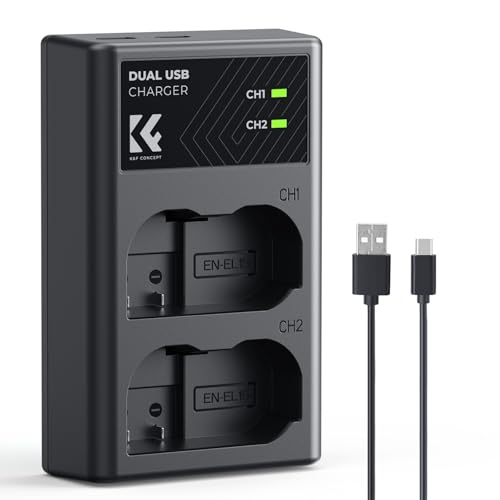
2. K and F Concept EN-EL15 Dual Slot Charger
A two-bay charger with Micro-USB and Type-C inputs and a 5 V supply. The listing names UL, CE, FCC and IEC compliance and a camera list that spans Nikon Z5, Z6, Z7, Z8 and many D-series bodies.
Suits: USB charging at a desk or in a car. Strengths: two bays and Type-C. Weaknesses: modest 0.5 A figure. Skip it if you want a four-bay station.

Best for travel with a folding plug
3. Norifon EN-EL15 Wall Charger
A single-bay wall charger with a foldable plug, 8.4 V and 0.6 A output, and an LED that shows no-load, charging and full states. The bullets say it works with worldwide AC voltages while the input field reads 240 volts, so check the plug on the page. The listing names the EN-EL15, 15A, 15B and 15E and a camera list from the Nikon 1 V1 to the D850.
Suits: travel with a folding plug. Strengths: a status light and a compact fold. Weaknesses: one bay and mixed voltage wording. Skip it if you need Z-series bodies confirmed.

View Norifon EN-EL15 Wall Charger for Nikon 1 V1 D500 D600 D610 on Amazon
Best for multi-battery shoots
4. Tilta EN-EL15 Portable Charging Station
A four-bay station that charges up to four EN-EL15C batteries at once with a stated maximum of 45 W over USB-C. The listing gives 8.4 V output, a 3 hour charge time and a weight of 8.8 ounces, and lists Z8, Z f, Z7 II, Z6 II and D850 among the cameras.
Suits: multi-battery shoots. Strengths: four bays. Weaknesses: bigger and needs a USB-C supply. Skip it if you carry only one spare.
Best for pocket carry
5. JJC EN-EL15 Dual Charger
A compact dual charger with a built-in USB cable, a 5 V input, 8.4 V output and a weight of 54 grams. The listing says two batteries are full in about 2.5 hours from a 5 V 2.2 A source and lists the EN-EL15, 15a and 15b with Z6 III, Z7 II and many D-series cameras.
Suits: pocket carry. Strengths: an attached cable and two bays. Weaknesses: the cable is fixed. Skip it if you need EN-EL15c confirmed.
View EN-EL15 EN-EL15a EN-EL15b Battery Charger Dual Charger Built-in USB Cable on Amazon
Best for an MH-25 style replacement
6. teesvk MH-25A Charger
A single-bay wall charger styled after the MH-25A, with an LED status light and a barrel connector. The listing gives AC 100 to 240 V in its bullets while a spec field says 240 volts, so confirm the plug and voltage on the page. It names the EN-EL15, 15a and 15b and lists Coolpix among compatible models.
Suits: an MH-25 style replacement. Strengths: a status light. Weaknesses: mixed voltage wording. Skip it if you want USB charging.
View MH-25A Battery Charger for Nikon EN-EL15 EN-EL15a EN-EL15b(c) Batteries on Amazon
Care and Setup
- Match the battery code to the charger listing before use.
- Use a power source that meets the input listed.
- Keep contacts clean and dry.
- Follow the maker’s instructions for charging and storage.
Mistakes to Avoid
- Buying an EN-EL20 charger, such as the Nikon MH-27, for an EN-EL15 battery.
- Assuming every seller list covers your exact camera.
- Using a weak USB source on a dual charger.
- Skipping the input voltage field on wall units.
EN-EL15 Versions and What Actually Differs
The EN-EL15 name covers several revisions of the same pack shape: the original, then the a, b and c versions. They share the same physical fit and voltage class, which is why a charger may list several codes together. The differences are in details such as capacity, in-camera USB charging support and compatibility with certain newer bodies. Nikon publishes which version each camera is designed to use, so the camera manual or the maker’s support pages are the best source rather than a charger listing.
Why does this matter for a charger? A wall or dual charger that lists only the earlier codes may still charge a newer pack, but a seller listing is not proof. Look for the exact code printed on your battery and compare it to the charger’s stated compatibility. If your code is missing from the list, ask the seller or choose a charger that names it. The same goes for cameras: a long list of bodies in a listing is the seller’s claim, and your own camera should appear on it.
Some newer cameras can charge a pack through their own USB port. That is convenient for travel, but it keeps the camera occupied and, depending on the body, may require a certain type of power source. A separate charger lets you refill spares while you keep shooting. It also reduces wear on the camera’s port, which is a small but real point when you charge often.
Finally, remember that older cameras in the family may use different charging contacts or chargers. Nikon’s own units use model codes, and not every code works with every pack. When in doubt, rely on the manual.
Slots, Charging Time and Choosing a Power Source
The number of bays decides how quickly you can prepare a kit for a shoot. A single-bay charger is simplest and works well for one spare overnight. A dual charger fills two packs in a session, and a four-bay station suits events, video work or several bodies. Charging time depends on the unit, the pack condition and the power supplied, and listings usually give a single estimate under ideal conditions. Treat it as a guide.
With multiple bays, power sharing matters. Some chargers split the available current between bays, which can lengthen charging when both are in use. USB chargers are especially sensitive to the source: a weak port on an old laptop or a low-power adapter can slow charging or fail to start it. Use a wall adapter or power bank rated for the output the charger lists, and check the cable. A charger that mentions a particular input, such as 5 V or USB-C with a stated wattage, is telling you what it needs.
Wall units with a built-in plug are simple and do not rely on cables. USB units are flexible: they work with laptops, power banks and car adapters, which is helpful if you travel or shoot in the field. Choose by where you will charge. At a desk, any option works. In a vehicle, a USB or car-powered unit is more practical.
- One spare, home use: single-bay wall charger.
- Two to three packs, travel: dual USB charger.
- Events or multi-camera kits: a multi-bay station and a capable power source.
Voltage, Plugs and Travel Use
If you carry a charger abroad, check the input voltage rating printed on the unit or in the listing. A charger marked for a broad range, often written as 100 to 240 V, can be used in many countries with only a plug adapter. A charger that lists a single voltage, or whose listing is inconsistent, should be checked carefully before you plug it into a different system. When the page contains conflicting statements, look at the label on the product itself or ask the seller.
Plug style is separate from voltage. A plug adapter changes the shape of the prongs but does not convert voltage. Folding plugs make a charger compact for a camera bag. Chargers with a separate cord offer flexibility but add bulk and one more item to lose.
For air travel, remember that lithium batteries are subject to airline rules. Spare packs are normally carried in cabin baggage, not checked baggage, and terminals should be protected from contact with metal. Rules differ by airline and country, so check current guidance before a trip. A small case with individual slots keeps contacts covered and prevents packs from touching keys or coins.
Power banks can be useful for USB chargers while travelling. Check the output rating and ensure the bank can supply the current the charger needs. Also carry a short spare cable, since cable failure is a common travel annoyance.
Finally, leave a little time. Do not rely on charging in the last hour before a shoot, and avoid charging in a bag or on soft furnishings where heat cannot escape.
Battery Care, Storage and Lifespan
Lithium-ion packs age with time and use. Capacity falls gradually, and a pack that once lasted a day of shooting may do noticeably less after several years. You cannot stop this, but you can slow it. Avoid leaving packs in a hot car, keep them away from direct sun and heat sources, and do not charge a pack that is visibly damaged, swollen or leaking.
For storage, a partial charge is generally better than full or empty for long periods. Follow the maker’s guidance and avoid leaving a pack drained for months. Store them in a cool, dry place and use a case that covers the terminals. Label packs or use a rotation system so that you use them evenly, which helps you spot a weak one.
Charging in cold weather can be a problem; allow a cold pack to warm to room temperature before putting it on a charger. In use, cold temperatures temporarily reduce runtime, so keep a spare in an inner pocket in winter.
Signs that it is time to replace a pack include a rapid drop in the battery indicator, shortened runtime, the camera showing a battery error, or a pack that becomes unusually warm while charging. A swollen case is a safety issue: stop using it, do not charge it, and dispose of it through a proper battery recycling point.
Finally, keep contacts clean. A dry cloth removes dust or fingerprints. Never use liquids on the terminals while they are connected.
Original Versus Third-Party Chargers: Questions to Ask
Camera makers sell their own chargers, and many third-party companies offer alternatives in different formats, such as dual bays, USB inputs and compact travel designs. Third-party units can be a practical choice, particularly when you want features the original does not offer. The key is to buy from a seller with clear specifications and a return policy, since quality and documentation differ widely between products.
Questions to ask before buying: Does the listing name your exact battery code and camera? What input does it need and what output does it give? Does it mention protections such as overcharge, short circuit or temperature control? Is there a status light that shows charging and full states? What is the warranty? Notice whether the product shows any recognized safety marks, and verify them through the maker rather than relying on a listing line.
When a listing contains inconsistent details, such as different input voltages in different fields, take that as a signal to look more closely or ask. Reading customer questions and photos of the actual label can help. Avoid chargers with no information on output at all.
Also think about future needs. If you plan to upgrade to a newer body that uses a different battery, a charger tied to one code is less useful. A USB-based unit can sometimes serve multiple devices with different adapters, but only if the maker says so. Keep the original charger as a backup, and test a new unit with a spare pack at home before relying on it for an important job.
Knowing Which EN-EL15 You Own
The EN-EL15 family covers several versions that look nearly identical but are not all the same. Checking the exact version matters for chargers, for camera compatibility and for replacement batteries.
- Printed code: look at the label on the battery for the letter that follows EN-EL15, if there is one, and compare it with your camera manual.
- Camera support: some older cameras do not work with the newest versions, and some features such as extended battery information may need a compatible body.
- Charger compatibility: a charger should name the batteries it supports. If your version is not listed, check the maker guidance.
- Physical condition: a battery that is swollen, leaking or damaged should not be charged. Follow local rules for disposal.
Make a habit of reading the camera manual for the approved battery types before you buy anything new.
Wall, Dual and USB Chargers Compared
Chargers for this battery come in a few forms, each suited to a different way of working.
| Charger type | Good for | Think about |
|---|---|---|
| Wall plug single | Home use with one battery | Needs a free outlet |
| Dual bay | Event shooters with spares | Slightly larger, check if bays charge at the same time |
| USB powered | Travel, power banks, car outlets | Needs a suitable cable and power source |
| Car adapter version | Road trips | Check input voltage on the label |
Charging Habits and Battery Care
Good habits make batteries last longer and keep you safe. Charge on a hard, non-flammable, uncluttered surface and do not cover the charger. Remove the battery when it is full if the maker suggests it, and never leave charging unattended overnight if the manual advises against it. Keep spare batteries in a case so the contacts do not touch metal objects. Avoid leaving batteries in a hot car or in freezing conditions, and allow them to reach room temperature before charging after cold shoots. Label your batteries with numbers so you can rotate them evenly, and note how long each one lasts in your camera. If a battery runs noticeably shorter than before, ask the maker or a service center about replacement, and recycle old cells through a proper collection point.
Travel and Backup Planning
If you fly with batteries, read the airline rules for lithium cells and carry them in your cabin bag with the contacts protected. Pack a charger that accepts the voltage of the countries you visit, or bring the right plug adapter, and check the label to see whether the charger covers a wide input range. For long shoots, plan a rotation: charge one set while the other is in the camera, and keep a written note of which batteries are full. A small pouch for charged and spent cells prevents mix-ups.
The Six Chargers Compared by Shooting Day, Not by Spec Sheet
A charging setup earns its keep on your busiest day, so compare the six picks by the day they serve. The Norifon EN-EL15 Wall Charger and the teesvk MH-25A Charger follow the single-pack wall pattern: plug in one battery, let it fill, and keep the routine simple at home. The K and F Concept EN-EL15 Dual Slot Charger and the JJC EN-EL15 Dual Charger suit photographers who rotate two packs and want both recovering at once from a USB source in a bag, a car or a hotel room. The LP EN-EL15 Battery Charger covers the straightforward spare-charger role many owners buy after a trip exposes a single point of failure. The Tilta EN-EL15 Portable Charging Station is the system choice, aimed at shooters juggling several packs who want them gathered, visible and charged in one place rather than scattered across sockets.
Reading a charger that seems to misbehave
A blinking light is information, not automatically a fault. Note the pattern, then check the simple causes in order: the pack is seated fully, the contacts on both battery and charger are clean and dry, and the power source can actually supply what a dual charger asks for. A pack that was deeply drained or left in a cold bag may charge slowly at first and then proceed normally once it warms to room temperature. If one slot misbehaves while the other works, swap the same pack between slots; the result separates a tired battery from a tired charger in a single test. Heat deserves respect but not panic: gentle warmth during charging is ordinary, while a pack that becomes uncomfortably hot, swells or smells unusual should be removed from service and handled according to local disposal guidance.
Keep a tiny log on the charger shelf: which packs went out, which came back empty, and which one seemed to fade early. Patterns that memory blurs become obvious on paper within a few shoots.
Rotation habits that stretch battery life
Number your packs and use them in rotation so the same battery is not always the spare and never the worker; even use evens out wear and reveals a fading pack while you still have healthy ones. Store packs partly charged rather than brim-full or empty when they will sit for weeks, keep them in a cool dry place, and charge the night before a shoot instead of living permanently on the charger. Any of the six chargers can support that routine. The difference is only how many packs it can ready while you sleep, pack and check the rest of the kit.
EN-EL15 Chargers FAQ
Which charger holds the most batteries?
The Tilta station lists four bays. The K and F Concept and JJC list two.
Which ones charge over USB-C?
The K and F Concept lists Type-C and Micro-USB inputs, and the Tilta lists USB-C.
Can I charge an EN-EL15 pack with any USB charger?
Only if the charger accepts the input it lists and your power source can supply it. A weak port can slow charging or fail to start it, so use an adapter rated for the output the charger needs.
How long do the packs take to charge?
Times vary by charger, bay count and the state of the pack. Listings give estimates under ideal conditions, so treat them as a rough guide and plan extra time.
Is it safe to leave a battery charging overnight?
Many chargers stop when the pack is full, but it is still sensible to charge on a hard, non-flammable surface and away from bedding. Follow the maker's guidance and unplug when finished.
Why is my charger light blinking?
The meaning depends on the model, but a blinking light often signals an error such as poor contact, a damaged pack or a mismatched battery. Check the manual, reseat the pack and try another one.
Can I carry spare batteries on a plane?
Spare lithium packs are generally required to go in carry-on baggage with terminals protected. Rules vary, so check your airline's current guidance.
Do I need a separate charger if my camera charges over USB?
Not strictly, but a separate charger lets you refill spares while you shoot and spares the camera's port. It is handy for long events and travel.
How do I know a pack is worn out?
Look for shorter runtime, a fast-dropping indicator and error messages. A swollen or hot pack should be retired and recycled promptly.
Building a Charging System for How You Actually Shoot
Charger choice stops being confusing once it is framed as a system question: how many batteries do you own, how fast do you use them, and where does charging happen? A photographer with two batteries who shoots on weekends needs very little: one reliable charger at home, used the night before, keeps both batteries ready. A photographer with four or more batteries, or who shoots long days back to back, needs throughput, and that is where dual-slot chargers and a deliberate rotation earn their cost.
Rotation is the unglamorous secret of battery reliability. Number your batteries discreetly, use them in order, and charge them in order, so every battery works and rests in turn instead of one favorite being cycled to exhaustion while others sit full for months. Batteries that sit unused still age, and batteries stored fully charged for long periods age faster than those stored partly charged, as the care guidance in this guide describes. A rotation spreads wear evenly and, just as usefully, reveals a weakening battery early, when it can be replaced calmly rather than discovered mid-assignment.
The night-before routine
Most charging failures are really scheduling failures. Build the habit of charging on return, not on departure: batteries go on the charger when the bag is unpacked, so they are ready whenever the next shoot appears, including the unplanned ones. A charger that lives permanently on the same shelf, plugged in and visible, supports that habit far better than one that must be found, untangled, and assembled each time.
Charging at events and on location
Long events reward a charging station mindset. Set the charger up at a fixed spot with spare batteries cycling through it, so a fresh battery is always a short walk away and spent ones are never mixed with charged ones. Keep the two groups physically separate, spent batteries in one pocket or pouch and charged in another, because the fastest way to lose a moment is to fit a battery you believe is fresh and find it is the one you removed an hour earlier.
Reading Charger Behavior: Lights, Times, and Heat
A charger’s indicator lights are a small language worth learning for the specific unit you own. The manual defines what each pattern means: charging, complete, and the fault indication that suggests a battery the charger cannot charge properly. When a battery triggers a fault indication, believe it. Remove the battery, let it rest, try once more in a different slot if the charger has one, and if the fault repeats, retire the battery from service. A battery that a charger refuses is telling you something about its internal condition, and arguing with it risks a failure in the camera at a worse moment.
Charging time is the other diagnostic. A battery that suddenly charges far faster than its siblings is often holding far less than it should; a battery that takes much longer may be struggling as well. You do not need instruments to use this information: simply noticing that one battery’s behavior has changed, and testing it in the camera against a known-good battery, separates a charger quirk from a battery problem. Mild warmth during charging is normal. A battery or charger that becomes genuinely hot, swells, smells, or hisses is not: stop, unplug, move it to a safe non-flammable surface, and do not use that battery again.
Why charge speed is not the whole story
Faster charging is convenient, and for a working photographer between jobs it can be essential, but it is not free. Charging generates heat, and heat is the long-term enemy of battery lifespan. A sensible pattern used by many owners is to charge at the ordinary pace for routine work and reserve any faster option for genuine time pressure. Whatever charger you choose, charging on a hard, clear surface with air around the unit, rather than buried in a bag or under papers, keeps temperatures where they should be.
Travel With EN-EL15 Batteries and Chargers
Air travel rules treat spare camera batteries as carry-on items: they belong in the cabin with you, terminals protected, each battery in its cap, a case, or its own pouch so contacts cannot short against keys or coins. Pack the charger in the same carry-on kit, and the whole power system travels as one unit that can be checked at a glance. Before an international trip, confirm the charger’s input range covers the destination’s voltage and carry the correct plug adapter; a charger that accepts a wide input range still needs the right physical plug, and discovering the gap at a hotel desk at midnight is a rite of passage best skipped.
At the destination, charge in the room rather than in transit where possible, and keep one battery in the camera and one fully charged in reserve at all times, so a day’s shooting never depends on finding an outlet at midday. Photographers heading somewhere remote add a USB-powered charging option to the kit, since vehicles, laptops, and power banks all speak USB, giving the batteries a path to charge wherever the day ends. The weight of a small secondary charger is trivial against the cost of a dead camera in a place you may never visit again.
Cold-weather shooting and warm batteries
Cold drains apparent battery capacity, sometimes dramatically, and the standard field technique is rotation through a warm pocket: the battery in the camera chills and flags, the spare rides against your body and stays capable, and swapping them revives the chilled one as it warms. Chargers matter here too, because a trip’s cold-weather success starts the night before, with every battery genuinely full. Bring batteries indoors to charge rather than leaving the charger in a freezing vehicle or tent, both for charge completeness and for the batteries’ long-term health.
When Batteries Age Out: Replacement and Disposal
Every rechargeable battery is a consumable with a finite life, and recognizing the end of that life is a skill. The signs are consistent: noticeably fewer shots per charge than the same battery once gave, a charge that drains quickly even in storage, swelling that makes the battery tight in its compartment, or repeated charger fault indications. Any one of these earns the battery a retirement. Mark it clearly the moment you decide, because an unmarked weak battery will find its way back into the bag at the worst possible time.
Retired batteries should go to battery recycling, never to household trash, and most camera shops, electronics retailers, and municipal programs accept them. Tape the contacts or return the battery in its cap for transport, the same short-circuit precaution as with working spares. When buying replacements, the guidance elsewhere in this guide applies in full: match the exact EN-EL15 variant your camera and charger expect, buy from a seller you trust, and be suspicious of prices that seem disconnected from the genuine article, since counterfeit camera batteries are a persistent problem and their failures range from short life to genuine hazard.
Keeping records that make replacement easy
A small habit pays off here: note the purchase date on each battery in fine permanent marker, and keep the count of batteries you own matched to a list somewhere simple. Dates turn lifespan questions into arithmetic, reveal whether a disappointing battery is actually old or genuinely faulty, and tell you when a whole set bought together is likely to fade together, which is exactly when a planned replacement beats an emergency one.
Questions Owners Ask About EN-EL15 Charging
Can I leave a battery on the charger after it finishes?
Modern chargers stop or maintain appropriately once charging completes, so an overnight stay on the charger is normal practice for most owners. For storage longer than a few days, though, take batteries off the charger and store them partly charged in a cool, dry place, as the storage guidance in this guide recommends, rather than leaving them topped up indefinitely.
Is it safe to charge a battery straight after a shoot?
Yes, with one exception: a battery that is hot from heavy use or from a hot environment should rest until it is near room temperature before charging. Charging a hot battery adds stress it does not need. The same logic applies in reverse in winter, when a very cold battery charges best after it has warmed indoors.
Why does my camera show a lower count than I expect?
Shot counts vary enormously with use: long exposures, extensive screen review, image stabilization, cold weather, and connected features all draw more power than the test conditions behind any headline figure. Judge a battery against its own history in your hands, not against a laboratory number, and investigate only a sudden change, which is the pattern that signals a real problem.
Should spares match the brand of the charger?
What matters is that batteries and charger are each made for the EN-EL15 system and its variants as described in this guide, and that both come from sources you trust. Mixing a reputable charger with reputable batteries is common practice. The combinations to avoid involve unknown batteries of any origin, which no charger can make safe or predictable.
The Quiet Goal: Power You Never Think About
A good charging setup is invisible. Batteries are full when you reach for them, spares rotate evenly, the charger lives in one place and behaves predictably, and the whole subject of power disappears from your attention, leaving it free for photographs. Reaching that state takes one deliberate pass: the right charger for your pattern of work, a rotation, a night-before habit, and a retirement rule for aging batteries. Everything in this guide points at that same unglamorous destination, and it is well worth the small effort to arrive there.
Charging Setups for Different Kinds of Photographers
A wedding photographer and a weekend hobbyist both use EN-EL15 batteries, and their ideal charging setups look nothing alike, which is precisely the point. The wedding photographer owns many batteries, shoots thousands of frames in a day, and cannot afford a power surprise; their setup centers on dual charging, a strict rotation, and spares that outnumber the cameras. The hobbyist owns two batteries and shoots twice a month; their ideal is one dependable charger, a night-before habit, and batteries stored sensibly between outings. Buying the working professional’s setup for hobbyist use wastes money and shelf space, while the reverse mistake risks the day itself.
Landscape photographers sit between the two, with a distinctive twist: their shoots are long but their frame counts modest, and their enemy is cold rather than volume. Their charging setup should emphasize completeness the night before and warm spare management in the field. Studio photographers, by contrast, often shoot tethered steps from an outlet, and for them the charger can live permanently at the studio station, with batteries rotating through it during the session itself. Matching the setup to the pattern, rather than to a generic idea of best, is the decision this whole guide keeps returning to.
Households and teams sharing batteries
Where several photographers share a pool of bodies and batteries, charging needs one extra layer: agreement. A shared shelf where charged batteries live, a shared rule that spent batteries go straight onto a charger or into a marked spent pouch, and dated batteries so age is visible at a glance prevent the tragedy of the commons in which everyone assumes someone else charged the spares. Teams that shoot together regularly often assign the power check to one person per event, the way they assign card formatting, because shared responsibility without a name attached is no responsibility at all.
Understanding What the Camera Tells You About Batteries
Many Nikon bodies offer battery information in their menus: a charge percentage, a shot count for the current charge, and an age or condition indicator for the pack. These readings turn battery management from guesswork into observation. Check them occasionally, especially before important work, and note the pattern over time. A battery whose reported condition has stepped down, or whose shot count per charge has fallen well below its earlier self in similar use, is giving fair warning, and fair warning is all a photographer needs to retire a battery on a calm Tuesday instead of during a ceremony.
The camera also teaches by behavior at the margins. A body that shuts down abruptly in the cold with a battery that showed a healthy charge indoors is describing temperature, not failure. A body that reports inconsistent levels with one particular battery, while behaving normally with others, is describing that battery. Reading these signals accurately, and cross-checking with a second battery before condemning anything, is the difference between a photographer who trusts their power system and one who carries anxiety in the bag alongside the spares.
Calibration and honest readings
Battery gauges estimate rather than measure, and their estimates drift, especially on batteries used in short, partial cycles. An occasional full, normal cycle of use and charge helps the camera’s estimate stay honest. If a battery’s reported level ever seems plainly wrong, such as dropping from full to empty in a handful of frames and then recovering, treat it as a data point about that battery’s health and watch it closely; repeated behavior of that kind is a retirement sign regardless of what any indicator claims.
Safety, Storage Rooms, and Sensible Precautions
Lithium batteries reward ordinary respect. Charge them on a hard surface away from flammable material, with the charger and battery where you can see them, and unplug a charger that behaves strangely rather than leaving it to be investigated later. Store batteries in a cool, dry place, neither in a hot vehicle nor against a damp exterior wall, with their caps on and nothing metal loose against their contacts. Keep them away from small children and pets, for whom a battery is a chewable object with serious contents.
Damaged batteries deserve a clear rule: a battery that is swollen, cracked, leaking, or was in a camera that took a serious fall gets quarantined, not tested in your best body. Place it in a non-flammable container, keep it away from other batteries, and take it to a recycling point that accepts damaged lithium batteries, telling them it is damaged so it is handled correctly. These precautions are brief to state and cheap to follow, and they are the reason battery incidents among careful photographers are mercifully rare.
Putting the Whole Power System on One Shelf
There is a small organizational idea underneath everything in this guide: treat batteries, chargers, caps, and spares as one system with one home. A single shelf, drawer, or case where chargers live plugged in, charged batteries stand in their row, spent batteries land in their marked spot, and the dated spares wait their turn turns power management from a recurring search into a glance. Photographers who adopt it stop asking where anything is, because the answer is always the same place.
Review that shelf a few times a year. Retire the batteries whose behavior has changed, replace the cable that has started to fray, confirm the travel charger and adapters are still with the kit, and check that the count of batteries matches the count you think you own. Ten minutes, two or three times a year, is the entire maintenance cost of a power system you can trust, and it is difficult to think of another part of photography where so little upkeep buys so much certainty.
The pre-trip power checklist
Before any trip that matters, run the same short list: every battery charged the night before, spares counted and capped, charger and correct plug adapter packed together, one battery in each body, and the USB charging option included if the destination is remote. Print it once and keep it in the battery case. Checklists exist because memory is least reliable exactly when a departure is busy, and power is the one system whose failure cannot be improvised around at the destination.
Chargers and the Second-Hand Market
Many EN-EL15 chargers change hands used, bundled with cameras or sold alone, and a used charger can be a sensible purchase with a few checks. Inspect the contacts for corrosion or damage, confirm the unit powers and indicates as its manual describes with a battery you trust, and check any cable and plug for fraying or looseness. A charger that runs unusually hot, buzzes loudly, or shows inconsistent indications with known-good batteries should be passed over, however attractive the price, because a charger is safety equipment as much as convenience equipment.
The same caution, doubled, applies to used batteries. A battery’s history is invisible: its age, its storage, and its treatment are all unknown, and its remaining life is a guess. Buy used batteries only from sellers who stand behind them, date them from the day they reach you, and watch their behavior over their first several cycles before trusting them to important work. A battery that earns trust gradually is a bargain; one trusted immediately is a gamble.
Documentation worth keeping
Keep the charger manual, physical or digital, with the charging shelf. The indicator patterns, fault meanings, and input specifications for your exact unit live there, and they are the first reference when behavior puzzles you. A photograph of the manual’s key page on your phone serves the same purpose on the road, where charging questions tend to arise at the least convenient hours.
The Short Version
For a plain wall unit, the LP, Norifon or teesvk. For two bays over USB-C, the K and F Concept. For pocket carry, the JJC. For four batteries, the Tilta.