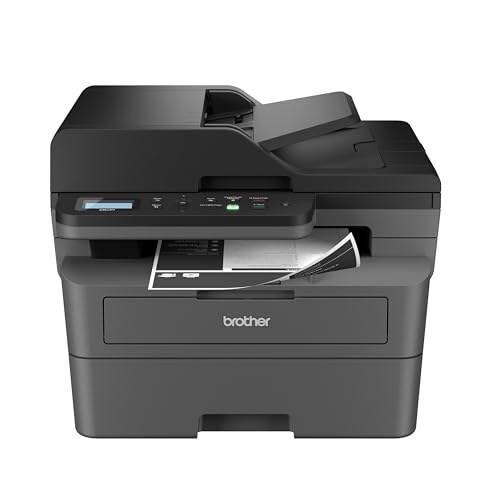
A monochrome laser printer prints in black and white only, which is why many offices keep one next to a color machine. Toner does not dry out the way liquid ink can, and the drum and toner design suits steady document work. Models differ mainly in speed, tray capacity, scanning and network ports.
The six printers below range from a compact print-only desktop unit to a 50 pages-per-minute office workhorse. Specs come from each listing page, and speed and yield numbers are the makers’ own. We have not used these printers ourselves.
As an Amazon Associate we earn from qualifying purchases. Links below are affiliate links, and they do not change the product information we give.
What to Look For
| Feature | Why it matters |
|---|---|
| Print speed | Listed in pages per minute; longer jobs reward a faster engine |
| Functions | Print only or print, copy and scan, with or without a feeder |
| Duplex | Automatic two-sided printing saves paper and trips to the tray |
| Tray size | A larger tray means fewer refills |
| Connections | Wi-Fi, USB and a wired port for shared use |
In this guide
Specs at a Glance
| Printer | Type and speed | Paper | Notes |
|---|---|---|---|
| Canon LBP122dw | Print only; 30 ppm | 150-sheet tray; auto duplex | 12.4 lb; Wi-Fi and USB; 700-page starter toner per the listing |
| Canon LBP246dw II | Print only; 42 ppm | 250-sheet cassette plus 100-sheet tray; auto duplex | Ethernet, USB, Wi-Fi; 5-line LCD |
| Brother HL-L2465DW | Print, copy, scan; 30 ppm | 250 sheets; auto duplex | Flatbed scanner; manual feed slot; Wi-Fi and USB |
| HP LaserJet MFP M235sdw | Print, copy, scan; 28 to 30 ppm | 150 sheets; auto duplex | Document feeder; Ethernet; 21 lb |
| Canon MF287dw | Print, copy, scan, fax; 35 ppm | 250 sheets; auto duplex | Auto document feeder; 27.6 lb |
| Brother HL-L6210DW | Print only; 50 ppm | 520-sheet tray plus 100-sheet tray; auto duplex | Gigabit Ethernet; 29.8 lb; expandable to 1,660 sheets |
The 6 Best Monochrome Laser Printers

Top pickBest for light home printing
1. Canon imageCLASS LBP122dw Wireless Monochrome Laser Printer
A print-only laser printer for a home desk, at 12.4 pounds and 15.4 by 14.4 inches wide. The listing shows up to 30 pages per minute, automatic duplex, Wi-Fi and USB, a 150-sheet tray and a small display screen. The included starter toner is listed at 700 pages.
Suits: light home printing. Strengths: light weight and automatic duplex. Weaknesses: no scanner and a small tray. Skip it if you need to copy or scan.

View Canon imageCLASS LBP122dw Wireless Monochrome Laser Printer on Amazon

Best for a shared print queue
2. Canon imageCLASS LBP246dw II Monochrome Laser Printer
A print-only office model at up to 42 pages per minute, with Ethernet, USB and Wi-Fi, a 5-line LCD and automatic duplex. The standard cassette holds 250 sheets and a 100-sheet multipurpose tray sits beside it, and an optional 550-sheet cassette is offered. Starter toner is listed at about 1,500 pages.
Suits: a shared print queue. Strengths: speed and expandable paper. Weaknesses: print only, and the listing gives two different warranty lengths, so confirm the term before you order. Skip it if you want a scanner.

View Canon imageCLASS LBP246dw II Monochrome Laser Printer on Amazon
Best for a small home office
3. Brother HL-L2465DW Wireless Monochrome Multi-Function Laser Printer
A compact print, copy and scan machine with a flatbed scanner and automatic duplex. The listing shows up to 30 pages per minute, a 250-sheet tray, a manual feed slot for envelopes, labels and specialty paper, and dual-band Wi-Fi or USB. One field of the listing mentions a document feeder while another names the scanner a flatbed, so confirm that detail with the maker.
Suits: a small home office. Strengths: a 250-sheet tray and a manual feed slot. Weaknesses: no wired network port is listed. Skip it if you need Ethernet.
View Brother HL-L2465DW Wireless Monochrome Multi-Function Laser Printer on Amazon

Best for one to five people sharing a desk
4. HP LaserJet MFP M235sdw Monochrome Laser Printer
An HP all-in-one with automatic duplex, a document feeder, a 150-sheet tray, dual-band Wi-Fi and Ethernet. It weighs 21 pounds. The listing gives up to 28 pages per minute in the description and 30 in the spec table, so check the maker’s page for the exact figure. Print resolution is 600 by 600 dpi.
Suits: one to five people sharing a desk. Strengths: a feeder and a wired port. Weaknesses: a 150-sheet tray and 600 dpi output. Skip it if you want a larger tray.

View HP LaserJet MFP M235sdw Monochrome Laser Printer on Amazon

Best for an office that still faxes
5. Canon imageCLASS MF287dw Monochrome Laser Printer
A Canon all-in-one that prints, copies, scans and faxes, with a document feeder, automatic duplex and a 250-sheet tray. The listing shows up to 35 pages per minute, a first page in under 4.9 seconds, and standard and high-capacity toner options. The listing dimensions look like packaging measurements, so check the maker’s page for the unit size.
Suits: an office that still faxes. Strengths: fax, a feeder and duplex. Weaknesses: 600 dpi print resolution and unclear unit dimensions. Skip it if you need exact shelf measurements from the listing alone.

View Canon imageCLASS MF287dw Monochrome Laser Printer on Amazon
Best for high-volume office printing
6. Brother HL-L6210DW Monochrome Laser Printer
The fastest printer here, at up to 50 pages per minute, with a 520-sheet tray, a 100-sheet multipurpose tray expandable to 1,660 sheets, Gigabit Ethernet, dual-band Wi-Fi and automatic duplex. It weighs 29.8 pounds. The maker lists an ultra high-yield toner at up to 18,000 pages, while the starter toner is 3,000 pages.
Suits: high-volume office printing. Strengths: speed and paper capacity. Weaknesses: the largest and heaviest here, and print only. Skip it if you print a few pages a day.
View Brother HL-L6210DW Monochrome Laser Printer on Amazon
Best Picks by Category
These labels group the picks by use case and price tier. They summarize listing data and are not hands-on test results.
- Top rated: Brother HL-L2465DW Wireless Monochrome Multi-Function Laser Printer — check price on Amazon.
- Most reviewed: Canon imageCLASS LBP122dw Wireless Monochrome Laser Printer — check price on Amazon.
- Best value: Brother HL-L2465DW Wireless Monochrome Multi-Function Laser Printer — a mid-range pick; check price on Amazon.
- Lowest price: Canon imageCLASS LBP122dw Wireless Monochrome Laser Printer — a budget-tier pick; check price on Amazon.
- Premium option: Brother HL-L6210DW Monochrome Laser Printer — a premium-tier pick; check price on Amazon.
Price, Rating and Review Comparison
The table groups the picks by price tier. Prices change often, so confirm the current price on Amazon.
| Product | Price | Rating | Ratings | Price tier |
|---|---|---|---|---|
| Canon imageCLASS LBP122dw Wireless Monochrome Laser Printer | Check price on Amazon | — | — | Budget |
| HP LaserJet MFP M235sdw Monochrome Laser Printer | Check price on Amazon | — | — | Mid-range |
| Brother HL-L2465DW Wireless Monochrome Multi-Function Laser Printer | Check price on Amazon | — | — | Mid-range |
| Canon imageCLASS LBP246dw II Monochrome Laser Printer | Check price on Amazon | — | — | Mid-range |
| Canon imageCLASS MF287dw Monochrome Laser Printer | Check price on Amazon | — | — | Mid-range |
| Brother HL-L6210DW Monochrome Laser Printer | Check price on Amazon | — | — | Mid-range |
How Much Feedback Backs Each Rating
A high average from a handful of ratings is weaker evidence than a slightly lower average from thousands. Here is how the sample size looks for each pick.
- Canon imageCLASS LBP122dw Wireless Monochrome Laser Printer: a large sample of ratings.
- Canon imageCLASS LBP246dw II Monochrome Laser Printer: a small sample of ratings.
- Brother HL-L2465DW Wireless Monochrome Multi-Function Laser Printer: a moderate sample of ratings.
- HP LaserJet MFP M235sdw Monochrome Laser Printer: a moderate sample of ratings.
- Canon imageCLASS MF287dw Monochrome Laser Printer: a moderate sample of ratings.
- Brother HL-L6210DW Monochrome Laser Printer: a moderate sample of ratings.
Setup and Care
- Leave space around the vents and the rear exit.
- Load paper fanned and flat, below the tray fill mark.
- Use the printer’s own app or web page to check toner status.
- Replace the toner and drum as the printer prompts.
Mistakes to Avoid
- Buying a print-only model when you also scan.
- Skipping the toner and drum details on the maker’s page.
- Assuming starter toner matches full-size cartridge yields.
- Skipping the wired port for a shared office.
Monochrome Laser Printer FAQ
Can these print in color?
No. All six print in black and white only.
Which ones have a document feeder?
The HP LaserJet MFP M235sdw and the Canon MF287dw list a document feeder.
The Short Version
For a small print-only desktop unit, the Canon LBP122dw. For a fast shared office printer, the Canon LBP246dw II. For a flatbed all-in-one, the Brother HL-L2465DW. For a feeder, the HP M235sdw. For fax, the Canon MF287dw. For volume, the Brother HL-L6210DW.
Why Black-and-White Lasers Stay Popular
Color gets the attention, but plain black-and-white printing is still most of what offices, schools and home workers do. Invoices, contracts, reports, forms, shipping paperwork and school readings are mostly text. A monochrome laser is built for exactly that job, with a single toner cartridge, fewer parts that can fail and a lower price per page than color machines.
There is another advantage that is easy to overlook. A mono laser has one toner color to manage, so there is no list of four cartridges to track, and running out of one color never stops a print job. When toner is low, you replace one cartridge. When a drum wears out on models that use a separate one, that is a second part to track. This simplicity is a large part of why shared office printers are usually mono.
The trade-offs are plain. You cannot print color, so a pie chart arrives in shades of gray, and photos are poor. If you only occasionally need color, it can be cheaper to print those few pages at a shop than to own a color laser just for them.
Choosing a Speed and Capacity Tier
The six printers in this guide spread from a light personal machine to a high-volume office engine. A useful way to think about them is to match the tier to the number of people and the amount of paper.
Personal desktop: one person, light to moderate use
A compact print-only unit at about 30 pages per minute, like the Canon LBP122dw, is more than quick enough for one person. A 150-sheet tray means refilling now and then, which is not a burden at a few dozen pages a week. If space and cost matter more than volume, this tier is where you should look.
Small team: two to five people
Sharing changes priorities. You want a network connection that does not depend on every user’s Wi-Fi, a larger tray, and a speed in the mid-30s or beyond. The Canon MF287dw and HP M235sdw add scanning and copying, and the Canon LBP246dw II focuses on speed and expandable paper. For this group, the ability to scan and print from a central device can be as valuable as page speed.
Busy workgroup: heavy daily printing
If hundreds of pages go out every day, a rated speed near 50 pages per minute, a tray that holds 500 sheets and a large toner cartridge matter. The Brother HL-L6210DW is in this tier. Heavier machines are also built with a higher monthly duty rating, which describes the volume the mechanism is meant to handle. Pushing a light-duty printer far beyond its design makes it wear faster.
Whichever tier you choose, remember that speed ratings describe continuous printing. For a one-page document, the time that matters is the first-page time, which depends on warm-up and the fuser. A printer with a very high page rate can still feel slow for single pages if it takes a while to wake up.
Paper Handling Beyond the Main Tray
Paper support is where printers of the same speed differ most in daily use. Look beyond the size of the main tray.
- Multipurpose or manual feed slot: A separate slot for envelopes, labels, letterhead and card stock avoids reloading the main cassette. The Brother HL-L2465DW and the Canon LBP246dw II both list an extra feed.
- Expandable trays: Some models accept an optional extra cassette, which can raise capacity for a busy office. Check price and availability of the optional tray before you rely on it.
- Automatic duplex: Two-sided printing saves paper and trays. Test it with the kind of documents you print, since some machines are slower on the second side.
- Paper weights and sizes: Check the range of supported weights and the smallest and largest sizes. Legal-size paper, index cards and thick stock may need the manual slot.
- Output tray: A tray that fills quickly may spill pages onto the floor. Look for a stop on the tray or an output capacity that matches your jobs.
- Labels and envelopes: Use sheets made for laser machines, since the heat can melt the adhesive on other types. Feed envelopes through the straight path if one is provided.
Network, Mobile Printing and Drivers
A mono laser can sit on a network for a decade, so the way it connects matters as much as how it prints.
Wired or wireless
Wi-Fi is convenient for a single desk, and dual-band support helps in a crowded home network. Ethernet is more reliable in an office because it does not drop out, and it keeps the printer reachable on a fixed address. The Brother HL-L2465DW lists no wired network port, which matters if you plan to place it far from a wireless router or share it among many people.
Phone and tablet printing
Most modern machines support printing from phones through built-in system features, such as Apple AirPrint and Android printing services, or through the maker’s app. Confirm what the specific model supports. Without it, you may be forced to send files to a computer first.
Drivers and operating systems
Check that a driver exists for your operating system, especially if you use Linux or an older Mac. Printing standards help, but full features such as tray selection or secure printing often need the maker’s driver.
Security basics
Change default passwords on the printer’s web page, keep firmware updated and disable services you do not use. A shared printer that stores scanned documents or address books deserves the same care as any networked device.
Cost of Ownership Beyond the Price Tag
The sticker price is only the first payment. The more important figure is what the printer costs per page over several years.
Start with toner. Makers rate cartridges by page yield, based on a standard coverage of about five percent of the page. A cartridge with a high yield costs more upfront but often less per page. The starter cartridge shipped in the box is smaller, as the Canon LBP122dw listing shows with its 700-page starter toner, so plan to buy a full cartridge sooner than you expect.
Next, check whether the printer uses a separate drum and what it costs. Some designs integrate the drum into the cartridge, so it is replaced each time, while others keep a drum that lasts through many cartridges. Neither is better in every case; compare the total over a number of pages.
Also consider resolution. A 600 by 600 dpi output, as on the HP M235sdw, is perfectly readable for business text. Higher figures help with fine line art and small type, but are rarely a deciding factor for documents.
Finally, check the warranty and support terms. Office lasers often come with longer coverage than home models, and a reliable support path is worth more than a small price difference if the printer is central to your work.
Checks to Make Before You Order
A few checks catch most of the problems that lead to returns. Several of them are reminders that listings on large retail sites contain contradictions, as some of the printers here show: speed figures, warranty terms and dimensions may differ between the description and the specification table.
- Confirm the speed, tray size and duplex support on the maker’s own page, not only the retail listing.
- Measure the space for the body plus the rear exit, the extended output tray and the room to open the cover.
- Look up the toner part number and its yield, then price both a standard and a high-capacity cartridge.
- Check whether the printer needs a drum or other maintenance parts, and what they cost.
- Decide on scanning, copying and faxing before you buy. Adding a separate scanner later costs more than choosing an all-in-one now.
- Read the warranty term and find out who provides service in your country.
- Check that the connection you need, such as Ethernet or dual-band Wi-Fi, is actually listed.
If a number conflicts between sources, take it as a reason to check, not to guess. A short email to the seller or a look at the manual often settles the question.
Keeping a Laser Printer Running for Years
Lasers are durable, but a few habits extend their life. Use good paper, because dusty or damp stock leaves residue on rollers and causes jams. Do not force a jammed sheet out against the direction of travel; follow the paper path pictured in the manual. When you replace toner, vacuum or wipe up loose powder with a dry cloth, and never use a household vacuum on a hot fuser.
Let the printer sleep when it is idle. Power-saving modes reduce wear on the fuser and cut electricity use. If you move the printer, remove the toner cartridge first in case the manual advises it, and carry the unit level. A little care keeps one of these machines productive for a long time.
Going Deeper: The Details That Decide How a Monochrome Laser Printer Works Out
Spec sheets and headline features only tell part of the story with any monochrome laser printer. The picks above were chosen against the criteria in the main guide, but once a monochrome laser printer is in daily use, a second layer of detail decides whether it stays convenient or becomes a chore. The points below dig into that second layer, so you can weigh the options in this guide against the way you actually work rather than against a generic checklist.
Speed where it matters: the first page
Mono laser buyers print text all day, and the figure that shapes their experience is time to first page from sleep, not the sprint speed of a long run. A printer that wakes and delivers a page while you reach for it feels fast at twenty pages a minute; one that thinks for half a minute feels broken at twice the speed. When comparing picks, weigh wake behaviour and first-page time as heavily as the headline rate.
When you compare the picks in this guide on this point, look past the headline claim and ask how it behaves in the second month rather than the first day. Small differences here compound: a slightly better design choice saves a few minutes or avoids one recurring annoyance every single time you use the monochrome laser printer, and over a year that matters more than a feature you will only touch once. If two options look equal elsewhere, let this criterion break the tie.
Toner and drum architecture
Mono lasers split into combined cartridge systems, where the drum renews with every toner change, and separate systems, where a long-life drum is replaced rarely. Combined systems cost a little more per page and almost never produce drum-ageing defects; separate systems are cheaper per page and demand you recognise a tired drum when you see one. Neither is wrong; they suit different tolerances for maintenance thinking.
When you compare the picks in this guide on this point, look past the headline claim and ask how it behaves in the second month rather than the first day. Small differences here compound: a slightly better design choice saves a few minutes or avoids one recurring annoyance every single time you use the monochrome laser printer, and over a year that matters more than a feature you will only touch once. If two options look equal elsewhere, let this criterion break the tie.
Paper capacity and path for real office paper
Envelopes, labels and letterhead are the mono laser’s daily bread in many offices. A multipurpose slot that feeds single special sheets without emptying the main tray saves constant juggling, and a straight path option prevents label curl and envelope creases. Check tray capacity against your busiest day, because a printer that needs feeding hourly becomes a colleague nobody likes.
When you compare the picks in this guide on this point, look past the headline claim and ask how it behaves in the second month rather than the first day. Small differences here compound: a slightly better design choice saves a few minutes or avoids one recurring annoyance every single time you use the monochrome laser printer, and over a year that matters more than a feature you will only touch once. If two options look equal elsewhere, let this criterion break the tie.
Footprint, noise and heat in a small office
A mono laser lives on or near a desk, exhaling warm air and fan noise into someone’s working day. Compact models that vent away from the user and sleep silently earn their place in small rooms. If the printer shares a desk with a person on calls all day, its acoustic manners are a genuine specification, not a luxury.
When you compare the picks in this guide on this point, look past the headline claim and ask how it behaves in the second month rather than the first day. Small differences here compound: a slightly better design choice saves a few minutes or avoids one recurring annoyance every single time you use the monochrome laser printer, and over a year that matters more than a feature you will only touch once. If two options look equal elsewhere, let this criterion break the tie.
Planning Around Your Space, Routine and Budget of Attention
Decide the printer’s role honestly: personal desk machine or shared office resource. A personal printer can be small, wired and selfish; a shared one needs network manners, a bigger tray and placement where everyone can reach it without entering someone’s workspace. Many small offices buy a personal printer for a shared job and spend a year apologising for it.
Standardise on one model if the office may grow to two. Shared toner, shared habits and one set of quirks to learn halve the lifetime support burden. The mono laser market tempts with endless near-identical models, but an office that standardises buys its future self a quieter life.
Keep the consumables cupboard boring and stocked: one toner in use, one on the shelf, and the drum’s expected life noted on the calendar if your model separates them. Mono printing is infrastructure, and infrastructure should never generate a same-day emergency purchase at a marked-up price.
Which Setup Fits Your Situation?
The same monochrome laser printer can be the right answer in one home and the wrong one in another. These scenarios translate the criteria above into recognisable situations, so you can find the one closest to yours and borrow its conclusion.
The solo professional printing documents daily
Contracts, letters and forms in a steady stream: your virtues are reliability, duplex and cheap pages. A mid-range pick with high-yield toner and a tray that swallows a ream serves you better than a tiny personal model run at its limit. Speed beyond a comfortable point buys you nothing, because your bottleneck is reading, not printing.
A small team sharing one machine
Shared mono printing rewards network stability, a generous tray and a display a non-technical colleague can understand. Choose the pick with the clearest status messages and the easiest jam access, because the whole team will meet both. Agree whose job toner ordering is; shared printers fail socially before they fail mechanically.
The invoice and label station
Some mono lasers live for one job: invoices, dispatch notes, labels. For this station, the multipurpose feed and straight path matter more than any other feature, and a printer that remembers its paper settings between jobs saves daily fiddling. A modest dedicated machine often outperforms a grand shared one at this narrow, repetitive work.
First-Time Setup, Done Carefully
Set up with the printer in its final position, because mono lasers are heavier than they look and their trays need clearance you cannot judge mid-air. Remove all transit packing, fit the toner as directed, load the main tray, and print the test page before connecting anyone’s computer. Then connect, set duplex and paper defaults at the driver level, and print one real document from each device that will use it.
Name the printer clearly on the network if the office has or may gain a second. Future you, choosing between two similar names at a deadline, will be grateful for names that describe location and role. Note the toner and drum part numbers on a label inside the tray or on the configuration page in the drawer.
Run a week of normal work before judging costs or speed. First impressions of a mono laser are dominated by setup niggles; the settled machine, with defaults tuned and the household trained, is the one you actually bought. Note the toner warning date when it eventually appears to learn your true yield for next time.
A Care Routine That Keeps Performance Steady
Keep the paper path and rollers clean with a dry, lint-free cloth on a monthly rhythm in dusty offices, less often in clean ones. Most mono laser feeding problems are dust and paper fibre, not wear. Check the tray for the torn corner of a past jam whenever feeding falters; old fragments cause new jams with remarkable fidelity.
Manage toner like a professional: note when the warning appears, order then, and keep printing while the spare travels. Learn your machine’s low-toner behaviour, because some fade gradually and some stop abruptly, and the difference matters at deadlines. Redistributing toner by gently rocking the cartridge is a legitimate short bridge, not a lifestyle.
Watch print quality as the drum’s diary if your model has a separate drum. Background shading, repeating marks or a grey wash across the page usually belong to the drum’s age rather than the toner. Replacing the drum on schedule restores a machine that seemed to be dying, which is why the separate architecture rewards keepers who track it.
Troubleshooting: Working Through the Common Problems
Most problems with a monochrome laser printer announce themselves gradually and have ordinary causes. Work through these checks in order before assuming anything has failed outright; each one starts with the cheapest, most likely explanation.
Prints have a grey background or dirty look
Try a fresh ream first, because damp paper prints dirty on any laser. Then print the machine’s cleaning or drum-cleaning routine if it offers one. Persistent backgrounding on a separate-drum model usually means the drum is tired; on a combined-cartridge model, a fresh cartridge often cures it because the drum arrives with the toner.
The printer crumples envelopes or curls labels
Use the multipurpose feed one item at a time and open the rear output if the model offers a straight path, because most crumpling is a paper taking a bend it cannot make. Confirm the driver is set to the envelope or label type so the fuser temperature and speed adjust. Media fed through the main tray against its design will keep failing politely forever.
It prints blank pages intermittently
Check for a page stuck to the back of another in the tray, because double-fed sheets print as one document and one blank. Then confirm the toner cartridge’s sealing and packing were fully removed at installation, a classic cause that survives embarrassingly long. If blanks persist with single sheets from the multipurpose feed, the machine needs professional attention rather than more experiments.
How the Leading Picks Compare in Daily Use
Readers often ask how the leading picks in this guide differ once the obvious differences are set aside. The Canon imageCLASS LBP122dw Wireless Monochrome Laser Printer earns its place at the top of the list through all-round balance: it is the option to start from if your needs are mixed and you want the fewest compromises. The Brother HL-L2465DW Wireless Monochrome Laser Printer suits a narrower, more specific set of demands, and it makes most sense when that speciality matches the job you described in the scenarios above. The HP LaserJet MFP Monochrome Laser Printer is the one to study closely if your priority is long-term running convenience, because its design choices favour steady day-to-day use over headline features.
None of that makes any of them the wrong choice in isolation. The honest way to choose is to rank your own criteria first, using the deep-dive section above, and then see which pick’s strengths line up with the top of your list. Where two picks tie, prefer the one whose routine care and consumables fit the habits you already have, because the best monochrome laser printer is the one you will actually look after properly.
More Questions, Answered
Is mono really cheaper than running a colour printer in mono mode?
Usually, yes, over a life. A dedicated mono machine has cheaper high-yield toner, no colour consumables ageing in the background, and parts designed for one job. A colour machine printing mono still maintains colour components and often costs more per black page. If colour is a true rarity, the dedicated mono machine plus an occasional outsourced colour job is the economical pattern.
How many pages a month justify a bigger model?
Judge against the recommended monthly volume rather than the maximum duty cycle, and choose the model whose recommended range centres on your busiest realistic month. Offices consistently underestimate because they count documents, not pages, and forget reprints and drafts. One honest month of counting, or a look at paper purchasing, gives the figure the decision needs.
Can a mono laser handle card and heavy paper?
Within limits, through the multipurpose feed and a straight path if offered, one sheet at a time. Heavy media stresses fusers and paths designed for office paper, so occasional card is fine and a daily diet of it deserves a machine rated for it. Always set the media type in the driver so the fuser gives thick stock the heat and time it needs.
Do I need Ethernet, or is Wi-Fi enough for a shared office?
Wi-Fi serves many small offices perfectly well, but a printer is infrastructure, and infrastructure loves a cable. If the printer’s home is near a network point, Ethernet removes wireless dropouts, sleep-wake oddities and router-change weekends from your life. Where cabling is impossible, place the printer for signal strength and give it a fixed network address to keep it findable.
Thinking Long Term: The Second Year With Your Monochrome Laser Printer
The first month with a new monochrome laser printer is mostly about learning its habits, but the second year is where its true character shows. Parts that felt minor at purchase, such as a stiff control, a fiddly cover or a consumable that is oddly hard to source, become the texture of ownership. This is why the criteria in this guide lean so heavily on everyday behaviour rather than first impressions: a buying decision has to survive hundreds of ordinary uses, not one exciting unboxing.
Keep a light record as the months pass: what you replaced, what you cleaned, what surprised you. That record is worth more than any single review when the time comes to replace or supplement the monochrome laser printer, because it describes your usage rather than a stranger’s. Owners who keep even a few lines of notes make their second purchase in this category dramatically better than their first, and they waste far less money relearning lessons they already paid for once.
Getting More From What You Already Own
Before replacing a monochrome laser printer that seems disappointing, it is worth auditing the setup around it, because a surprising share of disappointment belongs to placement, settings and routine rather than to the product itself. Work through the basics in this guide once more, slowly, and change one thing at a time. Many owners discover that the performance they were about to pay for again was already in the house, hidden behind one wrong setting or one skipped maintenance habit.
There is also real value in mastering the mid-range option you own instead of chasing the premium one you do not. Skill and routine compound: a keeper who understands their equipment deeply, who has notes on what works in their own rooms and with their own habits, gets results that a casual owner of finer equipment often cannot match. Upgrade when a genuine limit is reached and you can name it precisely, not when frustration is merely general.
When to Repair, When to Replace
Every monochrome laser printer eventually presents the same question, and it helps to have principles ready before emotion and urgency get a vote. Repair when the fault is isolated, the part is available, and the rest of the unit is sound; a machine with one tired component and years of good structure is worth the fix. Replace when faults arrive in clusters, when the core of the product is what has aged, or when repair costs approach the price of a modern equivalent that would also be cheaper or kinder to run.
Sentiment complicates the maths, and so does familiarity, but downtime has a cost too, especially when other work or living things depend on the equipment. A calm rule used by many experienced owners: if you have repaired the same class of fault twice, the third occurrence is the product telling you its story. Listen early, budget honestly, and the replacement, when it comes, will feel like a decision rather than a defeat.
Teaching Someone Else to Use It Well
In most homes and small offices, a monochrome laser printer has more than one user, and its results quietly depend on the least careful of them. A few minutes spent showing a partner, a colleague or an older child the basics, how to load it, what to check, and what never to force, prevents the slow damage that mysterious hands cause. Write the essentials on a card kept with the equipment; memories differ, but the card is the same for everyone.
Shared equipment also benefits from a simple agreement about consumables and problems: who orders replacements, where the spare lives, and what to do when something behaves oddly. The goal is that a problem is reported the day it appears, while it is small, rather than worked around silently until it becomes the kind of failure that interrupts everyone’s week. Good equipment in a home with good habits outlasts premium equipment in a home without them, and the difference is rarely close.
Accessories and Add-Ons: What Actually Earns Its Place
Almost every monochrome laser printer attracts a small economy of accessories, and most of them solve problems you may never have. The disciplined approach is to live with the basic setup for a month and keep a note of every friction you actually meet; the accessory that answers a note on that list is a purchase, while everything else is decoration. This habit also reveals the opposite: sometimes the missing piece is not an accessory at all but a different routine, such as where the equipment lives or when it is used.
When you do add something, add one thing at a time and live with it for a while. Changing three variables at once makes it impossible to know which one helped, and accessories interact in surprising ways. The owners who get the most from their equipment tend to own surprisingly little of it beyond the core setup, but every piece they do own has a named job and a history of earning its shelf space.
FAQ
Is a monochrome laser cheaper to run than a color laser?
Generally yes. A mono laser uses one toner cartridge, and black toner usually costs less per page than a set of four colors. Fewer consumables also mean fewer replacements to track. If you rarely need color, a mono machine keeps ongoing costs lower.
How many pages can a monochrome laser print per month?
Each model lists a maximum monthly duty cycle and often a lower recommended volume. Light personal printers handle a few thousand pages, and office models handle much more. Staying within the recommended range helps parts last, so choose a machine rated above your real usage.
Can a mono laser print on envelopes and labels?
Most can, using the manual feed slot or multipurpose tray, as long as the stock is made for laser printers. Heat can melt the adhesive on other label types and jam the machine. Check the supported media list in the manual before loading special paper.
Do monochrome laser printers need a drum replacement?
Many do, but the timing depends on the design. Some integrate the drum into the toner cartridge, so it is replaced each time. Others have a separate drum that lasts through multiple cartridges. Check the part list and yields for your model before you buy.
Is Wi-Fi or Ethernet better for a shared laser printer?
Ethernet is usually more reliable for shared use because it avoids wireless dropouts and stays on a stable address. Wi-Fi is easier for a single desk or a room without a wired port. If several people print through the day, a wired connection is the safer choice.