The best gaming laptops NZ buyers can actually buy are not the same as the best gaming laptops in a global roundup. A laptop that is only sold in the United States, with a US keyboard, a US charger, and no New Zealand warranty, is not a good buy for someone in Auckland, Wellington, or Christchurch. What matters in New Zealand is whether the model is sold here, whether it comes with a New Zealand power adapter, whether the keyboard is the layout you expect, and whether a local retailer will honour the warranty. The six laptops in this guide are all models from the ranges that New Zealand retailers stock: ASUS ROG Strix and TUF, Lenovo LOQ, HP Victus, and MSI Katana. Every linked model was checked against its listing title for brand and model before it was included.
There is the ASUS ROG Strix G16 in two versions, one with an AMD Ryzen 9 processor and one with an Intel Core i7, both with an RTX 5060 graphics card and a fast 165Hz display. There is the Lenovo LOQ with an RTX 4050 for a first gaming laptop at a sensible cost, the HP Victus 15 with an Intel Core i5 and an RTX 3050, the MSI Katana 15 with an Intel Core i7 and an RTX 4050, and the ASUS TUF Gaming A15 with an AMD Ryzen 5 and an RTX 3050. All six are 15 or 16 inch laptops with a dedicated graphics card, a fast display, and enough memory and storage for modern games. All six are the kind of laptop you will find on the shelves at PB Tech, JB Hi-Fi, and Noel Leeming, which are the stores most New Zealand buyers check first.
Before you buy, check three things: that the exact model is sold in New Zealand with a New Zealand charger and warranty, that the graphics card and processor match the games you play, and that the laptop's weight and battery suit how you will use it. A gaming laptop bought from overseas may arrive with the wrong plug, the wrong keyboard, and no local support, which is a false economy. The best gaming laptops NZ in this guide were chosen for models that New Zealand retailers stock, for a clear brand and model match, and for a balance of graphics power, display speed, and everyday usability.
In this guide
Quick picks: best gaming laptops nz
| # | Product | Where to buy |
|---|---|---|
| 1 | ASUS ROG Strix G16 Ryzen 9 | Check on Amazon |
| 2 | ASUS ROG Strix G16 Intel | Check on Amazon |
| 3 | Lenovo LOQ RTX 4050 | Check on Amazon |
| 4 | HP Victus 15 | Check on Amazon |
| 5 | MSI Katana 15 | Check on Amazon |
| 6 | ASUS TUF Gaming A15 | Check on Amazon |
How the picks were chosen for the best gaming laptops NZ
New Zealand availability came first. A gaming laptop is only a good buy in New Zealand if you can buy it here, with a New Zealand power adapter, a standard keyboard, and a warranty a local retailer will honour. Every model in this guide comes from a range that New Zealand retailers stock: ASUS ROG and TUF, Lenovo LOQ, HP Victus, and MSI Katana are all sold by PB Tech, JB Hi-Fi, and Noel Leeming, which are the stores most New Zealand gamers check first. A model that is only sold overseas was not picked, no matter how good its specifications look, because an import with the wrong plug and no local warranty is a bad buy.
Graphics power came second, because it decides which games the laptop can play and how well. The laptops in this guide run from an RTX 3050 to an RTX 5060. An RTX 3050 plays popular games well at 1080p, which is enough for a first gaming laptop. An RTX 4050 plays them better and handles newer games at higher settings. An RTX 5060 is the newest card here, and it plays modern games at high settings on a fast display. Every pick states its graphics card in the listing, so you can match it to the games you play. A laptop without a dedicated graphics card was not picked, because it is not a gaming laptop.
Finally, we checked that every pick is a complete gaming laptop sold as a new listing, with a brand and model that match the listing title exactly. Renewed listings were avoided in favour of new ones, because a new laptop comes with a full warranty and a battery that has not been used. Display speed, memory, and storage were recorded from each listing where stated: all six have a fast display of 144Hz or 165Hz, which is what makes games look smooth, and all six have at least 16GB of memory or a configuration that suits gaming. The keyboard layout matters in New Zealand too, so check that the model you buy locally has the layout you expect.
Buying a gaming laptop in New Zealand: retailers, warranty, and the Consumer Guarantees Act
The first decision is where to buy. PB Tech, JB Hi-Fi, and Noel Leeming are the three retailers most New Zealand gamers check first, and they all stock the ranges in this guide. Buying locally means the laptop comes with a New Zealand Type I power adapter for the 230 volt supply, a standard keyboard, and a warranty you can use at a New Zealand store. It also means you can see the laptop before you buy it, check the screen and the keyboard, and take it home the same day. Compare the same model across the three retailers, because stock and bundles change, and a bundle with a mouse or a bag can be worth more than a small discount on the laptop alone.
Warranty and the Consumer Guarantees Act are the second decision, and they are the reason to buy locally. New Zealand's Consumer Guarantees Act gives you rights beyond the manufacturer's warranty: a laptop has to be of acceptable quality, fit for its purpose, and last a reasonable time, and the retailer has to put it right if it does not. That protection applies when you buy from a New Zealand retailer, and it does not apply in the same way to a laptop bought from overseas. Keep the receipt, keep the box, and register the laptop with the manufacturer if the brand offers it. If a laptop fails early, talk to the retailer first, because they are the ones who sold it to you.
The third decision is the import trap. A gaming laptop that looks cheap from an overseas store often arrives with a US power adapter that needs a plug adapter, a US keyboard layout, and no New Zealand warranty, which means a fault becomes your problem and your cost. The price may also change at the border with shipping and GST, so the saving disappears. The models in this guide are all sold in New Zealand, so the price you see at a local retailer is the price you pay, with the right plug, the right keyboard, and local support. If a deal looks too good to be true, check where the laptop is shipping from before you buy it.
RTX 3050, RTX 4050, or RTX 5060: which graphics card do you need
An RTX 3050 is the right card for a first gaming laptop and for popular games at 1080p. The HP Victus 15 and the ASUS TUF Gaming A15 in this guide both use an RTX 3050, and they play the games most people actually play well at 1080p with sensible settings. An RTX 3050 will not run the newest games at maximum settings, but it will run them, and it costs less than the faster cards. If your games are popular online games, esports titles, or older games, an RTX 3050 is enough, and the money you save can go to more memory or more storage.
An RTX 4050 is the right card for a gaming laptop that has to handle newer games at higher settings. The Lenovo LOQ and the MSI Katana 15 in this guide both use an RTX 4050, and they play modern games better than an RTX 3050, with higher frame rates and better settings at 1080p. The RTX 4050 also handles newer features better, which matters as games keep demanding more. If you want a laptop that will still play new games well in two or three years, an RTX 4050 is the sensible middle choice, and it is the card most New Zealand buyers should aim for.
An RTX 5060 is the right card for a gaming laptop that has to play modern games at high settings on a fast display. Both ASUS ROG Strix G16 models in this guide use an RTX 5060, and they are the fastest laptops here. The 5060 is the newest card in this guide, and it is the one to buy if you play demanding games, if you want the highest frame rates on a 165Hz display, or if you want the laptop to stay current the longest. The trade-off is cost: an RTX 5060 laptop costs more than an RTX 4050 laptop, and the extra speed only matters if your games can use it. If your games are popular online titles, an RTX 4050 is enough. If they are the newest single-player games, the 5060 is worth it.
Display, memory, and battery: the parts that decide everyday use
Display speed decides how smooth games look, and every laptop in this guide has a fast display: 144Hz or 165Hz. A 144Hz display shows 144 frames a second, which is far smoother than a standard 60Hz display, and a 165Hz display is smoother still. For fast games, the difference is obvious the moment you move the mouse. Resolution matters too: all six laptops here use a 1080p or WUXGA display, which is the right resolution for their graphics cards, because a higher resolution would need a faster card to keep the same frame rate. Check the display in the listing before you buy, and do not trade a fast display for a higher resolution your graphics card cannot drive.
Memory and storage decide whether the laptop feels fast every day, not just in games. Sixteen gigabytes of memory is the minimum for a gaming laptop in 2026, and it is what most of the laptops in this guide carry. Eight gigabytes will run games, but it will struggle with a game, a browser, and a chat app open at the same time, so check the memory in the listing and prefer 16GB. Storage should be a solid-state drive of at least 512GB, because modern games are large and a small drive fills up fast. All six laptops in this guide list a solid-state drive, and several list 1TB, which is enough for a good library of games.
Battery life and weight decide whether the laptop is usable away from a wall. Gaming laptops are heavy and their batteries do not last long when gaming, because the graphics card draws a lot of power. Expect a few hours of light use and around an hour of gaming on battery, and carry the charger whenever you take the laptop out. Weight matters too: a 16 inch gaming laptop is heavier than a thin ultrabook, so check the weight if you carry it to class or to work every day. A gaming laptop is a portable desktop, not a tablet, and it is at its best plugged in on a desk.
Quick picks at a glance
| Product | Graphics card | Display and memory | Best for |
|---|---|---|---|
| ASUS ROG Strix G16 Ryzen 9 | RTX 5060, Ryzen 9 | 16 in, 165Hz | Fastest overall |
| ASUS ROG Strix G16 Intel | RTX 5060, Core i7 | 16 in, 165Hz | Fastest Intel |
| Lenovo LOQ RTX 4050 | RTX 4050, Ryzen 5 | 15.6 in, 144Hz, 16GB | Best value |
| HP Victus 15 | RTX 3050, Core i5 | 15.6 in, 144Hz, 8GB | Budget pick |
| MSI Katana 15 | RTX 4050, Core i7 | 15.6 in, 16GB, 1TB | Big storage |
| ASUS TUF Gaming A15 | RTX 3050, Ryzen 5 | 15.6 in, 144Hz | Durable pick |
The best gaming laptops NZ

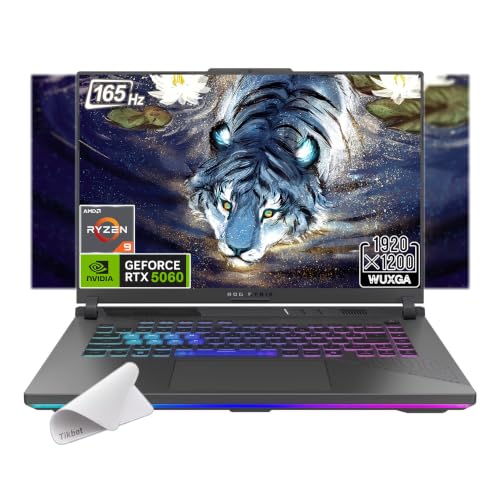
ASUS ROG Strix G16 Gaming Laptop, 16 Inch WUXGA 165Hz, AMD Ryzen 9 9955HX, NVIDIA GeForce RTX 5060, Windows 11 Pro
The ASUS ROG Strix G16 with the AMD Ryzen 9 9955HX is the most powerful pick in this guide and the one to buy when you want the fastest gaming laptop New Zealand retailers stock. The listing describes an ASUS ROG Strix G16 gaming laptop with a 16 inch WUXGA 165Hz display, an AMD Ryzen 9 9955HX processor, an NVIDIA GeForce RTX 5060 graphics card, and Windows 11 Pro. The Ryzen 9 is a high-end processor with plenty of cores for gaming and for work, the RTX 5060 is the newest graphics card in this guide, and the 165Hz display shows games at their smoothest. For a gamer who wants the fastest laptop in this guide, this is the one.
The combination of a Ryzen 9 processor and an RTX 5060 means this laptop plays modern games at high settings and handles streaming, recording, and editing at the same time. The 16 inch WUXGA display at 165Hz is the right size and speed for the graphics card, and the ROG Strix range is one that PB Tech, JB Hi-Fi, and Noel Leeming all stock in New Zealand, so you can buy it locally with a New Zealand adapter and warranty. The trade-off is cost and weight: a laptop this fast costs more than the others in this guide, and a 16 inch gaming laptop is heavy to carry every day. If you want the fastest, buy this one. If you want the best value, look at the LOQ and the Katana below.
Key specs:
- 16 inch WUXGA 165Hz display
- AMD Ryzen 9 9955HX processor
- NVIDIA GeForce RTX 5060 graphics
- Windows 11 Pro
- ROG Strix gaming range
Strengths:
- Fastest processor and graphics card in this guide
- 165Hz display for the smoothest gameplay
- ROG Strix range is stocked by New Zealand retailers
Trade-offs:
- Most expensive laptop in this guide
- 16 inch gaming laptop is heavy to carry daily
- More power than popular online games need
This laptop fits gamers who play demanding modern games and want the fastest laptop New Zealand stores stock.
Best for: the fastest gaming laptop you can buy in New Zealand
Not suited for: buyers on a budget, or anyone who carries a laptop to class every day
Check price on Amazon: ASUS ROG Strix G16 Ryzen 9


ASUS ROG Strix G16 (2025) Gaming Laptop, 16 Inch FHD+ 165Hz, NVIDIA GeForce RTX 5060, Intel Core i7 Processor
The ASUS ROG Strix G16 with the Intel Core i7 is the Intel pick in this guide and the one to buy when you prefer an Intel processor in the fastest laptop here. The listing describes an ASUS ROG Strix G16 from 2025, a gaming laptop with a 16 inch FHD+ display at 165Hz, an NVIDIA GeForce RTX 5060 graphics card, and an Intel Core i7 processor. It is the same ROG Strix G16 as the Ryzen model above, with the same RTX 5060 graphics and the same fast 165Hz display, but with an Intel processor instead of an AMD one. For a gamer who prefers Intel, or whose software runs better on Intel, this is the fastest Intel laptop in this guide.
The choice between this laptop and the Ryzen model above comes down to the processor you prefer and the software you use. Both have the same RTX 5060 graphics and the same 165Hz display, so they play the same games at the same speed. The Intel model suits buyers who already use Intel, who need Intel-specific features, or who simply trust the brand. The ROG Strix range is stocked by New Zealand retailers, so you can buy either model locally with a New Zealand adapter and warranty. Check the exact model in the store before you buy, because the ROG Strix G16 comes in several configurations and the processor is the difference between them.
Key specs:
- 16 inch FHD+ 165Hz display
- NVIDIA GeForce RTX 5060 graphics
- Intel Core i7 processor
- 2025 ROG Strix G16 model
- Fast gaming display
Strengths:
- RTX 5060 graphics with a 165Hz display
- Intel processor for buyers who prefer Intel
- ROG Strix range stocked in New Zealand
Trade-offs:
- Same cost as the fastest laptop in this guide
- 16 inch gaming laptop is heavy to carry
- Check the exact configuration in store, as models vary
This laptop fits Intel buyers who want the fastest gaming laptop New Zealand stores stock.
Best for: the fastest Intel gaming laptop in this guide
Not suited for: buyers on a budget, or AMD buyers who prefer Ryzen
Check price on Amazon: ASUS ROG Strix G16 Intel


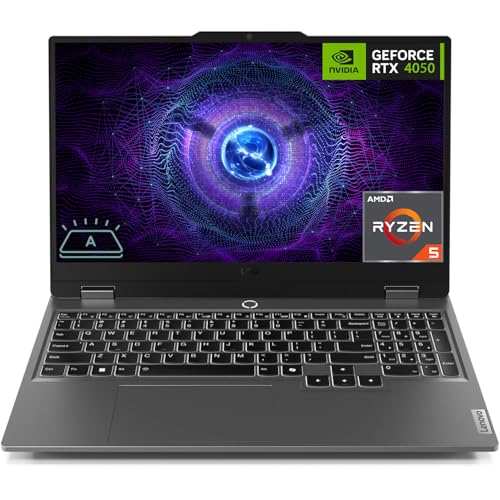
Lenovo LOQ Gaming Laptop, GeForce RTX 4050, AMD Ryzen 5 7235HS Processor 15.6 Inch 144Hz FHD Display, 16GB DDR5, 512GB SSD
The Lenovo LOQ with the RTX 4050 is the value pick in this guide and the one to buy when you want a proper gaming laptop at a sensible cost. The listing describes a Lenovo LOQ gaming laptop with a GeForce RTX 4050 graphics card, an AMD Ryzen 5 7235HS processor, a 15.6 inch 144Hz FHD display, 16GB of DDR5 memory, and a 512GB solid-state drive. The RTX 4050 plays modern games well at 1080p, the 144Hz display makes them look smooth, and 16GB of memory with a 512GB drive is the right specification for a gaming laptop in 2026. For a first gaming laptop, or for a student who needs a laptop that games and works, this is the best value in this guide.
The LOQ range is Lenovo's affordable gaming line, and it is stocked by New Zealand retailers, so you can buy it locally with a New Zealand adapter and warranty. The Ryzen 5 processor is fast enough for gaming and for everyday work, and the 16GB of DDR5 memory means the laptop will not struggle with a game, a browser, and a chat app open at the same time. The trade-off is the graphics card: an RTX 4050 will not run the newest games at maximum settings, but it will run them well at 1080p. If you want the best gaming laptop for the money in New Zealand, this is the one to buy first.
Key specs:
- 15.6 inch 144Hz FHD display
- NVIDIA GeForce RTX 4050 graphics
- AMD Ryzen 5 7235HS processor
- 16GB DDR5 memory
- 512GB solid-state drive
Strengths:
- RTX 4050 plays modern games well at 1080p
- 16GB of DDR5 memory and a 512GB drive
- Best value gaming laptop in this guide
Trade-offs:
- RTX 4050 will not max out the newest games
- 512GB fills up fast with large games
- LOQ is the budget line, so the build is simpler
This laptop fits first-time gaming laptop buyers, students, and anyone who wants good gaming performance at a sensible cost.
Best for: the best value gaming laptop for a first-time buyer
Not suited for: gamers who want maximum settings on the newest games
Check price on Amazon: Lenovo LOQ RTX 4050


HP Victus Gaming 15 Laptop: 15.6 Inch FHD 144Hz Display, Intel 8-Core i5-13420H, NVIDIA GeForce RTX 3050, 8 GB DDR4 SDRAM
The HP Victus Gaming 15 is the affordable pick in this guide and the one to buy when the budget is tight but the laptop still has to game. The listing describes an HP Victus Gaming 15 laptop with a 15.6 inch FHD 144Hz display, an Intel 8-core i5-13420H processor, an NVIDIA GeForce RTX 3050 graphics card, and 8GB of DDR4 memory. The RTX 3050 plays popular games well at 1080p, the 144Hz display keeps them smooth, and the Intel i5 processor is fast enough for gaming and for everyday work. The Victus range is HP's affordable gaming line, and it is stocked by New Zealand retailers, so you can buy it locally.
The 8GB of memory is the limit to know: it is enough for gaming on its own, but it will struggle with a game, a browser, and a chat app open at the same time. If you buy this laptop, plan to upgrade the memory to 16GB when you can, or check whether the retailer offers a 16GB configuration. The trade-off is the point of this laptop: it is the cheapest way into a proper gaming laptop in this guide, and the RTX 3050 still plays the games most people actually play. For a student or a first-time buyer on a tight budget, the Victus 15 is the laptop that gets you gaming without a big bill.
Key specs:
- 15.6 inch FHD 144Hz display
- Intel 8-core i5-13420H processor
- NVIDIA GeForce RTX 3050 graphics
- 8GB DDR4 memory
- Victus affordable gaming range
Strengths:
- Lowest cost way into a proper gaming laptop
- 144Hz display for smooth gameplay
- Intel i5 processor fast enough for gaming and work
Trade-offs:
- 8GB of memory should be upgraded to 16GB
- RTX 3050 will not max out newer games
- Budget build with a simpler design
This laptop fits students and first-time buyers on a tight budget who want a proper gaming laptop.
Best for: the cheapest proper gaming laptop in this guide
Not suited for: gamers who want maximum settings, or buyers who will not upgrade the memory
Check price on Amazon: HP Victus 15

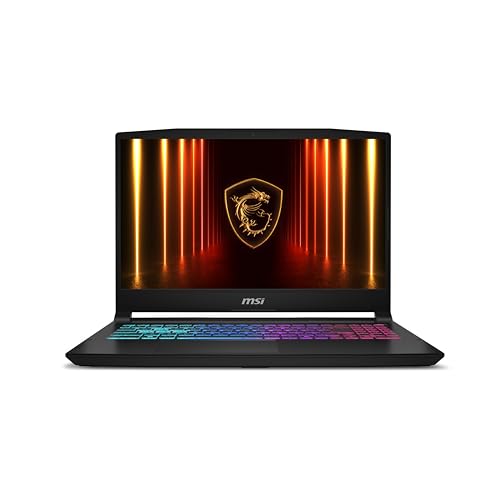
MSI Katana 15 B13VEK-277US 15.6 Inch Gaming Intel Core i7 13620H NVIDIA GeForce RTX 4050 16GB DDR5, 1TB NVMe SSD, Type-C, WiFi
The MSI Katana 15 is the storage pick in this guide and the one to buy when you want a fast laptop with room for a big game library. The listing describes an MSI Katana 15, model B13VEK-277US, a 15.6 inch gaming laptop with an Intel Core i7 13620H processor, an NVIDIA GeForce RTX 4050 graphics card, 16GB of DDR5 memory, a 1TB NVMe solid-state drive, a Type-C port, and WiFi. The 1TB drive is the largest storage in this guide, which means room for a good library of modern games without constantly uninstalling them, and the 16GB of DDR5 memory means the laptop will not struggle with a game and other apps open at once.
The Intel Core i7 13620H is a fast processor for gaming and for work, and the RTX 4050 plays modern games well at 1080p. The Katana range is MSI's affordable gaming line, and it is stocked by New Zealand retailers, so you can buy it locally with a New Zealand adapter and warranty. The trade-off is the display, which the listing does not state as a high-refresh model in the visible title, so check the display speed in the store before you buy: a Katana with a 144Hz display is the one to get. If you want a fast laptop with a big drive and plenty of memory, this is the one.
Key specs:
- 15.6 inch gaming laptop
- Intel Core i7 13620H processor
- NVIDIA GeForce RTX 4050 graphics
- 16GB DDR5 memory
- 1TB NVMe solid-state drive
Strengths:
- 1TB drive, the largest storage in this guide
- 16GB of DDR5 memory for gaming and multitasking
- Fast Intel i7 processor for gaming and work
Trade-offs:
- Check the display speed in store before buying
- Katana is the budget line, so the build is simpler
- 15.6 inch gaming laptop is heavy to carry daily
This laptop fits gamers with a large game library who want a fast laptop with plenty of storage.
Best for: a fast gaming laptop with a 1TB drive for a big game library
Not suited for: buyers who need a stated fast display, or the lightest possible laptop
Check price on Amazon: MSI Katana 15
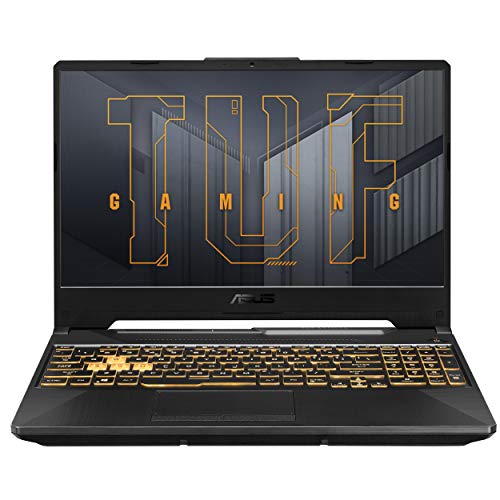
ASUS TUF Gaming A15 Gaming Laptop, 15.6 Inch FHD 16:9 144Hz Display, AMD Ryzen 5 7535HS Processor, NVIDIA GeForce RTX 3050
The ASUS TUF Gaming A15 is the tough pick in this guide and the one to buy when the laptop has to survive being carried every day. The listing describes an ASUS TUF Gaming A15 laptop with a 15.6 inch FHD 144Hz display, an AMD Ryzen 5 7535HS processor, and an NVIDIA GeForce RTX 3050 graphics card. The TUF range is ASUS's durable gaming line, built to a military standard for drops, vibration, and knocks, which is why it suits a student who carries a laptop to class every day or a gamer who takes a laptop to a friend's house. The RTX 3050 plays popular games well at 1080p, and the 144Hz display keeps them smooth.
The durability is the reason to buy this laptop over the other RTX 3050 laptop in this guide. The TUF range is tested for the knocks a laptop takes in a bag, on a bus, and on a desk, and it is the laptop that will still be working after a year of daily carrying. The Ryzen 5 processor is fast enough for gaming and for study, and the TUF range is stocked by New Zealand retailers, so you can buy it locally with a New Zealand adapter and warranty. The trade-off is the graphics card: an RTX 3050 will not max out the newest games, but it will play the games most people actually play. If you carry your laptop every day, buy the tough one.
Key specs:
- 15.6 inch FHD 144Hz display
- AMD Ryzen 5 7535HS processor
- NVIDIA GeForce RTX 3050 graphics
- TUF durable gaming range
- 16:9 widescreen display
Strengths:
- TUF build tested for drops and knocks
- 144Hz display for smooth gameplay
- Good for students who carry a laptop daily
Trade-offs:
- RTX 3050 will not max out newer games
- Heavier than a thin laptop
- Check memory and storage in store, as models vary
This laptop fits students and gamers who carry a laptop every day and need it to survive the trip.
Best for: a tough gaming laptop for daily carrying
Not suited for: gamers who want maximum settings, or buyers who never move the laptop
Check price on Amazon: ASUS TUF Gaming A15
Buying guide
Buy from a New Zealand retailer, not an overseas store
A laptop from PB Tech, JB Hi-Fi, or Noel Leeming comes with a New Zealand power adapter, a standard keyboard, and a warranty you can use locally. A laptop from overseas may arrive with the wrong plug, the wrong keyboard, and no local support, and the price can change at the border with shipping and GST. Check where the laptop ships from before you buy it.
Match the graphics card to the games you play
An RTX 3050 plays popular games well at 1080p. An RTX 4050 plays modern games better at higher settings. An RTX 5060 plays the newest games at high settings on a fast display. Buy the card that matches your games, not the fastest card you can afford, because the extra speed only matters if your games can use it.
Check the exact model in the store
Gaming laptops come in many configurations with the same name, and the processor, memory, and storage can differ between them. Check the exact model number, the memory, and the storage before you buy, and make sure it matches the listing. A laptop with 8GB of memory is not the same as the same laptop with 16GB.
Keep the receipt and know your rights
Under the Consumer Guarantees Act, a laptop has to be of acceptable quality and last a reasonable time, and the retailer has to put it right if it does not. Keep the receipt, keep the box, and talk to the retailer first if the laptop fails. Buying locally is what makes those rights work.
Setting up and everyday care
Keep the laptop cool, because heat is what shortens a gaming laptop's life. Use it on a hard, flat surface so the air vents are clear, not on a bed or a cushion that blocks them. Clean the vents every few months with compressed air, and check the fans are spinning freely. A laptop that runs hot will slow itself down to protect the processor, so a cool laptop is also a faster laptop. If you use the laptop plugged in all day, check the battery settings: some brands offer a mode that limits charging to protect the battery.
Update the graphics drivers regularly, because new drivers fix bugs and improve performance in new games. Use the manufacturer's app or the graphics card maker's site, not a third-party driver updater. Back up your game saves, because a drive failure loses them, and keep the laptop's software up to date. If the laptop ever gets hot, loud, or slow, check the vents and the drivers first, because those are the most common causes and the easiest to fix.
Common mistakes to avoid
Buying from overseas to save money
A laptop from overseas may arrive with the wrong plug, the wrong keyboard, and no New Zealand warranty, and the price can rise at the border with shipping and GST. Buy locally from a New Zealand retailer, and the Consumer Guarantees Act protects you.
Buying the fastest card for games that do not need it
An RTX 5060 is wasted on popular online games that an RTX 4050 already runs at full speed. Match the graphics card to the games you play, and spend the saving on more memory or more storage.
Ignoring the memory and storage
A laptop with 8GB of memory will struggle with a game and other apps open, and a 512GB drive fills up fast with modern games. Check the memory and the storage in the listing, and prefer 16GB and 1TB where you can.
Blocking the air vents
A gaming laptop on a bed or a cushion cannot breathe, so it runs hot and slows down. Use it on a hard, flat surface, keep the vents clear, and clean them every few months.
Our recommendation
For most New Zealand buyers, the Lenovo LOQ with the RTX 4050 is the best gaming laptop NZ to buy first: it plays modern games well, it has 16GB of memory and a fast display, and it is the best value in this guide at a New Zealand retailer. If you play the newest games at high settings, buy one of the ASUS ROG Strix G16 models with the RTX 5060 instead. If your budget is tight, buy the HP Victus 15 and plan a memory upgrade to 16GB. And if you carry the laptop every day, buy the ASUS TUF Gaming A15 for its durable build.
Whatever you buy, buy it from a New Zealand retailer, check the exact model and its memory and storage in the store, and keep the receipt so the Consumer Guarantees Act protects you. A gaming laptop is a big purchase, and the right one is the model that is sold here, with the right plug, the right keyboard, and local support. The six laptops in this guide are all sold in New Zealand, so pick the graphics card that matches your games, and the laptop will be ready to play the day you bring it home.
Related reading on Reviewstook: For more gaming laptop options, see our guides to the best gaming laptops, the best gaming laptop with long battery life under 1000, and the best lightweight gaming laptop for students under 1000.
Frequently asked questions
Where should I buy a gaming laptop in New Zealand?
PB Tech, JB Hi-Fi, and Noel Leeming are the main retailers that stock gaming laptops in New Zealand. Buying locally means a New Zealand power adapter, a standard keyboard, and a warranty you can use at a local store.
Is it cheaper to buy a gaming laptop from overseas?
It often looks cheaper, but the price can rise with shipping and GST at the border, and the laptop may arrive with the wrong plug and keyboard and no New Zealand warranty. Buying locally is usually the better deal once those costs are counted.
What does the Consumer Guarantees Act cover for laptops?
In New Zealand, a laptop has to be of acceptable quality, fit for its purpose, and last a reasonable time. If it fails early, the retailer has to put it right. Keep the receipt and talk to the retailer first if there is a problem.
How much memory does a gaming laptop need?
Sixteen gigabytes is the minimum for a gaming laptop in 2026. Eight gigabytes will run games, but it struggles with a game, a browser, and a chat app open at once. Check the memory in the listing before you buy.
Do I need an RTX 5060 or is an RTX 4050 enough?
It depends on the games. An RTX 4050 plays modern games well at 1080p and is enough for most buyers. An RTX 5060 is worth it for the newest games at high settings on a fast display, or if you want the laptop to stay current the longest.