Disclosure: As an Amazon Associate, reviewstook.com earns from qualifying purchases. Links to Amazon on this page are affiliate links; they cost you nothing extra.
Laptops need USB or a combined 3.5mm port. Many gaming headsets have separate plugs, so check connectors.
This guide is built from Amazon product listings, not our own testing, so confirm GPU model, specs and current price on each product page. Laptop configurations change often.
Check price on Amazon for current pricing.
Last updated: October 31, 2026.
In this guide
Quick Picks
| Product | Type | Best for |
|---|---|---|
| IMYB A36 Gaming Headset | USB or 3.5mm headset | Cheap wired |
| Ozeino Gaming Headset (7.1 Surround) | Wired headset | Cheap with LEDs |
| Lenovo 115 USB Stereo Headset | USB headset | Lightweight USB-A and USB-C |
| ETWAR EG100 USB Gaming Headset | USB headset | 7.1 USB for laptops |
| Razer BlackShark V2 X | Wired headset | 3.5mm with 50mm drivers |
| Acer Wireless Gaming Headset (Tri-Mode) | Wireless headset | 2.4GHz, Bluetooth 5.4 and 3.5mm |
| Razer Kraken V3 X | Wired USB headset | Lightweight Razer USB |
Our Picks
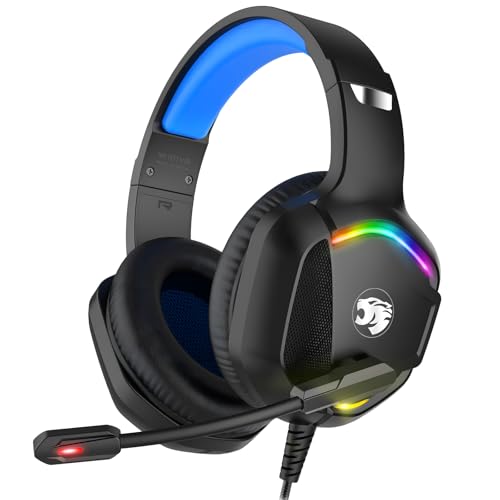
Top pickBest for cheap wired
1. IMYB A36 Gaming Headset
An IMYB A36 gaming headset with mic and stereo headphones for PC, PS5 and Xbox, per the listing. Check price on Amazon.
Good for: Cheap wired. Watch out: lesser-known brand.
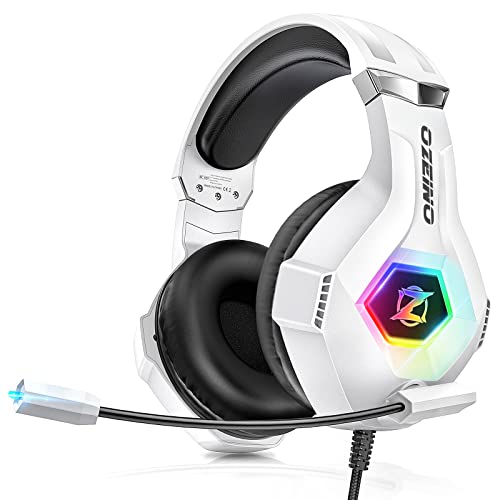
Best for cheap with LEDs
2. Ozeino Gaming Headset (7.1 Surround)
An Ozeino gaming headset for PC, PS4, PS5 and Xbox with 7.1 surround and a noise-canceling mic, per the listing. Check price on Amazon.
Good for: Cheap with LEDs. Watch out: virtual surround.
Best for lightweight USB-A and USB-C
3. Lenovo 115 USB Stereo Headset
A Lenovo 115 USB-A/USB-C wired stereo headset, lightweight and noise-cancelling with in-line control, per the listing. Check price on Amazon.
Good for: Lightweight USB-A and USB-C. Watch out: office-style design.
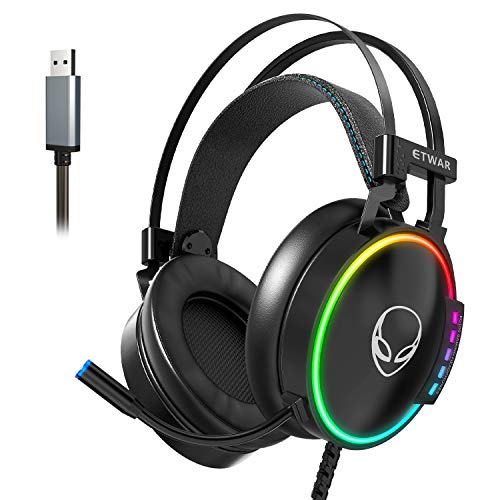
Best for 7.1 USB for laptops
4. ETWAR EG100 USB Gaming Headset
An ETWAR EG100 USB wired gaming headset for PC with 7.1 surround and a noise-cancelling mic, per the listing. Check price on Amazon.
Good for: 7.1 USB for laptops. Watch out: lesser-known brand.

Best for 3.5mm with 50mm drivers
5. Razer BlackShark V2 X
A Razer BlackShark V2 X gaming headset with 7.1 surround sound, 50mm drivers and memory foam cushion, per the listing. Check price on Amazon.
Good for: 3.5mm with 50mm drivers. Watch out: wired only.


Best for 2.4GHz, Bluetooth 5.4 and 3.5mm
6. Acer Wireless Gaming Headset (Tri-Mode)
An Acer wireless gaming headset for PS5, PC, PS4, Switch, Mac and laptop with tri-mode 2.4GHz, Bluetooth 5.4 and 3.5mm, per the listing. Check price on Amazon.
Good for: 2.4GHz, Bluetooth 5.4 and 3.5mm. Watch out: lesser-known gaming brand.


Best for lightweight Razer USB
7. Razer Kraken V3 X
A Razer Kraken V3 X wired USB gaming headset, lightweight, per the listing. Check price on Amazon.
Good for: Lightweight Razer USB. Watch out: wired only.

Best Picks by Category
These labels come from the Amazon listings. They are a data summary, not hands-on test results.
- Top rated: Razer BlackShark V2 X; check price on Amazon.
- Most reviewed: Ozeino Gaming Headset (7.1 Surround); check price on Amazon.
- Best value: IMYB A36 Gaming Headset — a budget pick; check price on Amazon.
- Lowest price: IMYB A36 Gaming Headset — a budget pick; check price on Amazon.
- Premium option: Razer Kraken V3 X — a premium pick; check price on Amazon.
Price, Rating and Review Comparison
This table lists the picks with their price tier. Check price on Amazon for current pricing.
| Product | Price | Rating | Ratings | Price tier |
|---|---|---|---|---|
| IMYB A36 Gaming Headset | Check price on Amazon | — | — | Mid-range |
| Ozeino Gaming Headset (7.1 Surround) | Check price on Amazon | — | — | Mid-range |
| Lenovo 115 USB Stereo Headset | Check price on Amazon | — | — | Mid-range |
| ETWAR EG100 USB Gaming Headset | Check price on Amazon | — | — | Mid-range |
| Razer BlackShark V2 X | Check price on Amazon | — | — | Mid-range |
| Acer Wireless Gaming Headset (Tri-Mode) | Check price on Amazon | — | — | Premium |
| Razer Kraken V3 X | Check price on Amazon | — | — | Premium |
What the Listings Say
Below are the concrete details each seller states on the Amazon listing. Check the live listing for the latest specs before you buy.
IMYB A36 Gaming Headset
The listing states: Professional Gaming Headset Gaming headphones with 6.5ft high tensile strength, anti-tangle braided cable, rotary volume control and button microphone mute..
Ozeino Gaming Headset (7.1 Surround)
The listing states: Immersive 7.1 Surround Sound: This gaming headset delivering stereo surround sound for realistic audio..
Lenovo 115 USB Stereo Headset
The listing states: Featherlight Comfort: Ergonomic, over-ear design with memory foam earcups ensures all-day comfort, weighing just 140g.
ETWAR EG100 USB Gaming Headset
The listing states: Multi-Platform Compatible EG100 USB7.1 Surround Sound gaming headset compatible with USB jack,working for PC PS4 PS5 Laptop Mac,do not work with X-box; [2 Years Warranty]: Etwar USB headset gaming with microphone are under strict quality inspection on each production line..
Razer BlackShark V2 X
The listing states: 7.1 SURROUND SOUND FOR POSITIONAL AUDIO Outfitted with custom-tuned 50 mm drivers, capable of software-enabled surround sound.; *Only available on Windows 10 64-bit; LIGHTWEIGHT DESIGN WITH BREATHABLE FOAM EAR CUSHIONS At just 240g, the BlackShark V2X is engineered from the ground up for maximum comfort; CROSS-PLATFORM COMPATIBILITY Works with PC, Mac, PS4, Xbox One, Nintendo Switch via 3.5mm jack, enjoy unfair audio advantage across almost every platform..
Acer Wireless Gaming Headset (Tri-Mode)
The listing states: Tri-Mode Connection For Flexible Play: Switch between 2.4GHz wireless, Bluetooth 5.4, and 3.5mm wired modes for gaming, calls, and entertainment.; Use 2.4 GHz for low-latency gameplay, Bluetooth for phones and tablets, or wired mode for a direct connection; Multi-Platform Compatibility: This gaming headset wireless works with PS5, PS4, PC, Mac, laptops, Switch, and mobile devices through supported connection modes.; Xbox Series X|S and Xbox controllers are supported by a 3.5mm wired connection only.
Razer Kraken V3 X
The listing states: 285G LIGHTWEIGHT BUILD Experience superior audio and game for hours without being weighed down by the headset; 7.1 SURROUND SOUND Provides accurate positional audio that lets you pinpoint intuitively where every sound is coming from.; *Only available on Windows 10 64-bit; #1 SELLING PC GAMING PERIPHERALS BRAND IN THE U.S..
How to Choose
Connector
USB works everywhere; 3.5mm needs a combo jack.
Mic
Check noise cancelling.
Weight
Light is easier to travel with.
USB or 3.5mm: which gaming headset connection suits a laptop?
For most laptops, a USB headset is the simpler choice because it carries its own sound processing and avoids jack problems, while a 3.5mm headset only works if your laptop has the right port. The key is knowing what your laptop actually offers.
Many modern laptops have a single combo jack that handles both headphones and a microphone. Others have separate ports, and some thin models have no headphone jack at all. A 3.5mm gaming headset with a single plug needs a combo jack, and a headset with two plugs needs separate ones or an adapter.
USB headsets such as the ETWAR EG100 USB Gaming Headset, the Lenovo 115 USB Stereo Headset and the Razer Kraken V3 X plug into a USB port and sidestep the question. The trade-off is that they use up a port, and USB-A and USB-C are not interchangeable without an adapter. The Lenovo 115 is described as working with both USB-A and USB-C, which is handy if your laptop only has one type.
Quick comparison:
- USB: fewer compatibility surprises, often has its own audio chip, uses a port.
- 3.5mm: works with many devices beyond laptops, needs the right jack layout.
- Wireless: frees you from cables but needs charging and a receiver or Bluetooth.
Check your laptop’s ports before you decide, then match the headset connector to what you have.
Is a wired or wireless gaming headset better for a laptop?
A wired headset is the safer, simpler pick for most laptop gamers, while a wireless one is better if you move around or want one headset for several devices. Neither is universally better.
Wired headsets do not need charging, and they avoid pairing issues. They also tend to be easy to compare on comfort and sound alone. The downside is the cable, which can snag on a desk or tug your laptop. Some picks, like the IMYB A36 Gaming Headset, mention a braided anti-tangle cable on the listing, which helps with this.
The Acer Wireless Gaming Headset (Tri-Mode) is the wireless option here. The post notes it offers 2.4GHz, Bluetooth and a 3.5mm wired mode. That flexibility is useful: 2.4GHz is generally the connection meant for gaming, Bluetooth suits phones and tablets, and the wired mode works when the battery is low.
Things to weigh with wireless:
- Battery life varies, so check what the listing states.
- A 2.4GHz receiver uses a USB port on your laptop.
- Bluetooth can add delay in fast games, so check which mode is best for play.
If you game at a desk, wired is usually enough. If you roam or switch between devices, the tri-mode headset is worth a closer look.
Does 7.1 surround sound and a noise-cancelling mic matter?
Surround sound can help with directional cues in some games, but on most budget headsets it is simulated in software, so do not treat it as a must-have. A clear microphone usually matters more for team play.
Several picks, including the Ozeino Gaming Headset (7.1 Surround), the ETWAR EG100 USB Gaming Headset and the Razer BlackShark V2 X, advertise 7.1 surround. The post flags the Ozeino as virtual surround. Razer’s listing notes the surround feature is software-enabled and only available on Windows 10 64-bit, so check that your operating system is supported if surround is important to you.
For voice chat, look at how the microphone is built and controlled. Useful features include:
- A flexible or retractable boom so you can position it near your mouth.
- A mute button or in-line control within easy reach. The IMYB A36 lists a microphone mute button, and the Lenovo 115 lists an in-line control.
- Noise-cancelling claims, which vary in effect. Treat them as a feature to check, not a promise.
If you mostly play single-player games, great stereo sound and comfort count for more than surround modes. If you play team shooters or call friends often, give the microphone more weight in your decision.
How do you choose a comfortable gaming headset?
Choose a headset with a weight and ear cup style that suits your head and your play sessions, because comfort decides whether you actually keep using it. Lighter headsets and softer cushions help in long sessions.
The listings give clues. The Lenovo 115 USB Stereo Headset is described as featherlight with memory foam earcups. The Razer BlackShark V2 X is described with breathable foam ear cushions and a lightweight design, and the Razer Kraken V3 X is also described as lightweight. These are seller statements, so comfort is still personal.
Think about these fit points:
- Glasses: thick cups can press frames against your head; softer foam helps.
- Head size: check whether the band is adjustable and how far it extends.
- Heat: leatherette cushions can feel warm; fabric or breathable foam can feel cooler.
- Clamp: a headband that grips too tight causes pressure after an hour or two.
- Travel: if you carry the headset in a laptop bag, lighter and more compact is easier to pack.
Since you cannot try one on before ordering, read general comments about fit on the listing and check the return terms in case the headset does not suit you.
Will a gaming headset work with your laptop and consoles?
A gaming headset works with your laptop if its connector and software support match your system, so check the listing before you buy. Compatibility details differ more than people expect.
The ETWAR EG100 listing says it works with PC, PS4, PS5, laptop and Mac, and says it does not work with Xbox. That is a clear example of why reading the compatibility line matters. The Acer headset lists PS5, PS4, PC, Mac, laptops, Switch and mobile devices through supported connection modes, with Xbox support described through a 3.5mm connection on controllers.
Your checklist:
- Does your laptop have USB-A, USB-C or a combo jack, and does the headset match?
- Is surround or a control app limited to a specific operating system?
- If you use a Mac or Linux laptop, does the listing mention support?
- Will you also use it with a console or phone? If so, the connector matters there too.
If a listing is vague about your system, treat that as a reason to pick a model that states support clearly.
It also helps to think about where the headset will be used besides your desk. A model with a 3.5mm mode can plug into a phone, a controller or a tablet that has the matching jack, while a USB-only model stays tied to computers. If you travel with a laptop, a headset that works in more than one mode saves you from carrying a second pair of earphones. Whatever you choose, plug it in and test the microphone and sound as soon as it arrives, so any compatibility problem shows up while returns are still simple.
Which gaming headset for laptops should you buy?
Choose by connection type and budget first, then by comfort and features. Here is how the named picks match common needs.
- Lowest price, wired: the IMYB A36 Gaming Headset, with the caveat that the post notes it is a lesser-known brand.
- Most-reviewed budget pick: the Ozeino Gaming Headset (7.1 Surround), which also has LED lighting.
- Lightweight for work and play: the Lenovo 115 USB Stereo Headset, with USB-A and USB-C, though its design is office-style.
- USB with surround for a laptop: the ETWAR EG100 USB Gaming Headset, but not for Xbox.
- 3.5mm with large drivers: the Razer BlackShark V2 X, which is wired only.
- Wireless flexibility: the Acer Wireless Gaming Headset (Tri-Mode) with 2.4GHz, Bluetooth and 3.5mm modes.
- Lightweight USB from a known gaming brand: the Razer Kraken V3 X, which is wired only.
If you are torn between two, pick the one whose connector matches your laptop and whose comfort claims suit your head, since those two factors cause most returns.
What to check before you buy a gaming headset
Run through a short checklist before you order so that the headset you receive works with your laptop the way you expect.
- Connector: USB-A, USB-C, single 3.5mm plug or dual plugs?
- Cable length: Is it long enough for your desk setup?
- Microphone: Is it detachable, flexible, and easy to mute?
- Software: Do surround or lighting features need an app, and does it run on your system?
- Platform support: Does the listing state support for your laptop, console or phone?
- Comfort: Look at weight, cushion material and band adjustment.
- What is in the box: Check for adapters or splitters if you need them.
- Warranty and returns: Confirm the terms on the listing. The ETWAR listing mentions a warranty, so read the details.
- Charging and battery: For wireless, check charging method and stated battery life.
Spending a few minutes on these items is cheaper than sending a headset back.
Is a cheap gaming headset enough, and who should skip these?
A cheap gaming headset is enough for casual play, calls and basic voice chat, but it may fall short on durability, fit and microphone clarity compared with pricier models. Paying more buys different trade-offs, not guaranteed better sound.
Budget picks like the IMYB A36 or Ozeino are easy to try, though lesser-known brands may offer less support. Mid-priced options such as the Razer BlackShark V2 X add larger drivers and a better-known brand. The premium end, like the Acer tri-mode, adds wireless flexibility rather than purely better sound.
Honest downsides to know:
- Virtual surround is not the same as true multi-speaker audio.
- LED lighting adds style but not sound quality.
- Wired headsets tie you to your laptop; wireless ones need charging.
- Gaming headsets can look bulky for office or travel use.
You may want to skip a gaming headset if you mostly take calls in an office, since a plainer headset like the Lenovo 115 may suit you better. Skip it too if you already own good headphones and a separate microphone, or if your laptop lacks a compatible port and you do not want adapters.
Compare the picks above, check the current listing for your laptop’s ports and what is included, then choose the headset that fits how you will play.
A Closer Look at Each Headset on a Laptop Desk
Connector charts only tell half the story. What decides whether a headset stays on your desk or ends up in a drawer is how it behaves across a whole evening: the first hour of a game, a voice call squeezed between matches, a film afterwards, and the moment you realise the cable, the clamp, or the microphone is quietly annoying you. This section walks through each pick in those terms, so you can match the headset to your habits rather than to a spec sheet.
IMYB A36 Gaming Headset: the straightforward starter
An entry-level wired headset like this one earns its place by removing friction. You plug it in, the laptop recognises it, and you are in voice chat without pairing menus, charging cables, or battery anxiety. That simplicity suits younger players, shared family laptops, and anyone buying a first headset for occasional gaming who would rather spend attention on the game than on audio settings. It is also a sensible spare: the headset that lives in a drawer and saves the evening when a primary headset fails.
The limits show up with heavy daily use. Budget headsets generally ask you to accept simpler materials, a microphone that is fine for team chat rather than streaming, and comfort that is good for a session rather than for a whole day of work and play combined. If you wear glasses, take extra care to check how the ear cups sit, because clamp pressure that feels fine for twenty minutes can ache after two hours. Choose the A36 style of pick when the goal is easy, inexpensive voice and game audio. Skip it when the headset must double as your all-day work call equipment.
Ozeino Gaming Headset (7.1 Surround): the immersion-first budget pick
Virtual surround processing is the headline here, and it is worth understanding what that means on a laptop. The headset uses software processing to widen the sense of space in games, which many players enjoy in story-driven titles and shooters alike, even though it is a simulation rather than separate physical channels. On a laptop, that processing usually arrives through a USB connection, which also means the headset carries its own audio path and behaves consistently across different machines.
This pick suits players who game mostly at one desk, enjoy a bigger, more theatrical soundstage, and are happy to install or enable companion software. It is less suited to minimalists who move between a laptop, a console controller, and a phone, because a USB-centred design travels less gracefully than a plain analogue plug. It also asks you to be realistic: processing can add flavour, but it cannot turn a budget driver into a premium one. Choose it for desk-bound immersion on a budget. Skip it if you need one headset to plug into everything you own without adapters or software.
Lenovo 115 USB Stereo Headset: the work-and-play crossover
Lenovo is a laptop company first, and a USB stereo headset from a laptop brand tends to be designed for the realities of calls, classes, and meetings as much as for games. That makes this style of pick quietly valuable for students and remote workers whose laptop is both office and entertainment. USB audio sidesteps the combined-jack confusion entirely, mute and volume controls are usually placed where your hand expects them, and the tuning tends to favour clear speech over booming effects.
The trade-off is excitement. A speech-first headset will not deliver the cinematic low end that a dedicated gaming model aims for, and it may look and feel more like office equipment than like gaming gear. For many laptop owners that is a perfectly good bargain, because clear microphone audio earns more goodwill in a meeting or a team lobby than extra bass ever will. Choose it when calls and classes share the headset with games. Skip it when gaming atmosphere is the whole point of the purchase.
ETWAR EG100 USB Gaming Headset: the plug-and-play gaming option
The EG100 sits in the practical middle: gaming styling and intent, delivered over USB so that a modern thin laptop with a single combined port, or no analogue port at all, is not a problem. USB also means the digital-to-analogue conversion happens in the headset rather than in the laptop, which can clean up the hiss and interference that some laptop analogue outputs suffer from, especially while charging.
It suits laptop gamers who want one cable, predictable behaviour, and no dongles to lose. Its limits are the usual ones for the class: software features vary, the microphone is built for chat clarity rather than broadcast work, and long-session comfort depends heavily on your head shape and whether you wear glasses. Test comfort early in the return window by wearing it for a full session, not for five minutes. Choose it when USB simplicity plus gaming intent is exactly your brief. Skip it if you also need controller or handheld-console compatibility from the same headset.
Razer BlackShark V2 X: the lightweight competitive favourite
The BlackShark line is aimed at players who care about directional audio and a clear microphone more than about lighting or extras, and the V2 X is the accessible end of that idea. Its appeal on a laptop is focus: a light frame you can wear through long ranked sessions, a microphone designed to isolate your voice, and tuning that prioritises the footsteps, reloads, and callouts that competitive players actually listen for. It is the pick for the player whose headset is sports equipment, not furniture.
That focus means accepting a wired life and a feature set trimmed to the essentials. There is no wireless freedom for the sofa, and the design language is functional rather than plush. Players who split time between competitive titles and films or music may prefer a warmer, heavier sound. Choose the BlackShark V2 X when competitive clarity and low weight top your list. Skip it when you want one wireless headset for desk, sofa, and travel alike.
Acer Wireless Gaming Headset (Tri-Mode): the flexible all-rounder
Tri-mode connectivity is the whole argument for this pick, and on a laptop it is a strong one. A low-latency wireless dongle serves gaming at the desk, Bluetooth serves a phone, tablet, or a quick call away from the desk, and a cable covers the flat-battery moment that always arrives mid-session. For a laptop owner whose machine moves between desk, sofa, and bag, that flexibility can matter more than any single audio specification.
The costs of flexibility are management and complexity. There is a battery to charge, a dongle to keep track of, and more settings to understand, and wireless convenience rarely comes at the lowest price in a list like this. It also means checking which mode your games and calls actually use, because microphone quality can differ between a dongle connection and Bluetooth. Choose it when your laptop life is genuinely mobile and multi-device. Skip it if the headset will never leave one desk, where a wired pick gives you the same evening with less to charge and less to lose.
Razer Kraken V3 X: the comfortable, expressive Razer option
Where the BlackShark is the focused tool, the Kraken is the crowd-pleaser: a lighter take on a famous, comfortable design, with the expressive touches that many gamers enjoy and tuning that leans into fun. On a laptop it suits long, varied evenings that mix competitive games, story titles, films, and voice chat, and it suits players who found purely functional headsets a little joyless.
The honest caveat is specialisation. A crowd-pleasing tune is not the same as the most analytical competitive sound, and players who live in ranked ladders may still prefer the BlackShark approach, while call-heavy workers may prefer the Lenovo approach. Comfort, though, is a genuine performance feature: the headset you can wear for three hours without thinking about it is the one that improves your game. Choose the Kraken V3 X for balanced, comfortable, all-evening use. Skip it if your only metric is competitive audio precision or if you need wireless freedom.
Matching the Picks to How You Actually Play
Start with your room, not with the product page. A shared room or a thin-walled flat argues for closed-back designs and a microphone that rejects background noise, and it argues against turning game audio up to compensate for a noisy space. A quiet solo desk gives you more freedom, and makes comfort and sound signature the deciding factors. Next, count your devices honestly. One laptop only points to USB or analogue simplicity. A laptop plus a console plus a phone points either to a plain analogue plug or to the tri-mode wireless pick, and those are very different budgets of money and patience.
Then think about your microphone life. If your voice carries a team, a class, or a work meeting, prioritise microphone clarity and a reliable mute over every lighting effect and surround mode. If you mostly listen, spend your attention on fit and tuning instead. Finally, respect the return window as part of the purchase: wear the headset for a full real session, make a real call, and record a short voice sample to listen back to. Ten honest minutes of testing tells you more than any listing can.
Setup and Care Habits That Improve Any of These Headsets
Set the laptop’s default input and output deliberately rather than assuming the game or call app guessed correctly, and check per-app permissions for the microphone. Keep sidetone and monitoring in mind if you find yourself shouting; hearing a little of your own voice settles volume naturally. Wipe ear cushions after long sessions, keep cables strain-relieved rather than sharply bent at the plug, and store the headset on a stand or hook instead of under a laptop bag. For wireless models, build a charging habit tied to something you already do, such as docking the laptop, so the battery is never the reason a session starts badly.
A short word on glasses, hats, and hairstyles, because fit advice rarely mentions them. Glasses arms change how ear cushions seal, which changes bass and isolation, so glasses wearers should favour softer cushions and moderate clamp and should test with the exact frames they game in. Long hair worn under cushions breaks the seal in the same way. If a headset feels excellent for ten minutes in a shop or at a desk but aches at the jaw or the crown after an hour, believe the hour, not the ten minutes, and use the return window while you still can.
Microphone technique repays a little attention on every pick in this list. Position the boom a short distance from the corner of your mouth rather than directly in front of it, speak across it instead of into it, and let noise suppression in your call or chat app do the rest. Record a sample in a quiet room and again with a fan or television running, and listen for whether your voice stays forward. That two-minute test separates a microphone that merely works from one your teammates will thank you for.
If you share one laptop with family or housemates, consider profiles and hygiene as part of the buying decision. Wipeable cushion materials, a headset that tolerates being adjusted to very different head sizes, and a wired connection that needs no pairing ceremony all make a shared headset painless. A personal wireless headset, by contrast, is better treated as individual equipment. Matching the pick to the sharing reality of your household prevents the quiet resentment that builds when an expensive headset becomes everyone’s headset by accident.
Finally, keep expectations in proportion. A headset upgrade improves clarity, comfort, and communication, and those are real competitive and social advantages. It will not fix a laptop that stutters, a connection that lags, or a team that does not communicate. Buy the pick that fits your connector, your devices, and your head, set it up carefully, and then spend your attention where it belongs: on the game and the people you are playing it with.
Headset Ownership Over Months, Not Minutes
The first evening with a headset tells you about sound. The following months tell you about ownership, and ownership has its own criteria. Ear cushions compress and absorb wear; a headset whose cushions can be cleaned or replaced gracefully ages better than one that cannot. Cables fray at the plug and at the ear cup, which is why strain relief and a habit of not wrapping the cable tightly around the headset matter more than any single feature on the box. Headbands and adjustment sliders take daily stress in silence until they do not, so a headset that feels solid at its moving parts is worth real preference when you handle two otherwise similar picks.
Think, too, about the software and settings layer. A headset that needs an application for its best features asks you to keep that application healthy across laptop changes, while a plain analogue or simple USB headset asks nothing. Neither is wrong; they suit different temperaments. Buyers who enjoy tuning equalisers and surround modes will use the software gladly. Buyers who want to plug in and forget should weight simplicity as heavily as sound.
There is also the question of the second use. Many gaming headsets in this list quietly become the household’s call headset, the travel headset, or the headset a younger family member inherits. A pick with a decent microphone and a standard connection makes those second lives easy. When two headsets are close in your estimation, choose the one whose second life in your household looks happiest, because headsets often serve longer in their second role than in their first.
A short trial routine before the return window closes
Run one long gaming session, one voice call with people who know your voice well, one film or long video, and one session wearing glasses if you ever game in them. Record a voice sample in a noisy moment and in a quiet one. Check that the laptop wakes, sleeps, and docks without losing track of the headset. That routine, done in the first days, converts a purchase into a decision, and it is the routine that separates satisfied owners from people who discover a headset’s one annoying trait in month two.
Two Headsets, One Desk: A Sensible Way to End Up
Many committed players eventually settle on a pairing rather than a single perfect headset: a lightweight wired pick for competitive sessions, where clarity and zero charging matter, and a comfortable or wireless pick for everything else the laptop does. This list supports that outcome naturally, with the focused wired models and the flexible wireless and all-round models playing different roles. If your budget and your habits point that way, buy the primary headset first, live with it for a season, and let its genuine weakness, the thing you actually miss rather than the thing a chart says you should miss, choose the second. A pairing built from experience beats a pairing built from speculation, and a single well-chosen headset that you understand completely beats two that you bought in a hurry.
If one headset must do everything, the deciding test is the longest day, not the best game. Wear it through work, play, and a film, in your real room, with your real glasses and your real chair. The headset that is still comfortable and clear at the end of that day is your answer, whatever its position in any ranking, because comfort and clarity across a whole day are the qualities that survive contact with real life.
Frequently Asked Questions
USB or 3.5mm?
USB avoids adapters.
Cheapest?
IMYB A36 or Ozeino.
Wireless?
Acer tri-mode.
Can I use a gaming headset on a laptop with only one headphone jack?
Yes, if the headset has a single 3.5mm plug that carries both audio and microphone, or if you use a USB headset. Headsets with two separate plugs need a splitter adapter. Check the plug type on the listing before ordering.
Do USB gaming headsets sound better than 3.5mm ones?
Not necessarily. USB headsets use their own sound processing, which can be more consistent across laptops, but sound quality depends on the drivers and tuning. Comfort and microphone quality often matter more in practice.
Is 7.1 surround sound real on gaming headsets?
On most budget headsets it is virtual surround created by software. It can help with positioning in some games but is not the same as having separate speakers. Check whether the feature needs a specific operating system.
Will a gaming headset work with Xbox?
It depends on the model and its connection type. Some listings say clearly that they do not work with Xbox, while others support it through a 3.5mm connection. Read the compatibility line on the listing first.
Are wireless gaming headsets good for laptops?
They can be, especially if they offer a 2.4GHz mode designed for gaming. You need to keep them charged and may need a free USB port for the receiver. Wired mode is a handy backup when the battery runs low.
How do I stop my gaming headset mic from picking up background noise?
Position the microphone close to your mouth, lower the mic gain in your sound settings and mute when you are not talking. Noise-cancelling mics help but have limits. Keep the keyboard and fans away from the mic when you can.
Why is my headset not detected on my laptop?
Check that it is plugged in fully, selected as the default device in your sound settings and not muted. For 3.5mm headsets, a plug-type mismatch can stop the microphone from working. Trying a different port or restarting the laptop often helps.
How long do gaming headsets usually last?
Lifespan depends on build quality, how you handle the cable and how often you use it. Cables, ear cushions and hinges tend to wear first. Check whether replacement cushions or a warranty are offered on the listing.
Bottom Line
For USB, the ETWAR or Razer Kraken V3 X. For wireless, the Acer tri-mode.
More Laptop Guides
- Best Gaming Laptops
- Best Gaming Laptops Under a Mid Budget
- Best Gaming Laptops Under a Higher Budget
- Best 14-Inch Gaming Laptops
- Best RTX 5060 Gaming Laptops
- Best High-End Gaming Laptops
- Best MSI Gaming Laptops
- Best ASUS Gaming Laptops
- Best Razer Gaming Laptops
- Best Gaming Laptop Backpacks
- Best Wireless Gaming Mice for Laptops
- All laptop guides
Related Guides
- 6 Best Gaming Laptops: HP Victus, MSI, ASUS TUF, Lenovo LOQ (2026)
- 8 Best Gaming Laptops Under a Mid Budget: RTX 5060 and 5050 (2026)
- 6 Best Gaming Laptops Under a Higher Budget: RTX 5070 and 14-Inch (2026)
- 4 Best 14-Inch Gaming Laptops: TUF A14, Helios Neo, Z13 (2026)
- 5 Best RTX 5060 Gaming Laptops: MSI, ASUS, GIGABYTE (2026)