Fujifilm builds several kinds of cameras, including compact fixed lens designs, interchangeable lens mirrorless bodies and instant film cameras. The maker is known for physical dials and color styles, which shape how it feels to shoot. It helps to think about how you like to work. Some people prefer a small body they can carry daily, while others want a camera with room for several lenses. Fujifilm covers both, so your habits matter more than any single feature.
We have not used these products ourselves, so this guide does not name models or rank them. It covers the decisions that matter, so you can read any Fujifilm listing and judge whether it fits your habits, your subjects and your bag.
As an Amazon Associate we earn from qualifying purchases. Links on this site are affiliate links, and they do not change the information we give.

In this guide
Quick Picks
| Pick | Product | Best For |
|---|---|---|
| 1 | Fujifilm X100VI (Silver) | Best fixed-lens compact for everyday carry |
| 2 | Fujifilm X-T5 Body (Silver) | Best for stills-first photographers |
| 3 | Fujifilm X-T50 Body (Charcoal Silver) | Best for film simulation fans |
| 4 | Fujifilm X-S20 Body | Best for video and content creators |
| 5 | Fujifilm Instax Mini 12 (Blossom Pink) | Best instant camera for parties and gifts |
Our Picks

1. Fujifilm X100VI (Silver) — Best for everyday carry with a fixed lens
The X100VI is the compact in the Fujifilm range that gets carried everywhere, and the listing details explain why. It pairs a 40.2MP APS-C X-Trans CMOS 5 HR sensor with a fixed 23mm f/2 lens (a 35mm equivalent view), so there are no lens decisions to make before you walk out the door. The hybrid viewfinder lets you switch between an optical view and an electronic one, and the body keeps the dedicated shutter speed and exposure compensation dials the guide above describes. Fujifilm lists 20 Film Simulation modes, in-body stabilization rated up to 6.0 stops, and 6.2K video recording for occasional clips. It suits street, travel and daily documentary shooting where a small, quiet body matters more than lens flexibility. If you know you will want to swap lenses later, look at the interchangeable bodies below instead, but as a single carry-everywhere camera this is the pick that matches the article’s compact criteria most closely.

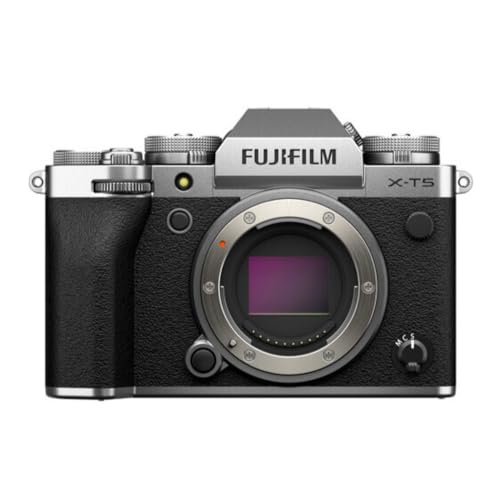
2. Fujifilm X-T5 Body (Silver) — Best for stills-first photographers
The X-T5 is Fujifilm’s stills-focused flagship in this line-up, built around the same 40.2MP X-Trans CMOS 5 HR sensor and X-Processor 5. The product details highlight the classic dial layout — separate dials for ISO, shutter speed and exposure compensation — which fits the controls section of the guide above. In-body stabilization is rated up to 7.0 stops, the electronic viewfinder is a 3.69-million-dot OLED, and a Pixel Shift mode combines frames for 160MP files aimed at landscape and studio work. Video is present at up to 6.2K/30p, but the design emphasis is clearly on photography: a three-way tilting screen rather than a fully articulating one, and a weather-resistant body. It takes the full X-mount lens range, so it can grow with a collection of primes and zooms. Choose this one if stills quality, resolution and the traditional dial handling matter more to you than vlogging features.

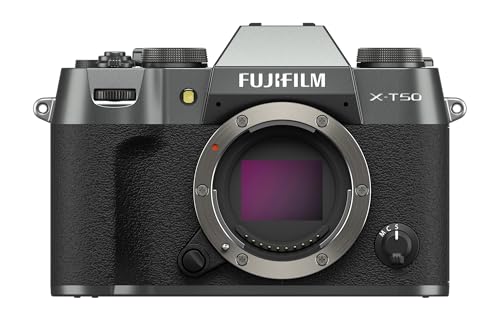
3. Fujifilm X-T50 Body (Charcoal Silver) — Best for film simulation fans
The X-T50 puts the same 40.2MP X-Trans CMOS 5 HR sensor into a smaller, rounder body, and its signature feature speaks directly to the color styles section of this guide: a dedicated Film Simulation dial on the top plate. Turning it cycles through 20 film looks, including the newer REALA ACE mode, without opening a menu. The listing notes in-body stabilization rated up to 7.0 stops, subject-detection autofocus covering animals, birds and vehicles, and video up to 6.2K/30p. At roughly 438g for the body, it is noticeably easier to carry all day than the flagship above, though the smaller grip and single card slot reflect its step-down position. It uses the same X mount, so lenses are shared with the rest of the system. This is the pick for photographers who love the film look, want high resolution, and prefer a compact body they will actually bring along.

4. Fujifilm X-S20 Body — Best for video and content creators
The X-S20 takes a different route from the dial-led bodies above: a deeper grip, a mode dial with a dedicated Vlog position, and a fully articulating touchscreen for filming yourself. Inside is a 26.1MP X-Trans CMOS 4 sensor with the X-Processor 5, which brings subject-detection autofocus for people, animals and vehicles, plus video recording up to 6.2K/30p and 4K/60p. The listing highlights the larger NP-W235 battery, rated by Fujifilm for around 750 frames in normal mode — a practical answer to the guide’s note about small bodies draining quickly. There are microphone and headphone ports, a product-priority autofocus mode for showing items to camera, and in-body stabilization rated up to 7.0 stops. Resolution is lower than the 40MP bodies, but for creators mixing stills with regular video, and anyone who prefers a modern grip-and-dial layout, this is the most balanced hybrid pick here.

5. Fujifilm Instax Mini 12 (Blossom Pink) — Best instant camera for fun and gifts
The Instax Mini 12 covers the instant category the guide opens with, and it is deliberately the simplest camera in this list. There are no menus or dials to learn: you twist the lens to switch it on, and automatic exposure metering adjusts the shutter speed and flash for the light around you. A close-up mode reduces parallax for arm’s-length shots, and the small selfie mirror beside the lens helps frame self-portraits. It prints onto Instax Mini film, producing credit-card-sized photos in about 90 seconds of development time, and runs on two AA batteries. The rounded body comes in several colors; this listing is the Blossom Pink version. There is no digital file and no editing step, which is exactly the appeal at parties, weddings and family gatherings where a physical print handed over on the spot beats another photo on a phone. Check you order the correct Instax Mini film format, as the guide warns.
View Fujifilm Instax Mini 12 (Blossom Pink) on Amazon
What to Look For
| Factor | Why it matters | What to check |
|---|---|---|
| Camera type | Instant, compact and mirrorless bodies serve different goals. | Decide whether you want prints, a pocket camera or a lens system. |
| Sensor size | Larger sensors usually handle dim light and depth effects better. | Check the stated sensor format and the resolution the maker lists. |
| Lens system | Interchangeable lenses let a camera grow with you. | Look at the mount name and the range of lenses the maker offers. |
| Controls and dials | Physical dials suit people who like direct control. | Check for exposure dials and how many custom buttons are available. |
| Color styles | Built in looks can reduce time spent editing. | See which film simulation modes the maker lists. |
| Video features | Video needs good formats, stabilization and audio inputs. | Compare recording modes, microphone ports and any stabilization claims. |
| Size and grip | A body you enjoy carrying gets used more. | Check weight, grip shape and battery life claims. |
Setup and Care Tips
- Spend a day with the menu so the custom buttons match your habits.
- Try the built in color styles before shooting in a raw format.
- Carry a spare battery, since small bodies can drain quickly.
- Update the firmware using the maker’s own instructions.
- Clean the lens mount area carefully when swapping lenses outdoors.
Mistakes to Avoid
- Choosing a fixed lens body when you need interchangeable lenses.
- Ignoring the lens system, which shapes long term spending.
- Assuming every body shoots strong video without checking the specs.
- Skipping a check of grip size and weight.
- Buying instant film without confirming the correct film format.
Which Fujifilm camera should you buy?
The best Fujifilm camera depends on whether you want a pocket carry-everywhere camera, a lens-swapping body for stills, a hybrid for video, or a simple instant camera. Match your habits to the cameras named in this guide.
- If you want one small camera with no lens decisions, go for the Fujifilm X100VI (Silver), the fixed-lens compact for everyday carry.
- If stills quality and traditional dials matter most, choose the Fujifilm X-T5 Body (Silver), the stills-first option that takes the full X-mount lens range.
- If you love film simulation looks and want a smaller interchangeable body, the Fujifilm X-T50 Body (Charcoal Silver) puts a dedicated Film Simulation dial on top.
- If you mix photos with regular video or vlogging, the Fujifilm X-S20 Body has the grip, articulating screen and larger battery that creators tend to want.
- If you want prints at parties, gifts or family events, the Fujifilm Instax Mini 12 (Blossom Pink) is simple and needs no editing.
Remember that the interchangeable bodies are sold as bodies, so budget for at least one lens. If that sounds like too many decisions, the fixed-lens compact or the instant camera removes them.
How do you choose between a Fujifilm compact and an interchangeable-lens camera?
Choose a Fujifilm compact if you want the lightest, simplest camera you will carry daily, and choose an interchangeable-lens body if you want to grow into different lenses. The decision comes down to flexibility versus convenience.
A fixed-lens compact keeps cost and bulk down, and the single lens forces you to move rather than zoom, which many street and travel photographers enjoy. The trade-off is that you cannot change the view for a portrait or a landscape.
An interchangeable-lens body, such as the X-T5, X-T50 or X-S20, opens up primes, zooms and specialty lenses. Over time, lenses often become a larger part of the spend than the body, and they add weight to your bag.
- Pick a compact if you value pocketability and a quiet, discreet camera.
- Pick an interchangeable body if you shoot varied subjects or want to upgrade lenses later.
- Pick an instant camera if the physical print is the point.
What does Fujifilm film simulation actually do?
Film simulation modes are built-in color and tone styles that give your photos a distinct look straight from the camera. They are one of the main reasons people pick Fujifilm over other brands.
Each mode adjusts color, contrast and tonality, inspired by classic film types. You can shoot a vivid style for landscapes, a softer one for portraits or a black and white mode for street work. If you shoot raw files, you can usually apply a style later, so you can experiment.
These looks reduce editing time for many people, but they do not replace skill with light and composition. Some photographers still edit afterward, particularly in tricky lighting.
- Try several modes on the same scene to learn how each behaves.
- Check how the camera lets you switch quickly, whether by dial or menu.
- Decide whether you prefer finished JPEGs or raw files for later editing.
What to check before you buy a Fujifilm camera
Before you buy a Fujifilm camera, confirm what is in the box, which lens it works with, how the batteries and memory cards work, and what the return terms are. Bodies and kits are not always packaged the same way.
- Body only or kit: several listings are body only, so you may need a lens.
- Lens mount: the interchangeable bodies use the X mount, so check lens compatibility.
- Memory card: confirm the card type the camera accepts and buy a reliable one.
- Battery and charger: check what comes in the box and consider a spare.
- Film format (Instax): make sure you buy the matching Instax Mini film.
- Size and grip: hold it in a shop if you can.
- Color and edition: make sure the listing is the color you want.
- Warranty and returns: read the terms on the listing and check that the seller is clearly identified.
Also plan for a strap, a bag and a screen protector, which are not always included.
How should you set up a new Fujifilm camera?
Set up a new Fujifilm camera by charging the battery, formatting a memory card in the camera, updating firmware and assigning the custom buttons to the settings you use most. A short setup session makes the camera feel like yours.
- Format the card in the camera instead of on a computer, so the file structure matches.
- Choose your image quality: JPEG for convenience, raw for editing flexibility, or both.
- Pick a favorite film simulation and a second one to compare.
- Set custom buttons for functions like focus mode, drive mode or film simulation.
- Check the maker’s instructions before applying any firmware update, and keep the battery charged during it.
Spend a few days shooting the same places in different modes. You will quickly learn which dials and looks suit you, and you can then adjust the layout.
What accessories do you need with a Fujifilm camera?
At minimum, you need a memory card and a spare battery, and many photographers add a strap, a small bag and a lens cloth. Accessories matter because many listings sell only the body.
- Memory card: choose a reputable card of the type the camera accepts, and keep a spare.
- Spare battery: compact bodies can drain quickly, especially with video.
- Strap or wrist strap: a comfortable strap makes you carry the camera more.
- Protective filter or lens hood: useful for outdoor shooting, if it suits your lens.
- Camera bag: choose one that fits the body plus one or two lenses.
- Instax film and a case: for the instant camera, film is a running cost to keep in mind.
Check that any accessory is made for your specific model, because sizes and mounts vary. Start small and add items as you find real gaps in how you shoot.
What are the common downsides of Fujifilm cameras, and who should skip them?
Fujifilm cameras reward people who enjoy dials and color looks, but they are not ideal for everyone. Be honest about how you shoot before you choose.
Is it worth paying more? A higher-priced body may bring stronger stabilization, better handling or higher resolution, but you may not need all of it. A simpler body can serve you well if your needs are modest.
What are the downsides? Lenses add to the cost, dial-based controls take time to learn, and smaller bodies can have smaller grips and shorter battery life. The instant camera gives you prints but no digital files.
Who should skip it? If you mostly shoot long telephoto wildlife or fast sports, check lens and autofocus support carefully. If you only want to point and shoot with no learning, a phone may be enough. If you own lots of lenses for another mount, factor in switching costs.
Compare the picks above, check the current listing for what is included, then choose the Fujifilm camera that fits how you will shoot.
Reading This Guide More Deeply: Fujifilm Camera Ownership in Everyday Life
The headline specifications of a Fujifilm camera only tell part of the story. Two models can look almost identical on a listing page and still feel completely different once they are part of your daily routine, because the differences that matter most tend to show up in small repeated moments: how quickly the Fujifilm camera is ready to use, how forgiving it is when you are tired or in a hurry, and how well it keeps doing its job month after month without demanding attention. The picks in this guide were chosen to cover distinct roles rather than to repeat the same idea at slightly different sizes, so the most useful way to read the reviews above is to start from the role you need filled, not from the longest feature list.
That is also why this extra section exists. The sections below slow the decision down and look at the Fujifilm camera from the owner’s side of the table: the details that separate a satisfying purchase from a frustrating one, the situations where one pick clearly suits better than another, the habits that keep the equipment working well, and the simple checks that catch problems while a return is still easy. None of this replaces the individual reviews above. It gives you a framework for weighing them against your own space, habits and expectations, which is where good buying decisions are actually made.
The Details That Separate a Good Fujifilm Camera From a Frustrating One
Most disappointment with a Fujifilm camera does not come from one dramatic flaw. It comes from a handful of small mismatches between what the buyer imagined and what the product does every day. The three areas below are where those mismatches usually hide, and each one is worth a few minutes of honest thought before you order, because each is much easier to judge on paper now than to live with later.
Fixed lens freedom or interchangeable lens range
Fujifilm’s line asks a genuine philosophical question. A fixed-lens camera removes decisions, weight and temptation, and suits photographers who know their focal length and love it. An interchangeable body buys a future of lenses and specialisation. Neither answer is a compromise, but buying one while dreaming of the other is: be honest about whether you compose at one focal length or collect possibilities. Judge this against your worst typical day, not your best one: the busy evening, the rushed job, the session where patience is short. A Fujifilm camera that still works smoothly under those conditions is the one that earns its place, while one that only shines when everything is calm tends to be quietly abandoned.
Dials, automation and how you like to think
Fujifilm’s appeal rests on direct controls: aperture rings, shutter dials and film simulations that invite deliberate photography. Some photographers find this slows them into better pictures, while others prefer the camera to vanish into automation. There is no correct temperament, only a match or mismatch between the camera’s personality and yours, and it is worth handling the controls mentally across a whole imagined day of shooting. A practical way to test your thinking is to picture the second month of ownership rather than the first day. Novelty hides friction at first, but by the second month the Fujifilm camera has to justify itself through routine alone, and this is exactly the quality that decides whether it still does.
Stills, video or the balance between them
Within one brand, bodies lean in different directions: stills-first designs with high-resolution sensors and viewfinders for photographers, and video-leaning designs with the cooling, screens and tools creators need. Hybrid shooters should name their real ratio honestly, because a camera optimised for the seventy percent usually serves better than one that splits its compromises evenly across a ratio you do not have. If you are torn between two picks in this guide, this is often the deciding ground. Headline features tend to be similar across close rivals, while the everyday behaviour described here is where one option quietly pulls ahead of the other for a particular owner.
Matching a Fujifilm Camera to the Way You Will Actually Use It
Buyers rarely use a Fujifilm camera in just one way, but most have one dominant situation that should drive the choice. Reading your own routine honestly, and then checking which pick in this guide was positioned for that routine, prevents the common mistake of buying for an imaginary use case while the real one goes unserved. The three situations below cover the patterns that come up most often.
Everyday carry and street photography
The camera that is with you wins, so size, discretion and a lens that suits your eye dominate this use. Fixed-lens models built for carry thrive here, and film simulations that deliver pleasing files straight from the camera suit photographers who would rather walk than edit. Weather, battery life across a long day and a quiet shutter shape the experience more than resolution does. If this sounds like your routine, weight the picks positioned for this role more heavily than the general all-rounders, even when an all-rounder looks more impressive on paper. A narrower tool that fits the main job usually beats a broader one that fits it only adequately.
Dedicated stills photography and printing
Photographers who print large or shoot deliberate genres such as landscape and portrait should weight sensor resolution, lens quality and viewfinder clarity. Interchangeable bodies let the system grow into specialised lenses over years, and the discipline of a stills-first body, with its dials and its pace, is part of the product being bought. Notice, too, how often this situation really happens. A Fujifilm camera bought for a weekly routine needs different strengths from one bought for an occasional task, and confusing the two is how capable equipment ends up feeling disappointing despite doing nothing wrong.
Content creation and video work
Creators need reliable autofocus in video, good audio options, a screen that faces the right way and files that grade or share easily. Fujifilm’s film simulations are a genuine shortcut to a finished look for many creators. Heat management across long recordings and the availability of lenses suited to video work decide satisfaction more than headline video specifications do. It also helps to think about who else is affected by the choice in this situation: family members, housemates, bandmates, clients or colleagues. A Fujifilm camera that works for you but creates friction for everyone around the task rarely stays satisfying for long.
How the Picks in This Guide Compare With Each Other
Readers often ask which single pick is best, but the more useful question is which pick is best for a particular pattern of use, because the models above were selected to be different from one another rather than to compete head-on. The notes below restate each pick’s role in plain terms and explain how to choose between neighbours, using only the positioning already given in the reviews above.
Fujifilm X100VI (Silver). In this guide it is presented as best for everyday carry with a fixed lens. Treat that positioning as a promise about priorities: this pick spends its design effort on the job named in its label, and accepts compromises elsewhere to do it. Choose it when that job is your main one, and look at the neighbouring picks when your routine spreads more evenly across several jobs.
Fujifilm X-T5 Body (Silver). In this guide it is presented as best for stills-first photographers. The honest question with this pick is not whether it is good, but whether its strengths line up with the hours you will actually spend. If its labelled role matches your dominant use, it is a strong candidate; if your routine is quite different, the same qualities can feel like compromises rather than virtues.
Fujifilm X-T50 Body (Charcoal Silver). In this guide it is presented as best for film simulation fans. Buyers who choose this pick and stay happy with it usually share one thing: the role in its label describes their ordinary week, not their aspirational one. If that is true for you, it deserves a place on your shortlist ahead of more fashionable alternatives.
Fujifilm X-S20 Body. In this guide it is presented as best for video and content creators. Compare this pick directly with the option reviewed just before or after it, because close neighbours in this guide are usually the real contest. The differences between them are about emphasis and fit rather than quality, so let your routine, your space and your existing equipment cast the deciding vote.
Fujifilm Instax Mini 12 (Blossom Pink). In this guide it is presented as best instant camera for fun and gifts. This is also the pick to measure your budget against most carefully. When a guide positions a model for a specific role, paying for that role only makes sense if you will use it often; occasional users are usually better served by the simpler or more versatile neighbour in the list.
When two picks still feel tied after this comparison, choose the one whose compromises bother you less. Every Fujifilm camera gives something up, and long-term satisfaction usually belongs to the buyer who picked the set of trade-offs that fits their habits, rather than the buyer who chased the longest list of strengths.
First Setup and the First Week With Your Fujifilm Camera
Set the camera up slowly on day one: date, file quality, your preferred film simulation, and the autofocus mode for your main subject. Shoot a familiar scene in familiar light across a few settings and review the results on a proper screen, so your defaults reflect evidence. Save further customisation for after real shoots reveal what you actually reach for.
During the first week, resist the urge to judge the Fujifilm camera on a single session. Early impressions are distorted by unfamiliarity: controls sit in unexpected places, routines are not yet automatic, and small setup issues masquerade as product flaws. Keep a short note of anything that bothers you, then check whether it is still bothering you after several ordinary uses. Genuine problems repeat themselves in the same way each time, while unfamiliarity quietly fades, and telling the two apart saves both returns of good equipment and tolerance of bad equipment.
It is also worth setting one simple baseline during that first week: a normal, repeatable version of the task you bought the Fujifilm camera for, done under ordinary conditions. Repeating that same baseline later is the easiest way to notice drift, wear or a setting that has wandered, long before a small change grows into a real problem.
Care, Storage and Troubleshooting for Fujifilm cameras
Keep the sensor and lens contacts clean, store the camera dry with a partly charged battery, and update firmware by the maker’s instructions when updates address your lenses or your shooting. A camera carried daily deserves a strap you trust and a bag that protects it without discouraging you from carrying it. Most faults that owners blame on build quality turn out, on inspection, to be maintenance or setup issues with simple fixes, so the sensible order is always the same: check the simple and reversible things first, change one thing at a time, and only conclude that the Fujifilm camera itself is faulty when the same symptom survives careful basic checks.
Files not looking like the simulations you expected
Check the basics: the simulation selected, white balance, and the tone and colour settings that modify the simulation’s character. Viewing files in software that ignores the camera’s settings can also flatten the look you chose in camera. Shoot a deliberate test series of one scene across settings, review it properly, and save the combination that matches your eye. Work through the checks in order and stop as soon as the symptom changes, because changing several things at once leaves you unsure which one mattered, and the problem then returns with no lesson attached to it.
Autofocus hunting in video
Confirm the focus mode suits the subject, since continuous autofocus behaves differently for a talking head, a walking subject and a product on a table. Low light, low contrast and busy backgrounds challenge every system. Updating firmware through the maker’s process and choosing focus areas deliberately rather than leaving the camera to guess usually restores confidence. If the symptom appeared suddenly after a period of good behaviour, think about what changed just before it started: a new accessory, a moved piece of furniture, a different cable, a software setting, a change in the room. Sudden faults almost always have a recent cause.
Battery life disappointing on a long day
Bright screens, continuous autofocus, stabilisation and cold weather all draw honestly on a small battery. Carry a charged spare as a matter of routine, dim the screen, and use the viewfinder for long sessions. If one battery drains dramatically faster than another, retire it; ageing batteries announce themselves this way before they fail completely. Keep a note of what you tried and what happened. If you do end up contacting the maker or a repairer, that short history turns a vague complaint into a quick diagnosis, and it often reveals the answer to you while you are writing it.
A Calm Decision Workflow Before You Order
When the reviews above leave you with two or three candidates, a short written workflow beats another hour of scrolling. Start by naming the main job in one sentence, in plain words, without brand names in it. Then check each candidate against that sentence and delete any pick that only serves a secondary job well. Next, list the equipment, space and connections the Fujifilm camera must work with in your home, and confirm each surviving candidate against that list, because incompatibility discovered after delivery is the most avoidable disappointment of all.
If you already own Fujifilm lenses, confirm they cover the sensor of the body you are considering and that their autofocus and aperture control behave as you expect on it. Check your computer and editing software handle the camera’s files, and confirm the battery and card types match any you already own if sharing matters to you.
Finally, decide in advance what would make you return the Fujifilm camera: a specific fault, a specific discomfort, a specific result that fails to appear in the first sessions. Writing that down before the box arrives protects you from both directions of bias, the urge to keep something unsuitable because returning feels like failure, and the urge to send back something good over a problem that one adjustment would have solved. A purchase decided this way rarely needs revisiting, and the Fujifilm camera that survives the process tends to stay in use for years.
Living With Your Choice: The First Few Months
Ownership of a good Fujifilm camera settles into a rhythm. The first month is about learning: where things live, which settings you actually use, and which advertised possibilities turn out to be irrelevant to your life. The second month is about refinement, when small adjustments to position, routine or accessories quietly remove the last points of friction. By the third month, the equipment should have become almost invisible, noticed only when it is missing. If it still demands regular attention at that stage, the problem is usually a mismatch worth addressing rather than a habit worth forming.
One habit separates satisfied long-term owners from frustrated ones: they revisit their setup occasionally instead of treating the first arrangement as permanent. Rooms change, skills grow, routines shift with the seasons, and a Fujifilm camera that was well matched in spring can be slightly wrong by winter for reasons that have nothing to do with its quality. A short review every few months, checking position, condition and whether your main use has drifted, keeps the original purchase working as your life changes around it.
Accessories and the Wider Kit Around a Fujifilm Camera
A second battery, fast cards suited to your largest files or video settings, a comfortable strap, and a bag sized to the camera you will actually carry cover the essentials. Lens purchases should follow evidence from your own photographs. A small cleaning kit and a screen protector are cheap insurance for a camera that lives in the world rather than on a shelf.
The safest order is to buy the Fujifilm camera first, live with it briefly, and let real gaps announce themselves before spending on extras. Accessories bought in advance often solve imagined problems, while the one small item that would genuinely help only becomes obvious in use. When you do add pieces, add them one at a time and notice the effect of each, so the kit grows by evidence rather than by enthusiasm. A small kit that is fully understood serves better than a large one that is half familiar, and it is far easier to keep in good order.
FAQ
Is a compact or a mirrorless body better?
A compact is lighter and simpler. A mirrorless body costs more in lenses over time but offers flexibility. Think about how much you want to carry and how far you want to grow. Look at lens availability too, since a good body paired with the wrong lens range can feel limiting, and extra lenses often cost more than expected.
Do the color styles replace editing?
They can reduce editing for many photos. Some people still adjust files later, especially when light is tricky, so consider your own workflow.
Are Fujifilm cameras good for beginners?
Yes, many are, especially if you enjoy learning exposure with physical dials. The built-in color looks also help you get pleasing results quickly. Simpler options like the instant camera need no learning at all.
What is the difference between the X-T5 and the X-T50?
Both use the same sensor family, but they differ in handling and size. The X-T5 is the stills-focused flagship with a traditional dial layout, while the X-T50 is smaller and adds a Film Simulation dial. Check each listing for current details.
Is the Fujifilm X100VI a good travel camera?
It is a popular choice for travel because it is compact and has a fixed lens. You carry one small camera instead of a bag of lenses. The trade-off is that you cannot change the focal length.
Which Fujifilm camera is best for video?
In this guide, the X-S20 is the pick for video and content creators. It has an articulating screen, a larger battery and microphone and headphone ports. Check the listing for recording modes.
Do you need to buy a lens separately for Fujifilm mirrorless cameras?
Often yes, if the listing says body only. Check whether a kit with a lens is offered. Make sure any lens you buy fits the X mount.
What film does the Instax Mini 12 use?
It uses Instax Mini film. Check that the pack you buy is the matching format. Film and batteries are sold separately unless the listing says otherwise.
Can Fujifilm cameras shoot raw files?
Yes, the interchangeable and compact digital models can capture raw files. Raw files keep more data for editing. You can also shoot JPEGs with built-in color styles.
Is a Fujifilm camera better than a smartphone?
A dedicated camera offers a larger sensor, real controls and interchangeable lenses on some models. A phone is more convenient. The better choice depends on how much you value handling and image control.
Questions to Ask Before You Buy
- Do you prefer dials on the body for shutter speed and exposure, or a more traditional mode dial layout?
- How important is a viewfinder compared with a rear screen only?
- Which lenses do you already own or plan to add in the next year?
- Will you shoot mostly stills, or do video features matter just as much?
- Do you want a body that feels compact in a coat pocket, or one with a larger grip for bigger lenses?
- How much do you value built-in film simulation looks straight out of the camera?
Matching It to Your Use
Different shooting styles lean on different strengths of the system.
| Use | Look for |
|---|---|
| Street and travel | Small body, quiet shutter, and a compact prime lens |
| Portraits | Fast aperture lenses and reliable face detection |
| Landscape | Higher resolution sensor and weather sealing |
| Family and events | Responsive autofocus and a usable grip |
| Video work | Clean output options and good heat management |
Feature Trade-offs
Smaller sensors keep bodies and lenses lighter, while larger sensors give more resolution and shallower depth of field at the cost of bulk. Mechanical dials are satisfying and quick to read at a glance, but they can feel limiting if you prefer to change settings through menus. A tilting screen helps with low and high angles, whereas a fully articulating one is more useful for vlogging but sits further from the body.
Also think about the lens line. Compact primes are a big part of the system appeal, yet larger zooms exist for those who want flexibility. Try to picture your two or three most-used focal lengths and make sure the camera you choose supports them comfortably.
Who Should Skip It
If you depend on very long telephoto lenses for wildlife or sports, check carefully whether the lens selection and autofocus tracking suit that work before committing. If you want the most basic point-and-shoot experience with no manual controls, the dial-heavy design may feel like more than you need. And if you already own a large collection of lenses from another mount, the cost of switching should be weighed honestly against the benefits.
If you can, hold a few bodies in a shop. Dial feel and grip depth are personal, and a short visit often settles the question faster than reading specifications.
Are Fujifilm film simulations just filters?
They are better understood as the camera’s colour science: carefully built renderings inspired by the maker’s film heritage that affect colour, contrast and tone together, applied as the photograph is made rather than pasted on afterwards. Photographers who dislike editing often build their whole workflow around them. They remain adjustable and optional; the camera also records raw files for those who prefer to develop their own interpretation. When in doubt, test the question against your own routine rather than against an idealised one, because most honest answers in this area depend on how the equipment is actually used.
Can one Fujifilm body serve for years?
Yes, and many do, because camera bodies age slowly compared with phones, and Fujifilm supports its system with lenses that remain useful across generations. The sensible approach is to buy the body that fits your hands and your main genre, then let lenses, not body upgrades, mark your progress. A body that encourages you to shoot is worth more than a newer one that stays home. If two answers seem to conflict in advice you read elsewhere, the difference is usually the situation being assumed, so identify your own situation first and the right answer normally follows.
What lens should an interchangeable-body beginner start with?
Start with the lens that matches your dominant subject: a moderate prime for the discipline and low-light ability it teaches, or the kit zoom for the freedom to discover which focal lengths you actually use. Review your first months of photographs and let the focal lengths you chose most often nominate your second lens. Buying a shelf of lenses in advance usually buys the wrong shelf. This is also a question worth revisiting after a few months of ownership, because the answer that fits a beginner often changes as habits and confidence develop.
Do I need to shoot raw with a Fujifilm camera?
Only if your editing enjoys it or your work demands it. The cameras are famous partly because their JPEG output is good enough that many photographers skip raw entirely for personal work. Shooting both costs only card space and preserves every option while you learn which workflow is truly yours. Decide after a month of real photographs, not before the camera arrives.
The Short Version
Decide between instant, compact and mirrorless, then compare sensor size, controls and lens support. Handling matters as much as the spec sheet. Handle a body in a shop if you can before deciding.


