reviewstook.com is reader-supported. When you buy through links on our site, we may earn an affiliate commission.
Where to buy
Starting video with a “proper camera” intimidates more beginners than any other step in the craft. Phones forgive everything; dedicated cameras present menus, modes and a lens that will not focus itself unless asked correctly. Newcomers drawn to Canon — for its colour, its reputation, or a relative’s recommendation — want the best canon cameras for beginners video work specifically: bodies that record a talking head, a tutorial or a family event beautifully while teaching their owner gently, rather than punishing every unlearned setting with ruined footage.
- Canon EOS R50: check current listings on Amazon
- Canon EOS R100: check current listings on Amazon
- Canon PowerShot G7 X Mark III: check current listings on Amazon
- Canon EOS R10: check current listings on Amazon
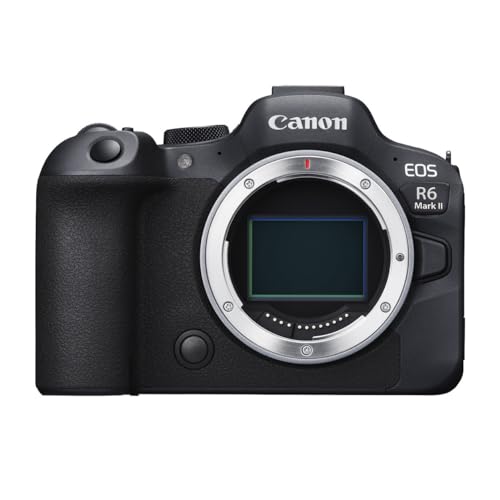
- Canon EOS R6 Mark II: check price on Amazon
- Canon EOS R6 Mark III: check price on Amazon
Four of the six picks appear without purchase links, and beginners deserve to know why before they suspect a trick. Our verified pool for this site currently confirms only the two full-frame R6 bodies, so Canon’s beginner models — the cameras this page most recommends — are covered in honest prose instead. Read the reviews on merit, then buy the beginner bodies through any reputable retailer; the absence of a link here reflects our verification limits, not the cameras’ worth. Indeed the guide’s top recommendation is a prose-only pick, which should prove the point.
What makes a Canon good for a video beginner is a specific bundle, not a price tier. A screen that flips to face the speaker, because nobody can frame what they cannot see. Autofocus that finds faces and eyes without being told, because beginners forget to tell it. A microphone input, because built-in sound is where beginner video goes to die. And menus that explain themselves, because the first month decides whether the camera becomes a habit or a cupboard resident.
Video beginners should also hear the unfashionable truth about their first year: lighting and audio will improve their footage more than any body upgrade. Every pick below assumes a cheap microphone and a window or a basic light join the kit early. The bodies differ in how gracefully they grow with those additions — which is precisely how this guide ranks them.
Beginners also deserve a warning about the internet they are about to consult. Video advice online is dominated by people selling courses, presets and the camera they happen to own, and its recurring message — that a beginner’s footage fails because their body lacks a feature — is usually wrong. Beginner footage fails on focus, sound and light, in that order, and every body in this guide handles the first adequately, accepts help with the second, and depends on the owner entirely for the third. Read the reviews below with that hierarchy in mind and the ranking will look less like a league table and more like what it is: a matching exercise between six forgiving tools and six kinds of newcomer.
One kind deserves naming separately: the beginner who is not beginning from zero but from a phone. Phone film-makers arrive with real instincts — they frame vertically without thinking, they edit fluently, they publish without fear — and their camera education is mostly translation, learning where the phone hid the decisions. Canon’s guided bodies suit them particularly well, because the menus narrate the translation instead of assuming it.
Key Takeaways
- Canon’s EOS R50 is our top beginner video pick: guided menus, a flip screen and eye autofocus in a light body.
- The EOS R100 is Canon’s simplest mirrorless route in, best for beginners who mostly film other people and events.
- The PowerShot G7 X Mark III pockets the whole hobby — flip screen, microphone input and no lenses to manage.
- Canon’s EOS R10 suits the beginner who already knows they will get serious about video within a year.
- The EOS R6 Mark II, linked and verified, is the buy-once full-frame destination for ambitious beginners.
- The EOS R6 Mark III offers the same destination in Canon’s newest generation for the longest ownership.
In this guide
Quick Picks
| Camera | Badge | Why it is here |
|---|---|---|
| Canon EOS R50 | Best beginner video Canon | Guided interface, forward screen and forgiving autofocus for a first channel or course. |
| Canon EOS R100 | Simplest way in | Canon’s lightest mirrorless body with the least menu depth to drown in. |
| Canon PowerShot G7 X Mark III | Best pocket beginner | One fixed lens, a flip screen and a microphone socket — nothing else to buy or learn. |
| Canon EOS R10 | Best for fast learners | Deeper video features and controls that will not need replacing in year two. |
| Canon EOS R6 Mark II | Best buy-once upgrade | Full-frame quality and stabilisation for beginners certain video is their craft. |
| Canon EOS R6 Mark III | Newest long-term body | The current R6 generation for beginners buying a decade-scale tool. |
How did we choose Canon bodies for people new to video?
Forgiveness was weighted above ceiling. A beginner’s footage fails in predictable ways — missed focus, muffled sound, shaky framing, exposure wandering as they move past a window — so we favoured bodies whose automation specifically rescues those failures. A camera that produces a good first video teaches faster than any tutorial, because success is the curriculum beginners actually follow.
Teaching design came second. Canon’s guided interfaces, plain-language explanations and sensible automatic modes vary across the range, and the picks below are partly a ranking of how well each body explains itself. Bodies that hide video essentials behind unexplained icons scored lower however fine their sensors.
Growth room decided the order within tiers. A beginner body should accept a better microphone, a brighter lens and a creator’s growing ambitions without being replaced, so lens mounts, audio sockets and headphone monitoring all earned marks. The two linked full-frame bodies sit at the list’s end not as beginner tools but as honest destinations, clearly labelled as such.
Which features actually matter for a first video camera?
Face and eye autofocus tops the list because beginners talk to cameras. When the camera holds a speaker’s eye in focus while they lean, gesture and glance at notes, the footage looks professional in the way audiences feel without analysing. Canon’s modern detection does this across every pick here, but the beginner bodies present it with the least setup — often it simply works from the first recording.
A forward-facing screen ranks second for anyone filming themselves, and its absence quietly kills more beginner channels than bad image quality ever did. Third is the microphone input: speech recorded at the speaker’s collar instead of across a room transforms perceived quality more than a resolution doubling. Stabilisation for handheld filming and honest battery life for an afternoon’s shooting complete the practical five.
Resolution headlines matter least. All six picks record video sharp enough for the platforms beginners publish to, and the differences viewers notice come from focus, sound and light. A beginner seduced by a specification their audience cannot see, on a body whose menus defeat them, has bought the wrong camera at any price.
Canon EOS R50 — Best beginner video Canon
Everything about the R50 seems designed by someone who remembers being new. Its guided menu mode explains settings in sentences and previews their effects; its screen flips fully forward so a solo creator can frame a talking head without a mirror or a helper; its autofocus finds faces and eyes and holds them while the speaker does everything beginners do — lean in, look away, wave hands through the focal plane. First videos from this camera routinely look like third-year videos from less forgiving bodies.
Canon’s colour does quiet work for newcomers. Skin tones emerge warm and plausible straight from the camera, sparing beginners the colour-grading apprenticeship that other brands’ flatter footage demands before it looks human. For course creators, family videographers and first channels, that straight-from-camera decency keeps the publish button reachable.
The body is small and light enough for a beginner’s everyday carry, the kit lens covers desk-to-room filming honestly, and the RF mount waits patiently for the brighter lens that year two usually brings. A microphone input is present; a headphone socket is not, so audio must be monitored by levels and faith — the one specification beginners will genuinely feel.
We recommend it without a purchase link because our pool cannot verify one today. Buy it from a retailer you trust, prefer the kit that includes the standard zoom, and add a memory card fast enough for its video modes. None of that errand-running changes the verdict: for a Canon beginner filming video, this is the body the guide would hand over first.
Its deepest virtue is motivational. Beginners persist when early footage pleases them, and the R50 manufactures early pleasure reliably — in focus, well-coloured, properly exposed — while its menus quietly teach the craft underneath. Cameras that teach while flattering are rare; this is one.
- Type: mirrorless, interchangeable lenses
- Screen: fully forward-flipping touchscreen
- Interface: guided mode explaining settings
- Audio: microphone input, no headphone socket
Strengths
- Menus that teach while you film
- Eye autofocus that simply works from day one
- Skin tones beginners can publish ungraded
Trade-offs
- No verified listing in our pool, so no link here
- No headphone monitoring for audio
- Kit lens is a starting point for low light
Best for: first channels, courses and family video with Canon colour. Not suited for: beginners who need headphone monitoring immediately.
Canon EOS R100 — Simplest way in
Minimalism is the R100’s whole proposition. It is Canon’s lightest, simplest RF-mount body: fewer dials, a calmer menu, a fixed screen, and an asking price that makes it the range’s doorway. For beginners whose filming points outward — children, pets, events, a partner’s performances — rather than at themselves, that simplicity removes decisions they never wanted to make.
Video quality comfortably exceeds its station. The sensor is a proven APS-C design, autofocus handles faces in ordinary scenes, and the footage intercuts respectably with the R50’s for family purposes. What the R100 withholds is creator furniture: the screen does not flip forward for self-filming, and the control layout assumes an owner content to let automation drive.
That fixed screen is the decision point, and beginners should confront it honestly before saving the money. Filming yourself with a rear screen means guessing framing or recruiting a helper, and most solo beginners eventually buy their way out of the guessing — by replacing the camera. If a single sentence of this review saves a reader a replacement cycle, it is this one.
As a household’s second camera or a young beginner’s first real body, though, its calm competence is exactly right. It takes the family photographs, films the match, and teaches the exposure basics without ever presenting a bill for features nobody in the house uses.
Covered in prose under the same pool rule as the other beginner bodies, the R100 earns its slot as the floor of sensible Canon video: below it lies false economy, above it lies choice.
- Type: mirrorless, Canon’s lightest RF body
- Screen: fixed rear screen
- Sensor: proven APS-C design
- Role: doorway body for outward filming
Strengths
- Least intimidating Canon mirrorless to learn
- Video quality above its price station
- Light enough for any bag, any day
Trade-offs
- No verified listing in our pool, so no link here
- Fixed screen frustrates solo self-filming
- Automation-first controls limit growth
Best for: beginners filming family, events and other people. Not suited for: solo creators who film themselves daily.
Canon PowerShot G7 X Mark III — Best pocket beginner
One box, no decisions: that is the G7 X Mark III’s charm for a video beginner. The lens is fixed but well chosen — a bright zoom on a 1-inch sensor — the screen flips up for self-filming, a microphone socket waits for the inevitable audio upgrade, and the whole camera slips into the pocket that a mirrorless body would never fit. Beginners whose filming happens out in life, rather than at a prepared desk, start faster with this than with any system camera.
Footage has the bright, friendly Canon look its long-running line is known for, and stills are strong enough that the camera doubles as the family compact without apology. Livestreaming support built into this generation suits the beginner whose ambitions point at live audiences, a path most rivals in this guide treat as an afterthought.
Autofocus on moving subjects is the known softness: it keeps a seated speaker honest but can wander when subjects rush the lens, so energetic filming styles should look at the mirrorless picks. Battery life matches the pocket format — an outing, not a filming day — and spares are small, cheap habits to form early.
No verified listing sits in our pool for it, so it is covered in prose like the other beginner Canons. Its second-hand and retail availability is generally broad; check the bundle for a spare battery, which this camera’s owners end up wanting more than any other accessory.
As a beginner’s only camera it suits the mobile creator — travel, days out, family life — better than the desk-bound. As a concept it may be the friendliest object on this page: nothing to assemble, nothing to configure, everything to film.
- Type: 1-inch-sensor pocket compact
- Lens: bright fixed zoom, nothing to swap
- Screen: flips up for self-filming
- Audio: microphone input included
Strengths
- Zero system decisions for a true beginner
- Pocketable enough to be present for life
- Livestream-friendly for aspiring live creators
Trade-offs
- No verified listing in our pool, so no link here
- Autofocus wanders on fast-moving subjects
- Battery sized for outings, not filming days
Best for: mobile beginners filming life as it happens. Not suited for: desk creators needing all-day recording.
Canon EOS R10 — Best for fast learners
Ambition arrives early for some beginners, and the R10 is Canon’s answer to the one who reads the manual. It adds a more serious control layout, deeper video features and faster shooting to the beginner formula, in a body still light enough for everyday carry. A newcomer who knows — from a course, a job, a consuming hobby — that video is a multi-year project will not outgrow this camera in the first year, which is the precise failure it exists to prevent.
Autofocus shares the modern Canon detection intelligence, tracking faces and eyes with a tenacity the R50 approaches and the R100 does not attempt. The articulating screen supports solo filming properly, and the electronic viewfinder helps in bright outdoor light where screens wash out — a small feature outdoor beginners underrate until their first sunny shoot.
Headphone monitoring remains absent, continuing Canon’s beginner-tier habit, so serious audio work still leans on level meters. The kit lens, as ever, is a beginning; the mount’s brighter options are where this body’s video matures, and fast learners should budget the first lens upgrade as a planned milestone rather than a surprise.
Covered without a link under our pool rule, the R10 is the recommendation for the beginner who finds the R50’s guidance charming but unnecessary. Between them sits the guide’s most useful beginner question: do you want the camera to teach you, or to keep up with you?
Either answer is respectable. This body serves the second, and serves it long enough that its buyers usually skip a whole generation of upgrades.
- Type: mirrorless, enthusiast-leaning controls
- Screen: fully articulating touchscreen
- Finder: electronic viewfinder for bright days
- Role: beginner body with year-two headroom
Strengths
- Controls and features that survive growing skill
- Strong tracking for faces and eyes
- Viewfinder rescues sunny outdoor filming
Trade-offs
- No verified listing in our pool, so no link here
- Still no headphone socket for audio checks
- More camera than a casual beginner needs
Best for: fast learners planning a multi-year video hobby. Not suited for: beginners wanting the simplest possible start.

Canon EOS R6 Mark II — Best buy-once upgrade
Some beginners arrive certain. They have filmed on phones for years, they know video is their craft, and they want the body they will still be using when their skills mature — skipping the beginner tier entirely. For that reader, the R6 Mark II is the honest destination: a 24.2-megapixel full-frame body whose video, stabilisation and autofocus operate at a level the beginner bodies above gesture toward. Its eye-tracking holds a speaker through movement that defeats lesser systems, and in-body stabilisation rescues handheld filming while its owner learns tripod discipline.
Full-frame image character is the visible reward. Shallow depth of field separates a speaker from a bedroom background the way audiences associate with professional channels, and low-light filming stays clean in rooms where APS-C footage begins to grain. Microphone and headphone connections both feature — the monitoring the beginner tier withholds — so audio can be practised properly from the first serious project.
Nothing about it is beginner-priced or beginner-weighted, and this guide will not pretend otherwise. Menus run deeper, mistakes in manual modes are entirely the owner’s, and the lens catalogue’s serious glass costs serious money. The buy-once logic only holds for beginners whose commitment is proven by prior filming, not hoped for in a shopping cart.
Growth, though, is total. Every accessory, lens and technique a video maker learns over a decade fits this body, and its stills quality means the same purchase covers photography ambitions that emerge later. It is the only pick here a beginner can buy with no planned replacement at all.
It earns its linked place as the list’s ceiling and compass: not the recommendation for most readers, but the reference that shows what the beginner bodies are wisely postponing.
- Type: full-frame mirrorless, 24.2 megapixels
- Stabilisation: in-body for handheld filming
- Audio: microphone input and headphone output
- Focus: eye-tracking for moving speakers
Strengths
- No planned replacement — a decade-scale body
- Full-frame look and low-light cleanliness
- Headphone monitoring the beginner tier lacks
Trade-offs
- Price and weight are not beginner-friendly
- Deep menus reward study, punish guessing
- Serious lenses cost serious money
Best for: proven phone film-makers buying their first real body once. Not suited for: uncertain beginners testing whether video is for them.
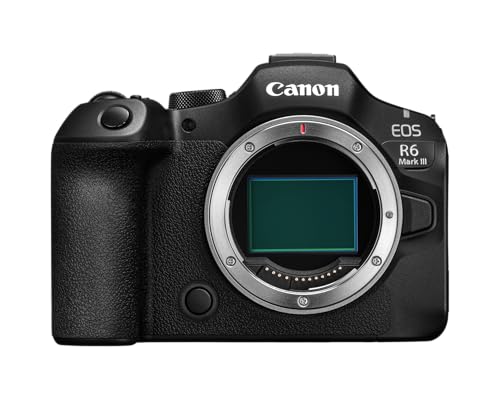
Canon EOS R6 Mark III — Newest long-term body
Buy-once logic has a current-generation expression, and this is it. The R6 Mark III succeeds the Mark II at the head of Canon’s hybrid line, and a beginner with proven commitment and a long horizon may rationally start here instead — gaining the newest processing, the longest firmware support and a body whose relevance stretches furthest into their filming future. The family’s established virtues carry the argument: full-frame imaging, in-body stabilisation, subject-detecting autofocus and video features built for creators who deliver.
Precise generational differences belong to the live listing, and beginners should read it with the same checklist this guide teaches: confirm the video formats suit your editing computer, the audio connections are complete, and the kit options price honestly against buying the body with a chosen first lens. Newest-generation launches sometimes bundle poorly; arithmetic protects the buyer.
Against the Mark II, the reasoning mirrors the action guide’s but with a beginner’s accent. A decade-scale owner gains more from the newer body’s runway than a three-year owner does, while a beginner whose budget is torn between generations should protect the lens and microphone money — the R6 Mark II plus a bright lens and a real microphone will out-film a Mark III behind a kit zoom with built-in sound, every single time.
Weight, depth and price all repeat the predecessor’s cautions. This is not a camera for discovering whether you enjoy filming; it is a camera for someone who already knows and wants the discovery phase permanently behind them.
It closes the list as the far shore. Most readers should start with the R50 and enjoy the swim; this pick exists for the few who are justified in taking the bridge.
- Type: full-frame mirrorless, newest R6 generation
- Stabilisation: in-body system
- Audio: full creator connections — verify on listing
- Role: longest-horizon starting body
Strengths
- Current generation with the longest support runway
- Full-frame video quality from the first project
- Every future lens and technique fits
Trade-offs
- Confirm launch bundles and formats on the listing
- Premium pricing over the Mark II
- Demands commitment a beginner may not yet have
Best for: committed beginners buying a body for the decade. Not suited for: anyone still deciding whether they like filming.
What should a beginner’s first video project actually be?
Small, finishable and about something the beginner already knows: that is the formula that survives contact with reality. A three-minute explanation of a hobby, a tour of a garden across one afternoon, an interview with a grandparent — projects with a natural end, a forgiving subject and an audience of people who already care. The camera skills a first project must teach are modest and specific: framing a person, keeping them in focus, recording their voice clearly, and stopping. Every body in this guide teaches those four on its first weekend.
Grand first projects are where beginner cameras go to die. The documentary about the whole town, the channel launching with daily uploads, the wedding filmed for a friend as a favour — each demands stamina, backup discipline and problem-solving that a beginner cannot yet have, and each failure convinces its owner the camera was wrong. It was not; the project was. Choose the project that fits the apprenticeship and the apprenticeship completes itself.
Publishing the small project matters as much as filming it. A finished, watched, imperfect video teaches the lesson no tutorial contains: which flaws the audience noticed (sound, usually) and which they never saw (the resolution you agonised over). Beginners who publish early calibrate their standards against viewers instead of against professionals, and they improve at a speed the private perfectionists never match.
How do Canon’s guided modes actually teach?
Most camera menus are reference books: they assume you know what a setting does and merely need to find it. Canon’s guided interfaces, strongest in the R50, are closer to a patient instructor standing at the shoulder. They name the effect in the language of results — blur the background, freeze the action — show a preview of the choice, and only gradually reveal the technical vocabulary underneath. A beginner can film successfully on day one in the language of results, and absorb the language of settings across the following months without ever being locked out of their own camera.
The teaching has a direction, and it matters that beginners follow it rather than skipping to full manual out of pride. Scene and guided modes first, for success; the creative modes next, changing one variable at a time; manual last, when the beginner can predict what a change will do before making it. Owners who climb in that order rarely stall. Owners who begin at manual often conclude, wrongly, that they lack talent for video, when what they lacked was a staircase.
None of this is unique in spirit — every brand offers automatic help — but Canon’s implementation is unusually literate, and for the self-taught beginner reading their camera alone at a kitchen table, literacy is the feature that compounds.
What does the first year look like with each of the six?
| Camera | Beginner role | Signature strength | Watch out for |
|---|---|---|---|
| Canon EOS R50 | Guided all-rounder | Teaching menus, flip screen, colour | No headphone socket, no link here |
| Canon EOS R100 | Simplest start | Calm, light, inexpensive doorway | Fixed screen blocks self-filming |
| Canon PowerShot G7 X Mark III | Pocket creator | Everything included, nothing to assemble | Focus wanders on fast subjects |
| Canon EOS R10 | Fast learner’s body | Headroom for year two and beyond | More than casual beginners need |
| Canon EOS R6 Mark II | Buy-once destination | Full-frame video and monitoring | Price, weight, deep menus |
| Canon EOS R6 Mark III | Newest destination | Longest ownership runway | Launch pricing, verify bundles |
How should a beginner set up their first Canon video?
Begin in the camera’s automatic or guided mode without shame, frame yourself with the flipped screen at eye level, and record a two-minute test talking about anything. Watch it for the three beginner diseases — focus wandering, echoing sound, a window behind you blowing the exposure — and fix exactly one before the next test: tap the eye-focus setting, move the microphone closer, turn yourself to face the light. Three tests in, most beginners own footage they are willing to publish, and the settings they changed have taught them more than a manual would.
Sound deserves its own ritual. Record ten seconds of silence in your filming room and listen: fridges, traffic and computer fans all announce themselves, and moving two metres or closing one door often beats buying anything. When a microphone does join the kit, place it at the speaker, not the camera, and check levels on the meter the beginner bodies provide.
When should a beginner upgrade from their first body?
Upgrade when a named limitation keeps costing footage: the R100’s fixed screen blocking solo work, kit-lens low light grain in evening rooms, the missing headphone socket on a paid project. A limitation you can name is a shopping list; a vague feeling that professionals own different cameras is marketing working as intended. Most R50 and R10 owners find their first true upgrade is a lens or a microphone, not a body — which is the system working correctly.
Which accessories should a Canon beginner buy, and in what order?
Order matters more than items, because a beginner’s budget spent in the wrong sequence buys frustration in instalments. First comes the memory card the camera actually needs — fast enough for its video modes, bought from a source that sells genuine stock — because a camera that stops mid-take teaches nothing but annoyance. Second comes the microphone, the single purchase that most transforms beginner footage, chosen to match the filming style: a small on-camera model for general work, a wireless lavalier for a talking presenter. Third comes support: a tripod for desk and room filming, which converts shaky intention into calm footage for less than any lens costs.
Light follows, and beginners consistently underrate how cheaply it improves things. One adjustable LED panel, or even the discipline of filming beside the largest window at the right hour, lifts footage more than the next body tier would. A spare battery joins the list the first time a shoot dies mid-sentence, which is to say within the first month, and a bag that fits the camera with its lens attached — not disassembled into a kit — determines whether the camera travels or stays home.
Lenses come last and deliberately. The kit lens teaches a beginner what focal lengths they actually use; the bright prime that follows should be bought to match that evidence, not a reviewer’s enthusiasm. Follow that order and each body ranked above pays you back; invert it, and the classic beginner’s trophy appears — beautiful glass, unusable sound.
How long does it take to feel competent with a first camera?
Honest answer: about ten finished videos. The first three are apprenticeship footage, valuable and embarrassing. Videos four through seven develop a personal routine — where the camera lives, how the room is arranged, which settings are simply left alone. Somewhere around the tenth, most beginners report the shift this guide has been promising: the camera disappears from their attention and the subject takes its place. That disappearance, not any specification, is what they were buying.
Speed varies with feedback. Beginners who publish and watch their own footage critically — once, kindly, with a notebook — compress the ten videos into fewer weeks than beginners who film privately and judge harshly. The bodies help at the margins: guided menus shorten the early confusion, reliable autofocus removes a whole category of discouragement, and that is precisely why the R50 leads this guide despite the pool giving it no link to sell itself with.
Competence also has a ceiling worth naming, because beginners blame cameras for it: the plateau after the tenth video is broken by projects, not purchases. A harder subject, a real audience, a deadline — these teach the next ten lessons. The camera bought well at the start is still, at that point, entirely sufficient.
What mistakes do Canon video beginners make most?
Filming everything at maximum settings until cards and batteries revolt comes first. Second is trusting built-in microphones across a room because the picture looks sharp. Third is manual-focus pride — refusing the excellent autofocus out of a belief that professionals focus by hand, while their footage quietly softens. Fourth is buying the destination body before the hobby exists, then filming nothing because the expensive camera feels too precious for practice.
What should a beginner film in their second month?
Month two is where a project with a person in it changes everything. Interviewing someone — a grandparent about their working life, a friend about their craft, a local shopkeeper about their street — forces the beginner to manage another human’s comfort, ask follow-up questions while the camera behaves, and discover that listening is a filming skill. Every body in this guide supports the technical side of that afternoon; the R50’s forgiving autofocus and colour make it the kindest partner for a first interview, because the beginner’s attention belongs on the guest.
Series thinking begins here too. A beginner who films the same subject four weeks running — the garden changing, the dog learning a trick, the kitchen skill improving — learns the deepest beginner lesson: audiences return for development, not for novelty. Cameras do not teach that lesson, but the ones that stay charged, simple and ready get to witness it.
Practical growth shows in the settings a beginner stops touching. By the second month the successful ones have a home position for their camera, a default mode they trust, and a short list of deliberate changes they make for a reason. That narrowing is not a failure of curiosity; it is the shape of craft arriving.
How do beginners keep a filming habit alive?
Habits survive on friction removed. The camera that lives charged on the desk films; the camera that lives dismantled in a cupboard, behind a lens cap, inside a bag, inside a chore, does not. Beginners should arrange their home so that filming can begin inside a minute — body assembled, card in, battery honest — and should treat that arrangement as part of the purchase, as real as the sensor. Several picks here help by size alone: the G7 X asks for a pocket, the R100 and R50 for a shelf, while the R6 bodies demand a photographer’s household and reward one.
Scheduling helps where space cannot. A standing filming hour, defended like a class, carries beginners through the weeks when motivation dips — and motivation always dips, usually around video five, when the gap between taste and footage is widest and most personal. The creators who publish for years are rarely the most talented beginners; they are the ones whose Tuesday hour survived their discouragement.
Community is the third leg. A friend who also films, a class, an online group small enough to know names — any audience that expects the next video converts a private hobby into a gentle obligation. Canon’s beginner bodies appear in those communities constantly, which has a practical consequence: borrowed advice, borrowed accessories and answers at midnight, all denominated in the same menus.
When does a beginner stop being one?
Not at a purchase, and rarely at a view count. The change is audible in how a film-maker talks about a failed clip: beginners blame the camera globally, intermediates blame a setting specifically, and the no-longer-beginner names the decision — the position chosen, the light accepted, the microphone left in the bag — and files it under tuition. Every body in this guide can carry its owner to that sentence; the guided ones may get them there a project sooner.
Equipment restlessness often peaks just before the change, because blaming the body is the last beginner habit to die. The healthiest response to that itch is a rental weekend or a borrowed lens: if the footage transforms, the limitation was real and named, and an upgrade is justified; if it does not, the tuition was cheap. This guide’s destinations — the R6 pair — wait patiently at the top of the range for the buyers who pass that test.
How should a beginner light a room without buying anything?
Start with the window, because it is the best light most beginners will own this year and it is already installed. Film facing it or beside it, never with it behind the subject, and schedule filming for the hours when its light is soft rather than theatrical. Turn off the overhead light that fights it — mixed light confuses both the camera’s colour and the viewer’s eye — and let one source, falling from one direction, do the work that studios pay to imitate. Arrange a room that way and each body ranked above shows its gratitude immediately, in footage that suddenly looks intentional.
Evening filming reverses the recipe: gather the room’s lamps on the subject’s side, move the subject nearer to them than feels natural, and accept the warmth as atmosphere rather than error. A beginner who masters those two arrangements — window by day, lamps by night — owns lighting skills that transfer to every camera they will ever buy, which is more than can be said for any menu setting.
Only when a beginner can name what the free light cannot do — reach a windowless room, hold steady through a winter afternoon, flatter two people at once — has a light purchase earned its place in the kit. Bought in that order, the first LED panel feels like a promotion rather than a rescue.
What filming etiquette should a beginner learn early?
Ask before filming people, and accept the answer with grace: a beginner’s camera pointed at family, colleagues or strangers carries obligations that a phone’s familiarity disguises. Homes have rooms that are off the record; workplaces have rules with contractual teeth; children deserve advocates in the room when a lens appears. Subjects relax around film-makers who ask well, and that relaxation — earned in the asking — is what lets a creator keep filming people for years.
Credit and honesty follow. Footage of other people’s performances, lessons and work carries their rights inside it, and a beginner who learns to caption, credit and — where money ever appears — ask about terms, is learning the profession rather than merely the hobby. Canon’s cameras will record whatever they are pointed at; the beginner’s judgement about pointing is the skill no guide can sell and every audience can see.
Finally, learn the delete key’s mercy. Not every clip deserves keeping, and a beginner who archives everything soon owns an unsearchable swamp. Keep the finished pieces and the irreplaceable moments; let the practice footage go. The camera’s card is a workbench, not a vault.
How should a beginner store and back up their footage?
A beginner’s archive begins the day the first card fills, and its rules can be learned in one sitting: copy everything to the computer the same week, keep the card unformatted until the copy is verified, and let one further copy live somewhere else — a drive at a relative’s house, a cloud folder, anywhere that a single house fire or laptop theft cannot reach both. Footage of grandparents, first homes and early attempts has a value that only becomes visible years later, and it is protected by habits, not by cameras.
Naming is the second habit, and it separates archives from swamps. A folder per project, files renamed by subject rather than by camera number, and one small text note about what the project was — five minutes of administration that a beginner’s future self will bless during every search. The bodies in this guide all produce identical-looking file names; the beginner’s system is what makes them a library.
What should a beginner do when footage disappoints?
Diagnose before despairing, using the order this guide opened with. Watch the clip muted: if it still disappoints, the problem is focus, framing or light. Watch it with eyes closed: if it disappoints only then, the problem is sound, and it is the cheapest problem in video to fix. Most beginner despair dissolves under that two-pass test into one named, fixable cause — and named causes, unlike global gloom, have shopping lists and practice drills attached.
Keep one disappointing clip from every project, deliberately. The archive of failures is the beginner’s truest progress record, and revisiting the first month’s footage after the tenth video teaches the lesson no compliment can: how far the eye has travelled. Cameras get replaced; that perspective is permanent equipment.
Which Canon should a beginner choose if two picks still tie?
Tie-break with the body, not the brochure. Hold both finalists if a shop allows it, and notice which one’s controls your fingers understand without instruction, which screen you can read in the shop’s worst light, which menu you can escape from after wandering in. Beginners live inside those small ergonomics for hundreds of hours, and a camera that fits the hand and the habits gets carried, charged and used — the three verbs that decide everything else in this guide.
Tie-break secondly with the filming you did last month, not the filming you imagine next year. A beginner whose recent footage is all people talking should weight the flip screen and the microphone path; a beginner whose footage is all outdoors should weight the viewfinder and the weather manners. The imagined future is a unreliable witness with excellent marketing; last month’s card is evidence.
And if the tie survives both tests, choose the cheaper body and spend the difference on the microphone and the lamp. That sentence has ended more beginner indecision than any review ever written, including this one — because at the beginner stage, the kit around the camera is the camera’s image quality.
How should a beginner choose their very first filming subject?
Choose someone patient, somewhere familiar, about something they love. A parent who bakes, a friend who restores bicycles, a sibling who can talk about their team for an hour without notes — subjects whose knowledge carries the conversation while the beginner’s hands learn the camera. The footage almost cannot fail socially, because the speaker’s ease covers the operator’s apprenticeship, and the beginner finishes with a film somebody genuinely wants to keep.
Avoid, for the first project, the subjects that punish beginners: toddlers in motion, events that happen once at speed, anything in a dark hall, and — hardest of all — yourself performing something difficult. Self-filming is a second-project skill, once the camera’s habits are known well enough to leave it running while dignity is risked. The bodies in this guide forgive beginners generously, but forgiveness is a budget, and a wise beginner spends it on learning rather than on spectacle.
Interview one person well and a beginner owns the template for a hundred future films: the questions, the framing, the sound discipline, the edit. That is why so many durable channels and family archives begin with exactly one such afternoon.
Keep that first interview somewhere safe, whatever its flaws. Beginners who preserve their earliest finished film own a measuring instrument no shop sells: proof, playable in two minutes, of the distance between the operator they were and the film-maker they are becoming. On the discouraged days — and the tenth-video plateau guarantees a few — that small film argues more persuasively than any review, including this one, that the camera was never the obstacle.
File that first film beside the footage that follows it, in the archive this guide made you build, and let the pair stand as the beginner era’s bookends. Everything between them — the microphones, the lamps, the settings finally left alone — was the education. The camera merely kept the minutes.
Final Recommendation
Start where your filming points. Solo creators and first channels belong with the EOS R50, bought through any trusted retailer; outward filming on the calmest budget belongs with the R100; mobile life belongs in the G7 X Mark III’s pocket; fast learners belong with the R10. The two linked R6 bodies wait at the top for the proven few — Mark II for value, Mark III for the longest runway. Every route here leads to the same place eventually: footage in focus, sound worth hearing, and a beginner who kept filming long enough to stop being one.
Frequently Asked Questions
Why are the beginner Canons not linked in this guide?
Our verified pool currently confirms only the two R6 bodies, and we link only what we can verify. The beginner models are recommended on merit and are widely available from reputable retailers — the R50 is this guide’s top pick despite having no link, which is exactly how a verification rule should behave.
Do I need a special lens to start filming video?
No. Kit zooms film perfectly respectable beginner video, especially in decent light. The first lens worth adding is usually a bright prime for indoor and evening filming, bought when low light — not curiosity — starts costing you footage.
Can these Canons livestream?
Most modern Canon bodies can stream via USB or HDMI with the right software, and the G7 X Mark III was notably designed with live creators in mind. Check the specific model’s current support before building a streaming setup around it, since software options change faster than cameras do.
Is 4K necessary for a beginner?
Rarely. Audiences judge beginner video on focus, sound and light long before resolution, and lower resolutions are kinder to cards, batteries and editing computers. Film in the quality your setup handles comfortably; upgrade the microphone and the lamp first.
How do I stop my Canon overheating on long recordings?
Smaller bodies warm up on extended high-resolution recording, so plan around it: record in segments, keep the camera out of direct sun, open the screen away from the body, and check the current model’s stated limits before a long event. For all-day recording duties, the full-frame bodies manage heat with more headroom.
Related Guides
Beginners who fall for Canon’s system can explore the glass in the best aftermarket lenses for canon cameras guide, while the R6 bodies’ faster talents appear in the best canon cameras for action shots roundup. The brand’s video history, for the curious, lives in the best cannon cameras for video 2007 article on the tape-era ancestors of these cameras.


