reviewstook.com is reader-supported. When you buy through links on our site, we may earn an affiliate commission.

Where to buy
There are two kinds of YouTube filming, and they ask for different cameras. The first kind is capture: point something at yourself, press record, let the platform’s pace forgive the rest. The second kind — the kind this guide is about — is production: videos conceived like short films, with deliberate framing, controlled light, scenes that cut together because somebody planned them. The best cameras to film with for youtube, read in that production sense, are bodies that behave like cinema tools scaled to a creator’s crew of one: full-frame sensors, serious codecs, autofocus that replaces a focus puller, and ergonomics that survive a shooting day rather than a shooting minute.
- Sony Alpha 7 IV: check price on Amazon
- Canon EOS R6 Mark II: check price on Amazon
- Panasonic LUMIX S5IIX: check price on Amazon
- Panasonic LUMIX S5II: check price on Amazon
- Canon EOS R6 Mark III: check price on Amazon
- DJI Osmo Pocket 3: check price on Amazon
That framing deliberately separates this guide from its neighbours. Beginners choosing a forgiving first camera, and creators whose whole question is autofocus behaviour, are served by other roundups in this series. Here the question is narrower and more demanding: which camera would a one-person production company — writer, presenter, camera department and editor in a single body — choose to film with when the video is meant to look made rather than merely recorded?
Production filming punishes weaknesses that casual filming never meets. A body that overheats at minute forty is a rounding error for vlogs and a catastrophe for an interview. A codec that crumbles when graded is invisible until the colour session, where it becomes the ceiling on the whole channel’s look. Rolling shutter, fan noise beside a microphone, a screen that cannot be seen in daylight — the shooting day finds them all. The six picks below were chosen by walking each one through an imaginary production day and noting where it would have been sent home.
Notice, too, what production does not require: the most expensive body in any catalogue. It requires reliability, a lens system with room to grow, and an image that tolerates the edit. Five of the six picks are interchangeable-lens bodies a working creator can build a career on; the sixth is a pocket gimbal camera included for the specific production role — movement — at which it humiliates bodies several times its size.
Key Takeaways
- Sony’s Alpha 7 IV is the default production body: balanced stills and video, autofocus a solo shooter can abdicate to.
- Canon’s R6 Mark II brings the warmest colour science and subject detection that understands busy scenes.
- Panasonic’s S5IIX is the video specialist’s choice, with the deepest filming toolset of the six.
- The standard S5II delivers most of that Panasonic video strength for creators who need fewer pro connections.
- Canon’s R6 Mark III is the forward-looking flagship step for channels already invested in RF glass.
- DJI’s Pocket 3 owns moving shots — walkthroughs, gimbal passes, travel sequences — in a jacket-pocket body.
In this guide
Quick Picks
| Camera | Badge | Why it is here |
|---|---|---|
| Sony Alpha 7 IV | Best production all-rounder | The body channels buy when filming becomes a business rather than a habit. |
| Canon EOS R6 Mark II | Best colour and detection | Footage that looks graded straight out of camera, with detection that reads a scene. |
| Panasonic LUMIX S5IIX | Best video toolset | Monitoring, recording options and stabilisation built for deliberate filming. |
| Panasonic LUMIX S5II | Best value video body | Phase hybrid autofocus and full-frame video for creators counting carefully. |
| Canon EOS R6 Mark III | Best step-up flagship | The newest R6 generation for RF shooters filming at the top of the platform. |
| DJI Osmo Pocket 3 | Best movement camera | Gimbal walking shots and travel sequences no static body can imitate. |
How did we choose cameras for production filming?
Weight went first to the image under manipulation. Production footage gets graded, reframed, slowed and matched across shooting days, so sensors and codecs were judged on latitude — how much shadow can be lifted, how gracefully highlights roll off, how the file behaves when a look is pushed — rather than on the punch of an unedited clip. A camera whose footage looks spectacular untouched but shatters in the grade is a trailer, not a tool.
Autofocus was judged as a crew replacement. A solo production shooter is simultaneously the talent, and focus that needs supervising is a second job nobody applied for. The standard applied throughout: can the body hold an eye through a presented piece, follow a walk-and-talk through a doorway’s light change, and transfer to a product or a prop without a visible search? Bodies that answered yes with different personalities fill the list; bodies that answered “with assistance” did not.
Endurance formed the third filter. Production days run long and hot: interviews that stretch, events that cannot pause, a creator filming a week’s content in one rented day. Recording limits, heat behaviour, battery ecosystems and media costs were treated as creative specifications, because a camera that stops is a scene that does not exist. Where a pick has a known endurance caveat, its review says so in plain words.
Finally, systems were priced as systems. A body is a down payment on lenses, and the honest cost of filming with any pick includes the fast standard zoom or prime pair the production look depends on. Lens ecosystems — their breadth, their focusing speed, their second-hand depth — therefore influenced ranking as surely as sensors did. A brilliant body behind an orphaned mount is a cul-de-sac with excellent image quality.

Sony Alpha 7 IV — Best production all-rounder
Ask working creators which body actually films their channel — not which they admire, which they load into the car — and the Alpha 7 IV’s name recurs with a frequency that stops looking like fashion and starts looking like evidence. It is the balanced instrument of its generation: a full-frame sensor with genuine stills credentials, 4K video that oversamples into a crispness editors appreciate, and an autofocus system that has become the industry’s shorthand for “set it and perform.”
That autofocus deserves its production framing. On a film set, focus is a person’s whole job; on a creator’s set, the A7 IV does that job with real-time eye tracking that survives turns, distance changes and hands crossing the face, then reacquires without ceremony when the subject re-presents. Solo shooters film longer takes, braver blocking and fewer safety reshoots because the camera’s attention can be trusted like a colleague’s. The compounding effect on a channel’s output — more finished videos per filming day — is the real specification being bought.
Colour and files suit the edit suite. Sony’s picture profiles give graders a flat, wide canvas when the production wants a look, and pleasing direct colour when the schedule wants speed; focus breathing compensation with compatible lenses keeps static frames from subtly inhaling during focus shifts, a polish detail viewers feel without naming. Dual card slots, a full-size approach to ports and a deep accessory ecosystem complete a body that behaves like infrastructure.
Lens strategy is where the purchase becomes a career decision. Sony’s E mount is the broadest modern ecosystem — native fast glass, third-party lenses at every price, rental availability everywhere — so an A7 IV bought for this year’s channel can be re-lensed for next year’s documentary without replacing the body. Production shooters should budget the lens with the body, favouring modern focusing motors that let the tracking perform as designed.
Caveats are a serious body’s caveats: rolling shutter that punishes whip-pans, a menu system that rewards one disciplined setup afternoon, and a price that assumes the channel is, or intends to become, a business. Creators filming casually will find its talents underemployed; creators filming deliberately will find them load-bearing within a month.
For the channel graduating from capture to production — the moment filming becomes the job — the A7 IV remains the recommendation against which rivals must argue. Most arguments end with the creator buying it anyway, a season later, having rented the lesson.
Resale depth closes the business case. Because so many creators standardise on this body, the used market is liquid in both directions: easy to buy into, easy to sell out of if the channel pivots. Production equipment that holds value is cheaper to own than its sticker suggests, and the A7 IV’s ubiquity is, in this unglamorous sense, one of its strongest features.
- Type: full-frame mirrorless, hybrid stills/video
- Focus: real-time eye AF, layered subject hold
- Files: grading-friendly profiles, dual slots
- System: E-mount lens ecosystem
Strengths
- Autofocus that replaces a focus puller
- Footage with real grading latitude
- The broadest lens ecosystem here
Trade-offs
- Whip-pans reveal rolling shutter
- Menus reward a setup afternoon
- Priced for channels run as businesses
Best for: solo production shooters and graduating channels. Not suited for: casual filming or whip-pan action styles.

Canon EOS R6 Mark II — Best colour and detection
Colour is the R6 Mark II’s opening argument, and it opens most creator conversations about this body. Canon’s rendering of skin — the subject of most YouTube frames — has a warmth and forgiveness that makes presenters look like the well-rested version of themselves, straight from the camera, before any grade. For productions on a schedule, footage that arrives nearly finished is a workflow feature disguised as an aesthetic one: hours per video return to the creator’s week.
Detection intelligence is the second argument. Canon’s deep-learning system distinguishes people, animals and vehicles, finds eyes inside crowds, and — the behaviour that wins converts — keeps faith with its chosen subject when the scene fills with rivals. Productions with guests, families, pets or event chaos inherit a camera whose attention matches the script’s intention, which reduces both reshoots and the subtle editorial triage of focus failures.
The body around those talents is a working hybrid: in-body stabilisation that steadies handheld production work, decisive autofocus acquisition inherited from a generation of dual-pixel refinement, and video quality that holds together in the mixed, dim light of real locations. A walkthrough that passes from a bright lobby into a lamplit interior is this camera’s home fixture, handled without the exposure-and-focus wobble that betrays lesser bodies.
RF lenses are the system’s toll and its treasure. The native glass is excellent and priced like it; creators should cost the standard zoom their format needs inside the same decision as the body. Those already holding Canon glass from earlier systems will find the transition the gentlest in this guide, which is precisely why so many established channels standardise here and stay.
Endurance and heat deserve the plain sentence: long, hot, continuous recording is the scenario to rehearse before committing this body to marathon interview days, as with most compact full-frame hybrids. Productions structured in scenes and takes — the overwhelming majority of YouTube — will never meet the edge; livestream-adjacent marathon formats should test at full session length in their own rooms.
Chosen by creators who want the footage to look expensive before the grade and the camera to understand a busy scene without instruction, the R6 Mark II is the production pick with the warmest handshake. Channels filming people, plural, in real places, should audition it first.
Wedding and event videographers moonlighting as creators form its quiet fanbase, and their reasoning transfers: a body that renders skin kindly, finds eyes in a crowd and stabilises a handheld processional is a body that films a family channel, a guest interview or a product launch with the same composure. Production is production, whatever the platform paying for it.
- Class: full-frame mirrorless hybrid
- Focus star: deep-learning subject detection
- Colour: famously kind skin rendering
- Stabilisation: in-body, production-grade
Strengths
- Footage nearly finished out of camera
- Keeps the right subject in busy scenes
- Confident in dim, mixed location light
Trade-offs
- RF glass prices belong in the budget
- Marathon recording needs a rehearsal
- Detection options reward configuration
Best for: people-centred productions and guest formats. Not suited for: buyers ignoring lens costs or all-day unbroken recording.
Panasonic LUMIX S5IIX — Best video toolset
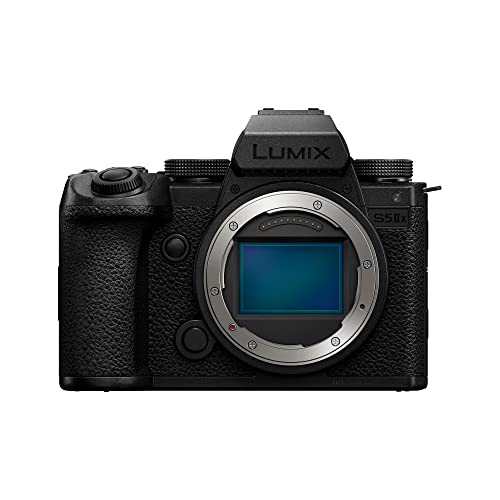
Every list has a body the professionals nod at, and here it is the S5IIX — the variant of Panasonic’s S5II built without apology for people who film on purpose. Where rivals treat video as a flagship feature, the S5IIX treats it as the whole job: the deepest monitoring and recording toolset in this guide, external recording options for productions that outgrow internal media, and cooling and connectivity decisions made by people who shoot for clients.
Its autofocus carries a redemption story that matters to production buyers. Panasonic’s contrast-only era made its video bodies unusable for solo work; the phase hybrid system in this generation ends that exile — decisive acquisition, steady holding, no visible pulsing around a presenter’s face during a long piece to camera. The practical translation: the Panasonic virtues creators always wanted — colour, stabilisation, video depth — are finally available without the asterisk.
Stabilisation deserves emphasis because it partners with everything. The in-body system lets a solo shooter handhold a walking piece-to-camera with a steadiness that flatters both the footage and the autofocus tracking it, and it rescues location work where tripods are impractical or forbidden. Productions that travel light — one body, two lenses, a microphone — lean on this body hardest and are rewarded most.
The L-mount alliance supplies the glass, including fast-focusing modern lenses from several makers, and the body’s layout is a videographer’s: controls where a working hand expects them, information presented for filming rather than for stills. Long sessions are an engineering case here rather than a hope, which interview and course creators — the long-form economy of YouTube — will register as the difference between a tool and a toy.
Where it concedes: in the most extreme tracking — fast, erratic subjects at distance — Sony’s eye-lock remains a shade more clairvoyant, and its stills credentials, while real, are not why anyone buys the X variant. Buyers whose channels are photography businesses with video attached should look at the hybrids above; buyers whose channels are films with thumbnails attached are home.
For the creator whose ambitions point past the platform — client work, documentaries, a production company wearing a channel as its shop window — the S5IIX is the most future-proof filming tool in this guide. It does not merely make YouTube videos. It makes the reel that gets the next job.
Course creators should weigh one unglamorous triumph: consistency across a filming day. Colour, exposure behaviour and stabilisation character stay uniform from the first module to the twelfth, so a course filmed over a week edits into a single seamless product. Bodies that drift in character across long sessions tax editors invisibly; this one’s discipline is worth tuition money.
- Class: full-frame mirrorless, video-flagship variant
- Focus star: phase hybrid autofocus
- Video: the deepest toolset in this list
- Mount: L-mount alliance lenses
Strengths
- Production monitoring and recording depth
- Phase autofocus ends the pulsing era
- Stabilisation that enables one-person crews
Trade-offs
- Extreme tracking a shade behind Sony
- Stills play second fiddle by design
- Built — and priced — for the committed
Best for: video-first creators and future production companies. Not suited for: stills-led businesses or casual filming.

Panasonic LUMIX S5II — Best value video body
Sibling rivalry clarifies products, and the standard S5II is clarified beautifully by its X-badged brother: same full-frame sensor philosophy, same phase hybrid autofocus that rescued the line, same stabilisation character — with the most specialised professional connections and recording exotica trimmed away, and a meaningfully gentler demand on the budget. For creators whose productions live inside the camera rather than on external recorders, it is not the lesser body. It is the correctly specified one.
Filming behaviour is where the money went. The hybrid autofocus acquires faces promptly and holds them through the presented-piece repertoire — leans, turns, glances at notes — without the hunting that historically exiled Panasonic from solo work. Presenters can finally buy the Panasonic colour and stabilisation for a one-person production and stop apologising for the focus in the comments.
Image character flatters the platform’s dominant formats. Talking-head, tutorial and review productions get clean, gradeable 4K with highlight behaviour that forgives a window in frame, and the stabilisation keeps handheld B-roll — the desk tour, the workshop walk-around — usable instead of decorative. A channel’s whole visual grammar, from locked-off pieces to roaming inserts, can be shot on this one body without the footage arguing with itself in the edit.
The L-mount lens shelf is shared with its brother, which matters for growth: start with one fast standard lens, add the wide or the portrait glass when a production demands it, and know the mount’s alliance keeps options arriving from several manufacturers. Few value bodies sit inside an ecosystem this alive, and ecosystem health is a five-year specification disguised as a footnote.
Trims should be named honestly. Creators planning external raw workflows, elaborate multi-device productions or the deepest monitoring setups will feel the ceiling the X variant was built to remove. Heat and endurance are well managed for scene-based filming; marathon unbroken sessions deserve the same rehearsal advice given to every hybrid body in this guide.
As the entry point to serious filming in this list — full-frame image, modern autofocus, professional stabilisation, a living lens mount — the S5II makes the strongest value argument of the six. Channels that know they are production companies but are not yet funded like them should start here and let the channel’s revenue argue for the X later.
There is a strategic elegance to that upgrade path worth stating: lenses, batteries, cages and habits all carry from the S5II to the S5IIX unchanged. A creator can therefore treat the standard body as the first instalment of a system rather than a compromise to be discarded, which is how professionals actually buy — in sequences, not in single heroic purchases.
- Class: full-frame mirrorless video body
- Focus star: phase hybrid autofocus
- Stabilisation: strong in-body system
- Mount: L-mount, shared with the X
Strengths
- Full-frame filming at the gentlest price here
- Autofocus solo shooters can trust
- Upgrade path that keeps every accessory
Trade-offs
- Pro recording exotica trimmed away
- Marathon sessions still want rehearsal
- Tracking summit belongs to Sony
Best for: unfunded production companies and serious starters. Not suited for: external-raw workflows or pro multi-cam rigs.
Canon EOS R6 Mark III — Best step-up flagship
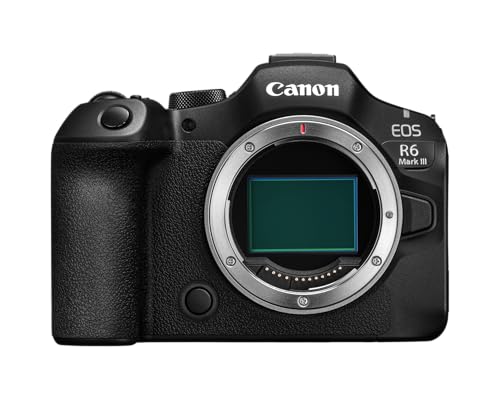
Generational purchases need a clear-eyed framing, so here it is: the R6 Mark III is the newest step in the line that produced the most creator-beloved hybrid in this guide, aimed at channels already invested in Canon’s RF system and filming at a level where incremental gains in detection, processing and video specification convert directly into publishable polish. It is not the recommendation for a first production body. It is the recommendation for the second one — the body a successful Canon channel buys when the work has outgrown the merely excellent.
What a flagship generation buys, in production terms, is headroom everywhere at once. Newer processing feeds faster, surer subject recognition; the video specification stretches to serve formats and frame rates a growing channel gets asked for; stills performance rises for the thumbnail and photography work that surrounds a serious channel. None of these leaps will rescue a badly conceived video. All of them widen the margin within which a well-conceived one can be executed.
Canon’s colour continuity matters strategically here. A channel’s look is an asset — subscribers recognise it in a feed — and upgrading within the line preserves that look while the capabilities underneath it grow. Productions can even intercut the Mark III with its predecessor during a transition period without the edit suite staging a protest, which is how working channels actually migrate: gradually, profitably, without a relaunch.
The purchase logic therefore runs through the lens drawer. RF glass owners should price this body as the engine their existing investment was waiting for; newcomers should price the whole system — body plus the glass their format needs — and compare that total honestly against the Sony and Panasonic systems in this guide. Flagships are bought by ecosystems, and the correct question is never “which body wins?” but “which system, at my budget, films my format best over five years?”
Availability and maturity deserve a practical note. Newest-generation bodies reward buyers who confirm that their essential lenses, accessories and workflow software are fully at home with the new model, and who let early production firmware settle while their current body keeps earning. None of that diminishes the recommendation; it schedules it. Ambitious channels plan flagship purchases a season ahead, and this is the body to plan around in Canon’s line.
For the RF-invested creator filming at the platform’s top end — brand deals with delivery standards, series with crews of two or three, a channel becoming a studio — the Mark III is the natural summit of this guide’s Canon path. Everyone else should read its presence as a signpost: this is where the road leads, and the Mark II below is where most travellers should currently camp.
Studios shooting client work alongside channel content will value one further trait: clients recognise flagship gear, fairly or not, as a proxy for seriousness. A body that films the channel all week and reassures a paying client on Saturday amortises itself across two businesses — an argument no specification sheet can make and every working production company understands.
- Class: full-frame mirrorless, newest R6 generation
- System: Canon RF mount
- Colour: continuity with the R6 line’s look
- Role: step-up body for invested Canon shooters
Strengths
- Flagship headroom for growing productions
- Preserves an established channel’s look
- Makes existing RF glass more capable
Trade-offs
- Over-specified for first production bodies
- System cost must include RF lenses
- Rewards a planned, seasonal purchase
Best for: successful Canon channels stepping up. Not suited for: newcomers choosing a first system.

DJI Osmo Pocket 3 — Best movement camera
Productions are remembered for their moving shots — the walkthrough that glides, the travel sequence that floats down a street, the reveal that circles a product — and moving shots are precisely what full-frame bodies do worst without rigs, practice and a second pair of hands. The Pocket 3 inverts the problem: a 1-inch sensor on a three-axis mechanical gimbal, in a body smaller than the microphones the other picks wear. It is in this production guide not as a toy but as the specialist that owns an entire shot category.
The gimbal’s work is physical and therefore honest. Footsteps, hand tremor and the subtle weave of a walking operator are absorbed mechanically, producing footage with the floating grammar viewers associate with budgeted productions. Add ActiveTrack subject following and the little camera can hold a presenter through a walk-and-talk while a friend — or a tripod and a prayer — handles the operating. Travel series, property tours, market visits and campus films are its native repertoire.
Image quality supports the illusion completely. The sensor is large enough for evening streets and interior locations, autofocus is fast and face-aware at vlogging distances, and vertical filming is native for the short-form excerpts productions now cut from every shoot. DJI’s wireless microphone pairing completes a one-brand field kit that a creator can carry in a jacket and deploy in under a minute — a deployment speed that changes what gets filmed at all.
Production discipline still applies. The Pocket is the B-camera and movement specialist, not the body for interviews, controlled studio pieces or lens-crafted cinematography; its fixed wide view is its grammar and its limit. Battery planning governs location days, and its footage’s look, while lovely, should be matched thoughtfully with the main body’s in any production that intercuts them heavily.
Economics argue for it as the second purchase in a production kit, after the main body and its first lens. No accessory available for a full-frame body — no cage, slider or stabiliser at comparable cost — buys as much finished-looking movement per unit of money, weight or learning curve. Directors of one-person productions feel that arithmetic immediately.
If your channel’s scripts keep writing the words “we walk toward…” and your footage keeps failing those words, this is the pick that closes the gap between the script and the screen. The other five bodies film the scene; the Pocket films the journey, and audiences remember journeys.
Solo travel creators add a testimony worth hearing: the Pocket’s size changes the social physics of filming. A full rig announces a production and attracts permission questions, crowds and self-conscious subjects; a pocket gimbal reads as a tourist’s toy and is waved through the world. For documentary-flavoured YouTube, that invisibility is a creative capability no specification measures.
- Type: gimbal camera, 1-inch sensor
- Movement: three-axis mechanical stabilisation
- Tracking: ActiveTrack subject following
- Audio: built-in mics, wireless ecosystem
Strengths
- Production-grade movement, pocket-sized
- Deploys in under a minute anywhere
- Travel and tour footage without a rig
Trade-offs
- Fixed wide view is its only grammar
- A specialist, not a main body
- Location days need battery planning
Best for: travel, tours and walk-and-talk productions. Not suited for: studio interviews or lens-crafted cinematography.
What separates filming from merely recording?
Intention, made visible. A recorded video accepts the room as found — its light, its angles, its background accidents — while a filmed video rearranges all three before the first take. The camera’s role in that difference is enabling: a body with grading latitude forgives the location’s colour, a body with trusted autofocus frees the shooter to direct, a body with stabilisation or a gimbal partner lets the shot move as the script imagined. The six picks earn their places by how much intention they let a crew of one execute.
Sound belongs in this section because production audiences forgive picture sins they never forgive in audio. Every body here should be paired, in any serious budget, with a real microphone path — the cameras’ inputs and monitoring exist for exactly that — and the filming day should budget ten minutes to sound checks for every hour of shooting. A production that looks like a film and sounds like a voicemail fools no one past the first minute.
Light is the other half of the filmed look, and it is cheaper than cameras. One controllable soft light transforms any body in this guide more than the price difference between the cheapest and dearest of them; two lights and a curtain transform it beyond recognition. Buy the body for reliability and system, then spend the next money on light and sound, in that order — the ordering error this guide most wants to prevent is a flagship body filming a dark, echoing room.
Storage and media close the production budget, and they are the line item beginners always undercount. High-quality video fills cards at a rate stills photographers find alarming, and a filming day that produces hours of footage needs a same-day home for it — fast cards in rotation, a drive with genuine spare capacity, and a backup that is not the same bag as the camera. Price that pipeline alongside the body; a flagship recording onto a nearly full laptop is a sports car parked across a driveway.
How do the six compare for a production day?
| Camera | Production role | Signature strength | Watch out for |
|---|---|---|---|
| Sony Alpha 7 IV | Main body | Trusted autofocus, grading latitude | Rolling shutter on whip-pans |
| Canon EOS R6 Mark II | Main body, people | Colour and scene intelligence | Lens costs, marathon heat |
| Panasonic LUMIX S5IIX | Video flagship | Deepest filming toolset | Stills take second place |
| Panasonic LUMIX S5II | Value main body | Full-frame filming, gentler price | Pro connections trimmed |
| Canon EOS R6 Mark III | Flagship step-up | Headroom for RF studios | Overkill for beginners |
| DJI Osmo Pocket 3 | Movement specialist | Gimbal shots in a pocket | Fixed wide grammar |
How do you light a one-person production set?
Keep the geometry boring and the results will not be. A single soft key light, large and close, placed to one side of the camera and slightly above the presenter’s eye line, gives every body in this guide the sculpted, dimensional look viewers call cinematic. A dimmer fill or a reflector opposite keeps shadows informative rather than black, and a small light behind — a practical lamp in frame counts — separates the presenter from the background. Three sources, one of them probably already in the room, and the set is lit for a year of videos.
Consistency outranks beauty. Mark the light positions with tape, note the settings in the same document as the camera’s, and a set rebuilt after a month away will match the previous episode closely enough that subscribers never notice the gap. Productions are remembered for their reliability; lighting that can be repeated is a subscription-retention feature disguised as a technical habit.
Which lenses does a production channel actually need first?
One lens, chosen honestly, beats a bag of intentions. Most productions live on a fast standard zoom — the range that covers a presenter at a desk, a two-shot interview and a location walkthrough without a lens change — and that lens, bought well, is the correct first companion for any body in this guide. It teaches the shooter the system’s character and covers the channel’s first year of scripts.
The second lens follows the format’s evidence, not a forum’s enthusiasm: portrait-length fast glass for channels built on faces and shallow depth, a wider zoom for property, travel and architecture-flavoured work, a macro for product channels whose scripts live at close range. Buy the second lens when a specific recurring shot is failing, and its cost becomes a production expense with a named return rather than a hobby’s drift.
Rent before the exotic purchases. A flagship body in this guide plus a rented specialty lens for one ambitious production teaches more — about the lens, the body and the channel’s real ambitions — than any review, including this one. Rental houses exist in every production city precisely because professionals refuse to own what they use twice a year.
How should a solo shooter run a filming day?
Front-load the decisions that cannot be made while performing. Scout the location’s light at the hour you will film, set the camera’s profiles and autofocus behaviour the night before, charge everything that accepts a charge, and format cards only after the previous day’s footage exists in two places. The performing self should inherit a machine that needs nothing but framing and a record button.
Film in the order the edit will thank you for: the presented pieces first, while energy is high and the light is as scouted; the B-roll and movement shots second, when the script’s spine is safely recorded; the experimental shots last, as pure surplus. Solo shooters who reverse that order spend their best hour on garnish and their tired hour on the main course, and the finished video always knows.
Review as you go, briefly and brutally. One playback at full size after the first take — checking focus at the eyes, exposure on the skin, audio in headphones — prevents the day’s classic catastrophe, discovered at midnight, of a beautiful performance filmed through a smudge, a dead microphone or a focus point loyal to the bookshelf.
What does a two-body production kit look like in practice?
Most mature solo productions converge on the same architecture: one main body doing the presented and interview work on a tripod, and one movement or second-angle body covering what the main body cannot. In this guide’s terms that means any of the five mirrorless bodies paired with the Pocket 3 — or, for studio-bound channels, two mirrorless bodies sharing a lens mount so glass, batteries and colour stay unified. The second angle is not vanity; it is the cut that rescues an edit, the reaction shot that saves an interview, the B-roll that covers a trimmed sentence.
Audio follows the same two-layer logic: a primary microphone on the main subject, recorded properly, and the camera’s own track as sync and safety. Productions that adopt the two-layer habit in both picture and sound stop losing days to single points of failure — the dead battery, the bumped focus, the card that was not — and start spending their luck on creative risks instead of technical ones. That, more than any sensor, is what “filming like a production” actually means.
What filming mistakes do growing channels keep making?
Upgrading the body before the light leads, followed by its twin: upgrading the body before the microphone. Third is shooting the master take before the test playback. Fourth is buying lenses for formats the channel does not make — the macro lens ageing beside a commentary channel is a genre of its own. Fifth is treating autofocus as a feature to admire rather than a colleague to brief: an hour learning your body’s focus behaviours returns more publishable footage than any accessory in this guide’s price range.
How does a production channel choose between these systems?
Start with the lens drawer you already own, because sunk glass is real money. A creator holding good E-mount, RF or L-mount lenses should need an extraordinary reason to leave that system, and none of the bodies here supplies one — each system contains a production-capable answer, and the differences between them are personalities rather than verdicts. Sony’s personality is the trusted all-rounder with the deepest third-party shelf; Canon’s is colour and detection warmth behind premium native glass; Panasonic’s is video depth and stabilisation at honest prices.
Next, interrogate your format’s worst day rather than its best. Interview channels should weight endurance, dual slots and autofocus composure across two unbroken hours. Travel productions should weight stabilisation, weather tolerance and the Pocket’s deployment speed. Studio channels should weight colour workflow and tethering comfort. The body that wins your worst day will bore you pleasantly on your best ones, which is exactly what production equipment is for.
Finally, price the five-year system, not the launch-day body: body, two lenses, batteries, media, a cage or rigging, and the microphone path. Totals reorder rankings that sticker prices settled confidently — a dearer body inside a cheaper ecosystem can undercut a bargain body behind expensive glass. Channels are businesses; buy like one, with a spreadsheet rather than a crush.
What does post-production demand from the camera?
Editors inherit every decision the shooting day made, so film for the edit you actually perform. Consistent colour between setups matters more than ultimate latitude for channels publishing twice a week; the Canon pair and the Pocket’s matched profiles serve that pace. Channels with a colourist’s ambitions — or a colourist — should weight the Panasonic toolset and Sony’s profiles, where the file’s flexibility is the raw material of a signature look.
Frame-rate discipline is an editorial gift: film each production at the rate its destination wants, keep slow motion for the shots conceived as slow, and the timeline assembles without conversion artefacts or mixed-rate mush. Audio recorded cleanly at the camera — scratch track at minimum, even when a separate recorder runs — is the sync reference that saves hours on multi-device productions. These are camera-department habits, free to adopt, and they separate productions that edit in an evening from productions that edit in a weekend.
Backup is post-production’s first act and it happens on the shooting day: footage in two places before cards are formatted, project files versioned, the day’s audio married to the day’s picture while memory is fresh. The bodies with dual slots in this guide exist because professionals learned this in the expensive tense. A channel that films like a production must also archive like one.
How will you know the upgrade worked?
Measure the channel, not the footage. A production body earns its money in finished videos per month, in reshoots avoided, in formats attempted that the old camera forbade — the interview series, the location special, the two-person format. If the catalogue’s ambitions widen within a season, the purchase was right; if only the test charts improved, the channel bought a trophy. Set that expectation before buying, in writing if necessary, and let it discipline both the purchase and the first month’s shooting schedule.
Final Recommendation
Decide what kind of production you are, then buy the body that kind respects. Balanced solo shooters should take the Alpha 7 IV and build on E mount. People-and-guests productions belong on Canon’s colour and detection — the Mark II for most, the Mark III when the studio and the RF drawer justify it. Video purists should choose between the S5II’s value and the S5IIX’s depth, and every production that moves should add the Pocket 3 as its second body. Film one full production as a rehearsal before the channel depends on the new body, watch it at full size with headphones on, and let that evidence — not any ranking — confirm the purchase.
Renting deserves its final endorsement here, because production bodies are the most rentable objects in the creator economy. A weekend with each finalist — filming your real format, in your real location, through your real edit — costs a fraction of a wrong purchase and answers questions no guide can: how the menus feel at hour three, whether the colour matches your channel’s memory of itself, whether the autofocus trusts you back. Arrive at the purchase with footage, not impressions, and the body you choose will feel less like a gamble and more like a colleague you have already worked with.
Frequently Asked Questions
What should I film as a test before the first real production?
Your hardest recurring shot, at your hardest hour. For most channels that is a presented piece in evening light with a walk to camera and a product or prop raised to the lens. Film it three times, edit it once, and read the footage for focus honesty, colour under your grade, and your own comfort performing to the body. A camera that passes your worst shot will pass your catalogue.
Is a full-frame body necessary to film professionally for YouTube?
Not strictly — skilled shooters film beautifully on smaller sensors — but full-frame buys the combination this guide ranks: low-light confidence, shallow-depth grammar, lens ecosystems and grading latitude in one purchase. Channels filming controlled, well-lit formats can spend less; channels filming the world as found will feel the difference weekly.
How is this guide different from a beginner camera roundup?
Beginner guides optimise for forgiveness — automatic modes, fixed lenses, low prices. This guide assumes a shooter who films deliberately and optimises for production ceiling: codecs, endurance, systems and autofocus that replaces crew. If you are choosing a first-ever camera, start with the beginner roundup and graduate here.
Which single lens should accompany these bodies first?
A fast standard zoom covering the presenter-to-location range, in the body’s native mount, with modern focusing motors. It will film most of your first year. Add specialty glass only when a recurring shot in your actual format is failing without it.
Do I need a second body, or is one camera enough?
One body is enough until your formats say otherwise — and they will say it specifically: interviews that want a reaction angle, productions that keep losing time to lens changes, locations where a second viewpoint would double the usable footage. Buy the second body when a named, recurring need appears, and buy it inside the same system so lenses, batteries and colour carry across. The Pocket 3 is the exception that proves the rule, earning its place as a specialist even beside a single main body.
Can the Pocket 3 really serve a production, or is it a toy?
It serves the movement department. No body in this guide, unaided, produces walking shots of its quality at its weight and price — and no serious shooter would make it their interview body. Productions are built from specialists; the Pocket is simply the most specialised tool here.
Does the S5II make the S5IIX pointless?
Only for productions that never leave the camera’s internal recording. The X variant’s deeper connections, monitoring and recording options are invisible until a production needs them, at which point they are the whole purchase. Buy the ceiling you will actually touch.
How long should a production body last a channel?
Plan on years, plural. Bodies in this class age slowly — autofocus and sensors improve incrementally now — and a channel’s look benefits from the consistency of one system across seasons. Lenses outlast bodies, skills outlast both, and the creators who upgrade least often are usually those who bought for their format’s real demands rather than for launch-week excitement. Rent the exotic, own the essential, and let the catalogue be the thing that changes every year.
What frame rate should a YouTube production film at?
Match the destination: the platform’s standard presentation rates for ordinary pieces, higher rates reserved for shots conceived as slow motion, and a consistent rate within each production so the edit assembles cleanly. Mixed rates have their place in deliberate montage; as an accident of inattention they tax every cut. Decide in pre-production, write it on the call sheet — even when the call sheet is a sticky note — and hold the line on the day.
Should I switch systems for a better body?
Rarely, and never for one feature. Lenses, batteries, habits and muscle memory are the real system cost; a body must be better at your format’s core work — not merely newer — to repay abandoning them. Every system in this guide contains a body capable of professional YouTube filming.
A closing word about ambition, since this guide has encouraged it throughout: the platform’s most distinctive channels were rarely the best-equipped ones in their niche — they were the ones whose equipment stopped being the story. Every body in this guide is capable of disappearing into the work, which is the entire point of buying at this level. Choose the system, learn its focus behaviours until they are reflexes, and then spend your creativity where audiences can see it: in the scripts, the subjects and the shots nobody else in your niche has thought to film.
Related Guides
Shooters whose main question is focus behaviour rather than production ceiling should continue to the best cameras for YouTube autofocus guide, where the same faculty is examined gesture by gesture. Movement filming in confined spaces is explored from another angle in the best cameras for yoga videos roundup, and desk-based creators will find their variant of this discussion in the best cameras for work from home guide.

