Disclosure: As an Amazon Associate, reviewstook.com earns from qualifying purchases. Links on this page are affiliate links; they cost you nothing extra. Prices and availability change often, so check the current Amazon listing before you buy.
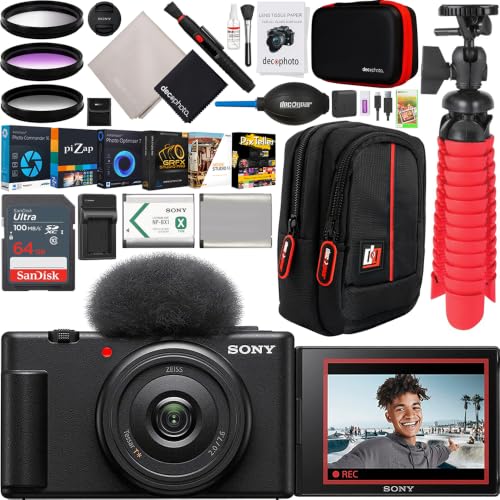
Where to buy the gear in this guide
Linked cameras were matched to verified listings held for this site, each link inside its own review. The worst-side types are discussed in prose — nobody needs a purchase link for a warning.
A guide to the best and worst cameras for youtube videos has to begin with an unfashionable truth: the platform forgives almost everything except bad audio, wandering focus and a camera that stops recording halfway through the one take that mattered. Viewers raised on phone footage will watch a slightly soft image without blinking, but they leave when the presenter’s eyes lose focus, when the room echoes, or when the upload looks nothing like the colourful thumbnail promised.
So this list is split honestly in two. The best side names six cameras this site could verify, each matched to a different kind of channel — the solo creator at a desk, the traveller filming in the street, the educator recording long lessons, the filmmaker building a channel like a small studio. The worst side names no villains by badge; instead it describes the types of camera that reliably disappoint on this platform, because the failure is usually a category error, not a defective product. A superb camera pointed at the wrong job is still the wrong camera.
One more discipline before the picks: a YouTube camera is a system of habits as much as a body. Heat management on long takes, a screen you can actually see yourself on, clean sound input, and files your computer can edit without a weekend of transcoding — these decide whether a channel publishes weekly or quietly dies in month two. Every judgement below is made on that publishing reality, not on launch-day excitement.
Key Takeaways
- Focus reliability, a flip screen and clean audio input matter more to a channel than headline resolution.
- The Sony ZV-1F is the lowest-friction start; the Panasonic S5IIX is the ceiling pick for studio-built channels.
- The worst YouTube cameras are usually fine cameras in the wrong job: action bodies at a desk, cinema rigs for daily vlogging, bargain camcorders with no audio input.
- Long lessons and streams punish heat and recording limits harder than short clips ever will.
- Buy for the format you will publish every week, not the one video you dream of making once.
In this guide
Best and Worst Cameras for Youtube Videos: Quick Picks
| Pick | Badge | Why it earns its place |
|---|---|---|
| Sony ZV-1F (Black bundle) | Best for Starting a Channel | A purpose-built vlogging compact with a flip screen, face-first autofocus and a bundle that covers the small extras beginners forget. |
| Sony ZV-1F (White) | Best for Beauty, Craft and Desk Channels | The same beginner-friendly camera in white — a small thing that matters on camera, in bright rooms and in tidy desk setups. |
| Panasonic LUMIX S5IIX | Best for Studio-Built Channels | A full-frame hybrid with professional recording options, streaming features and the headroom a growing production actually uses. |
| Nikon Z50 II | Best for Outdoor and Travel Channels | A light APS-C body with subject detection that follows animals, vehicles and people — the mix travel channels actually film. |
| Sony Alpha 7 IV | Best for Review and Interview Channels | The broad lens shelf and reliable face focus that product reviewers and interviewers lean on, in a body editors already know. |
| Canon EOS R6 Mark III | Best for Ambitious Hybrid Creators | The newest full-frame Canon here, for creators whose channel mixes high-end stills work with serious video ambitions. |
How picks were chosen
We verified each linked camera against listings already held for this site, then sorted them by channel type rather than by price or sensor. That sorting matters, because the question readers actually bring to this page is never which camera is best in the abstract. It is which camera will survive their format: the twenty-minute talking head, the travel diary shot in fragments, the tutorial that runs an hour, the review filmed in a small room with one window and strong opinions.
Five tests were applied to every candidate. Does focus stay on a face that moves, gestures and occasionally leaves and re-enters the frame? Can the creator see themselves while recording, without a phone app acting as a fragile middleman? Does the camera accept a proper microphone without adapters stacked like scaffolding? Can it record for the length of a real session in a warm room? And do its files drop into an ordinary editing laptop without drama? A camera that failed two or more was moved to the prose discussion, whatever its stills reputation.
The worst-side types were chosen from the returns, complaints and abandoned-channel patterns that repeat every year: cameras bought for their badge, their bargain or their toughness, which then met a tripod, a desk and a deadline. Naming the pattern protects readers better than naming a model, because next year’s version of the same mistake is already on a shelf somewhere wearing a new number.

Sony ZV-1F (Black bundle) — Best for Starting a Channel
The ZV-1F exists because Sony watched beginners fight general-purpose cameras and lose. Everything a new channel needs is pre-decided: a wide lens that fits a face and a room into the frame at arm’s length, autofocus that hunts for eyes rather than contrast, a screen that turns to face the presenter, and a product-showcase mode that shifts focus to whatever you hold up — the exact gesture every review, unboxing and craft channel performs fifty times a video.
The bundle form of this camera suits the true beginner, because the forgotten extras are what delay a first upload: a case that makes the camera a daily carry rather than a shelf ornament, a spare battery that ends the tyranny of the single pack, and the small accessories that otherwise arrive in four separate parcels across two weeks. A channel’s first month is a motivation problem disguised as a gear problem, and this box removes most of the disguise.
Growth is the honest ceiling. The fixed lens cannot become a portrait lens, the small sensor asks for decent light, and a creator who falls in love with cinematic depth will outgrow it. That is the correct shape for a first camera, though: it is outgrown because the channel succeeded, and it remains useful afterwards as the second, pocketable camera for the days the main rig stays home.
| Format | Fixed-lens vlogging compact, bundle |
|---|---|
| Position in kit | First camera for a new channel |
| Creator essentials | Flip screen, face-first autofocus, mic input |
| Session style | Short to medium clips, diary filming |
Strengths
- Decisions pre-made for beginners, in a good way
- Autofocus behaviour built around faces and products
- Bundle covers the extras that delay a first upload
Trade-offs
- Fixed wide lens limits creative growth
- Small sensor wants generous light
- Not the tool for long, locked-off lessons
Best for: new creators who need to publish this week, not this quarter / Not suited for: filmmakers chasing shallow depth and lens variety

Sony ZV-1F (White) — Best for Beauty, Craft and Desk Channels
Colour sounds like a trivial reason to list a camera twice, until a channel films the camera itself. Desk-based creators — beauty, craft, planning, tech-lite — shoot in bright rooms where a black body on a white desk reads as a hole in the frame, and where the camera often appears in shot as part of the setup. The white ZV-1F sits inside those frames instead of interrupting them, and its lens and screen behaviour are identical to the black version’s proven recipe.
The working virtues repeat because they are the point: face-priority focus that tolerates a presenter leaning in to show detail, a background-defocus switch that fakes a bigger camera’s look for talking segments, and audio arrangements that cope with a quiet room without a studio build. For craft channels the showcase focus shift is the feature that pays weekly rent, moving attention from face to hands to finished object with a reliability that manual focus pulling on a small sensor rarely matches.
Choose between the two ZV-1F listings by room and bundle rather than by capability, and accept the shared limits with open eyes: no lens changes, modest low-light reach, and a design aimed at clips rather than marathon recordings. Within the bright, close, personal formats that dominate lifestyle YouTube, those limits are barely visible in the published result.
| Format | Fixed-lens vlogging compact, white |
|---|---|
| Position in kit | Desk and lifestyle channel camera |
| Creator essentials | Flip screen, defocus switch, showcase focus |
| Session style | Bright-room clips and tutorials |
Strengths
- Sits naturally in bright, styled desk setups
- Showcase focus serves craft and beauty formats
- Same low-friction start as the black version
Trade-offs
- Identical fixed-lens ceiling to its sibling
- White finish shows travel scuffs sooner
- Not built for dim venues or long lessons
Best for: lifestyle, beauty and craft creators filming at a desk / Not suited for: low-light or event-led channels
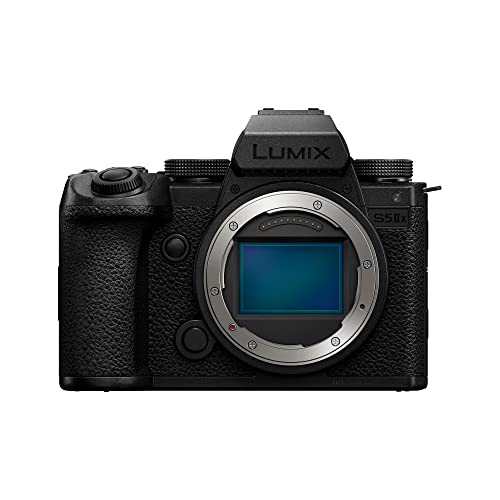
Panasonic LUMIX S5IIX — Best for Studio-Built Channels
The S5IIX is what the ZV-1F’s owner buys in year three, when the channel has a room, a lighting habit and opinions about codecs. Its recording menu reads like a small cinema camera’s — professional formats, raw output over HDMI for those who grade seriously, and streaming provisions that treat a live session as a first-class job rather than a webcam impersonation. For educators, interview channels and review studios, that depth converts directly into fewer workarounds per upload.
Two working traits matter more than the codec list. The stabilisation lets a one-person crew shoot walk-and-talk segments and product b-roll without a gimbal’s setup tax, and the autofocus — the old Panasonic hesitation finally retired — holds faces with the calm that long talking segments demand. Heat behaviour on long takes is managed like a professional tool rather than feared like a compact, which is the difference between planning a lesson and gambling on one.
The price of admission is a system: full-frame lenses, a body that wants a real tripod and a desk, and a learning curve measured in evenings. A beginner can grow into it, but a beginner can also be buried by it, publishing nothing while perfecting settings. Buy it when the channel’s format is proven and the bottleneck is genuinely the camera, not the ideas.
| Format | Full-frame mirrorless, L mount |
|---|---|
| Position in kit | Main studio and production camera |
| Creator essentials | Pro recording formats, streaming, stabilisation |
| Session style | Long lessons, interviews, produced segments |
Strengths
- Recording depth that ends codec workarounds
- Stabilisation serves solo b-roll and walk-and-talk
- Built for long sessions rather than short clips
Trade-offs
- System cost includes serious lenses
- Overwhelming menu depth for a true beginner
- Desk-bound weight compared with compacts
Best for: established channels building a small studio / Not suited for: first-time creators still finding their format

Nikon Z50 II — Best for Outdoor and Travel Channels
Travel and outdoor channels film whatever the day produces: a presenter at a viewpoint, a market street, a dog, a bird that was not in the script. The Z50 II’s subject detection was built for exactly that undisciplined mixture, and its light body means the camera is in the hand when the unscripted thing happens rather than in the bag because the bag got heavy by lunchtime. That presence, more than any single feature, is what fills a travel channel’s memory cards with usable life.
As a video tool it behaves like a stills camera that takes film seriously rather than a cinema tool slumming it: straightforward menus, dependable colour that needs little correction for a weekly upload rhythm, and lens options that keep a walking kit small. Paired with the two-lens kit below it becomes a complete travel system in one purchase, which suits creators whose budget is really a trip budget wearing a camera costume.
Desk-bound creators should note the fit honestly. This is a camera optimised for the moving day, and while it films a talking head perfectly competently, the dedicated vlogging compacts make that single job easier, and the studio Panasonic makes it deeper. Buy the Nikon when the channel leaves the house; that is the work it was shaped for.
| Format | APS-C mirrorless, Nikon Z mount |
|---|---|
| Position in kit | Travel and outdoor channel camera |
| Creator essentials | Subject detection, light body, simple menus |
| Session style | Fragmented clips gathered across a day |
Strengths
- Detection autofocus follows unscripted subjects
- Light enough to stay in the hand all day
- Straightforward colour suits a weekly rhythm
Trade-offs
- Studio depth is available elsewhere in this list
- Single card slot needs an evening backup routine
- Lens range narrower than full-frame systems
Best for: travel, outdoor and family channels that film on the move / Not suited for: desk studios chasing maximum recording depth

Sony Alpha 7 IV — Best for Review and Interview Channels
Review channels live or die on two shots: the presenter talking to lens, and the product close-up that must snap into focus the moment it is raised. The a7 IV handles both with the maturity of a line that has served this exact format for years. Face and eye focus stays planted through gestures and glances at notes, the lens catalogue offers a macro, a fast prime or a workhorse zoom for every reviewing niche, and the files grade predictably in every mainstream editor.
Interviews are where the system’s depth shows. Two card slots protect a conversation that cannot be re-recorded, custom buttons let a solo operator park exposure and focus decisions under the fingers, and the microphone and monitoring provisions behave like a grown production tool. For a channel whose guests give their time once, that reliability is not a luxury feature; it is the entire product.
Respect the running costs of the format. Full-frame lenses priced for professionals, a body that rewards an evening spent configuring it, and video takes that need heat awareness in warm rooms on the longest settings. Channels filming short, sharp segments will never meet those limits; channels recording two-hour podcasts in summer should plan around them rather than discover them live.
| Format | Full-frame mirrorless, Sony E mount |
|---|---|
| Position in kit | Review studio and interview camera |
| Creator essentials | Eye focus, dual slots, deep lens shelf |
| Session style | Talking heads, product work, interviews |
Strengths
- Lens choice for every reviewing niche
- Focus behaviour trusted by working reviewers
- Dual slots protect unrepeatable conversations
Trade-offs
- Professional lens pricing across the system
- Configuration takes real setup time
- Longest takes in hot rooms need planning
Best for: reviewers and interviewers publishing to a schedule / Not suited for: casual creators who film in fragments outdoors
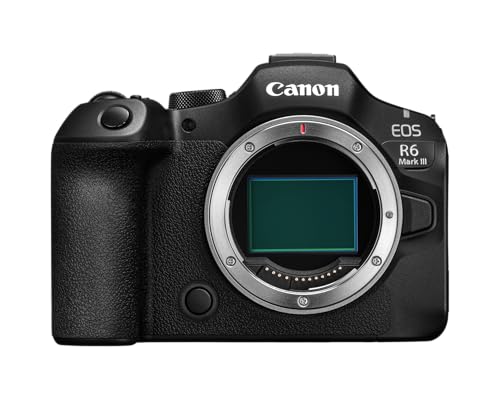
Canon EOS R6 Mark III — Best for Ambitious Hybrid Creators
Some channels are a photography business with a video arm: weddings documented on Saturday, a tutorial filmed on Tuesday, a short brand film when a client asks. The R6 Mark III is the pick for that hybrid life, arriving as the successor to a Mark II that working shooters trusted for years. Its stills pedigree is the headline, but for YouTube the relevant inheritance is the handling — a body that can be reconfigured between a photo day and a filming day without feeling like a compromise in either costume.
For the channel itself, the virtues are headroom and confidence. Autofocus bred for unpredictable subjects translates directly to presenters who move, sets with mixed light stop being exposure arguments, and the RF lens shelf offers the fast primes that give a talking-head frame its expensive look. Creators selling courses, presets or client work alongside the channel will feel the difference in the frames clients screenshot.
Newest also means dearest in this list, and the honest question is whether the channel’s income or ambitions justify the top shelf. A proven format filmed weekly on the S5IIX will outperform an aspirational format filmed monthly on this Canon every single time, because the platform rewards rhythm. Buy it when the work already exists and the camera is the ceiling; it is a magnificent ceiling, but it is still a ceiling purchase.
| Format | Full-frame mirrorless, Canon RF mount |
|---|---|
| Position in kit | Hybrid photo business and channel flagship |
| Creator essentials | Fast autofocus, RF fast primes, pro handling |
| Session style | Mixed stills days and produced video |
Strengths
- flagship handling across stills and video
- Autofocus confidence in mixed, moving scenes
- RF primes give talking heads a premium look
Trade-offs
- Top-tier cost across body and lenses
- More camera than a simple format can use
- Rewards experience; wasted on autopilot habits
Best for: working photographers building a serious channel / Not suited for: beginners whose format is still an experiment
Comparison table
Notice what the table cannot show: the worst column is where channels go to die. Every camera here is excellent at its assigned job and mediocre at someone else’s, which is precisely the lesson of the worst-side discussion that follows the buying questions. Match the row to your format first and your budget second; the platform’s audience cannot see your sensor, but it can see your focus hunting.
| Pick | Badge | Format or type | Standout trait | Watch out for |
|---|---|---|---|---|
| Sony ZV-1F (Black bundle) | Best for Starting a Channel | Fixed-lens vlogging compact, bundle | Decisions pre-made for beginners, in a good way | Fixed wide lens limits creative growth — Check price on Amazon |
| Sony ZV-1F (White) | Best for Beauty, Craft and Desk Channels | Fixed-lens vlogging compact, white | Sits naturally in bright, styled desk setups | Identical fixed-lens ceiling to its sibling — Check price on Amazon |
| Panasonic LUMIX S5IIX | Best for Studio-Built Channels | Full-frame mirrorless, L mount | Recording depth that ends codec workarounds | System cost includes serious lenses — Check price on Amazon |
| Nikon Z50 II | Best for Outdoor and Travel Channels | APS-C mirrorless, Nikon Z mount | Detection autofocus follows unscripted subjects | Studio depth is available elsewhere in this list — Check price on Amazon |
| Sony Alpha 7 IV | Best for Review and Interview Channels | Full-frame mirrorless, Sony E mount | Lens choice for every reviewing niche | Professional lens pricing across the system — Check price on Amazon |
| Canon EOS R6 Mark III | Best for Ambitious Hybrid Creators | Full-frame mirrorless, Canon RF mount | flagship handling across stills and video | Top-tier cost across body and lenses — Check price on Amazon |
What actually makes a camera one of the worst choices for YouTube?
The recurring failures share a shape. Action cameras pressed into desk service give a fisheye view of a small room, fixed focus that flatters nothing, and audio that sounds like a corridor. Bargain camcorders from unknown brands promise everything and deliver no microphone input, no screen the presenter can see, and files that editors handle like evidence. Cinema cameras, magnificent on a set, punish a solo creator with manual focus, rigging, and a setup time that quietly halves how often they publish.
Phones deserve an honest paragraph in this section too, because the phone is both the best starting camera most people own and a common worst choice for long formats. A phone recording a ninety-minute lesson in a warm room is a heat, storage and interruption problem wearing a great lens. Use the phone for fragments, b-roll and the first ten uploads; promote a dedicated camera when the format outgrows the phone’s stamina, not when a launch video makes you feel behind.
How much should a new channel spend before the first upload?
As little as the format allows. The ZV-1F end of this list exists because most channels die of irregular publishing, not of insufficient resolution, and money kept back for a microphone, a light and time is worth more than a body two tiers higher. A sensible order of spending for a talking-head format is camera, then sound, then light, then everything else — the audience hears the room before it judges the picture.
The exception is the channel that is already a business. If filming is billable work, lessons are sold, or guests give unrepeatable time, the calculus flips: reliability features like dual slots, professional recording formats and proven heat behaviour are not indulgences but insurance, and the S5IIX and a7 IV tier is the rational starting point rather than the upgrade.
Does a YouTube camera need 4K, a flip screen and a mic input — all three?
The flip screen and the microphone input are working necessities for a solo creator; resolution is a preference. Filming yourself blind produces the framing errors that make new channels look amateur, and built-in microphones record the room as faithfully as the voice, which is why every linked pick here treats sound input as standard. Resolution, by contrast, mostly buys cropping room and future-proofing — genuinely useful, rarely decisive.
Rank your own format’s needs before shopping. A screen-recording tutorial channel barely needs a camera at all beyond a face bubble in the corner. A travel channel needs stabilisation and stamina more than a studio codec. A teacher recording hour-long lessons should interrogate heat and recording limits before resolution. The spec that matters is the one your format stresses weekly.
How to set up a repeatable YouTube filming routine
Channels survive on routine. This is the setup sequence that turns any of the cameras above into a weekly publishing machine instead of a monthly event.
Fix the frame before you fix the settings
Tripod position, chair, background and light should be marked, taped or simply never moved. A frame that rebuilds itself in two minutes removes the largest friction in solo filming, and consistency across uploads reads to viewers as professionalism long before they can name why.
Set focus for a moving presenter, not a statue
Choose the camera’s face or eye detection, then test it the way you actually present: lean in, gesture, hold a product up, glance at notes. If focus wanders during the test it will wander during the take, and the time to change focus area or lighting is now, while the only audience is you.
Record a sound check you actually listen back to
Thirty seconds of your real delivery, played through headphones, reveals the room echo, the fridge hum and the microphone placement problems that meters hide. Sound is the cheapest quality on YouTube and the most commonly skipped; the check takes less time than re-recording a video does.
Film in chapters, not in marathons
Structure the session as segments with natural breaks. Chapters protect you from the camera’s heat and stamina limits, make editing a selection task instead of an excavation, and mean a ruined segment costs five minutes rather than the whole afternoon. The cameras in this guide all reward this rhythm.
Back up and log before you edit
Cards copy to the editing drive and a second location, with the session named by date and topic while memory is fresh. Channels lose more footage to optimistic filing than to failed hardware, and the log you write tonight is the search function you will beg for in six months.
Review one metric, change one thing
After each upload, note a single lesson — a framing habit, a sound improvement, a pacing fix — and apply only that to the next session. Gear temptation usually arrives disguised as a lesson; most early lessons are about light, sound and structure, and all three are cheaper than a new body.
Common mistakes
Buying the camera your favourite creator uses
Their format, room, crew and income are not yours. A cinema rig in the hands of a team produces cinema; the same rig in a solo spare room produces delay. Copy the reasoning of successful channels — reliability, rhythm, sound — rather than their shopping list.
Judging cameras by short test clips in a shop
Ninety seconds of filming reveals nothing about heat at minute forty, focus during a real presentation, or files in your editor. The failures that end channels are all slow failures. Weight session-length behaviour — the quality this guide keeps returning to — above any first impression.
Spending the audio budget on a lens
Viewers forgive soft pictures and abandon echoing rooms. A channel that buys a microphone and a basic light before its second lens will look and sound a full tier above its camera class, because production value is a system and the camera is only one part of it.
Filming everything in the highest setting available
Maximum resolution and frame rate multiply storage, editing time and heat for gains most viewers’ screens cannot show. Choose the setting the format needs, keep the pipeline light, and spend the saved hours on the next upload. Consistency is a quality metric on this platform.
Waiting for the perfect setup to start
Every camera on the best side of this guide was somebody’s upgrade from something worse. The first twenty uploads teach the format; the camera bought after them is chosen with knowledge instead of hope. Starting with the honest tool you can afford beats waiting with the perfect one you cannot.
Best and worst, judged by format: a channel-by-channel reading
The talking-head educator is the format with the least glamorous needs and the strictest stamina test. Hours of recording, a presenter who must stay in focus while thinking, and an audience that notices sound fatigue before picture quality. The studio picks — Panasonic for depth, Sony a7 IV for its lens shelf and dual slots — serve this format best, while the worst choice is the bargain camcorder with no mic input, bought precisely because it looked like a teaching tool.
The travel diarist inverts every priority. Weight, start-up speed and stabilisation decide what gets filmed, because the channel is made of fragments gathered between trains. The little ZV-1F and the light Nikon dominate here, and the worst choice is the magnificent full-frame rig that stays in the hotel safe — a camera whose footage is theoretically superior and practically nonexistent. Travel channels are edited from what exists.
The reviewer lives on the product shot. Focus that snaps to a raised object, a lens that can get close, colour that renders the product honestly — the a7 IV’s ecosystem was practically designed around this desk. The worst pattern in this format is the action camera on a mount above the desk: everything in focus and nothing emphasised, the visual equivalent of mumbling, in a genre whose entire value is clarity about objects.
The filmmaker-creator is the one reader for whom the top of this list is the starting point. When the channel is a portfolio — when clients hire from it — the S5IIX’s recording depth and the Canon flagship’s hybrid confidence are working tools, and the worst choice is the opposite sin: a beginner compact asked to produce a cinematic portfolio, its small sensor and fixed lens quietly capping the very ambition the channel exists to advertise.
Underneath all four formats sits the same arithmetic. Publishing rhythm multiplied by adequate quality beats occasional brilliance, for every channel, in every niche, because the platform’s discovery systems reward the catalogue rather than the masterpiece. Choose the camera that maximises the number of good-enough videos you will actually finish this year, and you have understood the best and worst of this entire category.
The podcast and long-form interview channel deserves a deeper look, because it is the format where the worst choices are made most expensively. Two or three cameras, sessions measured in hours, guests who will not return — this is a reliability contest disguised as an image contest. The studio picks in this guide earn their place here through session behaviour: recording depth, power options that do not depend on a small internal battery, and files that synchronise without drama. The classic worst purchase for this format is the beautiful stills-first body bought for its colour, which then meets a two-hour conversation in a warm room and introduces the host to the concept of thermal limits, live, in front of a guest.
Short-form vertical video rewrites the table again. For the creator whose real platform is the short, the camera requirements collapse to speed, vertical-friendly handling and a phone-adjacent workflow — which is why so many successful short-form creators shoot on devices this guide treats as starting points, and why a flagship cinema-leaning body can be an actively bad choice: its files are heavier, its handling slower, its advantages invisible at nine by sixteen. The lesson generalises uncomfortably for gear culture. Resolution and depth are not quality in the abstract; they are quality only where the format can display them.
Live streaming adds the cruellest requirement of all: there is no second take, and the audience watches the camera’s behaviour in real time. Focus that breathes, exposure that hunts as clouds cross the window, a connection that renegotiates mid-sentence — streaming exposes them all. The Panasonic’s streaming provisions and the general maturity of the Sony system matter here out of proportion to their paper specifications, while the worst streaming choice is the camera that treats the computer connection as an afterthought, whatever its recording brilliance. A streamer should test the full chain — camera, capture, software, room light — as one instrument, because the audience experiences it as one instrument.
Education channels filmed at a whiteboard or a workbench have a quieter, specific trap: autofocus that prefers the presenter over the work, or the work over the presenter, at exactly the wrong moments. The fix is partly technique — focus areas set deliberately, depth of field chosen to hold both planes — and partly the mature subject detection in the better picks here, which can be taught what matters in the frame. The worst choice for teaching is the bargain camera whose focus system cannot be instructed at all, leaving the presenter to perform a small dance of re-tapping that students can see and hear. Teaching is a performance of competence; the camera must not be allowed to heckle.
A word is owed to the second camera, because channels that grow always acquire one and rarely plan it. The B-camera’s job is the cutaway, the overhead, the product close-up — and its first requirement is not quality but compatibility: colour that cuts against the main camera without a grading argument, and a workflow that does not double the evening’s file management. This is the afterlife the ZV-1F was born for, and it is a genuine argument for starting inside one system and staying there. Channels that mix brands casually discover in the edit that they have bought a colour-matching hobby alongside their second angle.
Underneath every format discussion sits the economics of the edit, the least glamorous force in this entire guide. A camera whose files your computer chews happily will be filmed with more often than a camera whose files demand transcoding, proxies and patience, and that difference compounds across a year of uploads into the difference between a catalogue and a handful. When two picks in this list seem close, choose the one whose footage your existing machine opens like a document rather than a project. The audience will never know why you publish more often. They will simply notice that you do.
The thumbnail deserves its hearing in a camera guide, because it changes what the camera must do. A channel’s most-seen image is not a frame of the video but the still that sells it — often shot separately, often a face at an emotional pitch the video itself never reaches. Cameras whose stills are strong and whose colour matches their video give the creator one visual identity across both surfaces, which is a quiet argument for the hybrid picks in this list over video-only specialists. The worst arrangement is the channel whose thumbnails look like a different, better production than its videos, because the click it wins is repaid with a viewer’s small, permanent distrust.
Captions and chapters are not camera features, but they interact with camera choice more than buyers expect. A camera that produces clean, consistent audio makes automatic captions accurate; a camera whose files are standard makes chaptering, clipping and repurposing painless. The creator economy runs on reuse — the long video becomes shorts, the short becomes a post, the post becomes a thumbnail — and every nonstandard choice in the recording chain taxes that reuse forever. Boring technical virtues compound. It is not an accident that the cameras working channels converge on are, almost without exception, the boringly compatible ones.
Consider the guest’s-eye view for interview and collaboration channels. A guest experiences the camera as the room’s personality: a modest, confident setup relaxes them; a bristling rig of cages, cables and apologetic adjustments makes them perform wariness. Solo operators should build the smallest setup that does the job credibly, hide its complexity behind rehearsal, and remember that the a7 IV across a table reads as professional while a cinema rig across the same table reads as a film set the guest did not agree to be on. The best camera for interviews is partly the one the interviewee forgets by minute three.
Upgrades inside a running channel carry a hidden cost this guide should name: the archive effect. A new camera’s colour beside the old camera’s back-catalogue can make a channel look like two channels, and creators with deep archives sometimes delay an earned upgrade for visual continuity — or embrace the break deliberately at a new season, a new set, a new format. Either is defensible; drifting into the break unknowingly is not. When you change cameras, change something visible on purpose, so the audience reads a relaunch rather than an inconsistency.
The last word belongs to the delete key. Every camera in this guide will record far more than any channel should publish, and the discipline that separates growing channels from hoarding ones is editorial: film with intention, keep with reluctance, publish with rhythm. A camera purchase cannot supply that discipline, but the wrong camera can absolutely erode it — slow files, fussy transfers, sessions that feel like events. Choose the camera that makes the whole loop, from idea to upload, feel light enough to repeat weekly. Repetition is the algorithm’s whole secret, and it was never really about the camera at all.
Travel vlogging in public places adds a social specification no studio test measures: how the camera reads to strangers. A compact like the ZV-1F reads as a tourist’s toy and is waved through the world’s suspicion; a caged full-frame rig reads as a production and attracts questions, permissions and occasionally invoices. Neither reading is wrong — a commercial shoot should look like one — but the solo creator filming a market, a station or a festival should choose the reading deliberately. Channels have been shaped by this single variable: the creator who can film anywhere, unchallenged and unselfconscious, simply accumulates more of the world than the creator negotiating entry at every third location, and their back-catalogue shows it.
Finally, the repair and resale reality of a working channel deserves one practical paragraph. Cameras that serve channels are consumables with long lives: shutters, ports and screens wear, and a model with a healthy service network and a liquid second-hand market is cheaper to own across five years than a marginally better model without either. The picks in this guide were favoured partly on that unglamorous ground. When the main camera goes for service in upload week — and it will, once — the channel that owns a compatible second body from the same system keeps its rhythm, and rhythm, as this guide has argued from its first page, is the whole game.
One more format hides inside many channels and deserves its own sentence of guidance: the screen-plus-face tutorial, where the camera’s subject is small in the frame and the screen carries the lesson. Here the camera’s job shrinks to presence — a face that is lit kindly, in focus reliably, and framed consistently week after week — and almost every pick in this guide performs it well, while the worst choice is the overbought flagship whose depth of field is so shallow that a lean toward the keyboard throws the presenter soft. Tutorial creators should choose for consistency over beauty, set the focus once with intention, and remember that their audience’s loyalty is to the teaching. The camera that disappears is, for this format, the best camera in the world.
Keep one small, unfashionable habit above all of this: a notebook beside the camera, where each session’s settings, mistakes and surprises are written while they are still true. Channels compound on that notebook the way savings compound on interest, because next month’s session starts from this month’s lessons instead of from memory’s flattering summary. The camera will be replaced; the notebook’s knowledge transfers to every camera that follows, and it is, in the long run, the most valuable production equipment a creator owns.
Final recommendation
Start where your format starts. New and lifestyle channels should take the ZV-1F and spend the savings on sound and light; travel channels should take the Nikon and go outside; educators and reviewers should build on the Panasonic S5IIX or the Sony a7 IV; and hybrid professionals can justify the Canon flagship when the channel is part of a working photography business.
And keep the worst side of the ledger in view while you shop: the wrong category, bought confidently, is the most expensive camera mistake on this platform. The best and worst cameras for youtube videos are separated less by quality than by fit — the right tool used weekly will beat the wrong masterpiece every month of the year.
Related guides
- Best Cameras for Church Videos
- Best Cameras for Concert Videos
- Best Cameras for Artists YouTube
- Best Cameras and Microphones for YouTube Videos
Frequently asked questions
Can I just use my phone instead of any camera on this list?
For starting, yes — the phone teaches you your format at no cost, and its footage is genuinely good in decent light. Promote a dedicated camera when the phone’s real limits appear in your workflow: long sessions overheating, no easy quality audio, interruptions, or a fixed lens that cannot frame your room. Those are workflow limits, and they are the honest signal to upgrade.
Which single feature should a solo creator never compromise on?
A screen you can see yourself on, with face-detect autofocus behind it. Solo filming without framing and focus feedback produces the two errors viewers read as amateur within seconds. Everything else — resolution, sensor size, codec depth — can be rented, borrowed or upgraded later; self-monitoring is structural.
Why are action cameras on the worst side for desk channels?
Because their design brief is the opposite of a desk’s needs. Ultra-wide fixed lenses distort rooms and faces at close range, focus is set for landscapes rather than a presenter, and audio provisions assume wind and motion rather than a quiet voice in a reflective room. Brilliant on a helmet or a boat; a category error on a tripod in a spare bedroom.
How long should a YouTube camera be able to record in one take?
Longer than your longest real segment, with margin, in your warmest filming condition. Chapter-based filming keeps most takes under twenty minutes, which every pick here handles comfortably. Hour-long lessons and live sessions are the stress case — for those, weigh the studio picks’ session behaviour and test in your own room before a paying audience depends on it.
Is it worth buying a used flagship instead of a new mid-range camera?
Often, for the lens shelf and handling, provided the shutter and sensor are healthy and the video features match your format. The caution is session behaviour: older flagships can carry recording limits and heat habits that modern mid-range bodies have engineered away. For YouTube specifically, a newer mid-range hybrid frequently out-works an older flagship across a filming week.
When should a channel upgrade its camera?
When you can name the exact shot, session or client the current camera prevents — not when a launch makes the current one feel old. Named bottlenecks survive contact with a budget; vague dissatisfaction buys a new camera and keeps the old problems, which were usually light, sound and rhythm all along.


