reviewstook.com is reader-supported. When you buy through links on our site, we may earn an affiliate commission.
Where to Buy a Camera That Films Your Hands Making Things
Artists film differently from everyone else on YouTube, and the camera market mostly has not noticed. The best cameras for artists YouTube work are not vlogging cameras with better marketing — the best cameras for artists YouTube channels are chosen for the overhead shot that holds for three hours while a watercolour dries in real time, for colour honest enough that a mixed pigment on screen is the pigment on the paper, for autofocus that minds the hands and the work rather than hunting to the face, and for the stamina to record a whole session, a whole canvas, a whole build without overheating, filling up or demanding attention the art was supposed to receive. If you draw, paint, sculpt, letter, build or make — and your channel is the studio’s second window — this guide was written at your desk, under your rig, in your light.
The artist’s channel has a grammar of its own, and the picks follow it. The hero shot is the top-down: hands, tools, work surface, the piece arriving out of nothing at twenty-times speed or in reverent real time. The supporting shots are the face — for the talking, the teaching, the personality the audience subscribes to — and the detail: the macro of the nib, the brush loading, the kiln opening. A camera system for an art channel must serve the hero shot for hours, cut to the others without a colour shift the edit has to apologise for, and then do it again tomorrow, because art channels are built on rhythm and the audience can smell a missed week.
Five picks are current models from our verified pool, linked; one — the APS-C body many art channels graduate to — is prose-only, outside the pool. We have weighted long-session reliability, overhead practicality and colour honesty above the vlogging virtues, and we have said plainly where each pick’s art-channel ceiling lies. Your work is the content — the channel exists because your hands know something the audience wants to learn, watch or simply be near. The camera’s job is to be worthy of it and then invisible, session after session, year after year, until the catalogue of that work stands as the second body of art your life produced.
Key Takeaways
- The overhead shot is the art channel’s hero: rig-ability, flip screens and clean HDMI or webcam behaviour matter more than vlogging specs.
- Colour honesty is professional ethics here — your audience mixes, buys and learns from what the screen shows them.
- Long sessions punish cameras that overheat, stop at arbitrary limits or eat batteries; stamina is a creative feature.
- Focus must love hands and work surfaces, not only faces — test any camera on the desk before the channel depends on it.
- Most art channels run two angles: the overhead and the face. Buy for the pair, not for a single hero camera.
- Light is the art channel’s real production value: the camera budget should leave room for the lamp, because the lamp is in every frame.
In this guide
Quick Picks
| Pick | Badge | Why it made the list |
|---|---|---|
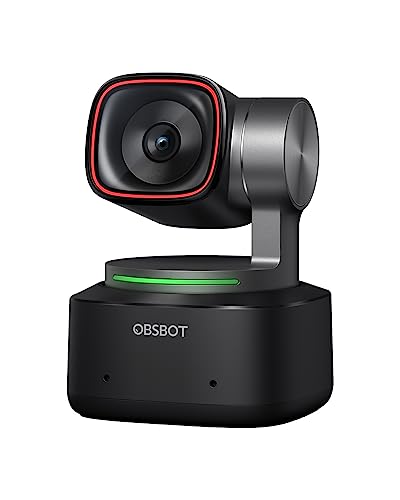
| OBSBOT Tiny 2 | Best overhead and desk camera | A PTZ webcam that pans, tilts and zooms from above the desk, tracks your hands, and answers gestures while both of yours are busy. |
| Logitech Brio | Best simple desk-and-face camera | Sharp 4K, honest colour and plug-and-play manners — the dependable second angle and streaming camera. |
| DJI Osmo Pocket 3 | Best roaming studio camera | Gimbal-smooth walkthroughs, material shopping and detail inserts, with low-light quality beyond its size. |
| Sony ZV-1F | Best face-and-intro camera | Built for the talking segments: face priority, flattering colour and product focus for the materials haul. |
| Insta360 GO 3S | Best tool’s-eye-view camera | Mounts where the work happens — the press, the wheel, the easel’s edge — for the angle no tripod can take. |
| Canon EOS R50 | Best system camera to grow a channel on | The interchangeable-lens step: overhead rigs, macro lenses, a channel that scales — prose-only in this guide. |
How Did We Choose the Best Cameras for Artists YouTube Channels?
We chose from the desk outward. The first filter was the overhead hour: can this camera live above a work surface, framed on hands and paper, and record a full session without heat warnings, recording limits or a battery’s surrender? Cameras that failed the hour failed the guide, whatever their vlogging laurels and however glowing their launch coverage, because the art channel’s basic unit is the session and the session is long, messy, unrepeatable and — once the paint is down or the clay is centred — utterly indifferent to a camera’s need for a rest. Clean output to a computer or recorder, reliable webcam behaviour, and screens or apps that let you frame the desk without climbing onto it all scored as first-class virtues.
The second filter was colour, treated as ethics rather than taste. An art channel teaches with colour: the pigment review, the mixing tutorial, the fabric haul, the before-and-after. A camera that shifts hues between angles, or renders the desk’s known colours unfaithfully under studio light, taxes every edit and misleads every student. We weighted consistent, correctable colour — and the white-balance discipline to lock it against a grey card rather than trusting any automatic system’s mood — as heavily as resolution, and in the final placings, heavier.
Third, the hands — the art channel’s true celebrities, whose treatment by a camera’s autofocus and close-focus ability decides more subscriptions than any face ever will. Art autofocus must track a working hand, a moving brush and a turning page without the face-hunting that ruins process footage, and macro ability — close focus for the nib, the stitch, the glaze — separates the detail-capable from the merely wide. Finally, the two-angle economy: most channels should buy a pair that complements rather than a flagship that duplicates, and the picks are arranged so the pairs assemble themselves across the list — hero and face, desk and roaming, session and insert — like the tools on a well-kept bench, each with its place and its purpose.
What Kind of Art Channel Are You Building?
The process channel — watch me make the thing — lives overhead and needs stamina, framing discipline and time-lapse manners above all. The teaching channel adds the face and the voice: lessons, critiques, materials science, where the talking camera’s colour and audio join the brief. The making-and-building channel — wood, clay, electronics, cake — adds scale and mess: wider rooms, tougher conditions, the tool’s-eye view and the roaming camera for the reveal. And the art-life channel — studio tours, sketchbook flips, the creative practice as content — is a vlogging discipline wearing an apron, served by the face cameras and the Pocket 3’s glide.
Most artists run two of these in one channel, often without having named either, which is why the pair logic governs the picks — and why the first diagnostic question for a struggling channel is never “which camera” but “which grammar, and is the camera serving it or auditioning for a different one”. Name your primary grammar honestly — the audience will — and let it choose your hero camera; the second angle can be the humblest pick here and still transform the channel, because the cut from overhead to face is where process becomes television.

OBSBOT Tiny 2 — Best overhead and desk camera
The Tiny 2 solves the art desk’s defining problem — the camera must see the work, follow the work, and never require a clean hand — with a pan-tilt-zoom head, a large sensor for a webcam, and control that answers voice and gesture. Mounted above or beside the desk, it frames the page; told to, it zooms to the detail of the nib or the bead; left alone, its tracking keeps a moving demonstration centred while both of the artist’s hands remain in their natural state, which is to say covered in the medium. For the solo teacher-artist, this is not a convenience. It is a camera operator who works for electricity.
The image supports the ambition: 4K from a sensor large enough to keep studio-lit colour honest and low-light sessions clean, with autofocus that handles hands and objects as first-class subjects. As a streaming and recording source it behaves impeccably with the usual software, so the live demonstration, the recorded lesson and the critique stream all run through the same small head above the desk.
Its limits are the webcam form’s own: it lives tethered to a computer, its zoom is electronic rather than optical, and the roaming shots belong to other picks. As the desk’s resident eye — the hero angle of process and teaching channels — nothing in this guide is more purpose-built, and art channels that adopt it tend to build their whole visual grammar around its quiet competence.
- Type: PTZ webcam with AI tracking
- Control: voice, gesture, remote and app
- Video: 4K with a large sensor for its class
- Mounting: desk, tripod and overhead rigs
- Role: the overhead hero and live-lesson camera
Strengths
- Follows the work while your hands stay dirty
- Zooms to detail without touching the rig
- Streaming and recording behaviour is seamless
Trade-offs
- Tethered to a computer — a desk citizen only
- Electronic zoom is not optical zoom
- Premium pricing among webcams
Best for: process and teaching channels filming solo at a desk. Not suited for: roaming, outdoor or multi-room production.

Logitech Brio — Best simple desk-and-face camera
The Brio is the art channel’s reliable second: a 4K webcam whose sharpness resolves the sketchbook page and the beadwork, whose colour stays honest under studio lamps, and whose plug-and-play manners have made it the default face camera of a million desks. On an art channel it covers the talking segments, the critique streams, the materials close-ups held to the lens — and it covers them today, without a settings pilgrimage, which for a working artist is a genuine creative virtue.
Its field-of-view options let the same camera frame the face tightly for a lesson and widen for the desk-and-artist establishing shot, and its low-light correction keeps evening sessions — the hours many artists actually film — presentable. Paired with the Tiny 2 above, it completes the classic two-webcam studio: one that moves and thinks, one that simply never fails.
Age is its only brief against itself: newer rivals add tracking and smarter framing, at newer-rival prices and maturity. The Brio’s treaty — proven 4K, honest colour, universal compatibility — remains the value anchor of the desk-camera world, and art channels buy it for the same reason IT departments do: it will work on the day, every day, while the art gets made.
- Video: 4K with adjustable field of view
- Colour: honest rendering under studio light
- Compatibility: plug and play across platforms
- Audio: built-in microphones for talk segments
- Role: face camera, second angle, streaming
Strengths
- Sharp enough for pages and detail held close
- Zero-drama setup and daily behaviour
- Flexible framing from one fixed position
Trade-offs
- No tracking — the framing is yours to set
- Fixed position limits the roaming shots
- Newer webcams offer smarter features for more money
Best for: talking segments, critiques and dependable second angles. Not suited for: overhead hero work — pair it with the Tiny 2 for that.

DJI Osmo Pocket 3 — Best roaming studio camera
Not all art happens at the desk, and the Pocket 3 is the camera for the rest of the studio: the walk from sketch to canvas, the gallery visit, the materials shop, the big piece that must be circled to be believed. Its gimbal turns the studio tour into a glide, its 1-inch sensor keeps gallery light honest, and its tracking holds the work — or the artist — while the camera moves, which is the grammar of the reveal, the tour and the vlog that art-life channels run on.
At the desk it moonlights as the detail camera: small enough to occupy the angles a rig cannot, quick enough to grab the insert — the kiln’s opening, the pour, the first cut — without a production meeting. The rotating screen serves the vertical formats where art audiences increasingly live, and the whole instrument fits the apron pocket it will, in practice, live in.
It is not the session camera: the overhead hour belongs to the desk picks, and the Pocket’s fixed perspective and gimbal delicacy argue against rigging it above a messy desk for a season. As the channel’s roaming unit — the camera of everywhere the art goes when it leaves the desk — it has no rival in this guide.
- Sensor: 1-inch on a 3-axis gimbal
- Recording: stabilised 4K with subject tracking
- Screen: rotating, vertical-native
- Size: apron-pocket portable
- Role: tours, reveals, inserts, art-life vlogging
Strengths
- Studio tours that glide instead of wobble
- Low-light honesty for galleries and evening studios
- Instant detail inserts anywhere in the room
Trade-offs
- Not built for the rigged overhead session
- Fixed lens and perspective
- Gimbal prefers a case to a toolbox
Best for: studio tours, reveals, art-life and travel content. Not suited for: the fixed overhead hero shot.

Sony ZV-1F — Best face-and-intro camera
Every process video begins and ends with a person, and the ZV-1F is purpose-built for that person’s camera: face-priority autofocus that holds the artist through the introduction, the colour science that flatters skin under studio light, the product-focus mode that snaps to the tube, the tool or the finished piece held up for the audience’s inspection. For teaching channels especially — where the lesson alternates between the work and the teacher — it is the friendly half of the classic pair.
Its fixed wide lens frames the desk-side talking shot without a rig, its microphone arrangement respects the voice that carries a tutorial, and its sharing path is the shortest in this guide for the clips and shorts that feed the channel’s discovery. Beginners to filming — which most artists are, whatever their mastery of the medium itself — will find it the least intimidating serious camera here.
The ceiling is the design’s own: no lens changes, no telephoto, stills as a sideline. An art channel that grows toward product photography and interchangeable glass will graduate past it — to the prose-only pick below, usually — but as the face of the channel for its first years, the ZV-1F is precisely shaped to the job.
- Sensor: 1-inch with a bright fixed lens
- Autofocus: face priority with product showcase mode
- Audio: voice-respecting built-in array
- Sharing: fast path to phone and platforms
- Role: introductions, lessons, hauls, shorts
Strengths
- The talking segments, solved simply
- Product focus for materials and finished pieces
- Kind to artists who are new to cameras
Trade-offs
- Fixed lens — the system ceiling arrives by design
- Not the overhead session camera
- Small battery for long filming days
Best for: teaching channels and face-led art content. Not suited for: overhead process filming or lens-system growth.

Insta360 GO 3S — Best tool’s-eye-view camera
There is an angle in every studio that no tripod, rig or webcam can occupy: the view from the work itself — inside the printing press’s approach, at the pottery wheel’s rim, along the chisel’s line, from the easel’s edge as the canvas fills. The GO 3S, thumb-sized and magnetic, lives in those angles. Mounted on the tool, the machine or the artist’s cap, it films the making from inside the making, and the resulting inserts are the spice that separates a competent process channel from a hypnotic one.
The practicalities suit messy work: the camera is small enough to protect easily, tough enough for the studio’s knocks, and quick to deploy for the thirty seconds of footage that will become the video’s most-replayed moment. Its pod recharges it between processes, matching the rhythm of studio work, and its stabilisation keeps even the wheel’s and the press’s perspectives watchable.
It is a garnish, not a meal: sessions, teaching and talking belong to the other picks. But the art channel that adds the tool’s-eye view gains a signature angle competitors cannot copy without the same small camera — and signatures, on YouTube, are the whole game after competence.
- Size: thumb-scale, magnetic mounting
- Recording: stabilised video from impossible angles
- Battery: pod recharges between processes
- Role: inserts and point-of-view spice
- Audience: makers, builders, wheel and press artists
Strengths
- Angles no other camera in the guide can take
- Fast to deploy for the decisive insert
- A signature look for process channels
Trade-offs
- An insert camera, not a session camera
- Short in-camera battery rhythm
- Small controls — set before the messy work begins
Best for: makers and process artists wanting the inside angle. Not suited for: anyone’s only camera.
Canon EOS R50 — Best system camera to grow a channel on
When an art channel’s ambitions outgrow webcams and fixed lenses — when the overhead rig wants a real camera, the product photography matters, the macro lens calls, the studio becomes a set — the R50 is the graduation the community recommends most: an APS-C mirrorless body with strong video, reliable autofocus, a vari-angle screen for the desk’s awkward framings, and Canon’s colour, which renders the artist and the artwork with the warmth audiences associate with the platform’s biggest teaching channels.
Its system is the argument: RF lenses from the affordable primes to the macro glass the detail work demands, rigging and clean output for the recorded session, and a body that serves the channel’s stills — the finished-piece photography, the shop listings, the book — as seriously as its films. Bought with one good lens and grown deliberately, it is a five-year camera for a channel with plans.
Prose-only in this guide, outside the verified pool: source it through Canon’s channels, and budget the lens with the body, because a system camera is a promise the lens keeps. For the artist whose channel is becoming a production, this is the door the webcams were the porch of.
- Sensor: APS-C mirrorless
- Video: strong recording with vari-angle screen
- System: Canon RF lenses including macro
- Stills: channel and product photography in one body
- Availability: prose-only — maker’s channels
Strengths
- The scalable foundation for a growing channel
- Overhead, macro and product work in one system
- Canon colour for artist and artwork alike
Trade-offs
- A system budget, not a webcam budget
- Long sessions need the power and rigging planned
- No purchase link in this guide
Best for: art channels graduating to a production system. Not suited for: beginners wanting plug-and-play this week.
How Do the Best Cameras for Artists YouTube Channels Compare Side by Side?
| Camera | Channel role | Angle | Standout trait |
|---|---|---|---|
| OBSBOT Tiny 2 | Hero desk camera | Overhead and detail | Tracking PTZ, hands-free control |
| Logitech Brio | Second angle | Face and desk | Proven 4K dependability |
| DJI Osmo Pocket 3 | Roaming unit | Tours and reveals | Gimbal glide, 1-inch sensor |
| Sony ZV-1F | Face camera | Talks and hauls | Face priority, product focus |
| Insta360 GO 3S | Insert specialist | Tool’s-eye view | Mounts inside the making |
| Canon EOS R50 | System foundation | All, with lenses | Growth path for serious channels |
How Do You Set Up the Overhead Shot That Carries the Channel?
The rig comes first and the camera second, because the overhead shot is a piece of furniture before it is a photograph. A boom arm, a ceiling mount or a sturdy overhead frame — any of them, provided it does not wobble when the desk is bumped, because a three-hour session amplifies every tremor into seasickness. Frame the work surface with margin for hands and materials, light it from the sides rather than from the camera’s position — side light models texture, which is the art’s third dimension — and lock the white balance against a grey card on the desk, because the session’s colour must not drift as clouds cross the studio window.
Then the session discipline: focus set or tracking tested on the hands’ actual working area, the record started before the first mark and stopped after the last, and a clap or a marker frame at the start to sync the second angle. Speed the footage in the edit rather than performing speed at the desk; the audience reads twenty-times as craft and reads rushed hands as anxiety. And keep the desk’s geography consistent across videos — the audience learns your workspace like a room they visit, and the channel that feels like a place outperforms the channel that feels like a series of accidents.
What Are the Most Common Art Channel Camera Mistakes?
Filming the face when the audience came for the hands is the founding error — the process is the promise, and the talking head is the seasoning. Second: colour drift between angles, so the piece changes hue when the edit cuts, quietly telling the audience the work cannot be trusted. Third: sessions lost to overheating, limits and flat batteries — the unglamorous failures that break a channel’s rhythm, which is why this guide weighted stamina like a creative virtue. Fourth: the desk lit for the artist’s eyes rather than the camera’s, leaving the work in shadow while the room looks fine in person. And fifth: buying the flagship first and the lamp never, when every frame the channel will ever publish is lit by the lamp and merely recorded by the camera.
What About Sound — the Teaching Channel’s Second Sense?
Art channels divide by ear as much as by eye. The silent process video — hands, work, music — can survive on the camera’s own audio or none at all. The teaching channel cannot: the lesson is the voice, and a voice recorded across a room by a webcam’s courtesy microphone arrives thin, echoing and quietly exhausting, however beautiful the picture. The fix is the filmmaker’s fix at desk scale: a microphone near the artist — a lavalier under the apron, a small USB microphone at the desk’s edge — chosen with the same job-first discipline as the camera, because in a teaching video the audience is paying attention to instruction for twenty minutes and attention is an auditory stamina.
The studio’s own sounds deserve a decision too. The scratch of the nib, the wheel’s hum, the kiln room’s hush are the ASMR layer that process audiences treasure and that a close microphone honours accidentally while a distant one loses entirely. Record the room deliberately for a minute at each session’s start; editors and audiences both will thank you, and the channel gains a sensory signature no visual style can copy.
How Does the Edit Shape What the Camera Must Do?
Art edits are built from duration: hours of session become minutes of flow, and the camera choices that serve that alchemy are specific. Consistent colour between angles is the first, because the edit cuts overhead-to-face fifty times and cannot re-grade every cut. A clean, unsharpened image is the second, because sped footage exaggerates every processing artefact — the process video at twenty-times speed will find your camera’s compression sins and publish them. And file behaviour is the third: chapters, sane file sizes or continuous recording that does not scatter a session across a hundred fragments, because the editor — who is also the artist, at midnight — is part of the production the camera was hired into.
Build the edit’s habits alongside the rig: a marker clap for sync, a spoken note at each stage change for the edit’s map, the second angle started a breath before the hero’s. None of this costs money. All of it is the difference between a session that edits in an evening and one that edits in a week, and at a channel’s rhythm that difference is the difference between publishing and apologising.
How Do Live Sessions and Streams Change the Brief?
The live lesson — the draw-along, the critique stream, the launch-day build — reverses several of the recorded session’s priorities. Reliability outranks beauty, because there is no second take; the webcam picks’ plug-and-play manners and the Tiny 2’s software fluency become headline virtues rather than conveniences. Interaction becomes a camera feature: the PTZ’s zoom answers a viewer’s “can you show that corner again?” in real time, and the second angle’s face carries the conversation while the hero angle carries the work. And the stream’s length — often longer than any recorded session — audits stamina more cruelly than any recording, which is why the desk cameras that run cool and powered, rather than hot and battery-bound, own this format.
Artists building toward live should buy for it early even if they launch recorded: the desk pair in this guide streams as happily as it records, and the channel that grows into live with its rig already fluent avoids the public technical apprenticeship that costs audiences. The art, as always, is the content. Live merely removes the edit’s forgiveness — and rewards the camera that never needed it.
What About Photographing the Finished Work — the Channel’s Other Job?
The same cameras moonlight, with varying grace, as the studio’s stills department: the finished piece photographed for the shop listing, the portfolio, the print run, the book. The system pick exists for exactly this graduation — interchangeable lenses, honest colour, files that print — but the desk cameras serve the everyday version honourably: the Brio’s 4K frame grabs a web listing, the Pocket 3’s stills document the piece in its setting, and consistency of colour between the process film and the product photograph quietly tells buyers the work is what the channel showed. That continuity is a commercial virtue disguised as an aesthetic one.
Discipline matters more than the device: the piece photographed in the same light the channel films in, on the same surface the audience watched it made on, with the scale honest and the colours true. Art buyers forgive a modest camera everything except a surprise. Keep the chain of colour unbroken from first sketch to listing, and the camera kit — whatever its tier — has done the channel’s commerce as faithfully as its art.
How Does a Working Artist Actually Schedule Filming?
Around the art, or the channel dies of its own production. The sustainable pattern the successful art channels converge on is batching with a light footprint: the rig lives assembled above the desk — another argument for the desk-bound picks — so a session costs the artist nothing but pressing record inside a practice that was happening anyway. Film every real session for a week; edit in one sitting; publish on the rhythm the audience can memorise. The camera that must be fetched, charged, rigged and framed from cold will be skipped on the tired Thursday, and channels are built or buried on tired Thursdays.
This is the deepest reason the guide favours the desk pair over a single magnificent camera for most artists: permanence beats power. A modest camera that is always ready captures the year; a superb camera that is sometimes ready captures the launch month. When the channel grows to where production days are scheduled like commissions — the system pick’s world — the calculus changes and the R50’s rigging earns its ceremony. Until then, let the studio’s geography decide: the camera lives where the art lives, awake and pointed at it.
What Separates Art Channels That Grow From Those That Stall?
Watch a hundred of each and the camera is rarely the difference — but the camera’s friction is. Growing channels film inside the practice: the rig is permanent, the record button is part of sitting down, the sessions accumulate whether or not any single one was destined for publication. Stalling channels film as an event — the studio cleaned, the camera fetched, the performance mounted — and events lose to tiredness, commissions and life within a season. The second difference is the archive habit: growers keep their masters, labelled by piece and date, because an art channel’s back catalogue is a body of work that compounds — the tutorial found in year three, the process video that a gallery shares, the before-and-after that sells the commission.
Buy, therefore, for frictionlessness as a first-class specification, which is what this guide has quietly done in every section: the always-mounted desk camera, the pod that recharges the insert camera, the face camera that needs no ceremony. Art is the variable. The camera’s constancy is what lets the variable accumulate into a channel — and a channel, accumulated honestly over years, becomes the second studio every artist dreams of: the one that pays for the first.
How Do You Film Detail — the Nib, the Stitch, the Glaze?
Detail is where art channels prove their love, and it is a discipline of proximity and light rather than of lenses alone. Get the camera close before you zoom — every pick here rewards physical proximity with its best quality — and rake the light across the surface so texture casts its tiny shadows; a glaze, an impasto ridge, a letterpress bite all read as flat under frontal light and as sculpture under raking light. Focus becomes manual craft again: set it on the point of contact between tool and work, let the hands move through the plane, and resist the autofocus’s urge to wander to the brightest knuckle.
The Tiny 2’s zoom and the GO 3S’s proximity are this guide’s two native answers — the directed detail and the immersed detail — and the system pick adds the third, the true macro lens, when the channel’s detail work becomes its signature. Whichever you use, shoot more detail than the edit needs: the audience rewinds the close-ups, clips them, shares them. In the economy of an art channel, ten seconds of perfect detail can carry ten minutes of process — spend the session’s care accordingly.
What Does the Audience Actually See — a Word on Trust?
An art channel is a promise made in pixels: that the colour is the colour, the process is the process, the finished piece in the film is the piece in the listing. Cameras serve that promise or break it in small ways — the hue shifted between angles, the detail softened where the hand was working, the session’s middle missing where a battery died — and audiences, who cannot name the technical causes, feel the sum of them as a quality of trustworthiness that decides subscriptions more than any single video’s brilliance. This is why the guide has weighted consistency, stamina and colour honesty like moral qualities: on an art channel, they are.
Keep the promise visibly, too. Show the colour checker occasionally; film the piece in daylight at the end; let the audience watch the work leave the desk and arrive at its wall. The channel that documents its own honesty gets believed about everything else — and belief, compounded over years of sessions, is the asset the camera was bought to build. Choose the kit that never makes a liar of you, and then make the work that makes the kit irrelevant. That ordering — honesty, then art, then equipment — is the whole syllabus.
How Should a Painter, a Potter and a Woodworker Each Read This List?
Differently, because the medium writes the brief. The painter and the illustrator live in the flat overhead world: colour is the product, sessions are long and still, and the desk pair — Tiny 2 above, face camera beside — is the complete studio, with light as the third and most important purchase. The potter works in the round and in the wet: the hero angle orbits rather than hovers, the GO 3S’s wheel-side view is worth a flagship to them, splash tolerance enters the specification, and the Pocket 3’s circling reveal of the finished vessel becomes the channel’s signature shot. The woodworker and the maker work at bench scale in a room full of dust and noise: wider framing, a camera that can be blown clean and forgiven, audio that survives machinery by being recorded close and after, and the system pick’s case strengthening with every project that leaves the bench for the garden, the client site, the world.
Read your own medium’s paragraph as your shortlist and the rest of the guide as your second angle. That is how the list was built — not ranked, but mapped, medium by medium, onto the desks and benches where the work actually happens.
What Is the First Month of an Art Channel’s Camera Life?
Week one is rig and light: the mount assembled, the lamp placed, the white balance locked against the desk’s grey card, and one full session filmed end to end without any intention of publishing — the rehearsal that teaches the rig’s wobbles and the camera’s manners in private. Week two is the pair: the second angle added, the sync clap habitual, the first real video edited from both, with the colour match between angles solved now rather than apologised for forever. Week three adds the signature — the detail insert, the tool’s-eye view, the reveal — one flourish, practised. Week four is rhythm: the filming folded into the practice’s ordinary sessions, the archive labelled, the publishing schedule set at the pace the art can feed without starving.
Artists who run that month own a production; artists who skip it own a camera and a series of good intentions. The distinction is not talent. It is the same distinction the art itself taught them years ago, between the sketchbook that gets filled and the one that stays beautiful and empty. Fill the sketchbook. Press record.
When Does the Channel Outgrow This List — and What Then?
When the production becomes a schedule rather than a habit: commissioned series, sponsor integrations with delivery specifications, a team where someone else operates the camera, a studio where the set is permanent and lit like one. The signs are practical — the edit demands angles the pair cannot give, the product photography becomes a revenue line of its own, the live show needs a third camera and a switcher. At that point the system pick stops being the graduation and becomes the foundation, and the channel’s camera conversation moves to the tier our filmmaking guides inhabit.
Notice what does not happen: the desk pair is not discarded. It becomes the second studio, the travel kit, the always-ready rig for the ideas that arrive between productions — because the channel’s soul remains the practice, and the practice still happens at the desk, on the tired Thursday, where permanence beats power. Growth in an art channel is additive. Buy in the order this guide suggests and nothing you purchase is ever wasted; it is merely promoted to a smaller, honester job, which in a working studio is the definition of a good tool.
A Note on Filming Other People’s Art — Classes, Studios and Collaborations
Sooner or later the art channel films beyond its own desk: the workshop you teach, the studio visit, the collaboration where two practices meet. The etiquette and the kit both travel from this guide. Ask before the camera enters another artist’s space, agree what the footage is for, and let their work’s colour and context be treated with the same honesty you demand for your own — the community is small, and a channel’s reputation for care is a production asset no camera can replace. The roaming picks earn their keep here: the Pocket 3 for the tour that respects the room’s flow, the GO 3S for the consented detail, and the discipline to put both away when the conversation matters more than the content.
What Should You Spend the Rest of the Budget On?
The lamp, as this guide has insisted since its first page — then, in order, the microphone the teaching voice deserves, the rig’s solidity, the storage that makes real-time masters a habit rather than a luxury, and the unglamorous insurance of a second card and a backup habit for the archive that becomes the channel’s catalogue. Notice that the camera is the first purchase chronologically and the last one conceptually: everything else on that list appears in, or protects, every frame the channel will ever publish, while the camera merely records them. Artists understand this ordering instinctively from their own materials — the paper outranks the pencil, the clay outranks the wheel’s motor — and the channel’s budget should obey the same wisdom the studio’s does.
How Do You Keep the Channel’s Look Consistent for Years?
By writing the recipe down — literally, in the studio notebook: the lamp’s position and setting, the white-balance number, the desk’s layout, each camera’s profile and height, the marker the framing is checked against. Channels drift visually the way handwriting drifts, a degree a month, until the catalogue looks like three different artists; the recipe arrests the drift and lets intentional evolution replace accidental. When you do change the look — a new studio, a graduated system — change it in one deliberate step, tell the audience, and let the before-and-after become content rather than confusion.
Consistency is also a kindness to the future editor, who is you, older, with a hundred sessions to mine for the retrospective, the course, the book. The channel that can cut year one against year four without a colour apology owns an asset its less disciplined rivals cannot buy retroactively. Cameras enable it only by being stable, settable and documented — one more reason this guide chose the desk’s permanent citizens over the spectacular visitors.
Final Recommendation
Build the pair. Process and teaching channels: the OBSBOT Tiny 2 overhead as the hero, with the Logitech Brio or the Sony ZV-1F on the face — the first for dependability, the second for flattery and product focus. Add the DJI Pocket 3 when the channel leaves the desk, the Insta360 GO 3S when the work deserves its own point of view, and graduate to the prose-only Canon EOS R50 when the production outgrows fixed lenses and webcams. Light the desk like it matters — it is the whole picture — lock the colour, protect the session’s stamina, and let the art be the spectacle. The best cameras for artists YouTube are the ones the audience never thinks about, because they were too busy watching your hands — and the ones you never think about either, because the rig was ready, the colour was locked, the session ran its full length, and the only thing in the studio that demanded your genius was the work itself.
Frequently Asked Questions
Do I need 4K for an art channel?
It helps for two practical reasons rather than one vain one: the overhead frame can be cropped in the edit — zooming the detail without a second camera — and the platform’s processing tends to treat 4K uploads kindly. But a well-lit, well-coloured 1080p process video beats a dim 4K one every day of the week. Buy light first, colour discipline second, resolution third.
How do I stop my hands from going out of focus?
Give the camera a defined stage: keep the work within the framed, lit area the focus was set or tested on, prefer cameras whose tracking handles hands and objects — the Tiny 2’s speciality — and close the aperture or add light where your system allows depth of field to forgive movement. Rehearse the piece’s big movements once with the camera watching; the take that matters should never be the first time the rig has seen the choreography.
What lighting should an art channel buy first?
One large, soft, daylight-balanced source placed to the side of the desk, plus the discipline to kill the room’s competing lights while filming. That single lamp does more for an art channel’s look than any camera upgrade in this guide, because it models texture, stabilises colour and flatters both the work and the artist. Add a second, dimmer fill when the shadows argue; stop there until the channel’s income argues otherwise.
Should I film sessions in real time or time-lapse?
Record in real time and decide in the edit — storage is cheaper than regret. Real-time masters let you publish the sped process video, the real-time lesson and the short clips from one session, while a time-lapse-only recording can never slow down. The exception is the genuinely long build, where interval recording protects cards and sanity; even then, film the key stages in real time as inserts.
Can I run an art channel with just a phone?
Many beloved channels began exactly there, and the phone remains a fine rehearsal studio. The cameras in this guide earn their place when the channel’s promises outgrow it: the three-hour session, the overhead rig, the colour a sponsor’s product deserves, the second angle. Graduate when the phone’s limits appear in your comments section — your audience will tell you, kindly, before the analytics do.
How do I film shiny, wet or reflective artwork without glare?
Move the light, not the camera: glare is the lamp’s reflection in the work’s surface, and it vanishes when the light sits to the side at a low angle rather than above the lens. Cross-polarisation — a filter on the light and the lens — is the professional’s complete answer for varnished and resin work, and even the simple version, one polarising filter on the camera, tames most desk glare. Test the setup on the glossiest piece you own before the session that matters.
What frame rate suits process videos?
Record at the platform’s standard rates and let the edit do the time work: real-time masters at normal speed, sped in post for the process cuts, with the option of higher rates where a moment deserves slow motion — the pour, the reveal, the kiln opening. Consistency within a video matters more than the number; mixed rates cut together carelessly are the beginner’s tell in this genre as in film.
Related Guides
Growing the channel’s kit? See our guides to the best webcams for streaming and calls, cameras for aspiring filmmakers and the best cameras for recording your work for the neighbouring crafts.


