reviewstook.com is reader-supported. When you buy through links on our site, we may earn an affiliate commission.
Where to buy
The best cameras for senior care are not really surveillance devices, and this guide will not treat them as such. They are communication tools: a camera that lets a daughter see her father’s face at breakfast across three time zones, a simple two-way-talk camera an older person can use to call for a chat — or for help reaching the high shelf — and video setups that make a care home’s family call feel like a visit. Everything here is chosen for dignity and ease: big, clear pictures, honest indicator lights, controls an eighty-year-old can master in one afternoon, and consent designed into how the devices are placed and used. Cameras support the humans who provide care; they never replace them, and nothing in this guide should be read as a medical or safety guarantee.
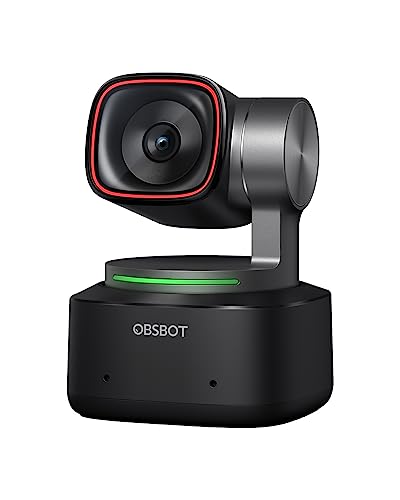
- OBSBOT Tiny 2: check price on Amazon
- Logitech Brio 4K Webcam: check price on Amazon
- Logitech C920S HD Pro Webcam: check price on Amazon
- NexiGo N60 Webcam: check price on Amazon
- Two-way talk indoor camera with a call button: check availability with reputable home retailers
- Large-screen video-calling display for the home: check availability with reputable home retailers
Two of the six picks are described without purchase links, deliberately: dedicated senior-friendly communication devices vary by country and retailer, and the right choice depends on the family’s existing phones and services. What matters is the category and the features to demand, which the reviews spell out. The four linked webcams, by contrast, are the dependable core most families start with — they turn a computer or a small TV-connected setup into a video-calling station an older relative can actually enjoy using.
Placement ethics run through every verdict. A camera in an older person’s home belongs there by their agreement, aimed at shared life — the kitchen table, the favourite chair, the front door — and never treated as a secret. Families who have that conversation first, and keep the older person’s hand on the controls, find the technology welcomed. Families who skip it find the camera unplugged, and deserve to.
Key Takeaways
- The OBSBOT Tiny 2 makes video calls effortless: it frames and follows the person automatically.
- Logitech’s Brio and C920S give family calls a clear, kind picture at two price tiers.
- The NexiGo N60 is the simple, private choice for a bedroom or study calling corner.
- A two-way talk camera with a physical call button serves older people who do not use computers.
- A large-screen calling display is the most welcomed gift format for technophobic relatives.
- Consent, indicator lights and the older person’s own controls decide whether any of this is care or intrusion.
In this guide
Quick Picks
| Camera | Badge | Why it is here |
|---|---|---|
| OBSBOT Tiny 2 | Best for effortless video calls | It pans, tilts and zooms to keep the person framed while they move and talk naturally. |
| Logitech Brio 4K Webcam | Best picture for family calls | A sharp, flattering image that makes a call feel like sitting across the table. |
| Logitech C920S HD Pro Webcam | Best proven all-rounder | The dependable classic for a computer-based calling corner, with a privacy shutter. |
| NexiGo N60 Webcam | Best simple and private | Plug-and-play 1080p with a sliding privacy cover an older hand can work by feel. |
| Two-way talk indoor camera with call button | Best for non-computer households | One press connects to family; the older person initiates, on their own terms. |
| Large-screen video-calling display | Best gift for technophobes | A photo-frame-like screen that rings like a telephone and asks almost nothing. |
How did we judge cameras for older people and their families?
By the afternoon test: could a tech-sceptical eighty-year-old, given one patient demonstration, use this device alone a week later and feel pleased rather than managed? That test weighted big clear pictures over specifications, automatic behaviour over menus, and physical controls — a shutter that slides, a button that calls — over anything hidden in an app. Devices that demand accounts, updates and troubleshooting from the older person were marked down regardless of their image quality.
The family’s side mattered too. A care camera succeeds when the adult children’s experience is calm: a call that connects first time, a picture clear enough to read a face and a room, audio that carries a soft voice. We favoured standard platforms and connections the family already uses, because every proprietary hurdle becomes a reason the Sunday call quietly stops happening.
Finally, dignity was a specification, not a sentiment. Visible recording lights, shutters that close, placement the older person chooses, and the standing rule that the person in front of the camera can always end its watching — hardware and habits that keep the arrangement a service the older person commands, rather than a watch kept over them. Any product, however clever, that could not honour that rule did not belong in a guide with care in its title.

OBSBOT Tiny 2 — Best for effortless video calls
The Tiny 2 removes the video call’s cruellest demand: sit still, in the frame, facing the light. Its motorised gimbal and AI tracking follow the person instead — from the armchair to the window to show the garden, to the kitchen to put the kettle on mid-conversation — while its large sensor keeps the face clear and kindly lit. Voice control means starting, framing and zooming happen by asking, which for arthritic hands or failing eyes is not a gimmick but the difference between using a device and avoiding it.
For families, the effect is a call that feels like company. Grandchildren stop performing for a static rectangle and start showing their drawings, their dances, their new shoes, because the camera at the other end behaves like an attentive grandparent — it watches the person, wherever the person goes. Set up once by the family on a shelf or a small tripod, it asks the older person for nothing but conversation.
It is the premium pick here, and it needs a computer or compatible setup at its side, so it suits the household where video calling is a real weekly ritual. For the relative who video-calls rarely, its talents are surplus. For the family whose Sunday call is sacred, it is the single kindest upgrade this guide can recommend.
- Sensor: large-for-class 4K webcam sensor
- Tracking: automatic pan, tilt and zoom following
- Control: voice commands and gestures, hands-free
- Use: video calls where the person moves naturally
Strengths
- The person never has to perform for the frame
- Hands-free control suits limited mobility
- Clear, flattering picture in home lighting
Trade-offs
- Premium price for a single-purpose kindness
- Needs a computer partner
- Tracking movement can surprise the uninitiated — demonstrate it first
Best for: devoted video-calling families. Not suited for: households that rarely call.

Logitech Brio 4K Webcam — Best picture for family calls
Some calls carry more than news: the first sight of a great-grandchild, the birthday with three generations on screen, the face a family needs to see clearly because distance has made faces precious. The Brio serves those calls. Its 4K image and accomplished light correction render skin, expression and the room behind with a fidelity that makes the screen feel thinner, and its adjustable framing fits one beloved face or a sofa of relatives without furniture rearrangement.
Set up by the family on the older person’s computer or a small dedicated calling PC, it behaves impeccably thereafter — plug in, appear, talk. The integrated privacy shutter gives the older person a physical closing ritual at the call’s end, a small ceremony of control that users of this generation consistently value more than any software promise.
It offers no tracking, so the caller stays seated — which, for the set-piece family call, is usually the arrangement anyway. Buy it where the picture itself is the gift: the clearest window the family can install between two homes that love each other.
- Video: up to 4K with autofocus
- Framing: adjustable field of view
- Light handling: automatic correction for home rooms
- Privacy: integrated shutter
Strengths
- The kindest, clearest family picture here
- Frames a person or a gathering
- Physical shutter for peace of mind
Trade-offs
- The caller stays in their seat
- 4K exceeds what many connections carry — it scales down gracefully
- Costs more than the all-rounders
Best for: milestone calls and clear-picture households. Not suited for: following a moving conversation.

Logitech C920S HD Pro Webcam — Best proven all-rounder
The C920S is the webcam a generation of families already trust, and familiarity is a genuine feature in a senior’s home: the visiting grandson who sets it up has probably met one before, and every calling platform knows its name. Its 1080p picture and stereo microphones handle the ordinary Sunday call with unshowy competence, autofocus keeps a leaning-in face sharp, and the included privacy shutter restores the one thing its famous predecessor lacked.
In the older person’s home it earns its keep by disappearing. It sits on the monitor, works when the call starts, and never asks to be understood. For the many households whose need is simply a reliable calling corner on an existing computer — for family calls, for the book club that went online, for the old friend in another country — it remains the safest recommendation in this guide.
Newer rivals out-shine it in resolution and out-think it in tracking, and a family building a flagship calling setup should look at the two picks above. But the all-rounder’s virtues — price, ubiquity, a decade of proven manners — are exactly the virtues that keep technology alive in a home where novelty is not loved for its own sake.
- Video: 1080p with autofocus
- Audio: stereo microphones
- Privacy: shutter included in the box
- Compatibility: every major calling platform
Strengths
- Proven in millions of family homes
- Good voice pickup for soft speakers
- Simple, familiar, replaceable
Trade-offs
- No 4K, no tracking
- Fixed field of view
- Needs the computer awake and willing
Best for: a dependable calling corner on an existing PC. Not suited for: hands-free, move-about calls.

NexiGo N60 Webcam — Best simple and private
The N60’s finest feature, for this guide’s reader, is a small sliding cover. It gives the older person a privacy control that works by touch, in the dark, without a password — slide it closed and the camera is closed, in a way no software setting ever quite convinces. Around that cover sits an honest 1080p webcam: plug-and-play, a built-in microphone that handles a quiet voice at desk distance, and software adjustments the family can set once and the user never needs to meet.
It suits the second calling corner — the study, the spare room, the care home bedroom with a laptop — where the flagship picks would be surplus and simplicity is the whole specification. Its picture flatters nobody and betrays nobody; it is the visual equivalent of a clear telephone line, which is what most family calls actually need.
Low light softens it and its microphone will not reach across a large room, so place it close and light the chair kindly. Within those honest limits it is the easiest device here to give, set up and forget — and in senior care, forgettability, once trust is established, is a compliment of the highest order.
- Video: 1080p Full HD
- Privacy: sliding cover, operable by touch
- Audio: built-in microphone
- Setup: plug-and-play, no drivers
Strengths
- The most reassuring privacy control here
- Genuinely simple to live with
- Gentle price for second rooms
Trade-offs
- Ordinary low-light picture
- Microphone range is a desk’s, not a room’s
- No tracking or 4K
Best for: bedrooms, studies and care-home rooms. Not suited for: the family’s flagship calling setup.
Two-way talk indoor camera with a call button — Best for non-computer households
For the older person who never adopted computers, the kindest camera is the one that behaves like a telephone. This category — a simple indoor camera with a speaker, a microphone and, crucially, a physical call button — lets its owner press one button and be connected, voice and picture, to a family member’s phone. No menus, no accounts on the older person’s side, no remembering which icon does what. The family sets it up; the owner simply talks.
Choose within the category by the dignity details: a clear indicator light when the camera is active, two-way audio clear enough for a soft voice, a design that looks like a household object rather than a security device, and placement agreed with the owner — the kitchen or the sitting room, aimed at shared life. Many families position it facing the favourite chair and the door, where the day’s ordinary news happens.
Set expectations honestly: this is a communication and reassurance device, chosen and controlled by the person it serves. It does not watch over anyone while they sleep, it does not summon ambulances, and it should never be installed quietly. Installed openly, with the button demonstrated and the first call made together, it becomes what the best of these devices become — the house’s easiest way to say hello, and to ask for a hand with the ordinary things.
- Control: one physical call button
- Audio: two-way talk for natural conversation
- Indicator: visible active light
- Setup: family-managed, owner simply talks
Strengths
- The older person initiates, always
- No computer skills required at all
- Doubles as the home’s friendly intercom
Trade-offs
- Models and services vary by country
- Needs the home’s Wi-Fi to behave
- Not a substitute for human care or emergency services
Best for: non-computer households and independent livers. Not suited for: anyone who has not agreed to have it.
Large-screen video-calling display — Best gift for technophobes
The most successful senior-calling technology of recent years looks like a photograph frame and behaves like a telephone. A large-screen calling display sits in the sitting room showing family photographs, rings visibly and audibly when a relative calls, and connects with a single touch on a big, labelled target. Between calls it asks for nothing — no charging ritual, no updates its owner must approve, no interface to learn — which is precisely why it succeeds where tablets, with their app grids and passwords, so often retire to a drawer.
Families manage it remotely: photographs arrive from the grandchildren’s phones, contacts are curated by the children, and the owner’s entire job description is “touch the ringing face of someone you love.” The picture and sound, sized for a room rather than a desk, suit hearing and eyesight that smaller devices insult, and group calls gather the whole scattered family onto one generous screen.
Choose by screen size honest to the room, volume that reaches a hard-of-hearing listener without distortion, and a family ecosystem your relatives already use. It is the least flexible pick here and, for the right recipient, the most used — a combination that should teach every technology buyer something about what “best” means in a senior’s home.
- Form: photo-frame-style touchscreen display
- Calling: one-touch answer, large targets
- Management: family-curated photos and contacts
- Audio: room-filling speaker for calls
Strengths
- The lowest learning curve of any pick
- Photographs between calls keep family present
- Sound and size respect older senses
Trade-offs
- Tied to its calling ecosystem
- Not portable between rooms
- Features beyond calling are limited
Best for: technophobic relatives and care-home rooms. Not suited for: households wanting a general computer.
How do you start the camera conversation with an older relative?
With the benefit, in their language, and with the veto stated early. “This would let you see the baby on Sundays, and you can close its cover whenever you like” opens a door that “we want to keep an eye on you” closes forever. Offer a trial — the device visits for a month, and its future is genuinely undecided — and demonstrate the controls into the older person’s hands, not past them. Most resistance to care technology is resistance to being managed; a conversation that begins with the older person’s command of the device usually ends with the device welcomed, because it was never an imposition to begin with.
Where should cameras sit in an older person’s home?
Where life is shared and dignity is not negotiated: the sitting room’s calling corner, the kitchen table’s neighbourhood, perhaps the front door’s approach if the household wants a doorbell’s-eye view of visitors. Bedrooms and bathrooms are not camera rooms in a care arrangement built on trust, whatever the technology allows. Placement should be visible, at a height that flatters a seated face — eye level, not the ceiling’s surveillance angle — and agreed aloud, with the indicator light explained. The geography of the cameras is the geography of the family’s respect, drawn in devices.
How do you make video calls succeed with hearing or eyesight changes?
Scale everything up and slow everything down. A bigger screen, a louder and clearer speaker, captions switched on where the platform offers them, and light on the caller’s face so lip-reading can assist hearing — these adjustments, all available around the picks here, matter more than any resolution figure. Seat the caller with the light in front, keep background noise (the television especially) off during calls, and let one person speak at a time as a house rule. Families who tune the call to the senses it must serve stop dreading the technology and start protecting the ritual.
What should families agree about recordings and privacy?
That communication cameras are for talking, not for keeping tapes. The healthy default in a family arrangement: calls are conversations, not recordings; any check-in viewing feature is used by agreement, at agreed times, and can be closed by the older person at will; and the arrangement is revisited as circumstances change, because consent given in one season of life deserves renewal in the next. Write the agreement down in plain words if it helps — not as a contract, but as a shared memory of what everyone promised. Trust, documented kindly, outlasts every device in this guide.
How can cameras help an older person live independently for longer?
By shrinking the distance that makes independence lonely and impractical. The grandchild’s face at breakfast, the daughter’s help reading a confusing letter held up to the camera, the neighbourly chat through the call-button device when the weather cancels the visit — these are the small connections that keep a household woven into its family, and woven-in households cope. None of this is medicine, and this guide claims none: it is company, logistics and reassurance, delivered by devices simple enough to survive in the homes that need them. Independence is mostly the presence of help that arrives easily; a good camera makes help’s arrival easier.
What is the right setup visit like?
Unhurried, and ending with a successful call. The family member installs, positions the light and the chair, sets the one or two controls, and then — the step everyone skips — makes a real call together, end to end, fixing the volume and the framing with the older person directing. Leave a large-print card with the three things that matter: how to answer, how to call, how to close the cover. Return in a week to adjust what the week revealed. Technology installed at demonstration speed fails at the first quiet Tuesday; technology installed at conversation speed becomes furniture.
How do cameras fit into a care home’s family life?
As the visiting room that never closes. A calling display or a webcam corner in a resident’s room — arranged with the home’s staff and policies — lets family attend the small days, not just the birthdays: the new haircut, the jigsaw’s completion, the view from the window described live. Homes that facilitate this well treat the devices as they treat visiting hours, with booking sense for shared spaces and privacy sense for personal ones. The family’s part is reliability: a call that happens when promised is worth more to a resident than any camera’s clarity.
What are the signs a camera arrangement is not working?
The cover that is always closed, the device unplugged “by accident” weekly, the calls that get shorter. These are communications, and they should be believed: something about the arrangement — its placement, its timing, its feeling of being watched rather than accompanied — has failed the person it was meant to serve. The remedy is a conversation, not a better camera: move it, re-time it, re-agree it, or remove it with grace. A family that can remove a camera kindly has understood care technology better than a family that can install a hundred.
How do you choose between a webcam setup and a dedicated calling display?
By the older person’s existing habits. A relative who already uses a computer happily gains most from a webcam — the Brio for splendour, the C920S for dependability, the N60 for a second room — because the calling joins a living routine. A relative whose computer is a source of stress gains most from the dedicated display, whose single job and telephone manners ask nothing of habits that were never formed. Audit the person’s actual week, not their past capabilities or your hopes, and the choice makes itself.
What role does sound play for older callers?
The decisive one. Voices soften and hearing narrows with age, and a call’s success is usually an audio story: a microphone close enough to catch a quiet voice, a speaker clear at volume without harshness, a room quieted for the call’s duration. Every pick here was judged partly as a telephone, and families can improve any of them with placement — device nearer, television off, door closed. When a call frustrates, resist upgrading the camera; move it a metre closer and try again. In senior communication, proximity is the highest technology.
How do grandchildren change the camera’s success?
They complete it. An older person’s calling setup lives or dies by whether the young actually call, and the young call when the experience delights at their end too — a grandparent who fills the screen, moves freely, shows the garden and the dog, and can be reached without a technical negotiation conducted through three relatives. The tracking camera and the big display earn their keep here: they make the older person a broadcaster the grandchildren seek out. Families should recruit the youngest competent member as the setup’s co-owner; technology adopted by both ends of a family survives, while technology installed at one end quietly expires.
What does a good calling corner look like?
A comfortable chair in kind light, a screen at eye height, and nothing to rearrange. The corner succeeds by being permanent: the camera lives there, the chair faces the window’s light rather than the window, a small table holds the water glass and the large-print card, and starting a call is a matter of sitting down. Older people abandon technology that must be assembled; they adopt technology that is simply where they already sit. Build the corner around the favourite chair, not around the router, and the ritual inherits the chair’s existing welcome.
How should families handle the first month?
With scheduled gentleness. Agree two short calls a week at fixed, protected times; keep them brief and cheerful while the mechanics become invisible; let the older person end every call — the power to hang up kindly is the arrangement’s soul. Expect one technical wobble and survive it together without commentary about competence. By the month’s end the calls should feel like the family’s ordinary weather. If they still feel like events, simplify the device, move the corner, or change the hour — the ritual is right and something in its staging is wrong.
What can a camera do for an older person’s hobbies?
Give them an audience again. The bridge club that moved online, the art class sharing work by camera, the choir’s sectional rehearsal, the language conversation hour — a dependable calling setup returns the older person to the communities that structure a week and witness a life. The webcams here serve those gatherings exactly as they serve family calls, which is why a good calling corner pays for itself in purposes its buyer never listed. When an estate agent asks what the spare room is for, “the studio” is a better answer than anyone expected.
How do you support an older person after a move to a new home?
Reinstall the familiar before introducing anything new. The calling corner — same device, same chair-side arrangement, same card — should be among the first things working in a new home or a care home room, because it carries the faces that make any room habitable. Coordinate with staff where relevant, label everything, and test the call from the new room before the family leaves. Moves disorient; a working window onto the family’s faces, on the first evening, is a form of care no camera specification captures and every family understands.
What is the family’s role in maintaining the setup?
A named person, a light touch, and no surprises. One relative owns the setup’s health — checking it during visits, handling the updates, replacing the cable before it fails — while everyone else simply calls. Maintenance done invisibly keeps the older person’s experience magical in the correct way: things work, people appear, no one discusses firmware at Sunday lunch. The worst arrangement is diffused responsibility, where five relatives each assume another is minding the technology and the camera dies of neglect between their good intentions.
How do cameras help siblings share the caring?
By making presence divisible. The sibling who lives nearby carries the visits; the sibling across the ocean can still carry the Tuesday call, the photograph stream, the reading of the confusing letter — real contributions that relieve the local sibling’s monopoly on guilt. A shared calling rhythm, agreed among the children with the parent’s pleasure at its centre, distributes both the labour and the joy. The camera does not equalise geography, but it stops geography from deciding which child gets to be a child to their parent.
What should you do when the older person outgrows the arrangement?
Renegotiate it with the same respect that began it. Needs change in both directions — a device once welcomed may become a burden, or a simple setup may need to grow as confidence grows. The annual conversation, held kindly and without an agenda to win, asks what is working, what is merely endured, and what should change. Families who institutionalise that conversation find their technology ageing gracefully alongside its owner. Families who treat the first agreement as permanent eventually discover it being enforced by an unplugged cable.
How do you choose a camera for a relative with dementia in the household?
With extra simplicity and extra counsel. Familiarity is everything: the device should resemble an object already understood — a telephone, a photograph frame — and its operation should never depend on remembering a sequence. Families in this situation should involve the person’s clinicians and the household’s actual carers in the decision, place devices only where they comfort rather than confuse, and accept that for some households the kindest camera is none. This guide’s general advice — consent, simplicity, the person’s own control — matters most exactly where it is hardest to apply, and professional guidance outranks any buying guide, including this one.
What is the photograph stream’s quiet power?
Presence without demand. The calling display that shows the family’s photographs between calls keeps absent people ambiently present — the new baby on the sideboard, the grandson’s match, the daughter’s garden in bloom — without requiring the older person to open, charge or operate anything. Families consistently underrate this feature when buying and overrate everything else; in lived experience, the photographs are glanced at a hundred times for every call, and they do the slow work of belonging. Choose the device whose photograph flow your family will actually feed, because an empty frame is just furniture.
How do you make calls with old friends work?
Rebuild the bridge at both ends. The oldest friendships often span two technophobic households, and the families who succeed play matchmaker-technicians for both — same platform, same simple setup, a first three-way call to prove it works, then a standing weekly hour the friends protect like the coffee mornings it replaces. The webcams here serve any computer-owning household identically, which is the point: standardise on the boring, universal tools, and two ninety-year-olds can out-call their grandchildren. Friendship is the strongest retention programme any technology ever gets.
What should the large-print card actually say?
Three things, in the older person’s own words where possible. To answer: what rings, what to touch. To call: whose picture to touch, or which button to press. To close: how the cover slides, with the sentence that matters most — “You can close this whenever you like.” Add the named relative’s number for problems, in digits large enough to read without glasses. Laminate it, put it where the hand falls, and revise it whenever the setup changes. Every word beyond the necessary is a small tax on the person the whole arrangement exists to serve.
How do seasons and occasions change the calling rhythm?
Wise families let the calendar enrich it. Birthdays gather the scattered onto one screen; the winter holidays justify the flagship picture; the dark months make the Sunday call a lamp in the week. The setup should flex for gatherings — the Brio’s wide framing, the display moved to the dining room for the occasion — and return to its corner afterwards. Rituals that breathe with the year survive; rituals frozen at their first design become obligations, and obligations are what older people quietly stop answering. Build the rhythm, then let life edit it.
What is the role of the television in senior video calling?
For many households, it is the screen that finally works. A webcam or small computer driving the living-room television gives the older person a picture at the size their eyesight requests, from the chair they already love, with sound through speakers that fill the room kindly. The family’s setup work is heavier — cables, inputs, a camera mounted at seated eye level — but the resulting ritual is the most natural in this guide: the family appears on the big screen, as people should. Where a relative’s computer setup has failed twice, stop repairing it and promote the television.
How do you know the arrangement respects its person?
Ask who can end it. If the older person can close the cover, decline the call, move the camera or retire the whole system — and knows it, and has seen the family honour a small exercise of that power without argument — the arrangement is care. If the power sits elsewhere, the arrangement is monitoring wearing care’s clothes, whatever the family intended. Audit the power, not the intentions, once a year. Each device here was chosen to make the respectful answer easy: shutters, buttons, lights and simplicity are, in the end, an ethics expressed in hardware.
What happens when the family disagrees about cameras?
The older person’s preference arbitrates, and the disagreement itself is information. Siblings argue about care technology because they are arguing about love, guilt and distance in a purchasable form; the parent’s stated wish cuts through all of it, because the camera will live in their home and watch their chair. Families who grant the veto early discover that the conversation becomes practical within minutes — which room, which device, which hour — while families who override it buy devices that get unplugged. The veto is not an obstacle to the arrangement. The veto is the arrangement’s foundation.
How should a camera setup be retired?
Completely and kindly. When the device no longer serves — the person has moved, the ritual has ended, the technology has been superseded — remove it, remove its accounts, and remove its recordings under the family’s agreed rules, rather than leaving a dormant eye in a room that has changed its meaning. Technology in a senior’s home accumulates moral weight as circumstances shift; a clean retirement honours what the device was for. And keep the large-print card in a drawer. Families are often surprised how soon a simpler successor gets requested, on the person’s own initiative — the surest sign the first arrangement was a respectful one.
What is this technology’s best possible outcome?
That it disappears into affection. The camera forgotten on the shelf, the call as ordinary as a knock at the door, the photographs accumulating on the frame, the grandparent who says “show me” and is shown — at that point the devices in this guide have done everything technology can do for care, which is to carry the humans’ love more easily across the distance. Buy for that outcome: the simplest tool, the clearest consent, the warmest ritual. The rest — the resolutions, the tracking, the shutters — is just engineering in service of a Sunday afternoon.
How do you introduce a camera to a proud, private person?
Through their generosity, not their need. The proud relative who refuses “help” often accepts the role of helper: the camera is how they will see the grandchildren, read to them, inspect the new house, advise on the garden. Frame the device as the family’s request — we miss you; this is for us — and let the older person be the giver of their presence rather than the receiver of supervision. Pride is not vanity; it is a lifetime’s self-respect, and technology that honours it gets used, while technology that wounds it gets a drawer.
What should families do about scam and safety worries?
Keep the circle closed and the habits plain. Calling devices should carry only family contacts, curated by the family; the older person should know that the device will only ever show faces they know, and that no stranger can call through it. Explain, once and calmly, what the indicator light means and that the cover defeats everything. Beyond the device, the family’s ordinary vigilance applies — the camera neither increases nor decreases the household’s exposure to the world’s dishonesty, and it should never be sold to an older person as protection. It is a window for the family, with curtains the owner controls.
How does a camera arrangement age alongside its owner?
By simplifying. The setup that begins as a computer and a webcam may, across the years, become the single-button display as eyes, hands and patience change — and planning that direction from the start, choosing ecosystems the family can migrate, spares everyone a crisis-driven replacement. Review the arrangement at the natural moments: the move, the new glasses, the changed routine. Technology for the old should be reviewed like their furniture — for fit, comfort and dignity — and replaced without drama when the fit is gone.
What is the measure of success after one year?
Count the calls, then count what the calls carried. A year in, the successful arrangement shows in the family’s texture: the grandparent who has watched a first year of school unfold, the sibling rivalry softened by shared Tuesdays, the old friend restored to weekly laughter. The device itself will be unremarkable by then — a shelf object, a frame of photographs — which is the deepest success available to it. Care technology wins when nobody calls it technology anymore. They call it Sunday.
How do you keep the ritual alive when life gets busy?
Protect a smaller promise rather than breaking a larger one. The weekly hour that collapses under work and school runs should shrink to fifteen kept minutes rather than dissolve into apologies — the older person experiences reliability, not duration, as love’s evidence. Anchor the call to something immovable: Sunday breakfast, the return from a standing appointment, the programme you both watch and then discuss. And when a call must move, move it aloud and early; a rescheduled call is a kept promise in a new shape, while a silently missed one teaches the older person to stop expecting, which is the one lesson this whole arrangement exists to prevent.
What do adult children most often get wrong?
They optimise for their own dashboard. The parent needs a window; the children shop for a control panel — feeds, alerts, histories — and then wonder why the window’s owner keeps the curtains drawn. The correction is to buy the parent’s experience first and let the family’s information be whatever that experience naturally shares: the call attended, the face seen, the room glimpsed in the background of a conversation. Everything beyond that must be negotiated as the separate, explicit arrangement it is. Families who learn this ordering stop having the camera argument entirely, because the camera stops being the argument’s subject.
Why does simplicity beat features in a senior’s home?
Because every feature is a future failure mode wearing a promise. The device with three behaviours can be understood, trusted and repaired by a visiting grandchild; the device with thirty will one day present its owner with a screen they cannot interpret, at the exact moment they wanted a face. Simplicity is not a condescension to age — it is sound engineering for any user who did not choose to become a technician. The picks in this guide were filtered by that standard first and by their pictures second, which is why the humblest devices here carry some of its warmest verdicts.
Comparison: all six picks at a glance
| Camera | Form | Character | Choose it if… |
|---|---|---|---|
| OBSBOT Tiny 2 | Tracking webcam | The attentive companion | Calls should follow a moving person |
| Logitech Brio 4K Webcam | Premium webcam | The clearest window | Milestone family calls deserve the best picture |
| Logitech C920S HD Pro Webcam | Classic webcam | The trusted regular | A computer calling corner needs dependability |
| NexiGo N60 Webcam | Simple webcam | The private one | A second room needs simple, shuttered calling |
| Two-way talk indoor camera with call button | Home communication camera | The telephone camera | There is no computer in the household |
| Large-screen video-calling display | Calling display | The welcome gift | The recipient must be asked almost nothing |
What are the most common mistakes families make with care cameras?
Installing first and asking later
A camera discovered is a trust withdrawn, whatever its intentions were. The conversation costs an afternoon and changes everything downstream: placement becomes collaboration, the cover’s closing becomes a right rather than a rebellion, and the device joins the household’s furniture instead of its grievances. Every successful arrangement in the experience behind this guide began with asking. Every failed one began with a well-meant surprise.
Buying for the family’s anxiety instead of the older person’s day
Features that reassure adult children — constant viewing, elaborate apps, alerts for everything — can sit heavily on the person being viewed, and a device bought to calm the family may quietly tax the relative. Buy for the older person’s Tuesday: the call they will enjoy, the button they can press, the cover they control. A calmer relative, genuinely accompanied, is also the honest answer to the family’s anxiety — it just arrives by the respectful route.
Letting the technology substitute for the visit
A camera that reduces loneliness can also, misused, license absence — the call replacing the journey it was meant to supplement. Guard the ritual’s purpose: the devices here exist to carry presence across the weeks between visits, not to retire the visits. Families who keep travelling to each other find the cameras make the intervals kinder; families who let the screen become the relationship find the screen, eventually, switched off.
Final Recommendation
Start with the conversation, then choose the simplest device that honours it. For a computer-using relative who calls weekly, the C920S or the Brio builds a dependable calling corner, and the Tiny 2 crowns it when movement and hands-free ease matter. For a second room or a tight budget, the N60’s shuttered simplicity is a small masterpiece of respect. For the relative without computers, give the call-button camera or the large-screen display, set it up slowly, and make the first call together. Then close the covers, keep the promises, and let the cameras do their one real job: making the people who love each other easier to reach.
Frequently Asked Questions
Are cameras in an older person’s home a good idea at all?
They can be, when they are communication tools chosen and controlled by the older person — a way to see grandchildren, ask for help with ordinary things, and feel accompanied across distance. They are a poor idea when installed without agreement or used to watch rather than to talk. The technology is neutral; the arrangement decides. This guide’s picks and placement advice exist to keep arrangements on the respectful side of that line.
What is the easiest camera for a technophobic parent?
The large-screen calling display, by a distance: it rings like a telephone, answers with one touch, and shows family photographs between calls, asking its owner to learn nothing. Where a computer already lives happily in the home, a webcam with a physical shutter — the N60 or C920S — is the next easiest, especially when the family sets it up and leaves a large-print card behind.
Can these cameras replace visits from carers or family?
No, and nothing in this guide should be read that way. Cameras carry conversation, company and small practical help — reading a letter, admiring a garden, saying goodnight — across distance. Hands-on care, health needs and emergencies belong to people and to the proper services. A camera arrangement that ever delays a needed visit or a needed call for help has failed at its only job, which is supporting the humans, never substituting for them.
How do we handle privacy if Mum closes the cover most days?
Believe her, and talk about timing rather than access. A cover closed outside agreed call times is the system working exactly as promised — the camera serves scheduled company, not ambient watching. If the cover is closed at call times too, the arrangement itself needs renegotiating: different hours, a different room, a different device, or none. Her hand on the cover is the arrangement’s foundation, not its obstacle.
What should we set up first with a small budget?
One good calling corner in the room the older person actually inhabits: a dependable webcam on the existing computer, or the call-button camera where no computer lives, plus a chair placed in kind light and a large-print instruction card. That single, working, welcomed setup outperforms any multi-room system installed in haste. Add the second room and the flagship picture later, when the ritual has proven it will be kept.
Related Guides
Keep exploring with our companion reading: best webcams for family video calls and grandparents, best cameras for home check-ins and household communication and best cameras for video calling on a television.


