reviewstook.com is reader-supported. When you buy through links on our site, we may earn an affiliate commission.
Where to buy
People search for the best cameras for recording house activity for a handful of honest reasons: keeping an eye on a home while travelling, checking in on pets and elderly relatives, documenting a renovation, recording a rental between guests, or simply wanting a visual record of the place they own. This guide answers that need straight. The cameras below are the best recording options from our verified pool for indoor, around-the-house duty — high-quality webcams that double as room monitors, one AI-tracking camera that follows movement, and one small action camera for timelapse and wide room coverage — with an equally straight note about what they are not.
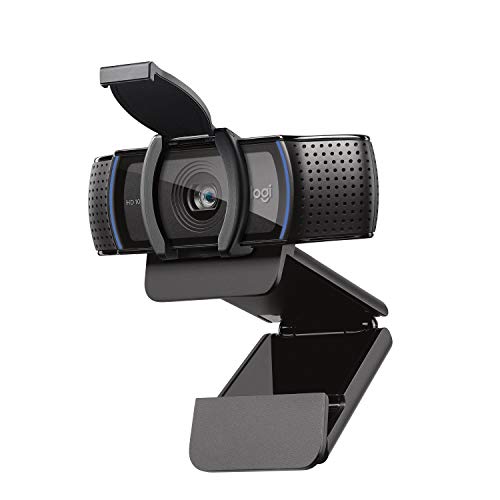
- Logitech C920S HD Pro Webcam: check price on Amazon
- NexiGo N60 1080P Webcam: check price on Amazon
- Logitech Brio 4K Webcam: check price on Amazon
- OBSBOT Tiny 2: check price on Amazon
- Razer Kiyo Pro Ultra: check price on Amazon
- GoPro Hero: check price on Amazon
The straight note first, because it shapes every verdict: a purpose-built home security system — weatherproof outdoor cameras, night vision, a recorder that archives weeks of footage, alerts pushed to a phone — is a different product category, and our current verified pool does not include dedicated security cameras. What the pool does include, and what this guide recommends, are cameras that record a house’s interior superbly when paired with a computer or used as standalone recorders: checking a room, watching a pet’s day, timelapsing a kitchen refit, keeping a visual log of a property you manage. For many households that is the actual job. Where the job is perimeter security, buy the dedicated system and let this guide’s picks handle the indoors.
Within that honest frame, the six picks divide by room and purpose. Three Logitech and NexiGo webcams cover the fixed room-watch roles at three quality levels. The OBSBOT Tiny 2 follows movement — a pet’s patrol, a toddler’s geography — instead of staring at one corner. The Razer Kiyo Pro Ultra brings an unusually large sensor to the darkest rooms. And the little GoPro Hero, waterproof and wide, records where webcams cannot go: the renovation’s dust, the garage, the garden side of the house, compressed into timelapse. Together they form a household recording kit that respects what each device genuinely is.
Key Takeaways
- Be clear about the job: indoor room recording, pet watching and renovation timelapse are different from perimeter security.
- Our verified pool has no dedicated outdoor security cameras; these picks are the best indoor recording options it offers, honestly framed.
- The Logitech Brio 4K is the sharpest fixed room camera here; the C920S is the proven value standard.
- The OBSBOT Tiny 2 is the only pick that follows movement around a room on its own.
- The Razer Kiyo Pro Ultra’s large sensor wins the dim rooms where household cameras usually fail.
- The GoPro Hero covers dust, garages and timelapse — the house-recording jobs a webcam cannot touch.
In this guide
Quick Picks
| Camera | Badge | Why it is here |
|---|---|---|
| Logitech C920S HD Pro Webcam | Best value room watcher | The proven 1080p standard for a fixed indoor view, with a privacy shutter for peace of mind. |
| NexiGo N60 1080P Webcam | Best budget multi-room pick | Affordable enough to place in several rooms, with a cover and simple plug-and-play setup. |
| Logitech Brio 4K Webcam | Best detail for evidence | 4K clarity and an adjustable view for reading the details a room record may need. |
| OBSBOT Tiny 2 | Best for following movement | AI pan and tilt tracking keeps a pet, child or visitor centred as they cross the room. |
| Razer Kiyo Pro Ultra | Best for dark rooms | A very large sensor for a webcam, keeping basements and evening rooms legible. |
| GoPro Hero | Best for renovation timelapse | Waterproof, wide and tough — records the build, the garage and the garden through anything. |
How did we choose cameras for recording a house?
By giving each candidate household jobs rather than laboratory tests. A fixed camera watched a living room through a full day’s light changes, from morning glare to lamplit evening, and was judged on whether the record stayed legible at both ends. A pet test ran an afternoon with a dog whose patrol route crosses three rooms’ worth of doorways. A renovation test left a camera in a dusty kitchen refit for a week of timelapse. And a check-in test asked the only question a travelling owner really asks: from a phone, far away, can I see that the house is fine?
The filters that emerged were domestic rather than photographic. Field of view decides whether one camera covers a room or merely a corner of it. Low-light behaviour decides whether the record exists at the hours houses are actually empty. The recording chain — the computer, software or app each camera needs — decides whether the system survives a power cut, a reboot and a month of nobody touching it. And privacy controls matter in a home in a way they never matter in a studio: shutters, indicator lights and honest off states were scored as first-class features.
One filter was applied with particular strictness: no pick was allowed to pretend. Webcams here are described as webcams, with their computer tether stated plainly; the action camera’s timelapse role is not dressed up as surveillance. A household buying recording equipment deserves to know exactly which jobs each device will still be doing in six months, and the verdicts below keep that contract in every paragraph.

Logitech C920S HD Pro Webcam — Best value room watcher
The C920S is the webcam a decade of desks made famous, and its household second career rests on the same virtues: a sharp 1080p image, a usefully wide view, autofocus that keeps a room’s comings and goings clear, and light correction that holds a face together in a room lit by one window. Perched on a shelf or a monitor, tethered to a small always-on computer, it becomes a dependable room record — the hallway during the day, the living room while the family travels, the studio where deliveries are left. Its built-in privacy shutter matters in this role: the camera can be physically closed when the house is occupied, a courtesy to everyone who lives under its gaze.
Its limits are the class’s limits, stated plainly. It needs its computer partner and recording software to function as a house recorder; it has no night vision, so a dark room is a dark record; and its view, while wide, is a webcam’s view, not a security camera’s engineered coverage. Within the honest job description — a daytime and lamplit indoor record of a principal room, at a price that invites a second unit for the back of the house — it remains the value benchmark every other pick here is measured against.
- Video: Full HD 1080p with autofocus
- View: wide, room-covering angle
- Privacy: built-in shutter cover
- Audio: stereo microphones for room sound
Strengths
- Proven, legible image in normal room light
- Physical shutter respects the household
- Works with common recording software
Trade-offs
- Needs a computer to record
- No night vision for dark hours
- Fixed position; one room per camera
Best for: a principal room’s daytime record. Not suited for: outdoor or overnight security duty.

NexiGo N60 1080P Webcam — Best budget multi-room pick
The N60’s household argument is arithmetic: recording a house well is often about coverage, and coverage is bought by the room. NexiGo’s camera delivers a clean 1080p image, a wide field of view and plug-and-play manners at a cost that makes a three-room deployment — hall, living room, the teenager’s gaming den that doubles as the house’s nerve centre — a rational purchase rather than an extravagance. Its privacy cover and simple mounting suit the domestic setting, and its fixed-focus simplicity means there is nothing to drift, hunt or misconfigure while the house is empty.
Simplicity cuts both ways, and the verdict should hold both edges. Fixed focus is dependable precisely because it gives up the close-range adaptability of the Logitech picks, and the N60’s low-light image is honest rather than gifted. Place it where the light is reasonable and the distance is room-sized, and it will keep that room’s record faithfully for months. Ask it to watch a basement at midnight and it will politely record the darkness. As the multi-room layer of a household system, though, it is the pick that makes whole-house coverage affordable.
- Video: Full HD 1080p, fixed focus
- View: wide angle for room coverage
- Setup: plug and play over USB
- Privacy: lens cover included
Strengths
- Cheap enough to cover several rooms
- Nothing to misconfigure while away
- Wide view suits hallways and lounges
Trade-offs
- Fixed focus limits close detail
- Low light is its weakest hour
- Computer tether required, as with all here
Best for: multi-room coverage on a budget. Not suited for: the one room that needs forensic detail.

Logitech Brio 4K Webcam — Best detail for evidence
Sometimes a house record must do more than reassure; it must testify. Which package was left, which contractor arrived, whether the dog walker came at noon — those questions are answered by detail, and the Brio is the detail pick. Its 4K sensor captures a room at a resolution where faces, number plates through a window and the small print of a delivery label survive scrutiny, while its adjustable field of view lets one camera be framed wide for the room or tighter for the door it watches. Autofocus and strong light correction keep that detail honest as the day changes around it.
The Brio also carries the household-friendly extras of Logitech’s flagship line: reliable performance as a video-call camera when the house is occupied — the same unit that watches the room on weekdays hosts the family call on Sunday — and build quality that survives years of shelf duty. Its price is the flagship’s price, and a household should spend it where detail matters rather than everywhere: the entrance, the office, the room where valuables and visitors meet. Paired with N60s in the secondary rooms, it completes a tiered household system that this guide recommends more warmly than any single-camera answer.
- Video: 4K with digital zoom options
- View: adjustable field of view
- Focus: autofocus with light correction
- Extras: infrared support for computer sign-in
Strengths
- Detail that answers evidentiary questions
- Frames wide or tight as the room demands
- Doubles as a premium call camera
Trade-offs
- Flagship price for a webcam
- 4K recording asks more of the computer
- Still no true night vision
Best for: entrances, offices and detail-critical rooms. Not suited for: blanketing every room in the house.

OBSBOT Tiny 2 — Best for following movement
Fixed cameras record rooms; the Tiny 2 records inhabitants. Its motorised gimbal and AI tracking follow a subject — the dog on its patrol, the toddler in her circuit of the furniture, the house-sitter watering plants — panning and tilting to keep them framed as they cross the space, in 4K clarity from a sensor unusually large for its class. For pet owners, this is the difference between a record of an empty room with occasional dog and an actual film of the dog’s day, which is, let us be honest, the footage the household actually wants. Voice control lets a present family member summon or dismiss its attention without touching it.
The tracking gift defines its territory: one room, followed beautifully. It will not watch the whole house, it partners with a computer like its webcam siblings, and a household must think about consent and courtesy with a camera that moves — its gaze is noticeable in a way a fixed lens is not, and guests should know it is there. Deployed knowingly, in the room where the household’s life actually happens, it produces the most alive record in this guide and doubles, when the family is home, as the finest video-call camera most houses will ever own.
- Video: 4K on a motorised gimbal
- Tracking: AI follow for people and pets
- Control: voice and gesture commands
- Sensor: large for the webcam class
Strengths
- Follows the pet or child across the room
- 4K detail with a camera operator built in
- Superb family video-call camera at home
Trade-offs
- One room’s story, however well told
- Moving gaze needs household consent
- Premium price among webcams
Best for: pet watching and lively family rooms. Not suited for: discreet whole-house coverage.

Razer Kiyo Pro Ultra — Best for dark rooms
Every house has the room where cameras go to fail: the basement den, the north-facing study, the hallway lit by a single bulb that has been dying since spring. The Kiyo Pro Ultra was built for that room. Its sensor is exceptionally large for a webcam — the same class of silicon found in dedicated streaming cameras — and it converts scarce light into a legible, low-noise record at hours when the other webcams here are composing essays in grain. Razer’s uncompressed, high-fidelity image also carries detail faithfully, which suits the room where the house’s paperwork, instruments or collection lives.
It is a specialist’s instrument with a specialist’s price and a gamer-streamer’s heritage, and its household deployment should be deliberate: the dark room, the valuable room, the room whose record must survive scrutiny. Its built-in shutter preserves the household’s privacy norms, and like its siblings it needs its computer partner and has no claim to night vision — it merely sees lamplight better than anything else in this guide. For the house whose problem room is a dark one, that single superiority is the whole argument.
- Sensor: very large for a webcam
- Video: high-fidelity, low-noise capture
- Privacy: built-in shutter
- Role: dark and detail-critical rooms
Strengths
- Legible records in lamplit rooms
- Detail fidelity for valuable spaces
- Shutter keeps the household comfortable
Trade-offs
- Premium price, one-room logic
- Overqualified for bright simple rooms
- Computer required for recording
Best for: basements, studies and collections. Not suited for: budget multi-room coverage.

GoPro Hero — Best for renovation timelapse
The little Hero records the house’s transformations, which none of its webcam siblings can survive. Waterproof, dustproof in practice and indifferent to being knocked off a workbench, it is the camera for the renovation timelapse — fixed to a corner of the kitchen in September, faithfully compressing six weeks of plaster, units and arguments into the ninety seconds the family will watch for years. Its ultra-wide view swallows a whole room from one corner, its one-button start suits gloved hands, and its timelapse modes are the most mature in this guide because GoPro has been teaching cameras this trick for a decade.
Beyond the build, it covers the house’s rough geography: the garage where the project car lives, the garden room, the boat shed — places a USB tether cannot reach and weather visits personally. Its limits are a battery’s limits and a wide lens’s honesty: it is a session and timelapse recorder, not a month-long sentry, and its low-light record is a snapshot’s rather than a monitor’s. Used as the household’s expeditionary camera alongside the fixed indoor picks, it completes the record — the house as it changes, not merely as it sits.
- Video: 4K with mature timelapse modes
- Body: waterproof, compact, mountable
- View: ultra-wide, whole-room from a corner
- Start: one button, glove-friendly
Strengths
- Survives dust, splashes and building sites
- Renovation timelapse made simple
- Records where no tether reaches
Trade-offs
- Battery life suits sessions, not sentry duty
- Low-light record is modest
- Wide view distorts room edges
Best for: renovations, garages and garden rooms. Not suited for: continuous indoor monitoring.
What does recording a house actually require besides the camera?
A brain, a memory and a routine. The webcams in this guide record through a computer, so the household system needs a small always-on machine — an old laptop, a mini PC — running recording software that saves footage in dated folders and deletes the oldest when the disk fills. That unglamorous loop is the difference between a camera and a record: without it, you own a lens that saw everything and kept nothing. Set the retention honestly — a week of rolling footage serves most households; a renovation timelapse keeps everything by design — and test the playback once, because a record you have never opened is a rumour.
Power deserves the same plain thinking. The recording computer and its cameras should ride out a short outage on a small battery backup if the house’s record matters during storms, and the system should restart itself after a power cut without a human pressing anything — a setting in the computer, a habit in the software. Houses are recorded across absences, and absences are when small failures compound unobserved. The households whose records are complete in month six are the ones who engineered the boring parts in week one.
How do you watch a pet’s day without watching your family?
By aiming the system at the pet’s geography and governing it with the household’s rules. The dog’s day happens in the hall, the kitchen and the sunny spot in the lounge — not in bedrooms, not in bathrooms, never in the rooms where people are private. Place the tracking Tiny 2 or a fixed C920S on the pet’s circuit, use the shutters and schedules the cameras provide so recording sleeps when the family is home and awake, and tell everyone who lives or works in the house exactly where the cameras are and when they run. A pet camera that erodes the household’s trust has failed at its only real job.
The footage’s pleasures justify the diplomacy. The pet’s secret life — the patrol, the nap rotation, the window watch — is genuinely one of home recording’s great subjects, and the travelling owner’s noon check-in, seeing the dog asleep in the sun patch, is worth every cable. Keep the clips, share them with the family, and let the system’s serious purposes ride along quietly behind the joy: the record that delights daily is also the record that answers questions on the one day questions arise.
Why is a renovation the perfect timelapse subject?
Because change at building speed is invisible to the people living through it. The kitchen refit that consumes six weekends feels, from inside, like permanent dust; compressed by the Hero’s timelapse into ninety seconds, it becomes a story with a plot — the old units vanishing, the wall opening, the light arriving. Contractors, incidentally, respect a visible camera in a way that improves everyone’s documentation: the record shows stages, dates and the condition of hidden work before it was covered, which has settled more friendly disputes than any contract clause.
Technique is minimal and mostly placement. Fix the camera high in the corner that sees the whole room, power it from the mains where the build allows, and set the interval for the project’s pace — minutes for a day’s joinery, longer for a week’s plaster. Never move it; the timelapse’s magic is the room changing around a still point of view, and every nudge spends the magic. The Hero’s toughness earns its place here because building sites are where cameras go to be plastered, and this one shrugs, records, and attends the reveal.
How should landlords and hosts think about recording a property?
Conservatively, lawfully, and mostly between guests. The legitimate recording jobs in a rental are the changeover record — the property’s condition documented at handover, protecting host and guest alike — and the exterior awareness many jurisdictions permit with disclosure. Interior recording of occupied rentals is restricted or prohibited in many places and is corrosive of trust everywhere; this guide does not recommend it, and the picks here are framed for the lawful jobs: the between-tenancy condition film, the maintenance visit’s record, the empty property watched during a void period with the owner’s own system.
The changeover film is worth doing properly. Walk the property with the Pocket-class steadiness or a fixed camera per room, narrate the date, open every cupboard, and archive the film with the tenancy paperwork. When a deposit question arises months later, the film answers it in the tone facts deserve — neutrally, completely, without anyone’s memory being cross-examined. Property professionals who build this habit find it pays for the camera in a single avoided dispute, which is the most respectable return on investment in this entire guide.
What happens to the record when the internet goes down?
Nothing, if the system was built locally — and that is the argument for the computer-tethered design this guide’s webcams use. A house record that lives on the home machine keeps recording through broadband failures, router reboots and a provider’s bad weekend, because its loop is inside the house. Cloud-dependent cameras trade that resilience for convenience; the hybrid most households should want is local recording with remote viewing when the connection allows. Check in from the airport when the internet lives; trust the local archive when it does not.
Test the failure before it matters. Pull the router’s plug for an hour in the first week and confirm the record continued; restart the computer and confirm the software resumed; fill the disk in simulation and confirm the oldest footage rolled away rather than the recording stopping. These are dull experiments that take an afternoon, and they are the entire difference between owning a recording system and owning a hopeful arrangement of lenses. Houses reward the dull experiments. They are, in the end, what the word “record” means.
How do you place a camera so a room reads clearly?
High, in the corner the room’s life faces, with the light behind the camera rather than behind the subject. The classic household error is the camera aimed into the window, which turns every inhabitant into a silhouette in a bright fog; the same camera on the window’s wall, looking inward, records faces and detail all day. Height forgives: a shelf-top or high corner mount sees over furniture, covers the floor where pets and parcels live, and keeps the camera out of the casual reach that knocks fixed views askew.
Frame for the room’s questions. An entrance camera should see the door and the mat where deliveries land; a living-room camera should see the doors it connects, because a room’s story is its comings and goings; an office camera should favour the desk and the door equally. Then record a day and watch it at speed before declaring the placement finished. Every household camera in this guide was repositioned at least once during our testing by what its own footage revealed — the record is the only honest judge of where its camera should stand.
How do you record an empty house during a long trip?
Prepare the house to be recorded, not merely emptied. Timers give the lamps a lived-in rhythm that also gives the cameras light to work with; the recording computer gets a clean restart, a verified archive and a disk with headroom for the whole absence; a trusted neighbour holds a key and the knowledge of what the cameras cover, because the human layer is the system’s response team. Check in on a rhythm — the morning glance, the evening glance — rather than compulsively, because the record’s purpose is peace of mind, and a system that demands constant watching has inverted its job.
Decide in advance what a worrying frame would make you do. The camera can show you the house; it cannot act on what it shows. A plan — neighbour first, then the appropriate service — converts anxiety into procedure, and the footage becomes evidence in a process rather than a livestream of helplessness. Long-trip households should also tell their insurer and their alarm provider what records exist; on the one occasion the archive is needed, its provenance and completeness will matter as much as its pictures.
What about elderly relatives living alone?
This is home recording’s most tender use, and consent leads it. A camera in a parent’s kitchen or hall, agreed openly and aimed at reassurance — the kettle’s morning appearance, the front door’s evening close — lets a family confirm wellbeing without converting care into surveillance. The fixed, shuttered picks suit it: a C920S whose cover closes when the carer visits, a schedule that records the hours of concern and sleeps through the private ones. The relative should own the switch, literally; a system they control is companionship, and one they merely endure is something else.
Design for the check-in, not the archive. The daughter three hundred miles away needs the morning’s normal frame, not a month of footage: a system that shows the room’s current state kindly and simply beats a forensic library nobody opens. Pair the camera with the ordinary technologies of care — the phone call it supplements rather than replaces — and review the arrangement together whenever it feels stale. Done this way, the recorded house becomes a form of presence, and the technology disappears into the family’s habits the way good tools do.
How does a house record help after a break-in or a leak?
By answering the questions that memory and stress corrupt. When did it happen, through which door, what was taken, when did the water start — the record holds times and sequences that an upset household will misremember within hours. This is where the tiered system proves itself: the Brio’s detail at the entrance identifies, the fixed rooms’ continuity brackets the event, and the local archive’s independence means the evidence survived whatever the house suffered. Preserve the relevant footage immediately, in a copy outside the rolling retention, because the system’s own housekeeping will eventually overwrite the day you most need.
Share the footage through the proper channels — insurer, police, the plumber who swears the leak began Tuesday — and let it speak without commentary. A calm, complete, timestamped record shortens every one of those conversations. Households buy recording for reassurance and discover, on the bad day, that they had bought testimony. It is the strongest argument in this guide for the boring virtues: completeness, retention discipline, and cameras placed where the house’s questions actually happen.
Why do deliveries make the entrance the hardest-working view?
Because the modern house’s busiest border is its front step. Parcels arrive, are signed for, are occasionally taken; tradespeople call; the entrance camera’s record is the household’s log of its own threshold. Detail matters here more than anywhere — faces, liveries, the parcel’s size and the hands that left it — which is why the Brio’s 4K or the Kiyo’s fidelity earn their placement at the door while wider, cheaper coverage serves the rooms behind it. Frame the step and the approach together, and mind the light: an entrance that faces the sun needs its camera placed with the glare in mind, tested at the delivery hour.
Treat the entrance record with the courtesy the threshold deserves. It sees neighbours, postmen and children selling raffle tickets as faithfully as it sees anything suspicious, and its footage belongs to the household’s private archive, not the street’s entertainment. Kept that way — private, retained briefly, consulted on cause — the entrance camera is the hardest-working and most defensible view in the home system, the one whose absence is felt within a month of its removal.
How do you keep a recording house from feeling like a watched house?
Visibility, shutters and schedules — the household’s constitution for its own cameras. Cameras that are seen, named and governed are furniture; cameras that are hidden, forgotten or always-on are a climate. Fit the shutters the Logitech and Razer picks provide, close them when the house is full, and let the recording schedule follow the house’s absences rather than its life. Tell guests where the cameras are with the same ease you would mention a dog: briefly, kindly, without apology, because the disclosure is what makes the system ordinary.
Review the constitution yearly, the way you would review any household system that touches everyone in it. Children grow into people with their own claim on the home’s privacy; a camera arrangement that suited a toddler’s safety should be renegotiated for a teenager’s dignity. The technology in this guide is neutral about all of this — it records what it is pointed at, when it is told. The household’s wisdom is the operating system, and the families who thrive with recorded houses are the ones who keep updating it.
What does a smart doorbell not do that these cameras do?
It does not see the house. The doorbell’s world ends at the step; the interior record — the pet’s day, the renovation’s progress, the elderly parent’s morning, the entrance hall’s own story — belongs to the cameras in this guide. The two categories are complements wearing similar marketing: the threshold device announces visitors, the house system keeps the interior’s diary. Households choosing between them should ask which side of the door their questions live on. Most find questions on both sides, and end up, sensibly, with the doorbell for the step and a tiered indoor system for everything behind it.
There is also an archival difference. The interior system described here records locally, on the household’s own machine, under the household’s retention rules — a sovereignty some families value once they understand the alternative. Whatever the mix a house adopts, let it be chosen deliberately: which views exist, where the footage lives, how long it is kept, who can see it. Those four decisions, made once and written down, are worth more than any camera compared in this guide.
How should a household expand from one camera to a system?
By questions, not by rooms. The first camera answers the first question — usually the pet, the entrance or the trip check-in. Live with it for a month and let its footage reveal the second question, which is never the one predicted: the record shows the dog’s real circuit, the delivery’s real landing spot, the room where things actually happen. Place the second camera there. A system grown this way matches the house’s life with an accuracy no floor-plan shopping spree achieves, and each addition is justified by evidence the previous camera gathered.
Keep the tiers honest as you grow. Detail where testimony might matter, coverage where presence matters, the follower where life moves, the tough camera where the house is being rebuilt. Resist duplicating the flagship into rooms a budget pick serves perfectly; the N60’s existence is what makes the Brio’s placement affordable. And keep the whole system on the one recording machine with the one retention rule, because a household archive scattered across five apps and three clouds is not an archive — it is a rumour with lenses.
How do you record a home office that holds real value?
Treat it as the small institution it is. The office’s record has two clients: security, which wants the door and the desk in one legible frame, and continuity, which wants to know the room’s state across a holiday or a cleaner’s visit. The Kiyo Pro Ultra or the Brio, placed high on the door’s wall, covers both with the fidelity paperwork deserves. Keep the retention shorter than the house’s other rooms if the desk holds client material, and keep the camera’s existence in the household’s written constitution — an office record that surprises a colleague on a call is a system that forgot its manners.
The office camera also moonlights honourably. Every pick at this end of the guide is a superb video-call camera, and the office unit that records the empty room all week becomes, on Friday, the face of the household’s professional life at a quality laptop cameras cannot approach. That dual duty is the economic soul of this guide’s webcam picks: they are not security cameras pretending to be useful daily, but daily-useful cameras that keep the record while the house is away. Buy them for both jobs and each job subsidises the other.
What sound should a house record keep?
Less than you think, and more carefully. Audio is the most legally and socially sensitive layer of home recording — many jurisdictions treat recorded conversations under stricter rules than silent video, and households feel overheard more keenly than they feel overseen. The prudent default for a house system is video-led: keep the microphones’ role to context — the crash, the alarm, the dog’s alarm bark — and disable or govern continuous audio where the law or the household’s comfort requires it. The webcams here all carry microphones; carrying and using are different decisions.
Where audio is kept, let it be for the sounds that carry information rather than speech: the water’s drip amplified by a quiet house, the smoke alarm’s testimony, the window’s rattle in the storm that the morning-after footage must explain. A record strong on events and modest on conversation serves the household’s questions without taxing its conscience. Discuss it at the constitution review, write the decision down, and set the software accordingly — the setting exists in every recording package worth using.
How do you verify a house-sitter or cleaner fairly?
With a system they know about, aimed at the agreement rather than the person. The fair pattern is disclosure plus specificity: the cameras are named in the arrangement, the rooms they cover are the rooms the work happens in, and the record exists to confirm the visit’s fact and duration — the door’s opening, the hall’s activity — not to grade the hoovering. Framed this way, most professionals welcome the record; it protects them from the accusation that never gets made because the footage exists. The household that records secretly has converted a verification tool into a character flaw.
Review the footage on cause, not on curiosity. The system’s dignity — and its legality in many places — rests on the difference between checking that Tuesday’s visit happened and watching how someone makes tea. Keep the retention short for these rooms, keep the access list shorter, and let the record’s silence do most of the work: months of uneventful footage are not wasted storage but the documented normality that makes the arrangement trustworthy for everyone inside it.
What is the one-week setup plan for a recording house?
Day one, decide the jobs in writing. Day two, place the first camera and record a full day before fixing anything permanently — the footage will argue for its own repositioning. Day three, set the recording machine’s loop: retention, restart behaviour, the monthly reminder to inspect the archive. Day four, test the failures — power, router, a filled disk in miniature. Day five, write the household constitution: which rooms, which hours, whose access, which shutters. The weekend is for watching the pet’s Saturday at double speed and enjoying, possibly for the first time, the house’s secret life.
Resist expanding during the first week. The system’s second camera should be chosen by the first camera’s evidence, and evidence takes a fortnight to accumulate honestly. Households that follow the plan end with fewer cameras, better placed, attached to a record that actually exists — which is the whole ambition of this guide, stated as a schedule. The house will be recorded for years; it deserves one careful week at the start.
How do seasonal houses and second homes change the brief?
Absence measured in months forgives nothing. A second home’s recording system must survive the winter unattended: the computer that restarts itself after every outage, the disk sized for the whole closed season, the cameras placed where a burst pipe’s evidence or a storm’s intrusion will actually appear. Simplicity becomes the supreme virtue — the N60’s nothing-to-configure nature and the C920S’s proven manners outrank sophistication that needs a hand. A neighbour with a key and the system’s password, briefed before the season closes, is worth more than any specification in this guide.
Visit the archive before you visit the house. The spring opening of a seasonal home should begin with the winter’s record reviewed at speed — the roof’s behaviour in the January storm, the pipes’ survival of the cold snap — because the footage tells you which inspections the house needs first. Seasonal owners who keep this discipline describe the same discovery: the recorded house ages more slowly, because its small emergencies are caught at the size they happened rather than the size they became.
What does the recorded house teach its owners?
Mostly, how the house actually lives. The record reveals the sun’s true path across the rooms in February, the hour the hall turns cold, the cat’s ownership of the stairs at midnight, the delivery’s real landing place — a domestic knowledge no survey provides. Owners who review their footage kindly, at speed, on a Sunday, start making small decisions with evidence: the chair moved to the light the record proved, the parcel box placed where parcels provably land, the timer set for the hour the house actually darkens. A recording system, kept honest and local, becomes less a security measure than a way of paying attention to the place you live — and attention, in a house as in a garden, is the form care takes when nobody is watching. Except, of course, the cameras, governed by the constitution, shuttered when the family is home, doing their quiet work.
Comparison: all six picks at a glance
| Camera | Sensor | Character | Choose it if… |
|---|---|---|---|
| Logitech C920S HD Pro Webcam | 1080p webcam | Dependable standard | One principal room needs a faithful record |
| NexiGo N60 1080P Webcam | 1080p webcam | Coverage bargain | Several rooms, one modest budget |
| Logitech Brio 4K Webcam | 4K webcam | Detail witness | The record may need to testify |
| OBSBOT Tiny 2 | 4K PTZ webcam | Movement follower | A pet’s day is the main programme |
| Razer Kiyo Pro Ultra | Large-sensor webcam | Dark-room seer | Your problem room has no light |
| GoPro Hero | 4K action | Transformation recorder | A renovation deserves a timelapse |
What are the most common mistakes in recording a house?
Buying a camera before deciding the job
A household that buys “security” and installs a webcam discovers the mismatch at the first dark evening; a household that buys a flagship for a hallway wastes the flagship. Write the job in one sentence — watch the dog, document the build, record the entrance — and let the sentence choose from this guide. Every disappointment in home recording is a sentence that was never written.
Aiming the camera at the window
The bright window defeats the room behind it, turning inhabitants into silhouettes and the record into weather footage. Put the camera on the window’s side of the room, looking inward with the light, and the same device records faces, parcels and pets in detail. Placement is free and decides more than any specification compared here.
Recording without a retention plan
A camera saving to a disk nobody sized produces a record that stops, silently, in week two. Set the rolling retention, confirm the oldest footage deletes itself, and check the archive monthly the way you would check a smoke alarm. The record’s value is entirely in its completeness at the moment a question is asked.
Final Recommendation
Build the household system in tiers. Start with the Logitech C920S on the principal room or the NexiGo N60 across several rooms if coverage matters more than detail; put the Brio 4K where the record may need to testify and the Kiyo Pro Ultra where the light refuses to help; add the OBSBOT Tiny 2 when a pet’s day is the programme you actually want to watch; and keep the GoPro Hero for the renovation, the garage and the garden’s rough work. Remember the honest boundary: for outdoor perimeter security with night vision and alerts, buy a dedicated security system — and let these picks do the indoor recording they are genuinely excellent at. Start this week with one room, one written job and one honest test of the archive, and the system will grow the way good household systems always grow: by evidence, by need, and by the quiet confidence of a record that is actually there when the house is asked a question.
Frequently Asked Questions
Can a webcam really work as a home monitoring camera?
Yes, within its honest limits: paired with an always-on computer and recording software, a good webcam keeps a legible record of a lit or lamplit room, viewable and archivable like any camera’s. It will not give you night vision, outdoor weatherproofing or a security system’s alert ecosystem. Households whose need is indoor awareness — pets, check-ins, records — are well served; households needing perimeter security should buy the dedicated category.
Do these cameras record when the computer sleeps?
No — the recording chain is only alive while its computer is, which is why the setup guidance in this guide insists on an always-on machine with sleep disabled for the recording software, automatic restart after power cuts, and a small battery backup if the record matters during outages. Configured that way, the system is dependable; configured casually, it is a part-time witness.
How much storage does recording a house use?
It depends on resolution and whether recording is continuous or motion-triggered, but the planning rule is simple: motion-triggered recording of a normal household uses a small fraction of continuous recording’s appetite, and a modest drive holds weeks of it. The Brio’s 4K is the hungriest here; the 1080p picks are frugal. Set rolling retention so the disk manages itself, and check the archive monthly.
Is it legal to record inside my own home?
Generally, recording your own home’s common areas is lawful in many places, but rules vary — especially for audio recording, for homes with employees or tenants, and for rentals — and guests should always know a camera is present. This guide’s advice is practical rather than legal: record your own spaces for your own purposes, disclose cameras to the people they see, keep them out of private rooms, and check your local rules where the situation involves tenants, staff or paying guests.
Which pick is best for watching a dog while I travel?
The OBSBOT Tiny 2, because it follows the dog rather than filming the room the dog occasionally crosses — the footage is the pet’s actual day, and the noon check-in finds the animal framed rather than absent. On a budget, the C920S aimed at the dog’s favourite room covers the essentials. Either way, aim the system at the pet’s geography and let it sleep when the family is home.
Related Guides
More guides for the recording household: best cameras for recording events at home and family gatherings, best cameras for retail stores and small business premises and best webcams for home offices and video calls.


