reviewstook.com is reader-supported. When you buy through links on our site, we may earn an affiliate commission.
Where to buy
Selling anything online now means feeding two hungers at once: the listing photograph that stops the scroll, and the short clip that closes the sale. The best cameras for pictures and video for sellers and creators are the ones built for that double duty at a desk, a workbench or a small studio corner — product stills with honest colour, demonstration clips with the product sharp and the hands free, unboxings, reviews and the endless short-form content that a modern shop, channel or craft business consumes weekly. Six cameras are ranked here for that working pattern, from the creator compacts designed for exactly it to the full-frame body a growing product business graduates to.
- Sony ZV-1F: check price on Amazon
- Sony Alpha 7 IV: check price on Amazon
- DJI Osmo Pocket 3: check price on Amazon
- Insta360 GO 3S: check price on Amazon
- OBSBOT Tiny 2: check price on Amazon
- Canon EOS R50: check current availability at your preferred retailer
The seller’s camera question is an economic one before it is a photographic one. Product media is not art for its own sake; it is a conversion instrument, judged coldly by whether the listing sells, the review is trusted and the clip is watched all the way to the end. That single fact changes the entire grading. Colour must be scrupulously honest because returns are ruinously expensive. Focus must find the product instantly and stay there, because reshoots are unpaid hours nobody budgets for. The whole apparatus must be fast to set up and reassuringly boring to operate, because the creator’s scarcest resource is not money but the weekly hours between making the thing and selling the thing.
The six picks divide the creator economy by scale. The compacts and the little gimbal serve the solo seller and the desk reviewer, where speed and simplicity are the business model. The wearable and the AI-tracking cameras serve the demonstrator — the maker whose hands must work while the camera directs itself. And the interchangeable-lens bodies serve the business that has grown into a small studio, where one camera must shoot the catalogue, the campaign and the channel. Read for the scale you actually operate at; in this market, overshooting your scale is every bit as costly as undershooting it, and quieter about the damage.
Key Takeaways
- For sellers, the camera is a conversion tool before it is anything else: honest colour and product-locked focus pay for it faster than any artistic virtue ever will.
- Creator-designed compacts exist precisely for this work — product showcase focus, one-button clips, vertical formats — and they outsell their specifications every single week of the year.
- Hands-free matters more than megapixels: wearable and AI-tracking cameras let a maker demonstrate properly while the camera quietly does the directing.
- Consistency across a whole catalogue beats beauty in a single frame, every time; buyers trust a shop whose photographs all speak the same language.
- Graduate to the interchangeable-lens body when the business itself does — its lenses and files become the studio’s permanent, appreciating assets.
In this guide
Quick Picks
| Camera | Badge | Why it is here |
|---|---|---|
| Sony ZV-1F | Best for solo sellers | Product-showcase focus and instant clips from the desk, designed for exactly this job. |
| Sony Alpha 7 IV | Best for growing product businesses | Catalogue-grade stills, serious video and every lens a product studio consumes. |
| DJI Osmo Pocket 3 | Best for walkthroughs and reviews | Gimbal-smooth product tours and shop stories with tracking that holds the subject. |
| Insta360 GO 3S | Best hands-free demonstrator | A thumb-sized 4K camera that mounts anywhere and films the making from inside it. |
| OBSBOT Tiny 2 | Best for desk demos and streams | An AI-tracking PTZ webcam that follows the presenter and the product without a crew. |
| Canon EOS R50 | Best first system camera for creators | A friendly-priced door into interchangeable lenses for channels outgrowing a compact. |
How did we choose these cameras for sellers and creators?
The candidates were graded at a workbench, not a beauty parade. Each was asked to perform the creator economy’s actual repertoire: photograph a product against a clean background with colour a buyer can trust; film a sixty-second demonstration in which the product stays sharp while hands move around it; produce a vertical clip ready for the platforms without a desktop session; and repeat all of it on a Tuesday-afternoon schedule, because content that takes a day to produce does not get produced weekly. Autofocus was judged on products and hands rather than on athletes — the ability to find the object being sold, hold it through a demonstration, and return to the presenter’s face on cue.
Two business criteria completed the grading. The first was setup economy: how many minutes and accessories stand between the camera in its box and a publishable asset, since a solo seller’s camera competes with every other job in the business for its owner’s attention. The second was the growth path — whether the purchase becomes a foundation (a mount, a workflow, a look) or a finished tool that will be replaced whole when the channel grows. Both kinds of answer are respectable, and the picks are labelled so a buyer knows which they are purchasing.

Sony ZV-1F — Best for solo sellers
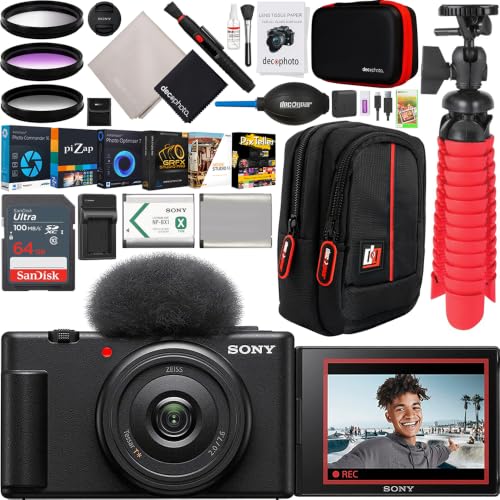
The ZV-1F was designed by people who had clearly watched a thousand product videos and taken notes. Its product-showcase behaviour — hold the item up, and the focus jumps to it and holds; lower it, and the focus returns to your face — is the single most useful automation in the creator economy, and it works with the reliability that turns a feature into a workflow. Around it sits a bright wide lens suited to desk and unboxing framings, a 1-inch sensor whose pictures shame phone listings, and 4K clips that publish with minimal ceremony. For the solo seller shooting listings and reviews between packing orders, it is the camera that respects the schedule.
Its stills deserve their sentence: for marketplace and shop listings, where the photograph’s job is clarity, honesty and speed, the ZV-1F’s files are entirely sufficient and its operation is faster than any system camera’s. The fixed wide lens sets its boundary — it will not isolate a product with a portrait lens’s blur or reach across a workshop — and within that boundary it is close to perfect for its purpose. Thousands of small businesses run on exactly this class of tool, and the ones that thrive share the trait the camera embodies: the media gets made, every week, because making it is easy.
- Sensor: 1-inch, roughly 20 megapixels
- Focus: product-showcase mode for sellers and reviewers
- Video: 4K with creator-first controls
- Lens: fixed ultra-wide, bright aperture
Strengths
- The demonstration workflow, automated beautifully
- Listing stills and clips from one pocket device
- Zero learning curve for a busy seller
Trade-offs
- Fixed wide lens limits product isolation
- No system to grow when the studio does
- Low light beyond desk lighting tests it
Best for: solo sellers, reviewers and unboxers. Not suited for: catalogue studios or telephoto product work.

Sony Alpha 7 IV — Best for growing product businesses
When the shop becomes a studio, this is the body it standardises on. The Alpha 7 IV’s 33-megapixel stills carry a catalogue — resolution for the zoom-hungry marketplace viewer, colour that can be profiled into honesty, files that survive the crop from hero shot to detail without a reshoot — and its video covers the channel’s reviews, demonstrations and brand films with the same lens set and the same subject intelligence. The E-mount bench supplies the product photographer’s specific tools, the macro and the portrait-length primes, at every budget the business passes through on its way up.
The business case is asset logic. Lenses bought for this body serve a decade of products; the tethering workflow professionalises the catalogue shoot; the colour pipeline, once calibrated, makes every listing in the shop recognisably kin, which is the visual form of a brand. It is more camera than a new seller needs and exactly the camera a thriving one stops outgrowing, which is why it anchors the top of this guide: buy it when the media has become a department, and it will run the department without complaint for years.
- Sensor: full-frame, roughly 33 megapixels
- Autofocus: product and eye tracking across both crafts
- Tethering: full studio workflow support
- Mount: Sony E, complete product lens bench
Strengths
- Catalogue files with crop and zoom headroom
- Macro and product glass at every price
- One system for listings, campaigns and channel
Trade-offs
- Setup and menus exceed a beginner’s patience
- Top-rate 4K carries a crop
- An investment a starting seller should defer
Best for: established sellers and product studios. Not suited for: first-month shops or pocket-only workflows.

DJI Osmo Pocket 3 — Best for walkthroughs and reviews
Some products are sold by walking around them — the restored chair, the camper van conversion, the workshop itself — and the Pocket 3 is the camera that walks. Its gimbal produces the floating, deliberate movement that reads as production value, its tracking holds the product or the presenter while the operator narrates and gestures, and its 1-inch sensor keeps indoor and workshop light honest. For shop tours, market-stall stories, before-and-after reveals and the review format where the camera must travel around the subject, it produces in an afternoon what a static camera produces in a day of tripod moves.
Its stills serve the listing’s supporting frames rather than its hero, and its natural role in a seller’s kit is the motion department: the tours, the reveals, the maker’s hands in moving context. Paired with the ZV-1F’s desk discipline or the Sony’s catalogue authority, it completes the small-business media kit that this entire guide describes — stills for the listing, a walk for the story, a clip for the feed. Creators who sell physical things in physical spaces will find it the hardest-working small camera they own.
- Sensor: 1-inch on a three-axis gimbal
- Video: 4K with subject tracking
- Role: tours, reveals and walking reviews
- Size: pocketable, instant-on
Strengths
- Movement that reads as production value
- Tracking frees the presenter to present
- Covers the spaces desk cameras cannot
Trade-offs
- Stills are supporting material
- Fixed lens; framing is by footwork
- Gimbal dislikes workshop knocks and dust
Best for: tours, reveals and space-led selling. Not suited for: macro or catalogue hero shots.

Insta360 GO 3S — Best hands-free demonstrator
The GO 3S is a camera the size of a thumb that shoots 4K, and its size is a production technique: it mounts on a cap, a chest, a shelf edge, a machine, inside the very process being demonstrated, filming the making from the maker’s own viewpoint while both hands do the work. For the craft seller, the repair channel, the cook, the mechanic-creator — anyone whose product is a process — it captures the angle that sells the expertise, the over-the-shoulder and inside-the-action footage that a tripod across the room can only describe. Its case flips out into a small standalone camera and screen for the conventional shots, so the kit is complete in a pocket.
Its stills are frames and snapshots rather than listing photography, and its battery and clip-length habits suit the short-form economy it was born in. Judged as a demonstrator’s second camera — or the first camera of a process channel — it has no equivalent in this guide: the other picks watch the work, while this one participates in it. Sellers whose value is their hands should consider it the most persuasive witness those hands can hire.
- Video: 4K from a thumb-sized camera
- Mounting: magnetic, wearable, anywhere
- Case: flip-out pod with screen for conventional shots
- Role: process and point-of-view demonstration
Strengths
- The maker’s viewpoint, hands free
- Mounts inside the process itself
- Short-form economy native
Trade-offs
- Stills are not listing-grade
- Short clips and small battery by design
- Low light is not its territory
Best for: makers, repairers and process channels. Not suited for: catalogue stills or long-form filming.

OBSBOT Tiny 2 — Best for desk demos and streams
The Tiny 2 is a webcam that behaves like a camera operator: a 4K PTZ unit on a gimbal, with AI tracking that pans, tilts and zooms to follow the presenter or the product, voice and gesture control for hands-busy moments, and a sensor large for its class that flatters desk lighting instead of exposing it. For the seller whose medium is the live demonstration, the stream, the video call with the client or the desk review filmed daily, it removes the static-webcam look that quietly taxes credibility, and replaces the operator entirely.
Its territory is the desk and the stream rather than the field, and within that territory it is a genuinely new kind of tool: the camera that directs. Product demonstrators use its tracking to keep the item centred while their hands work; teachers and consultants use it to move naturally instead of performing for a fixed frame; small teams use it to make a one-person broadcast look crewed. It will not photograph a listing — it is a video instrument — and it is ranked here because for a growing class of sellers, the moving picture at the desk is the shopfront, and this is its finest small camera.
- Video: 4K PTZ with AI subject tracking
- Control: voice and gesture commands
- Sensor: large for the webcam class
- Role: streams, desk demos, calls and lessons
Strengths
- An operator built into the camera
- Desk footage with movement and polish
- Hands-free control while demonstrating
Trade-offs
- Video only; no listing stills
- Desk-bound by design and connectivity
- Tracking can be keen beyond the brief
Best for: streamers, demonstrators and desk reviewers. Not suited for: field work or still photography.
Canon EOS R50 — Best first system camera for creators
Every successful compact-camera creator reaches the same fork: the channel has outgrown the fixed lens, the products need isolation and low light, and the business can justify a system. The EOS R50 is the friendliest door at that fork — a compact APS-C body with Canon’s subject-detection autofocus, colour that flatters products and presenters alike, and handling a compact graduate learns in a weekend. With its kit lens it immediately out-shoots the compacts for catalogue stills, and the RF mount behind it holds the macro and portrait lenses the studio will want next, in a system whose video credentials grow with the channel’s ambitions.
Against the Sony above it trades ultimate depth for price and approachability, which for a first system is often the correct trade: the money saved funds the lighting, and in product work the lighting outranks the body every day of the week. Its limits are the class’s honest ones — crop sensor, modest buffer, a lens bench whose finest pieces are priced for the business’s future — and they are stated here so the creator buys the R50 as a beginning, eyes open, rather than as a destination. Beginnings that know what they are have a way of lasting; this one equips a channel from its first catalogue to the edge of the professional studio.
- Sensor: APS-C, roughly 24 megapixels
- Autofocus: Canon subject detection
- Handling: beginner-friendly, creator-orientated
- Mount: Canon RF system
Strengths
- The system upgrade without the intimidation
- Colour for products and people in one voice
- Leaves budget for the lighting that matters more
Trade-offs
- Crop sensor in dim studios
- Not the video depth of the Panasonic-class bodies
- Finest RF glass is priced for later
Best for: creators graduating from compacts to a system. Not suited for: established studios, which should start at the Sony.
What makes a product photograph actually sell?
Clarity about what is being bought, delivered at a glance. The selling photograph answers the buyer’s three silent questions in order: what exactly is it — answered by honest framing and colour that does not promise a different object; what condition and quality is it — answered by detail the buyer can zoom into, which is where the Sony’s resolution and any camera’s honest focus earn their keep; and what will it be like to own — answered by the photograph of the product in a hand, on a desk, in use, at a scale the buyer can feel. Cameras serve those answers technically — colour honesty, focus that lands on the product rather than the backdrop, files that survive the marketplace’s zoom — and the rest is the seller’s discipline: clean backgrounds, consistent light, the same framing language across the whole catalogue so the shop reads as one trustworthy hand.
The clip then closes what the photograph opened. Sixty seconds of the product being handled — its weight, its mechanism, its sound, its scale against a known object — answers the questions stills cannot, and measurably reduces the returns that eat small businesses alive. This is why the guide ranks demonstration automation so highly: the ZV-1F’s showcase focus, the GO 3S’s maker’s view, the Tiny 2’s self-direction are not novelties but conversion instruments, each removing a reason a busy seller might skip the clip. In the creator economy, the best camera is the one whose footage exists, and existence is a workflow property before it is a technical one.
What does a desk studio that pays for itself actually look like?
With light first, background second and camera third — the same hierarchy as every studio in this site’s guides, compressed to a desktop. One soft light source, large relative to the product, placed to the side and slightly above, does most of the work product media ever needs; a clean sweep of paper or a consistent surface makes every listing in the shop kin; and a tripod or a fixed camera position turns the setup into a template, so the fiftieth product is photographed with the first product’s exact language. The cameras here reward the template differently — the compacts by needing nothing else, the system bodies by tethering the template into a production line — but the template itself is the asset, and it costs less than any camera on this page.
Sound and verticality complete the modern desk studio. The short-form platforms are the shop’s loudest channel, so the setup should frame vertically without rebuilding — the compacts and the Pocket 3 treat vertical as native, and the system bodies can be mounted and marked for it — and the audio, for demonstrations and reviews, deserves the small external microphone that separates a business’s media from a hobby’s. None of this requires a room; it requires a corner, a routine and the refusal to rebuild the set for every product. Sellers who build the corner once and shoot in it weekly out-produce, within a quarter, sellers with finer cameras and no corner at all.
What should a creator’s weekly content rhythm look like?
Batch the crafts and respect the calendar. One session for the catalogue stills, products accumulated until the light and the template earn their setup; one session for the demonstrations and reviews, scripted in bullet points on index cards rather than in hopes; and a standing habit — the pocket camera’s whole purpose — of harvesting the week’s unplanned material, the workshop moment, the delivery, the before-and-after, in clips that cost ninety seconds each. Edited in one sitting and scheduled across the week, that rhythm produces the appearance of a media department from a business of one, which is the creator economy’s central illusion and its central business skill.
The cameras were ranked to fit inside that rhythm without friction: quick to the desk, quick to focus, quick to file. Notice, too, what the rhythm does to equipment desire — a seller shooting weekly learns within a month exactly which limitation is costing sales, whether it is the compact’s reach, the light’s softness or the audio’s honesty, and the next purchase writes itself from evidence. That is the healthiest upgrade path in this guide, and it begins not with the finest camera but with the first month of Tuesdays.
How do you photograph reflective, white and tiny products without tears?
Each has a known enemy and a known answer. Reflective products — jewellery, watches, bottles, anything chrome — photograph their surroundings, so the skill is controlling what surrounds them: a tent of white diffusion for the clean commercial look, black cards placed to carve the edges that define the form, and the polariser’s judgement from the filter craft to manage the glare that survives. White products on white backgrounds die by exposure and edge light: expose for the product’s texture rather than the background’s brightness, and let a rim of light or a grey gradient give the silhouette somewhere to end. Tiny products belong to the macro discipline — focus stacking on the system bodies, the wearable’s close work for context, and patience measured in millimetres — and they reward the tethered monitor more than any other product class, because focus at that scale is a rumour until it is seen large.
None of these techniques belongs to a single camera in this guide, which is the point: the bodies were ranked on how completely they support the techniques — tethering for the tiny, colour honesty for the reflective, focus precision for all three — while the techniques themselves are the seller’s permanent capital. A creator who masters reflective, white and small products can photograph anything a marketplace sells, and the portfolio of those three problem classes, shot well, is the finest advertisement a product business can publish. Practise them on your own stock, in your own corner, until the problem classes become the easy days.
What does the unboxing and review format actually demand of a camera?
Reliability at arm’s length. The reviewer’s camera lives on a small tripod or an arm above a desk, focused on the zone where hands and products perform, and its whole virtue is to be forgotten: focus that finds the product when it is raised and the face when it is not, exposure that survives a white box and a black gadget in the same minute, audio that keeps the voice present while the hands make the honest noises of the thing being opened. The ZV-1F was designed inside this exact geometry, the Tiny 2 directs it, and the system bodies serve it with better glass and worse simplicity — the trade the graduating creator weighs in the R50 and Alpha 7 IV sections above.
The format’s second demand is honesty of scale and colour, because a review’s currency is trust and trust is spent by distortion: the wide lens that makes a small product look grand, the saturation that makes a dull finish look rich, will be repaid in comments and returns. Shoot the product at its true size against known references, let the colour pipeline be the calibrated one from the desk-studio section, and save the drama for the verdict, where it belongs. Reviewers build channels on the compound interest of being believed, and their cameras — whichever of these six they choose — are best selected as instruments of that belief.
How should a seller think about vertical video without reshooting everything?
As a framing discipline at capture, not a crop in desperation afterwards. The platforms’ vertical formats reward the creator who composes with the tall frame in mind — product centred with headroom, demonstrations staged in the column the phone will show — and the cameras here support the habit variously: the Pocket 3 rotates to vertical natively, the compacts mark the safe zones, and the system bodies reward the shooter who leaves 4K headroom to reframe. The economical pattern is one master take, composed with both frames acknowledged, from which the horizontal film and the vertical cuts are both harvested; the wasteful pattern is the horizontal take cropped in panic, with the product’s edges amputated by a format nobody planned for.
Build the vertical into the desk template itself — a marked position, a background that works in both orientations, lighting that flatters the tall frame’s tighter view — and the second format stops costing a second shoot. This is the recurring lesson of the whole creator economy in miniature: the businesses that thrive are the ones whose setups anticipate the deliverables, and the cameras ranked here were chosen, every one, for how gracefully they live inside a setup rather than how impressively they perform outside one.
What does a second camera add to a seller’s setup, and which should it be?
The second angle that turns a demonstration into a production. The main camera holds the presenter and the product’s hero view; the second — the wearable inside the process, the gimbal at the walkaround’s shoulder, the tracking unit at the desk’s other end — supplies the cutaway that keeps a viewer’s attention and the proof-shot that keeps a buyer’s trust: the mechanism actually turning, the stitching actually holding, the scale actually as described. Solo creators feel the lack of the second angle as a ceiling on their footage’s watchability long before they can name it, and the small cameras in this guide exist at prices that make the ceiling removable in the business’s first profitable quarter.
Choose the second camera by the footage your format lacks. Desk reviewers lack the product’s-eye and maker’s views — the GO 3S. Space-led sellers lack movement — the Pocket 3. Streamers lack a directed wide — the Tiny 2. In each case the discipline is the same as the main camera’s: fixed positions, matched colour where the system allows, and a place in the weekly rhythm rather than a drawer. A second camera that attends every session is worth three that attend the ambitious ones, which is the creator economy’s version of this site’s oldest law — the best camera is the one that is there, and the second-best is the other one that is also there.
How do you keep product media honest when the platforms reward exaggeration?
By remembering which balance sheet exaggeration lands on. The saturated colour and the wide lens’s flattery are repaid in returns, in comments that use the word “smaller” as an accusation, and in the slow tax on a channel’s credibility that no algorithm refunds. The honest kit is also, not coincidentally, the simpler one: colour profiled once and left alone, focal lengths that render the product at its true proportions, scale references included as a habit — the hand, the coin, the known object — and demonstrations that show the product’s limits alongside its talents, because a seller who shows the seam sells the shirt. Every camera in this guide was graded partly on how little it tempts its owner: neutral colour available, focus that tells the truth about sharpness, and no beauty automation standing between the product and the buyer.
There is a commercial philosophy underneath the technique, and the thriving sellers in this guide’s audience mostly share it: in a market where every listing is photographed beautifully, honesty is a differentiator with a conversion rate. The shop whose pictures look like the parcel that arrives earns the second purchase, the subscription, the word of mouth — the assets a small business actually compounds. Choose the camera that makes honesty easy, build the corner that makes it repeatable, and let the exaggerators compete for the first sale while you collect the fifth.
What should the first month of a seller’s media look like?
Week one builds the corner: the light placed, the background fixed, the camera’s position marked on the desk with tape, and the existing catalogue reshot inside the template until the shop’s grid reads as one business. Week two adds the clip to every listing that lacks one, using whichever automation your camera offers, at whatever polish the week allows — existence before excellence, because a plain demonstration outsells a beautiful absence. Week three is the review or the story: one longer piece of content, a making-of or a comparison, shot with the second angle if you have it and without apology if you do not. Week four is the audit, conducted with the shop’s own numbers open: which listings’ media was watched, which was skipped, which products photographed beautifully and sold slowly anyway — the most instructive data a seller owns, and the true syllabus for month two.
Notice what the month never contains: a camera upgrade. The equipment questions that survive a month of weekly production are specific and evidenced — the reach that a product class demands, the audio that a format keeps failing — and they are answered from the rankings above with a precision no amount of pre-purchase research can imitate. Sellers who run the month on a compact frequently discover the compact was never the constraint; sellers who run it on a system body discover the same about their lighting. Either discovery is worth more than the camera, and both are available free with any pick on this page, provided the month actually happens.
How does live selling change the camera question?
It promotes the desk cameras to the front of the shop. Live commerce — the streamed sale, the auction, the workshop open day broadcast to buyers — runs on presence and responsiveness rather than on edited polish, and its camera must hold a face and a product in honest focus for an hour while the seller’s attention is entirely on the audience. The Tiny 2 was practically designed in answer to that brief, tracking its presenter like a crew member; the compacts serve it with their one-button reliability; and the system bodies serve it as the premium option, with the depth and colour that make a brand’s live channel look like its advertising. Sellers entering live formats should audition their camera over a full rehearsal hour — heat, focus behaviour, the vertical frame — because live is the one format where the camera’s stamina is the whole review.
The strategic point is that live selling collapses this guide’s two crafts into one continuous performance, and the cameras that thrive in it are the ones whose automation can be trusted unsupervised. That trust is earned the same way as everywhere else in this article: in rehearsal, on the actual products, under the actual lights. Build the live corner beside the listing corner, let them share the light and the background, and the business acquires a second shopfront for the price of a camera it may already own — which is, in the creator economy’s arithmetic, the closest thing to free rent that exists.
A short defence of boring consistency in a shop’s media
Every instinct of the creative seller rebels against the template — the same background, the same angle order, the same light, product after product — and every number in the business argues for it. Consistency is how a buyer learns a shop’s language until a single thumbnail, seen in a grid of strangers, is recognisable as yours; it is how a catalogue of two hundred products stays navigable; and it is how media production becomes a process a business can delegate, schedule and survive its owner’s holidays with. The cameras in this guide serve consistency in their different dialects — saved positions, saved profiles, automation that repeats its behaviour exactly — and the sellers who exploit that sameness are not being uncreative. They are spending their creativity where buyers can see it: in the products, the stories and the service, while the media’s grammar holds steady underneath like a well-kept shopfront.
Save the experimentation for the channel’s stories and the brand films, where novelty is the currency, and let the listings be the shop’s handshake — identical, honest, firm. When the business is ready for its media to become art as well as evidence, the system bodies at the top of this guide will be waiting with the lenses and the files for that ambition. Until then, boring is not the enemy of selling. Boring, repeated weekly without fail, is most of what selling is.
What separates a shop’s media library from a pile of files?
Naming, backing up and knowing what you own. The seller who shoots weekly accumulates an asset most businesses never catalogue: footage and stills of every product ever sold, in every state of its life — new, used, repaired, compared, demonstrated. Kept with sane filenames and a mirrored backup, that library becomes the raw material of future listings, seasonal campaigns and the sold-out product’s waitlist page, all producible in an afternoon because the media already exists. The cameras support the library quietly — consistent colour across a product line, file naming in-camera on the system bodies, masters in 4K that stay re-usable — and the discipline is the seller’s own: shoot, name, back up, and never let a session end with the card still in the camera.
There is a final, under-rated member of the library: the out-takes. The failed demonstrations and the honest mistakes, kept rather than deleted, become the blooper reels and the behind-the-scenes stories that audiences reward with the loyalty no polished campaign buys. A creator’s library, properly kept, is therefore not an archive but a second inventory — stock that never runs out, appreciating with every week the business survives. Build it from the first Tuesday, on whichever of these six cameras you choose, and guard it with the same seriousness as the products themselves. A library kept this way also quietly solves the creator’s oldest scheduling problem, the empty week: when production falters — illness, a late supply delay, a family emergency of the kind this site’s other guides know well — the archive fills the publishing calendar with re-cut demonstrations, comparison pieces assembled from existing footage and seasonal reissues of evergreen reviews and roundups, so the channel never goes entirely silent and the shop never looks abandoned to a returning buyer. Silence, in the creator economy, is the one unforgivable gap the algorithm punishes out of all reasonable proportion, and a disciplined library is the best insurance policy against it, paid for entirely in footage and stills that was going to be shot anyway.
Comparison: all six picks at a glance
| Camera | Sensor | Character | Choose it if… |
|---|---|---|---|
| Sony ZV-1F | 1-inch fixed lens | Solo seller’s tool | Listings and reviews are a weekly solo job |
| Sony Alpha 7 IV | Full-frame | Studio standard | The business has become a media department |
| DJI Osmo Pocket 3 | 1-inch gimbal | Walking reviewer | Your products are sold by touring them |
| Insta360 GO 3S | Wearable micro | Maker’s viewpoint | Your hands are the product’s proof |
| OBSBOT Tiny 2 | PTZ webcam | Self-directing desk camera | You stream, teach and demonstrate live |
| Canon EOS R50 | APS-C | First system camera | You are graduating from a compact |
What are the most common mistakes sellers make with product media?
Photographing the product as art instead of as evidence
Moody light and shallow depth flatter the portfolio and tax the listing, where the buyer’s questions are forensic: colour, condition, scale, detail. Save the artistry for the brand film; let the catalogue be clear, bright and honest, and watch the returns fall. The confusion is understandable — the seller is often a maker, and makers photograph their work the way they feel about it — but the listing is not the maker’s diary. It is the buyer’s inspection, conducted at a distance, with money at stake, and every photographic choice should be graded by how completely it lets a stranger examine the object as if it were already in their hands.
Skipping the demonstration clip because the setup is a faff
The clip is where conversion lives, and skipping it for workflow reasons is a business decision disguised as a technical one. The automation in this guide — showcase focus, self-tracking, wearable cameras — exists to make the clip cost five minutes. Spend them. And notice the compound effect once the habit forms: the clip answers questions in the comments before they are asked, it gives the listing a second life on the short-form platforms without a second shoot, and it quietly trains the seller in how the product actually behaves in hands that are not its maker’s — feedback no focus group will ever give you as honestly.
Letting every listing look like a different shop
Inconsistent backgrounds, light and framing read as inconsistency in the business itself. Build the template, shoot every product inside it, and let the catalogue’s sameness become your brand’s signature of reliability. The buyer browsing your grid is performing a silent audit of your professionalism, and visual chaos — however excellent each individual frame — reads exactly like a workshop floor would: as a place where orders might be handled the same way. Order in the media implies order in the dispatch, and in a transaction between strangers, implication is most of what is being sold.
Final Recommendation
Solo sellers should start with the ZV-1F and a properly lit corner of the workshop, and let a full month of Tuesdays argue for everything else. Demonstrators should add the GO 3S for their hands’ point of view, streamers the Tiny 2 for a desk that directs itself, and walkers the Pocket 3 for the tours. Graduate to the R50 when the fixed lens starts visibly costing sales, and to the Alpha 7 IV when the catalogue becomes a department in its own right. In every case, remember the economy this guide is written in: the camera is bought with the business’s money and must return it in trust, in conversion and in hours — and the six above were ranked by exactly that return. One closing habit separates the sellers whose media compounds from those whose media merely accumulates: review the shop’s grid monthly, as a stranger would, on a phone, at arm’s length, and ask only whether it looks like one honest business that knows its products. If it does, your cameras are doing their work and the next investment belongs in stock, light or help. If it does not, the fix is almost never a new camera — it is the template, the colour discipline and the weekly rhythm, tightened once and then defended like the assets they are.
Frequently Asked Questions
Is a phone good enough for product pictures and video?
For a first listing, honestly yes — and the businesses that thrive treat the phone as the starting point this guide’s compacts improve on: dedicated focus behaviour for products, better light gathering, cleaner audio paths and a device that is not also the business’s telephone. Graduate when the media’s limits, not fashion, start costing sales. The signal is usually specific when it arrives: a product class the phone’s focus keeps missing, a room whose light it cannot drink, a week’s shooting queue that a dedicated device’s automation would halve. Until that evidence appears, the phone plus the lit corner from this guide will carry a young shop further than any camera upgrade bought on speculation.
What is product showcase focus, and do I need it?
It is the automation that shifts focus to an item held up to the camera and back to the presenter when it is lowered — the core gesture of reviews, unboxings and demonstrations. If your format includes showing products to the lens, it will save you time and retakes every single session. Judge its importance by your out-takes: if your editing folder holds a museum of clips ruined by focus hunting between your face and the product, showcase focus is not a luxury in your business. It is the difference between a demonstration filmed once and a demonstration filmed until the light changes.
Do I need 4K for selling and short-form video?
The platforms will compress whatever you send, but 4K masters give you cropping room for vertical reframing, cleaner downscaled results and an archive that survives the next platform shift. Every pick here offers it; shoot the master in 4K and deliver in the platform’s language. There is a catalogue argument too: products return, seasons repeat and footage is reused, and the seller who masters in 4K today owns a library that can be re-cut for formats nobody has announced yet, while the HD archive of a competitor quietly expires into unusability.
Which matters more for a small studio, a better camera or better light?
Light, by a distance that embarrasses the camera industry. A soft, consistent source transforms the output of every camera in this guide, while the finest body under a bare ceiling bulb produces expensive evidence of bad light. Buy the corner setup first; let the camera follow. And when the camera’s turn does come, let the month of production described in this guide choose it — the business will by then know its own bottleneck by name, whether that is focus, reach, low light or sheer setup time, and every pick above answers one of those names directly.
How do I film my hands working without a camera operator?
That is the wearable and tracking cameras’ home ground: the GO 3S mounted at your viewpoint, or the Tiny 2 following the work at the desk, or the Pocket 3 propped and tracking. Each removes the operator differently; makers usually end up owning the wearable, because the maker’s own viewpoint is the footage buyers trust most. Practise the framing before the real demonstration — the wearable’s angle is generous but not infinite, and a process filmed slightly off-axis teaches the lesson expensively — and narrate as you work, since the viewpoint footage with the maker’s own commentary is the closest a buyer can come to standing at the bench beside you.
When should a creator move from a compact to a system camera?
When the evidence says so: listings that need the macro’s detail or the portrait lens’s isolation, rooms whose light defeats the compact weekly, a catalogue whose volume justifies tethering. The R50 exists for that moment, and the Alpha 7 IV for the one after it. Treat the move as hiring rather than shopping — the system camera joins the business to do named jobs the compact cannot, at a salary of setup time and money the business can now measure — and the purchase stops being a gamble and becomes what every other tool in the workshop already is: an employee with a job description.
Related Guides
Keep exploring with our companion reading: best cameras for photoshoot and videos on directed sets, best cameras for picture and video for family life and best cameras for photography studio work and catalogues. The photoshoot guide shows these hybrid skills under professional direction, the family guide applies the same picture-and-video pairing to the household’s archive, and the studio guide takes the catalogue discipline of this page to its commercial conclusion — tethering, colour chains and all.


