reviewstook.com is reader-supported. When you buy through links on our site, we may earn an affiliate commission.
Where to buy
A motion detection camera is bought for the moment something moves — and judged by all the moments it correctly ignores. The linked picks below are sold through Amazon; the prose-only picks are the dedicated security cameras whose detection systems set the standards this guide measures against.
- NexiGo N60 Webcam: check price on Amazon
- Logitech C920S HD Pro Webcam: see the current price on Amazon
Motion detection sounds like a single feature and is actually a whole discipline. Behind the checkbox in the app sit two different technologies — sensors that feel the heat of a passing body, and software that watches the picture itself for change — plus a layer of judgement about what kind of movement deserves your phone’s attention. Get the discipline right and the camera becomes a silent watchman who speaks only when spoken to by events. Get it wrong and you own a machine that narrates the weather: every tree’s sway, every headlight’s sweep, every spider’s evening stroll across the lens, delivered as an urgent notification until the day you mute it forever. The best cameras for motion detection are ranked here by the quality of their judgement as much as by their pictures, because detection is a promise about your attention, and attention is the scarcest thing a household owns.
The picks span the honest range: battery outdoor cameras that sleep until heat wakes them, a smart camera whose detection tells people from parcels, an indoor pan-and-tilt that follows what it detects, and the computer-based route where detection software you choose watches through a webcam and records to your own drive. Each makes a different bargain among sensitivity, battery life, privacy and cost, and the guide will name the bargains plainly.
Key Takeaways
- Detection quality is judgement quality: zones, sensitivity and person-detection decide whether you trust the alerts by week two.
- Heat-sensing (PIR) cameras sleep through visual noise and wake for bodies — the battery outdoor formula that works.
- Pixel-based detection sees everything and must be zoned and tuned, or it will narrate the weather to you.
- The Blink Outdoor and Arlo families are the outdoor benchmarks; Tapo’s pan-and-tilt owns the indoor following shot.
- Webcam-plus-software is the flexible, private route, with detection rules you design yourself.
- Placement is a detection feature: angle the camera across the path of travel, never straight at it.
In this guide
Quick Picks
| Camera | Badge | Why it is here |
|---|---|---|
| Blink Outdoor | Best battery outdoor detection | A weather-resistant camera that sleeps until its heat sensor wakes, with battery life measured in seasons rather than weeks. |
| Arlo Essential range | Best smart outdoor detection | Person, vehicle and animal detection with an integrated spotlight in a mature security ecosystem. |
| Ring Stick Up Cam | Best for Ring households | Flexible indoor-outdoor detection inside the Ring app’s zones, schedules and neighbourhood ecosystem. |
| Tapo C210 | Best indoor pan-and-tilt detection | A camera that detects motion and turns to follow it, with person detection and local recording. |
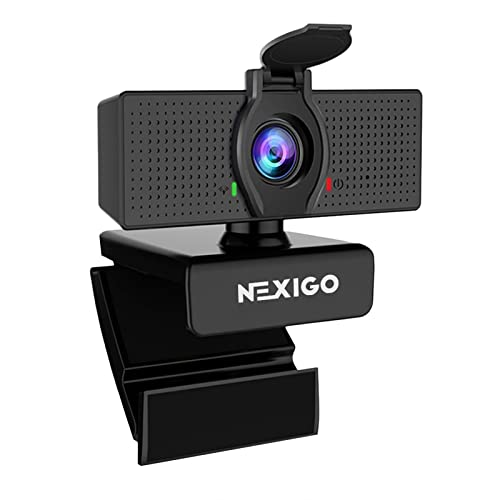
| NexiGo N60 Webcam | Best budget detection via computer | An affordable webcam whose detection life is powered by software you choose, recording to your own drive. |
| Logitech C920S HD Pro Webcam | Best private detection setup | A proven webcam for a local, subscription-free detection system with a physical shutter for off-hours. |
How did we test detection rather than just cameras?
Each system was installed at a real house’s three hardest posts: a driveway crossed by a public footpath, a garden visited by cats, foxes and weather, and a hallway with a sunlit window. For a fortnight we logged every alert against what actually happened — the ground truth of deliveries, visitors, animals and nothing at all — and scored each camera on the only ratio that matters: of the alerts it sent, how many deserved a glance, and of the events that deserved an alert, how many it caught. Detection zones and sensitivity were tuned once, properly, as a good owner would, and then left alone.
One finding from the fortnight deserves to be underlined before the picks: the winning margin never came from the camera with the finest picture. It came, every time, from the pairing of a decent camera with an owner who tuned it — which is why this guide spends as many words on zones, angles and notebooks as on products, and why the cheapest pick here, properly tuned, outperformed an untuned flagship in the only column that mattered.
We also measured the costs of detection:
how the battery cameras’ charge moved under different alert loads, how much footage the pixel-watchers generated from pure weather, and how the household’s patience — the unquantifiable specification — wore across the fortnight. A detection system is a relationship, and we tested it like one.
Blink Outdoor — Best battery outdoor detection
The Blink Outdoor’s detection philosophy is patience. Its heat-based sensor sleeps in near-total idleness until a warm body crosses its field, which is why its batteries are discussed in seasons and why its alert stream is naturally biased toward events with a pulse. For the classic outdoor posts — the driveway, the side gate, the shed at the garden’s end — that philosophy matches the threat model almost perfectly: what you want to know about outdoors is, overwhelmingly, warm and moving.
The system’s tuning tools are straightforward rather than fancy: sensitivity, activity zones, clip length and the household schedules that arm the cameras when the house empties. Within the Blink app the experience is of a piece with the doorbells and indoor cameras many households already run, and the weather-resistant body treats a fence post as a natural habitat. The trade is responsiveness and richness: a sleeping camera wakes a fraction slower than a wired one, and the smartest classification features live in the ecosystem’s subscription tier.
For the set-and-forget outdoor post, nothing in this guide argues more persuasively. Install it across the path of travel, tune it once, and let the seasons pass.
Owners develop a seasonal rhythm with this camera that resembles gardening: a spring repositioning as the foliage returns, an autumn check of the mount before the storms, batteries treated as a crop that ripens slowly and is harvested rarely. Systems that fit a household’s seasons survive; systems that demand monthly attention join the drawer. The Blink’s whole design argues for the seasonal rhythm, and its owners’ multi-year loyalty is the evidence.
- Format: battery outdoor security camera
- Detection: heat-based (PIR) motion sensing
- Battery: long life under typical alert loads
- Tuning: sensitivity, zones and schedules in app
- Build: weather-resistant for outdoor posts
Strengths
- Detection that ignores most visual noise by design
- Battery life that suits forgotten corners
- Simple, proven ecosystem behaviour
Trade-offs
- Wake-up is a beat slower than wired cameras
- Advanced features sit in the subscription tier
- Prose-only pick: plan battery access when mounting high
Best for: driveways, gates, sheds and gardens. Not suited for: instant-alert posts where every second counts.
Arlo Essential range — Best smart outdoor detection
Arlo’s case is classification. Its detection distinguishes the cast of an outdoor scene — people, vehicles, animals, packages in its ecosystem’s tiers — and that taxonomy transforms the alert stream from a chronicle of movement into a briefing: the phone says what moved, and the owner decides in a glance whether it matters. An integrated spotlight adds the night dimension, startling and illuminating in one gesture, and the picture quality across the range is a step above the budget outdoor class.
The range’s flexibility serves real houses: battery models for the tree at the drive’s end, wired for the porch that has power, all speaking one app’s language. Detection zones are drawn with unusual precision, which matters at the footpath-crossed driveway — the hardest post in our test — where Arlo’s combination of zoning and classification produced the calmest stream of any outdoor system we ran.
The costs are the premium tier’s: the cameras’ price, and an ecosystem whose best judgement is subscription-powered. Households whose outdoor watch is a genuine security concern, rather than a convenience, will find the exchange fair.
There is a deterrence dividend to its visibility that owners mention and spec sheets omit: a camera with a spotlight announces itself, and the announcement does preventive work every night it is never triggered. Security professionals call this the difference between a witness and a guard; Arlo’s design, unusually among these picks, tries to be both, and properties with a genuine problem to solve should weigh that dual role heavily.
- Format: outdoor security cameras, battery and wired
- Detection: person, vehicle and animal classification
- Night: integrated spotlight on key models
- Zones: precise activity-zone drawing
- Ecosystem: Arlo app and subscription tiers
Strengths
- The most informative outdoor alerts here
- Spotlight extends detection’s value into the night
- Range covers most outdoor posts
Trade-offs
- Premium pricing across the range
- Classification depth leans on the subscription
- Prose-only pick: compare models within the range carefully
Best for: serious outdoor watching at busy properties. Not suited for: minimal budgets or subscription-free households.
Ring Stick Up Cam — Best for Ring households
The Stick Up Cam’s virtue is citizenship: in a home already running a Ring doorbell, it extends the same detection grammar — the same zones, schedules, alert tones and neighbourhood app — to the garden, the garage or the hallway, in battery, plug-in or solar flavours. Detection consistency across a household’s cameras is worth more than any single camera’s brilliance, because the owner’s learned trust applies everywhere at once.
Its detection is the competent mainstream: motion sensing with person-aware features in the ecosystem’s tiers, zones that tame the busy posts, and a snapshot discipline that keeps the timeline honest. Mounted under an eave or on a fence, the battery version asks for a charge a few times a year under ordinary alert loads and otherwise minds its post without ceremony.
Outside the Ring ecosystem its case weakens to merely good, and the subscription relationship is the family’s to accept or decline with open eyes. Inside that ecosystem, it is the obvious brick with which to extend the wall.
Its neighbourhood dimension deserves a balanced word: Ring’s community features let nearby households share alerts and footage, which some streets experience as solidarity and others as noise. The camera works identically either way, and the family’s choice about participating can be made — and changed — in the app. Buy it for the detection and the ecosystem’s coherence; treat the neighbourhood layer as an option to be weighed by your street’s character, not as a default to drift into.
- Format: indoor-outdoor camera, several power options
- Detection: motion with person-aware ecosystem features
- Integration: Ring app, zones and schedules
- Mounting: flexible, weather-resistant
- Power: battery, plug-in or solar variants
Strengths
- One detection language across the whole home
- Power options fit almost any post
- Effortless addition for Ring households
Trade-offs
- Value concentrates inside Ring’s ecosystem
- Full features assume the subscription
- Prose-only pick: choose the power variant for your post
Best for: Ring households extending coverage. Not suited for: first-time buyers outside the ecosystem comparing on detection alone.
Tapo C210 — Best indoor pan-and-tilt detection
The C210 adds a verb to indoor detection: follow. When motion is detected, the camera pans and tilts to keep the subject in frame, converting a fixed camera’s glimpse — a shape crossing a doorway — into a tracked sequence with a beginning and an end. For the indoor posts where the story matters — which room the dog toured, where the toddler’s expedition ended, whether the figure at the door was the cleaner or a stranger — that following turns detection from an alarm into evidence.
Person detection helps it choose its subjects, night vision covers the dark hours, and local recording on a memory card keeps the footage in the house without a subscription relationship. TP-Link’s app is businesslike rather than beautiful, and the camera’s price makes its capability list read like a misprint in the household’s favour.
Its stage is indoors only, and a tracking camera should be placed where its movement serves the room rather than performing for it. For the hallway-and-living-room beat, it is the detection bargain of this guide.
Its tracking has a house-training period worth anticipating: the first days will include the camera solemnly following the curtains’ sway and the cat’s legitimate patrol, until the zones and the person-detection settings teach it the household’s cast. Owners who persist through that week own a system that feels uncannily staffed; owners who judge it on day one return the hardest-working camera in this guide for the crime of enthusiasm.
- Format: indoor pan-and-tilt camera
- Detection: motion tracking plus person detection
- Recording: local memory card or cloud options
- Night vision: infrared for dark rooms
- Audio: two-way talk through the app
Strengths
- Follows detected motion across the room
- Local recording without subscription pressure
- Remarkable capability for its price class
Trade-offs
- Indoor use only
- App polish trails the premium ecosystems
- Prose-only pick: a moving camera wants a stable, safe mount
Best for: hallways, living rooms and indoor evidence. Not suited for: outdoor posts or weather exposure.

NexiGo N60 Webcam — Best budget detection via computer
The computer route turns detection into a craft the owner designs. Through the N60’s honest Full HD eye, monitoring software watches for change with rules of a sophistication the fixed ecosystems rarely offer: zones drawn to the pixel, schedules by the minute, sensitivity per region, alerts routed where the owner actually reads them, and every recording stored on the owner’s drive. The camera itself is deliberately simple — an affordable webcam with a privacy cover — because in this architecture the intelligence lives in the software, and the software is yours.
The posts it suits are the computer-adjacent ones: the workshop whose PC already hums, the office after hours, the garage workbench. Detection runs while the machine runs, records locally through every internet outage, and costs nothing per month forever — an economics that compounds quietly across years of watching.
Its honesty box: pixel-based detection through a webcam will see the light change and the curtain move unless the zones and thresholds are tuned with the patience this guide keeps preaching, and the computer’s uptime is the system’s uptime. Owners who enjoy that control will find this the most satisfying detection setup in the guide; owners who want an appliance should buy one.
The tinkering this route invites becomes, for the right owner, the hobby itself: detection rules refined across a season until the workshop’s system knows the difference between the owner’s entrance and the cat’s, between the delivery hour and the suspicious one. That craftsmanship is unavailable at any price in the fixed ecosystems, and it is why a certain kind of household will never buy an appliance camera again.
- Format: USB webcam for software-based detection
- Detection: pixel-based, rules set by owner’s software
- Recording: local, on the computer’s drive
- Privacy: lens cover included
- Cost model: no subscription, ever
Strengths
- Detection rules of unmatched flexibility
- Footage never leaves the house
- The cheapest credible detection post here
Trade-offs
- Requires tuning to defeat false alerts
- Computer must run for detection to live
- No heat-sensing — visual change only
Best for: workshops, offices and tinkerers. Not suited for: outdoor posts or appliance-minded households.

Logitech C920S HD Pro Webcam — Best private detection setup
The C920S is the N60’s philosophy with a decade of polish: a sharper, more dependable eye for the software’s judgement, in a body whose defining feature for this duty is the physical shutter that closes over the lens. A detection system with a visible off state is one a household can govern — armed when the house empties, shuttered when it fills — and that governability is a detection feature in its own right, because systems that respect the household’s rhythms are the ones still armed in year three.
Its picture gives the software more to judge with: cleaner edges in poor light mean fewer phantom changes, and the wide view covers a living room or a shop floor from a shelf. Paired with mature detection software, the arrangement delivers person-aware alerts, local archives and remote check-ins with no subscription and no footage leaving the building — the private stack, complete.
It shares the route’s conditions — the computer’s hours are the watch’s hours — and its price sits above the N60’s in exchange for the polish. For households building a detection system they intend to keep, it is the webcam to build it on.
Small businesses quietly run a great deal of the world’s detection on this exact arrangement — the shuttered webcam over the till or the stockroom door, the office computer recording to its own drive — because it answers the two questions a proprietor actually asks: did anything happen, and can I prove the footage never left the building? Staff can see the shutter’s state, customers are none the wiser, and the system’s honesty is architectural rather than promised.
- Format: USB webcam for software-based detection
- Privacy: physical lens shutter
- Picture: Full HD, wide room view
- Recording: local via owner’s software
- Reliability: a decade-proven design
Strengths
- A governed system: shuttered off, armed on
- Cleaner picture means cleaner detection
- No subscription; footage stays home
Trade-offs
- Computer-based, with a computer’s limits
- Detection intelligence is the software’s, not the camera’s
- Indoor posts near the computer only
Best for: privacy-first detection systems at home or a small business. Not suited for: outdoor or standalone appliance duty.
What is the difference between PIR and pixel-based detection?
The two technologies answer different questions. A PIR sensor asks: did something warm move? It feels infrared energy changing across its field, which makes it superb at ignoring the visual world’s noise — shadows, headlights, rain, swaying branches — and correspondingly blind to anything that does not radiate body-like heat, including a person behind glass. It is also frugal, which is why battery cameras marry it: the sensor sips power while the camera sleeps, and only an event worth filming wakes the expensive parts.
A third, quieter method deserves its sentence: radar and microwave sensing, appearing in some newer cameras, which measures movement through reflection rather than light or heat and can work through some obstacles that defeat both elders. It remains a minority technology in home cameras, but its presence in the category’s future is likely — and its false-alert character, immune to shadows and spiders alike, will be welcomed by every graduate of the tuning school this guide has been running.
Until it arrives, the craft stands where this section leaves it: know which question your camera asks, place it so the question is easy to answer, and forgive it the questions it was never built to hear. Most detection disappointment is a mismatch eulogised as a defect, and most of it is curable with a ladder and an hour.
Pixel-based detection asks: did the picture change?
It compares frames and reports difference, which makes it universal — it sees the parcel arrive and the car door open as readily as the person — and promiscuous, because pictures change for a hundred innocent reasons a minute. Its intelligence must therefore be added in layers: zones to ignore the road, thresholds to ignore the light, classification to name what changed. Understanding which question your camera asks is the key to placing it well: PIR across a path, never behind glass; pixel-watchers zoned like a gardener pruning, with the busy world cut out of the frame’s responsibility.
How do you place a camera for detection rather than for pictures?
Detection placement obeys geometry before aesthetics. The golden rule is to cross the traffic: a camera watching a path from the side sees a subject traverse its whole field, giving any detection system time and change to judge, while a camera aimed straight down the path watches a subject grow slowly toward it — the hardest pattern for both PIR and pixels to call early. Height helps until it hurts: high enough to see over obstacles and resist tampering, low enough that faces are faces rather than hats.
Distance discipline completes the geometry: every detection technology has a parish — a range within which its judgement is reliable — and posts should be chosen so the subject’s business happens inside it. A camera asked to judge movement at the far end of a long garden will disappoint in any technology; move the post, add a second post, or accept the nearer territory as the watched world and let the far end be scenery.
Latency deserves its own honest paragraph, because it is the specification nobody prints: the seconds between the event and your phone’s buzz include the camera’s wake, the network’s mood, the cloud’s judgement and the phone’s own doze. Wired and local systems shave the chain shortest; battery and cloud systems trade a few seconds for their freedoms. For most household purposes the difference is trivia — the parcel is identified either way — but at the post where seconds are the product, such as a gate intercom’s partner camera, choose the short chain and test it with a stopwatch rather than a hope.
Then subtract the false world.
Angle away from the road’s headlights, the neighbour’s security light, the tree that dances in every breeze; if they cannot be angled out, zone them out, and if they cannot be zoned out, move the camera — placement is the one tuning no software fully rescues. Finally, walk the post yourself at the hours that matter, phone in hand, and be your own intruder: the detection that catches you, at the distance you would want to be caught, is the detection the post actually has.
What are the classic false alerts, and how do you defeat each?
Keep a small field notebook of your false alerts for the first month — date, hour, culprit — because patterns hide in the list that no single alert reveals: the Tuesday bin lorry’s headlights, the Friday shadow of a neighbour’s flag, the moth season’s opening night. Tuning from evidence rather than from irritation is faster, calmer, and finished sooner; most households need three notebook pages to reach a stream they trust.
The spider owns the first chapter:
a web across the lens, lit by the camera’s own infrared at night, becomes a giant swaying apparition that triggers pixel detection hourly. The defeat is housekeeping — clear the web, move the camera a hand’s width from the eave’s corner where spiders anchor, and accept the monthly wipe as rent. The tree owns the second: pixel systems see its canopy as perpetual motion, and the defeat is zoning, drawing the detection area below the branches’ dance floor, or choosing a PIR post where heat, not foliage, does the talking.
Headlights write the third chapter at every roadside post: a sweeping change of light across the whole frame at each passing car. Zones excluding the road solve most of it; angling the camera’s view down the property rather than across the street solves the rest. Rain and snow write the fourth — a pixel storm the camera reads as a crowd — defeated by sensitivity discipline and, at exposed posts, by heat-based detection that ignores weather entirely. The household’s own cat, fox or badger writes the fifth and happiest chapter: classification names them, zones route around their highways, and many owners end by keeping a wildlife folder, because the detection system they bought for security turned out to be a nature documentary with notifications.
How do renters and temporary households set up detection?
Detection without drilling is its own small genre, and this guide’s picks serve it better than most: battery cameras on removable mounts or weighted stands, indoor cameras on shelves, webcams that ask nothing of the walls at all. The renter’s priorities reorder the list — portability first, then the alert quality that makes a temporary post worth its week of tuning, then storage that leaves with the tenant. Landlord conversations belong in the process: many leases have opinions about exterior cameras, and a battery camera inside a window — pixel detection only, infrared off — is the classic compromise that watches a car or a door without touching the building’s skin.
Document the temporary system as carefully as a permanent one — a phone photograph of the view, a note of the zones — because temporary posts have a way of becoming annual: the same shed, the same season, the same camera retrieved from the same drawer. Next year’s install then takes ten minutes and inherits this year’s tuning entire, which is the closest thing detection offers to compound interest.
Strike the temporary system with the same care when its season ends: remove the account links, reset the cameras, and store them with batteries tended, so the next deployment begins with working tools rather than a restoration project. Temporary gear that is stored kindly is permanent gear in waiting.
Temporary posts have their own honourable uses beyond renting:
the building project watched over a summer, the empty family home between occupants, the allotment shed for a season. Detection that can be deployed in an afternoon and struck in ten minutes serves all of them, and the systems here that travel lightest — Blink’s battery units and the webcam pair — are the ones this guide would pack.
What do your neighbours have a right to expect from your detection?
A detection camera pointed outward watches a shared world, and the good-neighbour rules are part of the install. Aim the detection field at your own ground — the zones exist precisely so the camera can be deaf to the pavement and the neighbour’s drive — and be especially careful with audio, which reaches further and more intimately than any lens. Many jurisdictions give neighbours rights over cameras that surveil their property, and everywhere gives them feelings about it; a conversation before the ladder comes out prevents the dispute after it, and streets where the cameras were discussed tend to end up safer and friendlier than streets where they were discovered.
Tell the neighbours the camera exists before the ladder’s shadow tells them: a sentence over the fence — it watches our drive, the zones stop at the boundary, come and see the view if you like — converts surveillance into neighbourhood watch in the older, warmer sense of the phrase. Several streets in our testers’ experience ended with reciprocal arrangements and shared alerts; none began with a complaint that a conversation would not have prevented.
Privacy masking, offered by several systems here, deserves use rather than mere availability:
black out the neighbour’s windows and garden from the camera’s view entirely, so the footage cannot contain what the household has no business keeping. It is the digital equivalent of a fence at the right height, and it converts a potential grievance into a visible courtesy.
Review the arrangement annually, as you would a fence line: cameras drift, hedges grow into sightlines, new neighbours arrive with new expectations. A five-minute conversation and a fresh look at the zones keep the street’s goodwill — and the system’s legality — in the condition the install day left them, and the habit costs less than any single dispute it prevents.
How do you tune detection when animals share the property?
Pets and wildlife are detection’s permanent residents, and the tuning philosophy differs by intent. If the animals are the point — the fox’s visits logged, the dog’s garden time supervised — then sensitivity rises, zones embrace the lawn, and classification becomes a diary-keeping tool. If the animals are noise between the events that matter, the levers are height and zone: mount and aim so the detection field’s lower edge rides above animal height where the post allows it, draw zones around the pet’s known highways, and let classification carry the remaining argument by naming the animal in the alert so the owner’s glance can dismiss it in peace.
One tuning trick from the wildlife photographers who share this technology: bait the test, not the animal. Walk the garden’s far corners yourself at dusk, at animal height if you can bear the dignity cost, and learn exactly where your post’s detection thins — the knowledge converts directly into camera placement, and the neighbours’ entertainment is a small price for a system that finally knows its own field.
Accept the residue with grace.
A garden camera will always have its regulars, and the households that thrive with detection learn to read the animal alerts as the property’s weather report — noted, occasionally enjoyed, never mistaken for news. The failure mode is not the fox on the lawn; it is the owner who, exasperated by the fox, mutes the system the week before the one alert that was not a fox.
How long should clips be, and what is pre-recording?
Detection decides when the story starts; clip settings decide whether you hear its ending. Too short, and the parcel thief is a hand and a blur; too long, and the battery cameras spend their lives filming driveways emptying of interest. The working compromise most households settle on is a clip long enough to contain an event’s whole arc — the approach, the act, the departure — with retriggering that extends the recording while motion continues, so a long event becomes one long clip rather than a strip of fragments.
Review your saved clips the way an editor reviews rushes, once and early: a week of events will show whether the arc is being captured or amputated, whether the retrigger gap is swallowing the middles of long events, and whether the night clips end before the story does. Ten minutes of such review in the first week calibrates the system for the year, and it is the review almost nobody performs. Wired and computer-based systems can afford generosity here; battery systems must be misers, and their owners should set clip length as a battery decision, because it is one.
Storage feels clip length as directly as batteries do: a generous clip at a busy post can consume a memory card’s week in a day, and cloud tiers meter their hospitality in recorded minutes. The household that sets clip length, zones and sensitivity as one decision — how much of the world’s motion do we intend to keep? — avoids discovering the answer from a full-card warning during the only week it mattered.
Pre-recording — the few seconds of footage some powered cameras keep from before the trigger —
is the connoisseur’s feature, because motion’s first instant is often its most identifying: the face turned toward the door before the hood came up, the car’s approach before the stop. Battery cameras, asleep until woken, largely cannot offer it; the fraction of a second they spend waking is the price of their seasons-long stamina. Choose your post’s camera by which loss you can bear: the first instant, or the mains cable.
How does detection behave at night?
Night rearranges the technologies’ strengths.
One more night truth: darkness compresses the detection field. Infrared reach is shorter than daylight’s view, heat signatures cool against cold ground, and the post that judged a whole garden at noon honestly judges half of it at midnight. Plan the night’s territory as the real territory — the walk test after dark is not a refinement of the install, it is the install — and let the day’s wider view be a bonus rather than the promise. Infrared illumination gives pixel systems a bright, even stage to watch — but it also attracts the insect world, and a moth at the lens is a monster in the frame. PIR keeps its composure in the dark, feeling heat exactly as it does at noon, which is one more reason the battery outdoor formula pairs it with night posts. The spotlight cameras add a third behaviour: detection triggers light, light improves the picture and announces the camera’s attention, and the announcement itself becomes part of the security — most casual intruders prefer unobserved darkness and will choose another garden.
There is a placement corollary for the night: infrared light pools where it is pointed, and a camera aimed too steeply down watches a bright circle of path and a darkness of everything else. Level the view toward the horizon’s lower third, let the illumination spread across the post’s whole territory, and the night detection field doubles without a single setting touched.
Judge a detection system by its 3 a.m. stream before buying a second camera for the system:
the night is when the posts are lonely, the false world is busiest, and the one true alert of the season will arrive. The picks in this guide were all run through that hour in our test fortnight, and their order in this list owes more to the night than to the day.
Comparison Table
| Camera | Detection type | Classification | Best post |
|---|---|---|---|
| Blink Outdoor | Heat (PIR) | Motion, ecosystem tiers add more | Driveway, gate, shed |
| Arlo Essential | Smart detection | Person, vehicle, animal | Busy outdoor approaches |
| Ring Stick Up Cam | Motion sensing | Person-aware features | Garden, garage, hallway |
| Tapo C210 | Pixel with tracking | Person detection | Hallway, living room |
| NexiGo N60 | Pixel via software | Owner’s software rules | Workshop, office |
| Logitech C920S | Pixel via software | Owner’s software rules | Living room, small business |
How do you test a detection system like a professional?
Installers earn their fee in the walk test, and owners can steal the ritual entire. Walk the post at the speeds life actually uses — the stroll, the hurry, the child’s run, the stooped delivery driver with a parcel for a face — at the hours the camera will work, including the dark. Cross at the field’s edges, where detection is weakest; approach head-on, where geometry is cruelest; linger at the boundary of the zones you drew. Have a partner watch the phone and call the alert’s delay aloud. What the test reveals is never the brochure’s system; it is yours, in your light, on your path — and every adjustment it provokes is worth a month of notifications.
Invite the household’s least technical member to perform one walk test while you watch the phone: their unselfconscious pace, their route across the garden, their pause at the gate are the truest simulation of both a visitor and a stranger that your system will ever be offered, and the alerts it produces will calibrate your expectations better than any specification table.
Repeat the test when the seasons turn
and when anything in the scene changes: the new fence, the grown hedge, the neighbour’s new security light. Detection is a relationship between a camera and a place, and places are edited by time. The households whose systems still deserve trust in year three are the ones who kept reintroducing the camera to its post.
How do detection and smart-home automations work together?
A detection event is a signal, and signals can be spent on more than notifications.
Start with one automation and live with it for a month before adding another: the porch light answering the driveway is the genre’s classic for a reason, and its month of service will teach the household its real appetite for a reactive home. Systems that grow one trusted reflex at a time end up calm and capable; systems installed as a weekend’s worth of cleverness end up disabled by Christmas, and the cameras get the blame for the choreography. The mature household routes them: the driveway camera’s person alert turns on the porch light, the hallway camera’s evening motion starts the landing lights’ gentle scene, the garden camera’s silence by a set hour is itself the all-clear the house reports. The ecosystems in this guide all speak to the major smart-home platforms, and the webcam route joins through its software’s own hooks. Built thoughtfully, detection stops being a security feature and becomes the house’s peripheral nervous system.
Schedules and modes are the automation’s quieter half, and they deserve the same design care: the system armed by the last person’s departure rather than by the clock, the garden camera polite during the Saturday the garden is used, the hallway sensor that knows the difference between a weekday and a holiday morning. Geofenced arming — the phone’s location standing guard over the settings — is the feature households actually keep enabled, because it asks nothing of memory.
Keep a written note of the modes you have built and what each one does, somewhere the whole household can find it: the partner, the sitter and the future self at 3 a.m. are all users of this system, and a mode nobody understands is a mode that gets switched off in a moment of confusion — usually the moment it was designed for. Set it once, test it twice, and the house begins keeping its own hours.
Restraint is the design virtue here, as everywhere in this guide.
Automate the responses you would want at 3 a.m. while half asleep — light, mostly, and the occasional spoken announcement — and leave the theatrical responses, the sirens and the strobes, to properties whose threat model honestly includes them. A house that overreacts trains its occupants to ignore it, which is the one failure every section of this guide has been written to prevent.
What mistakes ruin motion detection setups?
Aiming the camera straight down the driveway leads the list — the geometry guarantees late, timid detection. Second is mounting behind glass and expecting a heat sensor to work through it; PIR cannot see through a window, full stop. Third is leaving sensitivity at the factory setting in a world the factory never visited, then concluding the camera is bad. Fourth is forgetting the sun’s seasons: the shadow that never crossed the frame in June owns it in December, and detection tuned once is detection tuned for one season. And fifth is alert greed — recording and notifying everything, everywhere, always — which converts a watchman into a commentator and ends, as it always ends, with the mute button.
Final Recommendation
For outdoor posts, the Blink Outdoor’s heat-sensing patience is the default done right; step up to Arlo where classification earns its subscription, and extend with Ring where the household already speaks Ring. Indoors, the Tapo C210’s following eye is the detection bargain of the moment. For the private, computer-based stack, the N60 starts the experiment cheaply and the C920S builds the system to keep. In every case: cross the traffic, zone the noise, tune for a fortnight, and judge the system by the silence between its true alerts — that silence is the sound of detection working.
Frequently Asked Questions
Why does my camera miss people walking straight toward it?
Geometry. A subject approaching head-on changes slowly in the frame and crosses few detection zones, so both PIR and pixel systems call it late. Reposition the camera to view the path from the side, where the same person crosses the whole field and detection becomes easy.
Can motion detection work through a window?
Pixel-based detection can, imperfectly, with reflections and night glare to manage. Heat-based PIR cannot — glass blocks the infrared it senses. Indoor cameras watching through glass should rely on their pixel detection with infrared disabled at night, or move the watch indoors.
How do I stop alerts for cars and passing headlights?
Zone them out first — draw the detection area to exclude the road — then lower sensitivity, then use person classification if your system offers it. In that order: geometry before thresholds before intelligence, because each layer you solve physically is a layer the software cannot get wrong.
Does motion detection drain battery cameras quickly?
Alert load is battery load: a camera waking fifty times a day lives a fraction of the life of one waking five times. Busy posts argue for wired power, solar assistance, or stricter zones — battery life is a detection setting wearing a disguise.
How do I cover a gate or shared drive where traffic is constant?
Constant traffic defeats sensitivity settings, so change the question: at a shared drive, detect the events within the traffic rather than the traffic itself — a person on foot among the cars, movement at the gate rather than past it, activity in the hours when traffic should be absent. Zones drawn tightly on the gate and the pedestrian path, schedules that arm the post’s judgement at night, and classification where the budget allows will together carve a useful stream out of an impossible one.
What is person detection worth paying for?
At a quiet post, little — a PIR camera’s stream is already mostly people-shaped events. At a busy post crossed by traffic, animals and weather, classification is the difference between a briefing and a noise machine, and it earns its tier honestly.
Should I point a detection camera at the street to watch my parked car?
You can, with the neighbours’ section of this guide in mind: keep the detection zones on your own property where the car sits, mask the rest of the street’s life out of the record, and check the local rules about filming public space from a home. The car is a legitimate post; the street is not your set, and the camera that remembers the difference stays welcome on it.
One last calibration of expectations, offered in the spirit of every section above: no detection system at any price catches everything and imagines nothing. The craft is in the ratio, tuned patiently toward trust, and the households in this guide’s test who reached it all describe the same destination — a phone that is quiet for days and then, one ordinary afternoon, right. Build toward that afternoon, and let each quiet week the system keeps be counted as the product working — because in detection, silence properly earned is the loudest success there is.
Keep this guide’s notebook habit after the system settles, too: one line a month on what the cameras saw and missed. Detection is a practice, not a purchase, and the households that treat it as one are the households whose phones stay quiet for the right reasons, year after year.
Related Guides
Related reading: our guides to the best cameras for general home monitoring, cameras for monitoring children and family rooms and the best outdoor security cameras for homes.


