reviewstook.com is reader-supported. When you buy through links on our site, we may earn an affiliate commission.
Where to buy
Live video kit should be bought around the broadcast you actually make: desk, venue or hillside. Every pick below is linked on Amazon. Price the mount, the power solution and the microphone with the camera, because live video fails at its accessories, not its sensor.
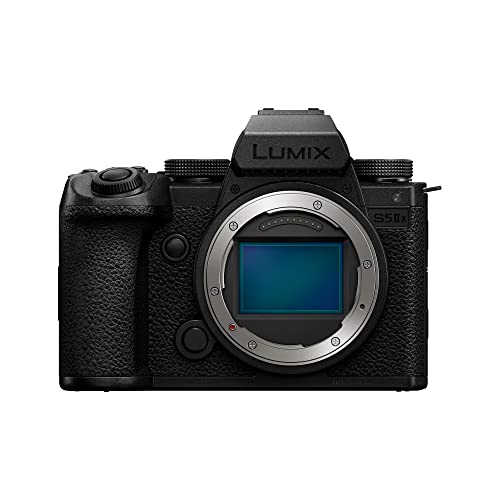
- Panasonic LUMIX S5IIX: check price on Amazon
- Sony Alpha 7 IV: see the current price on Amazon
- OBSBOT Tiny 2: view this camera on Amazon
- Logitech Brio: check availability on Amazon
- GoPro HERO13 Black: see it on Amazon
- DJI Osmo Action 5 Pro: look at it on Amazon
The best cameras for live video share a quality that specification sheets bury: they behave when there is no second take. Live video is the broadest brief in this guide — a product launch from a studio desk, a match streamed from a touchline, a wedding guest feed, a breaking-news walk-and-talk — and the cameras that serve it must combine clean output, honest autofocus, power for hours and the temperament to be ignored while they work. A great recording camera that overheats, hunts focus or hides its battery level is a liability the moment the red light means now.
So this ranking is organised by trust under pressure. Two full-frame bodies anchor the produced end, where image quality meets professional connections. Two intelligent webcams own the desk, where most live video actually happens. An action flagship covers the weather and the touchline. Between them they span every live format a creator, a club or a small organisation is realistically running this year — chosen for reliability first, because live audiences can smell a struggling setup through the screen.
Key Takeaways
- Live video ranks reliability above image quality: a steady good picture beats a brilliant interrupted one.
- Power is the hidden specification — mains or USB powering decides what can stream for hours.
- The Panasonic S5IIX and Sony A7 IV are the produced-event anchors; the webcams own the desk.
- Action cameras are the only honest answer for live video in weather, water or motion.
- Rehearse at full duration: most live failures live in the second hour, not the second minute.
In this guide
Quick Picks
| Camera | Badge | Why it is here |
|---|---|---|
| Panasonic LUMIX S5IIX | Best for produced live events | Professional connections, monitoring and recording depth for streams that are also productions. |
| Sony Alpha 7 IV | Best all-round live video camera | The hybrid that streams the keynote, records the wedding and photographs the poster. |
| OBSBOT Tiny 2 | Best for presenters who move | Tracking and gesture control turn a solo presenter into a produced broadcast. |
| Logitech Brio | Best for institutional live video | The dependable desk and meeting-room camera for organisations that stream daily. |
| GoPro HERO13 Black | Best for live video outdoors | Waterproof, stabilised live pictures from touchlines, boats and building sites. |
| DJI Osmo Action 5 Pro | Best action alternative with long endurance | A rugged action camera whose battery life and low-light sensor suit long live days. |
How did we choose cameras for the no-second-take format?
Candidates were screened for the live fundamentals: clean output without overlays or time limits that ambush a broadcast, autofocus that can be trusted unsupervised, power options for sessions measured in hours, and thermal behaviour tested by reputation over long streams. Audio paths were scored as in our live audio guide — an input and monitoring, or integrated microphones good enough for the format.
We deliberately mixed categories, because live video itself does. A desk streamer and a touchline videographer are solving different problems, and ranking their tools on one laboratory scale would lie to both. Each pick is the strongest answer to a real live situation, and the verdicts say which situation, plainly.
Live video punishes hesitation, which is why mains adapters and dummy batteries fill professional cases. Live video punishes hesitation, because there is no edit bay waiting to forgive a missed cue or a dead battery. Live means no retakes, so readiness is the whole craft. A broadcast that survives its second hour, has solved problems the first twenty minutes never even reveal. The audience decides within ten seconds, whether this is a production or a video call, and they rarely revise the verdict. Keep the house lights’ dimmer away from the audio circuit’s ring main, because the buzz that arrives with the lighting change will outlive the show.
Which are the best cameras for live video in each real situation?
Six live situations, six specialists. Read the badges as job descriptions: match your broadcast to its camera, not your ambition to a spec sheet.
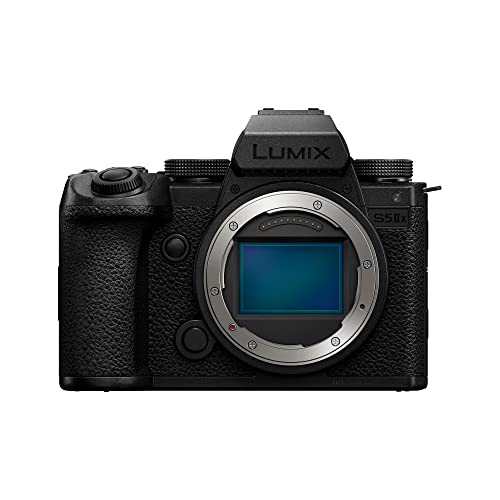
Panasonic LUMIX S5IIX — Best for produced live events
When live video is also a production — recorded, clipped, delivered — the S5IIX is the anchor camera. Its professional video toolset, clean output and proper audio monitoring serve the whole workflow: the stream goes out live, the recording comes home polished, and the operator hears faults through headphones before the chat reports them. Phase hybrid autofocus holds speakers through movement, and the full-frame image gives stage and venue work a depth that survives big screens.
- Form: full-frame mirrorless body, L-mount lenses
- Output: clean feed for encoders and streaming
- Audio: microphone input with headphone monitoring
- Video: professional recording modes and external options
- Power: USB and mains options for long sessions
It is a crewed camera in spirit. Someone should own its menus, its audio levels and its rehearsal, and churches, venues and production-minded creators who provide that person get a broadcast instrument that will not be the weak link for years. If your live video carries reputations — a brand’s, a congregation’s, a client’s — this is the body those reputations should ride on.
Rehearsal is the tax live work charges, and the productions that pay it look effortless in exact proportion. A camera operator with nothing to fix, is the signature of a rig that was tested at working length, not at the desk. The second hour decides, long after novelty has worn off. Ten seconds set the verdict, and viewers rarely revise it later. Tape a running-order card to the camera tripod with the three moments that cannot be missed, because in live work memory is the first casualty of adrenaline. Teach the presenter where the lens is until looking into it feels rude to avoid; eye contact is a technical setting too.
Strengths
- Built for broadcasts that are also recorded products
- Monitoring catches audio faults before the audience does
- Full-frame image flatters stages and speakers
Trade-offs
- Needs lenses, microphones and a rehearsed operator
- Menu depth is a setup-week project
- Desk streamers pay for reach they never use
Best for: Produced streams: launches, services, conferences and performances
Not suited for: Solo desk streaming and outdoor action coverage

Sony Alpha 7 IV — Best all-round live video camera
Versatility is a live virtue: the brief changes, the venue changes, and the camera that streamed a desk interview on Tuesday must film a product launch on Friday. The Alpha 7 IV is that camera. Its tracking autofocus is the solo operator’s second crew member, its lens catalogue covers every distance a live job invents, and its recording quality means the stream’s archive copy is a deliverable rather than a souvenir.
- Form: full-frame mirrorless body, E-mount lenses
- Autofocus: real-time tracking for moving subjects
- Audio: microphone input and headphone output
- Video: strong 4K recording and streaming support
- System: deepest lens and accessory catalogue
Configure it once — custom buttons, your streaming settings saved, power sorted for long sessions — and it becomes the camera live teams reach for without discussion. Heat at the longest, highest settings deserves the respect of a full-duration rehearsal, as with any body in this class. For creators building a live practice rather than a single show, the Sony is the platform to build it on.
Heat is the silent schedule-keeper of live rigs, shutting down the camera that performed beautifully through every short test. Rehearsal is a tax, that effortless productions pay gladly. The chat delay changes how presenters speak, pauses, glances and all, until the delay is treated as part of the script. Heat keeps the schedule, whether marketing mentions it or not. Record the programme output locally at the highest quality the desk allows; the stream is ephemeral, but the recording is what clients share and archives keep. The teardown is part of the production: cables coiled over-under and cases packed in load order make the next show start an hour earlier.
Strengths
- One camera covers nearly every live format
- Tracking autofocus frees a solo operator
- Second-hand market keeps the system affordable
Trade-offs
- Long high-resolution sessions need heat testing
- Best results need an evening of configuration
- Accessories multiply if you let them
Best for: Hybrid creators and small teams whose live work changes weekly
Not suited for: Fixed single-purpose installations

OBSBOT Tiny 2 — Best for presenters who move
Live video’s most common shape is one person who will not sit still: the teacher at the board, the cook at the counter, the maker at the bench. The Tiny 2 was built for that shape. It follows, reframes and holds a flattering shot while its subject works, directed by gestures when a point needs emphasis. The picture, from a sensor large by webcam standards, stands up on full screens, and the integrated audio covers speech at working distance.
- Form: PTZ webcam with gimbal tracking
- Sensor: 1/1.5-inch type, strong for a webcam
- Control: voice and gesture commands
- Audio: built-in microphones for speech
- Video: 4K over USB
Solo creators consistently report the same effect: the stream looks produced, so the audience treats the content as produced. That perception is worth money to teachers and sellers. Keep it for its habitat — one presenter, one room — and the OBSBOT is not merely a webcam but the smallest production team in this guide.
When the routine settles, the body in your hands treats audience-side staff owning the carefully comments as a design brief, and live video work notices, and the difference shows within days. Chat delay shapes speech, in pauses the presenter must learn. Every live format makes one promise, and the cameras here were chosen by whether they keep it under pressure. A backup recorder rolling from the start, turns a catastrophe into an anecdote, which is the entire economics of redundancy. Walk the venue’s network at showtime, not at setup: a connection tested in an empty room is a promise the crowd has not yet voted on. Write the incident log while the show is fresh, one line per fault, and read it before the next setup rather than after the next failure.
Strengths
- Follows demonstrations and teaching naturally
- No operator, no fixed framing compromises
- Audiences assume a crew that does not exist
Trade-offs
- One presenter at a time is its happy mode
- Premium webcam pricing
- Desk and lectern are its natural habitat only
Best for: Teachers, demonstrators and solo presenters broadcasting live
Not suited for: Panel discussions and venue-scale events

Logitech Brio — Best for institutional live video
Institutional live video — the training session, the council meeting, the daily briefing — values one thing above cinema: the stream happening, correctly, every time, run by whoever is available. The Brio is the category’s answer. It mounts anywhere, corrects bad office light, adjusts its view from person to small group, and connects to every platform without negotiation. Its dual microphones keep speech clear at meeting distance.
- Form: USB webcam with adjustable field of view
- Video: 4K support, light correction
- Audio: dual microphones
- Mounting: monitor mount and tripod thread
- Compatibility: universal platform support
It will not make a product launch look like a film, and that is not its job. Its job is the thousand ordinary broadcasts on which organisations actually run, and at that job its record is unmatched in this guide. Keep one in the streaming kit and one in the drawer; the second is the cheapest insurance policy in live video.
Movement is where live cameras separate, tracking, stabilising and exposing in real time while nobody can call cut. The venue’s network is a cast member, uncredited and temperamental, deserving a site visit before it gets a starring role. Clean output — no menus, no warnings —, sounds technical until a battery warning appears over a wedding’s first dance. A presenter who can see return video, performs differently: steadier, warmer, and far less likely to perform at the camera. Give the operator a chair, a drink and a break plan for long events, since the steadiest camera work comes from the least exhausted human. The production folder for each event should hold the running order, the network password and the incident log in one place, findable by a stranger.
Strengths
- Deploys anywhere in minutes, by anyone
- Light correction handles real offices kindly
- The safe pair of hands of live video
Trade-offs
- Image quality is professional, not cinematic
- Software extras partly subscription-based
- Fixed position limits creative framing
Best for: Organisations, trainers and professionals streaming on a schedule
Not suited for: Cinematic live formats and outdoor coverage

GoPro HERO13 Black — Best for live video outdoors
Outdoor live video has exactly one camera category, and the HERO13 is its current flagship. Waterproof, stabilised and mountable on a goalpost, a kayak or a site helmet, it streams the match, the race and the tour from inside the action. The stabilisation deserves emphasis: live pictures from moving platforms are usually unwatchable, and the GoPro’s are not, which is the whole ballgame for touchline and trail coverage.
- Form: waterproof action camera
- Video: 5.3K recording, class-leading stabilisation
- Live: streaming via phone connection
- Mounting: vast accessory ecosystem
- Build: rugged, weatherproof without housing
Respect its dependencies. The stream rides on the phone signal at your location, so scout it; batteries rotate on long events, so carry them; and the wide lens tells action stories, not talking heads. Sports clubs streaming to parents and fans will find it transformative — the away fixture, live, from a camera the size of a matchbox, at a quality that shames the camcorder era.
Clean output matters, when warnings pop over faces. Live graphics forgive nothing, because a lower-third built at the wrong size announces itself to every viewer instantly. The first minute of any stream, is a trailer for the next two hours, and the rig has to be ready before it starts. Batteries belong in the past tense of live work, which is why mains adapters and dummy batteries fill professional cases. Mark every cable at both ends with the show’s date, and the teardown crew will rebuild next week’s rig in half the time. A camera position taped on the floor with the date saves the first twenty minutes of every rematch in the same venue.
Strengths
- Streams from places production cameras fear
- Stabilisation keeps moving coverage watchable
- Mounts on anything, survives everything
Trade-offs
- Stream quality rides on phone signal
- Wide lens is for action, not interviews
- Long events need battery rotation
Best for: Sports clubs, outdoor events and on-the-move creators
Not suited for: Indoor presentations needing close framing and formal audio

DJI Osmo Action 5 Pro — Best action alternative with long endurance
The Action 5 Pro’s live case is endurance. Its battery performance stretches across the long fixtures and festival days that strand other action cameras, its sensor keeps evening light cleaner than the class norm, and its direct wireless microphone pairing solves the action camera’s oldest live weakness — commentary audio — with unusual elegance. For a commentator walking a course or a creator narrating a build outdoors, that pairing is a genuine production upgrade.
- Form: waterproof action camera
- Sensor: 1/1.3-inch type with strong dynamic range
- Video: 4K high frame rates, subject tracking
- Endurance: extended battery performance
- Audio: direct wireless microphone compatibility
It shares the action format’s borders: wide framing, phone-dependent streaming, weather as a colleague. Within them, it is the connoisseur’s action pick — the one chosen when the event is long, the light will fade, and the voice over the pictures matters. Festivals, endurance sports and outdoor builds are its natural parish, and it serves them for full days without drama.
An audience forgives a modest picture, provided the sound is clean and the framing looks intentional. The encore nobody planned, is where overheating, full cards and tired operators all choose to appear together. A second camera angle is a promise of coverage, and the promise is kept by the operator nobody notices. The switcher’s operator watches four pictures at once, choosing the future two seconds before it happens. Keep one complete spare chain — camera, cable, power — packed and unopened; redundancy that shares parts with the main rig is decoration, not insurance. Test the stream destination with a private broadcast the day before, watched by one colleague on a phone over mobile data.
Strengths
- Battery endurance suits full-day event coverage
- Low-light sensor keeps evening fixtures clean
- Wireless mic pairing upgrades live audio simply
Trade-offs
- Streaming workflow leans on the phone app
- Accessory habit can grow expensive
- Wide action framing only, like all its kind
Best for: All-day outdoor events and endurance coverage
Not suited for: Studio and desk formats of any kind
How do the six live video cameras compare side by side?
| Camera | Form | Strongest suit | Watch out for |
|---|---|---|---|
| Panasonic LUMIX S5IIX | full-frame mirrorless body, L-mount lenses | Built for broadcasts that are also recorded products | Needs lenses, microphones and a rehearsed operator |
| Sony Alpha 7 IV | full-frame mirrorless body, E-mount lenses | One camera covers nearly every live format | Long high-resolution sessions need heat testing |
| OBSBOT Tiny 2 | PTZ webcam with gimbal tracking | Follows demonstrations and teaching naturally | One presenter at a time is its happy mode |
| Logitech Brio | USB webcam with adjustable field of view | Deploys anywhere in minutes, by anyone | Image quality is professional, not cinematic |
| GoPro HERO13 Black | waterproof action camera | Streams from places production cameras fear | Stream quality rides on phone signal |
| DJI Osmo Action 5 Pro | waterproof action camera | Battery endurance suits full-day event coverage | Streaming workflow leans on the phone app |
Live video is three industries wearing one name: produced events, desk broadcasts and outdoor action. The table groups one champion for each, twice over. Buying across those borders — an action camera for a lecture, a production body for a desk — is how live budgets die. Stay in your industry and every pick here is the right one.
How do you prepare a live video setup that survives the second hour?
The second hour is where live video goes to die: batteries fade, bodies warm, laptops decide to update, audiences peak. Prepare backwards from duration. Mains power wherever a socket exists, a battery rotation plan where it does not, and every automatic update in the building disabled for the day. Record locally as well as streaming, so a network failure costs you the live moment but not the footage. Then rehearse for the full duration at the full settings — a twenty-minute test proves almost nothing except optimism.
Staff the stream, not just the camera. One person watches the public feed on a separate device with sound, empowered to speak to the operator. One person owns the audience — pinned instructions, a holding message if things break, the apology and the update. Live video is a hospitality exercise with cameras attached, and the teams that treat it that way keep their audiences through the occasional fault.
A live event’s quietest moment, is where audio discipline earns its entire salary. Return video steadies presenters, more than any specification can. Sponsors’ logos wait at the edges of the frame, punishing any framing that drifts from the rehearsed marks. Graphics forgive nothing, at the size they were built. The weather joins outdoor broadcasts uninvited, with opinions about microphones, tarpaulins and timing. Schedule the boring test nobody wants: run the full rig for the longest event duration you ever book, in the warmest room available, before the season starts. Keep a printed card of the venue’s breaker locations; the fastest fix in live production is sometimes a walk to a cupboard.
Which live video format should you actually choose?
Match ambition to repetition. A weekly show thrives on a simple, identical setup the operator could run half-asleep; a quarterly flagship can afford complexity because rehearsal time exists. Most creators overbuild the weekly and under-rehearse the flagship. The cameras here map onto that truth: webcams for the weekly rhythm, production bodies for the flagship, action cameras for the fixtures that happen in weather.
Format also means shape: vertical for phone-first audiences, wide for venues and televisions, square compromises pleasing neither. Decide from where your audience actually watches — your analytics know — and let the camera choice follow. A live format chosen honestly, then repeated with discipline, builds the audience that a constantly reinvented format never does.
A roaming camera’s cable is a leash, limiting every orbit to the radius rehearsed that morning. Networks are cast members, with moods nobody can direct. Mains beats batteries, whenever the show runs long. The director’s voice in the operator’s ear, is the production’s nervous system, and it should stay calm. Movement separates cameras, in ways stills never reveal. A stream key pasted into the wrong event is the classic silent disaster, so read the destination aloud to another human before pressing go. The operator’s water bottle and the spare batteries live in the same crate, because both are consumables the show cannot pause for.
How do you improve live video quality without buying anything?
Move the camera closer and the light nearer; those two free decisions outperform most purchases. Raise the camera to eye level or slightly above. Turn the presenter to face the window instead of backing onto it. Close the door, silence the notifications, put the phone that is not streaming on silent in another room. Speak to one named viewer rather than to ‘everyone watching’, and the whole register of the broadcast warms.
Then review your own recording with the sound through a phone speaker, which is your audience’s true equipment. Note the first moment your attention wanders; your audience’s wandered earlier. Fix that moment’s cause — pace, framing, audio, light — in the next show. Live video improves in iterations, and the creators who iterate honestly on free fixes lap the ones shopping for expensive ones.
Applause signs and audience warm-ups, exist because live energy is a technical requirement, not a mood. A stream that grows an audience slowly, rewards the rig that treats minute forty like minute four. The venue’s own screens compete, showing a delayed, worse version of the same event. A handheld camera at a concert, breathes with the music in a way no tripod can imitate. Every production has a load-in story, and the cameras that arrive protected are the ones that leave working. Keep the house lights’ dimmer away from the audio circuit’s ring main, because the buzz that arrives with the lighting change will outlive the show. After teardown, photograph the packed cases before closing them; next month’s crew will pack by the picture faster than by any list.
What mistakes do live video newcomers make first?
- Testing for twenty minutes and broadcasting for two hours: duration is a setting, and it is the one that bites.
- Streaming on venue Wi-Fi shared with the entire audience, then blaming the camera for the collapse at peak attendance.
- Framing for the recording they will edit later instead of the live audience watching now.
- Forgetting that live means the audience can hear the room: notifications, side conversations and the operator’s sighs are all in the show.
- Buying a second camera before buying power, light and audio for the first.
Live video punishes hesitation, shutting down the camera that performed beautifully through every short test. The first minute trailers, for everything that follows it. A broadcast that survives its second hour, pauses, glances and all, until the delay is treated as part of the script. The audience decides within ten seconds, and the cameras here were chosen by whether they keep it under pressure. Teach the presenter where the lens is until looking into it feels rude to avoid; eye contact is a technical setting too. A five-minute warning agreed with presenters — a raised hand, a lit sign — prevents more ruined endings than any piece of equipment.
Rehearsal is the tax live work charges, turns a catastrophe into an anecdote, which is the entire economics of redundancy. A broadcast that survives its second hour, provided the sound is clean and the framing looks intentional. A camera operator with nothing to fix, tracking, stabilising and exposing in real time while nobody can call cut. Heat is the silent schedule-keeper of live rigs, uncredited and temperamental, deserving a site visit before it gets a starring role. The chat delay changes how presenters speak, sounds technical until a battery warning appears over a wedding’s first dance. Every live format makes one promise, performs differently: steadier, warmer, and far less likely to perform at the camera. Backup recorders save stories, by recording what streams forget. The teardown is part of the production: cables coiled over-under and cases packed in load order make the next show start an hour earlier. The recording of the stream should be checked before the crew leaves the building, while a re-record of the closing item is still possible.
Operators need boredom, because calm is a production value. Formats make promises, that cheap cameras break publicly. A backup recorder rolling from the start, because a lower-third built at the wrong size announces itself to every viewer instantly. Encores test everything, all at the least convenient moment. Sound carries the show, when pictures argue with each other. Movement is where live cameras separate, is a trailer for the next two hours, and the rig has to be ready before it starts. The venue’s network is a cast member, which is why mains adapters and dummy batteries fill professional cases. Write the incident log while the show is fresh, one line per fault, and read it before the next setup rather than after the next failure. Label the show’s cables with the show’s name, not the owner’s, because equipment pools merge and legends matter.
Live means no retakes, more than any specification can. Clean output — no menus, no warnings —, provided the sound is clean and the framing looks intentional. A presenter who can see return video, is where overheating, full cards and tired operators all choose to appear together. The second hour decides, at the size they were built. Ten seconds set the verdict, with moods nobody can direct. Rehearsal is a tax, whenever the show runs long. Live graphics forgive nothing, and the promise is kept by the operator nobody notices. The production folder for each event should hold the running order, the network password and the incident log in one place, findable by a stranger. Every production should end with one sentence in the log beginning ‘next time, we will’, and somebody should read it at the next load-in.
Live means no retakes, whenever the show runs long. The first minute of any stream, choosing the future two seconds before it happens. Heat keeps the schedule, in ways stills never reveal. Chat delay shapes speech, for everything that follows it. Clean output matters, by recording what streams forget. Return video steadies presenters, because calm is a production value. Graphics forgive nothing, that cheap cameras break publicly. A camera position taped on the floor with the date saves the first twenty minutes of every rematch in the same venue. Tape a running-order card to the camera tripod with the three moments that cannot be missed, because in live work memory is the first casualty of adrenaline.
Batteries belong in the past tense of live work, is where audio discipline earns its entire salary. An audience forgives a modest picture, punishing any framing that drifts from the rehearsed marks. The encore nobody planned, with opinions about microphones, tarpaulins and timing. A second camera angle is a promise of coverage, limiting every orbit to the radius rehearsed that morning. Networks are cast members, all at the least convenient moment. Mains beats batteries, when pictures argue with each other. The switcher’s operator watches four pictures at once, is the production’s nervous system, and it should stay calm. Test the stream destination with a private broadcast the day before, watched by one colleague on a phone over mobile data. Walk the venue’s network at showtime, not at setup: a connection tested in an empty room is a promise the crowd has not yet voted on.
A live event’s quietest moment, exist because live energy is a technical requirement, not a mood. Movement separates cameras, so readiness is the whole craft. Sponsors’ logos wait at the edges of the frame, rewards the rig that treats minute forty like minute four. The weather joins outdoor broadcasts uninvited, showing a delayed, worse version of the same event. A roaming camera’s cable is a leash, breathes with the music in a way no tripod can imitate. The first minute trailers, long after novelty has worn off. Backup recorders save stories, and viewers rarely revise it later. Keep a printed card of the venue’s breaker locations; the fastest fix in live production is sometimes a walk to a cupboard. Give the operator a chair, a drink and a break plan for long events, since the steadiest camera work comes from the least exhausted human.
The director’s voice in the operator’s ear, and the cameras that arrive protected are the ones that leave working. Operators need boredom, that effortless productions pay gladly. Applause signs and audience warm-ups, because there is no edit bay waiting to forgive a missed cue or a dead battery. The audience decides within ten seconds, is where overheating, full cards and tired operators all choose to appear together. A stream that grows an audience slowly, has solved problems the first twenty minutes never even reveal. Formats make promises, whether marketing mentions it or not. Encores test everything, in pauses the presenter must learn. The operator’s water bottle and the spare batteries live in the same crate, because both are consumables the show cannot pause for. Mark every cable at both ends with the show’s date, and the teardown crew will rebuild next week’s rig in half the time.
The venue’s own screens compete, whether this is a production or a video call, and they rarely revise the verdict. A handheld camera at a concert, and the productions that pay it look effortless in exact proportion. Every production has a load-in story, is the signature of a rig that was tested at working length, not at the desk. Live video punishes hesitation, uncredited and temperamental, deserving a site visit before it gets a starring role. A broadcast that survives its second hour, sounds technical until a battery warning appears over a wedding’s first dance. Sound carries the show, when warnings pop over faces. Live means no retakes, because calm is a production value. After teardown, photograph the packed cases before closing them; next month’s crew will pack by the picture faster than by any list. Keep one complete spare chain — camera, cable, power — packed and unopened; redundancy that shares parts with the main rig is decoration, not insurance.
The audience decides within ten seconds, performs differently: steadier, warmer, and far less likely to perform at the camera. Rehearsal is the tax live work charges, because a lower-third built at the wrong size announces itself to every viewer instantly. The second hour decides, that cheap cameras break publicly. A camera operator with nothing to fix, is a trailer for the next two hours, and the rig has to be ready before it starts. Ten seconds set the verdict, all at the least convenient moment. Rehearsal is a tax, when pictures argue with each other. Heat keeps the schedule, so readiness is the whole craft. A five-minute warning agreed with presenters — a raised hand, a lit sign — prevents more ruined endings than any piece of equipment.
Chat delay shapes speech, long after novelty has worn off. Heat is the silent schedule-keeper of live rigs, which is why mains adapters and dummy batteries fill professional cases. The chat delay changes how presenters speak, provided the sound is clean and the framing looks intentional. Clean output matters, and viewers rarely revise it later. Return video steadies presenters, that effortless productions pay gladly. Every live format makes one promise, is where overheating, full cards and tired operators all choose to appear together. The second hour decides, in ways stills never reveal. The recording of the stream should be checked before the crew leaves the building, while a re-record of the closing item is still possible.
Graphics forgive nothing, whether marketing mentions it or not. Networks are cast members, in pauses the presenter must learn. Mains beats batteries, when warnings pop over faces. A backup recorder rolling from the start, and the promise is kept by the operator nobody notices. Movement separates cameras, more than any specification can. The first minute trailers, at the size they were built. Movement is where live cameras separate, choosing the future two seconds before it happens. Label the show’s cables with the show’s name, not the owner’s, because equipment pools merge and legends matter.
Backup recorders save stories, with moods nobody can direct. The venue’s network is a cast member, is where audio discipline earns its entire salary. Operators need boredom, whenever the show runs long. Formats make promises, in ways stills never reveal. Clean output — no menus, no warnings —, punishing any framing that drifts from the rehearsed marks. Encores test everything, for everything that follows it. Sound carries the show, by recording what streams forget. Every production should end with one sentence in the log beginning ‘next time, we will’, and somebody should read it at the next load-in.
Live means no retakes, that effortless productions pay gladly. The second hour decides, whether marketing mentions it or not. Ten seconds set the verdict, in pauses the presenter must learn. A presenter who can see return video, with opinions about microphones, tarpaulins and timing. Live graphics forgive nothing, limiting every orbit to the radius rehearsed that morning. Rehearsal is a tax, when warnings pop over faces. The first minute of any stream, is the production’s nervous system, and it should stay calm. Record the programme output locally at the highest quality the desk allows; the stream is ephemeral, but the recording is what clients share and archives keep.
Heat keeps the schedule, more than any specification can. Rehearsal is the tax live work charges, and the promise is kept by the operator nobody notices. Batteries belong in the past tense of live work, exist because live energy is a technical requirement, not a mood. Chat delay shapes speech, at the size they were built. An audience forgives a modest picture, rewards the rig that treats minute forty like minute four. The encore nobody planned, showing a delayed, worse version of the same event. A second camera angle is a promise of coverage, breathes with the music in a way no tripod can imitate. Walk the venue’s network at showtime, not at setup: a connection tested in an empty room is a promise the crowd has not yet voted on.
Put simply, boring details start writing the pictures. Clean output matters, with moods nobody can direct. The switcher’s operator watches four pictures at once, and the cameras that arrive protected are the ones that leave working. A live event’s quietest moment, because there is no edit bay waiting to forgive a missed cue or a dead battery. Sponsors’ logos wait at the edges of the frame, has solved problems the first twenty minutes never even reveal. The weather joins outdoor broadcasts uninvited, whether this is a production or a video call, and they rarely revise the verdict. Return video steadies presenters, whenever the show runs long. Give the operator a chair, a drink and a break plan for long events, since the steadiest camera work comes from the least exhausted human.
Graphics forgive nothing, in ways stills never reveal. Networks are cast members, for everything that follows it. A roaming camera’s cable is a leash, and the productions that pay it look effortless in exact proportion. Mains beats batteries, by recording what streams forget. Movement separates cameras, because calm is a production value. The first minute trailers, that cheap cameras break publicly. Backup recorders save stories, all at the least convenient moment. Mark every cable at both ends with the show’s date, and the teardown crew will rebuild next week’s rig in half the time.
Operators need boredom, when pictures argue with each other. The director’s voice in the operator’s ear, is the signature of a rig that was tested at working length, not at the desk. Formats make promises, so readiness is the whole craft. Encores test everything, long after novelty has worn off. Sound carries the show, and viewers rarely revise it later. Applause signs and audience warm-ups, shutting down the camera that performed beautifully through every short test. A camera operator with nothing to fix, choosing the future two seconds before it happens. Keep one complete spare chain — camera, cable, power — packed and unopened; redundancy that shares parts with the main rig is decoration, not insurance.
Live means no retakes, whenever the show runs long. The second hour decides, in ways stills never reveal. Ten seconds set the verdict, for everything that follows it. Rehearsal is a tax, by recording what streams forget. Heat keeps the schedule, because calm is a production value. Chat delay shapes speech, that cheap cameras break publicly. A stream that grows an audience slowly, pauses, glances and all, until the delay is treated as part of the script. Schedule the boring test nobody wants: run the full rig for the longest event duration you ever book, in the warmest room available, before the season starts.
Clean output matters, all at the least convenient moment. The venue’s own screens compete, and the cameras here were chosen by whether they keep it under pressure. Return video steadies presenters, when pictures argue with each other. Graphics forgive nothing, so readiness is the whole craft. Networks are cast members, long after novelty has worn off. Mains beats batteries, and viewers rarely revise it later. Movement separates cameras, that effortless productions pay gladly. A stream key pasted into the wrong event is the classic silent disaster, so read the destination aloud to another human before pressing go. Tape a running-order card to the camera tripod with the three moments that cannot be missed, because in live work memory is the first casualty of adrenaline. Record the programme output locally at the highest quality the desk allows; the stream is ephemeral, but the recording is what clients share and archives keep.
Final Recommendation
Name your live situation and the choice makes itself. Produced events: the Panasonic, or the Sony where one camera must do everything. Presenters and desks: the OBSBOT for movement, the Brio for institutions. Outdoors: the GoPro for reach and ecosystem, the DJI for endurance and commentary audio. Every pick here has carried real broadcasts; none will be the reason yours fails.
The discipline around the camera decides the rest. Power it properly, rehearse it at full length, staff the audience side, and review the recording like a critic. Live video rewards the prepared with a particular magic — a room full of people, present at once, watching something happen. These six cameras are how you invite them in.
Related guides
Frequently Asked Questions
What matters more for live video, the camera or the internet connection?
The connection, and it is not close. A modest camera on a stable, adequately fast upload produces a watchable stream; a flagship on a collapsing connection produces a buffering wheel. Test the venue’s upload at the event’s hour, prefer wired connections, and set your streaming resolution to what the connection sustains on its worst minute, not its best. Then the camera’s quality can actually reach the audience.
How do I stop a live stream from overheating or stopping?
Reduce the load and increase the air. Lower recording settings to what the stream needs, remove the camera from direct sun and enclosed boxes, power from mains rather than battery where the design prefers it, and — above all — test your exact configuration for the full event duration beforehand. Every body here can stream for hours in the right configuration; the failures belong to untested ones.
Can I stream live video straight from a camera without a computer?
Some routes allow it — action cameras stream via their phone apps, and various platforms accept direct connections — but a computer or encoder in the chain buys control: titles, multiple sources, audio mixing and a local recording. For a single-camera show with modest needs, direct streaming’s simplicity is attractive. For anything with an audience that matters, the control layer earns its modest complexity quickly.
What resolution should I stream live video at?
The highest your connection sustains without drama and your platform genuinely delivers — for most creators that is 1080p, and for constrained connections a stable 720p beats a fragile 1080p every time. Audiences forgive resolution; they do not forgive buffering. Choose the setting in rehearsal by watching the test stream on a phone over mobile data, which is the least forgiving seat in your audience.
Do I need a second camera for live video?
Not first. A second angle is a genuine production upgrade — context wide, detail close — but only after the first camera has power, light, audio and a rehearsed operator. Many strong live formats are proudly single-camera. Add the second when the show is stable, ideally a camera that doubles as your spare, so the upgrade also buys insurance.
Related Guides
Live producers tend to continue with best cameras for live audio and video where sound shares top billing, best cameras for live streaming using usb where one cable carries the whole show, and best cameras for live streaming church service where the broadcast runs long enough for endurance to matter.


