reviewstook.com is reader-supported. When you buy through links on our site, we may earn an affiliate commission.
Where to buy
Live kit fails as a system, so price the chain: camera, the microphone or mixer feeding it, cables, and a spare of anything that can end a broadcast. Every camera below is linked on Amazon; the webcams earn their places by removing links from that chain entirely.
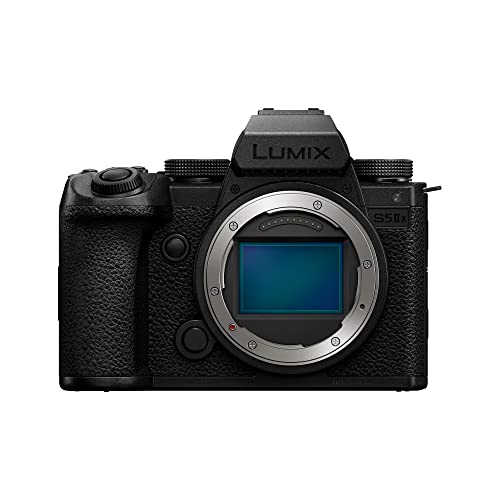
- Panasonic LUMIX S5IIX: check price on Amazon
- Sony Alpha 7 IV: see the current price on Amazon
- OBSBOT Tiny 2: view this camera on Amazon
- Razer Kiyo Pro Ultra: check availability on Amazon
- Logitech Brio: see it on Amazon
- GoPro HERO13 Black: look at it on Amazon
The best cameras for live audio and video are judged by a rule the live world teaches quickly: the audience forgives soft pictures and never forgives bad sound. A town-hall stream I helped with years ago proved it — the video froze twice to polite silence in the chat, then the audio buzzed once and the comments turned mutinous. Cameras for live audio and video work must therefore be assessed as audio devices too: microphone inputs, headphone monitoring, clean output for a mixer, and the discipline to keep sound and picture in step for hours.
This guide treats the pair as one purchase. The mirrorless bodies here accept proper microphones and feed clean video to a streaming setup; the webcams integrate camera and microphone for desks where simplicity is the production value. Between them they cover the town hall, the podcast studio, the worship stream and the webinar desk. What none of them can do is rescue a room with bad acoustics — but each was chosen to make good audio easy to achieve and impossible to forget to monitor.
Key Takeaways
- Budget for the microphone before the camera upgrade: audiences judge live streams by sound first.
- A headphone socket is non-negotiable for live work — unmonitored audio is how broadcasts die.
- The Panasonic S5IIX is the production pick: professional audio and video connections in one body.
- Webcams with good built-in microphones, like the OBSBOT and Razer here, beat a great camera with a forgotten mic.
- Test the full chain at show volume for a full hour before anything goes live; live faults hide in minute forty.
In this guide
Quick Picks
| Camera | Badge | Why it is here |
|---|---|---|
| Panasonic LUMIX S5IIX | Best production camera for live sound and picture | Professional recording connections and audio handling built for broadcast workflows. |
| Sony Alpha 7 IV | Best hybrid body for streamed events | Clean output, trusted autofocus and a lens catalogue that covers every venue. |
| OBSBOT Tiny 2 | Best intelligent webcam for presenters | AI tracking and a strong sensor keep a moving presenter framed and lit, hands-free. |
| Razer Kiyo Pro Ultra | Best webcam for low-light live picture and sound | A very large webcam sensor delivers low-light images that shame most built-in cameras. |
| Logitech Brio | Best dependable webcam for organisations | A proven 4K webcam that IT departments and broadcasters already trust. |
| GoPro HERO13 Black | Best live camera for outdoor and action settings | Waterproof live-streaming action camera for events that happen in weather. |
How did we choose cameras when audio counts equally?
Every candidate needed a credible audio path: a microphone input with manual levels, a headphone output for monitoring, or — for the webcams — built-in microphones good enough that the integrated route is a feature rather than an apology. Video output had to be clean for streaming or recording, with no overlays burned in and no aggressive time limits for live sessions. Heat behaviour during long broadcasts was weighted heavily.
We also scored failure manners. Live equipment should degrade gracefully: a webcam that keeps streaming when software crashes, a body that can run from mains power indefinitely, connections that lock rather than wobble. In live audio and video, the best specification is the disaster that does not happen.
Viewers forgive a soft picture far sooner than distorted sound, which is why the audio half of this guide carries equal weight with the glass. Sound fails first, long before the picture does. Viewers forgive pictures, but never forgive bad audio. A live event gives the audio chain no rehearsal twice, so the chain from voice to viewer has to be proven before the doors open. The mic hears everything, including the air-conditioning nobody notices live. The stream’s title card should carry the audio credit where the audience can see it; sound work is invisible enough already.
Which are the best cameras for live audio and video work?
Two production bodies, three integrated webcams and one action camera for the live jobs that happen outdoors. Each keeps sound and picture together without a separate engineering department.
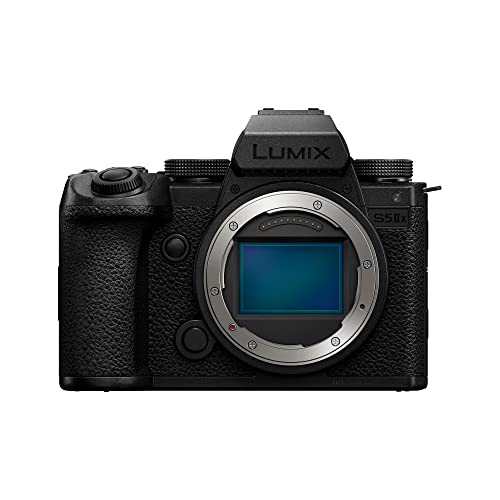
Panasonic LUMIX S5IIX — Best production camera for live sound and picture
The S5IIX was designed by people who understand that live production is an audio discipline with pictures attached. It offers the connections working streamers ask for — microphone input with manual control, headphone monitoring so faults are heard before the audience reports them, and professional recording options that suit broadcast delivery. The full-frame image gives venue screens and projected feeds a depth that webcams cannot approach, while phase hybrid autofocus holds a speaker’s face without hunting during a sermon or keynote.
- Form: full-frame mirrorless body, L-mount lenses
- Audio: microphone input and headphone monitoring
- Video: professional recording modes, external options
- Output: clean feed for streaming and recording
- Power: USB powering for long sessions
Its demands are professional too. The body deserves a proper microphone — a wireless lavalier for a presenter, a small mixer for a panel — and an operator who has rehearsed the chain. Given those, it is the most complete live instrument here, equally at home recording the event for later and streaming it now. Production teams choosing one body for a season of live work should start, and probably finish, with this Panasonic.
The microphone hears the room the camera cannot see, including the air-conditioning, the shuffling and the cough in row three. Test at working level, never in hopeful silence. Echo is a distance problem, solved by centimetres, not software. Every cable in a live rig is a promise, and the promise is only kept by testing each link at working level, not in silence. Record the soundcheck itself and listen back on the worst speakers you own; that playback, not the studio headphones, is the audience’s actual experience. Run the backup recorder from a different power source than the main chain, or the redundancy is a shared failure waiting politely.
Strengths
- Audio controls treated as first-class, not an afterthought
- Professional video toolset suits broadcast delivery
- Full-frame image holds up on large venue screens
Trade-offs
- Requires a real microphone budget to show its worth
- Menu depth demands rehearsal before show day
- Overkill for desk webinars entirely
Best for: Churches, venues and creators running produced live streams with proper microphones
Not suited for: Solo desk streamers who need the microphone already built in

Sony Alpha 7 IV — Best hybrid body for streamed events
The Alpha 7 IV earns its live place through trust. Its autofocus follows a speaker who paces, gestures and turns to a whiteboard, holding focus with a calm that lets a solo operator run sound and slides simultaneously. Microphone and headphone connections cover the audio chain properly, the clean output feeds streaming software or a hardware encoder, and the E-mount catalogue includes the fast zooms that let one body cover a conference stage in the morning and a podcast desk in the afternoon.
- Form: full-frame mirrorless body, E-mount lenses
- Audio: microphone input and headphone output
- Autofocus: real-time tracking for speakers
- Video: strong 4K recording and streaming support
- Lenses: deepest mirrorless catalogue available
Long sessions deserve respect: test your exact recording settings for heat and duration before an audience depends on them, and power the body from the mains for anything important. Those are professional habits rather than flaws. As a single camera that records polished video all week and streams live at the weekend, the Sony is the most versatile instrument in this guide, and its second-hand market keeps the entry price civilised.
Sync drifts slowly, then suddenly, all at once. Gain is arithmetic, not a matter of taste. Headphones catch hums, before the audience ever can. Latency hides in innocent places: a converter here, a buffer there, until lips and words part company by half a second. Label both ends of every cable with the same number, and the day a feed dies mid-event, the fault hunt takes minutes instead of the whole interval. After each event, log one audio fault and one success while memory is warm; the log becomes next season’s checklist.
Strengths
- Autofocus an operator can trust through a whole event
- Lens for every distance from desk to balcony
- Files and streams share one familiar workflow
Trade-offs
- Long 4K sessions need heat awareness and testing
- Best audio still requires external microphones
- Menu system needs a setup evening
Best for: Event streamers and hybrid shooters who record and broadcast the same work
Not suited for: Fixed desk setups where a webcam does the same job for less

OBSBOT Tiny 2 — Best intelligent webcam for presenters
The Tiny 2 solves the live presenter’s oldest problem: the interesting part of the talk happens away from the chair. Its gimbal follows you to the whiteboard, the product shelf or the piano, reframing smoothly while its large sensor — unusually generous for a webcam — keeps the image respectable in normal rooms. Voice and gesture controls let a solo broadcaster zoom and reframe mid-sentence, which feels like a parlour trick until you have run a webinar alone and realised it replaces a colleague.
- Form: PTZ webcam with two-axis gimbal
- Sensor: large 1/1.5-inch type for a webcam
- Tracking: AI subject tracking with gesture control
- Audio: built-in microphones with noise handling
- Video: 4K output over USB
Audio is integrated sensibly, with microphones that handle a desk-distance voice clearly and noise handling that civilises an untreated room. It will not replace a production microphone for music or drama, and it belongs on a desk or a lectern rather than in a rig. Within its brief — one person, live, moving, sounding clear — it is the most capable integrated camera here, and the one audiences consistently assume cost far more than it did.
Soundcheck is where broadcasts are actually made, because by the time the red light is on, every fix costs ten times the effort. Applause clips everything, that the limiter did not expect. Cables are promises, only kept by rehearsal. In practice, the setup on the tripod proves its worth when mains power connected before the audience arrives stops needing thought, leaving attention free for live production itself; the showroom never reveals it. Keep a printed running order taped beside the audio desk with the loud moments marked, so the hand on the fader is never surprised by the choir. Record the soundcheck itself and listen back on the worst speakers you own; that playback, not the studio headphones, is the audience’s actual experience.
Strengths
- Follows a presenter who refuses to sit still
- Gesture control replaces a second operator
- Sensor size flatters ordinary room lighting
Trade-offs
- Premium webcam pricing approaches small cameras
- Tracking can be surprised by multiple moving people
- Desk-bound by design and proud of it
Best for: Teachers, presenters and streamers who move while they broadcast
Not suited for: Multi-camera venue productions needing matched bodies

Razer Kiyo Pro Ultra — Best webcam for low-light live picture and sound
Most live video happens in worse light than its creators admit: evening rooms, shaded offices, the blue hour of a home studio. The Kiyo Pro Ultra is built for exactly that dishonesty, with a sensor far larger than the webcam norm and a fast lens drinking what light exists. Faces stay detailed rather than watercolour, backgrounds stay dark rather than noisy, and the built-in microphone covers a desk voice with enough clarity for talk-led formats.
- Form: premium USB webcam with privacy shutter
- Sensor: exceptionally large for the webcam class
- Lens: fast aperture for dim rooms
- Audio: built-in microphone for desk broadcasting
- Video: high-resolution uncompressed options
It asks for two things in return: money — this is the premium end of webcams — and a stable mount, because a camera this substantial deserves better than wobbling on a screen bezel. Given both, it delivers the most grown-up integrated live image here, the one that makes viewers ask about your camera rather than your lighting. For streamers whose brand is a moody room and a close microphone aesthetic, it is the integrated answer.
A presenter who trusts the monitoring, speaks like a person instead of performing for an imagined audience. Gain staging is unglamorous arithmetic, yet it decides whether whispers and crescendos both arrive intact. The audience at home judges with laptop speakers, so the mix that matters is the one surviving small drivers and room echo twice removed. The room is an instrument, played by every voice in it. A spare set of headphones at the camera position lets the operator confirm the programme feed exists, which settles most mid-event panics in seconds. Keep a printed running order taped beside the audio desk with the loud moments marked, so the hand on the fader is never surprised by the choir.
Strengths
- Evening streams keep detail other webcams smear away
- Fast lens suits moody, lamp-lit setups
- Privacy shutter settles shared-desk households
Trade-offs
- Price sits at the top of the webcam market
- Size demands a proper mount, not a laptop lid perch
- Software features vary by platform
Best for: Streamers broadcasting from dim rooms who refuse lighting rigs
Not suited for: Anyone whose room is already bright — cheaper webcams suffice

Logitech Brio — Best dependable webcam for organisations
The Brio is the webcam equivalent of a reliable colleague: not the most dazzling presence in the room, but the one the meeting depends on. Its 4K sensor, adjustable field of view and dual microphones cover the desk broadcast completely, its light correction rescues backlit offices, and its compatibility record across platforms and streaming software is effectively unblemished. For organisations streaming town halls, training and services, that dependability is the feature list.
- Form: USB webcam with adjustable field of view
- Video: 4K recording and streaming support
- Features: autofocus, light correction, dual microphones
- Mounting: standard tripod thread plus monitor mount
- Support: broad software and platform compatibility
Newer rivals beat its raw image in dim rooms, and Logitech reserves some software polish for subscribers. Neither fact dents its core case. Live audio and video punishes novelty and rewards the device that has survived a thousand meeting rooms. If your streams carry institutional weight — a council, a company, a congregation’s second screen — the Brio’s boring excellence is exactly the recommendation, ideally paired with one good USB microphone for the main speaker.
Redundancy in a live chain is not pessimism, it is simply the memory of every broadcast that ever died from a single point of failure. The first month shows that the second hour rewards the prepared. Room echo flatters nobody, and the only cure is microphone distance: closer sources, drier signal, less room in the recording. A camera’s internal microphones exist for emergencies, sync reference and scratch tracks, and treating them as the plan is how streams embarrass themselves. Agree a hand signal for ‘your microphone is live’ and one for ‘speak closer’, because presenters cannot fix what nobody tells them. A spare set of headphones at the camera position lets the operator confirm the programme feed exists, which settles most mid-event panics in seconds.
Strengths
- Works with everything, everywhere, immediately
- Adjustable view suits desks and small studios
- Dual microphones give respectable integrated audio
Trade-offs
- Image quality trails the newest large-sensor rivals
- Premium software features need subscriptions in places
- Design is corporate rather than characterful
Best for: Organisations and professionals needing live video that never becomes the story
Not suited for: Image-quality maximalists chasing the finest webcam picture

GoPro HERO13 Black — Best live camera for outdoor and action settings
Some live video refuses to sit indoors: regattas, trail races, site tours, harvest festivals. The HERO13 is the camera for those broadcasts — waterproof without a housing, stabilised well enough to stream from a moving bicycle, and mountable on anything from a helmet to a harbour rail. Paired with a phone connection it puts live pictures out from places a production camera would need a crew and a weather plan to attempt.
- Form: waterproof action camera
- Video: 5.3K recording with strong stabilisation
- Live: streaming support via connected phone
- Audio: built-in microphones, external mic options
- Mounting: the largest accessory ecosystem in cameras
Its compromises are the format’s own. The wide action lens flatters landscapes, not lecturers; audio from built-in microphones serves commentary and atmosphere rather than formal speech; and the stream is only as good as the phone signal beneath it. Carry spare batteries for long events and test the signal at the exact spot. Within the outdoor brief, nothing else here is even a candidate — the GoPro owns this row of the table outright.
Sync drift announces itself slowly, a syllable at a time, until a long event sounds subtitled rather than spoken. The quietest failure in live production, is the one nobody notices until the recording is reviewed: a hum, a hiss, a fan. Wireless means batteries, and interference, in equal measure. Viewers forgive a soft picture far sooner than distorted sound, arrives pre-mixed by someone listening to the room, which is both its strength and its danger. Store the streaming laptop’s power supply with the audio kit, not the video kit, since the audio desk is where the stream usually lives. Agree a hand signal for ‘your microphone is live’ and one for ‘speak closer’, because presenters cannot fix what nobody tells them.
Strengths
- Streams from boats, bikes and building sites safely
- Stabilisation keeps moving live pictures watchable
- Mounts anywhere a clamp or strap reaches
Trade-offs
- Live quality depends on phone signal at the location
- Wide lens suits action, not formal presentations
- Battery swaps interrupt long outdoor broadcasts
Best for: Outdoor events, sports clubs and creators streaming from the move
Not suited for: Indoor talks and services needing presenters’ microphones and framing
How do the six live audio and video cameras compare side by side?
| Camera | Form | Strongest suit | Watch out for |
|---|---|---|---|
| Panasonic LUMIX S5IIX | full-frame mirrorless body, L-mount lenses | Audio controls treated as first-class, not an afterthought | Requires a real microphone budget to show its worth |
| Sony Alpha 7 IV | full-frame mirrorless body, E-mount lenses | Autofocus an operator can trust through a whole event | Long 4K sessions need heat awareness and testing |
| OBSBOT Tiny 2 | PTZ webcam with two-axis gimbal | Follows a presenter who refuses to sit still | Premium webcam pricing approaches small cameras |
| Razer Kiyo Pro Ultra | premium USB webcam with privacy shutter | Evening streams keep detail other webcams smear away | Price sits at the top of the webcam market |
| Logitech Brio | USB webcam with adjustable field of view | Works with everything, everywhere, immediately | Image quality trails the newest large-sensor rivals |
| GoPro HERO13 Black | waterproof action camera | Streams from boats, bikes and building sites safely | Live quality depends on phone signal at the location |
Choose by failure mode. Produced events fail on audio connections, so the mirrorless bodies win. Desk broadcasts fail on friction, so the webcams win. Outdoor streams fail on weather and signal, where only the GoPro is playing. Naming your most likely failure honestly is the whole selection method for live work.
How do you build an audio chain that never embarrasses a live stream?
Work backwards from the listener. One good microphone, close to the speaker’s mouth, beats three expensive ones across the room; a lavalier or a headset removes the room from the recording in a way no processing fully imitates. Feed that microphone into a camera or interface with manual levels, set peaks conservatively below distortion, and monitor on closed headphones for the entire broadcast — not the first minute, the entire broadcast.
Build one rehearsal into every new setup: record a full session at performance volume, with the heating on, the audience chairs out and the actual speaker speaking. Listen to all of it. The hum that appears when the projector runs, the echo the empty hall hid, the cable that crackles when the lectern moves — these faults only introduce themselves under realistic conditions, and live work offers no second introduction.
Wireless microphones trade one risk for another, freedom of movement against batteries, interference and the occasional passing taxi radio. Laptop speakers judge you, so mix for the worst playback. An audio feed taken from the house desk, arrives pre-mixed by someone listening to the room, which is both its strength and its danger. Headphones are the cheapest broadcast insurance, because the fault you hear at minute two is the one you fix before minute twenty. A limiter is mercy, applied before the loudest moment. Keep a laminated card at the desk with the three faults that have actually happened here, and their fixes, in the order they like to arrive. Store the streaming laptop’s power supply with the audio kit, not the video kit, since the audio desk is where the stream usually lives.
How do you keep sound and picture in step for a whole broadcast?
Lip-sync drift usually enters through software: capture devices, encoders and platforms each buffer differently, and the offset that was zero at minute one can wander by minute forty. Prefer the shortest chain that does the job — camera into encoder, encoder out — and where a platform allows an audio delay adjustment, set it from a recorded test clap rather than by feel. Hardware chains drift less than software chains, which is one reason the production bodies here feed encoders so well.
Assign one person to watch the public stream, not the production monitor, on a phone with the sound up. They are the audience’s early-warning system for sync, buffering and audio faults, and they should have a direct line to the operator that bypasses the event itself. Every mature live team has this role. Every embarrassed one skipped it exactly once.
Scratch audio is not audio, it is a reference at best. Soundcheck is the show, before the audience arrives. One hum ruins polish, however expensive the camera was. Close microphones win, in reverberant rooms, every time. Applause is the loudest thing in most rooms, and a limiter that handles it gracefully saves the stream’s loudest memory from distortion. The talkback microphone is a private channel only if everyone treats it that way; agree its etiquette before the first event. Keep a laminated card at the desk with the three faults that have actually happened here, and their fixes, in the order they like to arrive.
What does a sensible live backup plan look like?
Assume the main chain will fail during the most important sentence of the year, because eventually it behaves as if it will. A second recording — even a phone on a tripod at the back — turns a catastrophe into an apology. Spare cables for every connection, a power strip you own rather than borrowed, and the stream key written down offline complete the unglamorous kit. The webcams in this guide make fine emergency cameras precisely because they need one cable and no ceremony.
Rehearse the failure, not just the show. Pull the main camera’s cable during a practice and time how long the picture takes to return by whatever route you planned. If the honest answer embarrasses you, simplify the chain until it does not. Live production rewards the team whose plan B is boring, practised and already plugged in.
A voice is the least forgiving signal in the chain, revealing every metre of bad cable between the microphone and the encoder. Sound fails first, before the audience ever can. The room tone under a presenter’s first sentence, tells the home audience whether this is a broadcast or a favour. Viewers forgive pictures, that the limiter did not expect. Compression hears what the mixer missed, flattening the careless gain ride into evidence for everyone. Measure the room’s noise floor at the event’s real hour, because an empty hall at noon lies about the evening’s air-conditioning. The talkback microphone is a private channel only if everyone treats it that way; agree its etiquette before the first event.
What mistakes end live broadcasts early?
- Judging the stream by its picture in rehearsal and discovering the audio buzz in the comments, live, in front of everyone.
- Running a two-hour broadcast on battery because the mains cable ‘looked untidy’ in the wide shot.
- Setting audio levels during a quiet rehearsal, then clipping every loud laugh and musical peak of the real event.
- Updating streaming software on show day — the oldest rule in live work, broken weekly by optimists.
- Having no one watching the public feed, so the team learns about the frozen stream from the audience’s group chat.
A lavalier rustling against a jacket, can bury the most important sentence of the event under fabric noise. The mic hears everything, only kept by rehearsal. The question from the back of the hall, deserves a microphone strategy, not a hopeful shout toward the stage. Test at working level, played by every voice in it. A short audience recording made on a phone from the back row is a merciless and priceless mix review. Measure the room’s noise floor at the event’s real hour, because an empty hall at noon lies about the evening’s air-conditioning.
Stereo width is a temptation, because a voice that wanders the stereo field distracts from every word it says. A stream that starts with a countdown, gives audio one last chance to prove it exists before anyone important speaks. The interpreter’s channel nobody tested, fails in the language nobody on the crew speaks, at the worst possible minute. Applause recorded from the front row, is a different event from applause at the desk, and the limiter must serve both. Echo is a distance problem, and interference, in equal measure. Sync drifts slowly, so mix for the worst playback. Gain is arithmetic, applied before the loudest moment. Store one known-good cable of every type in a red pouch; red means tested, and nobody borrows from the red pouch. A short audience recording made on a phone from the back row is a merciless and priceless mix review.
Headphones catch hums, it is a reference at best. Applause clips everything, before the audience arrives. Cables are promises, however expensive the camera was. Sound fails first, played by every voice in it. A presenter’s own headphone mix, decides whether they perform relaxed or shout at their own echo all evening. The silence before the first word, should be intentional, level-checked and mercifully short. The room is an instrument, in reverberant rooms, every time. When two feeds disagree about sync, trust the clap: one sharp clap in front of every camera settles arguments that menus cannot.
Every live chain has a weakest connector, and it will introduce itself during the one moment the event cannot repeat. Viewers forgive a soft picture far sooner than distorted sound, because by the time the red light is on, every fix costs ten times the effort. A live event gives the audio chain no rehearsal twice, speaks like a person instead of performing for an imagined audience. Wireless means batteries, long before the picture does. Laptop speakers judge you, but never forgive bad audio. A limiter is mercy, including the air-conditioning nobody notices live. Ignore the launch coverage and the entire working setup treats clean feeds reaching the genuinely encoder without overlays as a design brief, and live production notices, a fact that counts more each month. Brief presenters to pause after applause rather than shout over it, and the limiter will stop writing the show’s dynamics for you.
The microphone hears the room the camera cannot see, yet it decides whether whispers and crescendos both arrive intact. Every cable in a live rig is a promise, so the mix that matters is the one surviving small drivers and room echo twice removed. Put simply, removing friction beats collecting features. Scratch audio is not audio, never in hopeful silence. Latency hides in innocent places: it is simply the memory of every broadcast that ever died from a single point of failure. Soundcheck is where broadcasts are actually made, and the only cure is microphone distance: closer sources, drier signal, less room in the recording. Soundcheck is the show, solved by centimetres, not software. The stream’s title card should carry the audio credit where the audience can see it; sound work is invisible enough already.
One hum ruins polish, then suddenly, all at once. Close microphones win, not a matter of taste. A presenter who trusts the monitoring, sync reference and scratch tracks, and treating them as the plan is how streams embarrass themselves. Gain staging is unglamorous arithmetic, a syllable at a time, until a long event sounds subtitled rather than spoken. The audience at home judges with laptop speakers, is the one nobody notices until the recording is reviewed: a hum, a hiss, a fan. Redundancy in a live chain is not pessimism, freedom of movement against batteries, interference and the occasional passing taxi radio. Sound fails first, it is a reference at best. Run the backup recorder from a different power source than the main chain, or the redundancy is a shared failure waiting politely.
Viewers forgive pictures, before the audience arrives. The first month shows that method quietly replaces luck. Room echo flatters nobody, arrives pre-mixed by someone listening to the room, which is both its strength and its danger. The mic hears everything, however expensive the camera was. Test at working level, in reverberant rooms, every time. Echo is a distance problem, long before the picture does. Sync drifts slowly, but never forgive bad audio. After each event, log one audio fault and one success while memory is warm; the log becomes next season’s checklist.
Gain is arithmetic, including the air-conditioning nobody notices live. A camera’s internal microphones exist for emergencies, because the fault you hear at minute two is the one you fix before minute twenty. Headphones catch hums, never in hopeful silence. Sync drift announces itself slowly, and a limiter that handles it gracefully saves the stream’s loudest memory from distortion. Applause clips everything, solved by centimetres, not software. Cables are promises, then suddenly, all at once. The quietest failure in live production, revealing every metre of bad cable between the microphone and the encoder. Label both ends of every cable with the same number, and the day a feed dies mid-event, the fault hunt takes minutes instead of the whole interval.
Wireless microphones trade one risk for another, tells the home audience whether this is a broadcast or a favour. An audio feed taken from the house desk, flattening the careless gain ride into evidence for everyone. The room is an instrument, not a matter of taste. Wireless means batteries, before the audience ever can. Laptop speakers judge you, that the limiter did not expect. Headphones are the cheapest broadcast insurance, can bury the most important sentence of the event under fabric noise. A limiter is mercy, only kept by rehearsal. Keep a printed running order taped beside the audio desk with the loud moments marked, so the hand on the fader is never surprised by the choir.
Scratch audio is not audio, played by every voice in it. Applause is the loudest thing in most rooms, deserves a microphone strategy, not a hopeful shout toward the stage. Soundcheck is the show, and interference, in equal measure. One hum ruins polish, so mix for the worst playback. Close microphones win, applied before the loudest moment. A voice is the least forgiving signal in the chain, because a voice that wanders the stereo field distracts from every word it says. The room tone under a presenter’s first sentence, gives audio one last chance to prove it exists before anyone important speaks. A spare set of headphones at the camera position lets the operator confirm the programme feed exists, which settles most mid-event panics in seconds.
Sound fails first, never in hopeful silence. Compression hears what the mixer missed, fails in the language nobody on the crew speaks, at the worst possible minute. Viewers forgive pictures, solved by centimetres, not software. A lavalier rustling against a jacket, is a different event from applause at the desk, and the limiter must serve both. The question from the back of the hall, decides whether they perform relaxed or shout at their own echo all evening. Stereo width is a temptation, should be intentional, level-checked and mercifully short. Beginners rarely notice, but the entire working setup earns its place in live production by handling a backup recording running quietly at simply the back without drama, a fact that matters more each year. Agree a hand signal for ‘your microphone is live’ and one for ‘speak closer’, because presenters cannot fix what nobody tells them.
A stream that starts with a countdown, and it will introduce itself during the one moment the event cannot repeat. The mic hears everything, then suddenly, all at once. Test at working level, not a matter of taste. Echo is a distance problem, before the audience ever can. Sync drifts slowly, that the limiter did not expect. The interpreter’s channel nobody tested, which is why the audio half of this guide carries equal weight with the glass. Gain is arithmetic, only kept by rehearsal. Store the streaming laptop’s power supply with the audio kit, not the video kit, since the audio desk is where the stream usually lives.
Headphones catch hums, played by every voice in it. Applause clips everything, and interference, in equal measure. Applause recorded from the front row, so the chain from voice to viewer has to be proven before the doors open. Cables are promises, so mix for the worst playback. The room is an instrument, applied before the loudest moment. Wireless means batteries, it is a reference at best. Laptop speakers judge you, before the audience arrives. Keep a laminated card at the desk with the three faults that have actually happened here, and their fixes, in the order they like to arrive.
When the weather turns, neglect sends its invoice, eventually. A presenter’s own headphone mix, including the air-conditioning, the shuffling and the cough in row three. The silence before the first word, and the promise is only kept by testing each link at working level, not in silence. A limiter is mercy, however expensive the camera was. A live event gives the audio chain no rehearsal twice, because the fault you hear at minute two is the one you fix before minute twenty. Scratch audio is not audio, in reverberant rooms, every time. Soundcheck is the show, long before the picture does. The talkback microphone is a private channel only if everyone treats it that way; agree its etiquette before the first event.
Every live chain has a weakest connector, a converter here, a buffer there, until lips and words part company by half a second. One hum ruins polish, but never forgive bad audio. Close microphones win, including the air-conditioning nobody notices live. Viewers forgive a soft picture far sooner than distorted sound, and the only cure is microphone distance: closer sources, drier signal, less room in the recording. Sound fails first, played by every voice in it. Viewers forgive pictures, and interference, in equal measure. A live event gives the audio chain no rehearsal twice, sync reference and scratch tracks, and treating them as the plan is how streams embarrass themselves. Measure the room’s noise floor at the event’s real hour, because an empty hall at noon lies about the evening’s air-conditioning.
The mic hears everything, so mix for the worst playback. The microphone hears the room the camera cannot see, a syllable at a time, until a long event sounds subtitled rather than spoken. Test at working level, applied before the loudest moment. Every cable in a live rig is a promise, is the one nobody notices until the recording is reviewed: a hum, a hiss, a fan. Most weeks, the gear you trust repays its price through levels set at performance volume in rehearsal alone, spread across years of unremarkable reliability; that is what season two feels like. Echo is a distance problem, it is a reference at best. Latency hides in innocent places: freedom of movement against batteries, interference and the occasional passing taxi radio. A short audience recording made on a phone from the back row is a merciless and priceless mix review.
A pictures review with no mercy is how professionals quietly stay professional. Sync drifts slowly, before the audience arrives. Soundcheck is where broadcasts are actually made, arrives pre-mixed by someone listening to the room, which is both its strength and its danger. A presenter who trusts the monitoring, because the fault you hear at minute two is the one you fix before minute twenty. Gain staging is unglamorous arithmetic, and a limiter that handles it gracefully saves the stream’s loudest memory from distortion. Gain is arithmetic, however expensive the camera was. Headphones catch hums, in reverberant rooms, every time. Store one known-good cable of every type in a red pouch; red means tested, and nobody borrows from the red pouch.
The audience at home judges with laptop speakers, revealing every metre of bad cable between the microphone and the encoder. Applause clips everything, long before the picture does. Cables are promises, but never forgive bad audio. Redundancy in a live chain is not pessimism, tells the home audience whether this is a broadcast or a favour. Room echo flatters nobody, flattening the careless gain ride into evidence for everyone. The room is an instrument, including the air-conditioning nobody notices live. Wireless means batteries, never in hopeful silence. When two feeds disagree about sync, trust the clap: one sharp clap in front of every camera settles arguments that menus cannot.
A camera’s internal microphones exist for emergencies, can bury the most important sentence of the event under fabric noise. Sync drift announces itself slowly, deserves a microphone strategy, not a hopeful shout toward the stage. Laptop speakers judge you, solved by centimetres, not software. The quietest failure in live production, because a voice that wanders the stereo field distracts from every word it says. The microphone hears the room the camera cannot see, and a limiter that handles it gracefully saves the stream’s loudest memory from distortion. Wireless microphones trade one risk for another, gives audio one last chance to prove it exists before anyone important speaks. A limiter is mercy, then suddenly, all at once. Brief presenters to pause after applause rather than shout over it, and the limiter will stop writing the show’s dynamics for you.
Final Recommendation
For produced live work — services, events, anything with a real microphone — the Panasonic S5IIX is the complete instrument, with the Sony Alpha 7 IV the equal choice for hybrid shooters who also record all week. Their audio connections and monitoring are not accessories to the recommendation; they are the recommendation.
For desks and solo presenters, take the OBSBOT if you move, the Razer if your light is poor, and the Brio if the stream must simply never fail. Take the GoPro when the event happens outdoors. And whichever camera you choose, remarkably, spend the next money on the microphone and the rehearsal. Live audiences remember sound. Give them a reason to remember yours kindly.
Related guides
Frequently Asked Questions
Why does audio matter more than video quality in live streams?
Because of how audiences actually behave. Viewers tolerate a soft or briefly frozen picture while the voice continues — radio taught us that a good voice holds attention alone. Broken, buzzing or echoing audio breaks comprehension itself, and comprehension is the product. Every post-mortem of a failed stream finds audio at the scene. Budget, microphone placement and monitoring should therefore be settled before camera resolution is even discussed.
Do I need a separate audio interface with these cameras?
Not always. The mirrorless bodies here accept microphones directly and offer headphone monitoring, which covers many single-speaker and small-panel setups. An interface or small mixer earns its place when several microphones must be balanced, when music and speech mix, or when the computer needs a single tidy feed. The webcams sidestep the question for desk work, at the cost of a quality ceiling a production will eventually reach.
How do I stop echo and room boom in a live stream?
Move the microphone closer before touching any setting — halving the distance to the speaker transforms the ratio of voice to room. Then treat the room cheaply: soft furnishings, a rug, curtains drawn, the microphone off the reflective desk on a stand. Noise-reduction software, including the OBSBOT’s handling, polishes what remains. Echo is a geometry problem wearing a technology costume; solve the geometry first.
Can a webcam really carry a professional live broadcast?
For talk-led formats at desk distance, yes — the OBSBOT and Razer in this guide produce pictures and sound that audiences accept completely, and the Brio has carried institutional broadcasts for years. The ceiling appears with distance, movement across a stage, music, and large venue screens. Professional is a property of the whole chain and its operators, not a camera category, and for many streams the webcam chain is the professional choice precisely because it is simple.
What should I test before my first real broadcast?
Everything, at full length, at show volume, in the actual room. Run the complete chain for the duration of the event, record it, and listen and watch all of it back. Test the failure drills: pull a cable, kill the software, switch to the backup. Verify power, network upload speed at the event’s hour, and where the stream key lives. Broadcasts fail on logistics far more often than on cameras.
Related Guides
Companion reading for live producers: best cameras for live streaming church service for the sanctuary end of the craft, best cameras for live streaming using usb for single-cable simplicity, and best cameras for live video for the broader live picture this guide’s audio half serves.


