A cable modem sits between the coax line in your wall and the rest of your home network, so a poor match can hold back every device you own. Many people rent a unit from their provider for years without comparing it with a modem they could own outright, and the difference in features can be larger than expected. Before you compare models, look at your provider’s plan page to see the speed tier you actually pay for, and whether your home has a single coax outlet or several. Those two facts narrow the field quickly, and they keep you from paying for capability your line cannot use.
We have not used these products ourselves, so this guide does not claim personal experience with any of them. Instead it shows how to choose: which features matter, what to confirm on a product page, and which common mistakes to avoid before you buy.
As an Amazon Associate we earn from qualifying purchases. Links on this site are affiliate links, and they do not change the information we give.

In this guide
Quick Picks
| Pick | Product | Best For |
|---|---|---|
| Best Overall | ARRIS SURFboard SB8200 | Gigabit plans with room to grow |
| Best for Multi-Gig Plans | NETGEAR Nighthawk CM2000 | Plans above 1 Gbps and 2.5G routers |
| Best for Gigabit Plans | Motorola MB8600 | Stable DOCSIS 3.1 for Xfinity, Cox and Spectrum |
| Best Value DOCSIS 3.1 | NETGEAR CM1000 | Future-proofing on a smaller budget |
| Best Budget | NETGEAR CM500 | Plans up to about 400 Mbps |
Our Picks
1. ARRIS SURFboard SB8200 — Best Overall
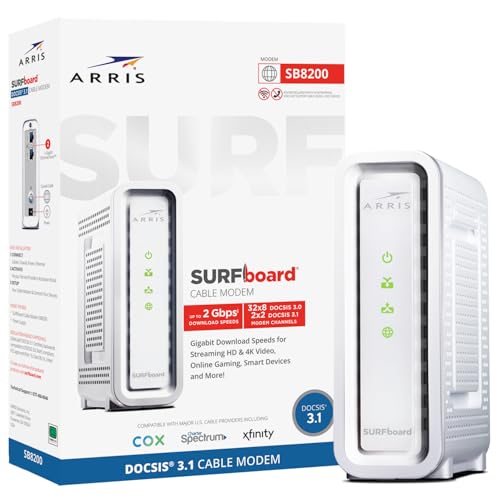
The SB8200 is the safe default for most cable homes. It is a DOCSIS 3.1 modem with 32×8 channel bonding, approved by Xfinity, Cox, Spectrum and most other major US cable providers, and ARRIS rates it for internet plans up to 1 Gbps. Its standout feature is the pair of 1-Gigabit Ethernet ports: with a router that supports link aggregation, the two ports can combine for faster wired throughput, and they give you flexibility the single-port modems below cannot. It is a modem only, so you keep your existing router or choose your own, which fits the upgrade path the guide above recommends. A two-year warranty is included in the box. Choose the SB8200 if your plan is at or near gigabit speed and you want a widely approved modem that will not need replacing the next time your provider raises speeds.
View ARRIS SURFboard SB8200 on Amazon
2. NETGEAR Nighthawk CM2000 — Best for Multi-Gig Plans
The CM2000 exists for the plans the SB8200 cannot fully feed. It is a DOCSIS 3.1 modem built for cable plans up to 2.5 Gbps, and its single Ethernet port is a 2.5-Gigabit port, so a Wi-Fi 6 or Wi-Fi 7 router with a matching port can actually use everything a multi-gig plan delivers. That directly answers the guide’s warning that one gigabit port can cap a very fast plan. It works with all major cable providers, including Xfinity, Spectrum and Cox, and like the others here it is a modem only, with no built-in Wi-Fi. The premium only makes sense if your provider sells tiers above 1 Gbps in your area now or you expect them soon. If they do, this is the modem that keeps the coax side of your network from becoming the bottleneck for years.
View NETGEAR Nighthawk CM2000 on Amazon
3. Motorola MB8600 — Best for Gigabit Plans
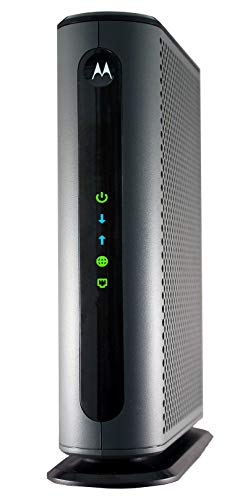
Motorola’s MB8600 is the other proven DOCSIS 3.1 workhorse, certified for Comcast Xfinity, Cox and Charter Spectrum and rated for cable plans up to 1,000 Mbps. It pairs DOCSIS 3.1 with full 32×8 DOCSIS 3.0 bonding, which gives it strong headroom on busy neighborhood nodes in the evening, and it carries a two-year manufacturer warranty. The one compromise to know about is the single 1-Gigabit Ethernet port: there is no second port for link aggregation, so the practical ceiling to one router is gigabit speed, which still fully covers the plans it is approved for. Motorola also points out that owning the modem ends the monthly rental charge many providers add. Pick the MB8600 if you want a set-and-forget gigabit modem from the other big name in cable hardware and do not need multi-gig ports.
View Motorola MB8600 on Amazon
4. NETGEAR CM1000 — Best Value DOCSIS 3.1
The CM1000 is the least expensive way in this group to get DOCSIS 3.1, the current standard the guide tells you to confirm before buying. It supports plans up to 1 Gbps, is backward compatible with DOCSIS 3.0 service, and is certified with all major providers including Xfinity, Spectrum and Cox. In practice it covers the same gigabit tiers as the SB8200 and MB8600; what you give up is the second Ethernet port and link aggregation, which only matters if you plan to feed two wired devices or aggregate ports on a high-end router. For the common setup of one modem feeding one router, that trade is easy to accept. Choose the CM1000 if you want to stop renting, gain the newer standard’s better handling of busy evenings, and keep the purchase price as low as possible.
5. NETGEAR CM500 — Best Budget Pick
Not every home pays for gigabit service, and for plans up to roughly 400 Mbps the CM500 is the sensible budget buy. It is a DOCSIS 3.0 modem with 16×4 channel bonding and a maker-rated ceiling of 680 Mbps, which leaves comfortable headroom over the 300 to 400 Mbps tiers it is sold for. It is certified for Xfinity and Cox and works with other major providers, but confirm your provider and tier on their approved list first, exactly as the guide advises. The honest limits: DOCSIS 3.0 is the older standard, and this modem will not suit a future gigabit upgrade, and it does not support bundled voice service. If your current plan is modest and likely to stay that way, the CM500 pays for itself against rental fees quickly and asks for nothing more.
What to Look For
| Factor | Why it matters | What to check |
|---|---|---|
| Standard support | Newer standards carry more data and handle busy evenings better | Confirm which DOCSIS generation the modem supports and which your provider uses |
| Speed headroom | A modem below your plan tier becomes the bottleneck | Compare the maker’s stated maximum with the speed tier you pay for |
| Provider compatibility | Providers keep lists of approved devices | Look up the exact model on your provider’s list before buying |
| Channel bonding | More bonded channels move more traffic at once | Read the downstream and upstream channel counts in the listing |
| Ethernet port | A single gigabit port can cap a very fast plan | Look for a faster port if your plan is near or above that limit |
| Modem only or combo | Combo units save space but are harder to upgrade piece by piece | Decide whether you want a separate router and plan your shelf space |
Setup and Care Tips
- Write down your account number and the modem’s identification numbers before calling your provider to activate it.
- Place the modem where the coax line is short and has few splitters.
- Use a surge protector with the power adapter and keep the vents clear.
- Connect a computer by cable first, then add wireless later.
- Power-cycle the modem only when your provider asks, and note the light patterns for support.
Mistakes to Avoid
- Buying a model that is not on your provider’s approved list.
- Choosing a unit that supports far less speed than your plan.
- Ignoring how many splitters sit on the coax line.
- Keeping a rented unit out of habit when owning one could suit you better.
- Forgetting that phone service through the provider may need voice support in the modem.
DOCSIS Versions Explained in Plain English
Almost every cable modem lists a DOCSIS version, and that single label tells you a lot about what the hardware can do. DOCSIS is the standard cable networks use to carry internet traffic over coaxial lines. Version 3.0 is older and relies on bonding several channels together to raise speed. Version 3.1 is newer, adds more efficient signalling and is built to handle higher speeds, which is why it appears on most modern modems.
A 3.1 modem is generally able to work on networks that still use 3.0 technology, so buying a newer unit does not usually lock you out of an older provider. The reverse is not always true: if your provider has moved to faster tiers, an older modem may become the limit. Check your provider’s list of supported devices to see which versions it accepts.
Think about your own plan rather than the biggest number you can find. If your plan tops out at a modest speed, a 3.0 modem with enough channels can still serve you. If you plan to upgrade, a 3.1 model gives breathing room for years.
Channel Bonding and What the Numbers Mean
Listings often show figures such as 32 by 8 or 24 by 8. Those numbers describe how many downstream and upstream channels the modem can bond. More bonded channels mean more capacity to carry data at once. For fast plans, a modem with fewer channels may not reach the speed you pay for.
The easiest way to avoid guesswork is to compare the modem’s stated maximum speed with the speed tier your provider sells, then leave a margin. Real-world results depend on line quality, how busy your local network is and your own equipment, so treat the stated speeds as ceilings rather than promises.
- Match the modem’s capacity to your plan, with room to grow.
- Check that the provider lists the model as compatible.
- Look at upstream capability if you upload large files or do video calls.
Checking Ethernet Ports and Multi-Gig Support
The port that connects your modem to your router can become a hidden bottleneck. A standard gigabit Ethernet port carries up to one gigabit per second. If your plan is faster than that, you need a modem with a faster port, often described as multi-gig, plus a router that can accept it.
Some modems offer two Ethernet ports and a feature called link aggregation, which combines them for more total throughput when your router supports the same feature. This is a niche setup, and most households do not need it. Read the listing carefully to learn which ports exist and which cable type the maker suggests for them. A quality Ethernet cable of an appropriate category is a small detail that avoids silly problems later.
| Home situation | What to look for |
|---|---|
| Modest plan, a few devices | Provider-approved modem, gigabit port |
| Gigabit plan, many devices | DOCSIS 3.1, strong channel count, matching router |
| Plan above one gigabit | Multi-gig port and a router that supports it |
| Home office with uploads | Good upstream capability and stable signal |
Modem Versus Gateway: Choosing the Right Box
A modem only brings the connection into your home. A gateway combines a modem and a Wi-Fi router in one case. Gateways are convenient and use less space, but you are locked into whatever Wi-Fi they provide, and an upgrade means replacing the whole unit.
A separate modem and router give flexibility. You can upgrade the router when Wi-Fi standards improve without touching the modem, and place the router in a better spot for coverage. The trade-off is another box and another power adapter.
If you already own a good router, a plain modem is the logical choice. If you want a single device and have a small home, a gateway may be enough. Either way, check that it is on your provider’s approved list.
Phone Service and Special Provider Requirements
Some providers deliver voice service over the same line, using a modem with built-in telephone ports. A standard data-only modem will not provide that feature. If you rely on a home phone through your cable provider, ask whether you need a model with voice support or a separate adapter, and confirm which models your provider accepts.
Provider rules differ between regions, and rules change over time. A phone call or visit to your provider’s support page is the most reliable way to confirm what your account permits.
Activation, Placement and Setup Steps
Installing your own modem is usually simple. The exact process depends on your provider, so follow its instructions, but the general pattern is like this.
- Disconnect the rented unit and remove its power.
- Connect the coaxial cable to the new modem and tighten it by hand.
- Plug in the power adapter and wait for the lights to settle.
- Contact the provider or use its activation portal, giving the modem’s identifying numbers from the label.
- Connect your router with an Ethernet cable and test your connection.
Place the modem where air can circulate, away from heat sources and from damp areas. Avoid stacking it under other electronics. Keep coaxial runs as short and direct as practical, and avoid sharp bends. Extra splitters on the line can weaken the signal, so remove any you do not need and ask your provider if you are unsure what is on the line.
Lights, Reboots and Basic Troubleshooting
Most modems have indicator lights for power, downstream, upstream and online status. The manual explains each pattern. A light that keeps blinking for a long time usually means the modem is struggling to lock onto a signal.
Try the simple steps first
Power the modem off for a short period, then power it on again and give it several minutes. Check that the coax connection is snug and that the cable is not damaged. Disconnect the router to see if the modem alone connects.
Know when to call the provider
If lights stay abnormal, speeds are far below your plan or the connection drops again and again, the issue may sit on the line or the provider’s side. Many providers can check signal levels remotely, and a technician can inspect outside lines. Do not open the modem case yourself.
Common Mistakes and Who Should Skip Which Option
- Buying without checking compatibility: an unsupported modem may not activate.
- Pairing a fast modem with an old router: the router becomes the limit.
- Ignoring the rental fee comparison: compare what you pay your provider over a couple of years to the cost of owning.
- Using too many splitters: they can reduce signal strength.
Skip a standalone modem if you prefer a single managed box and your provider handles all support for its own equipment. Skip older DOCSIS 3.0 models if your plan is fast or likely to rise soon.
Owning Versus Renting: A Simple Way to Work It Out
Rental fees are small each month, which is exactly why they go unnoticed. To compare fairly, take your provider’s monthly equipment fee and multiply it by the number of months you expect to stay. Compare that total to the cost of a modem you would own, and remember that an owned unit can usually be used again if you stay with the same kind of service.
Ownership does have trade-offs. You become responsible for choosing a compatible model, and your provider may offer less direct help with equipment it did not supply. On the other side, you avoid fees and can choose a unit with better features. If you plan to move soon to an area served by a different provider, check that your modem will still be accepted there before you buy.
A Worked Example: Upgrading a Busy Household
Imagine a family of four with several phones, a couple of laptops, a streaming box and a games console. They rent a modem and complain about slowdowns during evenings. The first step is to find out which plan they have and which models the provider supports. Next they compare the plan’s top speed to the capacity listed on a few supported modems.
They find that their rented unit is an older design with limited channels, while their plan is quite fast. A DOCSIS 3.1 modem from the approved list matches the plan comfortably. Because their router is several years old, they also check whether it can handle the plan’s speed. If the router is the weak link, replacing it matters more than changing the modem. After installation they compare results at different times of day, since evening congestion on the local network can slow any connection, no matter what equipment they own.
Power Protection and Placement Habits
A surge protector is a sensible companion for modems and routers, because storms and power fluctuations can damage electronics. Choose one designed for this use and follow its instructions. Some people also protect the coaxial line with a suitable device, though any work involving grounding or wiring belongs with a licensed professional or your provider’s technician.
Avoid putting a modem on the floor where dust gathers, or near a window where sun can heat it. A shelf with open space around it works well. Heat is a common source of trouble in network gear, so good airflow is a simple habit that pays off.
Common Myths Worth Dropping
- A better modem makes Wi-Fi faster: not directly. The modem handles the connection to your provider, while Wi-Fi speed depends on the router and where it sits.
- More channels always means faster internet: only if your plan and line can use them.
- Any modem works anywhere: providers keep lists of approved devices.
- The newest model fixes every problem: faults in outside lines or home wiring stay faults.
Short Glossary
- Downstream: data coming into your home.
- Upstream: data going out from your home.
- Coax: the round cable that carries the cable signal.
- Firmware: the built-in software, which on many modems is managed by your provider.
- MAC address: an identifying number printed on the label, often needed to activate the device.
Final Checklist Before You Order
- Confirm your plan speed and tier.
- Find your provider’s list of supported modems.
- Choose a DOCSIS version with room for future upgrades.
- Check the Ethernet port speed against your plan and router.
- Decide between modem only and gateway.
- Work out the cost of renting against owning.
- Read the setup guide so activation goes smoothly.
When Wi-Fi Is the Real Problem
If wired devices run well but wireless ones struggle, look at the router and its position before blaming the modem. A central, raised spot with few walls in the way helps. Keep it away from large metal objects and from other electronics that cause interference.
FAQ
Do I need a separate router?
A modem brings the connection into your home, while a router shares it among devices and handles wireless coverage. Combo units do both jobs, but separate pieces let you replace one without the other. In a small apartment, a combo unit can be enough. In a larger home with several floors, a separate router placed in a central spot often gives steadier coverage, and you can upgrade it later without touching the modem.
Can any modem work with any provider?
No. Providers support specific models, and some cable systems differ in how they provision devices. Always check the provider’s list and the standard it uses before you order.
Choosing Cable modems With More Confidence
The picks above give you a shortlist, but the right choice among cable modems usually comes down to how you will actually use the product in your home network, week after week. A model that looks ideal in a comparison table can disappoint if it does not suit your space, your routine or the other items it has to work alongside. This section slows the decision down and looks at the practical checks experienced buyers make before ordering, so you can weigh the options in this guide against your own situation rather than against a generic idea of what is best.
Start with fit and compatibility, because those are the checks that rule options in or out. For cable modems, that means confirming the measurements, connections or mounting points described in the sections above against what you already have. Your internet provider must approve the model for your address and plan. Write the key numbers down before you shop, compare them line by line with the maker notes for each pick, and treat any mismatch as a reason to pause rather than something to solve after delivery. Most returns in this category start with a skipped measurement, not with a faulty product.
Next, think about build and materials in terms of the work involved. Heavier construction is not automatically better, and a lighter design is not automatically flimsy; what matters is whether the materials suit the job. The modem only handles the incoming connection, so most homes still need a router for wi-fi. Look at how the parts that move, flex or take weight are described above, and favour the option whose construction matches the hardest job you will realistically ask of it, not the easiest demonstration job and not an extreme case you may never meet.
Ease of everyday use deserves more weight than it usually gets. Ask how the product behaves on an ordinary day: how it is carried, opened, adjusted, cleaned or put away, and whether those small actions feel simple or fiddly. Ventilation matters because modems run all day, every day. Features that save a few seconds once may matter less than a design you can live with daily. If several people will share the same cable modem, consider the least experienced user in the group, because a product only one person can operate comfortably tends to sit unused the rest of the time.
Finally, weigh total ownership rather than the headline appeal of a single feature. Consumables, replacement parts, accessories and storage all shape what a purchase costs you in time and effort over its life. Check what is included in the box for each pick above, what you would still need to add, and whether those extras are easy to find. A slightly simpler option that you can maintain properly will usually serve you better than a feature-heavy one that depends on parts or routines you will not keep up with.
Matching Cable modems to Real Situations
Different households and users ask very different things of the same product. The scenarios below describe the most common situations readers mention for cable modems, and the qualities that tend to matter most in each one. Find the scenario closest to yours, then re-read the matching pick descriptions above with those priorities in mind.
For beginners and first-time buyers
If this is your first purchase in the category, simplicity is your friend. Choose the option among the cable modems above whose setup and controls are described in the most straightforward terms, and avoid paying attention to advanced features you cannot yet judge. A forgiving first purchase teaches you what you actually value, and it leaves you better informed if you upgrade later. Keep the packaging and instructions until you have used the product through a full normal cycle, and note which small frustrations appear, because those notes are the best buying guide you will ever write for yourself.
For frequent, heavy use
If the product will be used most days, durability and serviceability move to the top of the list. Look again at the picks above and favour the ones whose construction, moving parts and wear points are described most convincingly. Frequent use also makes cleaning and routine checks more important, since small neglect compounds quickly. It is worth choosing a design you can inspect easily, because catching a loose fitting, a worn edge or a tired component early is far easier than dealing with a failure in the middle of a job you cannot postpone.
For small spaces
Space changes the ranking. In a compact room, garage or vehicle, the best option is often the one that stores neatly, moves easily or does double duty, rather than the largest or most powerful. Measure not only where the product will live in use, but also where it will go when it is not needed, and how you will get it from one place to the other. Among the cable modems in this guide, the picks described as compact, folding, lightweight or space-saving deserve a second look if your storage is tight, even if a bigger option looks more capable on paper.
For shared or family use
When several people rely on the same purchase, consistency matters. Choose cable modems that behave predictably, tolerate slightly different techniques and do not depend on one person’s careful habits to work well. Clear instructions, obvious controls and sturdy everyday handling all help. It also helps to agree on simple house rules from the start: where the product lives, who cleans or checks it, and what to do when something seems wrong. Shared products that everyone understands tend to last longer and cause fewer arguments than technically superior ones that only one person has mastered.
Setup, First Use, and Getting the Basics Right
Good setup is unglamorous, but it decides much of your experience with cable modems. Begin by unpacking everything in a clear space and checking the contents against the list in the instructions before anything is assembled, fitted or switched on. Missing brackets, seals, tools or small parts are far easier to sort out at this stage than halfway through a job. Photograph the layout of parts as you unpack if the design is unfamiliar; that simple record helps if you later need to repack, return or reassemble anything.
Work through the maker’s instructions in order, even if the steps look obvious. Manufacturers sequence steps for a reason, often because a later adjustment depends on an earlier one being done loosely, tightly or in a particular position. Keep the tools the instructions call for within reach, and avoid forcing any part that resists: resistance usually means misalignment, the wrong part or a step done out of order. For anything involving fixings, power, heat, water or weight-bearing parts, follow the safety guidance in the manual for your exact model rather than general advice, including this guide.
On first use, start gently. Run the product through its easiest normal task before asking it to handle the hardest one, and watch, listen and feel for anything unusual: vibration, noise, smell, looseness, uneven movement or results that do not match the description. Small oddities caught on a calm first run are usually simple adjustments. Keep notes on the settings, positions or arrangement that worked, because repeating a good setup is much easier than rediscovering it each time. If the product has adjustable parts, change one thing at a time so you can tell what made the difference.
Finish the setup stage by creating a simple home base for the product and its essentials: the manual, any included tools, spare parts and cleaning items, kept together in one known place in your home network. Label anything that is not obvious, and store small parts in a closed container so they are not separated from the main item. This ten-minute habit prevents most of the frustration owners report months later, when a needed accessory cannot be found or an instruction booklet has long since disappeared into a drawer of unrelated paperwork.
Care, Cleaning, Storage, and Routine Checks
Most cable modems do not fail suddenly; they decline gradually through skipped cleaning, loose fittings and poor storage. A light, regular routine protects performance far better than an occasional deep rescue. After each use, deal with the obvious: remove dirt, moisture, residue or debris before it hardens, dries on or works into moving parts, using only the cleaning methods and products the maker allows for the materials involved. When in doubt, start with the mildest method, a soft cloth and plain water where the instructions permit it, and test any cleaner on a hidden area first.
Build a short periodic check into your routine, monthly for frequently used items and at the start of each season for stored ones. Look over joints, fasteners, seals, edges, cords, hinges or other moving and load-bearing parts, depending on the design, and tighten, clean or replace anything the manual identifies as a wear item. Note changes rather than relying on memory: a new rattle, a stiff movement or a mark that was not there before is information. Acting on small changes early keeps them small, and it also keeps the product safer and more pleasant to use.
Storage deserves the same care as use. Keep the product clean and fully dry before it is put away, in a place protected from damp, extreme heat, direct sun and knocks, with enough room that it is not crushed or bent by heavier items. Keep accessories with the main product, and avoid storing anything under tension, pressure or load unless the maker specifically allows it. If the product will sit unused for a long stretch, check it occasionally anyway; seals dry out, batteries in associated devices fade, fabrics and foams suffer in damp air, and pests find undisturbed corners attractive.
Know when maintenance ends and replacement begins. Consumable parts are designed to be renewed, and replacing them on schedule is normal ownership, not failure. Structural damage, cracked housings, frayed cords, distorted frames or anything that affects safe operation is different: stop using the product and follow the maker’s guidance or a qualified repair route. Keeping a brief record of purchase date, parts replaced and checks done makes warranty questions, resale and repeat purchases much simpler, and it helps you judge honestly whether a product has earned its place or reached the end of its useful life.
How the Picks in This Guide Compare With Each Other
Readers often ask for a single winner, but the more useful question is which pick suits which job. The notes below restate the roles the guide above assigns to each option, so you can compare them side by side without re-reading every section. No new claims are added here; use these summaries to shortlist, then confirm the details in the full descriptions and the maker’s own listing before you decide.
ARRIS SURFboard SB8200 is presented above as best overall: Gigabit plans with room to grow. Put it at the top of your list if that description sounds like your situation in your home network, and weigh it against the neighbouring picks on the points the full review raises, such as fit, included parts and everyday handling. If the role sounds appealing but the details in its section raise a doubt for your case, that doubt is worth trusting, because the same strength that suits one buyer is often exactly what makes a product wrong for another.
NETGEAR Nighthawk CM2000 is presented above as best for multi-gig plans: Plans above 1 Gbps and 2.5G routers. Put it at the top of your list if that description sounds like your situation in your home network, and weigh it against the neighbouring picks on the points the full review raises, such as fit, included parts and everyday handling. If the role sounds appealing but the details in its section raise a doubt for your case, that doubt is worth trusting, because the same strength that suits one buyer is often exactly what makes a product wrong for another.
Motorola MB8600 is presented above as best for gigabit plans: Stable DOCSIS 3.1 for Xfinity, Cox and Spectrum. Put it at the top of your list if that description sounds like your situation in your home network, and weigh it against the neighbouring picks on the points the full review raises, such as fit, included parts and everyday handling. If the role sounds appealing but the details in its section raise a doubt for your case, that doubt is worth trusting, because the same strength that suits one buyer is often exactly what makes a product wrong for another.
NETGEAR CM1000 is presented above as best value docsis 3.1: Future-proofing on a smaller budget. Put it at the top of your list if that description sounds like your situation in your home network, and weigh it against the neighbouring picks on the points the full review raises, such as fit, included parts and everyday handling. If the role sounds appealing but the details in its section raise a doubt for your case, that doubt is worth trusting, because the same strength that suits one buyer is often exactly what makes a product wrong for another.
NETGEAR CM500 is presented above as best budget: Plans up to about 400 Mbps. Put it at the top of your list if that description sounds like your situation in your home network, and weigh it against the neighbouring picks on the points the full review raises, such as fit, included parts and everyday handling. If the role sounds appealing but the details in its section raise a doubt for your case, that doubt is worth trusting, because the same strength that suits one buyer is often exactly what makes a product wrong for another.
When two picks still look close after that comparison, decide on the practical tiebreakers: which one fits your measured space or existing equipment with less adaptation, which one you can clean and maintain with the routine described above, and which one’s included accessories leave you least to buy separately. Those unglamorous factors decide satisfaction far more often than a single headline feature. It also helps to imagine the product on its worst day in your routine, tired, rushed or short of space, and choose the option that still behaves well under those conditions.
Common Mistakes and How to Avoid Them
The most common mistake with cable modems is buying for an imagined use instead of the real one. A product chosen for an occasional ambitious project, a hoped-for hobby or a room that has not been rearranged yet will spend its life being worked around. Be honest about frequency: how often the product will be used this month, not in an ideal month. If the honest answer is rarely, the simpler, easier-to-store picks above deserve more credit. If the answer is daily, the sturdier, easier-to-maintain options earn theirs. Matching the purchase to the real routine is the single decision that predicts satisfaction best.
A second mistake is ignoring the supporting cast. Many products depend on surfaces, power, ventilation, clearance, compatible accessories or another item working properly, and disappointment often belongs to the support act rather than the headline purchase. Before ordering, walk through a complete use in your head, from storage to setup to cleaning to putting away, and list everything that journey touches. Check each item on that list against your space and equipment. This five-minute rehearsal catches the missing adapter, the too-short reach, the awkward doorway and the absent storage spot while they are still free to fix.
Over-tightening, overloading and over-cleaning form a third family of mistakes. More force is rarely the answer: fixings strip, seals distort, finishes suffer and delicate parts bend when enthusiasm replaces the manual’s guidance. Respect the limits the maker states for your model, use the gentlest effective cleaning method first, and stop and reassess when something resists. Likewise, resist modifying a product to make it do a job it was not designed for. The picks in this guide cover a range of intended uses, and choosing the right one is safer and cheaper than adapting the wrong one.
Finally, many buyers skip the early check window. Use a new purchase promptly and normally in its first days, while packaging, receipts and return options are still to hand. Problems that appear immediately are usually the easiest to resolve with the seller or maker, and a product that is wrong for you is easiest to exchange before it has been heavily used, marked or separated from its accessories. Keep a note of order details and model information in the same place as the manual. It sounds administrative, but future you, facing a warranty question or a replacement part, will be grateful for those two minutes of organisation.
More Questions Buyers Ask About Cable modems
What should I check first when my cable modem arrives?
Check the contents against the packing list, inspect for transit damage, and confirm that the model, size and variant match what you ordered before assembling or using anything. Photograph anything that looks wrong before you disturb the packaging. Then read the manual fully once, even briefly, because model-specific warnings and setup order are easy to miss when you skim. Only after those checks should you set the product up and run a gentle first use, watching for anything that does not match the description in this guide or the maker’s listing.
How do I know which size or version of cable modems I need?
Base the decision on measurements and compatibility information you can verify: the space available, the equipment or vehicle it must work with, and the maker’s own fit guidance for your exact situation. Avoid guessing from a similar-looking model or a friend’s purchase, because small differences in year, trim, room layout or existing fittings can change the answer. If the maker offers a size or fit guide, use it with your own written measurements beside it, and when you fall between two options, consider how you will actually use the product most days rather than on its biggest day.
Can a beginner use cable modems confidently?
In most cases, yes, provided the beginner chooses a straightforward model, follows the manual in order and starts with the easiest normal task rather than the hardest. The picks above include options described as simpler or more basic, and those are sensible starting points. Confidence grows quickly with a few careful first uses, especially if you keep notes on what worked. What beginners should avoid is improvising around safety guidance, skipping setup steps or modifying the product; if a step is unclear, the maker’s support material for the exact model is the right place to resolve it.
How often do cable modems need cleaning or checking?
Light cleaning after use is a good default for almost everything in this category, with a fuller check at intervals that suit how hard the product works: monthly for daily-use items, seasonally for stored ones. The manual for your model is the authority on specific parts and intervals, especially for anything involving filters, seals, blades, heating elements, electrical parts or load-bearing components. The pattern matters more than the exact day: small, regular attention prevents the gradual decline that owners often mistake for a product simply wearing out before its time.
What is the difference between the cheapest and most capable picks here?
In this guide the range is organised by role rather than by a simple quality ladder. Simpler picks usually cover the core job with fewer accessories, adjustments or refinements, while more capable picks add convenience, capacity or construction suited to heavier use. Neither end is automatically the smarter buy. The right question is whether the extra capability solves a problem you actually have, in {setting}, often enough to justify living with a larger, heavier or more complex product. If it does not, the simpler pick will usually feel like the better purchase every day you use it.
When is it time to replace rather than repair?
Replace consumable and wear parts whenever the maker treats them as renewable; that is normal maintenance. Consider replacement of the whole product when the structure, housing, frame or core mechanism is damaged, when safe operation is in doubt, or when repairs would require parts that are no longer available for your model. Also weigh honesty about fit: a product in perfect condition that no longer suits your space, routine or household has already done its job. Passing it on and choosing a better-matched replacement is often wiser than years of working around a mismatch.
The Short Version
Match the modem to your provider’s list and your speed tier, look for a newer standard and enough channels, and decide early whether you want a combo unit or a separate router. A clear match matters more than extra features you will never use. It also helps to keep the original box and receipt until activation is complete.
Related Guides
- 6 Best Functional Trainers for Home Gyms: Cable Stations (2026)
- 6 Best Refrigerator Locks: Child Safety and Cable Locks (2026)
- How to Plan Cable Access Behind Living Room Furniture
- How to Choose the Best 8×42 Binoculars: Buyer's Guide (2026)
- How to Choose the Best Activity Centers: Buyer's Guide (2026)