A basic student laptop has one job: get through the school day without drama. It needs to run a browser with a dozen tabs, a word processor, video calls, and the occasional presentation, and it needs to do that on battery for a full day of classes. It does not need a gaming graphics card, a 4K screen, or a premium aluminum body. What it needs is a decent processor, enough memory to keep tabs open, a solid-state drive that boots in seconds, and a keyboard that survives four years of essays.
The laptops below are all affordable, full-size machines with 15.6-inch or 14-inch screens, plus one Chromebook for students whose school runs on Google’s tools. They cover the two sensible choices for student computing: a Windows laptop, which runs everything, and a Chromebook, which is cheaper, simpler, and lasts longer on battery but only runs web apps and Android apps. Every laptop here has at least 8GB of memory except the Chromebook, which is designed to need less, and every one has a solid-state drive.
Before you buy, check what your school actually requires. Some courses need Windows for specific software — engineering, design, and some science programs do — while others are happy with a Chromebook and a browser. Check the weight too: a 15.6-inch laptop is fine in a dorm room but heavy in a backpack all day, so students who walk between classes may prefer the 14-inch Chromebook or the lightest Windows machine here. And buy the memory you need now: 8GB is the minimum for comfortable multitasking, and most of these laptops cannot be upgraded later.

In this guide
Quick picks: best basic student laptops
| # | Product | Where to buy |
|---|---|---|
| 1 | Lenovo IdeaPad 1 Laptop | Check on Amazon |
| 2 | HP 15 Laptop, 15.6" FHD Anti-Glare, Intel Core i5, 8GB RAM, 256GB PCIe SSD | Check on Amazon |
| 3 | acer Aspire 3 A315-24P-R7VH Slim Laptop | Check on Amazon |
| 4 | ASUS Vivobook 15 Laptop – 15.6” FHD Display- Intel® Core™ 3 100U – 8GB RAM – 256 GB SSD – Windows 11 Home – Cool Silver | Check on Amazon |
| 5 | Lenovo IdeaPad Slim 3 15.6" FHD Laptop, AMD Ryzen 5 40, 8GB DDR5 RAM, 512GB SSD, AMD Radeon 610M, Windows 11 Home, Copil | Check on Amazon |
| 6 | HP Chromebook 14 Laptop, Intel Celeron N4120, 4 GB RAM, 64 GB eMMC, 14" HD Display, Chrome OS, Thin Design, 4K Graphics | Check on Amazon |
| 7 | Dell 15.6 Laptop, FHD, Intel Core 3 100U, 8GB RAM, Windows 11 Home | Check on Amazon |
Quick comparison
| # | Product | Best for |
|---|---|---|
| 1 | Lenovo IdeaPad 1 Laptop 15.6-inch Ryzen 5 | Best overall basic student laptop |
| 2 | HP 15 Laptop 15.6-inch Intel Core i5 | Best HP student laptop |
| 3 | Acer Aspire 3 Slim Laptop 15.6-inch Ryzen 3 | Best budget Windows student laptop |
| 4 | ASUS Vivobook 15 Laptop 15.6-inch Intel Core 3 | Best ASUS student laptop |
| 5 | Lenovo IdeaPad Slim 3 Laptop 15.6-inch Ryzen 5 | Best student laptop with more storage |
| 6 | HP Chromebook 14 Laptop | Best Chromebook for students |
| 7 | Dell 15.6 Laptop Intel Core 3 | Best Dell student laptop |
The table above is a shortcut, not a verdict. Two products can look close on a spec line and feel very different in daily use, so use it to narrow the field to two or three candidates, then read those full sections before deciding.
1. Lenovo IdeaPad 1 Laptop 15.6-inch Ryzen 5
The Lenovo IdeaPad 1 is the default student laptop: a 15.6-inch Full HD machine with an AMD Ryzen 5 processor, 8GB of DDR5 memory, and a 256GB SSD, at a price that leaves room in a student budget for the rest of the setup. It runs Windows 11, so it handles Word, Excel, Zoom, and a browser full of research tabs without complaint, and the numeric keypad is a genuine help for accounting and science students.
On paper, the headline facts are straightforward: 15.6-inch Full HD display; AMD Ryzen 5 processor, 8GB DDR5; 256GB SSD for fast boots; Numeric keypad for spreadsheets; Lightweight with long battery life. None of that makes it the right pick for everyone, but it does define the audience clearly. If those headline facts match what you actually need day to day, this is a shortlist candidate rather than a curiosity. If they do not match, the rest of this section will make that obvious quickly, and you can move on to the next pick without losing anything.
What stands out
- 15.6-inch Full HD display
- AMD Ryzen 5 processor, 8GB DDR5
- 256GB SSD for fast boots
- Numeric keypad for spreadsheets
- Lightweight with long battery life
The balance is what makes it the default. The Ryzen 5 is fast enough for everything a student does and more, the 8GB of DDR5 memory keeps a dozen browser tabs open without stalling, and the SSD means the laptop boots in seconds and opens apps instantly. The 15.6-inch Full HD screen is big enough to split-screen a document and a source side by side, and the laptop is light enough to carry between classes. Lenovo’s keyboards are among the best at this price, which matters when the laptop’s main job is typing.
Before you buy, it is worth checking the practical details that cause most returns. Confirm that the listing shows the exact model name and configuration you expect, because similar models often share a name and differ in one specification that matters. Check the size and the connections against your setup, and make sure you know what is included in the box and what is sold separately. Read the return policy before ordering, and when the product arrives, test it with your real setup in the first few days rather than leaving it in the box. A quick check at the start saves a return later, and it is the simplest way to be sure the product you receive is the one you meant to buy.
Trade-offs to weigh
The screen is Full HD rather than brighter or higher-resolution, so it is fine indoors but struggles in direct sunlight. The 256GB SSD fills up faster than you expect once you add photos, videos, and course files, so an external drive or cloud storage is a sensible companion. And the plastic body, while light, will show wear over four years of daily use — a sleeve or a case is worth the small cost.
Who it fits best
Best for most students: the affordable, capable Windows laptop that handles classes, essays, and research without fuss.
Check price on Amazon: Lenovo IdeaPad 1 Laptop

2. HP 15 Laptop 15.6-inch Intel Core i5
The HP 15 is HP’s answer to the student laptop: a 15.6-inch Full HD machine with an Intel Core i5 processor, 8GB of RAM, and a 256GB PCIe SSD. The anti-glare display is the feature students notice first — it cuts reflections in bright classrooms and libraries — and the Core i5 gives the laptop headroom for heavier work like large spreadsheets, photo editing, and video calls with screen sharing.
On paper, the headline facts are straightforward: 15.6-inch FHD anti-glare display; Intel Core i5 processor, 8GB RAM; 256GB PCIe SSD; Non-touch display, Intel UHD Graphics; Webcam and fast Wi-Fi built in. None of that makes it the right pick for everyone, but it does define the audience clearly. If those headline facts match what you actually need day to day, this is a shortlist candidate rather than a curiosity. If they do not match, the rest of this section will make that obvious quickly, and you can move on to the next pick without losing anything.
What stands out
- 15.6-inch FHD anti-glare display
- Intel Core i5 processor, 8GB RAM
- 256GB PCIe SSD
- Non-touch display, Intel UHD Graphics
- Webcam and fast Wi-Fi built in
The Core i5 is a step up from the budget processors in the cheapest student laptops, so the HP 15 stays responsive with a browser, a word processor, and a video call running at once. The anti-glare screen is genuinely useful in a classroom with windows, and the PCIe SSD keeps boots and app launches fast. HP’s support network is wide, which matters if the laptop needs a repair during term, and the 15.6-inch screen is big enough for split-screen work.
Before you buy, it is worth checking the practical details that cause most returns. Confirm that the listing shows the exact model name and configuration you expect, because similar models often share a name and differ in one specification that matters. Check the size and the connections against your setup, and make sure you know what is included in the box and what is sold separately. Read the return policy before ordering, and when the product arrives, test it with your real setup in the first few days rather than leaving it in the box. A quick check at the start saves a return later, and it is the simplest way to be sure the product you receive is the one you meant to buy.
Trade-offs to weigh
It is a full-size 15.6-inch laptop, so it is not the lightest machine to carry all day, and the battery life is adequate rather than outstanding — plan on charging during the day on heavy-use days. The 256GB SSD is the same capacity limit as the IdeaPad, so cloud storage or an external drive helps. And the display, while anti-glare, is a standard Full HD panel rather than a bright or color-accurate one.
Who it fits best
Best for students who want an Intel machine with a glare-free screen for bright classrooms and libraries.
Check price on Amazon: HP 15 Laptop, 15.6" FHD Anti-Glare, Intel Core i5, 8GB RAM, 256GB PCIe SSD

3. Acer Aspire 3 Slim Laptop 15.6-inch Ryzen 3
The Acer Aspire 3 is the budget Windows laptop: a slim 15.6-inch Full HD machine with a quad-core AMD Ryzen 3 7320U processor, 8GB of LPDDR5 memory, and AMD Radeon graphics. It is the cheapest full Windows laptop on this list, and it is the right choice when the budget is tight but the school needs Windows. The slim design makes it easier to carry than the chunkier budget laptops it replaces.
On paper, the headline facts are straightforward: 15.6-inch Full HD slim laptop; AMD Ryzen 3 7320U quad-core processor; 8GB LPDDR5 memory, AMD Radeon graphics; Slim design for carrying; Model A315-24P-R7VH. None of that makes it the right pick for everyone, but it does define the audience clearly. If those headline facts match what you actually need day to day, this is a shortlist candidate rather than a curiosity. If they do not match, the rest of this section will make that obvious quickly, and you can move on to the next pick without losing anything.
What stands out
- 15.6-inch Full HD slim laptop
- AMD Ryzen 3 7320U quad-core processor
- 8GB LPDDR5 memory, AMD Radeon graphics
- Slim design for carrying
- Model A315-24P-R7VH
The price is the point: this is the least expensive way into a full Windows laptop that can run Office, a browser, and video calls properly. The Ryzen 3 quad-core is fast enough for student work, the 8GB of fast LPDDR5 memory keeps multitasking smooth, and the slim body slips into a backpack without the bulk of older budget laptops. For essays, research, and classes, it does everything a student needs.
Before you buy, it is worth checking the practical details that cause most returns. Confirm that the listing shows the exact model name and configuration you expect, because similar models often share a name and differ in one specification that matters. Check the size and the connections against your setup, and make sure you know what is included in the box and what is sold separately. Read the return policy before ordering, and when the product arrives, test it with your real setup in the first few days rather than leaving it in the box. A quick check at the start saves a return later, and it is the simplest way to be sure the product you receive is the one you meant to buy.
Trade-offs to weigh
The Ryzen 3 is the slowest processor on this list, so heavy multitasking — a video call plus a dozen tabs plus a spreadsheet — can make it feel sluggish, and it is not the machine for video editing or large data work. The storage is not specified in the listing title, so check the configuration before buying. And the build is plastic and light, which keeps the price down but means the laptop needs a sleeve to survive four years in a bag.
Who it fits best
Best for students on the tightest budget who need a real Windows laptop for classes and essays.
Check price on Amazon: acer Aspire 3 A315-24P-R7VH Slim Laptop

4. ASUS Vivobook 15 Laptop 15.6-inch Intel Core 3
The ASUS Vivobook 15 is the slim, light option: a 15.6-inch Full HD laptop with an Intel Core 3 100U processor, 8GB of RAM, and a 256GB SSD, in a Cool Silver finish that looks more expensive than it is. The Vivobook line is ASUS’s everyday laptop, and this model is tuned for exactly what students do — browsing, writing, video calls, and media — in a body that is easy to carry and pleasant to look at.
On paper, the headline facts are straightforward: 15.6-inch FHD display, Cool Silver; Intel Core 3 100U processor, 8GB RAM; 256GB SSD, Windows 11 Home; Slim and light Vivobook design; Good keyboard for long typing sessions. None of that makes it the right pick for everyone, but it does define the audience clearly. If those headline facts match what you actually need day to day, this is a shortlist candidate rather than a curiosity. If they do not match, the rest of this section will make that obvious quickly, and you can move on to the next pick without losing anything.
What stands out
- 15.6-inch FHD display, Cool Silver
- Intel Core 3 100U processor, 8GB RAM
- 256GB SSD, Windows 11 Home
- Slim and light Vivobook design
- Good keyboard for long typing sessions
The design is the attraction: the Vivobook is slimmer and lighter than most budget 15.6-inch laptops, and the Cool Silver finish stands out in a lecture hall full of black plastic. The Core 3 100U handles student workloads well, the 8GB of RAM and the SSD keep the machine responsive, and the keyboard is comfortable for long essays. ASUS’s build quality at this price is solid, and the laptop feels like a step up from the cheapest options.
Before you buy, it is worth checking the practical details that cause most returns. Confirm that the listing shows the exact model name and configuration you expect, because similar models often share a name and differ in one specification that matters. Check the size and the connections against your setup, and make sure you know what is included in the box and what is sold separately. Read the return policy before ordering, and when the product arrives, test it with your real setup in the first few days rather than leaving it in the box. A quick check at the start saves a return later, and it is the simplest way to be sure the product you receive is the one you meant to buy.
Trade-offs to weigh
The Core 3 100U is an entry-level Intel processor, so it is fine for student work but not for heavy multitasking or demanding software. The 256GB SSD is the usual capacity limit at this price, and the display is a standard Full HD panel. Like other laptops here, the memory is not user-upgradeable in most configurations, so buy the 8GB model and plan around it.
Who it fits best
Best for students who want a slim, good-looking laptop for everyday classes and essays, at a budget price.

5. Lenovo IdeaPad Slim 3 Laptop 15.6-inch Ryzen 5
The Lenovo IdeaPad Slim 3 is the IdeaPad 1’s slimmer sibling with a bigger drive: a 15.6-inch Full HD laptop with an AMD Ryzen 5 processor, 8GB of DDR5 memory, and a 512GB SSD. The extra storage is the reason to choose it — 512GB holds a full degree’s worth of files, photos, and apps without the constant juggling a 256GB drive demands — and the Slim 3 body is lighter and thinner than the standard IdeaPad.
On paper, the headline facts are straightforward: 15.6-inch FHD laptop, AMD Ryzen 5; 8GB DDR5 RAM, 512GB SSD; AMD Radeon 610M graphics; Windows 11 Home, Copilot ready; Slim 3 design, lighter than the IdeaPad 1. None of that makes it the right pick for everyone, but it does define the audience clearly. If those headline facts match what you actually need day to day, this is a shortlist candidate rather than a curiosity. If they do not match, the rest of this section will make that obvious quickly, and you can move on to the next pick without losing anything.
What stands out
- 15.6-inch FHD laptop, AMD Ryzen 5
- 8GB DDR5 RAM, 512GB SSD
- AMD Radeon 610M graphics
- Windows 11 Home, Copilot ready
- Slim 3 design, lighter than the IdeaPad 1
The 512GB SSD is the headline: double the storage of the other Windows laptops here, which means no deleting files to make room for the next semester’s coursework. The Ryzen 5 and 8GB of DDR5 keep the machine fast, the slim design is easier to carry, and the Radeon 610M graphics handle video and light photo work. It is the laptop to buy when you want the IdeaPad’s reliability with room to grow.
Before you buy, it is worth checking the practical details that cause most returns. Confirm that the listing shows the exact model name and configuration you expect, because similar models often share a name and differ in one specification that matters. Check the size and the connections against your setup, and make sure you know what is included in the box and what is sold separately. Read the return policy before ordering, and when the product arrives, test it with your real setup in the first few days rather than leaving it in the box. A quick check at the start saves a return later, and it is the simplest way to be sure the product you receive is the one you meant to buy.
Trade-offs to weigh
It costs more than the IdeaPad 1, which is the price of the extra storage and the slimmer body. The display is the same Full HD panel, so there is no upgrade in brightness or color. And like the IdeaPad 1, the plastic body benefits from a sleeve, and the battery life is good rather than exceptional.
Who it fits best
Best for students who want more storage and a slimmer body than the basic IdeaPad, without stepping up to a premium price.
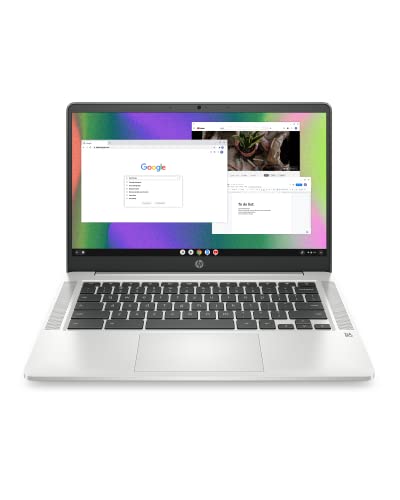
6. HP Chromebook 14 Laptop
The HP Chromebook 14 is the Chromebook option: a 14-inch laptop running Chrome OS, with an Intel Celeron N4120 processor, 4GB of RAM, and 64GB of eMMC storage. It boots in seconds, lasts all day on battery, and runs Google Docs, Classroom, and the web apps most schools use. It is the cheapest laptop on this list and the lightest to carry, and for students whose schoolwork lives in a browser, it is all the computer they need.
On paper, the headline facts are straightforward: 14-inch HD display, thin design; Intel Celeron N4120, 4GB RAM, 64GB eMMC; Chrome OS, fast boot and long battery; Thin and light for carrying all day; Built for Google Classroom and web apps. None of that makes it the right pick for everyone, but it does define the audience clearly. If those headline facts match what you actually need day to day, this is a shortlist candidate rather than a curiosity. If they do not match, the rest of this section will make that obvious quickly, and you can move on to the next pick without losing anything.
What stands out
- 14-inch HD display, thin design
- Intel Celeron N4120, 4GB RAM, 64GB eMMC
- Chrome OS, fast boot and long battery
- Thin and light for carrying all day
- Built for Google Classroom and web apps
The simplicity is the point. Chrome OS needs no antivirus, updates itself, and cannot be bogged down by the software clutter that slows Windows laptops over time. The battery lasts a full school day and more, the 14-inch body is light in a backpack, and the price leaves money for everything else a student needs. For Google Classroom schools, it is the natural fit — the laptop and the school’s tools are the same system.
Before you buy, it is worth checking the practical details that cause most returns. Confirm that the listing shows the exact model name and configuration you expect, because similar models often share a name and differ in one specification that matters. Check the size and the connections against your setup, and make sure you know what is included in the box and what is sold separately. Read the return policy before ordering, and when the product arrives, test it with your real setup in the first few days rather than leaving it in the box. A quick check at the start saves a return later, and it is the simplest way to be sure the product you receive is the one you meant to buy.
Trade-offs to weigh
It only runs web apps and Android apps, so it cannot run full Windows or Mac software: no desktop Office, no specialized engineering or design programs, and no Windows-only exam software. The 64GB of storage is small, so files live in Google Drive rather than on the laptop, and the 4GB of RAM limits heavy multitasking. Check with your school before buying: if any course needs Windows, a Chromebook will not do.
Who it fits best
Best for students whose school runs on Google Classroom and web apps, who want the cheapest, lightest, longest-lasting laptop.

7. Dell 15.6 Laptop Intel Core 3
The Dell 15.6 is Dell’s student laptop: a 15.6-inch Full HD machine with an Intel Core 3 100U processor, 8GB of DDR5 memory, and Windows 11 Home. The 300-nit anti-glare display is brighter than most budget panels, which helps in well-lit classrooms, and Dell’s support network is the widest of any brand here — useful when a laptop needs a repair in the middle of term.
On paper, the headline facts are straightforward: 15.6-inch FHD display, 300 nits; Intel Core 3 100U, 8GB RAM, DDR5; Windows 11 Home, anti-glare WVA display; Intel UHD Graphics, USB-C; Dell reliability and support. None of that makes it the right pick for everyone, but it does define the audience clearly. If those headline facts match what you actually need day to day, this is a shortlist candidate rather than a curiosity. If they do not match, the rest of this section will make that obvious quickly, and you can move on to the next pick without losing anything.
What stands out
- 15.6-inch FHD display, 300 nits
- Intel Core 3 100U, 8GB RAM, DDR5
- Windows 11 Home, anti-glare WVA display
- Intel UHD Graphics, USB-C
- Dell reliability and support
The display is the standout: 300 nits and an anti-glare coating make it readable in bright rooms where dimmer budget screens wash out. The Core 3 100U and 8GB of DDR5 handle student workloads, the USB-C port covers modern accessories, and the build is solid for the price. Dell’s support and parts availability are a real advantage for a laptop that has to last four years.
Before you buy, it is worth checking the practical details that cause most returns. Confirm that the listing shows the exact model name and configuration you expect, because similar models often share a name and differ in one specification that matters. Check the size and the connections against your setup, and make sure you know what is included in the box and what is sold separately. Read the return policy before ordering, and when the product arrives, test it with your real setup in the first few days rather than leaving it in the box. A quick check at the start saves a return later, and it is the simplest way to be sure the product you receive is the one you meant to buy.
Trade-offs to weigh
The Core 3 100U is an entry-level processor, so heavy multitasking can slow it down, and the storage is not specified in the listing title — check the configuration before buying. The 15.6-inch body is full-size, so it is not the lightest carry. And like other budget laptops, the memory is fixed at 8GB, so there is no upgrade path later.
Who it fits best
Best for students who want a Dell with a bright, glare-free screen and the best support network, at a budget price.
Check price on Amazon: Dell 15.6 Laptop, FHD, Intel Core 3 100U, 8GB RAM, Windows 11 Home
Buying guide
Warranties, returns, and checking your purchase
Most products in this guide come with a manufacturer warranty, and the length and coverage vary by brand, so check the warranty terms before you buy rather than after something goes wrong. Keep the packaging until you have tested the product, because a return is much easier with the original box. When the product arrives, check that the model name, the configuration, and the included accessories match the listing, and test it with your real setup in the first few days. If anything is wrong, contact the seller promptly, because return windows are limited and the first week is the time to find problems.
Windows or Chromebook: which does your school need?
This is the first question, and the answer comes from your school, not from a review. If any course needs Windows software — engineering tools, design programs, statistics packages, or Windows-only exam software — you need a Windows laptop. If your school runs on Google Classroom, Google Docs, and web apps, a Chromebook is cheaper, lighter, and lasts longer on battery. Ask the school’s IT helpdesk or check the course requirements before you buy, because the wrong choice means buying twice.
8GB of memory is the minimum that works
A student laptop with 4GB of memory struggles with a browser full of tabs, a word processor, and a video call running at once — which is a normal school day. 8GB is the minimum for comfortable multitasking, and it is what every Windows laptop on this list has. The Chromebook gets away with 4GB because Chrome OS is lighter, but it is still the exception. Do not buy a Windows laptop with 4GB to save money; the frustration costs more than the saving.
SSD storage: 256GB is the floor, 512GB is comfortable
A solid-state drive is non-negotiable: it makes the laptop boot in seconds and open apps instantly, where an old hard drive would take minutes. 256GB is enough for documents and apps, but it fills up fast once you add photos and videos, so plan on cloud storage or an external drive. 512GB, as in the IdeaPad Slim 3, holds a full degree’s worth of work without juggling. Whatever you buy, keep 10 to 20 percent of the drive free, because a full SSD slows down.
Battery life and weight: the daily carry test
A student laptop is carried all day, so weight and battery matter as much as speed. A 15.6-inch laptop weighs around 1.7 to 2 kilograms; a 14-inch Chromebook is noticeably lighter. Battery life is quoted for light use — real student use with video calls and a bright screen cuts it by a third. If you have long days without a charger, the Chromebook or the lightest Windows laptop is the better pick, and a compact charger in the bag is cheap insurance.
Keyboard, screen, and the four-year test
You will type tens of thousands of words on this laptop, so the keyboard matters: Lenovo and ASUS keyboards are consistently good at this price, and a numeric keypad helps accounting and science students. The screen should be Full HD at minimum — HD screens look coarse for reading all day — and an anti-glare coating helps in bright classrooms. Finally, buy a sleeve or a case: the cheapest way to make a budget laptop last four years is to protect it from the inside of a backpack.
Frequently asked questions
How much should a student spend on a laptop?
For basic student work — browsing, writing, video calls, and presentations — a laptop in the budget range on this list is enough. Spending more buys a better screen, a metal body, or a faster processor, but it does not make essays or research any easier. Spend the saving on a sleeve, a mouse, and cloud storage instead.
Is a Chromebook good enough for school?
It depends on the school. If your courses use Google Classroom, Google Docs, and web apps, a Chromebook is ideal: cheap, light, fast to boot, and long-lasting on battery. If any course needs Windows or Mac software, a Chromebook will not work. Check the course requirements before you buy.
Do students need 16GB of RAM?
For basic student work, no — 8GB is enough for a browser, a word processor, and video calls running together. 16GB helps for video editing, large data work, and heavy multitasking, and it is worth it if your course involves those. For essays and research, 8GB is the right amount.
What size laptop is best for a student?
15.6 inches is the standard: big enough for split-screen work and comfortable typing. 14 inches is lighter to carry and better for students who walk between classes all day. Avoid anything smaller than 14 inches for a main study laptop, because the keyboard and screen get cramped for long writing sessions.
Should I buy a laptop with a touchscreen for school?
It is nice to have but not necessary for most students. A touchscreen helps with note-taking apps and reading PDFs, and the touch laptops in our companion guide cover that option. For typing essays and research, a standard laptop is fine, and it costs less for the same performance.
Conclusion
The best basic student laptop for most students is the Lenovo IdeaPad 1: affordable, capable, and comfortable to type on, with a Ryzen 5 and 8GB of memory that handle everything a school day demands. The HP 15 is the Intel alternative with a glare-free screen, the Acer Aspire 3 is the cheapest Windows option, the ASUS Vivobook 15 is the slim and good-looking pick, and the IdeaPad Slim 3 adds the 512GB of storage that makes life easier. The HP Chromebook 14 is the right choice for Google Classroom schools, and the Dell 15.6 rounds out the list with the brightest screen and the best support.
Check your school’s software requirements before you buy, get 8GB of memory and an SSD as a minimum, and protect the laptop with a sleeve. A basic student laptop does not need to be expensive — it needs to be reliable, light enough to carry, and ready for the next four years of classes.


