The best AMD AM4 motherboards are still the smart buy for a Ryzen build. The AM4 platform supports Ryzen 3000 and 5000 series processors, DDR4 memory, and PCIe 4.0 on B550 boards, which means you can build a fast gaming or work PC with mature, well-priced parts instead of paying early-adopter prices for a newer platform. A good B550 board gives you nearly everything a modern build needs.
What makes a B550 motherboard good is the balance of power delivery, connectivity, and expansion. The voltage regulator modules decide whether the board can run a high-end Ryzen chip under load without throttling, the M.2 slots decide how fast your storage can be, and WiFi, 2.5Gb LAN, and USB ports decide how the board fits the rest of your setup. A board with weak power delivery will limit a strong CPU, while a board with poor connectivity will need add-in cards later.
This guide rounds up eight AMD AM4 motherboards, all B550 models, covering the main situations: budget micro-ATX boards for compact builds, full ATX gaming boards with WiFi, and premium models with strong power delivery for high-end Ryzen chips. Every pick below comes from the same product search used across this site, with its exact model name and listed features.
In this guide
Quick picks: best amd am4 motherboards
| # | Product | Where to buy |
|---|---|---|
| 1 | ASUS ROG Strix B550-F Gaming WiFi II AMD AM4 Motherboard | Check on Amazon |
| 2 | MSI MAG B550 Tomahawk Gaming Motherboard | Check on Amazon |
| 3 | GIGABYTE B550 AORUS Elite AX V2 AMD AM4 Motherboard | Check on Amazon |
| 4 | ASUS TUF Gaming B550-PLUS WiFi II AMD AM4 Motherboard | Check on Amazon |
| 5 | GIGABYTE B550 Gaming X V2 AMD AM4 Motherboard | Check on Amazon |
| 6 | MSI B550M PRO-VDH WiFi ProSeries Motherboard | Check on Amazon |
| 7 | GIGABYTE B550M K AMD AM4 Micro-ATX Motherboard | Check on Amazon |
| 8 | GIGABYTE B550 Eagle WIFI6 AMD AM4 Motherboard | Check on Amazon |
How the best amd am4 motherboards were chosen
Picks were chosen for AM4 Ryzen builds first. That means genuine B550 boards with an AM4 socket, DDR4 support, and PCIe 4.0, with clear power delivery specifications and M.2 storage support. Both ATX and micro-ATX boards were included, because a compact build and a full tower have different needs, and WiFi models were favored where the listing states them, since built-in WiFi saves an add-in card. Models with clear, verifiable feature lists were preferred over listings that hide behind vague claims, and every pick had to be a retail motherboard rather than a CPU bundle.
Quick comparison
| # | Product | Best for |
|---|---|---|
| 1 | ASUS ROG Strix B550-F Gaming WiFi II AMD AM4 Motherboard | ATX, PCIe 4.0, WiFi 6E, 2.5Gb LAN |
| 2 | MSI MAG B550 Tomahawk Gaming Motherboard | ATX, Ryzen 5000, PCIe 4.0, strong VRM |
| 3 | GIGABYTE B550 AORUS Elite AX V2 AMD AM4 Motherboard | ATX, 12 plus 2 power phases, WiFi, Ryzen 5000 |
| 4 | ASUS TUF Gaming B550-PLUS WiFi II AMD AM4 Motherboard | ATX, PCIe 4.0, WiFi 6, 2.5Gb LAN, TUF durability |
| 5 | GIGABYTE B550 Gaming X V2 AMD AM4 Motherboard | ATX, 10 plus 3 power phases, Ryzen 5000 |
| 6 | MSI B550M PRO-VDH WiFi ProSeries Motherboard | Micro-ATX, WiFi, PCIe 4.0, Ryzen 5000 |
| 7 | GIGABYTE B550M K AMD AM4 Micro-ATX Motherboard | Micro-ATX, budget B550, Ryzen 5000, PCIe 4.0 |
| 8 | GIGABYTE B550 Eagle WIFI6 AMD AM4 Motherboard | ATX, WiFi 6, 10 plus 3 phases, dual M.2 |
The table above is a shortcut, not a verdict. Two products can look close on a spec line and feel very different in daily use, so use it to narrow the field to two or three candidates, then read those full sections before deciding.

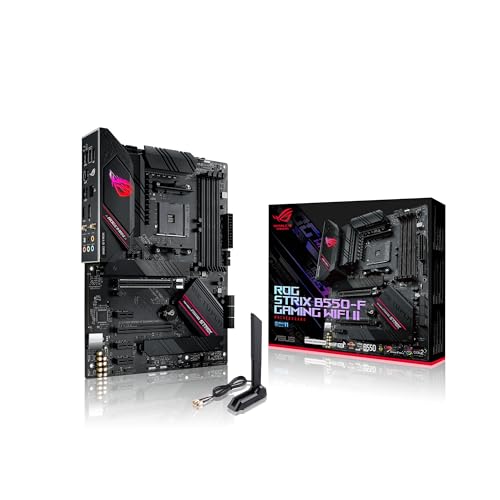
1. ASUS ROG Strix B550-F Gaming WiFi II AMD AM4 Motherboard
The ASUS ROG Strix B550-F Gaming WiFi II is an ATX DDR4 gaming motherboard for AM4 with PCIe 4.0, WiFi 6E, and 2.5Gb LAN. It is the premium gaming pick in this guide, with the connectivity and power delivery to run a high-end Ryzen 5000 chip and the fastest storage and networking available on B550.
Verified specs
- ATX DDR4 gaming motherboard, AM4 socket
- PCIe 4.0 support
- WiFi 6E and 2.5Gb LAN
- Supports 3rd Gen Ryzen processors
Strengths
- WiFi 6E and 2.5Gb LAN give fast wired and wireless networking
- PCIe 4.0 supports the fastest graphics cards and SSDs
- ROG Strix build quality and BIOS are proven for Ryzen
The Strix B550-F Gaming WiFi II is the board for a no-compromise AM4 gaming build. WiFi 6E and 2.5Gb LAN mean networking never bottlenecks your connection, PCIe 4.0 keeps storage and graphics fast, and the ROG BIOS makes overclocking and tuning straightforward.
Before you buy, it is worth checking the practical details that cause most returns. Confirm that the listing shows the exact model name and configuration you expect, because similar models often share a name and differ in one specification that matters. Check the size and the connections against your setup, and make sure you know what is included in the box and what is sold separately. Read the return policy before ordering, and when the product arrives, test it with your real setup in the first few days rather than leaving it in the box. A quick check at the start saves a return later, and it is the simplest way to be sure the product you receive is the one you meant to buy.
Trade-offs
- ATX size needs a mid-tower or larger case
- Premium features cost more than budget B550 boards
- No DDR5 support, since AM4 is a DDR4 platform
The Strix B550-F is a premium board, and its price reflects it. If you are building with a mid-range Ryzen chip and a modest graphics card, a cheaper B550 board will serve you just as well. If you want the best networking and the most polished BIOS on AM4, this is the board.
Who it fits best
Gamers building a high-end Ryzen 5000 PC who want WiFi 6E, 2.5Gb LAN, and PCIe 4.0 in a full ATX board.
Best for: A premium AM4 gaming build with fast networking.
Not suited for: Budget builds or compact cases that need micro-ATX.
Check price on Amazon: ASUS ROG Strix B550-F Gaming WiFi II AMD AM4 Motherboard

2. MSI MAG B550 Tomahawk Gaming Motherboard
The MSI MAG B550 Tomahawk is a gaming motherboard for AMD Ryzen 5000 series processors, with an AM4 socket, DDR4, PCIe 4.0, SATA 6Gb per second, M.2, USB 3.2 Gen 2, and HD audio. It is the value gaming pick in this guide, with strong power delivery and a reputation for reliable Ryzen performance at a fair cost.
Verified specs
- AM4 socket, DDR4, PCIe 4.0
- Supports AMD Ryzen 5000 series
- M.2 storage, USB 3.2 Gen 2
- SATA 6Gb per second, HD audio
Strengths
- Strong power delivery for Ryzen 5000 chips
- PCIe 4.0 for fast graphics and storage
- Well-regarded BIOS and build quality for the cost
The B550 Tomahawk is the board that shows up in build guides for a reason. It has the power delivery to run a Ryzen 9 without throttling, PCIe 4.0 for modern graphics cards and SSDs, and a BIOS that is straightforward to use, all for less than the premium boards.
Before you buy, it is worth checking the practical details that cause most returns. Confirm that the listing shows the exact model name and configuration you expect, because similar models often share a name and differ in one specification that matters. Check the size and the connections against your setup, and make sure you know what is included in the box and what is sold separately. Read the return policy before ordering, and when the product arrives, test it with your real setup in the first few days rather than leaving it in the box. A quick check at the start saves a return later, and it is the simplest way to be sure the product you receive is the one you meant to buy.
Trade-offs
- No WiFi listed on this model, so add a card if you need wireless
- ATX size needs a mid-tower case
- Fewer premium extras than the ROG Strix
The Tomahawk trades WiFi and premium extras for value, and that is a good trade if you use wired networking. If you need WiFi, the WiFi version of the Tomahawk or the Strix B550-F above is the better choice.
Who it fits best
Gamers building a Ryzen 5000 PC on wired networking who want strong power delivery and PCIe 4.0 for a fair cost.
Best for: A value AM4 gaming board with strong power delivery.
Not suited for: Builders who need built-in WiFi or a compact micro-ATX board.
Check price on Amazon: MSI MAG B550 Tomahawk Gaming Motherboard
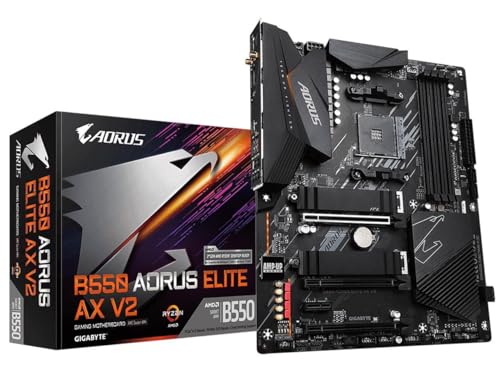
3. GIGABYTE B550 AORUS Elite AX V2 AMD AM4 Motherboard
The GIGABYTE B550 AORUS Elite AX V2 is an ATX AMD AM4 motherboard with DDR4, a 12 plus 2 power phase design, and support for Ryzen 5000, 4000, and 3000 series processors. It is the power-delivery pick in this guide, with one of the strongest voltage regulator designs of any B550 board here.
Verified specs
- ATX AMD AM4 motherboard, DDR4
- 12 plus 2 power phase design
- Supports Ryzen 5000, 4000, and 3000 series
- WiFi included in the AX model
Strengths
- 12 plus 2 power phases handle high-end Ryzen chips easily
- WiFi included, so no add-in card needed
- Broad Ryzen support from 3000 to 5000 series
The AORUS Elite AX V2 is the board for builders who want power headroom. A 12 plus 2 phase design means the voltage regulators stay cool under load, which keeps a Ryzen 9 running at full speed, and the included WiFi means the board is complete out of the box.
Before you buy, it is worth checking the practical details that cause most returns. Confirm that the listing shows the exact model name and configuration you expect, because similar models often share a name and differ in one specification that matters. Check the size and the connections against your setup, and make sure you know what is included in the box and what is sold separately. Read the return policy before ordering, and when the product arrives, test it with your real setup in the first few days rather than leaving it in the box. A quick check at the start saves a return later, and it is the simplest way to be sure the product you receive is the one you meant to buy.
Trade-offs
- ATX size needs a mid-tower or larger case
- AORUS software divides opinion
- Costs more than budget B550 boards
The strong power delivery is only useful if you run a high-end chip. With a Ryzen 5, a cheaper board will perform the same. With a Ryzen 9, the AORUS Elite AX V2 is the board that will not hold it back.
Who it fits best
Builders running a high-end Ryzen 5000 chip who want strong power delivery and built-in WiFi.
Best for: Strong power delivery and WiFi for high-end Ryzen builds.
Not suited for: Budget builds or compact micro-ATX cases.
Check price on Amazon: GIGABYTE B550 AORUS Elite AX V2 AMD AM4 Motherboard

4. ASUS TUF Gaming B550-PLUS WiFi II AMD AM4 Motherboard
The ASUS TUF Gaming B550-PLUS WiFi II is an ATX DDR4 gaming motherboard for AM4 with PCIe 4.0, WiFi 6, and 2.5Gb LAN. It is the durable gaming pick in this guide, with the TUF line’s focus on military-grade components and long-term reliability, plus modern WiFi and networking.
Verified specs
- ATX DDR4 gaming motherboard, AM4 socket
- PCIe 4.0, WiFi 6, 2.5Gb LAN
- Supports 3rd Gen Ryzen processors
- TUF Gaming durability focus
Strengths
- WiFi 6 and 2.5Gb LAN for fast networking
- TUF durability focus with proven components
- PCIe 4.0 for fast graphics and storage
The TUF B550-PLUS WiFi II is the board for a gaming PC that needs to last. The TUF line is built around durable components and thorough testing, and the WiFi 6 and 2.5Gb LAN mean the networking is current. It is the reliable middle ground between budget boards and premium ROG models.
Before you buy, it is worth checking the practical details that cause most returns. Confirm that the listing shows the exact model name and configuration you expect, because similar models often share a name and differ in one specification that matters. Check the size and the connections against your setup, and make sure you know what is included in the box and what is sold separately. Read the return policy before ordering, and when the product arrives, test it with your real setup in the first few days rather than leaving it in the box. A quick check at the start saves a return later, and it is the simplest way to be sure the product you receive is the one you meant to buy.
Trade-offs
- WiFi 6 rather than the newer WiFi 6E
- ATX size needs a mid-tower case
- Fewer premium extras than the ROG Strix
WiFi 6 is fast enough for nearly every home network, and the difference from WiFi 6E only matters on a very new router. If you want the newest wireless standard, the Strix B550-F above has it; for most homes, the TUF board is the better value.
Who it fits best
Gamers who want a durable, reliable B550 board with WiFi 6 and 2.5Gb LAN for a long-lasting build.
Best for: A durable gaming board with modern WiFi.
Not suited for: Builders who need WiFi 6E or a compact micro-ATX board.
Check price on Amazon: ASUS TUF Gaming B550-PLUS WiFi II AMD AM4 Motherboard

5. GIGABYTE B550 Gaming X V2 AMD AM4 Motherboard
The GIGABYTE B550 Gaming X V2 is an ATX AMD AM4 motherboard with DDR4, a 10 plus 3 power phase design, and support for Ryzen 5000, 4000, and 3000 series processors. It is the balanced ATX pick in this guide, with solid power delivery and full-size expansion at a mid-range cost.
Verified specs
- ATX AMD AM4 motherboard, DDR4
- 10 plus 3 power phase design
- Supports Ryzen 5000, 4000, and 3000 series
- Full-size ATX expansion
Strengths
- 10 plus 3 power phases suit mid-range and high-end Ryzen chips
- Full ATX size gives room for expansion cards
- Broad Ryzen support across three generations
The Gaming X V2 is the sensible ATX choice. Its 10 plus 3 phase power design handles a Ryzen 7 comfortably, the full-size board gives you room for a capture card or extra storage, and the cost sits in the middle of the B550 range.
Before you buy, it is worth checking the practical details that cause most returns. Confirm that the listing shows the exact model name and configuration you expect, because similar models often share a name and differ in one specification that matters. Check the size and the connections against your setup, and make sure you know what is included in the box and what is sold separately. Read the return policy before ordering, and when the product arrives, test it with your real setup in the first few days rather than leaving it in the box. A quick check at the start saves a return later, and it is the simplest way to be sure the product you receive is the one you meant to buy.
Trade-offs
- No WiFi listed, so add a card if you need wireless
- Fewer premium features than the AORUS models
- ATX size needs a mid-tower case
The Gaming X V2 is a board for wired setups. If you need WiFi, the AORUS Elite AX V2 above adds it with stronger power delivery. If you use Ethernet, the Gaming X V2 gives you the same core performance for less.
Who it fits best
Builders who want a full-size ATX B550 board with solid power delivery for a wired Ryzen build.
Best for: A balanced full-size ATX B550 board.
Not suited for: Builders who need WiFi or a compact micro-ATX board.
Check price on Amazon: GIGABYTE B550 Gaming X V2 AMD AM4 Motherboard

6. MSI B550M PRO-VDH WiFi ProSeries Motherboard
The MSI B550M PRO-VDH WiFi is a ProSeries micro-ATX motherboard for AMD Ryzen 5000 processors, with an AM4 socket, DDR4, PCIe 4.0, SATA 6Gb per second, M.2, USB 3.2 Gen 1, and WiFi. It is the compact WiFi pick in this guide, giving you a small board with wireless networking for a compact Ryzen build.
Verified specs
- Micro-ATX motherboard, AM4 socket
- DDR4, PCIe 4.0, M.2
- WiFi included
- USB 3.2 Gen 1, SATA 6Gb per second
Strengths
- Micro-ATX size fits compact cases
- WiFi included, so no add-in card needed
- PCIe 4.0 for fast graphics and storage
The B550M PRO-VDH WiFi is the board for a compact build that still needs wireless. Micro-ATX saves space and cost, the WiFi means the board is complete out of the box, and PCIe 4.0 keeps storage and graphics fast despite the small size.
Before you buy, it is worth checking the practical details that cause most returns. Confirm that the listing shows the exact model name and configuration you expect, because similar models often share a name and differ in one specification that matters. Check the size and the connections against your setup, and make sure you know what is included in the box and what is sold separately. Read the return policy before ordering, and when the product arrives, test it with your real setup in the first few days rather than leaving it in the box. A quick check at the start saves a return later, and it is the simplest way to be sure the product you receive is the one you meant to buy.
Trade-offs
- Fewer expansion slots than a full ATX board
- Micro-ATX power delivery is lighter than premium ATX boards
- USB 3.2 Gen 1 rather than Gen 2
A micro-ATX board always trades expansion for size, and the PRO-VDH WiFi is no exception. If you need multiple expansion cards, buy ATX. If you need one graphics card and one M.2 drive in a small case, this board is all you need.
Who it fits best
Compact PC builders who want a small B550 board with WiFi for a Ryzen 5000 build.
Best for: A compact micro-ATX board with WiFi.
Not suited for: Builders who need multiple expansion slots or heavy overclocking.
Check price on Amazon: MSI B550M PRO-VDH WiFi ProSeries Motherboard

7. GIGABYTE B550M K AMD AM4 Micro-ATX Motherboard
The GIGABYTE B550M K is a micro-ATX AMD AM4 motherboard with DDR4, a 3 plus 3 power phase design, and support for Ryzen 5000, 4000, and 3000 series processors. It is the budget pick in this guide, giving you a genuine B550 board with PCIe 4.0 at the lowest cost of any model here.
Verified specs
- Micro-ATX AMD AM4 motherboard, DDR4
- 3 plus 3 power phase design
- Supports Ryzen 5000, 4000, and 3000 series
- Budget B550 board
Strengths
- Lowest-cost genuine B550 board in this guide
- PCIe 4.0 support despite the budget price
- Compact micro-ATX size fits small cases
The B550M K is the board for a budget Ryzen build. It gives you the B550 essentials, PCIe 4.0, DDR4, and M.2 storage, at a price that leaves more money for the processor and graphics card, which is where performance actually comes from.
Before you buy, it is worth checking the practical details that cause most returns. Confirm that the listing shows the exact model name and configuration you expect, because similar models often share a name and differ in one specification that matters. Check the size and the connections against your setup, and make sure you know what is included in the box and what is sold separately. Read the return policy before ordering, and when the product arrives, test it with your real setup in the first few days rather than leaving it in the box. A quick check at the start saves a return later, and it is the simplest way to be sure the product you receive is the one you meant to buy.
Trade-offs
- 3 plus 3 power phases suit mid-range chips, not a Ryzen 9
- No WiFi listed
- Fewer ports and slots than full ATX boards
The light power delivery is the trade for the low price, and it matters: pair the B550M K with a Ryzen 5 and it will serve you well, but a Ryzen 9 will want a stronger board. Match the board to the chip, and the budget pick is a smart buy.
Who it fits best
Budget builders pairing a Ryzen 5 with a B550 board in a compact case.
Best for: The cheapest genuine B550 board for a Ryzen 5 build.
Not suited for: High-end Ryzen 9 builds or anyone who needs WiFi.
Check price on Amazon: GIGABYTE B550M K AMD AM4 Micro-ATX Motherboard

8. GIGABYTE B550 Eagle WIFI6 AMD AM4 Motherboard
The GIGABYTE B550 Eagle WIFI6 is an ATX AMD AM4 motherboard with DDR4, a 10 plus 3 power phase design, dual M.2 slots, and support for Ryzen 5000, 4000, and 3000 series processors. It is the value full-size WiFi pick in this guide, combining ATX expansion, strong power delivery, and WiFi 6 at a mid-range cost.
Verified specs
- ATX AMD AM4 motherboard, DDR4
- 10 plus 3 power phase design
- WiFi 6 included
- Dual M.2 slots
Strengths
- WiFi 6 included with full ATX expansion
- 10 plus 3 power phases suit high-end Ryzen chips
- Dual M.2 slots for fast storage expansion
The B550 Eagle WIFI6 is the board that covers the most bases for the money. Full ATX size, WiFi 6, dual M.2 slots, and a 10 plus 3 phase power design mean it can run a strong Ryzen chip, hold two fast SSDs, and connect wirelessly, all without an add-in card.
Before you buy, it is worth checking the practical details that cause most returns. Confirm that the listing shows the exact model name and configuration you expect, because similar models often share a name and differ in one specification that matters. Check the size and the connections against your setup, and make sure you know what is included in the box and what is sold separately. Read the return policy before ordering, and when the product arrives, test it with your real setup in the first few days rather than leaving it in the box. A quick check at the start saves a return later, and it is the simplest way to be sure the product you receive is the one you meant to buy.
Trade-offs
- Newer board with a shorter track record than the Tomahawk
- ATX size needs a mid-tower case
- WiFi 6 rather than WiFi 6E
The Eagle is a newer model in the Gigabyte range, so it has less long-term history than the Tomahawk or the Strix. Its specification is strong for the cost, though, and WiFi 6 is fast enough for nearly every home network.
Who it fits best
Builders who want a full-size ATX B550 board with WiFi, dual M.2 slots, and solid power delivery for a Ryzen 5000 build.
Best for: A full-size WiFi B550 board with dual M.2 slots.
Not suited for: Compact builds or anyone who needs WiFi 6E.
Check price on Amazon: GIGABYTE B550 Eagle WIFI6 AMD AM4 Motherboard
Buying guide
Warranties, returns, and checking your purchase
Most products in this guide come with a manufacturer warranty, and the length and coverage vary by brand, so check the warranty terms before you buy rather than after something goes wrong. Keep the packaging until you have tested the product, because a return is much easier with the original box. When the product arrives, check that the model name, the configuration, and the included accessories match the listing, and test it with your real setup in the first few days. If anything is wrong, contact the seller promptly, because return windows are limited and the first week is the time to find problems.
ATX or micro-ATX?
A full ATX board gives you more expansion slots, more M.2 slots, and usually stronger power delivery, but it needs a mid-tower or larger case. A micro-ATX board fits compact cases and costs less, but it has fewer slots and lighter power delivery. Choose by your case and your expansion needs, not by price alone.
Power delivery decides your CPU ceiling
The voltage regulator modules, listed as power phases, decide whether a board can run a high-end Ryzen chip under load. A 3 plus 3 phase board suits a Ryzen 5, a 10 plus 3 phase board suits a Ryzen 7, and a 12 plus 2 phase board suits a Ryzen 9. Match the board to the chip you plan to run.
WiFi or Ethernet?
Built-in WiFi saves an add-in card and is essential if your router is in another room. WiFi 6 is fast enough for nearly every home, while WiFi 6E adds the 6GHz band for the newest routers. If your PC sits next to the router, Ethernet is faster and more reliable, and a board without WiFi will serve you fine.
M.2 slots and storage
A B550 board has at least one M.2 slot for a fast NVMe SSD, and many have two. Check how many M.2 slots the board has and whether they run at PCIe 4.0 or 3.0 speeds, since that decides how fast your storage can be. Plan your storage around the slots, not the other way around.
BIOS updates for Ryzen 5000
Most B550 boards support Ryzen 5000 out of the box now, but an older board may need a BIOS update first. Check whether the board has BIOS flashback, which lets you update without a compatible CPU installed, and confirm Ryzen 5000 support before you buy.
How to use and care for your pick
Keep your motherboard clean by blowing dust out of the case every few months with compressed air, and check that all fans are spinning freely. Update the BIOS only when you need a new feature or a compatibility fix, and never interrupt a BIOS update, since that can brick the board. Keep the board’s drivers current, especially the chipset drivers, and check the CMOS battery every few years if the clock starts losing time. A motherboard that is kept cool, clean, and dust-free lasts for the life of the build.
Common mistakes to avoid
The most common mistakes are buying a micro-ATX board for a build that needs ATX expansion, pairing a Ryzen 9 with a budget board that cannot feed it, and forgetting to check whether the board needs a BIOS update for Ryzen 5000. Another is buying a board without WiFi and then discovering the router is in another room. Finally, many builders skip the chipset drivers after installing Windows, and then wonder why USB ports and power management behave oddly.
Final recommendation
For most Ryzen builders, the MSI MAG B550 Tomahawk is the best AMD AM4 motherboard to buy first: strong power delivery, PCIe 4.0, and a proven BIOS at a fair cost. If you need WiFi, the ASUS ROG Strix B550-F Gaming WiFi II adds WiFi 6E and 2.5Gb LAN, and the GIGABYTE B550 AORUS Elite AX V2 gives you the strongest power delivery in this guide. For a compact build, the MSI B550M PRO-VDH WiFi covers the essentials with wireless included, and for a budget build, the GIGABYTE B550M K leaves more money for the processor. Match the board to your chip, your case, and your networking.
Frequently asked questions
Is AM4 still worth buying?
Yes. AM4 supports Ryzen 5000 processors, DDR4 memory, and PCIe 4.0 on B550 boards, which is enough for a fast gaming or work PC at a much lower cost than a newer platform. The parts are mature, well-tested, and widely available, which makes AM4 the value choice.
What is the difference between B550 and X570?
X570 offers more PCIe 4.0 lanes and more high-speed USB ports, while B550 offers PCIe 4.0 for the graphics card and one M.2 slot, with the rest at PCIe 3.0. For most builds, B550 is enough, and it costs less and runs cooler than X570.
Do I need WiFi on my motherboard?
Only if your router is not next to your PC. Built-in WiFi saves an add-in card and is convenient, but Ethernet is faster and more reliable when it is available. If you use Ethernet, a board without WiFi will serve you just as well for less money.
Can a B550 board run a Ryzen 9?
Yes, but only with strong power delivery. A board with 10 plus 3 or 12 plus 2 power phases can run a Ryzen 9 under load, while a budget board with 3 plus 3 phases will throttle it. Match the board’s power design to the chip you plan to run.
Do B550 boards support Ryzen 5000 out of the box?
Most do now, since Ryzen 5000 has been out for years and boards ship with newer BIOS versions. Check the board’s specifications and whether it has BIOS flashback, which lets you update without a compatible CPU if needed.
Should I buy ATX or micro-ATX?
Buy ATX if you need multiple expansion cards, two M.2 drives, or strong power delivery in a mid-tower case. Buy micro-ATX if you want a compact case and only need one graphics card and one M.2 drive. The performance is the same; the difference is expansion and size.
More from Reviewstook
If this guide helped, these related guides cover the rest of your setup: Best AMD ITX Motherboards, Best Motherboards for 2018, Best Modded PC Cases.
Conclusion
The best AMD AM4 motherboard is the one that matches your Ryzen chip, your case, and your networking. The picks in this guide cover budget micro-ATX boards, value gaming boards, and premium WiFi models, all on the mature B550 platform, so there is a board here for every kind of Ryzen build.
Start with the MSI MAG B550 Tomahawk if you want the best value gaming board, or the ASUS ROG Strix B550-F Gaming WiFi II if you need WiFi 6E and 2.5Gb LAN. Check the power phases against your chip, confirm Ryzen 5000 support, and make sure the board fits your case. A good B550 board gives you nearly everything a modern Ryzen build needs, at a price that leaves room for the parts that matter most.