Disclosure: As an Amazon Associate, reviewstook.com earns from qualifying purchases. Links on this page are affiliate links at no extra cost to you; prices and availability change frequently, so check Amazon for the latest.
Where to Buy
Every pick in this best 4k tv for gaming under $300 shortlist is sold on Amazon. The links below go to the exact size reviewed — check the latest price on Amazon there, because television pricing moves often and sizes in one model line are priced separately.
Best Overall for Gaming: Hisense E6SR Series Hi-QLED Roku TV 43″ — Check on Amazon
Best Runner-Up: Hisense E6 Cinema Series Hi-QLED Fire TV 43″ — Check on Amazon
Best Bigger-Screen Pick: Roku Select Series QLED 50″ — Check on Amazon
Best QLED Pick: Toshiba M450 Series QLED 43″ — Check on Amazon
Best Budget Big Screen: Insignia F50 Series 50″ — Check on Amazon
Best Second-Room Pick: Amazon Ember 4-Series 50″ — Check on Amazon
Purchases made through links on reviewstook.com support our testing and writing at no extra cost to you.
Every guide in this series promises the same discipline, and this best 4k tv for gaming under $300 guide keeps it: picks verified against the product feed on 2026-11-21, specifications quoted only where a verified title states them, and no prices printed where they would rot within the week. The audience is console and PC gamers who split time between fast competitive titles and big story games, and the budget is a hard under $300. Shopping for a television at a fixed budget sounds simple until you open the listings and find the same three letters — LED, QLED, Mini-LED, OLED — attached to screens that behave very differently in a real room. Ranked honestly, the six sets below are the six different answers this tier offers — different panels, different platforms, different sizes — to the same evening: a PS5 or Xbox session where frame-rate stability matters more than sheer screen size, followed by a streamed film on the same screen.
Picture the typical use first: console play first, with smooth frame delivery as the priority, and a streamed film afterwards on the same panel. That scenario drove the ranking criteria in this guide: the gaming features the verified titles actually name — VRR, ALLM and Game Mode Plus on the Hisense models, the native 120Hz panel on the TCL T7, the 144Hz panels on the 65-inch Hisense Mini-LEDs, the VRR 165Hz listing on the LG OLED — plus input-friendly size and HDR support. The language rule is strict: refresh figures, HDR formats and gaming modes appear below only as the verified titles phrase them. A processing claim stays labelled a processing claim; the word native is used only where a title uses it. Sizes are explicit everywhere, and no model line is counted twice in different sizes to pad the list. At $300, the first tier with genuine choice in it, that discipline is what makes the choice legible.
In this guide
Quick Picks: The Best 4K Tv For Gaming Under $300 Shortlist
The whole ranking fits on one screen: six sets, six badges, six distinct reasons to buy at under $300. Pick the badge that matches a console-first room, read that one review in full, and check the size at the listing before you order.
Best Overall for Gaming: Hisense E6SR Series Hi-QLED Roku TV 43″ — Dolby Vision plus the gaming trio of Game Mode Plus, VRR and ALLM in a compact Roku set.
Best Runner-Up: Hisense E6 Cinema Series Hi-QLED Fire TV 43″ — Dolby Vision and Dolby Atmos together, with an AI Light Sensor that adapts to the room.
Best Bigger-Screen Pick: Roku Select Series QLED 50″ — Roku’s easy platform on a QLED panel, for buyers who want colour first and complexity never.
Best QLED Pick: Toshiba M450 Series QLED 43″ — a compact QLED on Fire TV — the small-screen colour upgrade.
Best Budget Big Screen: Insignia F50 Series 50″ — straightforward LED 4K value on Fire TV, with the size range to fit almost any room in this series.
Best Second-Room Pick: Amazon Ember 4-Series 50″ — Amazon’s own 4-Series hardware with HDR10+, Dolby Audio and the Ambient Experience.
How These Picks Were Chosen
The audit trail matters, so here it is, in the order it happened. Twenty-eight candidates arrived from the verified feed, and four left at the door: their titles say 1080p or FHD rather than 4K — the 32-inch and 40-inch Roku Select HD models, the 40-inch Insignia F40, and the 40-inch Hisense QD4SR. No monitors, accessories or 8K sets were in the pool to remove. The 24 genuine 4K televisions that remained were sorted into panel classes — LED, QLED and Hi-QLED, Mini-LED and OLED — before ranking began, at under $300 in a console-first room.
Within the under $300 tier, ranking followed the lens of this article: the gaming features actually named in the verified titles — VRR, ALLM and Game Mode Plus on the Hisense models, the native 120Hz panel on the TCL T7, the 144Hz panels on the 65-inch Hisense Mini-LEDs, the VRR 165Hz listing on the LG OLED — plus input-friendly size and HDR support. Picks were then checked for duplication — one size per model line — and for honesty of framing. TIER SHORTAGE (floor) for gaming, home theater and movies lenses: the step to $300 adds 50-inch entry and QLED options, but native 120Hz/144Hz gaming panels, Mini-LED and OLED still sit above this tier in the verified sheet and were not pulled down.
The verification discipline matters as much as the ranking it produces. No price is printed, because television prices move too fast to print honestly; no specification is padded, because a size, panel type, HDR format or gaming feature appears below only where the verified title names it. Motion figures are handled the same way — quoted in the title’s wording, with processing labels such as Motion Rate or DLG never upgraded into native refresh rates, at under $300 in a console-first room.
The step up to $300 is the first that buys choice rather than mere existence: a size step opens, the first QLED panels appear, and the platform question becomes real. Buyers here are usually furnishing a main room on a disciplined budget, and the discipline shows — nothing in the shortlist is decorative, and everything in it earns its place. For console and PC gamers, that framing decides which compromises are even visible on this page.
Detailed Reviews: Six Contenders for the Best 4K Tv For Gaming Under $300
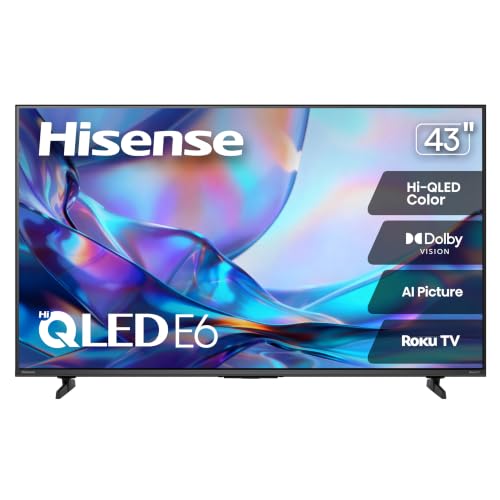
Best Overall for Gaming — Hisense E6SR Series Hi-QLED Roku TV 43″, Hi-QLED
On verified paper, the Hisense E6SR Series Hi-QLED Roku TV 43″ pairs a 43-inch Hi-QLED screen with Roku TV, and a feature set headed by Hi-QLED 4K UHD panel, Dolby Vision — set out in full in the spec box below. That list deserves more trust than most listing copy earns: it states the panel class outright, names the platform that will shape daily use, and confines every HDR and gaming claim to what the title itself is willing to say. Nothing has been inferred from a larger sibling. Bought for a console-first room at under $300, it is a set whose promises can all be checked before the box opens.
With a console underneath it, the questions change: does it wake fast, switch inputs without a fight, and deliver the gaming features its title promises? On those terms — the only honest ones — it holds up well for its class. Against the other five sets in this under $300 group, the Hisense E6SR Series Hi-QLED Roku TV is the deliberate choice for one kind of buyer rather than the default for everyone — that is what its badge, best overall for gaming, means here. If you are torn between this and a neighbouring pick, decide on the feature you will use weekly: panel class if films dominate, platform if the household streams everything, gaming features if a console lives under the screen.
Its shortfall is a shortfall of paperwork before it is a shortfall of picture. Like every Hi-QLED set at this level, it arrives without flagship claims in its verified record — no zone counts, no peak-brightness figures, no port layouts — and this review declines to supply them from imagination. Strip those absences away and the proposition is admirably plain: 43 inches of Hi-QLED 4K on Roku TV, headlined by hi-qled 4k uhd panel. At under $300, for a console-first room, that plainness is a virtue — provided the purchase is made for what is listed, not for what was hoped.
Strengths
- Verified Hi-QLED 4K UHD panel at a clearly stated 43-inch size.
- Hi-QLED 4K UHD panel leads a feature list taken entirely from the verified title.
- Roku TV is a platform most households already know how to drive.
Trade-offs
- Its class sets the ceiling: buyers wanting the next panel tier up should read the higher-budget guides in this series.
- Specifications not named in the verified title are not claimed here — check the Amazon listing for port counts and tuner details before you buy.
- Like every television in this guide, its built-in sound is a starting point, not a finish line, for film nights.
| Specification | Verified detail |
|---|---|
| Screen size | 43 inches |
| Resolution | 4K UHD (3840 x 2160) |
| Panel | Hi-QLED |
| Platform | Roku TV |
| Listed feature | Hi-QLED 4K UHD panel |
| Listed feature | Dolby Vision |
| Listed feature | Game Mode Plus |
| Listed feature | VRR |
| Listed feature | ALLM |
| Listed feature | DTS Virtual:X |
| Listed feature | Apple AirPlay |
| Listed feature | works with Alexa and Google Assistant |
Best for: viewers who want overall for gaming without leaving the under $300 tier / Not suited for: buyers whose first priority is a panel class or size this pick does not claim.
Check on Amazon — confirm the 43-inch size at checkout; this model line is sold in several sizes, and the under-$300 review above covers this one, for a console-first room.

Best Runner-Up — Hisense E6 Cinema Series Hi-QLED Fire TV 43″, Hi-QLED
One slot in this line-up belongs to the Hisense E6 Cinema Series Hi-QLED Fire TV 43″: the 43-inch version, a Hi-QLED design running Fire TV with Alexa Voice Remote, whose verified credentials open with Hi-QLED 4K UHD panel, AI Light Sensor. That short, checkable list is why it sits here at under $300 — for a buyer in a console-first room it answers the badge’s brief more completely than the other verified sets around it. Nothing has been borrowed from a sibling model: the list is the contract, exact about what is included and silent about everything else.
For gaming, judge it on the features its title actually names and on how it behaves in a living room between sessions — quick to wake, easy to switch inputs, and honest about the refresh ceiling of its class. Within this tier the Hisense E6 Cinema Series Hi-QLED Fire TV holds its place — best runner-up — because its verified strengths line up with what this article optimises for. Cross-shoppers should note where it concedes ground to the picks around it: usually a size step, a panel step or a platform preference, each of which is a legitimate reason to choose differently, and none of which changes the fact that on its own brief it is the right answer.
The Hisense E6 Cinema Series Hi-QLED Fire TV rewards realistic expectations and punishes inflated ones. It is a Hi-QLED set built to a price, so the silences in its title — flagship brightness, exhaustive port specifications, premium processing claims — are silences in its offer too. Against them stands a short, written-down list: 43 inches of 4K, Fire TV with Alexa Voice Remote, and hi-qled 4k uhd panel. That is the trade this badge is recommending at under $300, and for a console-first room it is a fair one. Buyers who need more than the list says should buy a different tier, not a different interpretation of this one.
Strengths
- A genuine 4K UHD Hi-QLED panel, sized at 43 inches and stated plainly.
- Headline feature is on the record: hi-qled 4k uhd panel.
- A familiar platform — Fire TV with Alexa Voice Remote — keeps the learning curve near zero.
Trade-offs
- The next panel class up lives in the higher tiers of this series, not here.
- Anything the verified title omits — port counts, tuner details — needs a check on the Amazon listing before you commit.
- Built-in sound is serviceable rather than cinematic; most film fans will add audio later.
| Specification | From the verified title |
|---|---|
| Diagonal | 43 inches |
| Resolution (as listed) | 4K UHD (3840 x 2160) |
| Panel type | Hi-QLED |
| Smart platform | Fire TV with Alexa Voice Remote |
| Listed feature | Hi-QLED 4K UHD panel |
| Listed feature | AI Light Sensor |
| Listed feature | Dolby Vision and Dolby Atmos |
| Listed feature | Motion Rate 120 (wording as listed in the API title) |
| Listed feature | HDR10+ Adaptive |
| Listed feature | Game Mode Plus |
Best for: the buyer this badge describes — runner-up at under $300 / Not suited for: anyone shopping a different panel class or a much larger room.
Check on Amazon for the 43-inch version reviewed here; other sizes in the line are separate listings, at under $300 for a console-first room.

Best Bigger-Screen Pick — Roku Select Series QLED 50″, QLED
On verified paper, the Roku Select Series QLED 50″ pairs a 50-inch QLED screen with Roku TV with Voice Remote, and a feature set headed by 4K (2160p) QLED panel, Roku Voice Remote — set out in full in the spec box below. That list deserves more trust than most listing copy earns: it states the panel class outright, names the platform that will shape daily use, and confines every HDR and gaming claim to what the title itself is willing to say. Nothing has been inferred from a larger sibling. Bought for a console-first room at under $300, it is a set whose promises can all be checked before the box opens.
For gaming, judge it on the features its title actually names and on how it behaves in a living room between sessions — quick to wake, easy to switch inputs, and honest about the refresh ceiling of its class. Against the other five sets in this under $300 group, the Roku Select Series QLED is the deliberate choice for one kind of buyer rather than the default for everyone — that is what its badge, best bigger-screen pick, means here. If you are torn between this and a neighbouring pick, decide on the feature you will use weekly: panel class if films dominate, platform if the household streams everything, gaming features if a console lives under the screen.
Its shortfall is a shortfall of paperwork before it is a shortfall of picture. Like every QLED set at this level, it arrives without flagship claims in its verified record — no zone counts, no peak-brightness figures, no port layouts — and this review declines to supply them from imagination. Strip those absences away and the proposition is admirably plain: 50 inches of QLED 4K on Roku TV with Voice Remote, headlined by 4k (2160p) qled panel. At under $300, for a console-first room, that plainness is a virtue — provided the purchase is made for what is listed, not for what was hoped.
Strengths
- Verified QLED 4K UHD panel at a clearly stated 50-inch size.
- 4K (2160p) QLED panel — named in the verified title, not assumed.
- Roku TV with Voice Remote keeps daily use simple for the whole household.
Trade-offs
- Its class sets the ceiling: buyers wanting the next panel tier up should read the higher-budget guides in this series.
- Specifications not named in the verified title are not claimed here — check the Amazon listing for port counts and tuner details before you buy.
- Like every television in this guide, its built-in sound is a starting point, not a finish line, for film nights.
| Specification | Verified detail |
|---|---|
| Screen size | 50 inches |
| Resolution | 4K UHD (3840 x 2160) |
| Panel | QLED |
| Platform | Roku TV with Voice Remote |
| Listed feature | 4K (2160p) QLED panel |
| Listed feature | Roku Voice Remote |
| Listed feature | Wi-Fi |
| Listed feature | Bluetooth Headphone Mode |
Best for: viewers in a console-first room chasing bigger-screen pick inside the under $300 tier / Not suited for: anyone whose first priority is a panel class or a size beyond what this pick claims.
Check on Amazon — confirm the 50-inch size at checkout; this model line is sold in several sizes, and the under-$300 review above covers this one, for a console-first room.
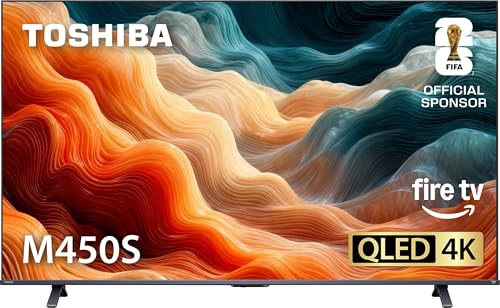
Best QLED Pick — Toshiba M450 Series QLED 43″, QLED
The verified record for the Toshiba M450 Series QLED 43″ is short enough to state plainly: 43 inches of screen, a QLED panel, and Fire TV with Alexa Voice Remote as the platform. The feature list its title stands behind is headed by QLED 4K UHD panel, Smart Fire TV, with the complete list in the spec box below — and nothing in the paragraphs that follow extends it by a single item. For a purchase in a console-first room at under $300, that traceability is the point: an assumed feature is the usual difference between a sound buy and a regret.
For gaming, judge it on the features its title actually names and on how it behaves in a living room between sessions — quick to wake, easy to switch inputs, and honest about the refresh ceiling of its class. Placed in the under $300 field, the Toshiba M450 Series QLED earns its badge — best qled pick — not by winning every category but by being the clearest answer to one specific question. Buyers cross-shopping it against the other five picks should compare panel class first, platform second, and size third; that order prevents the common mistake of paying for inches while giving up the panel or the HDR support you would have used every day.
Set expectations at the level of its class and the Toshiba M450 Series QLED makes sense. It is a QLED television built to a tier, and the things its title does not say — flagship brightness, exhaustive port specifications, premium processing claims — should be read as things it does not promise. In exchange, what it does promise is written down and checkable: 43 inches of 4K, Fire TV with Alexa Voice Remote, and qled 4k uhd panel. That is a fair trade at under $300, and it is the trade this badge is recommending.
Strengths
- 43 inches of verified QLED 4K — no resolution ambiguity anywhere in its title.
- Headline feature is on the record: qled 4k uhd panel.
- A familiar platform — Fire TV with Alexa Voice Remote — keeps the learning curve near zero.
Trade-offs
- Its class sets the ceiling: buyers wanting the next panel tier up should read the higher-budget guides in this series.
- Specifications not named in the verified title are not claimed here — check the Amazon listing for port counts and tuner details before you buy.
- Like every television in this guide, its built-in sound is a starting point, not a finish line, for film nights.
| Specification | Detail (as listed) |
|---|---|
| Listed size | 43 inches |
| Format | 4K UHD (3840 x 2160) |
| Backlight / panel | QLED |
| Platform (as listed) | Fire TV with Alexa Voice Remote |
| Listed feature | QLED 4K UHD panel |
| Listed feature | Smart Fire TV |
| Listed feature | Alexa Voice Remote |
| Listed feature | live TV streaming without cable |
Best for: buyers in a console-first room at under $300 whose requirements are precisely the ones this pick was chosen for / Not suited for: shoppers counting on a feature absent from its verified title.
See the 43-inch listing here: Check on Amazon — and re-check the feature list against the review above before ordering, at under $300 for a console-first room.

Best Budget Big Screen — Insignia F50 Series 50″, LED
On verified paper, the Insignia F50 Series 50″ pairs a 50-inch LED screen with Fire TV with Alexa Voice Remote, and a feature set headed by LED 4K UHD panel, Smart Fire TV — set out in full in the spec box below. That list deserves more trust than most listing copy earns: it states the panel class outright, names the platform that will shape daily use, and confines every HDR and gaming claim to what the title itself is willing to say. Nothing has been inferred from a larger sibling. Bought for a console-first room at under $300, it is a set whose promises can all be checked before the box opens.
For gaming, judge it on the features its title actually names and on how it behaves in a living room between sessions — quick to wake, easy to switch inputs, and honest about the refresh ceiling of its class. Against the other five sets in this under $300 group, the Insignia F50 Series is the deliberate choice for one kind of buyer rather than the default for everyone — that is what its badge, best budget big screen, means here. If you are torn between this and a neighbouring pick, decide on the feature you will use weekly: panel class if films dominate, platform if the household streams everything, gaming features if a console lives under the screen.
Its shortfall is a shortfall of paperwork before it is a shortfall of picture. Like every LED set at this level, it arrives without flagship claims in its verified record — no zone counts, no peak-brightness figures, no port layouts — and this review declines to supply them from imagination. Strip those absences away and the proposition is admirably plain: 50 inches of LED 4K on Fire TV with Alexa Voice Remote, headlined by led 4k uhd panel. At under $300, for a console-first room, that plainness is a virtue — provided the purchase is made for what is listed, not for what was hoped.
Strengths
- A genuine 4K UHD LED panel, sized at 50 inches and stated plainly.
- Headline feature is on the record: led 4k uhd panel.
- A familiar platform — Fire TV with Alexa Voice Remote — keeps the learning curve near zero.
Trade-offs
- Its class sets the ceiling: buyers wanting the next panel tier up should read the higher-budget guides in this series.
- Specifications not named in the verified title are not claimed here — check the Amazon listing for port counts and tuner details before you buy.
- Like every television in this guide, its built-in sound is a starting point, not a finish line, for film nights.
| Specification | From the verified title |
|---|---|
| Diagonal | 50 inches |
| Resolution (as listed) | 4K UHD (3840 x 2160) |
| Panel type | LED |
| Smart platform | Fire TV with Alexa Voice Remote |
| Listed feature | LED 4K UHD panel |
| Listed feature | Smart Fire TV |
| Listed feature | Alexa Voice Remote |
| Listed feature | live TV streaming without cable |
Best for: the shopper in a console-first room this badge was written for — budget big screen, under $300 / Not suited for: buyers after a different panel class, or a screen for a much larger room.
Check on Amazon for the 50-inch version reviewed here; other sizes in the line are separate listings, at under $300 for a console-first room.

Best Second-Room Pick — Amazon Ember 4-Series 50″, LED
On verified paper, the Amazon Ember 4-Series 50″ pairs a 50-inch LED screen with Fire TV with Alexa Remote, and a feature set headed by 4K Ultra HD panel, HDR10+ — set out in full in the spec box below. That list deserves more trust than most listing copy earns: it states the panel class outright, names the platform that will shape daily use, and confines every HDR and gaming claim to what the title itself is willing to say. Nothing has been inferred from a larger sibling. Bought for a console-first room at under $300, it is a set whose promises can all be checked before the box opens.
With a console underneath it, the questions change: does it wake fast, switch inputs without a fight, and deliver the gaming features its title promises? On those terms — the only honest ones — it holds up well for its class. Against the other five sets in this under $300 group, the Amazon Ember 4-Series is the deliberate choice for one kind of buyer rather than the default for everyone — that is what its badge, best second-room pick, means here. If you are torn between this and a neighbouring pick, decide on the feature you will use weekly: panel class if films dominate, platform if the household streams everything, gaming features if a console lives under the screen.
The Amazon Ember 4-Series rewards realistic expectations and punishes inflated ones. It is a LED set built to a price, so the silences in its title — flagship brightness, exhaustive port specifications, premium processing claims — are silences in its offer too. Against them stands a short, written-down list: 50 inches of 4K, Fire TV with Alexa Remote, and 4k ultra hd panel. That is the trade this badge is recommending at under $300, and for a console-first room it is a fair one. Buyers who need more than the list says should buy a different tier, not a different interpretation of this one.
Strengths
- 50 inches of verified LED 4K — no resolution ambiguity anywhere in its title.
- 4K Ultra HD panel leads a feature list taken entirely from the verified title.
- Fire TV with Alexa Remote is a platform most households already know how to drive.
Trade-offs
- Its class sets the ceiling: buyers wanting the next panel tier up should read the higher-budget guides in this series.
- Specifications not named in the verified title are not claimed here — check the Amazon listing for port counts and tuner details before you buy.
- Like every television in this guide, its built-in sound is a starting point, not a finish line, for film nights.
| Specification | Detail (as listed) |
|---|---|
| Listed size | 50 inches |
| Format | 4K UHD (3840 x 2160) |
| Backlight / panel | LED |
| Platform (as listed) | Fire TV with Alexa Remote |
| Listed feature | 4K Ultra HD panel |
| Listed feature | HDR10+ |
| Listed feature | Dolby Audio |
| Listed feature | Ambient Experience |
| Listed feature | Alexa+ show search |
Best for: buyers in a console-first room at under $300 whose requirements are precisely the ones this pick was chosen for / Not suited for: shoppers counting on a feature absent from its verified title.
See the 50-inch listing here: Check on Amazon — and re-check the feature list against the review above before ordering, at under $300 for a console-first room.
Comparison Table
| Pick | Size | Panel | Platform | Headline verified features |
|---|---|---|---|---|
| Hisense E6SR Series Hi-QLED Roku TV 43″ | 43″ | Hi-QLED | Roku TV | Hi-QLED 4K UHD panel, Dolby Vision |
| Hisense E6 Cinema Series Hi-QLED Fire TV 43″ | 43″ | Hi-QLED | Fire TV with Alexa Voice Remote | HDR10+ Adaptive, Game Mode Plus |
| Roku Select Series QLED 50″ | 50″ | QLED | Roku TV with Voice Remote | Wi-Fi, Bluetooth Headphone Mode |
| Toshiba M450 Series QLED 43″ | 43″ | QLED | Fire TV with Alexa Voice Remote | Alexa Voice Remote, live TV streaming without cable |
| Insignia F50 Series 50″ | 50″ | LED | Fire TV with Alexa Voice Remote | Alexa Voice Remote, live TV streaming without cable |
| Amazon Ember 4-Series 50″ | 50″ | LED | Fire TV with Alexa Remote | 4K Ultra HD panel, HDR10+ |
Read the table by columns, not by rows: fix the size your room can seat, then compare panel class within that size, then let platform settle what remains. That order mirrors how the differences will actually feel at home, in a console-first room at under $300.
How to Choose the Best 4K Tv For Gaming Under $300 for Your Room
Let distance outrank budget for the first decision at under $300. A 43-inch screen assumes roughly four to six feet of seating, a 50- to 55-inch screen six to eight feet, and a 65-inch screen only makes sense beyond that. Stretching the diagonal until the panel money runs out is this tier’s classic error; the Hisense E6SR Series Hi-QLED Roku TV 43″ follows the sounder pattern of right size, intact panel class, for a console-first setup included. A fixed sofa distance should fix the size shortlist before any other comparison begins.
Work up the backlight ladder honestly. Entry LED is the rational answer for bright rooms and daytime content; QLED and Hi-QLED answer colour-rich HDR; Mini-LED’s zone control answers the dark room; and OLED’s per-pixel control is the ladder’s top rung, reached in this pool only at its highest tiers. On that ladder the Roku Select Series QLED 50″ occupies the sweet spot at under $300 — the rung where the improvement stops being subtle, for a console-first setup included.
Check the HDR logo your content actually carries. Two dynamic formats compete here — Dolby Vision and HDR10+ — and support for one says nothing about the other. Every format claim in this guide comes from a verified title — Dolby Vision across the Hisense, LG and TCL picks, HDR10+ on the Ember and selected Hisense sets — so the check is easy: open your most-watched service, note its format, and confirm your shortlist names the same one, in a console-first room at under $300.
Choose the remote-and-menu life, not just the screen. Every platform here streams the big services; what differs is the daily texture — live TV handling, the voice assistant that answers, and details like the Bluetooth Headphone Mode in Roku’s titles for late-night listening. Fire TV leans on Alexa; Google TV leans on recommendations. If two picks are otherwise tied at under $300, the platform your household already knows is the tiebreaker that keeps paying out long after the panel has become invisible through habit, in a console-first room.
What Does Under $300 Actually Buy in a 4K TV?
At this level the money buys, in order: a genuine 4K panel, a current smart platform, and then — depending on how you allocate what remains — either more inches or a better panel class. Everything at once is not on offer, whatever a headline implies, at under $300 in a console-first room. Tier shortage (floor) for the gaming, home theater and movies briefs: the step to $300 adds 50-inch entry and QLED options, but native 120Hz and 144Hz gaming panels, Mini-LED and OLED still sit above this tier in the verified sheet and were not pulled down.
One allocation rule outlasts every other at under $300: protect the panel and the HDR formats your library uses, take the size your seating distance asks for, and keep the platform simple. Inches are the least durable thing money buys in a television; panel quality is the most, in a console-first room as everywhere.
How Do You Set Up a New 4K TV for Game-Mode Setup, Console Connection Order And The Settings That Keep Input Lag Low?
Step 1 — Start with a tape measure, not a listing. Three numbers decide whether the set can live in the room at all: the diagonal against your seating distance, the stand’s width and depth against your furniture, and the doorway path for the largest sizes. Get them before the box arrives, at under $300 in a console-first room; every one of them is cheaper to know now than after a delivery.
Step 2 — Wire it while you can still reach it. Attach the stand or mount, land each source while the back of the set is reachable, label every input on screen, and tidy the cabling only at the end, with power connected last. Future-you, swapping a source at midnight in a console-first room, will be grateful, at under $300 as anywhere.
Step 3 — Set the picture for your content. Start from the set’s standard or game-oriented preset rather than the vivid store mode, then adjust brightness in the evening, in the light you actually play in. Finish with the content-specific step: enable the named game features — Game Mode Plus, ALLM and VRR where your pick lists them — on the console input, and leave them there. They only help when switched on. At under $300, in a console-first room, set it once and properly.
Step 4 — Give the speakers one honest week. Live with the built-in speakers for a few evenings before spending anything. If dialogue keeps getting lost, the audition has given you its verdict: a modest soundbar and one correct audio-output setting will fix it permanently rather than nightly, at under $300 in a console-first room.
Problem: colours look cartoonish out of the box -> fix: the vivid store preset is doing exactly what it was designed to do on a shop floor. Move to the standard or movie-oriented mode, allow two evenings for your eyes to recalibrate, and only then touch the colour control — most cartoonish colour is a preset, not a panel. At under $300 in a console-first room, two minutes now saves every later evening.
Problem: motion looks unnaturally smooth on films -> fix: the set is inventing frames between the film’s real ones. Reduce or disable motion smoothing for film content — Filmmaker Mode, where your pick lists it, does it in one press — and reserve stronger processing for sport, if you like it there at all. At under $300 in a console-first room, two minutes now saves every later evening.
Problem: the screen reflects the whole room -> fix: change geometry before you change settings: angle the set a few degrees, move the lamp instead of the sofa, and close curtains for serious viewing. The hardware version of the same fix exists in the wider pool — the Hisense U6 Pro lists a glare-free screen in its verified title. At under $300 in a console-first room, two minutes now saves every later evening.
Common Mistakes
Mistake 1: reading the biggest motion number on the listing as the gaming spec, when the verifiable gaming facts at under $300 are the named features: VRR, ALLM, Game Mode Plus and any natively stated refresh rate.
Mistake 2: comparing televisions by their biggest printed number. In this category the headline figure is often a processing construct, which is why the reviews above quote titles verbatim and reserve native for the sets whose titles use it: the TCL T7 and the 65-inch Hisense Mini-LED models, at under $300 in a console-first room.
Mistake 3: ordering a screen the room cannot seat. Fill too much of your field of view and the picture does not turn cinematic — upscaled content and panel flaws simply get larger. In a console-first room at under $300, the sofa’s distance is the first specification, and it outranks the diagonal.
Mistake 4: postponing the format check until the library is already playing in the lesser format. Your services and discs have already chosen between Dolby Vision and HDR10+; the verified feature lists above say, pick by pick, which sets agree with them, at under $300 in a console-first room.
Mistake 5: forgetting the total setup. A television bought almost — screen paid for, stand, cables and sound left to chance — is outperformed by a slightly smaller one bought completely, at under $300 in a console-first room.
Final Recommendation
Our verdict for the under $300 tier is the Hisense E6SR Series Hi-QLED Roku TV 43″, chosen for console and PC gamers who split time between fast competitive titles and big story games. Everything else in the six is a deliberate variation on that answer: the Hisense E6 Cinema Series Hi-QLED Fire TV 43″ trades toward its own speciality, and the Toshiba M450 Series QLED 43″ trades toward value. Pick the trade that matches your evenings and you will not go wrong inside this list.
Readers whose budget is flexible should also compare the neighbouring tiers in this series before deciding — the step between tiers in televisions is unusually visible, because it is usually a panel-class step rather than a size step. Start with Best 4K Tv For Gaming Under $200, then weigh Best 4K Tv For Gaming Under $400 against Best 4K Tv For Gaming Under $500 if your room size is still undecided.
For a different viewing priority at this same budget, see Best 4K Tv Under $300 and Best 4K Tv For Home Theater Under $300; for the next tier up, see Best 4K Tv Under $400; and for the widest view of the range, see Best 4K Tv For Movies Under $2000. Whichever you choose, confirm the exact size and the feature list on the Amazon listing at checkout — that final check takes a minute and settles everything this guide could not.
Frequently Asked Questions
What is the best 4k tv for gaming under $300 overall?
The Hisense E6SR Series Hi-QLED Roku TV 43″ is the place to start. Its top ranking here is not a clean sweep of every category; it is the closest match to this article’s criteria, which were written for console and PC gamers who split time between fast competitive titles and big story games, among the six verified sets at under $300. Read its review first, then use the badge reviews to test it against the alternatives your own habits favour.
Is 4K worth it at smaller screen sizes?
Yes, particularly at close seating, where the extra resolution is easiest to see and upscaled everyday content benefits most. At 43 inches in a bedroom or study, 4K is a genuine upgrade rather than a spec-sheet luxury — and a small 1080p set is the one purchase in this category that dates fastest, which is why none survives in this guide at under $300, in a console-first room.
What is the difference between LED, QLED, Mini-LED and OLED?
Four names, one question: how is the light made and controlled? LED is the basic backlit design; QLED adds a quantum-dot colour layer; Mini-LED shrinks the backlight into many small zones for contrast; OLED lights each pixel individually, giving the strongest black performance here. This guide only assigns a panel class where the verified title names it — in a console-first room at under $300 as everywhere.
Do I need Dolby Vision or HDR10+?
Only in the sense that a key needs its lock. Both are dynamic HDR systems carried by different services and studios, and support is a per-model fact, not a brand fact. Every pick above states its formats as verified, so work backwards from your two most-used services to the models whose verified lists name the same format — in a console-first room at under $300.
What refresh rate do I need for gaming?
Judge by the features named in the title: VRR and ALLM help any console setup, Game Mode Plus targets latency, and a native high-refresh panel — stated as native on the TCL T7 at 120Hz and the 65-inch Hisense Mini-LEDs at 144Hz — is the step competitive players actually feel. Marketing motion numbers are quoted as wording, not converted into native rates, throughout this guide.
Will these TVs work with a soundbar?
Yes — and film-heavy households usually make it their first upgrade. This guide will not invent the port list to complete the answer: the listing for your specific size carries the exact connections, and the bar to buy is the one matching the audio formats — Atmos, DTS Virtual:X — named in your pick’s verified title, in a console-first room at under $300.
Should I wait for a sale or buy at this tier now?
Prices date; panel decisions do not — which is why this guide keeps them apart, printing no prices and pointing you to check the latest price on Amazon instead. Get the decision right from the verified lists above and timing becomes a minor optimisation rather than the strategy, in a console-first room at under $300.