Disclosure: As an Amazon Associate, reviewstook.com earns from qualifying purchases. Links to Amazon on this page are affiliate links; they cost you nothing extra.
Check native resolution before you pay for 4K.
This guide is built from Amazon product listings and maker specs, not our own testing, so confirm native resolution, brightness, compatibility and current price on each product page.
Check the current price on Amazon before you buy.
Last updated: November 2, 2026.
In this guide
Quick Picks
| Product | Type | Best for |
|---|---|---|
| Valerion StreamMaster Plus2 4K Laser Projector | 4K laser projector | 4K viewing |
| 4K Daylight Projector (2400 ANSI, PS5 Gaming, Netflix) | 4K-support daylight projector | 4K viewing |
| Outdoor Projector 4K with WiFi6 and Bluetooth (VIDAA Live TV) | 4K-support outdoor projector | 4K viewing |
| Smart Projector 4K with WiFi and Bluetooth (AI Auto Focus) | 4K-support smart projector | 4K viewing |
| Epson Home Cinema 3800 4K PRO-UHD 3-Chip 3LCD Projector | 3LCD 4K PRO-UHD projector | 4K viewing |
| Optoma UHZ36 4K UHD Laser HDR Projector | 4K laser projector | 4K viewing |
Our Picks

Top pickBest for 4K viewing
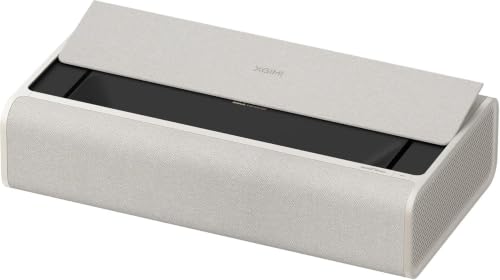
1. Valerion StreamMaster Plus2 4K Laser Projector
A Valerion StreamMaster Plus2 4K Laser Projector (4k laser projector), per the listing. Check price on Amazon.
Good for: 4K viewing. Watch out: High price.

Best for 4K viewing
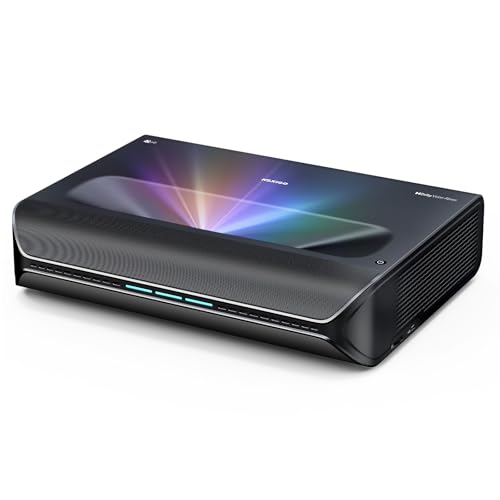
2. 4K Daylight Projector (2400 ANSI, PS5 Gaming, Netflix)
A 4K Daylight Projector (2400 ANSI, PS5 Gaming, Netflix) (4k-support daylight projector), per the listing. Check price on Amazon.
Good for: 4K viewing. Watch out: Check native resolution.
Best for 4K viewing
3. Outdoor Projector 4K with WiFi6 and Bluetooth (VIDAA Live TV)
An Outdoor Projector 4K with WiFi6 and Bluetooth (VIDAA Live TV) (4k-support outdoor projector), per the listing. Check price on Amazon.
Good for: 4K viewing. Watch out: Check native resolution.

Best for 4K viewing
4. Smart Projector 4K with WiFi and Bluetooth (AI Auto Focus)
A Smart Projector 4K with WiFi and Bluetooth (AI Auto Focus) (4k-support smart projector), per the listing. Check price on Amazon.
Good for: 4K viewing. Watch out: Check native resolution.


Best for 4K viewing
5. Epson Home Cinema 3800 4K PRO-UHD 3-Chip 3LCD Projector
An Epson Home Cinema 3800 4K PRO-UHD 3-Chip 3LCD Projector (3lcd 4k pro-uhd projector), per the listing. Check price on Amazon.
Good for: 4K viewing. Watch out: High price.

Best for 4K viewing
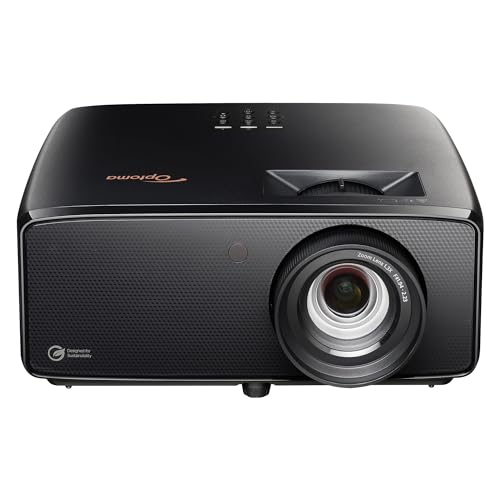
6. Optoma UHZ36 4K UHD Laser HDR Projector
An Optoma UHZ36 4K UHD Laser HDR Projector (4k laser projector), per the listing. Check price on Amazon.
Good for: 4K viewing. Watch out: High price.

Best Picks by Category
These labels summarize listing information and position each pick by tier. They are not hands-on test results.
- Daylight viewing pick: 4K Daylight Projector (2400 ANSI, PS5 Gaming, Netflix) — a budget-tier pick for 4K viewing; check price on Amazon. This is not an independent product-quality award.
- Outdoor pick: Outdoor Projector 4K with WiFi6 and Bluetooth (VIDAA Live TV) — a budget-tier pick for outdoor 4K viewing; check price on Amazon.
- Best value: Outdoor Projector 4K with WiFi6 and Bluetooth (VIDAA Live TV) — a budget-tier pick for 4K viewing; check price on Amazon.
- Lowest price tier: Smart Projector 4K with WiFi and Bluetooth (AI Auto Focus) — the budget-tier pick in this set; check price on Amazon.
- Premium option: Epson Home Cinema 3800 4K PRO-UHD 3-Chip 3LCD Projector — a premium-tier pick; check price on Amazon.
Price, Rating and Review Comparison
The table groups the picks by price tier. Prices change often, so confirm the current price on Amazon.
| Product | Price | Rating | Ratings | Price tier |
|---|---|---|---|---|
| Smart Projector 4K with WiFi and Bluetooth (AI Auto Focus) | Check price on Amazon | — | — | Budget |
| 4K Daylight Projector (2400 ANSI, PS5 Gaming, Netflix) | Check price on Amazon | — | — | Budget |
| Outdoor Projector 4K with WiFi6 and Bluetooth (VIDAA Live TV) | Check price on Amazon | — | — | Budget |
| Valerion StreamMaster Plus2 4K Laser Projector | Check price on Amazon | — | — | Mid-range |
| Optoma UHZ36 4K UHD Laser HDR Projector | Check price on Amazon | — | — | Mid-range |
| Epson Home Cinema 3800 4K PRO-UHD 3-Chip 3LCD Projector | Check price on Amazon | — | — | Premium |
How Much Feedback Backs Each Rating
Check the Amazon listing for each pick to see the current feedback behind it.
- Valerion StreamMaster Plus2 4K Laser Projector: check the Amazon listing for current feedback.
- 4K Daylight Projector (2400 ANSI, PS5 Gaming, Netflix): check the Amazon listing for current feedback.
- Outdoor Projector 4K with WiFi6 and Bluetooth (VIDAA Live TV): check the Amazon listing for current feedback.
- Smart Projector 4K with WiFi and Bluetooth (AI Auto Focus): check the Amazon listing for current feedback.
- Epson Home Cinema 3800 4K PRO-UHD 3-Chip 3LCD Projector: check the Amazon listing for current feedback.
- Optoma UHZ36 4K UHD Laser HDR Projector: check the Amazon listing for current feedback.
How to Choose
Technology
Lamp, LED or laser: laser lasts longer.
Contrast and HDR
Matter for movies in dark rooms.
Throw distance
Match your room.
Native 4K, Pixel Shifting and What the Label Means
The term 4K on a projector listing can mean different things. A native 4K projector uses a panel with the full number of pixels. Other designs use a lower-resolution panel and shift it rapidly to build a 4K image, and some accept a 4K signal but display a lower resolution. All of these can be sold as 4K-capable, and the picture differences may be subtle at typical viewing distances, but they affect price and sharpness.
Read the listing and the specification page for wording such as native resolution, pixel shifting or 4K input support. If the description is unclear, ask the seller or check the maker’s page. Remember that source quality matters: streaming compression, content resolution and screen quality all influence what you see. A sharp image also depends on lens quality and focus.
Think about how much resolution you need. For a screen of moderate size in a living room, the difference between native and shifted 4K may be less noticeable than the effects of brightness, contrast and room lighting. For a large screen viewed up close, sharpness matters more. Decide what you value: pure sharpness, brightness, ease of use or a balance. Use the product page’s claims as a starting point, and read independent descriptions of the technology to understand the terms.
Brightness, Ambient Light and Screen Choice
Brightness is rated in lumens, but different makers use different standards, so numbers are not always comparable. Check which measurement the listing uses. A projector in a dark dedicated room can look excellent with moderate brightness, while a living room with windows needs more output or light control. Brightness spreads over a larger image, so a bigger screen looks dimmer.
The screen matters as much as the projector. A white wall works for casual use, but a proper screen gives more even brightness and better color. Some screens are designed for ambient light rejection, which can improve contrast in a lit room, while standard screens suit dark rooms. Choose the screen size to fit your projector’s throw and your room, and check the screen gain and viewing angle.
Control the room. Heavy curtains, matte walls and dark furniture reduce reflections and improve contrast. Avoid shiny surfaces near the screen. Choose a picture mode for your lighting, and reduce brightness in a dark room to improve black levels and extend lamp or laser life. If daytime viewing is a priority, be wary of claims that seem too good, and look for details on how brightness is measured.
Lens Features, Keystone and Setup Flexibility
Placement flexibility makes a projector easier to live with. Lens shift moves the image up, down or sideways without tilting the projector, keeping the picture rectangular and sharp. Keystone correction adjusts a distorted image digitally, but heavy correction can reduce sharpness. Optical zoom lets you adjust the image size without moving the projector. Check the listing for which of these features are optical and which are digital.
Measure your room and compare it with the throw ratio. Short-throw designs sit close to the screen, which suits small rooms, while standard throw needs more distance. Consider where the projector will sit, such as on a shelf, a table or a ceiling mount. A ceiling mount needs a compatible bracket and should be installed securely, and the cable run to the power and source must be planned.
Focus and alignment are part of setup. Some models provide automatic focus and screen fitting, which helps beginners, but automation may be less precise than manual adjustment. Use a test pattern to fine tune. Check fan noise in the specification or user comments, since a loud fan can spoil quiet scenes. Think about heat and ventilation, and leave space around the vents. If the projector will be moved often, look at weight, a carrying case and how fast it sets up.
Inputs, Smart Features and Audio
Check inputs before you buy. Count the HDMI ports and whether they support the features you need for your devices, such as 4K at higher frame rates, HDR and audio return. If you plan to connect a console, a streaming box and a soundbar, you may need more than one port. USB ports can power a streaming stick, and some projectors can play media from a drive.
Smart features vary. Built-in platforms can reduce cable clutter, but app support, certification for streaming services and update policy differ. An external streaming device is a flexible alternative that you can replace. Wireless features such as screen mirroring and Bluetooth are convenient but may add latency. Check the listing for details, and confirm that the apps you use are supported.
Audio is often modest, as built-in speakers are small. For movies, plan for external speakers or a soundbar. Look for an audio output, such as optical, 3.5mm or HDMI return. Bluetooth output can connect to speakers or headphones. Consider lip sync adjustment if you use wireless audio. Place speakers at a sensible height and distance, and keep cables tidy. Good sound often matters as much as picture quality for enjoying a film.
Light Source Life, Maintenance and Replacement Signs
The light source affects upkeep. Lamp projectors use a bulb that dims over time and must be replaced, which is an ongoing cost. LED and laser designs generally have long rated lifetimes and need no bulb changes, but their brightness can still fade slowly. Check the rated life on the listing, and note whether it applies to the light source under specific modes.
Keep the projector clean. Dust on the lens or inside the unit reduces image quality and raises temperatures. Clean the lens with a soft cloth made for optics, and follow the maker’s instructions for filters. Allow the projector to cool after use before unplugging, since the fan protects internal parts. Store it away from dust, humidity and heat, and use the lens cap.
Signs it is time for repair or replacement include a dim image, color shifts, flicker, fan noise changes, overheating shutdowns and dead pixels. For lamp models, replace the lamp when it dims or fails, using the part the maker specifies. Check warranty terms, since some cover the light source for a limited period. Keep firmware updated, and record your settings so you can restore them. When shopping, ask about spare parts, support and the policy for returns on display issues.
Room Setup and Picture Calibration
A 4K projector can look excellent or disappointing depending on the room it sits in. Setup matters as much as the specs on the box, and a few steps are worth doing no matter which of the models above you choose.
Control the room first
Dark walls and ceilings reduce light bouncing back onto the screen, which improves perceived contrast. If repainting is not an option, blackout curtains and removing glossy surfaces near the screen help. Even a bright projector like the 2400 ANSI daylight model benefits from a darker room when you want deep blacks in movies.
Pick the right picture mode
Factory modes labeled Vivid or Dynamic are often tuned for bright rooms and can look washed or overly colorful. Cinema, Movie or Filmmaker-style modes usually give more natural color and a warmer white. Start there, reduce any sharpening and noise-reduction options that look artificial, and make small adjustments with a familiar scene rather than test patterns you do not understand.
HDR handling
HDR on a projector is not the same as HDR on a bright TV. Projectors cannot reach the same peak brightness, so they use tone mapping to fit HDR content into their range. Look for a dynamic tone-mapping option and try it on a few scenes. If the image looks dim, raise the HDR brightness setting a notch, or choose a lamp or laser power mode that is brighter.
Placement, Mounting and Cabling
The best projector in the wrong position is a headache. Measure first, and decide whether the unit will sit on a table, a shelf or a ceiling mount.
- Table or shelf. Easy and flexible, but the image can shift if someone bumps the surface, and you may need a stand that lets you tilt the projector.
- Ceiling mount. Cleaner, with fewer obstructions, but you need to know the throw distance and lens shift range first. Make sure the mount is rated for the projector weight and fastened to a joist, not just drywall.
- Behind the viewer. Keeps fan noise at the back. For short-throw models placed on a low cabinet in front of the screen, you will need a screen designed for them.
Cabling is the unglamorous part. A long HDMI run can drop signal, especially at 4K and high refresh rates, so choose a certified cable or an active or fiber option when the run is longer than about fifteen feet. Plan power and signal routes early, since fixing them after a mount is installed is a hassle. Wireless casting is convenient for streaming, but a wired connection is steadier for gaming.
Budget Beyond the Projector: Screen, Sound and Extras
Buying the projector is only part of the cost. A screen is often the biggest add-on, and a decent one improves brightness uniformity and color compared with a painted wall. Ambient-light-rejecting screens suit living rooms with some light, while standard matte white screens suit dark rooms.
Audio is the next gap. Built-in projector speakers are modest in nearly every model, so a soundbar or a small receiver and speakers make a large difference to the experience. Check that the projector has an audio output, such as optical or eARC, or that your streaming device can feed the sound system directly.
Other items to list: a ceiling mount or stand, spare lamp or laser warranty notes, a streaming stick if the built-in smart system is limited, and a cleaning kit for the lens. Adding these up before you buy prevents a surprise later, and it may change which projector makes sense. A modest projector with a good screen and sound often looks better than a premium one projecting onto a wall.
Choosing for Your Viewing Scenario
Different households need different things from the same category. A dedicated dark room favors contrast and black level, which points toward models with strong native contrast and laser or three-chip designs such as the Epson Home Cinema 3800 or the Optoma UHZ36 mentioned above. A living room with windows needs brightness first. For console gaming, input lag and 4K at 60 Hz matter, and some projectors offer a low-latency mode.
Outdoor movie nights are another case. You need brightness, a portable setup and enough speaker volume to carry across a yard. Consider a good inflatable or portable screen and an external speaker. Match the use first, then compare the models against it rather than the other way round.
Reading Spec Sheets Without Being Misled
Spec sheets for projectors mix useful numbers with marketing ones. ANSI lumens is the standard brightness measure, while terms such as LED lumens or peak lumens are less comparable between brands. Contrast ratios quoted as dynamic can be far larger than native values, so treat them as a rough guide. Refresh rates and input lag figures matter for gaming, but check whether they are quoted at 4K or at a lower resolution. Lamp and laser life hours are rated to a brightness drop, not a failure point. When two models list similar numbers, compare warranty length, lens features and support, since these tell you more about long-term ownership than a single headline spec.
What 4K Actually Changes at Home — and What It Does Not
Four times the pixels sounds like four times the picture, and the honest truth is more interesting. At the screen sizes and seating distances of a real living room, 4K’s gift is not that individual pixels vanish — at a sensible distance they were never the problem — but that fine detail holds together: the texture of a face in close-up, the weave of a costume, the small print of a stadium crowd, the clean edges of game graphics. Sit closer, or go bigger, and the gain grows; sit far from a modest screen and the gain shrinks toward the subtle. That is why this guide keeps pairing the resolution question with the seating question. A 4K projector like the Valerion or the Optoma UHZ36 in this list earns its premium in a room arranged to appreciate it, and the same money spent in a room where everyone sits far from a small image would be better spent on brightness, a screen or sound.
What 4K does not change is everything else that makes a picture good. Contrast still decides whether a night scene has depth or looks like grey soup. Colour still decides whether skin looks alive. Motion handling still decides whether a panning shot glides or judders. A well-set-up 1080p projector with strong contrast can and does beat a careless 4K setup on real films, which is why the Epson Home Cinema 3800 — a pixel-shifting design rather than a native 4K one — holds its place in this company without apology. Buy 4K for the detail, certainly, but judge the whole projector, because your eyes will.
Native, shifted and supported: reading the label like an adult
Three different claims hide behind the words 4K on a listing. Native 4K means the imaging device itself has the full pixel count. Pixel shifting means a lower-count device moves at high speed to present a full 4K image, and done well — as the established makers do it — the result at the seat is extremely close to native, which is why this guide treats good shifting as genuine 4K rather than a fudge. The third claim, 4K supported or 4K decoding, means only that the projector accepts a 4K signal and shows it at its own lower native resolution; that is a compatibility statement, not a picture statement, and several of the budget-leaning picks in this list use exactly that wording. None of this makes a supported-4K projector a bad buy at its price. It makes the label a thing to decode before comparing prices, because a native or well-shifted 4K machine and a 4K-supported one are different products wearing similar words.
Gaming on a 4K Projector: The Numbers Behind the Feel
Gamers ask a projector two questions that film viewers never do: how late is the picture, and how cleanly does it move. Input lag is the delay between your controller and the screen, and on a big image it is felt immediately in fast games. The figures that matter are measured at the resolution and refresh rate you will actually use, because a projector’s fastest mode is often a specific gaming mode at a specific setting, and the film-friendly processing that smooths movies adds delay that games cannot afford. When you set up, give the console its own picture memory with the game mode engaged and the extra processing off, and keep your film settings separate rather than compromising both. The 4K daylight and gaming-leaning picks in this list exist because that separation matters to the people who play as seriously as they watch.
Screen size cuts both ways in games. A huge image is glorious for racing and open-world exploration and genuinely harder for competitive play, where the corners of the screen leave your central vision and information arrives late to your eyes. Many projector gamers settle a size down from their film size, or sit a little further back for fast titles, and treat the flexibility as one of projection’s quiet advantages over a fixed television. Refresh and motion matter in the same practical way: judge them with the games you actually play, in the mode you will actually use, because a specification gathered in a different mode describes a projector you will never meet.
Sound for games is not optional either
Games carry their information in sound — footsteps, direction, distance — and a projector’s built-in speakers flatten all of it. A soundbar is the minimum serious step; headphones through the controller are the private alternative that many projector gamers prefer late at night. Plan the audio path when you plan the console’s HDMI run, not after the first session, because the cable you forgot is always the one the setup needed.
A Room-by-Room Guide to the Six Picks
For the dedicated movie room, the contest in this list is between the Valerion StreamMaster Plus2 and the Optoma UHZ36, with the Epson 3800 as the lens-flexible alternative for rooms whose geometry fights back. For the bright living room that hosts films, sport and games in daylight’s leftovers, the high-brightness 4K daylight pick and the VIDAA outdoor-leaning model trade a little cinema purity for the ability to hold a picture when the curtains are not a perfect seal — and in that room, that trade is the right one, because an unwatchable purist picture loses to a watchable bright one every single evening. For the buyer whose 4K interest is really a gaming interest with films on the side, the AI auto-focus smart projector’s convenience and quick setup suit a room that rearranges itself between uses. None of these is a consolation prize; each is the correct answer to a different room, and the work of this guide is matching yours.
More Questions Worth Asking
Do I need a new HDMI cable for 4K projection?
Possibly, and cable trouble is the most common cause of a 4K setup that flickers, drops to a lower resolution or loses sound. Longer runs are where marginal cables confess, and a ceiling-mounted projector usually needs a long run. Use a cable rated for the full bandwidth of your source and keep the run as short as the room honestly allows; if you are installing permanently, run the cable before the mount goes up and test the whole chain at the highest setting your source offers. A spare conduit or an accessible route is the mark of an installer who has been disappointed before.
Is 4K worth it for streaming, or only for discs?
Streaming at its best carries genuine 4K detail and good HDR, and on a large screen the difference from HD streaming is easy to see in the material that was made for it. The limits are your connection and the service’s own tiers and compression, not the projector. Where a film matters to you, the disc or the highest-quality stream still shows what the projector can really do, and most owners keep a small shelf of favourites in their best format for exactly that reason.
Why does HDR look dark on my projector?
Because HDR was designed around displays that can produce far more brightness in small highlights than any projector can, so the projector must map that range down into its own, and different makers map it differently. The practical responses are to use the picture mode your maker intends for HDR, to give the projector the darkest room you can, and to prefer the HDR settings that preserve shadow detail rather than chasing highlight punch the hardware cannot deliver. Judged in a properly dark room with sensible settings, projector HDR is convincing; judged in daylight against a television, it was never a fair fight.
Can a 4K projector make my HD sources look better?
It can present them cleanly and at full screen, and good scaling keeps HD looking smooth rather than blocky, but it cannot invent detail that was never recorded. Well-made HD on a good 4K projector looks genuinely fine — often better than people expect — because contrast, colour and size do most of the work. Set your expectations there: the projector will honour your HD library, not transform it, and your 4K sources will supply the step up you paid for.
How close should I sit to a 4K image?
Closer than HD habits suggest, because the finer image stays composed at distances where an HD picture would start to show its structure. As a working approach, arrange the main seat so the screen fills a wide but comfortable view, then test with real material: if you can see the picture’s texture rather than its content, you are a little close; if faces feel distant, you are leaving the 4K advantage unused. Your own eyes, in your own room, with your own films, settle this question better than any chart.
Ownership Notes for a 4K Machine
A 4K projector shows more, including the flaws in everything feeding it, so ownership includes a little housekeeping of the whole chain. Keep the lens clean with the gentlest tools — a blower first, a proper lens cloth second, never a sleeve — because at 4K sizes a smudge is a visible softness in the corner of every film. Keep the source honest: a streaming device set to output the resolution and frame rate the content actually carries will look better than one forcing everything into a single mode, and the projector’s info screen will tell you what it is really receiving if you ask it. And keep a note of the settings you settled on, per source, because a 4K setup has more modes in play — film, game, HDR, streaming — and the note in the drawer is what makes a curious visitor’s experiments reversible in two minutes.
Finally, expect your standards to rise, because that is the hidden cost and the real pleasure of the format. Films you loved in HD will occasionally disappoint you; films made with care will stop you mid-scene. The projectors in this guide were chosen to reward that rising standard rather than punish it, and a room arranged around them — dark, square, well-fed with good sources — will keep rewarding it for years.
One Sentence to Remember
If everything else in this guide fades, keep this: 4K is a detail format, and detail is a seating decision — arrange the room so your eyes can collect what the projector is offering, feed it sources worthy of it, and any of the machines above will show you things your old screen never mentioned.
Before You Order a 4K Projector
Run the short version of this guide as a checklist. Your seating distance and screen size justify the detail. Your room can be darkened enough for contrast to matter. Your sources — disc, streaming tier, console — actually carry 4K worth projecting. Your cable run can carry the signal without complaint. And your sound has a plan beyond the projector’s own speakers. Five yeses mean the premium is well spent on any of the six machines above; a no anywhere in the list names the thing to fix first, and fixing it will improve your evenings more than the difference between any two projectors in this guide.
What to Watch First
When the projector is installed, resist the blockbuster for one evening and choose material that shows you your own system: a film with night scenes and faces for contrast and colour, a nature programme for detail and texture, and ten minutes of your fastest game for lag and motion. You are not testing the projector against a laboratory; you are learning its character in your room, and every later adjustment will be quicker for that first evening’s education. Then watch the blockbuster, in the dark, from the best seat, and enjoy the moment the deliberation ends and the hobby begins.
A Closing Thought on Resolution
Every format arrives promising that the picture is finally finished, and every format is eventually a stepping stone. What does not date is a well-made film in a dark room on a big screen, watched with people you like. The 4K projectors in this guide are the current best way to hold that evening at home; buy the one your room deserves, and then spend your attention where it has always belonged — on the film, not the format.
The Two-Room Problem, Solved Honestly
Many buyers secretly want one projector to serve two rooms: the dark den for films and the bright lounge for everything else. The honest answer is that the projector can travel but the room cannot, and the compromise lands on brightness — a machine bright enough for the lounge will serve the den beautifully at reduced settings, while a den-optimised machine will always struggle at noon in the lounge. If two rooms are truly the plan, buy for the brighter one, install a perch and a power point in both, and let a single cable run in each room make the move a two-minute job rather than a twenty-minute expedition. The 4K machines in this list with the strongest brightness make the most convincing travellers, and the exercise of planning both rooms before purchase is what turns an optimistic idea into a system that actually gets used in both places.
And Finally, the Seat Test
Before the return window closes on whichever machine you chose, sit in your real seat, at your real hour, and watch the darkest scene of a film you love. If you lean forward happily rather than squint, the purchase is right and the specifications can be forgotten. That seat, that scene and that lean have settled more projector questions than every measurement in this guide combined.
Enjoy the Detail
That is the whole of it: the room dark, the seat close enough, the source worthy, and a machine from this list doing the thing it was built for. The rest is films, and there has never been a better time in history to have a wall-sized opinion about them.
Lights Down, Again
Every projector guide ends the same way because every projector evening begins the same way: the room darkens, the fan settles, and the wall becomes a window. Choose well, sit close, and enjoy the view from inside the film.
Frequently Asked Questions
Is laser better than lamp?
Longer life and brighter start, higher price.
Do I need a screen?
Yes for best contrast.
Gaming?
Check input lag and refresh.
How big should my screen be?
It depends on your room and seating distance. Check the projector's throw ratio and the manufacturer's size range, and choose a size that fits your wall and comfort.
Can I use a projector in a room with windows?
Yes, with light control. Curtains or blinds help a lot, and a screen designed for ambient light can improve contrast. A brighter projector helps but does not replace room control.
What is input lag and why does it matter?
It is the delay between a signal and the displayed image. It matters for gaming, so look for a game mode and any lag details on the listing.
Do I need a special HDMI cable?
For 4K and HDR, use cables rated for the bandwidth your sources need. Check the specifications of both the cable and the ports.
Is keystone correction bad for quality?
Heavy digital correction can reduce sharpness. It is better to position the projector squarely or use lens shift if available.
How do I reduce fan noise?
Place the projector on a stable surface with good airflow, use eco or low brightness modes, and keep filters and vents clean. Consider the distance between the projector and the audience.
Can I mount a projector on the ceiling myself?
It is possible but requires a rated mount, a secure anchor into structure and careful cable planning. If unsure, ask a professional installer.
Should I use cinema mode or vivid mode on my projector?
Cinema or Movie modes generally give more accurate color and a warmer white, which suits dark-room viewing. Vivid or Dynamic modes boost brightness and saturation and can help in rooms with ambient light. Try both on a familiar scene and pick the one that looks natural to you.
Is a 4K projector better than a 4K TV?
They suit different priorities. A TV is brighter, simpler and works in any lighting. A projector gives a much larger image for the money and a cinema feel, but needs a dark room, a screen or flat wall and some setup. Room control is the deciding factor for most people.
How long should my HDMI cable be for a 4K projector?
Standard certified cables usually work reliably up to roughly 15 feet at 4K. Beyond that, signal drops are more common, so consider an active cable or a fiber-optic HDMI cable. Make sure the cable supports the bandwidth you need for 4K at 60 Hz and HDR.
Can I use a projector for sports and TV during the day?
Yes if the projector is bright enough and you use an ambient-light-rejecting screen or close the curtains. Higher-lumen models handle daytime better, but dark colors may look washed out. Expect the best results with some light control in the room.
Bottom Line
For true 4K, look at Epson PRO-UHD, Optoma laser and Valerion; labels on cheap units can mislead.
More Projectors Guides
- Best Mini Projectors for Bedrooms and Trips
- Best Portable Projectors for Movies and Camping
- Best Projectors for Outdoor Movie Nights
- Best Portable Projector Screens for Backyards
- Best 120 and 150 Inch Screens for Home Theater
- Best Short Throw Projectors for Living Rooms
- Best UST Laser Projectors for Living Rooms
- Best Laser Home and Office Projectors