Where to Buy
All six picks below are sold on Amazon during Amazon Black Friday Week. Use the “Check on Amazon” links in each section to see the live price, stock and delivery estimate before you order — prices move hourly during the event, and the seller behind a listing can change when a deal sells through.
Disclosure: reviewstook.com is a participant in the Amazon Services LLC Associates Program. If you buy through links on this page we may earn a commission at no extra cost to you. Prices in this guide are dated sightings recorded on Nov 19, 2026, not promises — always check the live price at checkout.
Amazon Black Friday Week runs Nov 19-30, 2026, with Black Friday on Nov 27 and Cyber Monday on Nov 30, and monitors are the most specification-sensitive category in the entire event. A gaming monitor is a set of numbers that must agree with each other – resolution, refresh rate, panel type, input version – and deal listings profit when buyers read one number and skip the rest. A ‘240Hz’ badge on a panel your cable cannot feed, an HDR logo with no dimming behind it, a 1ms claim measured in a mode nobody uses: this guide checks the full specification set of every pick against its manufacturer’s data before a price is even mentioned.
The six deals below span the honest market: a proven 1440p value classic under $250, a 240Hz esports panel at a sighting price that would have been impossible two years ago, a budget ultrawide for immersion, a KVM-equipped hybrid-desk monitor, the best all-round 1440p IPS panel quality money buys this side of OLED, and a dual-mode 4K flagship. Every ASIN is verified, every price is a dated sighting recorded on Nov 19, 2026 from tracking or deal coverage, and every section repeats the only advice that matters during the event: check the live price, and check the exact model code, before you buy.
In this guide
Quick Picks
| Pick | Best for | Dated sighting | Deal |
|---|---|---|---|
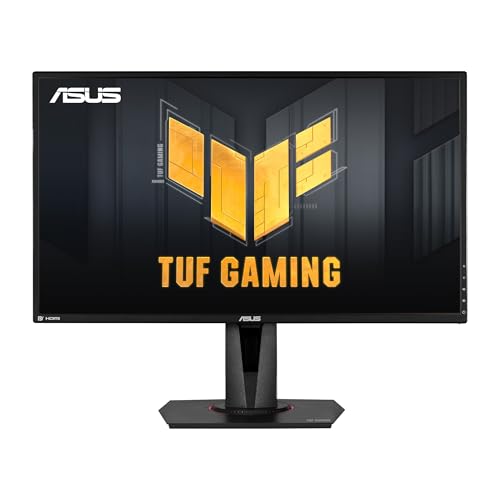
| ASUS TUF Gaming VG27AQ | Best value 1440p all-rounder | Spotted at $231.20 on Nov 19, 2026 (list $249.00) | Check on Amazon |
| Acer Nitro XV272U W2bmiiprx | Cheapest verified 240Hz 1440p deal | Spotted at $169.99 on Nov 19, 2026 | Check on Amazon |
| Samsung Odyssey G5 34-inch Ultrawide | Immersive ultrawide on a budget | Spotted at $203.99 on Nov 19, 2026 | Check on Amazon |
| Gigabyte M27Q | Hybrid gaming and work desks with KVM | Spotted at $280.67 on Nov 19, 2026 (list $299.99) | Check on Amazon |
| LG UltraGear 27GP850-B | Best colour and response balance at 1440p | Spotted at $359.99 on Nov 19, 2026 | Check on Amazon |
| LG UltraGear 27G850A-B Dual-Mode 4K | 4K 240Hz and 480Hz esports in one screen | Spotted at $599.99 on Nov 19, 2026 | Check on Amazon |
How These Deals Were Chosen
Selection started from specification truth. For each candidate we verified the panel type, native resolution, native and overclocked refresh rates, adaptive-sync certification and input set as one record, using manufacturer pages and Amazon listing data reproduced in independent sources. Monitors whose headline refresh rate applied only to a different size or variant were excluded, as were models whose only discount evidence was a retailer’s own strikethrough against a list price the monitor has not carried in years.
Pricing evidence had to be a dated sighting: pricehistory.app and smartvaluelab tracking, Slickdeals’ Amazon deal history, or dated deal coverage, with reference prices from the same source wherever a saving is described. Where a sighting is historically unremarkable – the Gigabyte and LG 27GP850-B both have lower prices in their past – the guide says so in the deal details rather than presenting a fair price as a record one. The final six were then balanced across the real ways monitors are bought in 2026: esports refresh, immersive width, hybrid-desk features, panel quality, and the 4K flagship tier.
1. ASUS TUF Gaming VG27AQ — Best value
The VG27AQ is the monitor that defined the affordable 1440p category, and in 2026 it is the Black Friday value benchmark everything else is measured against: a 27-inch IPS panel at 2560×1440, a 165Hz refresh rate (overclocked, via DisplayPort), 1ms MPRT response with ELMB Sync motion-blur reduction, and G-SYNC Compatible adaptive sync. ASUS’s specification is the set to trust – IPS, QHD, 165Hz, DisplayPort 1.2 and HDMI 2.0 – and it is worth stating the set together, because this TUF family now includes 170Hz, 180Hz and 300Hz siblings with similar names and different panels.
ELMB Sync is the feature that still separates this monitor from newer budget rivals: it runs backlight strobing and adaptive sync simultaneously, so fast pans in shooters stay sharp without the tearing that strobing alone would cause. Colour performance is honest SDR – this is a 100% sRGB-class panel that looks clean and accurate for games and desktop work. The HDR10 badge, by contrast, is a compatibility label rather than an experience; with no local dimming and SDR-class brightness, HDR games will tone-map down rather than light up, and this guide will not pretend otherwise.
Who it is for: RTX 4060 and RX 7600-class PC owners stepping up from 1080p, console players who want 1440p at 120Hz-class signals over HDMI, and anyone buying a first high-refresh monitor who wants a model with years of firmware maturity and community knowledge behind it. Use DisplayPort for the full 165Hz on PC; HDMI 2.0 tops out lower at this resolution. If you want a newer panel with faster native response, the ASUS VG27AQ3A and the Gigabyte and Acer picks below move the technology on – at prices that make this original’s deal case easy to understand.
Deal details: Spotted at $231.20 on Nov 19, 2026 against a $249.00 list price – a 7% reduction, as recorded by pricehistory.app tracking for ASIN B07WQ4FXY9, which also records a $198.55 historical low for this listing. At $231.20 it is fairly priced; if the live price during Black Friday Week drops under $210, it becomes the outstanding monitor buy of the event. Check the live price, and confirm the listing is the VG27AQ itself, not the VG27AQ1A or AQ3A variants that share its search results.
Honest limitation: An older panel by 2026 standards: HDMI 2.0 rather than 2.1, no USB hub, and HDR that exists on the spec sheet only. The 165Hz figure is an overclock; expect 144Hz as the guaranteed native rate, with 165Hz available over DisplayPort on most samples.
Check on Amazon · See the current Black Friday price · View this deal on Amazon
2. Acer Nitro XV272U W2bmiiprx — Best esports value
The Acer Nitro XV272U W2 is the price shock of this guide: a 27-inch IPS panel at 2560×1440 with a refresh rate of up to 240Hz, response times quoted up to 0.5ms, DisplayHDR 400 and 99% sRGB coverage, with DisplayPort 1.4 and two HDMI ports – at a sighting price below what most 165Hz monitors cost. Two years ago a 1440p 240Hz IPS specification started at more than double this money. For competitive players, 240Hz at 1440p is the current sweet spot: visibly smoother than 165Hz in tracking-heavy shooters, without the GPU demands of 4K or the price of OLED.
Panel type matters here, and Acer uses IPS rather than the VA found in most cheap high-refresh monitors, so dark-scene smearing is not the tax you pay for the refresh rate. AMD FreeSync Premium handles adaptive sync for both AMD and NVIDIA cards in practice. The full 240Hz rate is a DisplayPort specification; check the cable and port you plan to use, because not every input on every revision carries the headline number, and console players should note this is a PC-first monitor whose HDMI behaviour suits 1440p high-refresh PC output rather than 4K console signals.
Who it is for: Valorant, Apex, Overwatch and Rocket League players on RTX 4060 Ti-class hardware or better, sim racers who want headroom, and anyone whose upgrade question is simply ‘most hertz per dollar at 1440p’. Story-driven players who value contrast and HDR punch over motion clarity should look at the LG dual-mode and Samsung ultrawide picks instead. At this sighting price the Acer is also the rational second-monitor-that-becomes-the-main-monitor buy of the sale.
Deal details: Spotted at $169.99 on Nov 19, 2026, the price recorded for the XV272U W2bmiiprx in Amazon deal tables for this exact model during November 2026. That is an aggressive sighting for a 240Hz QHD IPS panel, so verify two things at checkout: the live price, and that the selected variant is the W2 240Hz model, because the XV272U family includes 144Hz, 170Hz and 300Hz variants under near-identical names. If the live price holds anywhere under $200, this is the esports value pick of Black Friday Week.
Honest limitation: HDR400 is a baseline certification with no local dimming, so HDR impact is minimal. The stand and port selection are functional rather than generous, there is no KVM or USB-C docking story for hybrid desks, and panel-to-panel uniformity at this price is a lottery every budget brand plays.
Check on Amazon · See the current Black Friday price · View this deal on Amazon
3. Samsung Odyssey G5 34-inch Ultrawide — Best ultrawide value
The Odyssey G5 34-inch is the cheapest honest route into ultrawide gaming: a 34-inch VA panel with a tight 1000R curve, 3440×1440 UWQHD resolution, a 165Hz refresh rate, 1ms MPRT response and FreeSync Premium. The 21:9 aspect ratio is the entire point – racing games, flight sims and open-world titles gain peripheral vision that no 16:9 monitor at this price can imitate, and desktop work gains a two-window workspace that genuinely changes how a desk feels. Samsung’s model code for this exact listing is LC34G55TWWNXZA, and the ASIN is verified against Samsung’s own listing data.
VA panel behaviour is the trade you are making, and it cuts both ways. Native contrast is far better than any IPS pick in this guide, so dark games and films look deep rather than grey. The cost is dark-level response: black transitions are slower than grey ones, which appears as smearing behind dark objects in fast motion. At 165Hz with overdrive set correctly it is manageable for immersive play; for competitive FPS, the IPS picks above are simply better tools. This is a horses-for-courses monitor, and its course is immersion per dollar.
Who it is for: sim racers, flight and space sim players, open-world and strategy gamers, and hybrid workers who want one wide screen instead of two. Check your desk depth before ordering – a 34-inch 1000R screen wants viewing distance – and confirm your games support 21:9, because a minority of titles still pillarbox. The stand is basic (tilt-focused), so budget a VESA arm if you need height adjustment; the panel itself is the value here.
Deal details: Spotted at $203.99 on Nov 19, 2026. The $203.99 figure for ASIN B08MVBYWGQ was recorded in Slickdeals’ Amazon deal history for this exact monitor, against a $449.99 original list context for the model. Ultrawide pricing swings hard during event weeks, so check the live price: anywhere in the low $200s keeps this the ultrawide value pick, while a climb toward $300 brings the 27-inch IPS picks back into contention on pure value.
Honest limitation: VA dark smearing in fast dark scenes, a basic stand, and no G-SYNC certification (adaptive sync here is FreeSync Premium; NVIDIA cards generally work in compatible mode, but it is not certified). Ultrawide support also varies by game, and console output does not use the full width.
Check on Amazon · See the current Black Friday price · View this deal on Amazon
4. Gigabyte M27Q — Best for hybrid desks
The Gigabyte M27Q is the grown-up pick in this guide: a 27-inch Super Speed IPS panel at 2560×1440 and 165Hz, 0.5ms MPRT response, 92% DCI-P3 colour coverage, FreeSync Premium – and a built-in KVM switch with USB-C, so one keyboard and mouse serve both a gaming PC and a work laptop, switching with the monitor input. In 2026 that feature, not the refresh rate, is why this monitor still earns its price: hybrid desks are the norm, and the M27Q was designed for them before most rivals noticed.
Gaming credentials are complete rather than headline-grabbing. The SS IPS panel is fast and clean in motion, the wide colour gamut makes games look richer than sRGB-only rivals, and 165Hz over DisplayPort is the right match for RTX 4060-class hardware at 1440p. Gigabyte’s OSD Sidekick software and a genuinely usable joystick control round out a package aimed at people who adjust their monitor rather than endure it. There is also a KVM-equipped ecosystem logic here: if your laptop charges and displays over a single USB-C cable, this monitor tidies a desk like nothing else at the price.
Who it is for: work-from-home gamers, laptop-plus-desktop desks, and buyers who value colour coverage and connectivity over a headline refresh number. Know the one technical footnote before ordering: the original M27Q revision uses a BGR subpixel layout, which can soften text rendering in Windows unless ClearType is tuned, and later revisions changed the layout. If you read text all day, check which revision the listing describes, or weigh the LG pick below. For mixed use with tuned text, it remains a non-issue for most owners.
Deal details: Spotted at $280.67 on Nov 19, 2026 against a $299.99 list price, as recorded by pricehistory.app for ASIN B08JWCHR5N, whose tracking also records a $179.99 historical low for this listing. That history is the honest context: the M27Q has been much cheaper in past events, so at $280.67 you are paying for the KVM and colour, not chasing a record discount. Check the live price during the week – a drop toward the low $200s, which this model has form for, makes it a buy-on-sight hybrid monitor.
Honest limitation: The BGR subpixel layout on the original revision is a real text-clarity footnote for office work, HDR support is token with no local dimming, and the current sighting is well above this listing’s historical low. Buy it for the feature set at a fair price, not as a deep-cut deal.
Check on Amazon · See the current Black Friday price · View this deal on Amazon
5. LG UltraGear 27GP850-B — Best all-round panel quality
The LG 27GP850-B is the panel-quality pick: a 27-inch Nano IPS display at 2560×1440, 165Hz native refresh (180Hz overclocked via DisplayPort), 1ms GtG response, 98% DCI-P3 coverage, DisplayHDR 400, and both G-SYNC Compatible and FreeSync Premium certification. Nano IPS was LG’s answer to washed-out gaming colour – a phosphor layer that widens the gamut – and paired with genuinely fast pixel response, it made this monitor the default ‘buy it once’ 1440p recommendation for years. In 2026 it is no longer the newest design, but the panel itself has not been caught by cheaper rivals on combined colour and motion performance.
Response tuning is the 27GP850’s quiet strength. Its overdrive behaviour stays clean across the refresh range, so adaptive sync gaming at 80fps looks as controlled as locked 165fps play – something several newer, cheaper 180Hz rivals still get wrong with inverse ghosting at lower rates. The stand is a proper ergonomic unit with height, tilt and pivot, the bezels suit multi-monitor setups, and LG’s gaming OSD remains one of the least annoying to live with. This is the monitor for buyers who notice panel flaws and are tired of returning ones that have them.
Who it is for: RTX 4070-class and RX 7800 XT-class owners who will hold a monitor for five-plus years, colour-sensitive players who also edit photos or video, and anyone choosing between ‘cheapest 1440p’ and ‘best 1440p IPS’. The honest counter-argument is price: the ASUS and Acer picks deliver most of the experience for much less, and OLED pricing (see the LG dual-mode pick’s family) keeps falling. Buy the 27GP850 for panel quality per se, with open eyes about the premium.
Deal details: Spotted at $359.99 on Nov 19, 2026, the price tracked for the 27GP850-B on Nov 18, 2026 by smartvaluelab’s daily Amazon tracking. Historical context matters: this model has been deal-tracked at $299.99 against a $429.99 list in earlier Amazon promotions, so $359.99 is a mid-range sighting, not its floor. Check the live price through Black Friday Week; at $299.99 or below it is an easy recommendation, and at $359.99 it is a quality purchase rather than a bargain.
Honest limitation: The premium is real: newer rivals offer higher refresh for less money, HDR400 changes little, and IPS contrast remains IPS contrast – dark rooms show glow that VA and OLED panels avoid. The 180Hz figure is an overclock over DisplayPort; 165Hz is the native specification.
Check on Amazon · See the current Black Friday price · View this deal on Amazon
6. LG UltraGear 27G850A-B Dual-Mode 4K — Best premium dual-mode
The 27G850A-B is the flagship statement of this guide: a 27-inch 4K UHD (3840×2160) IPS gaming monitor that runs at up to 240Hz at full 4K, and switches to a dual-mode 1080p presentation at up to 480Hz for competitive play. One panel, two personalities – cinematic 4K for story games and an esports mode faster than almost any dedicated 1080p monitor – with DisplayHDR 600, G-SYNC Compatible and FreeSync Premium Pro certification, DisplayPort 2.1 and HDMI 2.1 connectivity. LG’s model data for ASIN B0DSTPTMNS confirms the specification set exactly.
Dual-mode only makes sense if both halves are real, and here they are. The 4K 240Hz mode is a genuine flagship specification that needs DisplayPort 2.1-class bandwidth (or compression) and a graphics card most buyers do not own yet; the 480Hz FHD mode, by contrast, is usable today by any strong esports rig. Buyers should therefore think of this as a monitor bought for the next GPU as much as the current one. HDR 600 with local dimming support gives it more HDR credibility than the HDR400 picks in this guide, though it remains an IPS panel and OLED still owns ultimate contrast.
Who it is for: RTX 5080-class owners and upgraders who want one screen for the whole GPU cycle, competitive players who refuse to keep a separate 1080p esports monitor, and buyers choosing between this and a 1440p OLED at similar money. If your GPU is a 4060-class card and staying there, this monitor is wasted money – the Acer above gives you the refresh you can actually drive at a third of the price. Premium picks earn their place by matching the system, not by topping a spec table.
Deal details: Spotted at $599.99 on Nov 19, 2026. Deal tracking recorded this monitor at $599.99 on Amazon on Nov 2, 2026, down from a typical price of $652.21 – a real but modest reduction on a flagship, which is the normal shape of premium monitor pricing in event weeks. Check the live price before buying, and compare it against 1440p OLED pricing the same day; the right premium buy on Nov 27 may differ from the right one on Nov 19, and this guide’s sighting is your baseline for judging either.
Honest limitation: Driving 4K at 240Hz demands a flagship GPU and the right cable and port; most buyers will use a fraction of this panel for its first year. It is also two to three times the price of the 1440p picks, and as an IPS display it cannot match OLED black levels or per-pixel HDR.
Check on Amazon · See the current Black Friday price · View this deal on Amazon
Comparison Table
The comparison that matters is panel type against refresh against price. IPS owns the middle of this table on motion clarity, VA owns the ultrawide row on contrast and immersion, and the flagship’s dual-mode IPS sits alone at the top. Every sighting was recorded on Nov 19, 2026 – check the live price on each listing before treating any row as today’s deal.
| Model | Key specs | Dated sighting |
|---|---|---|
| ASUS TUF Gaming VG27AQ | Best value 1440p all-rounder | Spotted at $231.20 on Nov 19, 2026 (list $249.00) |
| Acer Nitro XV272U W2bmiiprx | Cheapest verified 240Hz 1440p deal | Spotted at $169.99 on Nov 19, 2026 |
| Samsung Odyssey G5 34-inch Ultrawide | Immersive ultrawide on a budget | Spotted at $203.99 on Nov 19, 2026 |
| Gigabyte M27Q | Hybrid gaming and work desks with KVM | Spotted at $280.67 on Nov 19, 2026 (list $299.99) |
| LG UltraGear 27GP850-B | Best colour and response balance at 1440p | Spotted at $359.99 on Nov 19, 2026 |
| LG UltraGear 27G850A-B Dual-Mode 4K | 4K 240Hz and 480Hz esports in one screen | Spotted at $599.99 on Nov 19, 2026 |
How to Shop Black Friday Without Overpaying
Match the monitor to the GPU you own, not the one you want. A 4K 240Hz panel behind an RTX 4060 is an expensive 60Hz experience in modern games. As a rule: RTX 4060-class cards belong with the 1440p picks, RTX 4070-class cards can justify the LG 27GP850-B and stretch toward 4K at reduced rates, and the dual-mode flagship only makes sense with a current high-end GPU or a planned upgrade. The cheapest monitor decision is the one you do not have to repeat in eighteen months.
Read refresh rate, resolution and input as one line. 165Hz at 1440p needs DisplayPort on most of these models; HDMI 2.0 inputs cap lower, and the cable in the box is not always the cable that carries the headline rate. Before ordering, confirm the port on the monitor, the port on your GPU or console, and the cable between them all support the mode you are paying for.
Use tracked lows as your walk-away number. Two picks in this guide have historical lows far below their current sightings. That does not make them bad buys at fair prices – it makes them bad buys at inflated ones. If a live price during the week sits above the sighting printed here, wait: monitor pricing reprices aggressively on Nov 27 and again on Nov 30, and this category almost always gives patient buyers a second chance.
Check the variant code at checkout. VG27AQ, VG27AQ1A and VG27AQ3A are three different monitors; XV272U covers at least four refresh rates; Odyssey G5 spans two sizes and two resolutions. The ASIN in each section is the exact listing the price was recorded against. If the basket shows a different code, the deal you read about is not the deal you are buying.
Common Mistakes
Mistake 1: buying the refresh rate and ignoring the panel. A cheap VA panel at 240Hz smears in dark motion in ways a 165Hz IPS never will. Panel type, resolution and refresh rate are one purchase decision, not three.
Mistake 2: believing the HDR badge. HDR400 without local dimming is a compatibility checkbox. If HDR gaming matters to you, the money goes to HDR600-with-dimming at minimum, or to OLED – not to a brighter badge on an SDR panel.
Mistake 3: forgetting the cable and port. Headline refresh rates assume DisplayPort and, on the flagship, DisplayPort 2.1-class bandwidth. HDMI 2.0 connections and bargain cables silently cap the mode you paid for.
Mistake 4: paying flagship prices for a mid-range GPU. A monitor cannot display frames the GPU never renders. Sequence upgrades GPU-first or together, and let the monitor’s resolution match the card’s real output.
Mistake 5: ignoring the stand and VESA mount. Tilt-only stands on budget picks are a real ergonomic cost over years of use. Confirm height adjustment or a 100×100 VESA pattern for an arm before the deal price makes the decision for you.
Final Recommendation
For most readers the decision is between two listings. The ASUS TUF VG27AQ at its $231.20 sighting remains the safest 1440p buy in the sale – proven panel, ELMB Sync, no surprises – while competitive players should go straight to the Acer Nitro XV272U W2 and its 240Hz sighting at $169.99, the single most aggressive specification-per-dollar deal in this guide if the live price holds.
Hybrid desks belong to the Gigabyte M27Q’s KVM, immersion belongs to the Samsung ultrawide, and buyers who keep monitors for half a decade should pay the LG 27GP850-B premium knowingly or step up to the dual-mode 27G850A-B with a flagship GPU behind it. In every case the workflow is the same: open the listing, confirm the model code matches this guide, compare the live price with the dated sighting – starting with the Acer’s live price, which has the most room to move – and buy the monitor whose full specification set, not whose biggest number, fits your system.
FAQ
Are Black Friday monitor deals better on Nov 27 or Cyber Monday Nov 30?
Both dates reprice this category. Headline models with limited allocation are often cheapest early in Black Friday Week before stock thins, while slower models frequently cut again on Cyber Monday. The dated sightings in this guide are your baseline: a live price below the sighting is a buy on either date.
Is 1440p or 4K the right upgrade from 1080p in 2026?
For most gaming PCs, 1440p. It is a large sharpness step that mid-range GPUs can drive at high refresh, while 4K at high refresh needs flagship hardware. The exception is the dual-mode LG in this guide, whose 1080p 480Hz mode lets one panel serve both worlds if the budget allows.
Does my console benefit from these monitors?
Consoles output up to 120Hz-class signals and benefit most from the 1440p picks with HDMI inputs, which accept and downscale or display those signals cleanly depending on the model. The ultrawide Samsung will not use its full width with console output, and the flagship’s 4K modes are aimed at high-end PCs.
What does overclocked refresh rate actually mean?
Several picks list a native rate (144Hz or 165Hz) and a higher overclocked rate (165Hz or 180Hz) available over DisplayPort. The overclock is a manufacturer-supported mode, but the native figure is the guaranteed specification, which is why this guide always prints both numbers together.
Should I buy an extended warranty or dead-pixel coverage?
Monitor failures cluster early, inside standard returns windows, so inspect on arrival: full-screen colour slides reveal dead pixels and uniformity issues in minutes. Do that check during Black Friday Week while returns are frictionless rather than paying to insure against a fault you can catch for free.
Keep Reading
Best Gaming Desktop For 1440p Gaming Under $400 Best 1440p Gaming PC For 1440p Gaming Under $1500 Best Budget Gaming PC Under $1500 Best Gaming PC For Streaming Under $700 Best Gaming PC For Small Spaces Under $400