The best kids video calling smartwatches with cellular plans are watches that let a child call a parent, and be called back, without a phone. A video calling kids smartwatch carries a camera and a cellular connection, so a child can press one button and see a parent face, while the parent can see where the child is on a map, and the watch works anywhere there is a mobile signal, not only where there is Wi-Fi. The six watches in this guide are all genuine listings from the product search, with the brand and the model stated in their titles, and every one of them states video calling and a cellular connection in its title.
The six watches in this guide are the TickTalk 6, a kids smartwatch with GPS tracking, calls, texts, and SOS for ages 3 to 12, with HD face calling, SMS, real-time GPS tracking, parental controls, and LTE walkie-talkie; the myFirst Fone S4, a kids smartwatch with GPS and video calling, 4G eSIM, dual-frequency GPS, a 5MP selfie camera, SOS alerts, class mode, and parental controls for ages 5 to 12; the imoo X10, a kids smartwatch with 4G video calling, real-time GPS tracking, dual cameras, and fitness tracking for ages 4 to 12, compatible with Verizon and T-Mobile; the myFirst Fone S3+, a kids smartwatch with 4G GPS, eSIM, video voice calling, a 2MP camera, GPS tracking, and text for ages 8 to 12; the SmartPro, a kids smartwatch with GPS tracking and 4G video and voice calling, safety alerts, school mode, and parental controls; and the Spodus, a 4G kids smartwatch with GPS tracking, video and voice calling, school mode, SOS, and a camera for ages 5 to 12.
A video calling watch is different from an ordinary kids watch, and the difference is the cellular plan. An ordinary kids watch counts steps, tells the time, and plays games, and it needs nothing more than a battery, while a video calling watch needs a mobile plan to work, because video calls travel over the mobile network. That plan is usually a small monthly add-on from a carrier, or a plan from the watch maker, and it is the running cost of the watch.
The other difference is control. A kids video calling watch is a phone for a child who is not ready for a phone, and its parental controls decide who the child can call, who can call the child, and when the watch can be used at all. Every watch in this guide states parental controls in its title, and most of them state a school mode or a class mode, which silences the watch during lessons.
This guide describes each watch with the facts stated in its listing title, explains how cellular plans work for kids watches, and helps a parent choose the watch that fits their child, their carrier, and the way the family will use it. The buying guide covers plans, carriers, and school rules, and the mistakes section covers the errors that leave a family with a watch that cannot call, a plan that does not fit, or a child who cannot reach a parent when it matters.
In this guide
Quick picks: best kids video calling smartwatches with cellular plans
| # | Product | Where to buy |
|---|---|---|
| 1 | TickTalk 6 | Check on Amazon |
| 2 | myFirst Fone S4 | Check on Amazon |
| 3 | imoo X10 | Check on Amazon |
| 4 | myFirst Fone S3+ | Check on Amazon |
| 5 | SmartPro | Check on Amazon |
| 6 | Spodus | Check on Amazon |
How the picks were chosen for the best kids video calling smartwatches with cellular plans
The picks were chosen from the product listings returned by the site product search, and only watches that state both video calling and a cellular connection in their titles made the list. Every listing title was checked for both features, and watches were excluded when they failed either test: watches with no cellular connection, including toy watches and fitness trackers with no phone needed, were excluded, and watches with calls but no video, including watches that state only voice calling or texting, were excluded too. A watch was only linked when its title stated video calling and a 4G or LTE connection.
The second filter was the brand and the model. Every pick is a new listing from a named brand, with the model stated in the title: TickTalk 6, myFirst Fone S4, imoo X10, myFirst Fone S3+, SmartPro, and Spodus. Listings for used or renewed watches were excluded, and listings whose titles named a different model were excluded too. A watch was only linked when its brand and its model both matched the listing, and a listing that stated a different model in its title was not used as a substitute.
The third filter was variety. The guide covers watches from five makers, TickTalk, myFirst, imoo, SmartPro, and Spodus, and it covers the two kinds of cellular connection a buyer will meet, a physical SIM card and an eSIM, so a parent can compare them side by side. It covers watches for younger children and watches for older children, with the ages stated in the titles running from 3 to 12, and it covers watches that state a carrier in the title and watches that leave the carrier open. A watch that appeared twice under two listings was counted once, because the article is about six different watches, not six listings of the same watch.
What makes a kids video calling smartwatch good
The first quality that matters is the video call itself, because it is the reason to buy this kind of watch. A good video calling watch has a camera that faces the child, so the parent can see them, and a connection fast enough to carry the picture without freezing, which is why the picks in this guide state 4G or LTE in their titles. The TickTalk 6 states HD face calling, the myFirst Fone S4 states a 5MP selfie camera, and the imoo X10 states dual cameras, and those details matter, because a watch with a poor camera or a slow connection makes video calls that nobody wants to use.
The second quality is the cellular plan, because a video calling watch is only as good as its connection. A watch with 4G or LTE can call from anywhere with a mobile signal, while a watch that depends on Wi-Fi can only call where there is a network to join, which is why every pick in this guide states a cellular connection. The imoo X10 states that it is compatible with Verizon and T-Mobile in its title, and a buyer should check the same for any watch they buy, because a watch that does not work on their carrier cannot call at all.
The third quality is the safety system around the watch: GPS tracking, an SOS button, parental controls, and a school mode. Every pick in this guide states GPS tracking, and most of them state SOS alerts and a school or class mode, which together let a parent see where a child is, let a child call for help with one press, and keep the watch quiet during lessons. A watch without those features is a phone, not a safety device, and a parent buying a video calling watch should treat them as essential.
eSIM watches, SIM card watches, and how to choose
eSIM watches carry their mobile connection as a digital SIM built into the watch, and the myFirst Fone S4 and the myFirst Fone S3+ both state eSIM in their titles. Their advantage is that there is no small card to lose, and the plan can be set up from a phone app without opening the watch, which suits a parent who wants the watch working the day it arrives. Their trade-off is that the plan must come from a carrier or a provider that supports eSIM for the watch, so a buyer should check that their carrier offers an eSIM plan for kids watches before choosing one.
SIM card watches carry a physical SIM card, and the Spodus states that it includes a SIM card in its title, while the imoo X10 states compatibility with Verizon and T-Mobile, which are carriers whose plans use SIM cards. Their advantage is flexibility, because a physical SIM can be moved between watches and swapped for a different plan, and most carriers understand a SIM card watch without special setup. Their trade-off is the small card itself, which must be fitted into the watch, and which a child should never be asked to remove.
The choice between them is a matter of the carrier a family already uses. A family on a carrier that supports eSIM for kids watches should choose an eSIM watch, because the setup is simpler, and a family on a carrier that works best with a physical SIM should choose a SIM card watch. Either kind makes video calls, and the wrong choice is not a SIM kind but a watch bought without checking the carrier, so a buyer should check the carrier first and the watch second.
Quick picks at a glance
| Watch | Video calling | Cellular | Best for |
|---|---|---|---|
| TickTalk 6 | HD face calling | LTE | Best all-round pick |
| myFirst Fone S4 | Video calling | 4G eSIM | Best camera pick |
| imoo X10 | 4G video calling | Verizon, T-Mobile | Best carrier pick |
| myFirst Fone S3+ | Video voice call | 4G eSIM | Best for older kids |
| SmartPro | 4G video, voice | 4G | Best school-mode pick |
| Spodus | Video, voice call | 4G | Best value pick |
The best kids video calling smartwatches with cellular plans

TickTalk 6 Kids SmartWatch
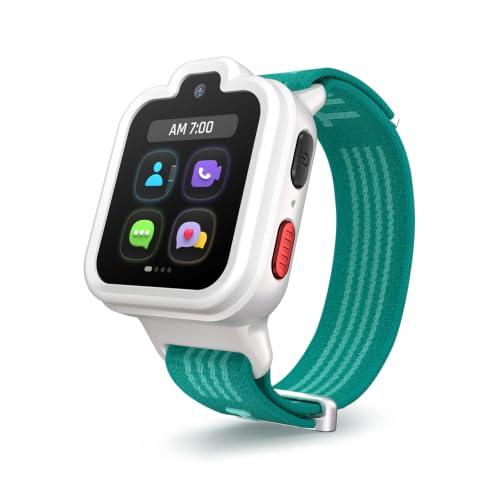
The TickTalk 6 is the all-round pick in this guide. The listing title states the brand TickTalk, the model 6, a kids smartwatch with GPS tracker, calls, texts, and SOS for ages 3 to 12, with HD face calling, SMS, real-time GPS tracking, parental controls, LTE walkie-talkie, and kid-friendly music and wellness. It is the most complete watch here, and the one a parent who wants a single watch to do everything should choose.
HD face calling is the feature that sets the TickTalk 6 apart, because it means the video call is clear enough for a parent to see a child face properly, not a small, frozen picture. The LTE walkie-talkie is the other useful feature, because it lets a parent send a quick voice message to the watch without a full call, which suits a short message such as a pickup time.
Key specs:
- Brand and model: TickTalk 6
- Calling: HD face calling, SMS, LTE walkie-talkie
- Tracking: real-time GPS tracker
- Safety: SOS, parental controls
- Ages: 3 to 12
Strengths:
- HD face calling is the clearest video in this guide
- Widest age range here, from 3 to 12
- LTE walkie-talkie for quick voice messages
Trade-offs:
- Title states no camera resolution, so check the listing
- Title states no carrier, so check yours before buying
- A full-featured watch may be more than a young child needs
The TickTalk 6 fits the parent who wants one watch to do everything. It is the pick for a first video calling watch, for a child from 3 to 12, and for a family that wants clear video calls and real-time tracking in one device.
Best for: a first video calling watch for a child from 3 to 12. Not suited for: a family that wants the simplest possible watch.
Check price on Amazon: TickTalk 6

myFirst Fone S4 Kids Smartwatch
The myFirst Fone S4 is the camera pick in this guide. The listing title states the brand myFirst, the model Fone S4, a kids smartwatch with GPS and video calling, 4G eSIM, dual-frequency GPS, a 5MP selfie camera, SOS alerts, class mode, and parental controls, for ages 5 to 12. It is the pick for a parent who wants the clearest video calls and the most accurate tracking.
A 5MP selfie camera is the highest camera resolution stated in this guide, and it matters for video calls, because the parent sees the child through it. Dual-frequency GPS is the other serious feature, because it uses two satellite bands to fix the watch position more accurately than a single band, so a parent sees where a child is, not where they were a street away.
Key specs:
- Brand and model: myFirst Fone S4
- Calling: video calling, 4G eSIM
- Camera: 5MP selfie camera
- Tracking: dual-frequency GPS
- Safety: SOS alerts, class mode, parental controls; ages 5 to 12
Strengths:
- 5MP selfie camera is the clearest camera stated here
- Dual-frequency GPS tracks more accurately
- Class mode keeps the watch quiet at school
Trade-offs:
- eSIM plan must come from a supporting carrier
- Ages 5 to 12, so not for the youngest children
- Title states no battery life, so check the listing
The myFirst Fone S4 fits the parent who wants the clearest video calls and the most accurate tracking. It is the pick for a child from 5 to 12, and for a family on a carrier that supports eSIM.
Best for: clear video calls and accurate GPS for a child from 5 to 12. Not suited for: a carrier that does not support eSIM watches.
Check price on Amazon: myFirst Fone S4

imoo X10 Smart Watch for Kids
The imoo X10 is the carrier pick in this guide. The listing title states the brand imoo, the model X10, a smart watch for kids with 4G video calling and real-time GPS tracking, a waterproof design, dual cameras, and fitness tracking for ages 4 to 12, and it states compatibility with Verizon and T-Mobile. It is the pick for a family on one of those carriers, because the title says so, and there is no guessing about whether the watch will work.
Stating the carrier in the title is worth more than it sounds, because carrier compatibility is the most common reason a kids watch cannot call. A watch that works on one carrier may not work on another, and a parent who buys without checking can end up with a watch that tracks by GPS but cannot make a call.
Key specs:
- Brand and model: imoo X10
- Calling: 4G video calling
- Carriers: Verizon and T-Mobile compatible
- Cameras: dual cameras
- Design: waterproof; fitness tracking; ages 4 to 12
Strengths:
- Carrier compatibility stated in the title
- Waterproof design survives rain and hand washing
- Dual cameras for calls and for photos
Trade-offs:
- Only Verizon and T-Mobile stated, so other carriers must check
- Title states no SOS button, so check the listing
- Title states no school mode, so check the listing
The imoo X10 fits the family on Verizon or T-Mobile who wants no doubt about compatibility. It is the pick for a child from 4 to 12 who swims, plays in the rain, and takes photos as well as making video calls.
Best for: a Verizon or T-Mobile family who wants stated compatibility. Not suited for: a family on a carrier not stated in the title.
Check price on Amazon: imoo X10
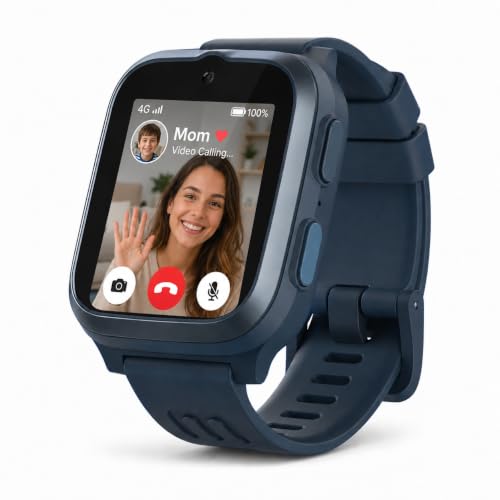
myFirst Fone S3+ Kids Smart Watch
The myFirst Fone S3+ is the older-kids pick in this guide. The listing title states the brand myFirst, the model Fone S3+, a kids smart watch with 4G GPS, eSIM, video voice call, a 2MP camera, GPS tracking, text, and a waterproof eSIM dual band, for ages 8 to 12. It is the pick for a child who is old enough for more independence, and whose watch should keep up with them.
An age range of 8 to 12 means the Fone S3+ is built for a child who walks to school alone, stays for after-school activities, and needs to call a parent from the field or the club, rather than a young child who stays close to home. The waterproof eSIM dual band design suits that life: the watch survives rain and sport, and the eSIM keeps it connected without a card to lose.
Key specs:
- Brand and model: myFirst Fone S3+
- Calling: video voice call, text, 4G eSIM
- Camera: 2MP camera
- Tracking: GPS tracking
- Design: waterproof eSIM dual band; ages 8 to 12
Strengths:
- Built for older children, ages 8 to 12
- Waterproof design suits sport and rain
- eSIM means no card to lose
Trade-offs:
- 2MP camera is smaller than the Fone S4 camera
- eSIM plan must come from a supporting carrier
- Not for younger children under 8
The myFirst Fone S3+ fits the older child who walks to school and stays for activities. It is the pick for a child from 8 to 12 who needs to call home from the field, the club, or the bus stop.
Best for: an older child from 8 to 12 who is out on their own. Not suited for: a younger child under 8.
Check price on Amazon: myFirst Fone S3+

SmartPro Smart Watch for Kids
The SmartPro is the school-mode pick in this guide. The listing title states the brand SmartPro, a smart watch for kids with GPS tracking and 4G video and voice calling, safety alerts, school mode, and parental controls, and it states that two straps are included and that it runs Android OS. It is the pick for a parent whose first worry is the school day, because the school mode and the parental controls are stated in the title.
A school mode matters because a watch that rings in class is a watch a teacher takes away, and a watch taken away cannot call a parent after school. The SmartPro school mode silences the watch during lessons, so the child can wear it all day without trouble, and the parental controls let the parent decide who can call the child and when.
Key specs:
- Brand and model: SmartPro
- Calling: 4G video and voice calling
- Tracking: GPS tracker
- Safety: safety alerts, school mode, parental control
- Extras: two straps included; Android OS
Strengths:
- School mode keeps the watch quiet in class
- Two straps included in the box
- Parental controls and safety alerts stated in the title
Trade-offs:
- Title states no ages, so check the listing for fit
- Title states no camera resolution, so check the listing
- Title states no carrier, so check yours before buying
The SmartPro fits the parent whose first worry is the school day. It is the pick for a child who wears the watch to school every day, and for a family that wants a spare strap in the box.
Best for: a school-day watch with a proper school mode. Not suited for: a parent who needs a stated age range before buying.
Check price on Amazon: SmartPro

Spodus 4G Kids Smart Watch
The Spodus is the value pick in this guide. The listing title states the brand Spodus, a 4G kids smart watch with GPS tracking, video and voice calling, school mode, SOS, a camera, an alarm, a calculator, a pedometer, an HD touch screen, and parental controls, for ages 5 to 12, in black. It is the pick for a parent who wants every feature in one watch without paying for a brand name.
A watch with a calculator, a pedometer, and an alarm is a watch a child will actually use, because those are the features a child reaches for every day, and a child who uses a watch is a child who wears it. The HD touch screen makes the watch easy for a small child to use, the school mode keeps it quiet in class, and the SOS button and parental controls make it a safety device as well as a toy.
Key specs:
- Brand and model: Spodus
- Calling: video and voice call, 4G
- Tracking: GPS tracker
- Safety: SOS, school mode, parental control
- Extras: camera, alarm, calculator, pedometer, HD touch screen; ages 5 to 12
Strengths:
- Every feature in one watch, including a calculator and pedometer
- HD touch screen is easy for a small child to use
- Age range of 5 to 12 covers the primary years
Trade-offs:
- Lesser-known brand, so fewer families know the name
- Title states no carrier, so check yours before buying
- Title states no battery life, so check the listing
The Spodus fits the parent who wants every feature in one watch at a value price. It is the pick for a child from 5 to 12 who will use the calculator, the pedometer, and the alarm every day, and whose parent wants video calls and SOS in the same device.
Best for: a value watch with every feature for a child from 5 to 12. Not suited for: a parent who wants a well-known brand name.
Buying guide: choosing the best kids video calling smartwatches with cellular plans
How cellular plans work for kids watches
A video calling kids watch needs a mobile plan to make calls, because video calls travel over the mobile network. The plan is usually a small monthly add-on from a carrier, or a plan sold by the watch maker, and it gives the watch a phone number and a data allowance for calls, texts, and GPS tracking. A buyer should expect a monthly cost on top of the watch, and should compare that cost between watches.
Some watches need a plan from a specific carrier, and some work with any carrier that supports them. The imoo X10 states compatibility with Verizon and T-Mobile in its title, which tells a family on those carriers that the watch will work, while the eSIM watches in this guide need a carrier that supports eSIM for kids watches. A buyer should check with their carrier before buying, and should ask whether the carrier offers a kids watch plan, what it costs each month, and whether it includes the data for video calls.
eSIM, SIM cards, and what to check first
An eSIM is a digital SIM built into the watch, and it is set up from a phone app without opening the watch, while a physical SIM is a small card fitted into the watch. The myFirst Fone S4 and Fone S3+ state eSIM in their titles, and the Spodus states that it includes a SIM card, so this guide covers both kinds. A buyer should check which kind their carrier supports before choosing, because a watch bought for the wrong kind cannot be set up at all.
A buyer should also check whether the watch is locked to a carrier. A watch sold for one carrier may not work on another, and a watch that states compatibility with named carriers, as the imoo X10 does, is the safest buy for a family on those carriers. A family that changes carriers often should choose a watch that works on several.
Parental controls, school mode, and who can call
Parental controls are the point of a kids watch, and a buyer should set them up the day the watch arrives. The controls decide who the child can call, who can call the child, and whether strangers can reach the watch at all, and every watch in this guide states parental controls in its title. A parent should add only the family numbers to the watch, and should test the controls by calling the watch from a number that is not on the list, to confirm that the call is blocked.
A school mode or class mode silences the watch during lessons, and most watches in this guide state one: the myFirst Fone S4 states class mode, and the SmartPro and the Spodus state school mode. A parent should set the school hours in the app before the first school day, and should agree with the child that the watch stays on the wrist and quiet during lessons, so that a teacher never needs to take it away. A watch that rings in class is a watch a child will be told to leave at home.
GPS, SOS, and what a parent should expect
GPS tracking lets a parent see where a child is on a map, and every watch in this guide states it. A parent should expect the map to show the child within a street or two, because GPS in a small watch is less precise than GPS in a phone, and the myFirst Fone S4 states dual-frequency GPS, which fixes the position more accurately than a single band.
An SOS button lets a child call for help with one press, and the TickTalk 6, the myFirst Fone S4, and the Spodus all state SOS in their titles. A parent should teach the child when to press it, which is when they feel unsafe or lost, and should test it once, so that the child knows what happens when it is pressed and is not afraid to use it. A watch whose SOS has never been tested is a watch nobody knows works.
Using and caring for a kids video calling smartwatch
Setting up the watch and the plan
A video calling watch is set up in two steps: the plan first, then the watch. The parent should set up the mobile plan with the carrier, or with the watch maker, before the child ever wears the watch, because a watch without a plan can track by GPS and play games but cannot make a video call. Once the plan is live, the parent pairs the watch with the phone app, adds the family numbers, sets the school hours, and tests a video call from another room.
A parent should also set the watch to the child wrist before the first school day, and should check that the strap fits snugly but not tightly, because a loose watch slides around and its camera points at the ceiling, while a tight watch is uncomfortable and the child will take it off. The SmartPro includes two straps in the box, which is useful when a child outgrows one or breaks one, and a spare strap means the watch stays on the wrist.
Charging, water, and daily care
A kids watch should be charged every night, like a phone, so that it is full in the morning. A parent should make charging part of the bedtime routine, with the charger in one place, so that the watch is never left flat on a school morning. A watch that is flat cannot call, cannot track, and cannot sound its SOS, so a nightly charge is the most important habit in this guide.
A waterproof watch, such as the imoo X10, survives rain and hand washing, but no kids watch should be worn swimming unless its title states it clearly, and no watch should be charged while it is wet. A parent should dry the watch before charging it, and should check the strap and the screen each week, because a cracked screen lets water in, and a broken strap means a watch left at home.
Common mistakes with kids video calling smartwatches
Buying the watch before checking the carrier
The most common mistake is buying a video calling watch without checking whether it works on the family carrier. A watch that cannot connect to the carrier cannot make a video call, and a parent who discovers that after the birthday has a watch that tracks by GPS but cannot call, which is not what they bought. The fix is to check first: ask the carrier whether it supports the watch, whether it offers a kids watch plan, and what the plan costs each month.
The imoo X10 states compatibility with Verizon and T-Mobile in its title, which is the safest kind of buy, because the answer is printed on the listing. For any other watch, the carrier is the first question, and the watch is the second, and a buyer who asks in that order will not buy a watch that cannot call.
Choosing a toy watch instead of a cellular watch
The second most common mistake is buying a toy watch, or a fitness tracker with no phone needed, and expecting it to make video calls. Toy watches have cameras and games, and fitness trackers count steps, but neither has a cellular connection, so neither can call a parent from the park. The search results for this kind of watch are full of them, and they are cheaper than cellular watches, which is why they are tempting.
The fix is to check the title for both features before buying: the watch must state video calling and a 4G or LTE connection. Every pick in this guide states both, and a watch that states only one of them is not a video calling smartwatch with a cellular plan, whatever else it can do.
Skipping the parental controls setup
The third most common mistake is giving a child the watch without setting up the parental controls. A watch without controls is a phone on a wrist, and a child can be called by anyone, can call anyone, and can use the watch in class, which is why teachers take watches away. The fix takes minutes: add only the family numbers, set the school hours, and test the controls by calling from a number that is not on the list.
A parent should also agree the rules with the child before the first day: who they can call, when they can call, and what the SOS button is for. A child who knows the rules will use the watch well, and a child who does not will use it until a teacher takes it away, which helps nobody.
Our recommendation for the best kids video calling smartwatches with cellular plans
For most families, the TickTalk 6 is the pick to buy first, because it pairs HD face calling with LTE, real-time GPS, parental controls, and the widest age range in this guide, from 3 to 12, in one watch. A parent who wants the clearest video calls should buy the myFirst Fone S4 instead, because its 5MP selfie camera and dual-frequency GPS are the best stated in this guide.
A family on Verizon or T-Mobile should choose the imoo X10, because its carrier compatibility is stated in its title, and there is no guessing about whether it will work. A family with an older child should choose the myFirst Fone S3+, because it is built for ages 8 to 12, and a family that wants every feature at a value price should choose the Spodus, because it carries video calling, school mode, SOS, and a calculator and pedometer in one watch.
Related reading on Reviewstook: see our guides to best kids smartwatches, best smartwatches with calling function, best smartwatches with calling for more on this topic.
Frequently asked questions about kids video calling smartwatches with cellular plans
Does a kids video calling smartwatch need a cellular plan?
Yes, a video calling watch needs a mobile plan to make calls, because video calls travel over the mobile network. The plan is usually a small monthly add-on from a carrier, or a plan sold by the watch maker, and it gives the watch a phone number and a data allowance for calls, texts, and GPS tracking. A watch without a plan can track by GPS and play games, but it cannot make a video call.
How much does a cellular plan for a kids watch cost?
The cost depends on the carrier and the plan, and it is usually a small monthly add-on to a family mobile plan, or a plan sold by the watch maker. A buyer should ask their carrier what a kids watch plan costs each month, whether it includes the data for video calls, and whether the watch needs a plan from that carrier or works with any carrier that supports it.
What is the difference between eSIM and a SIM card in a kids watch?
An eSIM is a digital SIM built into the watch, set up from a phone app without opening the watch, while a physical SIM is a small card fitted into the watch. The myFirst Fone S4 and Fone S3+ state eSIM in their titles, and the Spodus states that it includes a SIM card. Either kind makes video calls, and the choice depends on which kind the family carrier supports.
Can a child use a video calling watch at school?
Yes, when the watch has a school mode or a class mode, which silences it during lessons. The myFirst Fone S4 states class mode, and the SmartPro and the Spodus state school mode, and a parent should set the school hours in the app before the first school day, so that the watch stays quiet in class and the teacher never needs to take it away.
What age is right for a video calling smartwatch?
The watches in this guide state ages from 3 to 12 in their titles: the TickTalk 6 states ages 3 to 12, the imoo X10 states ages 4 to 12, the myFirst Fone S4 and the Spodus state ages 5 to 12, and the myFirst Fone S3+ states ages 8 to 12. A parent should choose the watch whose stated age range fits their child, and should agree the rules for calls and SOS with the child before the first day.
Will a kids video calling watch work on any carrier?
Not always, and a buyer should check before buying. The imoo X10 states compatibility with Verizon and T-Mobile in its title, and other watches may work only on carriers that support eSIM or a physical SIM for kids watches. A buyer should ask their carrier whether it supports the watch and whether it offers a kids watch plan, before buying the watch.