The best internal SATA hard drives are the ones that give a desktop room for games, photos, and video without costing as much as a large SSD. A SATA hard drive is slower than an SSD, but it holds far more for the money, and it is the right choice for a library that does not need SSD speed. The six drives in this guide cover the main choices: 2TB, 4TB, and 8TB sizes, 5400 RPM and 7200 RPM speeds, and desktop and gaming uses.
An internal SATA hard drive matters because a desktop with only a small SSD will fill up fast. Games are large, photos pile up, and video takes room, so a desktop needs a big drive for the library. A SATA hard drive fits any desktop with a 3.5 inch bay and a SATA port, and it holds terabytes for the price of a small SSD. The right drive fits the bay, the budget, and the use.
The drives in this guide cover the main uses. The Seagate BarraCuda 2TB is the best all-round pick, the Seagate BarraCuda 4TB is the capacity pick, the Seagate BarraCuda 8TB is the big-storage pick, the Western Digital Blue 8TB is the quiet 8TB pick, the Western Digital Blue 2TB is the value pick, and the Western Digital Black 4TB is the gaming pick. All six are internal SATA hard drives, and all six are sold as new listings.
This guide covers six best internal SATA hard drives: three Seagate BarraCuda drives and three Western Digital drives. All six are 3.5 inch SATA drives, all six state their size, speed, and cache in the listing title, and all six suit desktop storage. The comparison table below gives the short version, and the sections after it give the detail.
In this guide
Quick picks: best internal sata hard drives
| # | Product | Where to buy |
|---|---|---|
| 1 | Seagate BarraCuda 2TB internal hard drive SATA | Check on Amazon |
| 2 | Seagate BarraCuda 4TB internal hard drive SATA | Check on Amazon |
| 3 | Seagate BarraCuda 8TB internal hard drive SATA | Check on Amazon |
| 4 | Western Digital WD Blue 8TB internal hard drive | Check on Amazon |
| 5 | Western Digital WD Blue 2TB internal hard drive | Check on Amazon |
| 6 | Western Digital WD Black 4TB gaming internal hard drive | Check on Amazon |
How the picks were chosen for the best internal SATA hard drives
Every drive below started as a listing returned by the reviewstook.com product lookup, and every listing was checked the same way. First, the title had to name the exact brand and the exact model, including every capacity and model number, because a Seagate BarraCuda 2TB ST2000DM008 is not a BarraCuda 4TB ST4000DM004, and a WD Blue 2TB WD20EZAZ is not a WD Blue 8TB WD80EAAZ. Second, the title had to state that the drive is an internal hard drive with a SATA interface, because an SSD or an external drive is not an internal hard drive.
The drives were also checked for the details that decide real use. The capacity decides the library, and the drives here run from 2TB to 8TB. The speed decides the loading, and the drives here run at 5400 RPM, 5640 RPM, and 7200 RPM. The cache decides the reads, and the drives here have 256MB caches. The form factor decides the fit, and the drives here are all 3.5 inch desktop drives.
One more check shaped the list: the drive must be an internal SATA hard drive, not an SSD, an external drive, or a laptop drive. Listings for SSDs, external drives, and 2.5 inch laptop drives were left out, because a buyer searching for the best internal SATA hard drives wants a desktop hard drive. The six drives below are all internal SATA hard drives, sold as new listings, with the brand, the model, and the specs stated in the title.
What an internal SATA hard drive is, and who should buy one
An internal SATA hard drive is a spinning disk drive that sits inside a desktop PC, connects by a SATA cable, and stores files on magnetic platters. It is slower than an SSD, but it holds far more for the money, and it is the right choice for a library of games, photos, and video. An internal SATA hard drive is the bulk storage of a desktop, and it is the drive that holds what the SSD cannot.
An internal SATA hard drive suits any desktop owner who needs room. It is the right choice when the game library is large, when the photo and video collection grows, and when the SSD is full. It is not the right choice for the operating system, because an SSD boots faster, and it is not the right choice for a laptop, because a laptop needs a 2.5 inch drive.
The six drives in this guide cover the main buyers. The all-round and value picks are for the desktop owner who wants a fast 2TB drive, the capacity and big-storage picks are for the owner with a large library, and the quiet 8TB pick is for the owner who wants big storage that runs cool. The gaming pick is for the gamer who wants a fast drive for the library.
An internal SATA hard drive also suits a desktop owner who backs up files, because a big drive holds the backup as well as the library. The buyer who pairs a small SSD for the system with a big hard drive for the library gets the best of both, and the buyer who checks the size, the speed, and the cache gets the best drive. The right drive is the one that fits the bay and the library.
What makes a good internal SATA hard drive
Capacity is the first test, and it decides the library. A 2TB drive holds the essentials, a 4TB drive holds a large library, and an 8TB drive holds years of files, so a buyer should choose by the library size. The drives here run from 2TB to 8TB, and a buyer should check the capacity in the title before buying, because it decides how much fits.
Speed is the second test. A 7200 RPM drive loads games faster than a 5400 RPM drive, and a 5400 RPM drive runs cooler and quieter, so a buyer who plays games should look for 7200 RPM, and a buyer who stores files should look for 5400 RPM. The BarraCuda 2TB and the WD Black 4TB here run at 7200 RPM, and the others here run slower, and a buyer should check the speed in the title before buying.
Cache is the third test. A 256MB cache speeds up reads, and all six drives here have a 256MB cache, so a buyer should check the cache in the title before buying. A bigger cache helps with large files, and a smaller cache slows the drive down. The cache decides how fast the drive reads.
Form factor is the fourth test. A 3.5 inch drive fits a desktop bay, and a 2.5 inch drive fits a laptop, so a buyer should check the size in the title before buying. All six drives here are 3.5 inch desktop drives, and a buyer with a desktop should buy one of them. A buyer with a laptop needs a different drive.
Quick picks at a glance
| Drive | Size and speed | Use | Best for |
|---|---|---|---|
| Seagate BarraCuda 2TB | 3.5 inch, 7200 RPM, 256MB | Desktop, games, daily use | Best all-round drive |
| Seagate BarraCuda 4TB | 3.5 inch, 5400 RPM, 256MB | Desktop, large library | Best capacity drive |
| Seagate BarraCuda 8TB | SATA, 8TB, Rescue service | Desktop, huge library | Best big-storage drive |
| WD Blue 8TB | 3.5 inch, 5640 RPM, 256MB | Desktop, everyday use | Best quiet 8TB drive |
| WD Blue 2TB | 3.5 inch, 5400 RPM, 256MB | Desktop, everyday storage | Best value drive |
| WD Black 4TB | 3.5 inch, 7200 RPM, 256MB | Gaming, large library | Best gaming drive |
The best internal SATA hard drives


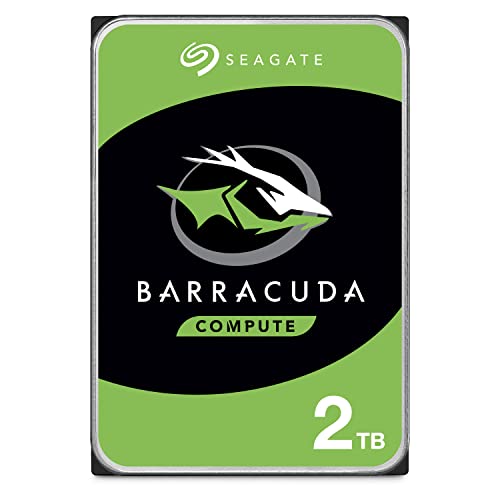
Seagate BarraCuda 2TB Internal Hard Drive HDD – 3.5 Inch SATA 6Gb/s 7200 RPM 256MB Cache – Frustration Free Packaging (ST2000DM008/ST2000DMZ08)
The Seagate BarraCuda 2TB Internal Hard Drive is the best all-round pick in this guide, and it is the pick for a desktop owner who wants fast everyday storage. It is a Seagate BarraCuda 2TB internal hard drive, 3.5 inch, SATA 6Gb/s, 7200 RPM, with a 256MB cache, in frustration free packaging, model ST2000DM008 and ST2000DMZ08. The 7200 RPM spin suits everyday computing and gaming, and the 2TB size holds the system, the games, and the files.
The BarraCuda 2TB suits a desktop owner who wants a fast drive for daily use. The 7200 RPM speed suits games and apps, the 256MB cache speeds up reads, and the SATA interface fits any desktop. It is the drive for a buyer who wants a fast 2TB internal hard drive.
Key specs:
- Seagate BarraCuda 2TB Internal Hard Drive
- 3.5 Inch SATA 6Gb/s
- 7200 RPM, 256MB cache
- Frustration free packaging
- ST2000DM008/ST2000DMZ08
Strengths:
- 7200 RPM suits games and everyday computing
- 256MB cache speeds up reads
- SATA interface fits any desktop
Trade-offs:
- 2TB fills up with a large game library
- A 3.5 inch drive, not a 2.5 inch laptop drive
- A spinning drive, slower than an SSD
The BarraCuda 2TB fits a desktop owner who wants a fast drive for games and daily use.
Best for: fast everyday desktop storage. Not suited for: a laptop, or a buyer who wants SSD speed.
Check price on Amazon: Seagate BarraCuda 2TB internal hard drive SATA


Seagate BarraCuda 4TB Internal Hard Drive HDD – 3.5 Inch Sata 6 Gb/s 5400 RPM 256MB Cache For Computer Desktop PC – Frustration Free Packaging ST4000DMZ04/DM004
The Seagate BarraCuda 4TB Internal Hard Drive is the capacity pick in this guide, and it is the pick for a desktop owner who wants more room for less money per terabyte. It is a Seagate BarraCuda 4TB internal hard drive, 3.5 inch, SATA 6 Gb/s, 5400 RPM, with a 256MB cache, for a computer desktop PC, in frustration free packaging, model ST4000DMZ04 and DM004. The 4TB size holds a large game library and years of files, and the 5400 RPM spin keeps it cool and quiet.
The BarraCuda 4TB suits a desktop owner who stores a lot and wants the room. The 4TB size covers games, photos, and video, the 256MB cache speeds up reads, and the SATA interface fits any desktop. It is the drive for a buyer who wants 4TB of desktop storage.
Key specs:
- Seagate BarraCuda 4TB Internal Hard Drive
- 3.5 Inch SATA 6 Gb/s
- 5400 RPM, 256MB cache
- For computer desktop PC
- ST4000DMZ04/DM004
Strengths:
- 4TB holds a large library and years of files
- 256MB cache speeds up reads
- 5400 RPM runs cool and quiet
Trade-offs:
- 5400 RPM is slower than 7200 RPM
- A 3.5 inch drive, not a 2.5 inch laptop drive
- A spinning drive, slower than an SSD
The BarraCuda 4TB fits a desktop owner who wants 4TB of quiet storage for games and files.
Best for: 4TB of quiet desktop storage. Not suited for: a laptop, or a buyer who wants the fastest speed.
Check price on Amazon: Seagate BarraCuda 4TB internal hard drive SATA


Seagate 8TB BarraCuda Internal Hard Drive | SATA 6 Gb/s (ST8000DM004) | Desktop HDD for everyday PC storage, gaming, & computing. Trusted reliability with 2-Year Warranty + 2-Year Rescue
The Seagate 8TB BarraCuda Internal Hard Drive is the big-storage pick in this guide, and it is the pick for a desktop owner who wants the most room here. It is a Seagate 8TB BarraCuda internal hard drive, SATA 6 Gb/s, model ST8000DM004, a desktop HDD for everyday PC storage, gaming, and computing, with trusted reliability and a 2-year warranty plus 2-year Rescue service. The 8TB size holds a huge library, and the Rescue service covers data recovery.
The BarraCuda 8TB suits a desktop owner with a huge library of games, photos, and video. The 8TB size covers years of storage, the SATA interface fits any desktop, and the Rescue service gives peace of mind. It is the drive for a buyer who wants the biggest drive here.
Key specs:
- Seagate 8TB BarraCuda Internal Hard Drive
- SATA 6 Gb/s, ST8000DM004
- Desktop HDD for everyday PC storage
- Gaming and computing
- 2-Year Warranty + 2-Year Rescue
Strengths:
- 8TB, the biggest size here
- Rescue service covers data recovery
- SATA interface fits any desktop
Trade-offs:
- No RPM or cache stated in the title
- A 3.5 inch drive, not a 2.5 inch laptop drive
- A spinning drive, slower than an SSD
The BarraCuda 8TB fits a desktop owner with a huge library who wants the most room.
Best for: the biggest desktop storage here. Not suited for: a laptop, or a buyer who wants stated RPM and cache.
Check price on Amazon: Seagate BarraCuda 8TB internal hard drive SATA

Western Digital 8TB WD Blue PC Internal Hard Drive HDD – 5640 RPM, SATA 6 Gb/s, 256 MB Cache, 3.5" – WD80EAAZ
The Western Digital 8TB WD Blue PC Internal Hard Drive is the quiet 8TB pick in this guide, and it is the pick for a desktop owner who wants big storage that runs cool. It is a Western Digital 8TB WD Blue PC internal hard drive, 5640 RPM, SATA 6 Gb/s, with a 256 MB cache, 3.5 inch, model WD80EAAZ. The 5640 RPM spin runs cooler and quieter than a faster drive, and the 8TB size holds a huge library.
The WD Blue 8TB suits a desktop owner who wants big storage for everyday use. The 8TB size covers games, photos, and video, the 256 MB cache speeds up reads, and the SATA interface fits any desktop. It is the drive for a buyer who wants a quiet 8TB drive.
Key specs:
- Western Digital 8TB WD Blue PC Internal Hard Drive
- 5640 RPM, SATA 6 Gb/s
- 256 MB cache, 3.5"
- WD80EAAZ
Strengths:
- 8TB holds a huge library
- 5640 RPM runs cool and quiet
- 256 MB cache speeds up reads
Trade-offs:
- 5640 RPM is slower than 7200 RPM
- A 3.5 inch drive, not a 2.5 inch laptop drive
- A spinning drive, slower than an SSD
The WD Blue 8TB fits a desktop owner who wants quiet 8TB storage for everyday use.
Best for: quiet 8TB desktop storage. Not suited for: a laptop, or a buyer who wants the fastest speed.
Check price on Amazon: Western Digital WD Blue 8TB internal hard drive

Western Digital 2TB WD Blue PC Internal Hard Drive HDD – 5400 RPM, SATA 6 Gb/s, 256 MB Cache, 3.5" – WD20EZAZ
The Western Digital 2TB WD Blue PC Internal Hard Drive is the value pick in this guide, and it is the pick for a desktop owner who wants a plain 2TB drive that works. It is a Western Digital 2TB WD Blue PC internal hard drive, 5400 RPM, SATA 6 Gb/s, with a 256 MB cache, 3.5 inch, model WD20EZAZ. The 2TB size holds the system and the files, and the 5400 RPM spin keeps it cool and quiet.
The WD Blue 2TB suits a desktop owner who wants a simple drive for everyday storage. The 2TB size covers the system, the games, and the files, the 256 MB cache speeds up reads, and the SATA interface fits any desktop. It is the drive for a buyer who wants a plain 2TB drive.
Key specs:
- Western Digital 2TB WD Blue PC Internal Hard Drive
- 5400 RPM, SATA 6 Gb/s
- 256 MB cache, 3.5"
- WD20EZAZ
Strengths:
- Plain design that just works
- 5400 RPM runs cool and quiet
- 256 MB cache speeds up reads
Trade-offs:
- 5400 RPM is slower than 7200 RPM
- 2TB fills up with a large game library
- A spinning drive, slower than an SSD
The WD Blue 2TB fits a desktop owner who wants a plain 2TB drive for everyday storage.
Best for: a plain 2TB drive for everyday use. Not suited for: a laptop, or a buyer who wants the fastest speed.
Check price on Amazon: Western Digital WD Blue 2TB internal hard drive

Western Digital 4TB WD Black Gaming Internal Hard Drive HDD – 7200 RPM, SATA 6 Gb/s, 256 MB Cache, 3.5" – WD4006FZBX
The Western Digital 4TB WD Black Gaming Internal Hard Drive is the gaming pick in this guide, and it is the pick for a gamer who wants a fast drive for the game library. It is a Western Digital 4TB WD Black gaming internal hard drive, 7200 RPM, SATA 6 Gb/s, with a 256 MB cache, 3.5 inch, model WD4006FZBX. The 7200 RPM spin suits games, and the 4TB size holds a large library, and the WD Black line is built for gaming.
The WD Black 4TB suits a gamer who wants a fast drive for the library. The 7200 RPM speed loads games faster than a 5400 RPM drive, the 4TB size covers many games, and the 256 MB cache speeds up reads. It is the drive for a buyer who wants a gaming hard drive.
Key specs:
- Western Digital 4TB WD Black Gaming Internal Hard Drive
- 7200 RPM, SATA 6 Gb/s
- 256 MB cache, 3.5"
- WD4006FZBX
Strengths:
- 7200 RPM loads games faster
- 4TB holds a large game library
- WD Black line built for gaming
Trade-offs:
- 7200 RPM runs warmer than 5400 RPM
- A 3.5 inch drive, not a 2.5 inch laptop drive
- A spinning drive, slower than an SSD
The WD Black 4TB fits a gamer who wants a fast drive for a large game library.
Best for: a fast gaming hard drive. Not suited for: a laptop, or a buyer who wants a quiet drive.
Check price on Amazon: Western Digital WD Black 4TB gaming internal hard drive
Buying guide for the best internal SATA hard drives
Capacity: 2TB, 4TB, or 8TB
Start with the capacity, because it decides the library. A 2TB drive holds the system and the essentials, a 4TB drive holds a large game library, and an 8TB drive holds years of files, so a buyer should choose by the library size. The drives here run from 2TB to 8TB, and a buyer should check the capacity in the title before buying, because it decides how much fits.
The capacity also decides the cost per terabyte, because a bigger drive costs less per terabyte than a smaller one. A buyer who needs room should buy the biggest drive the budget allows, and a buyer who needs little room can buy a 2TB drive. Check the capacity in the title before buying.
Speed: 5400 RPM or 7200 RPM
Speed decides the loading, and a buyer who plays games should look for 7200 RPM. A 7200 RPM drive loads games faster than a 5400 RPM drive, and a 5400 RPM drive runs cooler and quieter, so a buyer should choose by the use. The BarraCuda 2TB and the WD Black 4TB here run at 7200 RPM, and the others here run slower, and a buyer should check the speed in the title before buying.
The speed also decides the heat, because a faster drive runs warmer. A buyer with a well-ventilated case can buy a 7200 RPM drive, and a buyer with a small case should buy a slower one. Check the speed in the title before buying, because it decides the loading and the heat.
Cache: why 256MB matters
Cache is the fast memory on the drive that speeds up reads, and a bigger cache helps with large files. All six drives here have a 256MB cache, and a buyer should check the cache in the title before buying, because it decides how fast the drive reads. A drive with a small cache will feel slow with large files, and one with a large cache will feel faster.
The cache also helps with repeated reads, because the drive can serve the same data from cache instead of the disk. A buyer who reads the same files often will feel the cache, and a buyer who writes once and reads rarely will not. Check the cache in the title before buying.
Form factor: 3.5 inch desktop or 2.5 inch laptop
Form factor decides the fit, and a buyer should check it in the title before buying. A 3.5 inch drive fits a desktop bay, and a 2.5 inch drive fits a laptop, so a desktop owner should buy a 3.5 inch drive. All six drives here are 3.5 inch desktop drives, and a buyer with a desktop should buy one of them.
The bay matters too. A desktop with a free 3.5 inch bay can take one of these drives, and a desktop with only 2.5 inch bays cannot. Check the case before buying, and look for a free bay and a free SATA port. The drive needs both to work.
SSD or hard drive: which for what
An SSD is faster than a hard drive, and a hard drive holds more for the money, so a buyer should use both. The operating system and the most-played games belong on the SSD, and the library belongs on the hard drive, because the SSD boots fast and the hard drive holds the bulk. A buyer who pairs a small SSD with a big hard drive gets the best of both.
The hard drive is the right choice for files that are read rarely, because the speed does not matter for a backup or an old photo. A buyer who stores a lot should buy a hard drive, and a buyer who wants speed should buy an SSD. Check the use before buying, because it decides the drive.
Using and caring for an internal SATA hard drive
Install the drive and format it
Install the drive on the first day, and connect the SATA data cable and the power cable, because a drive that is not connected will not show up. Mount the drive in a 3.5 inch bay, screw it in firmly, and format it in the operating system, because a new drive needs formatting before it can store files. A drive that is installed right will show up at once.
After installing it, check that the drive is seen by the system, and run a quick test, because a drive that is not seen needs the cables checked. Take the time to install it right, because a good install is the whole point.
Keep the drive cool and steady
A hard drive gets warm under load, and it needs air to stay cool. Use it in a case with airflow, and do not block the vents, because a drive that overheats will fail early. A drive that is kept cool will last for years, and one that is smothered will wear out.
Keep the drive steady too, because a spinning drive does not like shocks. Do not move the PC while the drive is running, and do not knock the case, because a shock can damage the platters. A drive that is treated gently will last longer.
Back up the drive for the long term
A hard drive can fail, and a buyer should back up the files that matter. Copy the photos and the documents to another drive or to the cloud, because a backup is the only fix for a failed drive. A drive that is backed up will not lose the files, and one that is not will.
Check the drive health now and then, because a drive that is failing will show warnings. Listen for clicking, and check the SMART status, because a drive that clicks needs replacing. A little care keeps the files safe.
Common mistakes when buying an internal SATA hard drive
Buying an SSD instead of a hard drive
SSDs appear in the same search results as hard drives, and a buyer in a hurry can buy one by mistake. An SSD is faster but holds less for the money, and a hard drive holds more for the money, so a buyer who wants bulk storage should buy a hard drive. Check the title for the words hard drive and HDD before buying, and look at the capacity, because a hard drive holds terabytes.
The same care applies to external drives. An external drive connects by USB, and an internal drive connects by SATA, so a buyer who wants an internal drive should buy one. Check the title for internal and SATA before buying.
Buying a laptop drive for a desktop
A 2.5 inch laptop drive will fit in a desktop with an adapter, but it is slower and smaller than a 3.5 inch desktop drive, so a desktop owner should buy a 3.5 inch drive. All six drives here are 3.5 inch desktop drives, and a buyer with a desktop should buy one of them. Check the size in the title before buying, because it decides the fit.
The same care applies to the bay. A desktop with no free 3.5 inch bay cannot take one of these drives, so a buyer should check the case before buying. Look for a free bay and a free SATA port, because the drive needs both.
Buying too little capacity
A buyer who buys too little capacity will fill the drive fast, because games are large and photos pile up. A 2TB drive holds the essentials, and a 4TB drive holds a large library, so a buyer who stores a lot should buy 4TB or 8TB. Check the capacity in the title before buying, because it decides the library.
The same care applies to the cost per terabyte. A bigger drive costs less per terabyte, so a buyer who needs room should buy the biggest drive the budget allows. A 2TB drive is the smallest here, and an 8TB drive is the biggest.
Forgetting the backup
A hard drive can fail, and a buyer who forgets the backup will lose the files. Copy the photos and the documents to another drive, because a backup is the only fix for a failed drive. A buyer who backs up will not lose the files, and one who does not will.
The same care applies to the drive health. A drive that clicks or shows warnings needs replacing, and a buyer should check the SMART status now and then. A drive that is checked will be replaced before it fails, and one that is ignored will fail without warning.
Our recommendation for the best internal SATA hard drive
The best internal SATA hard drive for most desktop owners is the Seagate BarraCuda 2TB Internal Hard Drive, because it is a 3.5 inch SATA drive at 7200 RPM with a 256MB cache, model ST2000DM008, that suits games and everyday computing. It suits daily use, it covers the system and the files, and it is the drive for a buyer who wants a fast 2TB internal hard drive. A buyer shopping for an internal SATA hard drive should start there.
A desktop owner who wants more room should buy the Seagate BarraCuda 4TB, a desktop owner who wants the most room should buy the Seagate BarraCuda 8TB, and a desktop owner who wants quiet 8TB storage should buy the Western Digital Blue 8TB. A desktop owner who wants a plain value drive should buy the Western Digital Blue 2TB, and a gamer who wants a fast drive for the library should buy the Western Digital Black 4TB.
Whichever drive is chosen, check the capacity first, match the speed to the use, and check that the case has a free 3.5 inch bay and a free SATA port. The right drive is the one that fits the bay, holds the library, and lasts for years.
Related reading on Reviewstook: see our guides to best SATA SSD under 20, best SATA SSD for gaming under 20, best SATA SSD for backups under 20 for more on this topic.
Frequently asked questions about internal SATA hard drives
What size internal SATA hard drive should I buy?
It depends on the library. A 2TB drive holds the essentials, a 4TB drive holds a large game library, and an 8TB drive holds years of files, so a buyer should choose by the library size. The drives here run from 2TB to 8TB, and a buyer should check the capacity in the title before buying, because it decides how much fits.
The capacity also decides the cost per terabyte, because a bigger drive costs less per terabyte. A buyer who needs room should buy the biggest drive the budget allows, and a buyer who needs little room can buy a 2TB drive.
Is 7200 RPM better than 5400 RPM?
A 7200 RPM drive loads games faster than a 5400 RPM drive, and a 5400 RPM drive runs cooler and quieter, so a buyer should choose by the use. A gamer should buy 7200 RPM, and a buyer who stores files should buy 5400 RPM. The BarraCuda 2TB and the WD Black 4TB here run at 7200 RPM, and the others here run slower.
The speed also decides the heat, because a faster drive runs warmer. A buyer with a well-ventilated case can buy a 7200 RPM drive, and a buyer with a small case should buy a slower one. Check the speed in the title before buying.
Can I use a SATA hard drive with an SSD?
It is the best setup, because the SSD holds the operating system and the most-played games, and the hard drive holds the library. The SSD boots fast, and the hard drive holds the bulk, so a buyer who pairs a small SSD with a big hard drive gets the best of both. Check the use before buying, because it decides the drive.
The hard drive is the right choice for files that are read rarely, because the speed does not matter for a backup or an old photo. A buyer who stores a lot should buy a hard drive, and a buyer who wants speed should buy an SSD.
Will a 3.5 inch drive fit my desktop?
It will when the case has a free 3.5 inch bay and a free SATA port, because the drive needs both. A desktop with a free bay can take one of these drives, and a desktop with only 2.5 inch bays cannot. Check the case before buying, and look for a free bay and a free SATA port.
The drive also needs a SATA data cable and a power cable, and a buyer should check that both are free. A drive that is connected right will show up at once, and one that is not will not show up at all.
How long does an internal SATA hard drive last?
A hard drive that is kept cool and steady will last for years, and one that is overheated or knocked will fail early. Keep the drive cool with airflow, do not move the PC while the drive is running, and back up the files that matter, because a backup is the only fix for a failed drive.
Check the drive health now and then, because a drive that is failing will show warnings. Listen for clicking, and check the SMART status, because a drive that clicks needs replacing. A little care keeps the files safe.