The best SSDs are the ones that make a computer feel new again, and the upgrade is the cheapest speed a PC can buy. A solid state drive has no moving parts, so it reads and writes far faster than a hard drive, and it makes booting, loading, and opening files take seconds instead of minutes. The six SSDs in this guide were picked because their listing titles state the exact brand and model, the interface, the capacity, and the speed, and every listing was checked in full before it was linked.
An SSD is either SATA or NVMe, and the difference is speed. A SATA SSD, like the Samsung 870 EVO, the Crucial MX500, and the WD Blue SA510, fits a 2.5 inch drive bay and reads at up to 560MB/s, which is several times faster than a hard drive. An NVMe SSD, like the Samsung 990 PRO, the WD Blue SN5100, and the Samsung 9100 PRO, fits an M.2 slot and reads at 7,100MB/s or more, which is more than ten times faster than SATA. The right choice depends on the slot the computer has, not on the highest speed available.
This guide covers six SSDs: three SATA drives for older PCs and laptops, two PCIe 4.0 NVMe drives for gaming and work, and one PCIe 5.0 NVMe drive for the fastest workstations. All six are sold as new listings, with the model, the capacity, and the speed stated in the title, so the comparison is honest.
An SSD is also a device that must match the computer it goes into, and the buying decision is only half the job. The other half is checking the slot, cloning the old drive, and keeping the new drive healthy. This guide covers the buying choice first, then the fitting, the use, and the mistakes that leave a buyer with a drive that does not fit the PC.
In this guide
Quick picks: best ssds 2 17
| # | Product | Where to buy |
|---|---|---|
| 1 | Samsung 870 EVO 1TB SATA SSD | Check on Amazon |
| 2 | Samsung 990 PRO 1TB NVMe SSD | Check on Amazon |
| 3 | Crucial MX500 1TB SATA SSD | Check on Amazon |
| 4 | Western Digital Blue SA510 1TB SATA SSD | Check on Amazon |
| 5 | Western Digital Blue SN5100 1TB NVMe SSD | Check on Amazon |
| 6 | Samsung 9100 PRO 2TB PCIe 5.0 NVMe SSD | Check on Amazon |
How the picks were chosen for the best SSDs
Every SSD below started as a listing returned by the reviewstook.com product lookup, and every listing was checked the same way. First, the title had to name the exact brand and the exact model, including every number and letter, because a Samsung 990 PRO is not a Samsung 990 EVO Plus, and a WD Blue SN5100 is not a WD Blue SN5000. Second, the title had to state the interface, the capacity, and the speed, because an SSD that hides its speed hides its value, and those were left out. Third, the listing had to be a new product, not a used or renewed one, since a used SSD can arrive with worn flash and little life left.
The SSDs were also checked for the numbers that decide the speed. Interface matters most: SATA drives here read at up to 560MB/s, PCIe 4.0 NVMe drives read at up to 7,450MB/s, and the PCIe 5.0 drive reads at up to 14,700MB/s, and those numbers decide how fast the computer feels. Capacity matters next: five of the drives here are 1TB, which holds the operating system, the programs, and the files, while the Samsung 9100 PRO is 2TB, which holds large video and AI projects as well. Form factor matters for fitting: SATA drives are 2.5 inch, and NVMe drives are M.2 2280.
One more check shaped the list: the SSD must be an SSD, not an accessory. Listings for enclosures, adapters, and heatsinks were left out, because a buyer needs the drive itself. The six SSDs below are all complete internal drives, sold as new listings, with the model, the capacity, and the speed stated in the title.
What an SSD is, and who should buy one
An SSD is a solid state drive, a storage device with no moving parts that stores data on flash memory. It replaces a hard drive, which stores data on spinning disks, and it is faster, quieter, and tougher than a hard drive, because there is nothing to spin and nothing to break when the computer moves. A computer with an SSD boots in seconds, loads programs at once, and opens files without waiting, while a computer with a hard drive waits on the disk for every task.
An SSD suits any PC or laptop that still runs on a hard drive, and any PC that needs more storage or more speed. It is the right choice for an older laptop that feels slow, a gaming PC that loads games slowly, a video editing PC that moves large files, and a workstation that runs heavy programs. It is not the right choice for a buyer who only needs to store files and never opens them, because a hard drive stores files more cheaply, and speed does not matter for files that sit untouched.
The six SSDs in this guide cover the main needs. The Samsung 870 EVO, the Crucial MX500, and the WD Blue SA510 are the SATA picks for older PCs and laptops. The Samsung 990 PRO and the WD Blue SN5100 are the NVMe picks for gaming and work. The Samsung 9100 PRO is the PCIe 5.0 pick for the fastest workstations.
What makes a good SSD
Interface is the first test, and it decides the speed. A SATA SSD reads at up to 560MB/s, which is fast enough for booting, browsing, and documents, and it fits any PC with a 2.5 inch bay. An NVMe SSD reads at 7,100MB/s or more, which is fast enough for games, video, and large files, and it needs an M.2 slot. The numbers in this guide come from the listing titles, so they can be compared directly, and a buyer should match the interface to the slot the computer has.
Capacity is the second test. A 1TB drive, like five of the drives here, holds the operating system, the programs, and the files, with room to spare, and it is the sensible size for most buyers. A 2TB drive, like the Samsung 9100 PRO, holds large video projects and game libraries as well, and it is the right size for a buyer who works with large files. A drive that is too small fills up, and a full drive slows down, so buy more capacity than the files owned today.
The third test is the brand and the model, because a drive from a known brand with a stated model can be judged, while a drive from an unknown brand cannot. The drives in this guide are from Samsung, Crucial, and Western Digital, and their models are stated in the titles, with the exact model codes, so a buyer can check the maker support page and know what is being bought.
Quick picks at a glance
| SSD | Interface and speed | Form factor | Best for |
|---|---|---|---|
| Samsung 870 EVO 1TB | SATA, 560MB/s | 2.5 inch, upgrade | First-SSD pick |
| Samsung 990 PRO 1TB | NVMe Gen4, 7,450MB/s | M.2 2280, high-end | Speed pick |
| Crucial MX500 1TB | SATA, 560MB/s | 2.5 inch, 3D NAND | Reliable pick |
| WD Blue SA510 1TB | SATA, 560MB/s | 2.5 inch, 7mm thin | Thin-laptop pick |
| WD Blue SN5100 1TB | NVMe Gen4, 7,100MB/s | M.2 2280, value | Value-NVMe pick |
| Samsung 9100 PRO 2TB | NVMe Gen5, 14,700MB/s | M.2 2280, 2TB | Fastest pick |
The best SSDs


Samsung 870 EVO 1TB SATA SSD
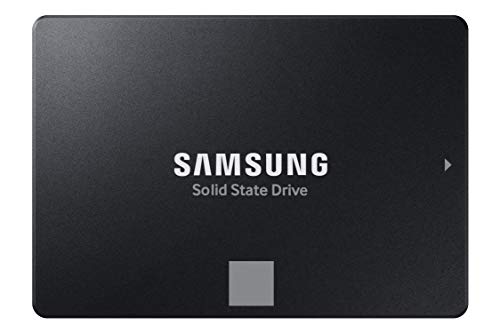
The Samsung 870 EVO 1TB is the standard SATA upgrade in this guide, and it is the SSD for a PC or laptop that needs more speed without changing its shape. It is a SATA III 2.5 inch SSD with read speeds up to 560MB/s, model MZ-77E1T0B, which means it fits the same slot as the hard drive it replaces, and it makes the whole computer faster: booting, loading, and opening files all take less time. A hard drive reads at a fraction of this speed, and the difference is felt at once.
The 870 EVO suits an older desktop or laptop with a 2.5 inch drive bay, and a buyer who wants the simplest upgrade possible. Its SATA connection works with almost any PC made in the last decade, and its 1TB capacity holds the operating system, the programs, and the files, with room to spare. It is the pick for a first SSD.
Key specs:
- Samsung 870 EVO 1TB
- SATA III 2.5 inch SSD
- Read speeds up to 560MB/s
- Model MZ-77E1T0B/AM
- Upgrade PC or laptop storage
Strengths:
- Fits the same 2.5 inch slot as the hard drive it replaces
- 560MB/s reads make booting and loading much faster
- 1TB holds the system, programs, and files
Trade-offs:
- SATA speed is far below NVMe speed
- 2.5 inch size needs a drive bay, not an M.2 slot
- No heatsink, though a SATA drive does not need one
The 870 EVO fits an older desktop or laptop with a 2.5 inch drive bay, and a buyer who wants the simplest upgrade possible. It is the pick for a first SSD.
Best for: older PCs and laptops getting their first SSD. Not suited for: a PC with only an M.2 slot, or a buyer who needs NVMe speed.
Check price on Amazon: Samsung 870 EVO 1TB SATA SSD
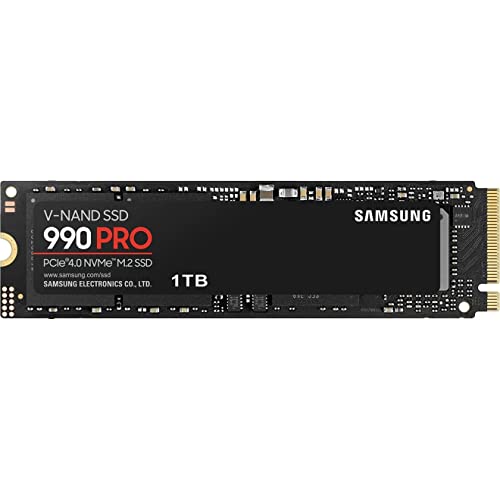
Samsung 990 PRO 1TB NVMe SSD
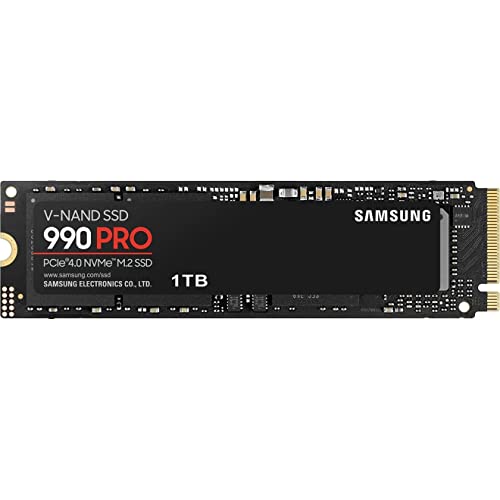
The Samsung 990 PRO 1TB is the fast NVMe drive in this guide, and it is the SSD for a PC that works hard. It is a PCIe 4.0 M.2 2280 NVMe SSD with speeds up to 7,450 MB/s, model MZ-V9P1T0B, which is more than thirteen times the speed of a SATA SSD. That speed shows up when moving large files, loading large games, and editing video, where the drive is the bottleneck and a faster drive means less waiting.
The 990 PRO suits a gaming PC, a video editing PC, and a heavy-duty workstation, and a buyer who wants the fastest PCIe 4.0 drive available. Its M.2 2280 size fits the slot on a modern motherboard, and its 1TB capacity holds the operating system and the working files. It is the pick for a PC that works hard.
Key specs:
- Samsung 990 PRO 1TB
- PCIe 4.0 M.2 2280 NVMe
- Up to 7,450 MB/s
- Model MZ-V9P1T0B/AM
- High-end computing and workstations
Strengths:
- 7,450 MB/s is more than thirteen times SATA speed
- M.2 2280 fits a modern motherboard directly
- Built for high-end computing and heavy work
Trade-offs:
- Needs an M.2 slot with PCIe 4.0 to reach full speed
- 1TB fills fast with large games and video
- Costs more than a SATA drive of the same size
The 990 PRO fits a gaming PC, a video editing PC, and a heavy-duty workstation. It is the pick for a PC that works hard.
Best for: gaming and video editing PCs that need speed. Not suited for: an older PC with no M.2 slot, or a buyer who only browses and writes documents.
Check price on Amazon: Samsung 990 PRO 1TB NVMe SSD

Crucial MX500 1TB SATA SSD
The Crucial MX500 1TB is the reliable SATA drive in this guide, and it is the SSD for a PC that needs a drive that simply works. It is a 1TB 3D NAND SATA 2.5 inch internal SSD with speeds up to 560MB/s, model CT1000MX500SSD1, which means it is the same shape and speed class as the Samsung 870 EVO, from a brand that has made memory for decades. The MX500 is the drive that repair shops fit when a customer asks for a solid, honest upgrade.
The MX500 suits an older desktop or laptop, and a buyer who wants a known brand at a fair size. Its 3D NAND flash is the modern storage technology, and its 2.5 inch size fits the same bay as the hard drive it replaces. It is the pick for a reliable upgrade.
Key specs:
- Crucial MX500 1TB
- 3D NAND SATA 2.5 inch SSD
- Up to 560MB/s
- Model CT1000MX500SSD1
- Internal SSD for PC and laptop
Strengths:
- 3D NAND flash is modern, reliable storage
- 560MB/s reads make an old PC feel new
- Crucial is a long-standing memory brand
Trade-offs:
- SATA speed is far below NVMe speed
- 2.5 inch size needs a drive bay, not an M.2 slot
- No heatsink, though a SATA drive does not need one
The MX500 fits an older desktop or laptop, and a buyer who wants a known brand at a fair size. It is the pick for a reliable upgrade.
Best for: a reliable SATA upgrade for an older PC. Not suited for: a PC with only an M.2 slot, or a buyer who needs NVMe speed.
Check price on Amazon: Crucial MX500 1TB SATA SSD

Western Digital Blue SA510 1TB SATA SSD
The Western Digital Blue SA510 1TB is the thin SATA drive in this guide. It is a 1TB WD Blue SA510 SATA internal SSD, SATA III 6 Gb/s, 2.5 inch and 7mm thin, with speeds up to 560 MB/s, model WDS100T3B0A. The 7mm thickness matters: it fits the thin drive bays in slim laptops that a thicker drive cannot, and it is the drive for a laptop that needs an upgrade without a fight.
The SA510 suits a slim laptop with a 2.5 inch bay, and a buyer who wants a Western Digital drive. Its SATA III connection works with almost any PC, and its 1TB capacity holds the system and the files. It is the pick for a thin laptop.
Key specs:
- Western Digital Blue SA510 1TB
- SATA III 6 Gb/s, 2.5 inch/7mm
- Up to 560 MB/s
- Model WDS100T3B0A
- Internal SSD for PC and laptop
Strengths:
- 7mm thin size fits slim laptop drive bays
- 560 MB/s reads make booting and loading much faster
- Western Digital is a long-standing storage brand
Trade-offs:
- SATA speed is far below NVMe speed
- 2.5 inch size needs a drive bay, not an M.2 slot
- No heatsink, though a SATA drive does not need one
The SA510 fits a slim laptop with a 2.5 inch bay, and a buyer who wants a Western Digital drive. It is the pick for a thin laptop.
Best for: slim laptops with a 2.5 inch drive bay. Not suited for: a PC with only an M.2 slot, or a buyer who needs NVMe speed.
Check price on Amazon: Western Digital Blue SA510 1TB SATA SSD


Western Digital Blue SN5100 1TB NVMe SSD
The Western Digital Blue SN5100 1TB is the value NVMe drive in this guide, and it is the SSD for a PC that wants NVMe speed without the top price. It is a 1TB NVMe SSD, M.2 2280, PCIe Gen 4.0, with read speeds up to 7,100MB/s, model WDS100T5B0E, which is nearly as fast as the Samsung 990 PRO, at the Blue price. That speed shows up when loading games, moving files, and starting programs, where the drive is the wait.
The SN5100 suits a gaming PC and a laptop with an M.2 slot, and a buyer who wants NVMe speed at a fair size. Its M.2 2280 size fits a modern motherboard or laptop, and its 1TB capacity holds the system and the working files. It is the pick for NVMe speed on a budget.
Key specs:
- Western Digital Blue SN5100 1TB
- NVMe SSD, M.2 2280, PCIe Gen 4.0
- Read speeds up to 7,100MB/s
- Model WDS100T5B0E
- Upgrade storage for PC and laptops
Strengths:
- 7,100MB/s reads are nearly as fast as the top drive here
- M.2 2280 fits modern motherboards and laptops
- Blue pricing for NVMe speed
Trade-offs:
- Needs an M.2 slot with PCIe 4.0 to reach full speed
- 1TB fills fast with large games and video
- No heatsink included
The SN5100 fits a gaming PC and a laptop with an M.2 slot, and a buyer who wants NVMe speed at a fair size. It is the pick for NVMe speed on a budget.
Best for: gaming PCs and laptops that want NVMe speed on a budget. Not suited for: an older PC with no M.2 slot, or a buyer who only browses and writes documents.
Check price on Amazon: Western Digital Blue SN5100 1TB NVMe SSD

Samsung 9100 PRO 2TB PCIe 5.0 NVMe SSD
The Samsung 9100 PRO 2TB is the fastest drive in this guide, and it is the SSD for a PC that needs the newest speed available. It is a PCIe 5.0×4 M.2 2280 NVMe SSD with speeds up to 14,700MB/s, model MZ-VAP2T0B, which is twice the speed of the PCIe 4.0 drives here, and more than twenty-five times the speed of a SATA SSD. That speed is for large files, video editing, and AI computing, where the drive moves gigabytes at a time, and the listing names AI computing as its use.
The 9100 PRO suits a high-end workstation, a video editing PC, and a buyer who wants the fastest drive that fits an M.2 slot. Its 2TB capacity holds large projects, and its PCIe 5.0 speed needs a motherboard with a PCIe 5.0 M.2 slot to reach its full rate. It is the pick for the fastest drive here.
Key specs:
- Samsung 9100 PRO 2TB
- PCIe 5.0×4 M.2 2280 NVMe
- Up to 14,700MB/s
- Model MZ-VAP2T0B/AM
- AI computing and heavy workstations
Strengths:
- 14,700MB/s is twice the speed of PCIe 4.0 drives here
- 2TB holds large video and AI projects
- Newest PCIe 5.0 speed available
Trade-offs:
- Needs a PCIe 5.0 M.2 slot to reach full speed
- Costs more than PCIe 4.0 drives
- Speed is wasted on ordinary browsing and documents
The 9100 PRO fits a high-end workstation, a video editing PC, and a buyer who wants the fastest drive available. It is the pick for the fastest drive here.
Best for: workstations and video editing that move very large files. Not suited for: a PC with no PCIe 5.0 slot, or a buyer who only browses and writes documents.
Check price on Amazon: Samsung 9100 PRO 2TB PCIe 5.0 NVMe SSD
Buying guide for the best SSDs
SATA or NVMe: check the slot first
A SATA SSD needs a 2.5 inch drive bay, while an NVMe SSD needs an M.2 slot, so check the computer before ordering. Open the case or check the manual, and look for the slot: a 2.5 inch bay takes the Samsung 870 EVO, the Crucial MX500, or the WD Blue SA510, while an M.2 slot takes the Samsung 990 PRO, the WD Blue SN5100, or the Samsung 9100 PRO. A drive that does not fit the slot is a return.
Also check the M.2 slot type. An M.2 slot can carry SATA or NVMe, and a SATA M.2 drive will not reach NVMe speed in a SATA-only slot. Check the manual for the slot type, and buy the drive that matches it, because the fastest drive in the world is slow in the wrong slot.
Capacity: buy more than the files owned today
A 1TB drive is the sensible size for most buyers, and it holds the operating system, the programs, and the files, with room to spare. A 2TB drive is the right size for a buyer with large games, large video files, or large AI projects, and the Samsung 9100 PRO here is 2TB for that reason. A drive that is too small fills up, and a full drive slows down, so buy the next size up if the budget allows.
Also check what is on the old drive. A buyer moving from a 500GB hard drive to a 1TB SSD has room to grow, while a buyer moving from a 2TB hard drive to a 1TB SSD must leave files behind. Count the files before ordering, and buy the capacity that holds them all.
Speed: match it to the work done
A SATA drive at 560MB/s is fast enough for booting, browsing, and documents, and it is the right buy for an older PC that needs a simple upgrade. An NVMe drive at 7,100MB/s or more is fast enough for games, video, and large files, and it is the right buy for a gaming PC or a workstation. A PCIe 5.0 drive at 14,700MB/s is fast enough for the largest files, and it is the right buy for a high-end workstation, but it is wasted on ordinary browsing.
Do not pay for speed that will not be used. A buyer who only browses and writes documents will not feel the difference between a SATA drive and an NVMe drive, because the work is too light to need it. Buy the speed for the work done, not for the highest number on the box.
Cloning: move the old drive, do not start over
A new SSD is easiest to use when the old drive is cloned onto it, because cloning copies the operating system, the programs, and the files, and the computer works as before, only faster. The Crucial P310, a related model, includes Acronis data recovery software for cloning, and the makers of the drives here offer cloning tools as well. Clone the drive before swapping it, and keep the old drive as a backup until the new one is tested.
Also check the cloning cable. A laptop with one drive bay needs a USB adapter to clone, because the new drive must connect while the old drive is still inside. Buy the adapter with the drive if it is not included, because a drive that cannot be cloned is a drive that needs a fresh install.
Heatsink: when it matters and when it does not
An NVMe drive can run hot under heavy work, and a heatsink helps it keep its speed. The Samsung 990 PRO with heatsink, a related model, is made for a PlayStation 5, where the drive needs cooling, and a desktop PC with good airflow may not need one. A buyer who edits video or moves large files should check the drive temperature, and add a heatsink if it throttles.
A SATA drive does not need a heatsink, because it runs cooler than an NVMe drive. The SATA drives in this guide, the Samsung 870 EVO, the Crucial MX500, and the WD Blue SA510, work without one, and a buyer should not pay for cooling a drive that does not need it.
Using and caring for an SSD
Leave free space, and the drive stays fast
An SSD slows down when it is nearly full, so leave at least a tenth of the drive free, and more if the budget allows. A 1TB drive with 100GB free stays fast, while the same drive with 10GB free crawls, because the drive needs free space to write. Move large files that are rarely opened to an external drive, and keep the SSD for the system and the working files.
Check the free space now and then, and clean up when it falls. A drive that is full is a drive that is slow, and no setting fixes it. Free space is the cheapest speed an SSD can get.
Keep the firmware current, and the data backed up
Check for firmware updates from the maker now and then, because a new firmware can fix bugs and improve speed. Samsung Magician software, which the 870 EVO listing names, manages the drive and its firmware, and the makers of the other drives here offer similar tools. Update the firmware before the drive has problems, not after.
Back up the data, because an SSD can fail without warning, and a failed SSD is harder to recover than a failed hard drive. Keep a copy of the important files on an external drive or a cloud service, and test the backup now and then, because a backup that has never been tested is a hope, not a backup.
Mind the heat on NVMe drives
An NVMe drive can run hot under heavy work, and heat makes it slow down to protect itself. Keep the PC airflow clear, and do not block the vents, because a hot drive is a slow drive. A buyer who edits video or moves large files should check the drive temperature in the maker software, and add a heatsink if it runs hot.
A SATA drive runs cooler, and it does not need the same care. The SATA drives in this guide work in any PC with a drive bay, and they do not throttle, because their speed is low enough to stay cool.
Common mistakes when buying an SSD
Buying a drive that does not fit the slot
The most common mistake is buying an NVMe drive for a PC with no M.2 slot, or a SATA drive for a PC with no drive bay. Check the computer before ordering: a 2.5 inch bay takes a SATA drive, and an M.2 slot takes an NVMe drive. A drive that does not fit is a return, not an upgrade.
A related mistake is buying an M.2 SATA drive for an NVMe slot, or an NVMe drive for a SATA-only M.2 slot. Check the manual for the slot type, and buy the drive that matches it, because the fastest drive in the world is slow in the wrong slot.
Buying too little capacity
A drive that is too small fills up, and a full drive slows down. A buyer who moves from a 2TB hard drive to a 1TB SSD must leave files behind, and a buyer who buys a 500GB drive for a 1TB library will fill it at once. Count the files before ordering, and buy the capacity that holds them all, with room to grow.
Also check the operating system and the programs. A Windows install with programs can take over 100GB, and a game library can take hundreds more. A 1TB drive is the sensible minimum for most buyers, and a 2TB drive is the right buy for large libraries.
Paying for speed that will not be used
A PCIe 5.0 drive at 14,700MB/s is wasted on a buyer who only browses and writes documents, because the work is too light to need it. A SATA drive at 560MB/s is fast enough for that work, and it costs less. Buy the speed for the work done, not for the highest number on the box.
A related mistake is buying a fast drive for a slow computer. A drive cannot make a slow processor fast, and a PC with an old processor and little memory will still feel slow with the fastest SSD. Upgrade the drive for the storage, and judge the whole PC, not the drive alone.
Buying a used or renewed SSD
SSDs are sometimes sold used or renewed, and a used SSD can arrive with worn flash and little life left. Flash memory wears with every write, and a used drive may have used most of its life. Read the full listing title before buying, and do not buy a listing that describes the drive as used or renewed. Every SSD in this guide is a new listing, with the exact model in the title.
Check the drive health when it arrives, using the maker software, and test it before the return window closes. A new drive should show full health, and a drive that shows wear should be returned.
Final recommendation
For most buyers, the Samsung 870 EVO 1TB is the SSD to buy: it is a SATA III 2.5 inch drive with read speeds up to 560MB/s, it fits the same slot as the hard drive it replaces, and it makes an older PC feel new for the least money and the least fuss. It is the balanced choice for a first SSD.
For a gaming PC or a laptop with an M.2 slot, the WD Blue SN5100 1TB is the strongest choice, with NVMe speed up to 7,100MB/s at a fair size, and the Samsung 990 PRO 1TB is the faster pick at up to 7,450MB/s. For a reliable SATA upgrade, the Crucial MX500 1TB is the pick, and for a thin laptop, the WD Blue SA510 1TB is the pick, with its 7mm size. For the fastest workstation, the Samsung 9100 PRO 2TB is the pick, with PCIe 5.0 speed up to 14,700MB/s. Any of the six SSDs in this guide is a sound buy, as long as it fits the slot and holds the files.
Before ordering, check the computer once more: the slot it has, the files it holds, and the work it does. Those three checks decide more than any feature list, and they are the reason the same drive can be perfect in one PC and wrong in another. Buy the interface for the slot owned, the capacity for the files owned, and the drive whose listing title states the exact brand and model, and the computer will feel new again.
Related reading on Reviewstook: see our guides to the best 2TB SSD under 100, the best 2TB SSD for backups under 100, the best 4TB SSD for laptops under 150 for more on this topic.
Frequently asked questions about the best SSDs
Is an SSD faster than a hard drive?
Yes, by a large margin. A SATA SSD reads at up to 560MB/s, while a hard drive reads at a fraction of that, and an NVMe SSD reads at 7,100MB/s or more. A computer with an SSD boots in seconds, loads programs at once, and opens files without waiting.
Should I buy a SATA or an NVMe SSD?
It depends on the slot the computer has. A SATA SSD fits a 2.5 inch drive bay and reads at up to 560MB/s, while an NVMe SSD fits an M.2 slot and reads at 7,100MB/s or more. Check the computer before ordering, because a drive that does not fit the slot is a return.
How much SSD capacity do I need?
A 1TB drive is the sensible size for most buyers, and it holds the operating system, the programs, and the files, with room to spare. A 2TB drive is the right size for large game libraries, large video files, or large AI projects. Count the files before ordering, and buy the capacity that holds them all.
Will an SSD make my old laptop faster?
Yes, in most cases. An old laptop with a hard drive feels slow because it waits on the disk, and an SSD removes that wait, so booting, loading, and opening files all take less time. A SATA SSD such as the Samsung 870 EVO or the Crucial MX500 is the usual upgrade for an older laptop.
What is the difference between PCIe 4.0 and PCIe 5.0 SSDs?
PCIe 5.0 SSDs are twice as fast as PCIe 4.0 SSDs. The Samsung 990 PRO reads at up to 7,450MB/s on PCIe 4.0, while the Samsung 9100 PRO reads at up to 14,700MB/s on PCIe 5.0. A PCIe 5.0 drive needs a motherboard with a PCIe 5.0 M.2 slot to reach its full speed.
How long does an SSD last?
An SSD lasts for years of normal use, and its flash memory wears with every write, so a drive that is written heavily will wear faster. Keep the firmware current, leave free space on the drive, and back up the data, because an SSD can fail without warning, and a backup is the only protection.